



Verizon increasing upgrade and activation fees to $40 in February
 Bad news, Verizon folks. The carrier is upping their activation and upgrade fees to $40 starting February 5th. The current activation fee is $35, while the upgrade fee is $30. If you’ve been considering upgrading your device and want to save a few bucks, you may want to go ahead and knock that out in the next week.
Verizon isn’t the only carrier that charges upgrade fees, and AT&T’s have been sitting at $40 for a few months. You can avoid these activation fees if you go onto an installment plan like Verizon Edge or AT&T Next, anyway, so if you’re on one of those programs, this news may not affect you at all.
source: Phone Scoop
Come comment on this article: Verizon increasing upgrade and activation fees to $40 in February
Spotify partners with Sony and will replace Music Unlimited globally with Playstation Music
Spotify has partnered up with Sony to bring a new service to consumers under the branding of Playstation Music. This new content service will be replacing the current Sony Music Unlimited service and will be launching in February in 41 markets including the US, Canada, Mexico and Brazil. The new service will launch for Sony’s […]
The post Spotify partners with Sony and will replace Music Unlimited globally with Playstation Music appeared first on AndroidSPIN.
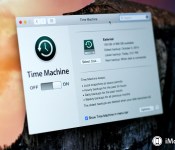
How to easily back up and restore your Mac with Time Machine

Time Machine is OS X Yosemite’s “OS X 10.10 Yosemite reviews, features, apps, help, and how-to”)’s built-in backup software. It was introduced with OS X 10.5 Leopard and has been there ever since. If you’ve never used it, please start. Time Machine is absolutely the easiest way to back up your Mac, and is great for recovering individual files you’ve deleted or restoring your entire hard drive in the event of a catastrophe.
In this how to, I’m going to cover two aspects of using Time Machine — how to set it up initially and how to restore individual files. You can also use Time Machine to restore the entire contents of your hard drive with your OS X Recovery Partition.
To set up a Time Machine backup
Time Machine works with any hard disk connected to your computer using USB, FireWire or Thunderbolt.
- Select the Time Machine icon from the Menu.
- Select Open Time Machine Preferences…
- If Time Machine is off, set the slider to on.
- Select the disk you want to use as a Time Machine backup.
- Time Machine will set the hard drive up for backups and will automatically start the first backup within two minutes.


Time Machine backs up the entire contents of your hard disk, hourly, daily and weekly.
You don’t need to use just a hard drive connected to your Mac, either. Time Machine also works on backup disks connected over a network, provided the disks support Apple File Protocol (AFP) file sharing. As long as the disk is available to your Mac, you can use it for a Time Machine backup.
Time Machine also works with Apple’s Time Capsule. Time Capsule is a device connected to your local Wi-Fi network that provides network routing capabilities as well up to three terabytes of storage for local Time Machine backups. All the Macs on your local network can back up to a Time Capsule.
To restore individual files from a Time Machine backup
- Select the Time Machine icon from the Menu.
- Select Enter Time Machine.
- You’ll be taken to the Time Machine window. Here you can navigate to the file or folder you need to retrieve.
- Locate the file or folder and click the Restore button.
- Time Machine will copy that file back to its original location on your hard disk.


To restore the complete contents of your hard drive from a Time Machine backup
- Power up your Mac and hold down the command and R keys to enter the Recovery Partition. Your Mac should boot to a screen that says OS X Utilities.
- Select Restore from Time Machine Backup and click Continue.
- Read the info on the Restore Your System page and click Continue.
- Select your Time Machine backup and click Continue.
- Select the most recent backup of your hard disk and click Continue. Your Mac will then restore the Time Machine backup; once it’s done it will restart.


If you’ve had to replace your Mac’s hard drive with a raw drive fresh out of the box, there’s no recovery partition to restore from. But fear not, you can get the recovery rolling from the Time Machine backup disk itself. Just hold down the Option key when you start your Mac; you’ll be able to select the Time Machine backup disk as your startup, instead.
I hope this helps you get rolling with Time Machine. If you’re not using it, I strongly recommend you give Time Machine a try. You never know when you’ll have to recover a file or a disk, and it’s better to be safe than sorry.
Do you use Time Machine? If not, why? Let me know in the comments, I want to hear from you!
Note: Updated for OS X Yosemite.

Chrome figurine unveiled by Dead Zebra

Another day, another Android figurine unveiled by Dead Zebra. And this member of the Android Mini Collectible Series 05 was designed by Google itself. The fourth series featured gold and chrome green figurines and here we have a true chrome variant. Apparently, there was a substantial demand for a true chrome. The Chrome figurine is shiny and reflective all around.
Here is a recap of the previous Android Mini Collectibles Series 05 figurines:
Hit the break to see another picture of the Chrome figurine.

Each figurine is expected to retail for around $10.
Source: Dead Zebra
Come comment on this article: Chrome figurine unveiled by Dead Zebra

FTC Levies $40M Fine Against TracFone for Throttling Unlimited Data Customers
 In recent months, the Federal Trade Commission has taken a significant interest in carrier throttling practices and today handed down a ruling that could have future ramifications for carriers who throttle their unlimited customers.
As reported by Re/code, the FTC has ordered prepaid wireless carrier TracFone to pay $40 million to consumers who paid for unlimited service and were then throttled after reaching certain data limits.
TracFone advertised “unlimited text, talk, and data” for $45 a month under the brands Straight Talk, Net10, Simple Mobile, and Telcel America, and until September 2013, did not clearly disclose its throttling policies that saw customers experiencing data speeds that were cut by up to 90 percent, thereby violating the FTC Act.
While this ruling only affects TracFone at the current time, there are several other carriers that have similar practices for their unlimited customers. AT&T and Verizon no longer offer unlimited data plans, but continue to provide unlimited data for many people who remain on grandfathered plans. AT&T has engaged in throttling practices for years, often cutting off customers who exceed 5GB of LTE data usage.
“The issue here is simple: when you promise consumers ‘unlimited,’ that means unlimited,” said Jessica Rich, director of the FTC’s Bureau of Consumer Protection. “This settlement means that Straight Talk, Net10, Simple Mobile, and Telcel America customers will be able to get money back from the company for services the company promised but didn’t deliver.”
Last year, Verizon planned to throttle its high-usage unlimited data LTE customers, sparking interest from FCC chairman Tom Wheeler, who said he was “deeply troubled” by the decision. Verizon ultimately reversed course and opted not to throttle its unlimited customers, but the FCC’s attention was already roused, and the agency began questioning all carriers on their unlimited throttling practices.
The government’s interest in carrier throttling practices led the FTC to file a federal complaint against AT&T in October of 2014, accusing the carrier of misleading its smartphone customers by charging them for unlimited data and then going on to reduce data speeds. Based on today’s TracFone decision, AT&T may also be facing hefty fines in the future, and the FTC’s ongoing interest in carrier throttling of unlimited customers could finally put an end to the practice.

OneDrive improves its photo albums for its web, iPhone and iPad users

Microsoft has just announced some improvements to its storage service that will offer users a better look at their photos, along with new search features. Those changes and additions are currently available on the web and in the newly updated app for the iPhone and iPad.
Microsoft described the new photo viewing user interface for OneDrive, which it is calling Albums. It stated:
Unlike traditional folders, Albums let your photos stand front and center. Thumbnails are larger, photos are edge-to-edge, and everything is arranged together into a beautiful collage. When you open a photo, it now fills up the whole screen. Information details are still available, but from a pop-up menu, so now your photos stand out like they were always meant to! Albums also let you bring photos and videos together from anywhere in your OneDrive. You don’t need to copy files from other folders. That means you can easily create an album using photos from your phone in your camera roll folder, your camera in your “European Vacation 2012″ folder, or from your email, with the photos you saved to your attachments folder. And even more, you can also add to your albums after they’ve been created and shared.
OneDrive will start using Bing search technology in a new way for both photos and documents. Microsoft stated:
You can now search for Office documents and PDFs by text inside of them and photos based on time, location, or text that is extracted from images themselves. You can also search for photos based on tags – both ones you manually created and ones that we’ve automatically identified.
In addition, the new OneDrive iOS update adds support for 1Password users.
- Free – Download now
Source: Microsoft
The phone designed to protect your information had a big hole

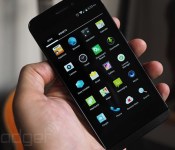
Folks buy the highly secure Blackphone handset for the warm and fuzzy feeling that nobody can see their stuff, but that trust was misplaced until recently, according to security expert Mark Dowd. He found a vulnerability in the text message application of the phone that let attackers steal messages, contacts and location info, and even execute malicious code to gain full control. All a bad guy needed to know was the device’s “SilentCircle” account info or phone number.
According to his blog, the instant messaging application (included with the Blackphone or available on Google Play) had a so-called type confusion vulnerability flaw. That means the app could mistake one type of data for another, and allow hackers to overwrite memory and replace it with malicious code. Luckily, Dowd had been probing his recently purchased Blackphone and discretely reported the bug to the company, which has now patched it. Considering the way Blackphone markets itself “to address modern privacy concerns,” however, we’d expect hackers — both black and white hat — to keep on testing it.
Filed under: Cellphones, Mobile
Via: Ars Technica
Source: Azimuth Security
ZTE debuts Blade S6 with $250 off-contract price

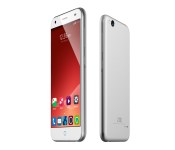
ZTE this morning unveiled its latest Android smartphone, the mid-range Blade S6. Carrying a $250 price tag, it’s a 5-inch handset with Android 5.0 Lollipop running the show.
Powered by a Qualcomm Snapdragon 615 processor, specs include a 13-megapixel rear camera, 5-megapixel front-facing shooter, and 2GB RAM. Nothing to knock your socks off, no, but that sticker has mass appeal. Additional specification include 16GB storage, microSD expansion, 4G LTE connectivity, and a 2400mAh battery.
ZTE doesn’t make reference to the resolution of the display so we’re assuming it is on the lower side of things. But, on a positive note, this potentially means longer life out of the battery. Listed as “HD” we’ll assume it’s along the lines of 1280×720.
In terms of software, ZTE has loaded version 3.0 of its MiFlavor OS and features Smart Sense.
…Includes an intuitive and practical sets of gesture and motion controls, such as with a flick of the wrist that allows users to shine the Blade S6’s flashlight, activate its built-in mirror application, take rapid succession of photographs, play music, and much more.
The ZTE Blade S6 will be offered in silver or pink matte finish when it launches. No hard dates were announced though we should expect it in retailers such as AliExpress, Amazon, and eBay.
The post ZTE debuts Blade S6 with $250 off-contract price appeared first on AndroidGuys.

Snapchat introduces Discover
Snapchat announced yesterday on their Tumblr blog a new service called Discover.
The way the blog post describes it is that a user would be able to view a gallery of posts selected every 24 hours. This galleries would contain snaps that editors and artists deem worthy.
Team Snapchat makes it very clear that this is NOT a social media service. They claim that social media is marked by showing the user what is popular based on likes and reshares.
Discover will be different in that it will display photos like a curated gallery. Here is a quick preview:
The post Snapchat introduces Discover appeared first on AndroidGuys.
New leaked images offer up a look at what the HTC One M9’s apparently really look like
HTC and Samsung have both been hot topics of leaked images. We know the next two flag ships from each of the OEM’s will be the Galaxy S6 and the HTC One M9. On the HTC side of things there have been talks of two models, code-named Hima and Hima_Ultra. There have been a number […]
The post New leaked images offer up a look at what the HTC One M9’s apparently really look like appeared first on AndroidSPIN.
 AIVAnet