


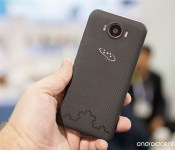
Saygus announces V2 pre-orders open Jan 29, price will be under $600

Once expected to be just vaporware, the Saygus V2 is actually going to go on sale starting with official pre-orders this Thursday, January 29. After making a debut at CES 2015 with actual hardware that we could see and use for ourselves, Saygus has been running “pre-registrations” for those interested, but hasn’t actually taken orders just yet — now we know (some of) the details.
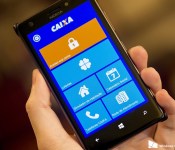
Brazilian bank Caixa launches official Windows Phone app [updated]

Update: We’re not sure what’s going on, but the app has been pulled from the store as quickly as it arrived. It’s probably just a hiccup and will be back shortly.
While Chase bank may be abandoning the Windows Phone platform here in the states, Brazilian Windows Phone users were treated to a new app from one the country’s largest banks, Caixa, today.

Big Android BBQ Meat and Greet tickets now on sale
 Tickets and information are officially available for the Big Android BBQ’s April 4th Meat and Greet. There are two parts to the event, with the first section during the day consisting of coding events and challenges and the night including a BBQ and a trip to the Cherry Blossom Festival, complete with food and an open bar.
The event will be held in the USPTO’s Mason Auditorium on 600 Dulany Street, and you can snag a ticket for around $75, although the day portion is free to join in on. If you need a hotel, the BAMG company has teamed up with some local companies in the area for discounted rates.
Hit the link below if you’re interested in going.
source: Big Android BBQ Meat and Greet
Come comment on this article: Big Android BBQ Meat and Greet tickets now on sale
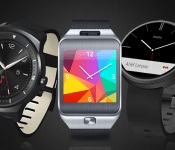
Why I prefer Samsung Gear’s Tizen to Android Wear

A few months ago our US Senior Editor Andrew Grush offered his praise of the Moto 360, having spent a month with it. Despite the quality of the writing itself, I took issue with the core of the content: that Android Wear is a suitable platform for wearables. I have to disagree, at least as things now stand. Android Wear seems fundamentally broken due to its being chained to Google Now and a smartphone, something not so true of Samsung’s Gear products, which run on Tizen.
After a discussion with Andrew however, a larger issue surfaced: the divergent opinion is largely based on the individual’s needs and expectations. To this end, I felt it an interesting experiment to delve into the functionality of both, and try and give readers a bit more insight into the very different paths that Google and Samsung are taking with their wearables.

Good on Google
Android Wear is Google’s answer to the wearable wars, a battle that in no small way ramped up big-time when rumors started flying about Apple releasing an “iWatch” well over a year ago. Ironically it wasn’t until last Fall that the Apple Watch actually came to fruition, though it has yet to be released at the time of writing this piece.
Android Wear looks very clean, serves as an extension of Google Now, and has very basic functionality. Presumably Google was aiming for all three when it designed the software. While this is not intended to be a review of the platform, I will nonetheless discuss some pros and cons. For reference, I have spent considerable time with the Samsung Gear Live, the Moto 360, the LG G Watch, and the LG G Watch R. I tested both the 4.X software version and then more recently, the 5.X build.
The Good
Wear has a very clean interface that perfectly complements the Google Now functionality it is tied to. It is quite literally, an extension, in every sense of the word. The various swipe-based gestures work well to navigate the various menus and screens, and I absolutely love the “face-palm” motion that will turn-off the screen: it not only feels cool to do, but it’s a highly effective way to turn off the screen when it might have turned on by accident. I also like the ability to enable Developer Mode, just like on standard Android: hit the Build Version a few times and presto!
The real “big deal” with Android Wear seems to be the fact that it works on any Android device running on Jelly Bean 4.3 or higher. The element of proprietary requirements completely go out the window, something that Samsung seriously needs to address (something I will be addressing later). It is also worth noting that, even though there’s not much of an out-of-box experience, there are a growing number of apps available that are compatible with Android Wear.

The Bad
Android Wear is fairly limited without its accompanying smartphone or tablet tether. Ask it the weather? It needs to connect to Google Now. Ask for directions? Google Now. Ask for movie info? Google Now. Sure, some apps do work even when your phone connection is dropped or your phone’s battery dies, but they still have to be synced initially to the phone and the apps have to be installed on the phone in order to continue to be available on the watch.
Also, Google seriously needs to do something about its search hot phrase: “OK Google” is just ridiculous at this point. If Motorola managed to solve this problem with the Moto X (2014) by allowing the user to select any phrase or word to activate it, there is really no excuse Google can’t. The company wants Android Wear to catch on, yet the key out-of-box functionality requires talking to the watch – something many people aren’t comfortable with for the potential embarrassment of doing it in public – and you need to use the most unoriginal phrase ever to do it. This “hotword” gripe extends to the Android OS as a whole however: it needs to change.
Probably my biggest gripe is that a Bluetooth tether must constantly be connected between your handset and smartwatch, and that means battery on both is going to drain faster than normal. I also just don’t feel that AW offers enough of an experience that it is necessary, and in many situations I’d rather just go for my phone or tablet in order to check notifications and perform some of the other basic tasks Android Wear is capable of. Of course, not everyone will feel this way. Some folks, like Andrew, like the idea of a companion device and don’t mind that it is tied to a phone in order to provide a great number of its functions.

Smitten with Samsung
Turning to the other side, let’s take a look at the Tizen build running on Samsung’s Gear products. For reference I have spent considerable time with the Gear Fit, Gear 2, and Gear S. For the sake of this commentary, I will use the SIM-enabled Gear S, however the majority will also apply to the Gear 2.
The Good
To be quite blunt, from a user-interface perspective, one would be hard pressed to believe the Gear series isn’t running Android TouchWiz. The bridge between the two is so tight it’s almost as if they are one-and-the-same. The icons, the settings, the features. Gear devices even have a truly stunning level of depth in the Settings menu, allowing you to change the text size, font, window colors, backgrounds, motions, and with the Gear S, even toggle on/off WiFi, 3G, and the GPS.
The Gear S has a pre-installed Contact List (Address Book) for starters, along with an SMS application, a Calendar App, a Phone Dialer and various Widgets (like a news filter that can use 3G to update) among other features, things that just mop the floor with Android Wear in terms of productivity. Heck, you can even download Opera Mobile from the Samsung App store. Now I will be the first to admit that typing anything on the tiny virtual keyboard the Gear S has isn’t exactly easy to do, but the fact is you can do it, and surprisingly with minimal mistakes assuming your fingers aren’t excessively thick. It is very much a smart watch, and one that serves to legitimize the genre.

Fleksy, one of the downloadable keyboards for the Gear S, however the device comes pre-installed with Samsung’s own for reference.
Looking at other features, the Gear series also has a built-in music player and a camera (on some models). The speakers are quite loud and while their actual use is somewhat questionable (there is no microphone jack) again, you can use it as an impromptu speaker if necessary while exercising by loading the internal memory with albums. Android Wear on the other hand, is limited to vibrations and that’s it. Google doesn’t believe in cameras, speakers, or anything else “smart”, rather it views the wearable platform as an extension of vanilla Android: plain and simple.
Special mention also needs to be made to the fact that the Gear S’s charger is actually a mini battery. Snap it onto the back of the device and it will begin charging the battery of the watch even without a USB connection. This is an absolutely brilliant addition and serves as a legitimate reason to carry around the charger piece when you worry the device’s battery might die before you get home.

The Nexus 9 and Galaxy Tab S have a surprising similarity despite otherwise irreconcilable differences: neither will work with a Gear S.
The Bad
First and foremost, it is absolutely shameful the manner in which Samsung supports its Gear devices. The question isn’t what is compatible with it, but rather, how many of the devices you own aren’t. Let’s put aside the fact that the Gear is 100% proprietary: Samsung wants you to use Samsung products much like Apple wants customers to use Apple. This is just an unavoidable reality. The problem however, is the fact that there is no clear “cut off” to compatibility as there is with Android Wear and its 4.3 minimum requirement.
Last year Samsung released the Galaxy Tab S 10.5 and 8.4 and for reasons totally unknown, neither work with the Gear S, not even the LTE variants. Mind you, it’s possible to download the Gear Manager software, but the wearable won’t be found when pairing is initiated. It’s been how many months since the Gear S released and this still isn’t fixed? While basically any other product from 2014 works seemingly without a hitch, things are a different nature when you travel a bit farther back in time. Are we actually supposed to believe it takes 2014-era CPU processing power to handle a watch application?
Other issues with Tizen include the aforementioned minuscule keyboard that makes typing quite difficult, the almost overly-confusing number of menus and actions that are possible, the fact that (with the Gear S) a tether with your phone is still required for some functionality that should be 100% functional on the device itself (e-mail for example), and (also with the Gear S) the fact that the camera was removed.

Round and round they go, but try to sync with a second device and you’re dealing with a flat.
Grouped Gripe
Finally, I want to share another major, major gripe with both Android Wear and Tizen: the fact that they can only be synced with a single device. Let’s say that you have a smartphone and a tablet, something that companies like both Google and Samsung seem to encourage (see the Nexus 6 and Nexus 9 or the Galaxy S5 and Galaxy Tab S, respectively). Let’s say that you have your wearable linked with the phone, but you want to sync it with your tablet. Well, you can’t. In Samsung’s case this is hardware compatibility, but with Google’s it’s possible assuming you format the device and make a new profile on the tablet.
Better yet, let’s say you upgrade your phone. Well say “Goodbye” to everything on your watch, because there is no way to simply link it to a new device. No, you need to completely format the software and pair it fresh with the new device. Why is this? The tablet issue I can understand given that the device is meant to pair with the phone, but the fact that you can’t have it linked to more than one device is just poor execution if you ask me. Maybe most customers don’t change phones regularly, but some do.

Could a device like the Simband take Samsung’s wearable platform to the next level?
Wrap up
Disclaimer: As this was written as an opinion piece, I make no claim whatsoever that my views are in any way, shape, or form the “correct” ones. You, the reader, are free, welcome, and encouraged to disagree.
So the question is, what is the purpose of a wearable device? Clearly for me, it’s about functionality. If I’m spending $300 on a piece of technology that offers very little watch-related perks (it needs to be constantly recharged, you are encouraged to disable the perpetual always on watch condition, the designs have yet to reach those of genuine timepieces, especially in Samsung’s case), the barren out-of-box functionality of Google Wear is such that I’d be better off just sticking with my phone.
This is why I found the Gear S to be absolutely fantastic. The design is borderline horrible, so much so that it’s more like a bracelet than a watch, and the rubber strap lacks any conviction of premium whatsoever. Heck, the actual device itself appears to be a return to plastic: the tacky chrome rim highlights the fact that the Gear 2 used metal for its face. Yet, Tizen/the Gear S has a large SAMOLED screen, it has so many features right out of the box, and even allows you to make a phone call, for crying out loud. This is very much as smart as smart can get for the moment.
While I’m not writing off Android Wear by any means (heck, the LG G Watch R is just plain awesome as far as I’m concerned), for me at least, it doesn’t provide the basic innate features that I feel a smartwatch should have.

‘Galaxy S Edge’ name spotted in Vodafone site source code

For a while now we’ve heard rumors suggesting at least one variant of the Samsung Galaxy S6 will offer up an edge display somewhat similar to the Note Edge. More recently we learned Samsung will allegedly offer dual edges this time around, alongside other improvements that should alleviate some of the issues consumers had with the original Note Edge.
Looking for more proof of the Samsung Galaxy S6’s Edge model? As first reported by Netherlands-based Galaxy Club, it seems that a new placeholder page for the Galaxy S6 has now appeared on Vodafone Netherlands’ website. At first glance, there’s really nothing to learn from this page, but digging into the source code reveals an interesting tidbit: a developer note makes mention of the need to add a “pre-order form for Samsung Galaxy S Edge” in the future.

While obviously this is a placeholder page and the note could simply be based on anticipation of an Edge model and not because Vodafone has definitive proof from Samsung, we have to admit that the idea of the name “Galaxy S Edge” makes a lot of sense. After all, Samsung didn’t call the Note Edge the Note 4 Edge. Of course there is still the possibility that the dual-edged model won’t use the “Edge” moniker at all, but we wouldn’t be too surprised if this possible leak proves true.
Unfortunately nothing else can be sleuthed from reading the source or looking at the placeholder page. What do you think, could Galaxy S Edge be the final name of the dual-edged GS6?

Here are the first films from Oculus Story Studio

Look out, Hollywood, because Oculus VR is coming for you. Earlier today, the Facebook-owned company introduced its new film division Story Studio, as it looks to broaden its horizons and experiment with narrative through virtual reality. The first short film to come out of Oculus VR’s in-house movie lab is Lost, which is making its debut at Sundance. In addition to that, Story Studio has revealed that it’s already working on more shorts with a VR twist to them, all expected to appeal to different audiences. Along with Lost, there’s also going to be Dear Angelica, Bullfighter and Henry, plus two other films that haven’t been announced yet.
Unfortunately, aside from displaying posters for the films and saying that they are “coming soon,” Oculus Story Studio didn’t share any further details. It’s worth keeping in mind, however, that the newly minted production house is partially made up of former Pixar and Industrial Light and Magic staffers. For now, the only thing we can do is look at the posters and use our imagination to dream of what these virtual reality short films will be about. For its part, Lost was being screened on a Crescent Bay headset and, to say the least, it was beautiful — stay tuned; more on that to come.
Filed under: Misc, Gaming, Home Entertainment, Wearables, HD

Plex migrates to one app, changes to in-app purchase model

If you happened to stumble upon the Plex app in the Play Store today, you might have noticed that it’s Free and not the normal $4.99 price. No, Plex isn’t running a sale. They just changed their model in that the app will now offer in-app purchases, and there will no longer be the need for a separate app for Plex Pass members.
Up until today, Plex Pass members needed to download the Plex for Plex Pass app in order to enjoy the benefits of their membership, while basic Plex members needed to only download the basic Plex app. That has all changed today as all users only need to download the basic Plex app. If you’re a Plex Pass member, you will still get all the member benefits. All you have to do is log into your account, and the app will recognize your subscription status. The Plex for Plex Pass app is still in the Play Store, but it’s only there to notify (in the What’s New section) current users that they should start using the basic Plex app from now on.
In addition, basic Plex users still need to pay $4.99 for the app, but they can now do it via an in-app purchase. This is actually a good thing in that users can now try Plex to see how it all works without dropping any coins. Free users can stream any content in their Plex Media Server, but they will be limited to one minute for music and video, and a watermark will appear on photos. The $4.99 one time charge will remove that limitation. If you already purchased the app before, there is no need to purchase it again. Of course, users can instead opt for the Plex Pass membership, which opens up additional features for $4.99 per month, $39.99 yearly, or $149.99 lifetime.
Come comment on this article: Plex migrates to one app, changes to in-app purchase model
Ice Cream Smart is LG’s Latest Smartphone Addition
Flip phones are not as common nowadays as they were in the days of yore but that has not stopped LG from releasing their latest flip phone the Ice Cream Smart. Coming in with a 3.5 inch LCD display, 1.2 Quadcore processor, 8GB of storage and LTE connectivity, the Ice Cream Smart is a mid range device that is quite suitable if you don’t use your phone for intensive tasks.
What does make the Ice Cream Smart stand out is its many physical buttons that allow you to quickly dial numbers, bring up the messaging app and access the camera. There nothing revolutionary about the Ice Cream Smart but if you miss having your old flip phone but also like having the added capabilities of an Android powered smartphone then this is the phone for you. Also, nothing beats the added dramatic effect of flipping your phone shut when you reach a disagreement with someone.
The Ice Cream Smart does not shows signs of coming over seas but you might be able to pick one up via eBay when the phone rolls out. For more information regarding the Ice Cream Smart you can use the following link.
The post Ice Cream Smart is LG’s Latest Smartphone Addition appeared first on AndroidGuys.

Humble Mobile Bundle 10 updated, adds iPollute, Sorcery and Tiny Bang Story

Just last week the Humble Mobile Bundle 10 touched down, bringing Buddy & Me, LYNE and Doodle Kingdom to those who donated any price and the addition of Sorcery 2, King of Dragon Pass and OTTTD for those that paid above the average asking price. As is typical of the Humble Bundle program, three new games have now been added to the mix: iPollute, Sorcery and the Tiny Bang Story. The former is a puzzle game, the latter is a point-and-click adventure and the one in the middle is the predecessor to Sorcery 2.
For those haven’t got in on the Humble Bundle 10 already, all you need to do is pay higher than the average asking price ($3.94 at time of writing). If you already bought into the Humble Bundle, all you need to do is raise your price to the current asking rate and you’ll be able to download the bonus games. For those that had already beat the asking rate, you’re good to go. The Humble Bundle is a great way to get a bunch of games at great price, and at least a part of your donation ends up going to charity — so you’re doing good for others as well.
For more details on the Humble Mobile Bundle 10, you’ll want to head on over to the Humble Bundle website.

 AIVAnet