1TB Wi-Fi hard drive + 10TB cloud backup from iDrive, $97

When my parents were young, they’d collect photographs in shoeboxes, albums, and scrapbooks. Now, all of my photos and videos are on a small MicroSD card tucked into the back of my phone. …



When my parents were young, they’d collect photographs in shoeboxes, albums, and scrapbooks. Now, all of my photos and videos are on a small MicroSD card tucked into the back of my phone. What if I were to lose that phone or, even more likely, that card? Sure, I can back the images up on my laptop’s internal hard drive — and I do — but there’s only so much space and who’s to say the laptop will even last? With this deal from iDrive, you’ll be able to benefit from the best of both worlds — physical and digital.
This deal includes a 1TB Wi-Fi hard drive with 256-bit AES encryption and is compatible across all platforms (Mac, PC, Android, etc) at rapid transfer rates. That means you’ll be able to back up your entire mobile device, wirelessly! If you do prefer a more tactile approach, it also comes with USB 3.0 capabilities for even faster transfer speeds. What’s even cooler is that this deal also includes a 1-year subscription to iDrive Pro Personal, a 10TB cloud storage solution. With that much space — both physical and digital — we’re potentially talking about a lifetime of photo, video, and file storage. Even better yet is that you can grab this bundle, normally priced at $475, for just $97.
See more at deals.androidguys.com
When my parents were young, they’d collect photographs in shoeboxes, albums, and scrapbooks. Now, all of my photos and videos are on a small MicroSD card tucked into the back of my phone. …

Xiaomi is making headlines with it’s high-quality, low-priced devices and today its first foray into the smart wearables market, the MiBand, can be had for just $14.99 with free shipping. …

Extra battery life. Who doesn’t need it? We’re all walking around with high-powered computing devices in our pockets, sucking the life out of them with incessant scrolling, yet we …

Do you have what it takes to make the next Flappy Bird? If you’re on the brink of greatness with your game idea but need a nudge to get over the creative hump, this deal is tailored to fit …
The post 1TB Wi-Fi hard drive + 10TB cloud backup from iDrive, $97 appeared first on AndroidGuys.
Looking for a deal on a new Chromebook? You are in luck, right now on Woot! you can snag a 2014 HP 14-inch Chromebook sporting the NVIDIA Tegra K1, 2GB of RAM and a 16GB solid state drive for $209.99. Looking around the various online retailers it looks like you are saving $90 off the […]
The post Deal: 14-inch HP Chromebook with NVIDIA Tegra K1 on sale for $90 off appeared first on AndroidSPIN.
Google Fiber is on its way to four new markets across the United States with coverage planned for Atlanta, Charlotte, Raleigh-Druham and Nashville according to sources of the Wall Street Journal. Apparently local news outlets in those areas have been sent invitation to attend events scheduled for this week that make the announcements official. The city […]
The post Look out Atlanta, Charlotte, Raleigh-Druham and Nashville, Google Fiber is coming appeared first on AndroidSPIN.


The Federal Trade Commission just laid out its initial recommendations for the burgeoning Internet of Things industry — and they’re pretty much what you’d expect. In an extensive report (PDF) released this morning, the agency emphasized that connected device makers will need to think hard about security, as well as how they manage consumers’ private information. That shouldn’t be news to any company that’s been developing web-enabled products over the past few decades, but it’ll be particularly important when even the most mundane devices in our lives are filled with sensors and connected. “The only way for the Internet of Things to reach its full potential for innovation is with the trust of American consumers,” FTC Chairwoman Edith Ramirez said in a statement. “We believe that by adopting the best practices we’ve laid out, businesses will be better able to provide consumers the protections they want and allow the benefits of the Internet of Things to be fully realized.”
The FTC’s suggestions include considering security when new products are being design (instead of as an afterthought), developing in-depth strategies for when security risks are found, and supporting devices throughout their lifetime (including patching them when necessary). Given that most consumers likely won’t even notice when one of their smart devices are compromised (it probably won’t be as obvious as a typical PC virus or malware infection), there’s more of an impetus of the companies creating connected devices to keep an eye on things. The agency also recommends that companies consider data minimization, the process of keeping consumer data for only a limited period, as well offer people the ability to control exactly how they’re data is used. This all may seem obvious, but it’s crucial for the FTC to make it clear. After all, you probably don’t want your future connected toilet to get compromised and publish the dirty details of your daily routine on Facebook.
Source: FTC


Google has started pushing out an update to the Chrome OS taking it up to version 40. As is usual for an update to a major system like the OS, Google has included a host of bug fixes, security updates and feature enhancements, most of which are under the hood or run in the background. However, users will see a few changes in the look of the desktop on Chrome OS.
The changes that will be most noticeable involve the default wallpaper, which has been updated to reflect a Material Design. If users happen to own more than one Chrome device, the wallpaper, including custom wallpapers, will now be synced across their devices. If users enjoy using emoji in their communications, they will find a new emoji palette has been added to give users quicker access.
If you have a Chrome OS powered device, be on the lookout for the update to be available to you soon.
sources: Chrome Releases Blog
Come comment on this article: Google updates Chrome OS to version 40, most changes in the background


Spotify, one of our favorite music streaming services, is currently offering a 60-day free Premium trial for new subscribers to the service. Users who have previously subscribed to the service or taken advantage of the free trial in the past are ineligible for this offer. Normally the service only gives users a 30-day free trial, so if you’re a new user, you may want to think about signing up today. Of course, you can cancel at any time, and after your 60 days are up, you’ll be charged the normal price of $9.99 per month.
This promotion follows the recent Android app update to version 2.0, which brought some welcome performance fixes. Spotify will keep playing if a notification sound pings your device, which is something many users have been complaining about for quite some time. Additionally, the app used to be very sluggish to start up, but the developers have now made it much quicker, even if you have a poor internet connection.
We’re unsure how long this 60-day free trial offer will last, so head to the link below to sign up before time runs out. If you have yet to download the Android app, you can do so here.
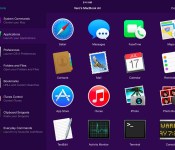
Running with Crayons today announced Alfred Remote, an iOS app that turns an iPhone or iPad into a remote control for various tasks on a user’s Mac, from controlling a screensaver to launching apps (via The Verge).
Designed with parity of the Alfred app on the Mac App Store in mind, Alfred for iOS also allows users to expand into systemwide interactions with their desktop computers. Users with a Powerpack addition to their Alfred 2 experience, which costs about $25, can then use the Remote to control Powerpack-exclusive features via iOS.

These include iTunes playback, copying and pasting from iOS to OS X, running user-defined scripts, AppleScripts, and terminal commands, and creating and controlling custom Workflows for enhanced productivity. Normal features like opening websites and setting a screensaver are available to all users.
With a single touch on your iOS device, you can control many Alfred 2 actions on your Mac, including:
– Show Alfred 2 on your Mac
– System Commands: Lock, restart, shut down, log out or sleep your Mac, eject all devices, quit all apps and empty trash
– Launch Applications and System Preferences on your Mac
– Open files and folders you’ve defined on your Mac
– Open websites and bookmarks, or pop up Alfred with a custom search filled in
– Replace hard to remember hotkey combinations and keywords with icons on iOS
To be able to fully use the features of each app, users will need both Alfred 2 for Mac and Alfred Remote for iOS, and have both of them running on the same Wi-Fi connection.
Alfred Remote can be purchased from the App Store for $4.99. [Direct Link]
Version 2 of the Alfred Mac App is available from the App Store for free, with an option to upgrade with the Powerpack options. [Direct Link]
Motorola has officially re-entered China by launching three smartphones; the Moto X, the Moto X Pro, and the Moto G (4G LTE). The news of Motorola re-entering the Chinese market surfaced earlier this month. The American smartphone manufacturer is now all set to take pre-orders for the Moto G (2nd gen.), the flagship Moto X (2014), […]
The post Motorola officially re-enters China, launches three new smartphones appeared first on AndroidSPIN.
Google has begun rolling out an update to the stable channel of Chrome OS, that is what you find on the Chromebooks, to version 40. Many of the changes are all under-the-hood changes that fix bugs, address security issues and make things a little smoother. There are a few smaller details that users might notice, while […]
The post Stable channel of Chrome OS updated to version 40, adds emoji palette and custom wallpaper sync appeared first on AndroidSPIN.
Twitter has grown exponentially since its release in 2006 and CEO Dick Costolo is adamant to prove that the social platform is not going anywhere anytime soon. Twitter just released two new capabilities to their mobile app that are going to feel right at home for those that use Twitter on a regular basis.
You will now be able to start private groups with your fellow followers and be able to have private conversations with them. This way you do not have to share publicly everything that you have to say about that new tweet that is taking the day by storm until the next sensation. The second notable feature that was added today is the ability to take 30 second videos and share them directly from the Twitter app without having to use a third party app. Now you can capture videos at a moments notice and share them instantly so that you and your friends can converse privately about how funny it was.
These new features are going to make your Twitter experience that much better. If you do not have Twitter but these added features have you wanting to give it a shot, you can download the app using the widget below. For more information regarding the added features you can use the link provided.
The post Twitter Launches New Messaging and Video Capabilities appeared first on AndroidGuys.
 AIVAnet