


Samsung Galaxy S Edge name exposed on Vodafone’s site

When the Galaxy S 6 launches this spring, the handset will likely be joined by an Edge variant. The Edge variant would be similar to what the Galaxy Note Edge is for the Galaxy Note 4 – identical internal specifications with a modified exterior. The naming for the Edge variant of the Galaxy S 6 has been up in the air; however, Vodafone may have given away its official name.
A page for the Galaxy S 6 went live on Vodafone’s site recently and revealed that the Edge variant would be called Galaxy S Edge. There are no pictures or anything providing a description, though. Instead, in the source code of the page, was the option to pre-order the Galaxy S Edge. Nowhere else on the page was it mentioned. That is likely because this is all fresh and details are sparse.
Source: Vodafone
Come comment on this article: Samsung Galaxy S Edge name exposed on Vodafone’s site

AMOLED Burn-in Fixer for Nexus 6 and other AMOLED display devices
Burn-ins on your AMOLED screen are the worst. They are just absolutely terrible. There is nothing worse than seeing a ghost on your phone for all eternity. The good news is that you don’t have to site idly by while your OCD goes crazy.
One Brendon Sled has taken it upon himself to fix your devices unfortunate screen. AMOLED Burn-in Fixer is an app designed to be effective and easy to use.
The basic idea behind the app is to invert the colors of your status bar and/or navigation bar (depending on which location is showing signs of burn-in) to reverse the eye sore.
There are three easy steps to fixing these burn-ins. Install, Test and Fix. It is that simple.
1) Install
Step one, install the app from the Google Play Store for free. You can either search “AMOLED Burn-in Fixer” or make use of the widget at the bottom of this post.
![Screenshot_2015-01-26-16-04-54[1]](https://i1.wp.com/www.androidguys.com/wp-content/uploads/2015/01/Screenshot_2015-01-26-16-04-541.png)
![Screenshot_2015-01-26-16-05-00[1]](https://i0.wp.com/www.androidguys.com/wp-content/uploads/2015/01/Screenshot_2015-01-26-16-05-001.png)
2) Test
Step two, test your screen for signs of burn in. You just follow the yellow brick road on this one. Tap the “Test Burn-in” tab, then select “Hide UI”. You will be presented with a solid gray background that will reveal any burn-ins to you. This will most likely be around the status bar and navigation bar areas as previously stated.
![Screenshot_2015-01-26-16-05-28[1]](https://i2.wp.com/www.androidguys.com/wp-content/uploads/2015/01/Screenshot_2015-01-26-16-05-281.png)
![Screenshot_2015-01-26-16-05-32[1]](https://i1.wp.com/www.androidguys.com/wp-content/uploads/2015/01/Screenshot_2015-01-26-16-05-321.png)
3) Fix
Step three, fix all the things! Once you determine the areas that require doctoring, go back to the “Fix Burn-in” tab and select the locations you require. Then, follow the instructions on screen. Enable inverted colors in your system settings and hide the app settings.
![Screenshot_2015-01-26-16-05-51[1]](https://i2.wp.com/www.androidguys.com/wp-content/uploads/2015/01/Screenshot_2015-01-26-16-05-511.png)
![Screenshot_2015-01-26-16-06-04[1]](https://i0.wp.com/www.androidguys.com/wp-content/uploads/2015/01/Screenshot_2015-01-26-16-06-041.png)
Everything is simple and painless. You just have to leave the inverted screen up until the signs of any burn-in are reduced to your satisfaction.
Unfortunately, the app only installs on Lollipop devices.
The post AMOLED Burn-in Fixer for Nexus 6 and other AMOLED display devices appeared first on AndroidGuys.

Deal Alert: Grab an unlocked 32GB LG G2 from Ebay for only $210

The LG G2 was one of our favorite smartphones of 2013, and continues to be a great option for those who want a solid Android device for cheap. If you’re looking to buy one without breaking the bank, Ebay is currently selling a 32GB GSM unlocked LG G2 for only $209.99. Considering the price for an unlocked 32GB G2 is normally upwards of $300-$350, this is really a steal. The phone will work on either T-Mobile or AT&T’s network. You can purchase either the Black or White model, and free shipping is included with the purchase of this device.
If you need a refresher, the LG G2 has a 5.2-inch 1080p display, a 2.26GHz quad-core Snapdragon 800 processor, 2GB of RAM and a 13MP rear-facing camera. The G2 is LG’s first device with a rear-mounted volume rocker and power/standby button, and has since been featured on most other LG handsets. If you’re unfamiliar with the buttons on the back, give it a try. Most users become accustomed to button layout within days of using the handset. Want more information on this device? Check out our LG G2 review.
This deal likely won’t last long, so head to the link below to grab your own LG G2.
Buy the 32GB unlocked LG G2 from Ebay for $209.99

[Deal] Get 101 4×6 photo prints from Snapfish delivered for $0.07 with the mobile app, plus get 100 prints each month for 12 months

Printing photos might not be as popular as it used to be, but just the other day my wife was saying it would be nice to put together a photo album or two of our son. If you’re thinking of doing the same, you might want to check out this deal from Snapfish. Right now you can grab 101 (or possibly 156) 4×6 photo prints delivered to your house for only $0.07 (USA only). Not only that, you can grab 100 more 4×6 prints each and every month for 12 months.
The only caveats are that you have to use the mobile app (for Android or iOS) and you must open a new account. How this deal works is that upon installing the app and opening a new account, you will automatically be credited with your first month of 100 prints. You will then add one more photo for $0.07 so that you can enable the Free Shipping code. All you have to do is click the Edit button near the order total an apply coupon code 25X2DAY.
Some have found they were able to grab 156 photos instead of 101 since new users get 55 additional photos after their first upload.
Now you might be thinking that uploading 150+ photos from your phone would be a royal pain, so use your laptop or desktop PC. I would however, make sure to install the app and open your new account (using the app) before logging into your account and uploading images from a computer.
source: Slickdeals
Come comment on this article: [Deal] Get 101 4×6 photo prints from Snapfish delivered for $0.07 with the mobile app, plus get 100 prints each month for 12 months

[Deal] Get 101 4×6 photo prints from Snapfish delivered for $0.07 with the mobile app, plus get 100 prints each month for 12 months
Printing photos might not be as popular as it used to be, but just the other day my wife was saying it would be nice to put together a photo album or two of our son. If you’re thinking of doing the same, you might want to check out this deal from Snapfish. Right now you can grab 101 (or possibly 156) 4×6 photo prints delivered to your house for only $0.07 (USA only). Not only that, you can grab 100 more 4×6 prints each and every month for 12 months.
The only caveats are that you have to use the mobile app (for Android or iOS) and you must open a new account. How this deal works is that upon installing the app and opening a new account, you will automatically be credited with your first month of 100 prints. You will then add one more photo for $0.07 so that you can enable the Free Shipping code. All you have to do is click the Edit button near the order total an apply coupon code 25X2DAY.
Some have found they were able to grab 156 photos instead of 101 since new users get 55 additional photos after their first upload.
Now you might be thinking that uploading 150+ photos from your phone would be a royal pain, so use your laptop or desktop PC. I would however, make sure to install the app and open your new account (using the app) before logging into your account and uploading images from a computer.
source: Slickdeals
Come comment on this article: [Deal] Get 101 4×6 photo prints from Snapfish delivered for $0.07 with the mobile app, plus get 100 prints each month for 12 months
Old square Dropcams will stop working soon, but they’ll replace it with a new one for free

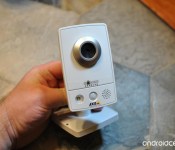
We’ve got some good news and some bad news for you Dropcam owners out there. If you own one of the older Original or Echo models, the bad news is you won’t be able to use it for much longer. The good news is that the company is going to make it up by sending you a new one for free.
SCORE! is T-Mobile’s latest program aimed at saving you money on your next device
T-Mobile just recently announced another new program aimed at helping consumers SCORE! better deals on phones. Since the big moves, consumer bought their devices out right and paid for them in installments on their monthly statements. It cut the, for the most part, the larger out-of-pocket charges needed to get your hands on a new […]
The post SCORE! is T-Mobile’s latest program aimed at saving you money on your next device appeared first on AndroidSPIN.
OS X 10.10.2 Includes Fix for ‘Thunderstrike’ Hardware Exploit Affecting Macs
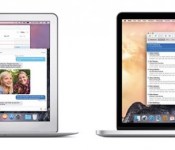
Apple is readying a fix in OS X 10.10.2 for the so-called “Thunderstrike” hardware exploit targeting Macs equipped with Thunderbolt ports, iMore has learned. According to the report, Apple patched the vulnerability by making code changes in the upcoming software update that prevent a Mac’s bootrom from being replaced or rolled back to a previous state in which it could be attacked.
To secure against Thunderstrike, Apple had to change the code to not only prevent the Mac’s boot ROM from being replaced, but also to prevent it from being rolled back to a state where the attack would be possible again. According to people with access to the latest beta of OS X 10.10.2 who are familiar with Thunderstrike and how it works, that’s exactly the deep, layered process that’s been completed.
Thunderstrike is a serious vulnerability discovered earlier this year by security researcher Trammell Hudson, enabling an attacker to replace a Mac’s bootrom with malicious code without a user knowing. Since the malicious code is stored in a low level inaccessible to the user, the problem would remain even if the bootrom was replaced.

The proof-of-concept attack is limited in scope, however, as an attacker would require physical access to the Mac or savvy social engineering skills in order to trick a user into attacking his or her Mac themselves. Apple has already addressed the issue in its latest hardware, including the iMac with Retina 5K Display and new Mac mini.
OS X 10.10.2 has been in pre-release testing for over two months and should be made available to the public in the coming days. The most recent OS X 10.10.2 beta was seeded to developers for testing last Wednesday. In addition to the Thunderstrike fix, the upcoming software update addresses security vulnerabilities exposed by Google’s Project Zero security team last week.
According to 9to5Mac, the latest OS X Yosemite release will also add iCloud Drive in Time Machine and resolve issues related to Wi-Fi, VoiceOver and security. In particular, a recently identified glitch causing Spotlight on OS X to expose system information to spammers through remote content loading will reportedly be patched. Safari will also gain improved performance and security.
No public instances of Thunderstrike attacks have yet to be reported.

Quick Look: Airship Bakery

Are you a fan of match-three games? Do you find yourself constantly on the lookout for something new and exciting in that genre? Fortunately, there seems to be an endless supply of those sorts of games on Android. One of the latest we’ve encountered is Airship Bakery. Not only is it match three type stuff but it can be match four and more. Play for a few minutes and you’ll see exactly what we mean.
With nearly 100 levels and climbing this one starts out incredibly simple but gets more involved over time. Your goal is to slide tiles around to match three bakery items in a row. Do it enough times and you’ll make the requisite number of customers happy. Be warned, these guys begin to ask for more and more over time. Oh, and you’ve only got so many moves to use each round. Thankfully, there are some bonus items that show up every so often to help in a pinch.
Here’s a Quick Peek video we did last week for the game.
The post Quick Look: Airship Bakery appeared first on AndroidGuys.

‘Bowling Central’ Expands Wii-Style Gaming on Apple TV [iOS Blog]
Back in 2013, Rolocule debuted Motion Tennis, an iPhone game that brought Wii-style gaming to the Apple TV via AirPlay. Using AirPlay Mirroring, users could display the game on an Apple TV while using an iPhone as a tennis racket. The setup drew natural comparisons to Nintendo’s Wii Sports, with the iPhone playing the role of the Wii Remote.
Motion Tennis wasn’t perfect, as it did suffer from minor lag and there were naturally concerns about users accidentally throwing their iPhones across the room or into their televisions, but it did serve as an interesting glimpse of both the potential of AirPlay and the possibilities for Apple TV gaming.
Rolocule is now back with an addition to its sports-themed Apple TV games, earlier this month debuting Bowling Central. The game itself is fairly simple, allowing users to bowl a classic game of 3, 6, or 10 frames, or take on a challenge mode that currently offers 30 stages with various stationary and/or moving blockers in the way of the pins.
Bowling Central is by no means the first bowling game for iOS, nor even necessarily the best or most realistic, but once again the selling point is Apple TV compatibility via AirPlay. When in AirPlay mode, the user can wave his or her iPhone side to side to set the release point and then swing the device to bowl the ball, even imparting spin depending on the trajectory of the swing.
In our testing, we found very little lag when playing via Apple TV, an important factor considering the need to accurately time throws in challenge mode. Throws also felt natural with the iPhone after a bit of practice that involved getting used to keeping a thumb on the screen during the throw rather than releasing as on Wii Sports. Rolocule co-founder Anuj Tandon notes the controls were specifically designed to keep the thumb in place during throws in order to maintain better control of the device and minimize the chances of accidentally throwing it.
We did experience some crashing problems when AirPlaying to a second-generation Apple TV, although these appear to be due more to AirPlay issues on the older set-top box than an app problem. No such issues were seen with a third-generation Apple TV.
Overall, Bowling Central is a fairly straightforward bowling game with limited gameplay options so far. For example, there is no live multiplayer option and the 30 challenge levels can be completed rather quickly, although it can take a bit longer to achieve “three-pin” ratings on each.
More challenge levels appear to be in the works, however, and the Apple TV compatibility is what makes Bowling Central an interesting concept as party entertainment. With Apple yet to allow games or any sort of App Store for the Apple TV, Rolocule’s AirPlay implementation gives a nice impression of the potential for the set-top box should Apple ultimately decide to open it up to third-party developers.
Bowling Central is available now in the App Store for $2.99. [Direct Link]
 AIVAnet