



Longtime Apple Board Member Mickey Drexler to Retire in March [Mac Blog]
 Mickey Drexler, who has served on Apple’s Board of Directors since 1999, will retire at the end of his current term, according to a new shareholders filing. Drexler’s term ends at the annual shareholder’s meeting, on March 10, 2015. A replacement for Drexler has not yet been chosen.
On January 16, 2015, Millard “Mickey” Drexler, 70, who has served on the Board since 1999, notified the Board of his intention to retire at the end of his current term, which will expire at the Annual Meeting. The Board has not yet nominated an individual to fill the vacancy that will be created by Mr. Drexler’s departure from the Board.
Drexler is the CEO of JCrew and was formerly the CEO of Gap, where he’s widely credited for the chain’s popularity during the 1990s. Jobs brought Drexler in to help define Apple’s retail store goals at a time when its retail push was just beginning. Ron Johnson was hired during the same time period, and the first Apple Stores launched in 2001.
Drexler is the second longtime board member to leave the Apple Board of Directors in recent months, with Bill Campbell retiring back in July of 2014. He was replaced by BlackRock’s Susan Wagner.
(Image courtesy of BU Today)

Spotify adding new Touch Preview feature to service

If you enjoy Spotify and use it regularly, you may be glad to know that the company is planning to roll out a new feature called Touch Preview to help you discover new music. The Touch Preview feature provides a way to listen to a short sample of a song simply by pressing on the album art icon. In a video that Spotify released to show how the new feature works, you can see that the preview clips should play almost instantaneously as a user moves their touch from one album cover to another when viewing the grid for a playlist.
This new feature should make it much easier for users to preview music. Many streaming players force users to drill down into an album to see the list of songs and then try to tap on tiny little buttons to access the preview clips. Needless to say, this is a lot of tapping on the screen and really makes in cumbersome to figure out what you may be getting ready to listen to.
Besides the preview capability that Spotify added, they also put in some new gestures that will make it easy to save songs when you find something you like after checking out the sample. A right swipe on a song title in a playlist will add it to a user’s queue and a left swipe will add it to the library.
Overall, Spotify’s new Touch Preview is a solution that should help make music discovery much more seamless than it has been in the past. Spotify has started the rollout of this new feature on iOS platforms and it will be coming to Android devices and even the desktop version in the near future.
Click here to view the embedded video.
source: Engadget
Come comment on this article: Spotify adding new Touch Preview feature to service
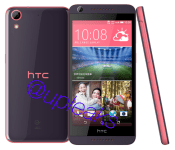
HTC has more phones in the pipeline for your desire according to latest leak

Although much of the latest rumor frenzy surrounding HTC involves the forthcoming HTC One M9 smartphone, a new leak from Twitter leakster @upleaks shows an HTC Desire 626 is in the works. Earlier this month at CES 2015, HTC announced a couple new devices for their HTC Desire line of budget smartphones. The HTC Desire 826 is heading to Asian markets while the HTC Desire 320 is off to the U.K. and Germany. Presumably, based on the model number, the HTC Desire 626 will fall in the middle of these devices spec-wise.
Sources indicate the Desire 626 will have a 5-inch display running at 1280 x 720 resolution, a 1.7 GHz octa-core MediaTek MT6752 processor, 2 GB of RAM, 16 GB of internal storage, a 13 MP rear-facing camera and 5 MP front-facing camera, and a 2,000 mAh battery. The new smartphone will come with Android KitKat, but HTC is planning to upgrade it to Android Lollipop down the road. Sources also believe HTC may be working on an even lower end version of the same device with a 1.2 GHz Snapdragon 410 processor and only 1 GB of RAM.
No pricing or planned market information has leaked to this point, so it is not clear whether the Desire 626 will be available in the U.S. It is possible we may see more information about the device surface at MWC 2015.


source: @upleaks
Come comment on this article: HTC has more phones in the pipeline for your desire according to latest leak


HoloLens is and isn’t Xbox One’s answer to PlayStation 4’s virtual reality headset

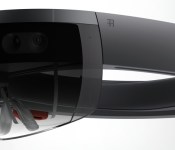
Finally, we can stop asking Microsoft’s Xbox lead Phil Spencer about virtual reality headsets. “For us I think this is the area,” Spencer told a group of interviewers at yesterday’s Windows 10 event. He was responding to whether or not there’s also a virtual reality headset in the works at Microsoft, just an hour after the company unveiled HoloLens: a “mixed reality” headset that enables the wearer to see holograms in real life.
For Spencer, HoloLens is both Microsoft’s alternate answer to the recent virtual reality explosion and a potential answer to Sony’s Project Morpheus headset — a VR peripheral that works with the PlayStation 4, where HoloLens could work with the Xbox One. “It’s very cool. To me there’s not a successful consumer electronics device on the planet where gaming is not a primary form of app category on the thing,” Spencer said. There’s even a “Minecraft-inspired” demo — which answers that question — for HoloLens that shows the implications of gaming with holograms. But no demo showed the headset working with the Xbox One in any capacity. Spencer instead talked around that possibility:
“I think gaming will be important. Specific scenarios with the Xbox, we’re thinking hard about. People could ask about streaming solutions. Could I use it as a display for my Xbox? We don’t have answers to any of those things, but know it’s all part of the same organization.”
And that’s why I say HoloLens both is and isn’t an answer to Sony’s Project Morpheus, or the Oculus Rift, or even Samsung’s Gear VR. It’s similarly impressive, and head-mounted, and even delivers some similar experiences, but it’s not virtual reality and it’s not a head-mounted display. It’s…something else.
The fact that HoloLens runs as a standalone device, untethered, is the first major differentiator.
Gaming with HoloLens and Xbox One wouldn’t involve a wire the same way the PlayStation 4 does with Morpheus. Regardless of the fact that it runs standalone, HoloLens could aim to offer a companion experience — a living “second-screen experience,” if you will. Sounds a lot better than connecting our tablets and smartphones!
Or imagine a horror game where HoloLens introduced more and more visual chaos into your life as you lost your mind in-game? That sounds goddamn terrifying!
The other major differentiator right now is that HoloLens has its own processing power on board, capable of running Windows 10. Well, since it runs Windows 10, then you can stream your Xbox One games to it, right? Maybe instead of playing Xbox One games on my TV, I play them on my ceiling while lying on my back, with the game projected directly into my vision so only I can see it. Sounds like a pretty solid solution for playing violent (“adult”) games with kids in the house.
As for whether HoloLens will take advantage of the Xbox One’s horsepower through tethering, that’s “clearly on the roadmap” according to Spencer. But I don’t know, the possible use cases without even heading into tethering are incredibly broad and, bizarrely, maybe even more fascinating.
It’s very early days for HoloLens — so much so that its potential far outclasses its delivery at the moment. What is there is full of promise, and it’s exciting to see a juggernaut like Microsoft pushing innovation in a completely different direction from the competition. What it will become is another question, but so far Microsoft’s made a truly original push into an arena crowded by folks all trying to deliver the same device.
As Spencer put it: “I’ve always applauded Oculus for what they’ve created. I think this is something different.” That, Mr. Spencer, it is.
Filed under: Gaming, Wearables, Science, Software, HD, Microsoft
Android customization – send Android notifications to your computer using Pushbullet

We took the time last week on our Android customization series to talk about Google’s tool to help you locate and secure a missing Android device. Android Device Manager is one of the easiest to use and most supported options around, we hope it helped you find or secure your missing device.
This week, we want to look at how to push notifications from your Android device over to your computer using one of our favorite productivity tools, Pushbullet.
Pushbullet is an app and service than can be used to push things between your Android devices and computers. Website URLs, files and more are on the list, be sure to check out our previous coverage of Pushbullet to see it all.
Before we get started
 As mentioned, Pushbullet is an app and a service, to follow along today you will need to install the app on your Android device, Pushbullet is free in the Google Play Store.
Next, you will need to install the Pushbullet program (beta versions for Windows and Mac), or one of the available browser extensions onto your computer. Chrome users can head to the Chrome Web store here.
Finally, for best results, you are going to want to log into Pushbullet with your Google account. You’ll need to use the same account on both Android and your PC, so choose wisely.
Send Android notifications to your PC
Because there are two sides to the project, we’ll have to break things into two parts. We’ll start on your Android device before we dive over to your computer.
Set up Pushbullet on Android

The first time you open Pushbullet, you will get a side scrolling overview of the app, plus a persistent ‘Sign in with Google’ prompt at the bottom. If you are still on board, go ahead and sign in with Google to get started.
If this is your first time through, Pushbullet will immediately prompt you to turn on Notification access. Follow the on screen steps or skip forward and see below.

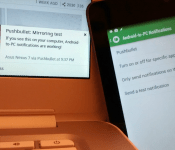
Once inside Pushbullet, swipe in from the left, or hit the triple-line menu button in the top left, to access the main menu. You will see the option to turn on Android/PC notifications right here, or hit Settings for more options.
Tap to turn on Show my notifications on my PC.
This takes you to the Notification Access settings of your device, where you will need to grant Pushbullet access to your system notifications. Simply tap the check box and confirm by hitting the OK button on the popup screen.
As mentioned, go ahead and play with the remaining settings, such as sending notifications only over WiFi or fine tuning a specific list of apps that can send notifications. Whenever you are ready, we are now going to head over to your computer.
Set up Pushbullet on your computer
We will work with the Pushbullet extension for the Chrome browser today.

Once installed, head into the options for the Pushbullet extension.
You will find the Notifications tab, head into it.
Inside Notifications you will see a few options. Configure everything as you see fit, but be sure to turn on the first option – Show my phone’s notifications on my computer.
As far as getting things to operate, this should about do it for you. Go ahead and give it a try.
What’s next
Pushbullet is capable of so much more than simply displaying your Android device notifications on your computer. Instead of trying out just any old notification, be sure to try out an SMS message. Unless you’ve turned things off in the settings, you’ll be able to respond to that Text message right from your computer.

You may have also seen and heard that Pushbullet operates as a Plugin for Tasker. This allows you to find all sorts of creative ways to push information, including notifications, to all of your enabled devices. This also allows you to use Pushbullet to trigger Tasker Tasks on your Android device. If you recall a couple weeks back, we sent SMS messages to Tasker to turn on our home-grown security tool, you may find Pushbullet to be a more elegant method of doing this.
Finally, Pushbullet offers one more point of entry. Head on over to the Pushbullet website and log in with your account. You will gain access to all un-deleted pushes and be able to fire stuff to your other connected computers and Android devices.

At this time, just for fun, I am using the Pushbullet website on my laptop to turn on the flashlight feature on my phone. I will leave it to you to imagine what possible reason I would have for setting up this Tasker project, but it works quite well.
Bonus
Pushbullet users can now subscribe to our new Android customization Pushbullet channel to receive an alert when we bring you a new tool, tip or trick.
http://www.jonathanfeistdevelopments.com/AndroidCustomizationPushbulletChannel.html
Next week
I hope that you are enjoying seeing your Android notifications on your computer screen, we thought that would make for a handy Android customization to add to your world. Next week, we’d like to continue looking at ways to handle SMS from your PC with a mini app-shootout.
Do you use Pushbullet, or do you prefer another method of getting Android notifications to your computer screen?
Leef Bridge 3.0 is a USB OTG thumb drive for Android and your PC
I am not ashamed to say that I am still a huge advocate of physical storage. The cloud has its place in our lives, but there are still plenty of limitations to it all. We can discuss that later though. Right now we are going to take a quick look at a product from Leef, […]
The post Leef Bridge 3.0 is a USB OTG thumb drive for Android and your PC appeared first on AndroidSPIN.
Deal: 2-year subscription to NordVPN services for 67% off
Keeping your data and online activity safe and secure is a pretty hot topic. Getting yourself setup with a VPN (Virtual Private Network) is certainly a good place to start. There is currently an offer through StackSocial which brings you a 2-year subscription to NordVPN for 67% off the general price tag of $120, which […]
The post Deal: 2-year subscription to NordVPN services for 67% off appeared first on AndroidSPIN.

Apple CEO Tim Cook Earned $9.2M in Fiscal 2014, Doubling 2013 Compensation
 Apple CEO Tim Cook’s compensation for fiscal 2014 was $9.22 million, according to a newly released SEC filing. That breaks down to a salary of $1.7 million and non-equity incentive compensation of $6.7 million, double the $4.3M compensation he received in 2013.
Apple’s newest executive hire, Angela Ahrendts, received $73 million in cash and stock. That includes a $400,000 salary, a $500,000 bonus, and $70 million in stock. Ahrendts, who joined Apple in May of 2014, was previously making $37 million at Burberry, and her offer package included an RSU award with a value of $37 million to compensate her for her unvested Burberry awards along with an RSU award of $33 million as a new Apple hire.
As for other Apple executives, Eddy Cue and Jeff Williams made over $24 million in stock awards, salary, and non-equity incentive plan compensation. Peter Oppenheimer earned $4.5 million, and Luca Maestri, Apple’s new CFO, received $14 million.
Apple had a record year under the guidance of Tim Cook, generating $182.8 billion in sales with $38.5 billion in net income in fiscal 2014, a new high for the company. According to its October forecast Apple expects to see revenue between $63.5 and $66.5 billion for the first quarter of 2015.
Apple will announce its earnings for the first fiscal quarter of 2015 on Monday, January 27. MacRumors will provide live coverage of both the earnings release and the conference call.

[New Google Cardboard Game] Attack of the Teapotcopters VR is a 3D base-defense game

If you have Google Cardboard, you might want to check out a new game called Attack of the Teapotcopters VR. Hell, even if you don’t have cardboard, it might be worth a shot since it will still be playable.
Teapotcopters features stunning 3D graphics and is a helicopter flight simulator that was developed by XDA member agnu17. In fact, it’s his first game ever. The goal is to defend the base from enemy teapotcopters. There are 4 levels of play: Earth, Moon, Mars, and Ocean, and 3 helicopters to choose from. You can also collect CopterCoins for upgrades.
The game not only supports Google Cardboard, but also other VR headsets including Durovis Dive, Refugio3D, VReye GO, and Fov2Go.
Attack of the Teapotcopters VR is Free in the Play Store now so give it a shot and let us know what you think about it.


Come comment on this article: [New Google Cardboard Game] Attack of the Teapotcopters VR is a 3D base-defense game
 AIVAnet