


Android customization – how to use Android Device Manager to find your lost phone

Last week on our Android customization series, we went a little crazy with device security, rigging things up using Tasker to take a photo of anyone accessing your device. We were sure to save the device’s current GPS coordinates as a part of the file name of the photo, making it as likely as possible you can recover a lost device.
We want to tackle a similar task here today, using Google’s own tool, Android Device Manager.
Android Device Manager comes in two parts, first, there is an app that installs on your device providing access to your device through a web interface.
Before we get started
 To proceed today, you will need to have Android Device Manager installed on your Android 2.3+ device. This may sound strange to some, but you will also need to have an active Google account set on the device. Android Device Manager is free in the Google Play Store, but many manufacturers have included the app by default. Follow the set up instructions below to see if you have Android Device Manager installed before you go to install it again.
Set up Android Device Manager
Google has been careful not to step on your toes when it comes to your privacy, as such, you will need to manually grant the Android Device Manager the required access to perform its powerful tasks on your device. There is a good chance that you said ‘yes’ to a system prompt already, but you can both verify the status and get started from scratch the simple steps below:

Head into your main system Settings.
Choose Security.
Choose Device Administrators.
Hit the check box to grant Android Device Manager access to your device.
Go ahead and exit. Believe it or not, that is all there is too it.
How to use Android Device Manager to find your phone
It should go without saying that you do not need your device at hand to use Android Device Manager, once the app is installed and set up, of course. Google has built everything you need into a handy web interface, and if you haven’t stumbled across it yet, you’ll find the link in the settings of the Google Play Store. Hit the link to get started.

First off, you will need to have a Google account to proceed, and you are going to need to use the same account as is set up on your Android device.
Warning: Android Device Manager can only operate if your device has battery life
remaining and is turned on. Limited functionality is available if your device is
turned off, and some features will perform the next time your device turns on.
As you may already know, Android Device Manager is capable of performing a few different actions on your device. Primarily, you will use it to simply pinpoint the location of your missing phone. The other features vary by device, but include the ability to Ring, Lock and Erase. Let’s look at each quickly.
Using GPS to locate your device
Locating your device using Android Device Manager is almost as simple as opening the web page. It will immediately provide you the last known coordinates of your device, assuming you have not completely disabled Location Services on your gear.
To update the location, simply tap the GPS crosshairs icon and hang on a minute.

You will also find that the GPS location is not as pinpoint as you might like. Android Device Manager’s location service may not be able to tell you if your phone is in your couch cushions, under the bed or on the roof, but at least it will show you if your device is close to home, or at your school or workplace.

Please, I beg of you, if you find your phone is at a random location, take precautions in recovering your device from a stranger.
Use Ring to locate your device
You know how I said that the GPS locator may not be able to help you find your phone within your home? That’s OK, that is why there is a Ring feature.

No surprises here, simply tap the Ring button and prepare to go rummaging through that laundry pile. Your device will begin to blare, even if you had it set to silent mode.
Use Lock to protect your data
Often times, your missing device will turn up at school, work, at a restaurant or in your car. It may even end up with a stranger that has contacted you (because you have your contact info on your lock screen.) No matter where your device is, if you are certain of recovery, but are not certain you can trust the person currently holding your phone, you can lock them out.
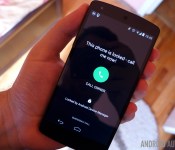
The Lock feature of Android Device Manager is also fairly simple. Tap Lock in the web interface and your device will go into lock down.

You will be asked to apply a new password for your device, you get to write a short message that will display on the lock screen and, best of all, you can supply a phone number that the holder of the phone can easily tap to give you a shout. Not half bad.
Use Erase to say good bye to your lost device
Sometimes there is no hope of recovering your lost device. This is sad, but your private data does not have to be compromised just because you now need to go phone shopping. For this, Android Device Manager provides the Erase option, which simply triggers a full device reset.
Before you trigger Erase on your device, do keep in mind that this will not clear the data on your external microSD card. For this, there are apps like Airdroid and more than can remotely control your device, allowing you to download or wipe the data from the external memory card. You best look into those apps now though, as they can be a nuisance to set up without having your hands on the device.

Confirm your choice, and the next time your device connects to Google servers, BAM! No more data.
What’s next
I wish I could tell you that there was more we can do with Android Device Manager to control and recover your missing device, but I am afraid that is about it, officially speaking.
When it comes to using Android Device Manager, remember that there is a Guest Mode that you can use, if you have to borrow a friend’s device for your tracking efforts.
Next week
I hope that you’ve been able to follow along, maybe even locate a missing device thanks to today’ s Android customization post. Next week, we take a step away from security, we would like to show you how to push notifications to your computer using one of our favorite productivity apps, Pushbullet.
Has Android Device Manager ever saved you from a loss?

Daily Roundup: Google Glass, Xiaomi phones, 2015 expectations and more!

The Google Glass experiment is over, but that doesn’t mean Glass is finished. Nest co-founder Tony Fadell will take the reigns as Google builds the next generation of its head-mounted display. Meanwhile, Xiaomi continues to make waves with its lineup of impressive hardware that look, well, suspiciously familiar. With CES finally behind us, we share some of the things we’re looking forward to in 2015. All that and more in today’s Daily Roundup!
Google Glass experiments are done, Nest CEO now in charge

It looks like the Google Glass team is being spun out into a division of its own, and the person running it will be Nest co-founder Tony Fadell. He is taking over as the team starts working on the next generation of its head-mounted device.
Xiaomi mocks Apple with its very own premium phablet

Oh, sure. It’s easy to see where Xiaomi gets a lot of its design inspiration from. But the Chinese company isn’t afraid to compare itself to the cool kids in Cupertino. The recently announced Mi Note is a slimmer and lighter weight competitor of the iPhone 6 Plus and features some pretty impressive hardware to boot.
4K, VR and a watch by Apple: What we’re excited for in 2015

With CES behind us, it’s time to focus on the future. Were you worried 2015 would be an unexciting year for technology? We show you what to look forward to in the coming months: the Apple Watch, VR headsets, 4K TV and more.
Hyperloop test track likely bound for Texas

When Elon Musk unveiled the Hyperloop, it seemed like a pipe dream. Sure, who wouldn’t want to travel between cities at supersonic speeds? The problem was that no one wanted to build it. It sounds like that’s changing, as Elon Musk took to Twitter today and shared plans for a test track in Texas.
Marriott no longer wants to block guests’ WiFi devices

It looks like Marriott hotel chain is backing down from its onerous policy of blocking WiFi in its hotels in order to force customers to purchase (often expensive) internet connections. In the end, it’s a victory for the little guys. And the bigs guys, too.
Elon Musk donates $10M to keep AI from going full Skynet

Elon Musk isn’t just content with merely changing the world. He wants to save it, too. He’s donating $10 million to the Future of Life Institute in order to help keep AI beneficial to humanity. With his financial contributions, we may not have to worry about thanking our robot overlords any time soon.
Logitech wants to link the living room with the rest of your smart home

Logitech is opening up its Harmony platform and giving developers access to any of the 270,000 devices that it supports. The hope is that this tool will spurn innovative new ways for customers to control the devices found in their homes.
Filed under: Misc

[New App] Bring a unique twist to your homescreen with T9 Launcher

There was a time when T9 dictionaries were all that we wanted to use on our smartphones. But with modern day handsets, we’ve quickly transitioned into standard sized QWERTY/AZERTY keyboards. But a new homescreen launcher app called T9 Launcher promises to bring back some memories.
Once installed, all you have to do is press the home button on your device which will then pull out a keyboard for you to search stuff on. And in conventional T9 style, you can type anything that you have on your device (apps or contacts) and it will find it for you. It works seamlessly and is surely worth a try. The app comes from XDA member wulltd.
The only downside to using an application like this is that it doesn’t support widgets or toggles. But since most of these can be accessed from the drop down settings bar, that’s not much of an issue. Head over to the link below to give this app a try for free from the Play Store.


Come comment on this article: [New App] Bring a unique twist to your homescreen with T9 Launcher

Anatomy of a hit game: Monument Valley creators share downloads, sales and other data

Ustwo Games, the developer behind the hit Monument Valley, has just given some insight on how well the game is doing in the Google Play Store, Amazon Appstore and the iOS App Store. Monument Valley made our list as one of the best designed games of 2014, as well as Google’s list of 102 most popular games of 2014, and continues to stay on the charts as one of the top paid games in the Play Store.
If you can remember back a few weeks ago, Ustwo Games tweeted some disheartening piracy statistics regarding the Google Play Store, only to clarify the stats in a report released a few days later. Taking the piracy numbers into consideration, the statistics the developers talk about are apparent in the numbers shown below. Sales on iOS are miles ahead of the Google Play Store and Amazon Appstore, though the game was an iOS exclusive for months before coming to Android.
So, are you curious to see what exactly it takes to make it to some of the best game lists of the year? Check out the image below for some more information:

Have you downloaded the game? How are you liking it? Let us know your thoughts in the comments!

Patient 3D prints his own kidney to guide surgeons

Despite having millions of dollars of imaging technology at their disposal, surgeons often have to wait until they open a patient up before deciding the best course of action. Even for the simplest procedure, knowing the actual size and composition of the affected body part can make all the difference. When British patient John Cousins collapsed in pain from appendicitis and a 3.5cm “stags head” kidney stone, he wanted to provide specialists with as much information on his affected organ as he could, so he decided to 3D-print a replica model of it.
BBC News reports that surgeons at Southampton General Hospital referenced the model during the two hour operation to remove the stone, allowing them to find the best point of entry, ensure greater precision and generally perform the surgery quicker. Following the operation on Monday, surgeon Bhaskar Somani is already planning a trial with 20 other patients at the hospital to show how 3D printed models can aid future cases. The technology may soon let doctors grow new organs or create new skin for burn victims, but it may also help get patients come off the operating table quicker too.
The use of 3D models to help with surgery is becoming more common. In fact, a cardiovascular team at Miami Children’s Hospital recently used one to plan a complicated procedure for a 4-year-old girl. At the Children’s Hospital in Boston, 3D-printed models have become a regular tool for prep when there’s a need to examine tiny details, like that of a baby’s brain or skull. The process being used here employs multiple materials, so skin, tissue, bone and blood vessel behavior can all be simulated. While some doctors may prefer to use detailed imagery and scans, those who’d rather do some hands-on research are sure to benefit from these developments.
Source: BBC News

Google Glass promoted from Google[x], Explorer program shutting down

The Google Glass team announced today that they are moving on from Google[x] labs and will become their own business unit. The new Google Glass unit will be assigned to Tony Fadell who currently heads up Nest Labs for Google. The Glass team itself will continue to be run by Ivy Ross who will now report to Fadell. As part of the new direction for Glass, Google will stop selling the Explorer Edition of Google Glass after January 19th, although some units will continue to be made available to developers and companies working on specific applications.
Google strongly hinted that they already have plans for the next version of Google Glass and although no timelines were provided, it is anticipated the next update will be released in 2015.
Some sources indicate this change in direction for Google Glass also signals a change in how Google develops products for the market. Glass was probably the most ambitious “beta” program the company engaged in, thanks in no part to the $1,500 cost of Glass for anyone who wanted to volunteer to be a beta tester. This move could signal a transition to a more traditional path to product development, similar to what Nest and Apple have used, where products are developed in secret an only released when considered “fully finished.”
In the Glass announcement today, Google makes specific mention of their Glass at Work initiative. Many industry watchers see the future of Glass as being brightest in workplace applications. However, Ms. Ross comes from a consumer-oriented background and Google’s Nest is also a strong consumer-oriented platform. Despite the slow sales after the program was opened up earlier this year and persistent criticism over privacy issues and technical shortcomings, Google does seem to see potential for the wearable device in both the business and consumer markets.
source: +Google Glass
Come comment on this article: Google Glass promoted from Google[x], Explorer program shutting down
Deal Alert: 30 days free access to the OnLive Playback game streaming catelog
There are discounts, deals and then freebies. I personally like freebies the best, even if the freebie isn’t all that spectacular. In this case, however, it is a pretty killer deal on a service that some of you may greatly enjoy the chance to check out, OnLive. OnLive is a company that has been around […]
The post Deal Alert: 30 days free access to the OnLive Playback game streaming catelog appeared first on AndroidSPIN.
VLC teases Android TV app, preview build available for download

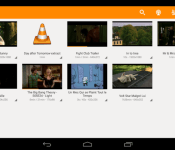
With Google TV officially closing down and Android TV becoming Google’s vision for the living room, more and more companies appear to be embracing the possibilities of what it could mean for how consumers view media. VLC, the makers of the beloved VLC media player (which sadly still hasn’t received Chromecast support), are hitting the ground running in 2015 when it comes to Android TV, and have released a preview build of their Android TV app to give consumers an early taste of how VLC could potentially fit in your living room.
The application is still is obviously a very early release that is sure to have some bugs, and there are also features that aren’t quite working yet. That being said, voice search, audio playback, album art, loading subtitles, adjusting playback speed and aspect ratio are currently up and running. You will need to make sure that the media you wish to play is located directly on the Android TV device or on a wired hard disk, as loading from a network attached drive isn’t functional just yet.
If you want to have a peek at the user interface, you can have a look at the preview build of the app via this video, courtesy of the GigaOm YouTube channel:
Again, it’s important to remember that this is nowhere near a final build of the application, and should be treated as as a preview/alpha build. If you can’t stand waiting and want to give the app a try, you can download the APK directly from this link.
What are your impressions of Android TV so far? Let us know what you think about it in the comments below.

MacIT Conference dates announced for July 14-16

While the plug on Macworld was sadly pulled after last year’s event, the fun is still set to continue with this year’s MacIT conference, which just had its dates announced for July 14-16 of this year at the Santa Clara Convention Center in California.
If you’re unfamiliar with MacIT, here’s a quick run-down of what you can expect from the event:
MacIT® is the world’s premiere event for “Deploying Apple in the Enterprise.” Learn how Fortune 1000, Global 50, and Higher Education and Governmental organizations are addressing the emerging issues of putting iOS and OS X tools to work in their worlds. Get ahead of emerging “Consumerization of IT” trends, solve your organization’s problems today and position your IT group for the challenges of tomorrow.
Registration isn’t yet open for the conference, and specific sessions haven’t been detailed, but the folks behind MacIT say that further details on both subjects will be available in April.
Source: MacIT
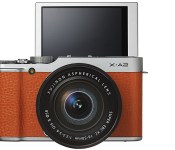
Fujifilm’s latest mirrorless camera has a flip screen for superior selfies


Filed under: Cameras
Via: CNET
Source: CNET
 AIVAnet