



New Survey Finds 18% of iPhone 6/6 Plus Owners Will ‘Definitely’ Buy Apple Watch [iOS Blog]
A new survey from finance company Credit Suisse found that of the solely iPhone 6 and iPhone 6 Plus owners questioned, 18 percent of them would “definitely” purchase Apple’s upcoming wearable, the Apple Watch.
As reported by Business Insider, the level of interest from iPhone owners could translate to 35 million units moved during the device’s first year. Beyond the definite purchasers, 11 percent of those surveyed said they “probably” would buy the Watch, another 18 percent said they would “definitely not” buy it, and a large pool of “maybe” and “probably not” users occupied 27 percent each in the middle.

With strong interest levels in the Apple Watch, Credit Suisse believes there will be shortages of the device at its rumored March launch.
But even if one out of every five iPhone 6 owners wants an Apple Watch, Credit Suisse believes Apple will only make about 20 million Apple Watches in 2015, suggesting there might be a supply shortage when the smartwatch goes on sale.
These estimates aren’t far off from a survey by UBS in early December that focused on consumers in general, not just specific iPhone 6 owners, and found that 10 percent are “very likely” to buy the Apple Watch, with the company selling 24 million units in the first nine months. Following Apple’s unveiling of the device last September, speculation on the Apple Watch’s unannounced details has continued in the lead-up to its launch, with the most recent piece of news revealing details of the Watch’s iPhone companion app.

Adobe finally brings Lightroom mobile to Android

Lightroom mobile has been available on iOS since last June, and now Adobe has finally made it available for Android phones. Lightroom is one of the most powerful photo editing tools for photographers, and the mobile version has most of the familiar desktop tools and presets, including non-destructive processing using Smart Previews.
It’s part of the Adobe Creative Cloud, which means that you will have access to all your images in the cloud from your phone, and any changes that you make will be synced so that you can continue where you left off with a Mac or Windows computer.
As you might know, Lightroom is popular since you can work with RAW (DNG) images. If the the RAW images are in your personal cloud catalog, you will be able to edit them from your phone, but for now, you will not be able to edit RAW images captured on your Lollipop Nexus 5 or Nexus 6 using the app. That feature will be added soon. You will however, be able to edit any JPG images that you capture from your Android phone.
In order to use Lightroom, you will need a Creative Cloud Photography Plan, which costs $9.99 per month and consists of Photoshop CC 2014 and Lightroom for the desktop, mobile, and the Web. Plus, you get integration with Photoshop Mix. Your Android phone needs to be running Android 4.1+, have a 1.7 GHz quad-core CPU ARMv7 or higher, at least 1 GB of RAM, and at least 8 GB of internal storage in order to run Lightroom mobile. Unfortunately Lightroom mobile is not officially compatible with tablets, but I know a few testers who say that it works okay.


Full Press Release
Lightroom mobile Now Available for Android Phones
Adobe today announced the availability of Lightroom mobile for Android phones. Lightroom mobile is a companion app to Lightroom 5 desktop software, available as part of Adobe Creative Cloud. First released for iPad and iPhone, Lightroom mobile offers powerful capabilities to edit, organize and share images anywhere and anytime.
Built on a powerful cloud sync architecture, Lightroom mobile provides the most efficient way to manage and edit images across desktop, mobile devices and the Web. With Creative Cloud Photography Plan, photographers have access to professional-class photographic workflows on desktops and smartphones, allowing users to perfect images on any device.
Key Lightroom mobile capabilities include:
- Sync edits, metadata and collection changes to the Lightroom catalog on a Mac or
- Windows computer
- Automatically import images from the smartphone gallery and sync back to the
- Lightroom catalog on the desktop
- Edit images using familiar Lightroom tools and presets, including non-destructive
- processing using Smart Previews
- Quickly flag and reject photos
Pricing and Availability
Lightroom mobile is immediately available as a free download for Android phones via the Google Play store. Customers must have Lightroom 5.4 or higher, available as part of a full Adobe Creative Cloud membership and Creative Cloud Photography plan. The Creative Cloud Photography plan (USD$9.99 per month) is a comprehensive photography solution for both professional and hobbyist photographers. It includes Lightroom 5, Photoshop CC and Lightroom mobile with immediate access to updates as soon as they are released. New customers can download Lightroom mobile and start a 30-day free trial. After the 30 days, purchasing a Creative Cloud subscription is required for continued access.
To learn more about Lightroom mobile for Android features and availability, visit: http://blogs.adobe.com/lightroomjournal/?p=1448
Learn more about Lightroom mobile, visit http://www.adobe.com/products/lightroommobile.html.
Come comment on this article: Adobe finally brings Lightroom mobile to Android

Lightroom mobile comes to Android — here’s your first look!

If you’re a Lightroom user, this may be the easiest way to sync and edit photos on a desktop
Adobe today has announced that Lightroom mobile — the on-the-go version of its powerful photo organization and editing software — is now available for Android phones.
The broad strokes: Lightroom mobile lets you organize and edit pictures you take with your phone. (Tablet support is coming later, Adobe says.) It’s also a two-way sync with the full desktop version of Lightroom, completely with auto-upload. So anything you shoot with your phone will be available in a collection in Lightroom, and any edits you make there will also appear on the phone.
This one’s probably not for casual editors — Lightroom continues to be a pretty serious tool, and you’ll need one of Adobe’s Creative Cloud subscriptions for it all to work. But if you’re willing to put in a little effort, this might well be one of the best ways to manage and edit your mobile photos.
Let’s explore.

Alleged HTC timetable spells out Android 5.0 dates

If you’re the owner of an HTC One M8 or HTC One M7 and are patiently awaiting the arrival of the Android 5.0 Lollipop update, then you’ll be happy that you’ll be receiving the update very soon, as we already know.
But what about the other HTC devices like the HTC One E8, or the HTC Desire 610? Well according to a new roadmap that has been leaked, it looks like these devices are next up on the list after the HTC One.

The HTC One E8 will receive Android Lollipop in the second quarter of 2015, as well as HTC Desire EYE, HTC One M8 EYE, and HTC Butterfly 2. The HTC One max, HTC M7 Dual SIM, HTC Desire 816, HTC Desire 820u, HTC One (M8) mini, One E8 China, and the One M8 EYE China will follow in the third quarter, with the HTC Desire 610, HTC Desire 820s, HTC Desire 510 and the HTC One mini following in quarter four.
The post Alleged HTC timetable spells out Android 5.0 dates appeared first on AndroidGuys.
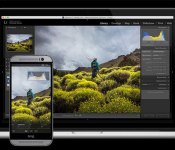
Adobe Lightroom mobile comes to Android, but it’s only for phones

Last spring, Adobe brought a version of its Lightroom photo-editing software to the iPad making for some convenient editing on the go. Months later, a version of the app is ready for Android devices and it brings all of the key features from the iOS version to those handsets running Google’s mobile OS. You’ll notice that I said “handsets” there, and that’s an important caveat. The app is designed for use on phones, and not tablets. Adobe says a version that’s optimized for tablets is on the way, but for now, the app is meant to be used on phones. If you’ll recall, the iPad version preceded the iPhone app, which, you know, makes sense. While this new Lightroom mobile equips devices running Android 4.1 (Jelly Bean) and later with its toolbox of tweaks (more on that in a minute), the creative software company recommends that you have at least 8GB of free space on your device to keep things running smoothly.
Just like the iOS version, the Android app is a free download, but you’ll need a Creative Cloud subscription to use it. You don’t need the full membership though, as the photography-specific plan is now a permanent fixture at $10 a month. Lightroom mobile syncs edits, metadata and collections with Lightroom 5.4 (or higher) on both Windows and Mac. It also automatically imports shots from your phone and allows you to access Creative Cloud-stored files for editing while your away from that work machine. Don’t expect the full set of tools, as the mobile software is limited to much of what’s in the Basic Panel and cropping tools. Options like color temperature, exposure, highlights and contrast are available, but those handy presets that you’ve created, or purchased from the likes of VSCO, won’t be accessible. Adobe says that expanded preset support is something it’s working on, but there’s no timeline for when they’ll be added to the mobile apps.

Just like the iPad app, Lightroom mobile uses the RAW file to create a compressed preview version that’s only about 5 percent of the original size (around one to two megabytes). The original is maintained, and a 2,560-pixel wide image ensures that the collection you edit during your evening commute doesn’t take forever to download or take up all of your storage space. As we’ve already mentioned, Adobe says you’ll need 8GB of internal storage (not extra space you’ve added on a microSD card) to move the files back and forth, along with a minimum 1.7GHz quad-core CPU.
Remember when I said most of the key features from iOS made it over to Android? Well, the one difference is Lightroom’s commenting system is absent on this version, but Adobe says it will be part of a future update. You can, however, still like, flag and reject images as needed. My biggest gripe here is the lack of tablet support. I’ve used Lightroom mobile on an iPad, and the app seems much better served with the larger display of a slate. Here’s to hoping Adobe’s plan to outfit Android tablets is just around the corner, but until then, those who prefer Google’s software will have to settle for using smaller screens.
Source: Adobe, Google Play

Apple, Google, and Others Offer Increased $415M Settlement in Class Action Anti-Poaching Lawsuit [Mac Blog]
After a judge had rejected an earlier settlement deal, Apple, Google, Intel and Adobe today offered a higher settlement that may end an anti-poaching lawsuit filed on behalf of technology workers, reports Reuters. Citing a source close to the negotiations, The New York Times claims the companies are offering a combined payment of $415 million to settle the case.

The suit asserts that the companies had illegal agreements that they would not directly solicit one another’s employees. That limited the engineers’ mobility and their pay, to the benefit of the companies, the suit said. The case grew out of reported actions by the companies that centered on a period that began in 2005, when Google was ascendant and Apple was trying to defend its turf.
Judge Lucy Koh rejected an earlier settlement of $324 million when plaintiff Michael Devine objected to the proposed amount. In her rejection, Koh agreed with Devine, stating that the total compensation “falls below the range of reasonableness,” when compared to the settlement that Pixar, Lucasfilm, and Intuit previously reached with the employees in 2013.
Lawyers confirm this new settlement amount is acceptable to the plaintiffs, but Judge Lucy Koh will still need to approve the deal. A settlement would allow the companies to avoid a potentially embarrassing trial that would expose internal communications between top technology companies such as Apple, Google, Intel, Adobe, Intuit and others.

VLC’s video player officially coming to Android TV
 VLC’s extremely popular video player application is officially coming to Android TV. Video enthusiasts should be pretty happy to hear this, since VLC supports just about any type of format or codec you can throw at it.
They’ve released a preview of the app, which you can find below. If you need help sideloading the application, check out our guide here.
source: GigaOM
Come comment on this article: VLC’s video player officially coming to Android TV
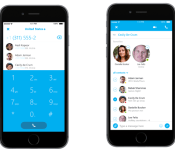
Skype for iPhone Adds Enhanced UI Improvements and Pre-Release Feedback Program [iOS Blog]
Microsoft today announced the release of an updated version of its Skype iOS client app bringing a few tweaks to the dial pad and chat picker alongside a new pre-release feedback program.
The first major user interface overhaul focuses on the dial pad, streamlining the process by automatically detecting matching numbers as soon as the user begins inputting a phone number. The update to the new chat picker further expedites the process of starting a chat or a call, letting users scroll through a quick list of their contacts, making them all a tap away from a video call or voice chat.

Perhaps most interesting in the 5.9 update, however, is Microsoft’s introduction of the new pre-release program for the iOS Skype app. The company states it is currently looking for “enthusiastic Skype users” who can provide feedback on the chat program’s iOS app to “shape and enhance” the program in the future.
Those willing to sign up will gain access to early versions of Skype for iOS in the future, provided they agree to update the company with “regular feedback” as each update is rolled out to them. Applicants must also be 18 years or older with a valid email address and Skype or Microsoft account.
You can help us shape your skype experience by:
-Trying out some new or upgraded features (don’t worry we’ll let you know what’s new) and tell us about your experience after doing so
-Giving us feedback and suggestions on what you would like to see in the app in the future
-Letting us know of any issues that you run into while using this previewed version
The new version 5.9 is available now, and those interested in the pre-release program, which the company promises has limited availability, can sign up on Skype’s official website. Skype for iPhone is available for free from the App Store. [Direct Link]
Google Maps Updates to Version 9.3 and Brings Sharing Directions [APK Download]
It’s Wednesday folks, and you know how Google loves to update their apps on Wednesdays. Today, Google Maps updates to version 9.3, and now the app allows you to share directions to whatever destination you want to share. Crazy to think that all this time we couldn’t do that, but now it’s here. Shareable directions […]
The post Google Maps Updates to Version 9.3 and Brings Sharing Directions [APK Download] appeared first on AndroidSPIN.

Appetite ‘pacemaker’ tells you when you’re actually hungry

For some, the biggest challenge of reaching a healthy weight isn’t adjusting their diet or getting more exercise — it’s resisting pangs of hunger when they’ve already eaten enough. They might have a better time resisting that urge after today, as the US Food and Drug Administration has approved a first-of-its-kind appetite controlling device, EnteroMedics’ Maestro Rechargeable System. Think of it as a pacemaker for your stomach. The device sits just under your abdomen and sends electrical pulses that both block hunger signals and send fullness signals more often. In theory, you’ll lose weight simply because you have a better sense of when to stop.
Don’t be too quick to ask your doctor about getting one, though. For one thing, the jury’s still out on how well it works. People with a test Maestro only lost 8.5 percent more excess weight in a year than people who had dummy units, and the FDA wants EnteroMedics to conduct a five-year study to see if its claims match reality in the long run. Also, your health insurance probably won’t cover this — you’ll likely have to pay for the device and surgery. If Maestro does work as promised, though, it could be a lifesaver for anyone whose weight issues are normally out of their control.
Filed under: Wearables, Science
Via: NBC News
Source: EnteroMedics, FDA
 AIVAnet