


Google Chrome update now enables Guest Browsing and easy switching of accounts
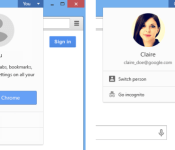

Google appears to have updated the Chrome browser for desktops with the ability to switch profiles right from the top right corner of your window. This feature was originally announced on Chrome Beta back in August, but has now made its way to the standard Chrome as well.
There’s also a new Guest Mode feature, which will open a new browser window with no access to history, which is ideal if you don’t want guests to snoop on your browsing history. This can be easily turned on from the Switch Person option which appears when you click on your name (located on the top right corner).
To add or remove people from Chrome, you can head over to the browser settings and make the necessary changes under the People section. It is important to note that Chrome will not use the browsing history of one user when browsing from another account, which is a very handy security feature.
So if you have two accounts on the browser, your browsing history will not be visible to the other person and vice versa. The browsing history and bookmarks available on your account will be accessible on connected devices as usual.
Overall, it’s a very neat addition to Chrome on desktops. Chromebooks are yet to receive the update apparently, but we’re certain that an update is on the horizon. Make sure you give this feature a try if you happen to use the Chrome browser on your computer.
Via: Unofficial Google OS Blog
Come comment on this article: Google Chrome update now enables Guest Browsing and easy switching of accounts
 AIVAnet