


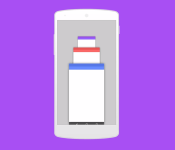
Check out this Android 6.0 Muffin concept

With us all revelling in the beauty of Material Design and Android 5.0 Lollipop, why not take a look at what Android 6.0 could hold for us?
Potentially codenamed Muffin, the below concept video comes courtesy of AndroidHackz who created a video showing off some new features that Android 6.0 could bring, including a new opening and closing animation, as well as a multi-window feature.
What do you guys think? Drop us a comment below.
The post Check out this Android 6.0 Muffin concept appeared first on AndroidGuys.
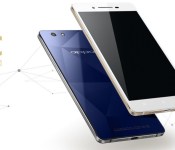
Oppo R1C officially announced, costs around $400

Oppo has taken the wraps off its latest phone, the Oppo R1C. The new device has a 5 inch, 720p HD LTPS LCD display and uses a 64-bit, octa-core Qualcomm Snapdragon 615. But the biggest feature of the phone is its sapphire clad rear panel.
As you can see from the photos, the phone has a flat back, without the traditional removable battery cover. Instead there is a sapphire glass pane which protects the phone from scratches and hopefully from shattering! The sapphire glass has also helped Oppo keep the thickness down, it measures just 6.85mm thick.

Looking at the rest of the phone, you get 2GB of RAM, 16GB of internal storage and a 2420 mAh battery. The device runs ColorOS 2.0.1 which is based on Android 4.4 KitKat.
As for the optics, there is a 13MP rear facing camera that uses a Sony Exmor RS IMX214 sensor and an F2.0 lens. On the front there is a 5MP camera. The bundled camera app also does some clever tricks and allows you to tweak the focus of your photos, as well as create depth-of-field and blur effects. There is also a double exposure mode so that you can make a subject appear twice in the same photo.
The phone offers 4G LTE connectivity (for Asia) and supports dual SIM cards, one micro and one nano. The Oppo R1C costs 2499 RMB, which is about $400.

The two-face YotaPhone 2 is coming to T-Mobile this spring

The YotaPhone 2 made quite a splash at last week’s CES 2015, after a few rumors began circulating around the web regarding the availability of the device. Currently, the YotaPhone 2 is available in 20 countries throughout Europe, the CIS and the Middle East, though it was originally slated to head to the US by the end of 2014. Up until now, we’ve had no word as to which US carrier would get the device.
According to our sources that are familiar with the matter, the YotaPhone 2 will make its way to T-Mobile around March-April. Though we are very confident in the validity of this information, sometimes even the most reliable sources can prove inaccurate, so do not treat this information as official. There’s always a chance that unforeseen issues will change the schedule.
The device is also headed to a Canadian carrier sometime in 2015, but that name has yet to be disclosed.
So far, no pricing information has been revealed regarding the device in the US. The YotaPhone 2 is currently available in Europe for €699 (~$850), which is the typical price of a flagship device. We can only speculate that the cost will be around . The fact that this device is headed to T-Mobile isn’t necessarily a surprise, given the carrier’s track record with other devices that normally wouldn’t make their way to the US. T-Mobile was one of the first carriers to offer the LG G Flex, as well as one of the only carriers to offer any device from Sony’s Xperia line. So, it’s not unlike T-Mobile to carry a device such as this one.
We interviewed Vlad Martynov, CEO of Yota Devices, last week at CES. While he didn’t comment on specific carrier availability, we got a first-hand look at Yota Devices’ vision for future smartphones and what they’re doing to improve the E Ink technology on the back of the phone.
If you’d like more information on the YotaPhone 2, check out our full review!
We’ll be sure to keep you updated when we hear more about the YotaPhone 2’s availability. If this device comes to T-Mobile for around $600-$700 unlocked, are you willing to try it out? Let us know what you think in the comments!

Even the police feel over-charged by Rogers

If you think you’re dishing out too much to service provider Rogers, you’d be in the same boat as the Royal Canadian Mounted Police. Newly discovered documents have revealed that as of August 1, Rogers had imposed a new set of fees on police divisions seeking data about their service subscribers. Though many of these requests were processed for free according to Rogers, some required a “minimal” charge to produce affidavits in court and track location when provided a warrant. The fees for affidavits have since been dropped, but location tracking charges remain.

How to instantly switch audio sources in OS X

If you have your Mac connected to different audio input and output sources, having to switch between them can be a process: You have to open up System Preferences, click on the Sound preference, and toggle the Input and Output tabs to find the right source. Or do you? Here’s a much faster way to do it.
The Mac is well-designed for audio media management. Whether you’re just listening to music and podcasts, or whether you’re a professional musician, the Mac has abilities (and complicated software tools and workflows) to suit you.
So it’s easy to get your Mac set up with audio inputs ranging from USB interfaces to the digital audio input, output including Bluetooth speakers, AirPlay and more. And keeping track of what audio is routing through which device can get to be a bit much to manage, at least if you’re doing it all through the Sound system preference.
How to add volume to the menu bar
You’re probably familiar with the volume level manager in the menu bar. If not, let’s get that out of the way first. Here’s how to turn it on:
- Click on the menu.
- Select System Preferences.
- Select Sound.
- Check Show volume in menu bar.

Now click on the sound icon in the menu bar. You can adjust the volume of whatever speaker is selected for output at present.
How to get more volume menu bar options
If you hold down the option button on the keyboard and then click on the sound icon in the menu bar, you’ll see a different menu appear. Now you can select whichever sound input method you’d like, and if you do it again, you can select whatever sound output method you’d like.

Obviously this has its limits: If you have really complicated audio workflows, you may not see all of your options listed here. And if you’re trying to manage multiple devices at once — let’s say AirPlay speakers throughout the house, for example — you may have to resort to iTunes or whatever app you’re using to control audio instead.
But this offers a quick and easy way to redirect audio into and out of your Mac without having to deal with the Sound system preference, so that’s something.
Any questions?
Any trouble with this? Or have any questions, comments or thoughts to add? Let me know!

Alien Isolation ‘Safe Haven’ DLC introduces new game mode, map, and character
Get ready to be terrified yet again. SEGA has announced that its new DLC pack for Alien Isolation is available today. The add-on pack, called “Safe Haven,” introduces a new challenge map, the new salvage game mode, and a new playable character in Hughes, Sevastopol Station’s Communications Manager.
Android 5.0 Lollipop for the HTC One M8 Unlocked and Developer Editions is available today
Just a day after getting a sneak peek at what it was going to look like, Android 5.0 Lollipop for the HTC One M8 Unlocked and Developer Editions has been made available today. The news dropped after HTC VP of Product Management, Mo Versi, tweeted that the OTA would be going out today, and it’s being […]
The post Android 5.0 Lollipop for the HTC One M8 Unlocked and Developer Editions is available today appeared first on AndroidSPIN.

Download the best icon packs of 2015

We’re well into 2015 so now it’s time to check out the hottest new icon packs of the year. Icon packs are theme packages that can be applied to a variety of launchers to change the stock icon for apps. The Google Play Store is littered with thousands of icon packs, so trying to find good ones is often quite a task; luckily we’ve pulled out the best ones for you.
We’ll be updating this throughout the year, so be sure to check back regularly to download the best icon packs of 2015.
Illus

Opals

Dekk

Balx

Elun

Have we missed off your favourite icon pack? Be sure to drop us a comment below to have it added to the best icon packs of 2015.
The post Download the best icon packs of 2015 appeared first on AndroidGuys.
Installation and uninstall process of joy downloads
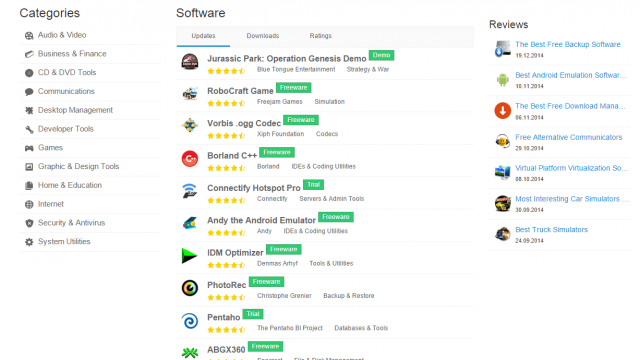
How user can install joy downloads:
User can download the file to install this and run to further process. On the user’s pc the setups run and further start the installation by the help of the application. The windows XP, windows vista and windows 7 can install these easily.
How the user can uninstall these software:
The user can uninstall the program there is no space in the hard drive of the pc or there is no free space for additional things. All types of versions of the windows can perform this task at user’s pc. In the windows XP, windows 7, windows 8 and windows vista can perform this function. Their setup to uninstall is relatively similar. The user who installs the software on the pc can operate the accurate instruction.
Uninstall the program in window 7: start from the start menu. The option of control panel can be selected. User has the view to use the configuration in control panel. Then select the program to search and uninstall this software. The user can view the small and large icons to the control panel then click on the program and feature. The program which can be uninstall, the button of uninstall is pressed and user can also press right click to uninstall the program. From the pc through this instruction the program can be removed.
Uninstall a program in windows 8: a search bar is appeared from the bottom if press the right click from the metro. In the corner bar the option of the ALL APPS can be clicked. With an uninstall icon by pressing the right button to install the program in menu of application jut click on it. If user want to delete the application permanently user can click to uninstall after the confirmation message. From the pc to remove the program instruction can be followed.
Uninstall a program in the windows vista: user can select first control panel from the start menu. It is same as the windows 7. View the category to choose the program to uninstall. Then view the small and large icons and click on features and then click on right button to uninstall the program.
Uninstall a program in windows XP: firstly start with start menu and then control panel is selected. If user is using the classic XP then go to the option of settings and then control panel. Then go to recovery icon then uninstall the program f your choice.

Google moves one step closer to becoming a universal translator

Even with the assistance of modern technology, holding a conversation in two different languages can be difficult. Google Translate allows you to speak with someone and have each utterance translated as text and audio, but until now you had to manually toggle every time the other person talked. As expected, Google is speeding up the process with smarter language recognition and speaker switching, which comes as part of a new update. So when you boot up the app and press the microphone icon, it’ll recognise which of the two languages is being spoken, offer a translation and then automatically alternate whenever the conversation flips over. No more tapping on the screen again and again.
In addition, Google has revamped its camera mode to quickly translate words and phrases directly on your screen. So if an important sign on the Paris Metro has you stumped, you should be able to just grab your smartphone, tap the camera icon and wait for a translation to appear augmented reality-style. The feature currently works for English, French, German, Italian, Russian, Portuguese and Spanish words, and Google says it’ll be adding support for additional languages over time. Of course, this is hardly a new idea — Word Lens had a similar proposition, and ever since Google acquired its developer Quest Visual we’ve been waiting patiently for its inevitable debut.

Filed under: Cellphones, Google
Source: Google
 AIVAnet