


You can install custom code on Chrome OS with a USB drive
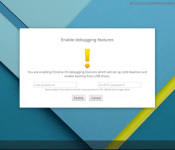

Currently, it is possible possible to install and work with custom code (such as Linux) on a Chrome OS device. The entire process of installing custom code is possible but it is not necessarily easy. That all changes because Google is adding Debugging Features for Chrome OS devices in Developer Mode. It means that Chrome OS users will be able to take a USB drive, connect it to the device, and install the custom code.
The following are what will be possible with the new feature:
- Remove rootfs verification² so you can modify OS files
- Enable SSH access to the device using the standard test keys so you can use tools such as cros flash³
- Enable booting from USB so you can install an OS image from a USB drive
- Set both the dev and the system root login password to a custom value so you can manually SSH into the device
You can access it right now by heading to the Dev Channel and selecting “Enable debugging features.” From there, follow these directions.
Source: +François Beaufort
Come comment on this article: You can install custom code on Chrome OS with a USB drive
Visit TalkAndroid for Android news, Android guides, and much more!
 AIVAnet