Develop for Lollipop with this coding course, $89

With Lollipop trickling out to more and more devices, there’s no better time to start developing for the next evolution of the Android operating system. This package of expertly produced …




Some of the world’s biggest publications including the Wall Street Journal and Forbes are running a story about how Google is no longer fixing security bugs in older versions of Android. The prize for the most sensationalist headline probably goes to Forbes for “Google Under Fire For Quietly Killing Critical Android Security Updates For Nearly One Billion.”
A headline about critical security updates that aren’t going to be available for nearly one billion devices is enough to worry even the most non-technical of people. With publications like the WSJ and Forbes pushing out this story, I think we can officially call this a “scare.”
It all started with a post by Tod Beardsley on the Metasploit blog. Metasploit is a tool that security experts use to test different computers and devices to see if they are susceptible to security vulnerabilities. The Metasploit tool has a large following in the security world and it garners a huge amount of respect. Tod Beardsley himself is a respected engineer with years of experience working in the security industry. He has often been a speaker at security conferences and is a member of the IEEE.
The whole business of distributing patches downstream is a whole other problem that needs to be addressed.
Tod wrote a blog post about how Google is no longer accepting security related patches for the WebView component of Android prior to Android 4.4. The WebView component is a core part of Android. It allows any app to create a mini web browser within the app itself. This can be useful for displaying simple static HTML, like help or instructions, or it can be used to build an entire app using HTML5 and Javascript. If any of these apps actually connect to the web to download content or to visit a site then the potential exists for a hacker to trick a user into opening a web site that exploits bugs in the WebView. Once exploited the hackers can take control of the device and install malicious software.
For example, if you use a RSS reader that relies on using WebView as a way to read the full story from an item listed in an RSS feed, then it would be possible for an attacker to get a story published that takes users to a malicious site. The mini web browser in the RSS reader could then be exploited, if it is vulnerable.
Beardsley does some maths and demonstrates that some 930 million Android devices are no longer receiving any security patches from Google. Everything that Beardsley has written is factually correct and the threat is real. “Without openly warning any of the 939 million affected, Google has decided to stop pushing out security updates for the WebView tool within Android to those on Android 4.3 or below,” wrote Thomas Fox-Brewster for Forbes.

But the situation isn’t as black and white as Beardsley and Fox-Brewster are suggesting. Ask yourself this question, when was the last time that Samsung, or HTC, or LG posted an update for devices running Android 4.1, 4.2 or 4.3? Obvioulsy, I am unable to keep track of every update pushed out by every company in the world, so I am sure there will be some exceptions to this, but the answer is – rarely.
Even if Google does continue support, would the devices even get it?
So even if Google fixed the source code in Android 4.3, the chances of it arriving on a actual handset are quite small. One of the first comments on Beardsley’s post was by dr.dinosaur who wrote, “Even if Google does continue support, would the devices even get it? As you mentioned, getting updates on these old devices is not an easy process as it has to get approved by the manufacturer, approved by the carrier, pushed to the device itself, and downloaded and installed by the user.”
Tod acknowledges this with a follow-up reply, “The whole business of distributing patches downstream is a whole other problem that needs to be addressed. That said, if the handset manufacturers or the carriers weren’t picking up Google-sourced patches before, I somehow doubt they’ll be faster to pick up patches from Some Guy On The Internet…”
What is really broken with Android is not if and when Google supplies patches for Android, but the ‘whole business of distributing patches downstream.’
And his point is valid in that OEMs are unlikely to pick-up security fixes to AOSP that have been published by random people on the Internet. But he also points out that the handset manufacturers weren’t picking up Google-sourced patches anyway. What is really broken with Android is not if and when Google supplies patches for Android, but the “whole business of distributing patches downstream.”

Google has done a lot to address this problem over recent years. Firstly it started de-coupling various components and services from the main Android build and offering them as updates via the Play Store. For Android 5.0 Lollipop, Google has also unbundle the WebView component and is offering that as an automatic update from the Play Store. That should stop the current situation with Android 4.3 occurring in the future.
If you are using Android 4.x then you should consider installing a browser like Chrome or Firefox to do you main mobile browser
Second, Google has various programs like the Nexus range and Android One, which allow people to buy handsets which get updates directly from Google. The result is that the downstream update model is slowly changing. It isn’t perfect by a long way, and while the OEMs and carriers remain slow in updating devices then the potential for this kind of problem still exists.
It is also worth mentioning that alternative firmwares, like Cyanogenmod, probably pick up the fixes from Google quicker than the OEMs. So technically anyone running CyanogenMod 10.x will no longer get any security updates unless a non-Google engineer patches the the AOSP or Cyanogenmod code for known vulnerabilities.
If you are using Android 4.x then you should consider installing a browser like Chrome or Firefox to do your main mobile browsing, rather than using the built-in browser. This will at least ensure that you are protected from known vulnerabilities when surfing the web, regardless of what patches are available for your version of Android. If you use an app that opens up a WebView to connect to the Internet then you should consider finding an alternative, unless the app only accesses some limited hard-coded URLs.

 Xiaomi has an event slated for January 15th where we’re expecting a handful of new devices to be announced, but according to a recent Chinese certification, Xiaomi might be launching a Chromecast competitor device, too.
The listing suggests that Xiaomi might be announcing a few versions of a Mi Box, which is designed to be a small streaming device that connects to your television. There have been rumors about Xiaomi releasing an actual box, similar to a Roku, but this listing makes it seem like there will be a version of the Mi Box that connects to the HDMI port in a dongle like we’ve seen with the Chromecast, Roku Stick, and Fire TV Stick.
There aren’t many more details about the streaming stick, but like other similar devices, you’ll probably be able to stream internet content to your television with this one. We’ll know more on the 15th.
source: My Drivers
via: Android Headlines
Come comment on this article: Xiaomi may launch Chromecast competitor at January 15th event


With Lollipop trickling out to more and more devices, there’s no better time to start developing for the next evolution of the Android operating system. This package of expertly produced courses includes over 30 hours of instructional videos (topics include Java, eXstensible, SQLite, Git, and more) to keep you in and ahead of the game. Videos are great, sure, but sometimes retaining the information isn’t enough. For our hands-on learners, you’ll also get a healthy portion of app-building exercises that allow you to apply what you’ve learned in a practical setting. Not only has this helpful content been created by a professional programmer, AndroidGuys readers can now get it for a real steal. Normally priced at $499, you can order the Lollipop Coding Course today for just $89.
See more at deals.androidguys.com
With Lollipop trickling out to more and more devices, there’s no better time to start developing for the next evolution of the Android operating system. This package of expertly produced …

That’s right! We’re giving away a free Nexus 6 phone and Nexus 9 tablet to one lucky AndroidGuys reader. Why, you may ask? How about why not?! There’s no purchase necessary so …

Remember Flappy Bird? What a hit! With just a little bit of code and some retro minimalism, an amazingly viral sensation was created and generated tons of income for its creator. Do you have a …

That’s right. You’ve heard the the hype about this new handset destined to make a huge impact in the Android marketplace. Now, you can get your hands on the OnePlus One for free! …
The post Develop for Lollipop with this coding course, $89 appeared first on AndroidGuys.

Apple on Saturday announced via Twitter a re-launch of sorts for a section of the App Store specifically aimed at children’s apps. Apple originally rolled out a Kids category back in 2013, but the new feature offers a more tailored look at games designed for the various age ranges.

The storefront’s first showcase product is for an eBook, “Family Time With Apps,” that hopes to “show parents how to find the best apps that fit your child’s needs, provide tips on how (and why!) to use apps together, and highlight even more resources that will make the process of selecting apps less overwhelming and more fun.”
Below that the section is subdivided into three main categories, specifying age ranges for an array of apps: “Ages 5 & Under”, “Ages 6-8″, and “Ages 9-11.” The lower age categories include games focusing on colors and shapes, as well as basic interactive storybooks, while higher age groups include more complex experiences like platformers and physics puzzlers.

“Set children loose in wondrous worlds designed especially for them. From cute puzzlers to accessible tower-defense games, our selections are perfect for a wide range of skill levels and interests.”
Like elsewhere in the App Store, the new “Games for Kids” section helps users understand which games are truly free and which may require further payments, with all “Free” games prompting users with a “Get” button, and apps with in-app purchases being designated so underneath. The new “Games for Kids” area of the App Store comes on the heels of the service’s announcement of a hugely successful 2014 that has carried over into record-breaking sales in the new year.
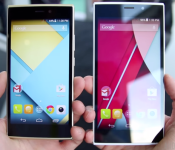

CES 2015 is finally over, and we saw tons of new products being announced throughout the week. BLU Products, the low-cost smartphone manufacturer, had a slew of newly-announced devices at the trade show and we went hands-on with all of them.
Each one of these 4G-capable devices will be available sometime in January (with the Life One & Life One XL available in March) and will be sold for under $300 off-contract. Note that each one of these devices are running Android 4.4 KitKat out of the box, but BLU assures us they’re all get the Lollipop update within the coming months. Without any further ado, let’s take a look!
Aside from the size, the Life One (2nd Gen.) and Life One XL are very similar in terms of specifications. The devices bring 5-inch and 5.5-inch 720p displays, respectively. They’re both running on a 1.2GHz Snapdragon 410 processor with 1GB of RAM, and also come with only 8GB of on-board storage. To soften the blow, each device has a slot for microSD expansion up to 64GB. The devices also have 13MP rear-facing cameras, 5MP front-facing cameras, and are both available in Sandstone Gray, Ceramic White, Blue and Gold. The Life One (2nd Gen.) has a 2420mAh battery, while the Life One XL comes with a 2820mAh battery.
These devices will go on sale at the end of March on Amazon in dual-SIM unlocked variants for $179.00 and $199.00, respectively.
Next up is the Vivo Air, the thinnest out of the bunch. Coming in at only 5.1mm and weighing sub 100g, this is one of the thinnest and lightest handsets available on the market. The chassis is made of metal and glass, giving it a really premium feel in-hand. It has a 4.8-inch Super AMOLED 720p screen, 1.7GHz Octa-core Mediatek 6592 processor, 8MP rear cam, 5MP front cam, 1GB of RAM, 16GB of internal storage and a 2100mAh battery.
The device will be available on January 13th in White/Gold or Black/Gun Metal variants, and will cost $199.00.
Out of BLU’s newest smartphones, the Studio Energy is one you should consider if you’re constantly running out of battery on your mobile device. It is a bit thicker than others, and that’s because it totes a 5000mAh battery. BLU is quoting that this device can last up to four days on a single charge. Whether or not the phone can last that long, we’d expect it to last at least two days or so. The Studio Energy also has a 5-inch 720p screen, a 8MP rear-facing shooter, 2MP front-facing shooter, 8GB of internal storage, a microSD card slot with expansion up to 64GB, and is powered by a 1.3GHz Mediatek 6582 processor on this device. This Mediatek chip is known for its battery saving properties which will help the device last even longer.
The Studio Energy handset will be available on January 13th on Amazon in Ceramic White, Sandstone Gray, Blue and Gold, and will cost only $179.00.
The Studio 6.0 LTE is the biggest device out of the bunch, coming in with a 6-inch 1080p display. So far, the display has offered up great viewing angles and very vibrant colors. It has a 1.6GHz Snapdragon 400 processor with 2GB of RAM, 3200mAh battery, 13MP rear-facing camera, 5MP front-facing camera, 16GB of internal storage with microSD expansion up to 64GB. The Studio 6.0 LTE is available now in Black or White from Amazon for $275.
Are you interested in any of these new devices? Let us know if you’re planning on picking one up!


Lots of people — about half the folks walking in to Apple retail stores, according to Apple’s own estimates — are getting Macs for the first time. Some are switching from Windows PCs, others have been drawn in by their iPhone or iPad. Either way, If you’re buying your first Mac, you probably have lots of questions you want answered before dropping a significant sum. We’re here to help. Even if you have a lot of experience buying Macs, you can save this link to quickly pass on to friends, colleagues, and family members.
If you live near an Apple Retail Store, that’d probably be your first choice, and it’s not hard to understand why. The stores look great, you can get your hands on the latest models, and innovations like the Apple Store app for the iPhone and Apple Pay make it trivially easy to get in and out quickly.
Unfortunately, not all of us live near an Apple retail store. The closest store to me is almost an hour away. And that’s a lot longer than many people are willing to drive, just to buy a computer.
Apple’s retail stores have proven to be an enormously popular way for people to get Apple products, but they’re certainly not the only place where you can buy a Mac.
If there’s a Best Buy at a mall near you, they stock Macs, though their selection won’t be as good as the Apple Store. Still, they make for a convenient place to go, especially if you’re happy buying a standard model without a lot of bells and whistles.
Best Buy’s sport an Apple “store within a store” location where most of the Apple products (and many accessories that work with Apple products) are showcased. So just look around your local Best Buy until you see a glowing Apple logo, and head in that direction.
If you’re lucky to live near a Micro Center or Fry’s Electronics, those are good places to check too.
Of course, Apple Retail Stores and Best Buy aren’t the only places where you can buy a Mac. I’d also recommend consulting your friendly neighborhood Apple reseller. Apple works with a worldwide network of local resellers that are independently owned and operated, and these are often some of the best places to get really customized help and support after the fact.
Disclaimer: I work at one of these on the weekends, so my perspective isn’t entirely objective. But if I do say so, we’re a great resource for people who don’t want to have to drive the hour or so to the closest Apple-owned retail store. We have a lot of really loyal customers that love having someone local, and appreciate our ability to help them and tailor support to their needs.
If you come in expecting to haggle over the price of the Mac, expect to walk away disappointed — local resellers won’t be able to match the occasional discount on specific models you see online and in big box stores. They don’t deal in the sort of volume that make those deals possible. What’s more, Apple maintains a very tight yoke over its distributor network. So retail margins on Apple hardware are typically very small.
But local Apple-authorized resellers can and often do make deals to get your business with discounts on accessories or services that you can’t match anywhere else, even at big box stores like Best Buy.
So if you’re prepared to buy a package that includes the computer, accessories like a printer, external hard drive or networking gear, and AppleCare, you can often score a significantly better deal than you’ll get either through the Apple Store or big-box retailers. Plus you’ll be supporting a locally-owned business that put money back into the local tax base, so pat yourself on the back for being a good citizen.
Millions of Macs are sold online every year through the Apple Online Store and through other mail-order catalog web sites.
Some of the businesses were around back before there really was a World Wide Web: Companies like MacConnection and J&R Computerworld, for example.
It’s very important to check the credentials of wherever you’re buying the computer from to make sure they’re an Apple-authorized reseller, or you may have trouble getting warranty coverage after the fact. In fact, Apple actually maintains a list of authorized Apple catalog resellers. Stick to the list to be safe.
If you’re looking for a bargain, the Refurbished Mac section of Apple’s own online store is the best place to start. Apple repackages (in white boxes) and resells Macs that have been returned, right from their web site. I’ve bought a couple this way and saved hundreds of dollars. What’s more, the ones I’ve bought have been in pristine condition — you wouldn’t know to look at them (except for the fact that they ship in white boxes instead of Apple’s typical retail trim) that they’re open box returns. And they come with full warranties and are eligible for AppleCare coverage, too. The only downside is that Apple doesn’t have the latest selection and configure-to-order options, so you’re limited to what’s actually in stock.
Finally, if you’re affiliated with an educational institution, either as a student or as faculty or staff, you can often score an educational discount via Apple’s Store for Education.
Hopefully this will give you a leg up on your hunt for the right Mac and the right price, from the right retailer. I welcome any questions, comments or observations, so please let me know if you have anything you’d like to add.


There’s nothing like a beautiful new phone in your hand… that is, until you drop it for the first time. Say goodybe to the worries of scuffs, scratches, and dings with the Otterbox Defender for your Samsung Galaxy S5. Designed to completely protect your device, at only $29 (Prime eligible) this is a must-buy for S5 owners looking to secure their investment.
Join Prime and get this deal with FREE two-day shipping!
Also worth checking out:
The post Accessory of the Day: Otterbox Defender for Samsung Galaxy S5, $29 appeared first on AndroidGuys.


This is the sort of stuff that makes me want to hug programmers and engineers. Google and Microsoft are both hard at work rolling out updates to Hangouts and Skype, respectively, that will allow for real-time translation in a video call.
To be clear, the service does not involve a third party translating back and forth, but rather, as one speaker delivers his or her prose, the software will utilize existing (and improving) voice-to-text technology and then incorporate translation services to display translated text on screen. So basically, one can interact with someone else in a foreign language via subtitles. Pretty cool.
For its part, the Skype service is being used by a cool 40,000 people at this point, and reviewers say it still has plenty of bugs to work out, functioning more like a walkie talkie service than one that allows organic conversation. But bugs routinely populate the road to success, and programmers can track them to make improvements.
On top of the Hangouts updates, Google has been rolling out all sorts of updates to Translate, recently adding 10 new country languages to its service. Longtime users of Gmail will note the ability to change your email into Elmer Fudd and Klingon. Google is even working on an augmented reality service surely based in its longtime photo identifier app Goggles that will read foreign street signs and put up a translation on screen.
But with voice translation, the question of anonymity and security comes to mind. Being able to transcribe and translate anything surely requires the recording of that data, and then where will that data go? Will it be merged in with all our other Google activity to guide automated ads across our Google experience? Will the government be able to tap into any of this?
Skype officials say that with their software, the conversations are broken up into separate packets before the translation is even checked. Ergo, there’s no way to tell who was speaking to whom.
Macduff Hughes, the engineering director of Translate, also stressed that Google is careful with how it handles voice because of potential issues surrounding biometric security. Imagine the horror if hackers get into voice recognized passwords instead of the traditional written-form ones.
Regardless, as these new services expand and sort themselves out, the possibilities are endless. Remember pen pals? Kids could now have “Skype pals” where they interact directly with other children in a foreign tongue. International business could see fewer hurdles to success.
Let’s just hope some of the more amusing quirks of Translate never get resolved, because where would the world be without the English-French-German-English Google Translate party game?
Source: New York Times
Come comment on this article: Google Translate to Include Real-Time Voice Translation


President Obama’s State of the Union address is going to include at least two proposals that could affect how companies handle your data. One, the Personal Data Notification and Protection Act, would require that firms tell their customers about data breaches within 30 days after discovering that hackers got in. The varying state data laws that exist today both leave people vulnerable and create headaches for businesses, the President argues. The speech will also include a voluntary deal that makes it easier to get your credit score and find out if a data thief wrecked your financial reputation.
The second measure, the Student Data Privacy Act, would prevent companies from exploiting the data they collect though apps and services for schools. There aren’t many details surrounding this proposal yet, but there would be another voluntary pact that would protect your energy grid info.
The would-be laws would represent big milestones — they’d create a national baseline for data security that could eliminate gaps in states with little to no protection. However, there’s a concern at the Center for Democracy and Technology and other privacy-minded advocacy groups that the proposals may not live up to the more stringent laws in some states, like California. These critics don’t want federal policy to be “watered down” and leave some Americans more vulnerable than they were under state-only rules. You’ll likely know more after the President’s speech wraps up on the 20th — until then, it’s too soon to know whether this legislation will really protect your info.
[Image credit: Bill Pugliano/Getty Images]
Filed under: Internet
Source: New York Times
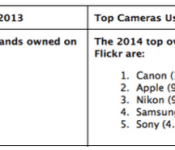
Flickr over the weekend released data detailing the most popular camera rankings of 2014 for the online photo sharing service. With 100 million users uploading 10 billion photos last year, the usual standouts of Canon and Nikon edged out most of the competition, but most interesting was Apple moving past Nikon to take second place in the rankings (via The Next Web).

Focusing solely on the top 5 camera brands used on the service last year, Canon took first place with 13.4 percent, followed by Apple with 9.6 percent and Nikon with 9.3 percent. Samsung and Sony round out the other top spots.
Individual iPhone models have long registered as the most popular camera devices on Flickr, but in looking at overall brand performance, major traditional camera manufacturers Canon and Nikon with as many as several hundred different models on the market long held down the top spots until Apple’s entry in 2014.
Flickr also looked at the top mobile device cameras used on Flickr, where Apple unsurprisingly dominated the top ten list. In first through fourth were the iPhone 5 (10.6 percent), iPhone 4s (7.0 percent), iPhone 4 (4.3 percent), and the iPhone 5c (2.0 percent). The iPhone 6, iPad, and iPad mini also placed in the top ten. It is unclear why the iPhone 5s is not included on Flickr’s year-end lists, as it has been registering as the most popular camera overall for a number of months now.

Though Flickr’s data can’t exactly be used to specifically track the rise or fall of full-fledged DSLR and professional cameras, as Flickr is used by both paid professionals and everyday amateurs, it’s still interesting to see Apple’s own hardware slowly edge out such big brands in the photography space.

 AIVAnet