


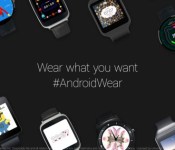
Top 7 Lollipop API watch faces for your Android Wear smartwatch

Back in early December, Google finally got around to releasing the application program interface (API) for Android Wear watches. Up to that point, app developers and user interface artists were left in the dark about how to get watch faces onto devices like the Moto 360. A few developers, like Facer for example, were winging it, and doing a pretty good job at that.
Now that it’s been almost a month since the API was released, the Play Store is beginning to show signs of life in the watch face category so I spent some time going through the watch faces for my Samsung Gear Live and made a list of my top 7 favorites. Note that these seven picks will look good on a square or rounded watch, but the final three do favor the circular design.
#1: 500px

Launched in Toronto back in 2009, co-founders Oleg Gutsol and Evgeny Tchebotarev aimed to make a location online for photographers to create a professional gallery for their work. That website became 500px (pronounced “five hundred pixels”) and since its debut, it now has 2.5 million registered users and touts 10 million active users per month.
Now this month, 500px added a new feature to their mobile app, which will create two watch face options (one digital, one analog) inside of the Google Android Wear app.
There are no settings for these watch faces and they seemingly cycle through your favorite photos list, as well as other photographs seeded by 500px themselves, every time you leave the default screen and come back to it. This could be done by either letting your watch face dim or by pulling up a card and returning to the home screen.
The information overlay on the home screen is simply the time and 500px’s logo.
The pictures are, of course, beautiful. This isn’t Instagram so these are mostly photos from professionals and aspiring photographers.
I would’ve liked to have seen more information on the home screen, like battery life or the local temperature, as well as settings for the watch face, like a photo switching frequency or a change in the color of the text. These options might come in a future update.
The 500px app is free and, if you check it out, remember that this is the main 500px app. It just happens to come with the two watch faces baked in as a side perk.
#2: Alien 3D Watch Face

I discovered the incredible feature of live wallpapers (LWP) on my very first Android phone, so I set out to the Play Store to find a worthy selection. I found Maxelus’ work and I’ve since downloaded nearly every one of his LWP offerings.
Well now you can get one of his LWP apps on your Android Wear watch! It’s called Alien 3D Watch Face and it will kick your watch up a notch.
If you try out this app, you’ll notice that a standalone app did not download to your app drawer. Where is it? It gets integrated right into your Android Wear app’s watch faces menu. To access Alien 3D’s settings, simply select the watch face and touch the gear-like Settings icon that will now be overlayed on the watch face’s image.
Once inside, you will see the option to select six different backgrounds. These backgrounds are animated and they will move relative to your watch, creating a parallax effect.
You can also change the seconds’ icon, as well as the color of various things.

Again, this watch face is new, so I expect there will be more backgrounds and seconds icons over time.
The app can be purchased from the Play Store for $1.19 USD.
#3: Galactic Core Watch Face

In a similar case to the watch face above, this watch face started its life as a regular LWP. Kittehface Software’s Galactic Core LWP has been a long time classic on the Play Store, so it makes sense that they would try and bring that success to Android Wear.
This app also does not create a standalone program in your app drawer. You will find it and its settings inside of the Android Wear app.
The name of the app indicates exactly what you’re going to get: an animated spiral galaxy as your watch face. There are also a number of settings that will let you pick different galaxies and even alter them by inputting your own color choices. There are also options to add further information to your watch face screen, like moon phases.
Similar to Alien 3D’s watch face background, there appears to be a parallax effect on Kittehface’s galaxies.

This app is pretty fleshed out despite it being relatively new. I would like to see other font choices as I was not particularly fond of the ones presently available. Other than that, maybe a bit more space between the lines of information, plus make the information slightly larger. I do have to sometimes squint to see what it says, which is obviously a consequence of an animated background.
This app will run you a fair price of $0.99 USD. Follow the link below to check it out in the Play Store.
#4: Minimal & Elegant

I will admit, this is probably my all-time favorite. It’s simple, clean and pretty customizable. Minimal & Elegant (M&E) is the work of Studio eXtreme and M&E really brings a touch of class to your watch, while not sacrificing a bit of animation in some vain attempt to make your watch not appear to be what it is: a smart watch.
This app, unlike the previous watch faces above, came out before Google released the watch face API, so it still creates a standalone settings app; however, since the Google update, M&E’s settings are now in the Android Wear app like the others, but the download still creates a standalone app. If you open it, it’ll tell you where to go to find the new access point for M&E’s settings. I imagine that this is for users of M&E before the Google update and after a time, once its pre-API users get the message, Studio eXtreme will remove that standalone app.
Back to M&E’s settings: there are options to change the colors, change some of the animation aspects, and even the ability to create a random design timer.

There is almost nothing that I would change about this app. I truly feel like it’s near perfect. When turning on, sometimes the watch face is a little sluggish updating the time, but it’s not too noticeable to me.
M&E will run you $0.99 USD and can be found by following the link below.
#5: Angles Watch Face

This entry and the following two are the ones I mentioned that will favor the circular design. They still looked great on my Samsung Gear Live, but it’s pretty obvious that they would look better on a Moto 360 or LG G Watch R.
FlyingRhinoCMG’s Jose Azua & Marcin Stepien have really designed a great looking timepiece face with Angles Watch Face. I really like the aesthetics and it runs smoothly.
The only real complaint I have about this watch face is its options are extremely limited when it comes to color selection. Almost every other developer allows you to select any hue you want using sliders and a color wheel, and I cannot really see why this would not work with this watch face.

Additionally, I’m somewhat suspicious of FlyingRhinoCMG’s motives in this regard because they have a few entries in the Play Store where they’ve designed one watch face but have different color versions for sale. I’m not going to buy the same watch face twice…
But this watch face app doesn’t have a different colored twin for sale, so no red-marks from me on that matter. I would just like to see the color wheel and sliders like other watch faces out there.
If you have a circular watch, I really think you should try it out. You can snag it from the Play Store for $0.99.
#6: Countdown

This watch face is also designed by the creators of M&E, Studio eXtreme. This app definitely loaded up with customization options and, as the app’s name suggests, is really designed to have some fun with timekeeping.
The outer ring contains analog elements, while the inner circle is digital. You’ll notice from the images, this watch offers you the ability to set a timer, but if you don’t need anything to count down, you can change this to just display the current time.
This watch face has lots of tweak available in the settings. Colors, lines of text, animation changes, etc. are all there waiting to be tinkered with. Sadly, unlike M&E, color options on this watch face are limited.

I did notice a very distinct bit of lag with the sweeping seconds’ hand. It’s a similar lag to what I experienced with M&E when it first came out, which has since been pretty well resolved via updates, so perhaps this too will be fixed over time. The lag wasn’t significant enough that made it a deal-breaker, though.
This watch face costs the same as M&E, $0.99 USD. See the link below!
#7: Roto 360

The app’s name really hints as to which watch design will look best with it. Square! Ahem, circle.
Part Mayan calendar, part thermostat, Roto 360 is really quite gorgeous. It almost makes me want to go out and buy a Moto 360 or LG G Watch R.
App developers Gaurav Singh and Krishna Prajapati are no strangers in taking design inspirations from other common instruments. They have two other watch faces that are pretty slick as well. And when you download Roto 360, you get a white and black version as you can see in the picture above.
Roto 360, sadly, does lose some of its luster on my Gear Live. But I knew what I was getting into before I bought it thanks to the app’s name.
There aren’t any settings to modify with this watch. It’s what you see is what you get with this one. I can’t think of any ideas on what someone would want to customize on this watch face, but I think a settings option will probably find its way to the app sometime in the future.
Roto 360 costs $0.99 from the Play Store. It definitely warrants a test drive on your watch.
After looking over these 7 watch faces, I can’t help but be excited to see what new offerings these developers and others will bring us over time. LWP, for example, on our smart watches is genius.
On the topic of LWP, I feel many of you might be concerned about battery life. Smart watches don’t last long as it is, so would an animated watch face kill the battery even quicker? In my experience with these seven, I did not notice any greater power consumption than normal. If there was, it was small enough to escape my observations.
You might have noticed that apps like Facer were not on this list. Facer didn’t really go through much of a change after the API was released and it is still community driven. That’s fine, I love Facer, but the aim of this article was to talk about post-API work that is beginning to appear on the Play Store.
So this weekend, if you have the time, you should definitely play around with these watch faces. Thanks for reading!
Come comment on this article: Top 7 Lollipop API watch faces for your Android Wear smartwatch
Samsung enhancing S Pen experience with Penvatars

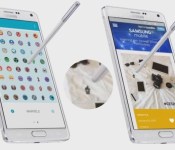
Samsung Galaxy Note owners will be familiar with the little circle (pointer) that appears when the S Pen is brought near to the screen. Until now it has been purely functional, but now Samsung want to spice up the S Pen experience with the introduction of Penvatars.
Using a play-on-words – Penvatar rather than Avatar – this new feature by Samsung allows Galaxy Note 4 and Galaxy Note Edge users to chnage the pointer from a bland circle to a more interesting character, even a Marvel super hero.
It is being reported that Penvatars will only be available on the Galaxy Note 4 and Galaxy Note Edge.
Penvatars come with a tie-in from Marvel comics. The demo shots from Samsung show a selection of Marvel themed icons under the category of “Marvels.” A closer look at these Penvatars shows that you can pick from a lots of different Marvel related icons including Iron Man, Thor, Captain America, and Nick Fury, as well as things like Thor’s hammer or Captain America’s shield. In fact Samsung announced Penvatars on its Twitter feed with: “You can’t choose your super power, but you can choose your pointer with new Samsung Penvatars.”
It is being reported that Penvatars will only be available on the Galaxy Note 4 and Galaxy Note Edge, and there is no word on whether Samsung will also add support for the Galaxy Note 3 and Galaxy Note tablets.
Samsung has made the announcement during CES and it probably won’t be too long before they will become available.
What do you think? Good idea or gimmick?

BladeStorm: Nightmare to combine history, fantasy, and strategy on Xbox One

Earlier this week, Koei Tecmo released new details on its upcoming Xbox One action-strategy-RPG hybrid Dynasty Warriors 8: Empires. Among those details, we discovered that Empires would be releasing on February 24 instead of in January. I noted that it would be bumping up against BladeStorm: Nightmare’s release date, and predicted that Nightmare would get pushed back as well.
Call me Nostradamus and bake me a pumpkin pie, because Koei Tecmo has just announced that BladeStorm: Nightmare will now arrive on Xbox One and Playstation 4 on March 17 instead of March 3. Nightmare is an exciting action-strategy game set within the Hundred Years’ War between England and France. Even better, monsters and magic will stir things up in a separate campaign.
Check out our new screenshots and gameplay details to learn why BladeStorm: Nightmare will be worth the wait!

Google App 4.1 update disables cards and features for some users
 A couple of days ago, the Google App received its version 4.1 update, bringing with it a host of new Google Now cards, languages and tweaks. However, it seems that the update has ended up disabling Google Now features for users in some locations, instead displaying that the service is “not available in your country”.
Reports state that Google Now cards, such as sports updates or news stories, and reminders are no longer functioning after updating to version 4.1. The problem seems to be predominantly afflicting those in and around the Latin and South American region, with plenty of negative reviews appearing on the Play Store since the update. The service has always had some restrictions in place depending on the region, but what isn’t clear is why features that previously worked for many users now appear to be completely disabled across such a large area.
A workaround from XDA user kevindeoz has helped sidestep the issue for some Spanish speakers. Simply changing the language setting to “Spanish (United States)” appears to re-enable the missing Google App features, which makes the cause seem even stranger.
Google has not yet clarified the reason for the issue, but we will hopefully hear something from official channels soon.

Google Compare seeking to bring auto insurance comparisons to U.S.

It goes without saying that Google has its hands in many different ventures, from Fiber to Android, but the Google search engine is still their crowning achievement. For some time now, Google has been quietly working on dedicated price comparison searches, falling under the service of Google Compare (formerly called Google Advisor).
Our friends across the pond have had Google Compare more front-and-center than those of us in the U.S. If you were to type www.google.com/compare/ in the U.S., you’re taken to a page that only offers credit card comparisons; however, if you type in www.google.co.uk/compare, you can see a much larger service being built. There are comparisons and quotes for travel insurance, mortgages, banking, and auto insurance.
Google has been offering car insurance quotes in the U.K. for several years now. Seemingly testing out the waters there, it’s been discovered that Google has been quietly getting permission in many states here in the U.S. to sell auto insurance policies on behalf of such companies like MetLife.
There are two comparison services that Google does offer here in the U.S. that I frequent often, but are not listed under Google Compare, are flight searches and hotel finder. Getting to either of these is not very intuitive and you have to hunt down the options on the Google search results page. (Alternatively you can type in www.google.com/flights and www.google.com/hotels.)
The reason as to why Google has seemingly buried its own services has not been clear. Google gets quite a bit of ad revenue from companies like Orbitz and Kayak, so it may be finding itself in a similar position it did when it had acquired Motorola, namely it doesn’t want to find itself competing with its allies.
So why is Google getting involved with auto insurance in the first place? Perhaps Google is getting situated for the day that its driver-less cars begin to hit the market.
Source: Wall Street Journal
Come comment on this article: Google Compare seeking to bring auto insurance comparisons to U.S.
Microsoft updates Xbox One SmartGlass Beta for Windows Phone

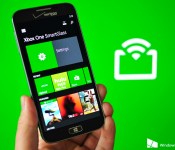
Microsoft has released an update for its Xbox One SmartGlass Beta app on Windows Phone. The app enables Xbox One console owners to connect to their box of gaming and check messages, control playback, as well as use a mobile device as a controller. Today’s release bumps the app to version 1.0.0.29.

Apple raises the minimum price of apps in Europe and Canada

If you live in Europe, Canada or Norway, you might find that some apps are now a little more expensive on your iPhone or iPad. Yesterday, Apple informed developers that it would be raising prices before the weekend to reflect changes in VAT and foreign exchange rates. Those increases are now starting to take effect, with a 10 pence rise for the cheapest premium apps in the UK, up from £0.69 to £0.79, and a new €0.99 starting price in EU countries. The minimum spend in Canada (beyond free apps, anyway) has risen from $0.99 to $1.19, and Norway, which uses its Norwegian krone, should see a similar rise in price. Apple is tinkering with app fees in Iceland and Russia too, so if you live in any of these countries it’s probably worth opening up the App Store to assess the damage.
Filed under: Cellphones, Apple
Source: AppleInsider
A round Samsung smartwatch is rumoured for a MWC 2015 next month
The smartwatch wars appear to be heating up, but one thing is quite clear in the early going: round smartwatches have been the ones to watch, presumably in large part to our familiarity with the round form factor. Well, apparently even Samsung is seeing the signs now and is preparing a round Samsung smartwatch, rumoured for […]
The post A round Samsung smartwatch is rumoured for a MWC 2015 next month appeared first on AndroidSPIN.
Only 20,000 Nokia N1 tablets were available to be sold despite half a million people trying to get one
The Nokia N1 is a pretty fantastic device – I’m not going to lie, I wish I could get my grubby hands on one. Unfortunately, that is currently impossible as the device is only being sold in China, after the first day of sales happened yesterday. As it turns out, lots of people are finding the price […]
The post Only 20,000 Nokia N1 tablets were available to be sold despite half a million people trying to get one appeared first on AndroidSPIN.

Google launches guide for bringing technology into the classroom
 Google has released its guide to help schools integrate new technology into classrooms in an effort to boost engagement with Google Apps for Education and similar services. Many schools are bringing Google services and Chromebooks to the classroom, and Google wants to use them as an example for how other schools can enhance how they teach students with technology.
The guide touches on five major steps: Defining your goals, Invest in (internet) access, Build your team, Offer web tools, and Manage change. Each step of the guide goes into detail and examples of how to integrate technology and how other schools have done the same. There’s quite a bit of information in the guide, so if you’re interested, you can find it at the link below.
source: Google
via: 9 to 5 Google
Come comment on this article: Google launches guide for bringing technology into the classroom
 AIVAnet