



Update pushes out for the Windows Phone game HiLight, adds a new gaming mode

Several months ago we took a look at the Windows Phone game HiLight that is more or less a picturesque game of Simon Says. The multi-level game presents you with a sequence of lighted circles that flash and you have to repeat the pattern by tapping on the circles. You start out with only four lights and slowly build up to levels with fifteen lighted circles.
Available for low-memory Windows Phones, the game was updated a few weeks ago to version 1.0.1219.2, which adds a new gaming mode, new rankings and personal gaming stats. HiLight came across as an entertaining Windows Phone game to pass the time with and the new game mode only adds to HiLight’s appeal.

Plex to show off a variety of new streaming features at CES

Plex, the popular multimedia streaming service, has just announced a variety of new smart playlist and music video features to be shown off at CES 2015. The new features mainly encompass a more music-oriented path than we’ve seen from the app in the past. This update is quite large, and should be rolling out to users in the coming weeks. Here are all of the improvements coming to the app:
- Using the same Gracenote database as iTunes, Plex will now create personalized “Plex Mix” playlists with the click of a button. Playlists can be separated by genre, mood and even by tempo. What’s more, you can also get personalized recommendations based on your music taste.
- If you’re a Plex Pass subscriber, you’ll soon be able to take advantage of streaming HD music videos from VEVO to match music from your personal library. You can stream these music videos via any mobile or home device.
- With the addition of Gracenote, music recognition will be much more accurate. Songs will be able to be appropriately tagged, even if the original source or metadata isn’t included with the track.
On top of the new features, Plex is also getting an updated interface to help completely refresh the app. Here’s a first look at the new UI:

Plex aims to show off all of the new features at CES this year. Looking for something more than an update to Plex? We’ve got you covered! Stay tuned to Android Authority for more CES 2015 coverage.
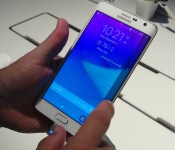
Samsung Galaxy Note Edge comes to U.S. Cellular on January 7


U.S. Cellular on Monday announced the upcoming availability of the Samsung Galaxy Note Edge. Arriving on Wednesday, January 7, the unique device will carry a $400 price tag with two-year service agreement. As the first Samsung smartphone to boast the curved side display, the Galaxy Note Edge boasts a 5.6-inch display and 16-megapixel rear camera.
Powered by a 2.7GHz quad-core processor, the phone also packs a 3.7-megapixel front-facing shooter and 4G LTE connectivity.
The Samsung Galaxy Note Edge will be available in U.S. Cellular stores as well as through its website.

The post Samsung Galaxy Note Edge comes to U.S. Cellular on January 7 appeared first on AndroidGuys.

CES 2015: Bandstand Dock Leads Accessory Makers’ Apple Watch Push
The Apple Watch may not be launching for a few more months, but that hasn’t stopped accessory makers from showing off their ideas at CES this week. iOS device stand and accessory maker Standzout is one of the early entrants, announcing its upcoming Bandstand docking station and showing off prototypes of the accessory at CES. The new Bandstand dock was designed from the ground up for Apple’s upcoming Watch, offering both a watch stand and charging functionality in a single dock.

The new Bandstand dock features a pivoting platform that will securely hold the Watch and allow users to adjust the angle of the display for optimal viewing. More than just a holder, the Bandstand will support induction charging of the Apple Watch using Apple’s upcoming cable while also providing a pair of USB ports for charging additional devices. Though the device is on display at CES, pricing and availability details are not yet available as the company will need to finalize the design to ensure compatibility as more information on Apple Watch becomes available.

The Bandstand claims to be the “first great Apple Watch accessory”, but it certainly won’t be the last. With Apple Watch’s launch approaching, other vendors are no doubt preparing their offerings and will be making announcements in the coming weeks and months.
Intel Launches New Broadwell Chips Appropriate for MacBook Air and 13-Inch MacBook Pro
Intel today announced the launch of a full set of “Broadwell-U” processors, opening the door for updated versions of Apple’s MacBook Air and 13-inch Retina MacBook Pro. The chip launch is essentially in line with a leaked timeline from last July that also pegs the release of more powerful Broadwell chips appropriate for the 15-inch Retina MacBook Pro as late as July or August of this year.
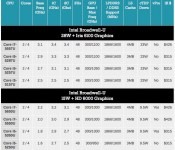
As outlined by AnandTech, the new Broadwell-U chips include a set of four 28-watt chips ranging from 2.5 GHz to 3.1 GHz in base frequency and featuring new Iris 6100 integrated graphics. The Core i5-5257U, Core i5-5287U, and Core i7-5557U chips appear to allow for direct upgrades from the Haswell-U chips currently used in the 13-inch Retina MacBook Pro. While the new chips include only a 100 MHz CPU speed increase over their Haswell counterparts, a number of other improvements, especially with regard to graphics, should make for significantly improved performance.
 Broadwell-U chips appropriate for 13-inch Retina MacBook Pro (top) and MacBook Air (bottom)
(Source: AnandTech)
On the MacBook Air front, Intel is offering four different 15-watt Broadwell-U chips that would be appropriate for the lineup, with all of the new chips carrying improved HD 6000 graphics. Base clock speeds range from 1.6 GHz to 2.2 GHz compared to the 1.4 GHz and 1.7 GHz options available in the current MacBook Air, and associated upgrades in Broadwell should yield significant performance improvements for the new chips.
Looking at potential release dates for Apple’s Broadwell systems, Intel tells AnandTech that the new Broadwell-U chips are already shipping to vendors, with the first systems based on the new chips expected by the end of the month. Systems based on chips using Iris graphics may be more toward the end of the current quarter.

New to the Mac? You have questions, we have answers

A lot of the customers I help at the store I work at on the weekends are new to the Mac platform. There are three main reasons they switch: They are tired of the problems they’re having with Windows PCs, they have an iPhone or another Apple device that they’re happy with, and they have friends, family or other trusted people who tell them about their own experience. They also have a lot of questions. Here are some of the basics I cover with them.
It’s worth understanding that about half the people who walk into an Apple retail store to buy a Macintosh are new to the platform. So you’re not unique. Apple’s invested a lot of time and effort to make the transition as painless as possible.
Don’t Macs cost a lot of money?
Not really. You certainly can spend a lot of money on the Mac, but a basic Mac mini will only set you back $499. And that Mac model is more than enough for a lot of people.
Sure, you can pick up a cheaper PC, but I’d challenge you to find one in that price range that comes nearly as well-equipped as the Mac mini does — it includes the exact same suite of software included on every other Mac. What’s more, the Mac mini doesn’t include a lot of trial software or adware that’s going to get in your way.
Isn’t using the Mac more difficult than a PC?
There are a few things you’re going to need to relearn, of course: The command key is like the control key on a PC. The option key works like the alt key. And the absence of a lot of mouse or trackpad buttons sometimes confuses PC users (more on that later).
But Apple knows that, so they’ve included help to guide your transition right into the operating system. If you click on the Help menu in the Finder, you’ll see Get to know your Mac. Select it and you’ll be brought to an Apple web page where you can learn more about how the Mac works. Clicking on the Help menu again, click on Mac Help then select New to the Mac? and see even more info that will be helpful to you. It’s all there, built right in.
Do I have to use a special mouse/keyboard/hard drive/printer?
No. Apple’s really good about making sure that commodity peripherals designed to work with PCs will work with the Mac too. External mice will be recognized as soon as they’re plugged in, and contrary to the belief of some, the Mac does just fine recognizing more than one mouse button (it should recognize the right button as a “secondary click” right away, and many mouse makers these days also offer Mac drivers if you want to customize how it works). PC Keyboards are also work fine — the Mac recognizes them and asks you to type a couple of keys to make sure it knows where everything is.
External hard disk drives should be reformatted for the Mac using the Disk Utility found in the Utilities folder. And if the Mac doesn’t have driver software for your printer already included with it, it can usually download the software from Apple’s servers without any hassle.
But does Office work on the Mac?
Yep, Microsoft has made Mac versions of Office for many years. You can buy it outright, or if you prefer, subscribing to Microsoft’s Office 365 program (for about $10 per month) will let you install it too. And Office is even available for iOS.
For casual users, there’s less need for Microsoft Office now than there used to be, because Apple includes a very competent set of productivity apps that mimic some of the capabilities of Office — Pages is Apple’s word processor; Numbers is Apple’s spreadsheet app; and Keynote is Apple’s presentation software (analogous to Word, Excel and PowerPoint, respectively). And all those apps can import and export their Office document counterparts. Up until 2013, Apple charged extra for those apps, but they’re included with new Macs now.
Having said that, some people prefer to use Office because it’s what they’re used to. And that’s fine. The choice is yours.
Do Macs get viruses?
Macs aren’t as nearly susceptible as most PCs are to getting malware infections like viruses, trojan horses, keyloggers and other nefarious software. Most of that software is aimed squarely at security exploits that exist in Windows.
Apple has its own countermeasures for dealing with this sort of problem: anti-malware software called Gatekeeper, built into the Security & Privacy settings in the Mac’s system preferences. Ordinarily, software can only be installed on your Mac if it’s been downloaded from the Mac App Store, and Apple checks all that software to make sure it doesn’t have these sort of problems.
You can override those preferences if you want, and that’s how people with Macs typically get problems with “adware” — software that hijacks the web browser and redirects searches. So my recommendation is to not override the system preferences unless you really have to, and then, be very careful about where you download software from.
Some third-party companies make anti-malware software for the Mac. Ordinarily you don’t need to run it, but it’s there if you want to be extra careful.
I have an app that only runs on Windows. What do I do?
Although there are some apps that only run on Windows, there usually is an equivalent that runs on the Mac, so I’d shop around a bit to see if you can find an app (or ask here or in iMore’s Mac Apps & Games forum).
The Mac runs OS X — a different operating system from Windows, so the same apps that run on your PC won’t run on your Mac under ordinary conditions. But the Mac is quite flexible, and can be configured with software that will let your Windows apps run. In fact, Apple makes software called Boot Camp that will let you partition part of your Mac’s hard drive for Windows, and use it accordingly. When your Mac is running Windows, it is a Windows PC, for all intents and purposes.
One downside to Boot Camp is that it requires you to restart your Mac each time you want to use Windows or OS X. To get around that, you can install virtual machine apps that will let you run Windows apps at the same time as you’re running OS X. There’s a free one called VirtualBox; there are commercial products including Parallels Desktop and VMWare Fusion. You can download the commercial ones and try them out before you buy them. Bear in mind that you will need a copy of Windows (and whatever Windows-specific apps you’ll need) to install on your Mac, too.
Can I bring my data files over from my PC?
Yep. Easiest way to do it is simply to copy them onto a USB thumdrive or another device, then move that device over to the Mac and copy the files. Apple also includes an app in the Mac’s Utilities folder called Migration Assistant which can copy the contents of your PC’s user directory on the Mac; it works in conjunction with a Windows utility you can download from Apple’s web site. (Migration Assistant works between Macs too.)
More questions?
I know I’m only scratching the surface here, so if you have other questions about switching to the Mac from Windows, let me know.

Google unveils “Cast for Audio”

Google has today taken the wraps off its “Cast for Audio” streaming platform, which has been specifically configured to enable hardware partners to embed Chromecast compatibility into their speakers, soundbars, TV’s and set-top boxes. This provides users with the ability to use Android, iOS and desktop operating systems to stream music, podcasts and more.
Major audio manufacturers Denon, LG and Sony are the first to unveil their “Cast Ready” speakers. Recent reports suggest that gaming-orientated OEM’s are also working with the search engine giant to bring the first Cast Ready console to the market as early as the second quarter of this year.
Users of the Cast Ready speakers will be able to stream content from any application that currently supports Chromecast, like, for example, Google Play Music, Deezer, Pandora, Rdio, TuneIn and iHeartRadio. The process works in exactly the same way, you simply open the app, hit the Cast button and select your destination device.
Click here to view the embedded video.
Is a Cast Ready audio system something you’d be interested in? If so, be sure to let us know why in the comments section down below.
Source: Google
Come comment on this article: Google unveils “Cast for Audio”
BRAVEN announces the BRAVEN Balance, a snazzy Bluetooth speaker for those who like to be active
BRAVEN‘s product lines are all about lifestyle, so it’s no surprise that at CES 2015 they’re announcing a product line for yet another kind of lifestyle, the BRAVEN Balance. Like the name suggests, the Balance is for people who like, well, balance: active people who go about their day and need a Bluetooth speaker that they can just […]
The post BRAVEN announces the BRAVEN Balance, a snazzy Bluetooth speaker for those who like to be active appeared first on AndroidSPIN.

14 best Android calculator apps

Android devices have a metric ton of uses that range of ridiculously simple to absurdly complex. One of the more simple uses for an Android device is to use it as a calculator and this is one of the better uses. You have your Android device on your pretty much all the time which means you have a calculator on you at pretty much all times. There are even many kinds of calculators. Here are the best Android calculator apps!
 Algeo Graphing Calculator
[Price: Free with in app purchases]
First up is Algeo Graphing Calculator and it’s a very solid option for casual use and academic use. It has a simple interface which makes basic calculations a breeze and digging into the app a little bit reveals some more complicated functions that you’ll likely need for your trigonometry class or algebra class. The graphing part is solid but not overly feature filled. It’s definitely no substitute for a TI-series graphing calculator but for simple applications, it’s good.


 Andie Graph
[Price: Free]
Andie Graph isn’t a calculator on the face of it. It’s actually a TI-series emulator that lets you run TI-series ROMs (think video game emulators). That means it’s possible to have an actual TI calculator on your device. You’ll have to procure yourself a TI ROM and those instructions are available online. It’s a little complicated but once you get it done, you can keep your bulky calculator in the desk drawer and just use your phone. Warning: some schools and classes won’t let you use this substitute. You should ask your teacher before switching over to this permanently and don’t throw away your actual TI calculator.

 Calcu: The Ultimate Calculator
[Price: Free / $1.96]
Calcu is a calculator app that focuses more on style than functionality. It has the basic stuff with some extra functions thrown in. It’s good for your run-of-the-mill math classes and it can be used for light trig, calculus, and even physics thanks to its customization but you’ll probably end up defaulting to a more specialized calculator for anything more complex. It also comes with 12 themes, a customizable keypad, and a sleek design.

 Calculator++
[Price: Free / $3.99]
Calculator++ is a scientific/graphing calculator option with a lot of unique features. Along with the basic stuff, you get a dedicated copy/paste button, support for Android 1.6 and up, a widget, and more. The design is a little old school and a tad cluttered but most complex calculators share that negative aspect. Much like Calcu, it’s great for the basics and some light computations in the more complex mathematics. It’s also open source which is always a good thing.
 Calculator (CyanogenMod)
[Price: Free]
Calculator (CyanogenMod) is the calculator app that has been inside of the CyanogenMod ROM since 2012 and it’s also open source and used in other AOSP ROMs. It comes with some basic graphing functionality along with some of the more basic advanced math functions that you’ll likely need. It hides it all behind a simple and sleek interface so it can be used for the basic stuff without feeling bloated or confusing. It’s also totally free which is great.
 Calculator Plus and Fraction Calculator
[Price: Free / $0.99 and Free / $0.99 respectively]
Developers Digitalchemy, LLC have released not one, but two calculators and they’re both really good. The first is Calculator Plus which is essentially a calculator for dummies. On basic calculators, you hit buttons and the calculator does things and it doesn’t ever explain what it did. Calculator Plus shows its work so you know what happened. It comes with a fun, colorful design and is compatible with Samsung’s Multi-Window for those with Samsung Devices. Fraction Calculator is a calculator designed for those who are math-challenged or for kids. It allows you to type in fractions in a manner people who are bad at math can understand and includes enough extra functionality to keep a kid going through middle and potentially some of high school as well. These are two solid calculators.
 Financial Calculators
[Price: Free]
Financial Calculators are a set of calculators to help with calculations in and around finance. It contains things like a credit card payoff calculator, APR calculator, loan calculator, currency converter, stocks and bonds calculators, and much more. What makes this so useful is the fact that a lot of people don’t know how to calculate these things on their own and this helps them with those uncomfortable terms and equations that many people don’t know. It’s also totally free.

 Graphing Calculator MathlabPRO
[Price: Free with in app purchases / $1.99]
Graphing Calculator MathlabPRO is a scientific calculator and graphing calculator with a lot of functionalityh. On the scientific side of things, you can have trig functions, inverse functions, scientific and engineering notation, derivatives, and more. For graphics, you have quite a bit more functionality than you usually see outside of the TI-series calculators and that includes 3D graphs on the Pro version. It’s solid and powerful but you don’t really see the awesome unless you pay for it and that may upset some people.
 Handyman Calculator
[Price: Free]
Much like Financial Calculators, Handyman Calculator contains a number of equations and functionality for a specific profession. Included in this little gem are calculators that help you calculate square and cubic footage, woodworking, electrical calculations, asphalt volume, concrete, brick, mortar, and sand, and plenty more. If you work in one of the many handyman professions, this is a calculator that you should definitely check out.

 Mobi Calculator
[Price: Free / $3.20]
Mobi Calculator is more of a classic scientific calculator in terms of look and feel. That means it has a crowded interface with a lot of buttons and they all do multiple things. This is great for people who are still use to the old way of doing things when buttons had multiple uses and the ratings reflect that many people quite enjoy the familiarity. It contains all the basic stuff along with logarithms, trig functions, Radix mode, percentages, and more. There are also multiple themes in case you want a different look.

 MyScript Calculator
[Price: Free]
MyScript Calculator is an interesting entry. Instead of having buttons and the like, it allows you to literally write out the equations you need solved and it’ll attempt to solve it for you. The basics are all covered and you can put down some pretty complicated algebra and trig without there being any hiccups. It’s recommended for people with tablets although it does work on phones as well but you’ll likely want a stylus to get maximum enjoyment. There aren’t a lot of functions available but it handles what is available quite well and it’s a unique premise.
 Numix Calculator
[Price: Free / $1.50]
Numix Calculator is another one that focuses a bit more on style. It adheres to Google’s Material Design standard and was one of the first calculator apps to do so. It features some bright colors and a sleek interface that is just enjoyable to use. The free version is a basic calculator while the pro version includes additional mathematical functionality, more themes, and more. It’s open source, has a widget (great for tablets!), and it’s great for basic math uses.
 RealCalc
[Price: Free / $3.49]
RealCalc was one of the first really good scientific calculators ever available on Android. It features a cluttered interface not unlike Mobi Calculator above. That said, it does do a lot with a little bit of space. It has only one screen and you can do a ridiculous number of things inside of it. It’s one of the highest rated Android apps out there and it’s been around forever. About the only downside is the interface looks older, but not bad.

 Wolfram Alpha
[Price: $2.99]
Wolfram Alpha isn’t a calculator app but it does have a calculator included. It’s a knowledge app that shows you statistics and facts about all sorts of things including things like math, statistics, physics, chemistry, engineering, and much, much more. It’s one of the “smartest” apps ever released on Android and you can do calculations on it using its built in calculator. It’s one of the few apps that we would recommend to all math students no matter how advanced it is. Wolfram Alpha is a must-have app.

Wrap up
If we missed any great Android calculator apps, please let us know in the comments! Also, don’t forget that all Android devices come with a calculator app installed which is usually more than good enough for light use.
To see our complete list of Android apps and games lists, click here!

Parrot unveils new aftermarket dashboard head unit, brings Android Auto to consumers

Seasoned manufacturer of aftermarket smart dashboard units, Parrot has now unveiled their newest gadget, the RNB 6. The goal of RNB 6 is to bring Android Auto and Apple CarPlay to vehicles produced before the automotive industry’s adoption of Google or Apple’s new automobile technology.
Parrot describes itself as a manufacturer in “Connected Automotive Infotainment”. While it is true that they’ve been making dashboard head units for a few years now (#cablets, anyone?), they also produce a pretty awesome selection of remote controlled cars and drones.
For more Talk Android coverage of CES 2015, you can follow along all week by clicking here. If you want to see more about the Parrot RNB 6, keep reading after the break.
Parrot says that the RNB 6 is a double DIN, 65 watts per four channel output head unit. As you can see from the photos, provided by CNET’s Tim Stevens, this gadget’s screen features a 7-inch HD touchscreen. Parrot also included a HDMI input, internal storage so you can upload files directly to the unit, satellite radio ready, and traditional AM/FM channels.
The RNB 6 runs Android 5.0 Lollipop as default, but is able to switch to iOS when an iPhone connects to the system. In addition to car stereo features, the RNB 6 will feed off your smartphone’s GPS, and supports the connecting of dashcams and proximity devices.

Parrot has not disclosed pricing for this dashboard upgrade. I suspect, however, that it is a great deal cheaper than buying a new car that comes with Android Auto pre-installed. To get a better idea of this gadget in action, see below for Parrot’s YouTube video showing off the RNB 6.
Click here to view the embedded video.
Source: CNET
Come comment on this article: Parrot unveils new aftermarket dashboard head unit, brings Android Auto to consumers
 AIVAnet