



Alcatel OneTouch to reveal new smartwatch line at CES

Alcatel OneTouch may be poised to catch some people off guard at CES 2015 starting next week when they reveal a new line of smartwatches. As you can see from the image above, Alcatel OneTouch has decided to go with a round watch face for their devices along with several different straps. According to Alcatel OneTouch, they were aiming for a traditional watch look and feel for the hardware, which it appears they may have achieved that goal with their new line of Watch devices.
Judging by the image, it looks like the devices will be powered by Android Wear. No details about the specific hardware that is located within the device has been revealed yet, though the images and Alcatel OneTouch’s statement that the devices will “allow users to monitor daily activity” suggest at least some items like pedometers and heartbeat monitors may be present.
Alcatel OneTouch also says they are aiming for what they call a “smart price.” It is not clear exactly what that may mean, but a good guess is that they are aiming at or below other round smartwatches on the market like the Moto 350 or the LG G Watch R.
Just based on the looks, do you think you may be interested in grabbing an Alcatel OneTouch Watch if the price is right? Let us know in the comments and be sure to check back for our CES 2015 coverage starting next week for all the details on this and other devices being announced.
source: phoneArena
Come comment on this article: Alcatel OneTouch to reveal new smartwatch line at CES


Android Central 216: In and Out in 2015

height=”480″ src=”http://www.youtube.com/embed/kD25cUWUii0?wmode=opaque”
frameborder=”0″ allowfullscreen>
We’ve arrived at our first show of a new year. So it’s a good time to take a quick look back at the best of 2014 — and what we really think is important might surprise you — and look ahead to 2015, including CES in Las Vegas.
For all of our CES coverage, visit AndroidCentral.com/ces2015.

Accessory of the Day: Make any car stereo wireless with this Bluetooth adapter $60.51

Sick of fussing around with an auxiliary cable? Want to just get in the car and have your music and podcasts play without wires? TuneLink Auto is your ticket. Crystal clear sound quality with auto-pair functionality makes this a great option for drivers who want to cut the cord. Bring your car up to date for under $100 (Prime eligible) and enjoy the world of wireless audio.

The post Accessory of the Day: Make any car stereo wireless with this Bluetooth adapter $60.51 appeared first on AndroidGuys.
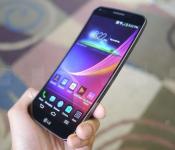
LG Curved LG G Flex 2 with Snapdragon 810 to be announced at CES 2015

PhoneArena reports that LG will reveal the LG G Flex 2 at CES 2015. As the name implies, the phone will offer a curved display, just like its predecessor. Korean website Naver confirms this and adds that the device will contain a 64-bit Snapdragon 810 processor with LTE-A connectivity with tri-band carrier aggregation.
The site could not confirm anymore details. However, according to rumors, the display will be smaller than the six-inch, 720p screen featured on previous the G Flex. The LG G Flex 2 is expected to have a 5- to 5.5-inch 1080p display and a self-healing rear back.
We won’t have to wait long to confirm the matter since CES starts next week on January 6.
Source: PhoneArena
FEATURED POSTS


The post LG Curved LG G Flex 2 with Snapdragon 810 to be announced at CES 2015 appeared first on AndroidGuys.

17 best Android VPN apps

Virtual Private Networks (VPNs) are among the best security tools a web surfer can have. You can use them to surf otherwise seedy public WiFi with more security and privacy. They can even be used to get around firewalls if your work has, say, Facebook blocked. Many people use them to overcome regional restrictions with Google Play content. Whatever the reason, VPNs are powerful tools. Here are the best Android VPN apps!
Don’t know what a VPN is or how it works? Check out our guide here!
 F-Secure Freedome VPN
[Price: $4.99 per month / $29.99 per year]
First up is F-Secure Freedome VPN. On top of all of the inherent features that a VPN brings, F-Secure also features a very slick and easy interface for those who may not have a lot of experience with VPNs. It also contains a built-in virus scanner for those who want to kill two birds with one stone. It’s simple and comes with a week’s free trial before you need to get the subscription. It also boasts unlimited bandwidth.

 Fast Secure VPN
[Price: Free / $2.5 per month / $7.10 for 3 months / $13.00 for 6 months / $16.70 for 12 months]
Fast Secure VPN is another simple VPN. The interface is self-explanatory even if it is a little bit out-of-date. You can connect to various servers based on country which is great for those who need to get around regional restrictions. There is a free version but it’s bottlenecked. Unlocking all of the features requires dealing with Fast Secure VPN’s admittedly confusing pay structure. It’s good for basic stuff like getting around regional restrictions for a bit but those looking for a full featured VPN may want to look elsewhere.

 FinchVPN
[Price: Free / $1.61 per month for Pro / $3.21 per month for Premiere]
FinchVPN is another solid VPN option that is somewhat bottlenecked by a complicated pricing scheme. The interface is a splash of Holo which makes FinchVPN easy to use and pleasing to look at. You also get the standard features that all VPN apps get. If you get the pro version, you’ll get 25GB while Premiere members get unlimited. You’ll also get access to the paid servers. There is a free version for those who need basic protection and it has no data restrictions. It’s a solid option.
 FlashVPN
[Price: Free]
FlashVPN scales down the VPN experience to its most basic ideas. There is one button to connect and it requires no configuration and you can choose between Japan, England, or US servers. It’s entirely free which is a rarity in the VPN field. Thanks to its bare-bone set up, you won’t get all of the features you may get from larger apps that you have to pay for, but if you just need something simple and quick (and free), this is the ticket.

 Hideman VPN
[Price: Free / $1.00 per 10 hours to $9.50 for 100 hours / $2.90 per month / $24.90 per year]
Hideman VPN is one of the more popular, well-known options. It features a more sleek and simple interface than many and uses a unique but still complicated pay structure. You can pay by the hour if you just need something quick like browsing at the airport or you can engage in subscription services by the month or year. It sounds like a rip off but some people only need VPNs sometimes and Hideman’s ability to let you pay for it only when you actually intend on using it instead of maintaining a subscription for something you may only rarely use. is something unique. It works well for a VPN app and it’s worth checking out.

 Hideninja VPN
[Price: Free / $2.99 to remove ads / $19.99 per year for pro version]
Hideninja VPN is another very popular and well-known VPN app on Android and one of the few that carry a very simple pay structure. You can use the free version which gives you access to a limited number of servers with unlimited bandwidth or you can go pro and get everything the app has to offer. The interface is based on Holo so it’s nice and easy to use. The advertising is intentionally and truly obnoxious but if you can get passed that, it’s a decent VPN app.

 Hotspot Shield VPN
[Price: Free / $4.99 per month / $29.99 per year]
Hotspot Shield VPN is one of the more complete VPN apps on the list. It has some extra features like Smart protection which automatically connects you to a VPN based on what kind of network you’re on. It has a colorful and simple interface and there is a free version as long as you don’t mind limited bandwidth and advertising. The pro version will get unlimited bandwidth and no advertising. Also, bravo to Hotspot Shield for putting the pricing right on the front page of the app. More VPN apps should do that.
 OpenVPN Connect
[Price: Free]
OpenVPN Connect is one of the precious few truly free VPNs available on Android. It’s also open source which is always a plus with security apps like this. Most of the apps so far have been the “fire and forget” variety but OpenVPN Connect requires a little more knowledge and, thus, has quite the learning curve. You can do things like import .ovpn profiles and engage in a number of advanced settings. This VPN also uses PolarSSL which was, most notably, not affected by the Heartbleed issue from months back. If you don’t mind getting your hands dirty and actually learning the ins and outs of VPNs, this is a fantastic option. Do note that you’ll need to create and set up an OpenVPN server yourself in order to use this application.

 OpenVPN for Android
[Price: Free]
OpenVPN for Android is a branch off of OpenVPN Connect and has a lot of the same functionality. The interface is a bit more friendly compared to the official app but you’ll still need to learn how to set everything up on your own. This app just makes it look less confusing and more modular to help you make your way around. At its very core, OpenVPN for Android and OpenVPN Connect accomplish the same goals in very similar ways and they’re both free so you can’t go wrong with either one. Do note that you’ll need to create and set up an OpenVPN server yourself in order to use this application.

 SpeedVPN
[Price: Free]
SpeedVPN is another rare option that is totally free to use. It boasts a simple interface, totally free use, and the ability to use the app without signing up for anything. Each connection is 60 minutes and then you’re kicked off but you can extend or reconnect whenever you want. This is so people who aren’t using the service get kicked off to free up bandwidth for others. The developers expressly state that things like torrent use will get your banned so this is for those who just need to browse the web or do other low-bandwidth activities. For most, that’s more than good enough.

 SurfEasy VPN
[Price: Free / $4.99 per month or $49.99 per year for 5 devices / $2.99 per month or $29.99 per year for 1 mobile device]
SurfEasy VPN is a VPN app with a little bit of flair. When initiated it will show you where you appear to be along with your new IP address which, while not overly functional, is a nice visual touch. Free accounts get 500MB per month which should be good enough if all you do is web surf. You can also earn more through things like referrals. Paid accounts get unlimited bandwidth and ad blocking if you prefer.
 Tigervpns
[Price: Free / $2.50 for 5GB, $25 for 50GB, $45 for 100GB / $3.50 per month, $10.50 for 3 months, $33.60 per year]
Tigervpns is a “one click” solution that tries to focus on ease of use. Unfortunately, their pricing plans don’t agree with their mission statement but you can get 500MB for free every month if you just need it to surf the web a little bit. It was one of the longer lists of countries available for free users with 11 and the app is easy to use once you figure out how much you plan on paying for it.

 TunnelBear VPN
[Price: Free / $2.99 per month / $29.99 per year]
TunnelBear VPN is probably the most adorable and most user-friendly VPN available. It shows you what’s going on using an animation of a bear tunneling. It’s great for beginners and is functional. It also has a simple, straightforward pricing structure which is refreshing. Free users get 500MB per month so it’s still great for those who need to browse the web a bit and don’t want to pay for it. If you need something simple with a bit of flair and you like bears, this is the way to go.

 VPN by Private Internet Access
[Price: Free / $6.95 per month / $39.95 per year]
VPN by Private Internet Access is a VPN app with a no-frills interface but a lot of features. On top of the standard VPN, the app will also help compress data to make your browsing a bit faster. There is a free option that doesn’t require you to make an account but it is extremely basic and you can’t pick what servers you connect to. For pretty much all of the features, you’ll have to buy a subscription which is a little more strict than most. There are more advanced options for pro users as well for those that need that.
 VPN Master
[Price: Free / $2.97 per month / $9.93 for a 6-month subscription]
VPN Master is an app that boasts speed, consistent uptime, and loose restrictions on free users. It’s based on OpenVPN so it carries with it many of the same kind of features minus the need to create your own server. While it does boast fast internet speeds, it does strictly prohibit the download of torrents and the like so this is not the thing you want to use for that. There aren’t a whole bunch of servers but the service seems pretty stable which is a good thing for a VPN app.

 VPN Viatun
[Price: $1 per month / $5 for 6 months / $9.50 for 12 months]
VPN Viatun carries a sleek interface with all of the basic VPN features you need. The only downside is that aside from a free trial (with a 200MB limit), there is no free version of this app. Thankfully the subscription isn’t expensive. The interface is minimal but it gets the job done and the VPN service does actually function. Other than the basics, the app doesn’t offer much so if you’re looking for simplicity and you don’t mind paying for it, this is a good place to start.

 ZPN Connect
[Price: Free / $3.99 per month / $4.99 per month (adds 100GB and one additional user) / $6.99 per month (adds 100GB more GB and one more additional user)]
Last on our list is ZPN Connect. Unlike most VPN apps, ZPN uses a tiered pricing structure like most mobile service carriers. For $3.99 you get 50GB per month and one user, $4.99 gets you 150GB and two users, and $6.99 per month gets you 250GB per month and three users. The app interface is no-frills but it gets the job done and it contains the basic VPN features that most need. It boasts OpenVPN support and no traffic logging. Free accounts still get 3GB per month which is better than most free accounts.

Wrap up
If we missed any great Android VPN apps or if there is anything wrong with these, let us know in the comments! It’s also important to note that due to the way VPNs are, your mileage will likely vary a great deal. If an app doesn’t work, just try another one.
To see our complete list of Android apps and games lists, click here!

FCC plans to vote on new net neutrality rules in February

Clear your calendars, defenders of the internet: The next big development in the net neutrality battle is due in February. First reported by the Washington Post, the FCC has confirmed it plans to vote on new rules next month. The rumors indicate a draft proposal will go around first with a vote planned for a couple of weeks later, but there’s no word yet on whether the ever-controversial “fast lanes” will be included, or if the FCC will reclassify internet services under Title II. The President has weighed in with his opinion, along with thousands of internet comments — we’ll find out more about how those balance against the interests and threats of the big telecommunications companies next month.
[Image credit: BRENDAN SMIALOWSKI/AFP/Getty Images]
Source: Washington Post

Huawei Honor 6 Plus now available internationally

Last month Huawei introduced the Honor 6 Plus, a follow-up device to the Honor 6 that was released earlier in the year. The Honor 6 Plus bumped up the screen size to a 5.5-inch display compared to the Honor 6′s 5.0-inch display. When initially released, Huawei was only making the device available in the Chinese market. Now, buyers outside of China have a chance to get the Honor 6 Plus for $399 thanks to Oppomart which is selling an unlocked version.
The $399 that you shell out for the Honor 6 Plus will get you a 16 GB version that does support 4G LTE. The main caveat is that you have to want a white phone as that is the only color that is currently available. Along with the 5.5-inch 1080p full HD screen and support for 4G LTE, Huawei gave the device an octa-core Kirin CPU running at 1.8 GHz, 3 GB of RAM, and the dual 8 MP camera setup particular to the Honor devices. Huawei also gave the device their Emotion UI on top of Android 4.4.
If you want to check out the Huawei Honor 6 Plus or even place an order, hit the source link to start the process.
source: Oppomart
via: phoneArena
Come comment on this article: Huawei Honor 6 Plus now available internationally
The Alcatel Onetouch Watch will be shown off at CES 2015, actually looks gorgeous
The name Alcatel Onetouch doesn’t come up often, apart from being mentioned for purchasing Palm trademarks, but we thought this news was too good to pass up. If you’re wondering what those smartwatch devices are in the image above, they are part of the Alcatel Onetouch Watch line that Alcatel is planning to announce and show […]
The post The Alcatel Onetouch Watch will be shown off at CES 2015, actually looks gorgeous appeared first on AndroidSPIN.

Arbor reveals their rugged Gladius 10 tablet before CES

Arbor isn’t usually the name we think of when talking about tablets, but the company has just announced their plans to show off their new rugged tablet at CES 2015 in the next few days. The Gladius 10 tablet is meant specifically for warehousing, transportation, medical, and mobile point of sale applications.
The Gladius 10 features a 10.1-inch TFT LCD display with 1280×800 resolution with a Corning Gorilla Glass 2 coating. It also brings a MediaTek MTK8392 Octa-core Cortex A7 CPU, a Quad-core ARM Mali 3D GPU, 2GB of RAM, optional barcode scanner, a 13MP rear-facing camera, 2MP front-facing camera and a dual-SIM card slot. On top of these already decent specifications, the tablet is also rated with IP65 protection, and meets the U.S. Military’s 810G standard for drops and other hazards. There’s no mention of the battery capacity in the release, but Arbor is quoting the tablet to have up to 10 hours of battery life.
The Gladius 10 seems like a decent tablet so far, until we get to the price. The tablet will go on sale in May of 2015 for $1,030, and can be customized to the user’s preferences. We’ll see more about this tablet later in the week during our coverage of CES 2015.
Designed for Variety of Mobile Applications, New Rugged Gladius 10 Device Has HD Multi-Touch Screen, Multiple Connectivities, and Up to 10 Hours of Optimized Battery Life
San Jose, CA – January 2, 2015
Arbor Solution announces the introduction of the latest model in its growing line of rugged Android tablets: the Gladius 10. The device features a large 10.1″ TFT HD LCD display, an Octa-core Cortex™A7 processor, assorted connections to stay in touch in today’s highly mobile world, and a barcode scanner. The rugged unit works perfectly in applications such as warehousing, transportation, medical, and mobile point of sale (mPOS). It will be available nationwide and in Canada May 2015.
Editor Note:
The Gladius 10 will be demoed at Pepcom’s Digital Experience! during International CES, January 5, 2015 from 7 p.m. – 10:30 p.m. at the Mirage Hotel in Las Vegas.
“Mobile technology is quickly changing the way work and business is conducted today,” said Brian Yurkiw, Arbor Solution vice president. “The key to success, along with a smaller design and advanced features, is durability and connectivity. Our new Gladius 10 rugged tablet is especially designed to withstand drops, vibrations, dirt, and water and can operate across a very wide temperature range. In other words, it is durable and ready for whatever it encounters in a mobile work application.”
Durability Factor
The Gladius 10 is a rugged and durable tablet for many applications. The proof is in its MIL-STD-810G and IP-65 certifications, four-foot drop resistance, raised bezel for LCD impact protection, and hinged rubber covers over the I/O ports. The unit will operate in temperatures ranging from 32°F to 113°F, and may be stored in areas where the temperature is between -14°F and 140°F.
Large LCD Display with Enhanced Scratch Resistance
The rugged Gladius 10 tablet has a large, easy-to-view 10.1″ TFT color LCD with 1280 x 800 HD resolution and a projected capacitive 5 point multi-touchscreen. Exceptionally thin, damage-resistant Corning® Gorilla® Glass 3 coating is applied to the screen for enhanced scratch resistance, reduced scratch visibility, and better retained strength once a scratch occurs. Sunlight readable with optical bonding and a high intensity backlight is available, when direct sunlight or high ambient-light conditions are a factor.
Staying Connected
The Gladius 10 keeps workers connected with features such as:
- Integrated GSM WWAN, WiFi and Class 1 Bluetooth digital connections that aid the sharing of information while keeping workers in touch
- Micro-USB, micro-SD card slot, and mini-HDMI port as well as two SIM card slots extend its versatility
Performance Driven
The new Arbor Solution Gladius 10 provides plenty of performance as it incorporates a power-efficient MediaTek MTK8392 Octa-core Cortex™ A7 CPU and a Quad-core ARM Mali 3D GPU for high- performance, energy-efficient graphics.
Additional Features
- Customer replaceable Lithium-Ion battery with up to 10 hours of battery life in normal use or8 hours of continuous video playback; wirelessly rechargeable (with Arbor Solution’s Gladius 10 desktop cradle or vehicle dock)
- System access control via RFID/NFC reader
- Factory Option of an Integrated Bar Code Reader (1D Laser Scanner or a 1D/2D Imager) with a physical trigger button
- 2GB of standard memory
- 16GB storage
- 2MP front camera and 13MP auto focus rear camera with light
- Built-in microphone and speaker
- Accelerometer (G sensor), 3-axis digital gyroscope, barometer, and ambient light sensor
- GPS, Assisted GPS (AGPS), and e-compass systems for navigational uses
Accessories
The Gladius 10 comes with the following standard accessories: universal power adapter, rechargeable Li-ion battery pack, and earphone. Optional accessories include: desktop cradle and in-vehicle docking station both supporting wireless charging.
Availability and Pricing
The Arbor Solution Gladius 10 will be available in May 2015 from authorized resellers throughout the U.S. and Canada. It has an MSRP starting at $1,030 (model with 1D bar code scanner) and may be customized to user’s preferences. For more information about the Arbor Solution Gladius 10 fully rugged handheld device, click here.
Customize to User Needs
For customers with unique hardware and software requirements, Arbor Solution’s team of U.S. and Taiwan-based engineers have extensive experience customizing the Gladius line of rugged tablets to meet specific customer needs.
About Arbor Solution, Inc. North America
Arbor Solution, Inc. North America provides embedded systems and rugged tablets to a variety of markets. Its expertise as an Industrial PC (IPC) provider makes it uniquely positioned to provide reliable solutions through a customer-first approach. Its products are known for their high productivity, convenience, efficiency, cost-effectiveness, and dependability. The company is at the forefront of the technology required to conduct business in challenging applications, encompassing operating environments to product size and the coding needed for specialized applications. Arbor Solution North America offices are located in the US in San Jose, CA; Florence, MA; and Flower Mound, TX; and in Canada in Ottawa, Ontario. The company is part of Taiwan-based Arbor Technology Corporation.
 AIVAnet