



Debug 59: Space Age episode 2: 2014

Debug is a casual, conversational interview show featuring the best developers in the business about the amazing apps they make and why and how they make them. On this episode — 18 months later, we sat down once again with Matt Comi and Neven Mrgan of Big Bucket Software, to talk about Space Age. This time, post release. So, last week you got 2 hours of what was, this week 2 hours of what is! Time travel!
Support our sponsors: Go to hover.com and use promo code “aces” to get 10% off your first purchase. Go to lynda.com/debug to try it free for 7 days
Show notes
Guests
Hosts
Feedback
Question, comment, recommendation, or something you want us to follow up on for the next show?
Email us at debug@mobilenations.com or leave a comment below.
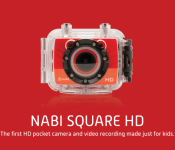
The Nabi Square HD is a kid-proof 4K action camera
 Nabi has announced a new action camera that’s designed specifically for kids so you won’t have to worry about your children destroying that new $300 GoPro you got for Christmas. The Nabi Square HD is a rugged action camera that shoots 4K video and comes with its own sturdy case. Even without the case, the camera is rated to withstand being submersed in 30 feet of water, so you shouldn’t have to worry about little drops and spills tearing this thing up.
The camera is able to shoot 4K video at 15 fps and 1080p video at 60 fps, plus a super slow-motion 120 fps mode at 720p. The camera works with Nabi’s own tablets, allowing kids to edit and upload videos to share with family and friends. The parental controls are definitely still in place, too, so the videos won’t end up anywhere you don’t want them to go. The app will also be made available to other Android and iOS users, although with less features.
The Nabi Square HD will be available for $170, so it’s still pretty close to entry-level GoPro territory. The Nabi integration and extra durability will definitely be the selling points on this one.
source: Engadget
Come comment on this article: The Nabi Square HD is a kid-proof 4K action camera

The Broon F8 series is the Android-powered electric car of your child’s dreams
Your child may end up driving sooner than you might think, thanks to South Korean company Hennes. The company has just announced their F8 series of Power Wheel-like cars for children, bringing class and prestige to your child’s first driving experience.
For those thinking that the F8 series doesn’t really differentiate from the old Power Wheels cars from the 90’s, it does. With a top speed of only 10 mph, this car features an electronic breaking system, and independent suspension system, a leather seat, voice and visual guidance system, along with a slew of other insane features. You can also control the car using a Bluetooth 4.0-powered controller, so it can even help fulfill your RC car needs from when you were a child. Oh, and did we mention it comes with its own 7-inch Android tablet? It’s used as the car’s dashboard to provide all types of media controls. The tablet also comes with the Google Play Store available, so your kid can download as many educational apps or stream as many YouTube videos as they’d like.

As awesome as this thing sounds, there are a few downsides to this car, however. The car is only meant for children five and under, so older kids may have a tough time squeezing in. Also, it seems to be quite difficult to buy one at this time. The car is still considered a prototype, but the company has announced that it will go on sale between $895-$1000, depending on which model you choose.
Seriously, there are way too many features to list here, so head to the official Broon site to see everything this car has to offer.

Richard’s favorite Android devices of 2014

What I enjoyed using the most in 2014
2014 was a pretty good year for Android powered, and related, devices. Smartphones, tablets and wearables all advanced to a stage genuinely above anything we’d seen before and whichever manufacturer you looked at there was a good chance you’d find a great phone.
The devices that came across my own desk surprised me a lot. I can honestly say that no truly bad phones came my way at all in 2014, and some of the ones that I enjoyed using the most were from some unlikely sources. So, here’s the devices I enjoyed using the most from 2014.
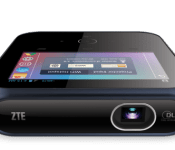
ZTE to sell WiFi-only model of its SPRO portable projector
 ZTE announced a portable projector/hotspot/battery charger mismash of a device at CES last year that Sprint did end up carrying in 2014. This year, it looks like they’ll be offering a new version of the device that has all of the same hardware and features, just without the 4G LTE connectivity.
The ZTE SPRO still runs Android 4.2 with a 1.2 GHz Snapdragon processor inside to power the 4-inch display, and it still holds an extra battery for juicing up your devices while projecting media on a 10 ft x 10 ft area. The little device will cost you $399, which seems pretty hefty considering just how weird this thing is, but if you want to purchase one without cellular capabilities, at least now you’ll have the option to do so.
You can put your pre-order in for one at ZTE’s site below.
source: ZTE
Come comment on this article: ZTE to sell WiFi-only model of its SPRO portable projector

Samsung Promotion, 1 year Netflix with new Galaxy S5, Note 4 or Tab S

Samsung is working on a little treat for new Galaxy S5, Note 4 and Tab S buyers. Starting January 4th, Samsung is giving eligible U.S. buyers one free year of Netflix to go along with their new Samsung device.
If you are looking to buy one of these Samsung devices this weekend, you best hold off until after noon EST on Sunday. Of course, you best not procrastinate either, Samsung is only offering the promotion to the first 115,000 buyers.
With purchase in hand, head on over to SamsungPromotions.com to register. If you get in on time, and are a U.S. mainland or District of Columbia consumer that is 18 or older, Samsung will get you a credit for your new or existing Netflix account, good for 12 months of streaming service. Worth more than $100.

The information for this deal is not live yet, but the folks over at Android Central captured a shot of the promo flyer, see below. In addition to Netflix, the flyer is proud to announce that you’ll also get access to Samsung’s music streaming service Milk Music.
Again, those eligible devices are Samsung’s latest flagship phone, the Galaxy S5, their handy tablet the Galaxy Tab S, and the phone that lives in between those two in terms of size, the Galaxy Note 4. If you are not looking for a phone or tablet, there are also 10,000 4K streaming Netflix promos up for grabs for certain 4K Samsung TV purchases.
The Samsung promo for one year of free Netflix streaming starts this Sunday, January 4th, and runs until either January 17th or until 115,00 people claim the offer, whichever comes first.
Is a free year of Netflix worth picking up one of these Samsung devices?

Download: Leaked build of Android 5.0 for Galaxy Note 3 (N9005)

If you’re a Galaxy Note 3 owner who’s hankering for the official Android 5.0 Lollipop over-the-air update to start rolling out, you’re destined for a rather long wait as Samsung is currently focusing its attention on bringing the update to more recent devices first. However, if you can’t wait, your handset carries the model number N9005, and you want to get your hands on it early, you can now download and install a leaked beta build.
This ROM is designed exclusively for the International unlocked variant of the Galaxy Note 3 (SM- N9005) and can be flashed onto the handset using the ODIN tool for PC. We recommend only installing the software if you have some knowledge of sideloading otherwise you could brick your device leaving it rendered useless.
With that being said, if you have a Note 3 and want to try the firmware, you can download it from the XDA Developers forum, where you’ll also find installation instructions.
All the changes you’d expect to find in Lollipop are bundled into this upgrade, including support for multiple accounts, improved notifications, a smoother multitasking experience and the recently-announced Material Design guidelines, in addition to the latest version of Samsung’s TouchWiz user interface.
Source: XDA
Come comment on this article: Download: Leaked build of Android 5.0 for Galaxy Note 3 (N9005)

Xbox One SmartGlass update appears to fix crashing woes

While the Xbox One SmartGlass apps for Windows and Windows Phone were off to a crash-tastic start this year (seemingly due to a date related bug), it appears that an update pushed out today has patched up the problem, according to tips from Windows Central readers.

Extend the life of your MacBook power adapter with Python

As I’ve made my way through MacBooks, MacBook Pros, and MacBook Airs over the years, I’ve gone through a lot of power adapters. They typically wear out and fray in one of two places: Either near the MagSafe adapter, up near the MacBook, or down near the transformer. Recently I became aware of a new product, the Python cord protector, that purports to resolve that latter issue.
There’s no question that over time, power adapter cables can wear and fray. Replacing them isn’t cheap — $80 for a new Apple-branded adapter. For $11, you can have a bit more peace of mind with the Python cord protector.
Apple’s MagSafe power adapters may save you from breaking the cable where it connects to the MacBook, but it doesn’t solve another issue: When you wrap the power cable around those two tabs that pop out of the transformer, or when you’re just moving it around, the cable at the base of the transformer can fray as well. Apple reinforces it a bit, but probably not as much as they should. As such, that cable can bend and the casing around it can snap open. That’s an electrical hazard.
I’ve seen (and tried) some MacGyver-level solutions, like wrapping duct tape or electrical tape around the base to keep it from flexing: Cheap, ugly, and not always effective — electrical tape flexes and bends too, after all.
The developers of the Python cord protector have another solution. They’ve developed a silicone rubber band that wraps around the transformer and firmly reinforces the cable. A long, slender silicone sleeve extends from the band to wrap the base of the cord and the couple of inches above it. It’s open, wider at the bottom, and tapers in a spiral all the way up to the top.
You feed the MagSafe end of the adapter through by flexing the Python, then wrap the Python snugly around base of the cable before stretching the band in place over the transformer. It only takes a minute to put on, and it works as advertised.
The Python is an elegant solution that looks a lot better than duct tape, and works better too. And for $11, it’s certainly cheaper than a replacement AC adapter.
It’s not just available for the Mac — the makers of the Python cord protector say it’ll work with PC laptop adapters as well. It’s available in black or white.
- $11 – Buy now
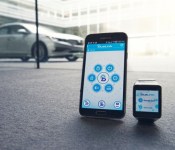
Hyundai announces Android Wear app that can start your car remotely

It seems like car technology is growing way faster than anything else out there. We have already seen Android Auto, super high-end children’s cars, and now a new development from South Korean car manufacturer Hyundai. The car company has just announced their new Android Wear app that allows users to control their cars from their wrist.
The app is called Blue Link, and it gives users the ability to remotely start, lock and unlock their cars, and even find the parking location in a crowded parking lot. They’ve made navigation pretty simple, too. You can access all of these controls using a couple of taps or voice commands. Here are all of the features available on the app at launch:
- Remote Engine Start
- Remote Engine Stop (Only available when vehicle is in remote engine start mode)
- Remote Door Lock / Unlock
- Remote Flash Lights / Honk Horn
- Car Finder
- Call Roadside
- Call Blue Link

The app will only be available on Hyundai cars with the Blue Link services installed, and will work with all first generation and newer Blue Link cars. Hyundai will be showing off the Blue Link app at CES 2015 this week. The app will be available for free in the Google Play Store in Q1 of this year, and will be compatible with all Android Wear devices.
- The Blue Link smartwatch app works with first and second generation Blue Link equipped Hyundai models.
Fountain Valley, Calif., Jan. 2, 2015 – Smartwatch sales are skyrocketing and starting early in 2015 Hyundai owners will be able to connect with their cars using these wearable devices and the Hyundai Blue Link® smartwatch app. Hyundai will debut and demonstrate the Blue Link smartwatch app at Pepcom’s Digital Experience and at the Consumer Electronics Show (CES®). Pepcom’s Digital Experience takes place before CES on Jan. 5 and Hyundai’s exhibit (North Hall, booth #2818) at CES will be open Jan. 6-9, 2015. Hyundai’s cloud-based Blue Link platform allows features like remote start and service information to be quickly accessed through devices like smartwatches and smartphones. Hyundai partnered with Station Digital Media to develop the Blue Link smartwatch app.
“This new app expands Hyundai’s exploration into how wearable technology and Blue Link fit into a customer’s lifestyle,” said Barry Ratzlaff, executive director, customer connect and service business development, Hyundai Motor America. “Connecting to your car through a smartwatch and voice recognition was previously something seen only in science fiction movies. Now, we can provide this capability to owners of Hyundai vehicles equipped with Blue Link.”
The app is easy to use. The wearer simply taps an icon or uses voice commands to execute remote functions. The Blue Link smartwatch app allows Hyundai owners to remote start, lock and unlock doors as well as find their car in a crowded parking lot. Pushing the microphone icon on the watch activates the voice function, where the driver can execute commands such as “Start my car,” “Lock my car” or “Find my car.”
 AIVAnet
