



OTTTD makes its long awaited release on Android, will rekindle your love in Tower Defence Games
 There are tower defence games, and then there are Over-The-Top Tower Defence games. You may recall that we took a look at a game called “Over-The-Top Tower Defence”, or OTTTD for short, at EB Expo 2013 last year. The game looked to breath new life into a mostly stale tower defence genre by adding RPG and RTS elements into a game that features incredible violent and ridiculous action. While it has taken the game a little longer than expected to be released, small Australian developer, SMG Studio, has now released OTTTD to the Google Play Store. Check out their “meet the characters” trailer for a taste of what the game is like and a healthy dose of humour:
As you can see, an crazy combination of tower defence with the ability to customize and improve your heroes who are the mainstay of your defence. And a sense of humour doesn’t go astray either. My favourite thing about OTTTD by far is its art style, which I see has been updated since the pre-alpha screenshots we took a look at late last year; my particular favourite is the toilet rolls strewn around after killing enemies. If you’re interested in picking up OTTTD, you can grab it from the Play Store now for $2.99 USD (or $3.18 AUD) (Play Store link below). Stay tuned for our review of OTTTD.
What do you think about OTTTD? Let us know your thoughts in the comments.
Game: OTTTD
Price: $2.99
//<![CDATA[
ord = window.ord || Math.floor(Math.random()*1E16);
document.write('’);
//]]>
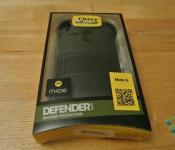
OtterBox Defender Series Case for Motorola Moto G Review: Nothing but the best Protection
 One name generally stands out when it comes to ultimate mobile protection: OtterBox. It’s hard to go past the steadfast quality of OtterBox cases, particularly when you are considering getting the best protection for your smartphone. Despite the Moto G being one of the best selling phones that Motorola has ever produced in recent years, there are still lack of cases that are capable of fully protecting the device. Enter the OtterBox Defender Series for Motorola Moto G.
What’s in the box
 If you have never heard of the OtterBox Defender Series, the premise of the product is to be the best possible protection for a device in any given environment. It’s dust proof, water proof, and drop proof. Just by looking at it, you’d think it were also tank proof (definitely unconfirmed).
 Inside the humble little box, you will find the Defender along with a belt harness that can be mounted on all manner of things. There aren’t any peripheral things like screen protectors or screen cleaning cloths included because you won’t be needing them; a plastic film encases the screen to stop errant debris being forced into the case, making for a relatively airtight seal.
 The Defender is made up of three pieces; two of these make up the hard plastic inner case which can be likened to a skeleton protecting inner organs (i.e. your previous phone). A silicon outer layer goes on top of this skeleton, giving your Moto G the shock proofing it needs. The process of opening the case can be a little fiddly, but once inside, you really do get the sense that your Moto G can now face any adversity. We have the Black version of the case here today, but the case can also be had in Glacier, Key Lime, Wild Orchid, and Hornet variants.
How does it perform?
 As with the previous entries in the Defender Series, the Moto G version does exactly what Otterbox does best, and that’s protecting your phone. The inner plastic frame forms an extremely snug fit around the Moto G, allowing for no free space inside. I found it a little frustrating trying to get it open initially, but perseverance is the key here.
 Once the silicon cover goes over, each accessible port on your device (bar the microphone on the bottom and the back speaker) are covered with a flap to prevent any dust or dirt getting in. The hold and volume buttons are also encased within the silicon case, and I had been concerned that the case would ruin the tactile feel of the Moto G’s normally crisp buttons. To my pleasant surprise, the buttons remained impressively tactile; dampened of course, but much better than I had expected.


Over my test period of several weeks, my device suffered absolutely no damage and the silicon case looks exactly the same as the day I put the case on, save for some specs of dust. As you might expect, there was a little build up of dust in specific parts of the case including the microphone and speaker port, as well as the slit where the front facing camera and ear speaker are left open. In general, the Defender engulfs the Moto G and makes it look fairly ambiguous, which is good or bad depending on how you look at it; all I know is I was asked why I had such a big case for my iPhone quite a few times.
 The harness has been a staple for the Defender Series and its inclusion with the Moto G version is no surprise. The construction is basically identical the previous versions, including the swivelling clip. The harness is made from hard plastic to withstand the rigours of outside activities. I’m personally not big on using the harness myself, but it’s a great little accessory with great durability.
What I like about the Defender Series case
 I like that the Defender case is protective; I know that sounds almost like a moot point given OtterBox’s reputation, but it’s one thing to say it, but it’s another to excel at it, which the Defender does. If you’re the type of person who drops your device frequently, or just needs a little more security in case something happens, the Defender has those credentials written all over it.
 As I mentioned earlier, I was quite afraid that the case would impair the Moto G’s button tactility, however I’m hugely impressed that it hasn’t really taken away from that at all. The same can’t be said for the Commuter case which we reviewed earlier, as the silicon buttons seemed to absorb too much of the force to create a nice feeling button press. So yes: you could say that the Defender pushes my buttons.
What I don’t like about the Defender Series case
 While the Defender is a supremely protective case, that naturally comes at somewhat of a cost. Because the edges around the screen are raised so high and ends right where the screen is, I found that the screen near those edges became a little more difficult to use. Case in point for me has been while I try to swipe words on my screen and I want to hit the letter “p”; because the edge is so close to the screen and the fact that fingers are round, it would actually take a few attempts to properly spell the word I was intending to. Sure it might be a small peeve, but since it happens on a daily basis, it’s more than a little frustrating.
Final Thoughts
 It’s hard not to give the Defender Series top marks as a smartphone case; if you’re in the market for something super-heavy duty to protect your Moto G, you can’t go past the Defender. Sure it has its peeves and downsides, but if your concern is protecting your phone, you can be sure that the Defender has the same concerns in mind. And for $49.95, that’s a small price to pay for peace of mind. That said, if you’re looking for something almost as protective with a little more freedom, take a look at the OtterBox Commuter instead (read our review here).
If you’re interested in picking up the OtterBox Defender Series Case for Motorola Moto G, you can visit its product page here, or to take a look at OtterBox’s other products, you can check out their full website here.
Gallery of Photos


//<![CDATA[
ord = window.ord || Math.floor(Math.random()*1E16);
document.write('’);
//]]>

Roombots: Lego-like robotic blocks that transform into furniture (video)

Imagine if you can just snap your fingers or issue a verbal command for a table, a chair or any other furniture to assemble right in front of you. That’s what a team of researchers from the Swiss Biorobotics Laboratory (BioRob) at École Polytechnique Fédérale de Lausanne (EPFL) hopes to achieve by developing Lego-like robotic blocks called Roombots that can stick to each other and form different structures. Each Roombot is made up of two blocks with wireless connection and a battery that powers motors, which the robot uses to rotate into place. These blocks also have retractable claws so anything you conjure up can climb walls and ceilings or stay attached to floors. The researchers believe that Roombots could be very useful to the elderly and people with disabilities, as they could eventually tell the machines to move closer to them or move out of the way.
For now, though, the team still needs to figure out how users can control the robots — while voice or gesture command would be ideal, the team’s looking at using software made for tablets at the moment. They still also need to smooth out the robots’ movements, tweak their algorithm and make sure they work together better first before your can fill your homes with reconfigurable furniture.
Filed under: Robots
Via: NanoWerk
Source: ScienceDirect

FCC gets approval for plan to subsidize fast rural internet access

At long last, the FCC can move forward with reforming its rural connection subsidies for the broadband era. A federal appeals court has upheld the agency’s Connect America Fund after challenges from smaller carriers, which were worried that the shift from subsidizing phone calls to fast internet access would hurt their bottom line. Their arguments were either “unpersuasive” or were blocked from legal consideration in the first place, the court says.
The fund still faces criticism from those worried that the $4.5 billion in subsidies will hike phone bills through growing fees; there’s also concerns that the occasional fraud seen in existing programs might carry over to Connect America. However, the plan may be worthwhile if it gives tens of thousands of homes a first chance at the speedy, affordable internet access that many of us in urban areas take for granted.
[Image credit: Associated Press]
Filed under: Internet
Via: New York Times
Source: FCC (PDF)

Apple wants more money from Samsung, so it’s asking for a retrial

The next chapter of the (seemingly) never ending legal wrangling between Samsung and Apple is here, and because it’s a holiday weekend when everyone has better things to do, Apple is tossing a few new requests into the ring. After recent jury ruling found Samsung in violation of certain patents (and Apple in violation of one itself), Apple is simultaneously requesting a retrial in pursuit of more damages than the $119 million it was already awarded, and asking the US to ban Samsung from selling the infringing products. That could include current or future phones and tablets that Apple says are using its tech for things like slide-to-unlock and word prediction. It’s not clear if there’s any real chance of either request being granted, but FOSS Patents has posted the documents if you’d enjoy Apple’s legal arguments for some weekend reading.
[Image credit: Brent Lewin/Bloomberg]
Filed under: Cellphones, Software, Mobile, Apple, Samsung
Source: FOSS Patents (1), (2)

Cox will start its gigabit internet rollout in Phoenix, Las Vegas and Omaha

Bandwidth-hungry internet users can register a few new cities as potentially acceptable places to live. Following Google Fiber and AT&T, Cox Communications is one of the first big cable companies to announce plans for internet service at gigabit speeds, and the initial areas on its list are Phoenix, Las Vegas and Omaha. It’s also extending its WiFi hotspot program to Phoenix and Las Vegas, and promises the high speed connections will both to neighborhoods and “select” new condo or apartment developments. If you have Cox but don’t live in those areas you’re not entirely out of luck, since it’s also cranking up the speeds on its existing tiers this year. The Preferred tier will go from 25Mbps to 50Mbps, while its high speed internet service is going from 50Mbps to 100Mbps. The bad news? The gigabit rollout could take a while, since the company is only saying it will begin rolling out these speeds in all of its markets by the end of 2016.
[Image credit: Ed Shadid / Flickr]
Other details that we’re waiting to have filled in are the stats of its bandwidth limit (currently up to 400GB on some tiers, after which customers are notified) and pricing for the speedy new service. Cox president Pat Esser told the WSJ that the company wouldn’t require sweeteners from areas where it will roll out the service, and that it would be “affordably priced.” While it’s nice to hear that higher speeds are on the way, without a definite timetable or specifics, it’s hard to compare to services already in use in at least a few areas. Hopefully Cox comes up with more details (and the rest of the industry gets into the Gigasphere trend) soon, if you see trucks upgrading equipment in your neck of the woods or get a flyer promising eye-popping speeds then let us know.
Filed under: Home Entertainment, Internet, HD
Source: Cox

Recap: 5 Android-related posts you may have missed this week (May 24)

Were at the end of another great week in Android and so let’s take a look at some of the awesome articles written by the staff here at AndroidGuys. This is a mix that includes editorial original pieces as well as product reviews that you may have missed during the week. So relax, kick back, and fire up that Samsung device into reading mode because its time for this weeks recap!

To start this week off Google was busy updating some of their core android apps such as G+ and the Photos app. David Martin posted a quick dive into the newly updated Stories and Movies feature. I would make sure to check this out and then head to your device and see what all the fuss is about as its kind of amazing.
Read more- Google+ introduces Stories and Movies feature

Tony McAfee wrote a great peace this week on why he’s trading his Google Nexus 5 in for the upstart Blu and their Life Pure XL. Its a great article and is a great read for those of you out there who are wondering about Blu’s products or buying your devices outright instead of going for the traditional, here in the US, route of carrier subsidized pricing.
Read more-Life Pure XL By Blu, Why I’m Trading In My Nexus 5

If you own a device that doesn’t have a removable battery, that’s a win for you Galaxy owners, then you may want to check out Jimmy Westenberg’s review on the Tego Power Grid. The battery pack received high marks for design and performance but fell short on value.
Read more-Tego Power Grid Review

If you are a fan of rooting and placing custom ROM’S on your device have a look at David Martin’s ROM of the week post. This weeks ROM was the popular AOKP, one of my favorites. See what David thinks of this ROM and why you should or should not flash this to your device.
Read more- ROM of the Week: AOKP

Speaking of ROM’s and skins, and if you’re like me and not a big fan of Touchwiz or Samsung phones in general, Kristijan wrote a thorough piece on what he would change if he was running the show. Kristijan lays out the good and the bad from his perspective and makes some very valid points.
Read more-Samsung: Good, bad, and what I’d change
The post Recap: 5 Android-related posts you may have missed this week (May 24) appeared first on AndroidGuys.

Feedback Loop: Warming up to ads, killing tablets and more!

In this week’s edition of Feedback Loop, we take a look at the possibility of Google bringing ads to home appliances, discuss whether Microsoft is trying to kill the tablet, as well as the reasoning behind Nintendo pulling the plug on its Wi-Fi Connection and older online gaming services. Add to that our impressions of Steam’s new streaming service, troubleshooting a weak home network connection and a whole lot more. Join us below.
Will Google be bringing ads to your home appliances?
A recent filing with the SEC seemed to imply that Google is thinking about new ways to deliver ads into our homes. The thought of ads suddenly appearing on my Nest thermostat creeps me out. Am I wrong to feel like that? How would you feel about ads suddenly appearing on everything from refrigerators, to microwaves to ovens?
Is Microsoft trying to kill the tablet?
The Surface Pro 3 is here. Microsoft’s keynote repeatedly compared the new tablet to Apple’s MacBook Air. This made cjtylr wonder if Microsoft is trying to change how we think of tablets in order to better compete with its rivals.
Nintendo Wi-Fi Connection goes dark
Nintendo pulled the plug on their Wi-Fi Connection service which provided online features to a number of games on the Nintendo DS and Wii. For those of you who were playing things like Mario Kart right up until the end, what are you doing to cope?
Impressions of Steam’s In-Home Streaming
For those longing to play their massive gaming libraries on other machines, Steam finally announced that its In-Home Streaming service is now available for public consumption. Over in the Engadget Forums, a few of us took it for a drive. Have your played with it yet? Tell us what you think!
Improving a home network
Happy WiFi, happy life. Maybe that’s not exactly how it goes, but the sentiment is all the same! A slow home network with spotty coverage can grate — a lot. Frank shares his own frustrations with his home network and is wondering what he can do to improve it. Share what you’ve done to improve the reliability and connection speeds in your own home.
That’s all this week! Do you want to talk about your favorite gadget or have a burning question about technology? Register for an Engadget account today, visit the Engadget forums and start a new discussion!

From foe to friend: my journey with Linux

Nowadays, it’s just a sanctuary for my father to play marathon sessions of Diablo 3. But a little over 15 years ago, the breakfast nook in my parents’ kitchen more closely resembled a coliseum where man (my father) was pitted against machine. Back then, it wasn’t uncommon to hear strings of profanities streaming out of the room while he sat in front of a desktop computer hunched over in defeat — all in an attempt to run Linux.
“What the… ?”
(loud clacking of keys)
BEEP
“I don’t get it…”
(banging on keys)
BEEP
“God damn piece of shit!”
(punching of keys, distinct metallic crash)
“Grrr…”
I’d heard of Linux before, but had never actually seen or used it until the age of 15. Mine was a home filled with Windows and DOS boxes for as long as I can remember. But my father found himself in the position of having to learn about the open-source operating system for work — his company was going to start moving all of its servers to Linux, and he’d have to support them. If the company’s internal home page went down or someone couldn’t access the shared folders, that would be his problem to deal with. And so Linux entered my life.
I’d been told that Linux was only for nerds, but at first glance, I couldn’t fathom how people were confused by the upstart OS. There was something immediately familiar about it. Probably, the fact that it looked almost exactly like Windows 95: There was the desktop interface loaded with shortcuts, a taskbar and even a start menu.
I’d been told that Linux was only for nerds, but at first glance, I couldn’t fathom how people were confused by the upstart OS.
I’m not sure how long it took that very first time — it could’ve been five minutes or five hours — but I watched as Linux slowly installed itself on the hard drive, filling the screen with an ASCII progress bar. When all was said and done, my father had a PC running a boxed and enterprise-friendly version of Linux. But a funny thing happened when he got to the desktop and tried to install additional software from the same CD: The drive we’d just used to install Linux suddenly didn’t exist. The drivers required to run the CD drive didn’t install… or maybe they never existed to begin with. And in that moment, I understood exactly why, even though it’s free, people would rather pay $100 for Windows than fight with Linux.

For the next several days, my father and I would convene in the breakfast nook for a few hours every night to attempt a new solution. Perhaps we could copy the right drivers from the CD to a 1.44MB floppy disk on another computer? No such luck. We then turned to the internet for help, thinking that surely someone, somewhere would know how to get this drive working. But no, we couldn’t even get the computer’s modem to work.
Eventually, my father and I were forced to accept defeat. The Linux discs went back into their cases; the cases went back into the sparsely branded, white cardboard box; and the box went into the back of a cabinet. It stayed there collecting dust for years, until one day it just vanished. We think it was probably tossed in the garbage during a frenzied bout of spring cleaning.
in that moment, I understood exactly why, even though it’s free, people would rather pay $100 for Windows than fight with Linux.
It wasn’t until nearly a decade later that I would cross paths with Linux again. And honestly, I can’t say my second (no sound) or third date (no WiFi) with the open-source OS went any better. But something about Linux keeps me going back for more. Maybe it’s the challenge; the OS puzzle waiting to be solved. Maybe I’m just a masochist. These days, I’m a dedicated Ubuntu user. I do love the price (i.e., free), but it’s the power and the flexibility that have really seduced me; I can easily change the way something looks or works. Still when I look back on those first days with Linux, I wonder how our relationship made it this far.
[Image credits: Alamy; Getty]
Filed under: Software

The Engadget Podcast is live at 12pm ET!

Ben and Terrence are back, a day late but definitely not a dollar short. You might be wondering why your weekly dose of the dynamic duo was postponed? Well they’re in San Francisco and they’ve got a special treat in store for you — a whole bunch of extra Engadget editors! So follow along after the break for a bit of an impromptu partycast.
 AIVAnet
