


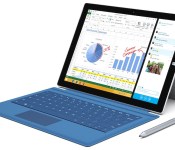
Microsoft Introduces Thinner Surface Pro 3 with 12″ Display Starting at $799
Microsoft today hosted a media event in New York City to introduce the Surface Pro 3, the company’s next-generation tablet device. Billing the Surface Pro 3 as the culmination of a three-year effort to create a “tablet that can replace your laptop”, Microsoft’s Panos Panay highlighted a number of improvements over the previous generation, including a larger 12-inch display with 3:2 aspect ratio, thinner design, an improved stylus, and a full friction kickstand that gives users greater flexibility for adjusting viewing angles.
Pricing begins at $799 with pre-orders starting tomorrow and availability of select models coming on June 20 in the U.S. and Canada. Availability will expand with additional models and countries in August.
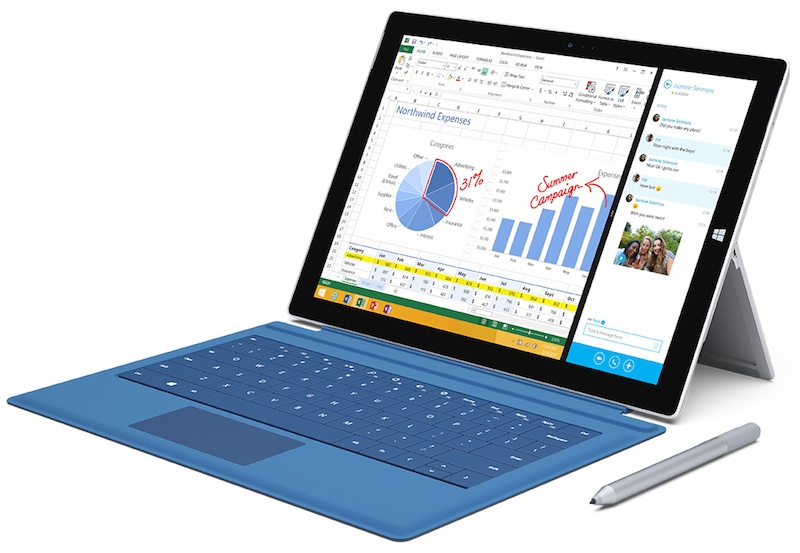
Based on Intel’s Core i3, i5, or i7 processor, Surface Pro 3 measures 9.1 mm thick and weighs 800 grams, making it thinner and lighter than a MacBook Air, with Panay placing the two devices on a scientific balance scale to highlight the difference in weight.
The Surface Pro 3 also comes with a new Surface Pen stylus offering 256 levels of pressure sensitivity. During the presentation, Panay highlighted how the very thin optical stack of the Surface Pro 3 brings the content close to the surface of the tablet, allowing for greater precision with the stylus and which makes it appear as if ink is flowing directly from the pen tip. Integration with OneNote makes it easy to jot down notes on the Surface and have those notes uploaded to other devices, and the Surface Pen’s button can be used to wake the tablet to take notes and then upload to the cloud when finished.
In support of its argument that the Surface Pro 3 can replace a notebook computer, Microsoft partnered with Adobe to show a preview of Photoshop optimized for the tablet device, with larger icons and support for both stylus and touch input.
The entry-level $799 Surface Pro 3 model carries a Core i3 processor with 4 GB of RAM and 64 GB of storage, with Core i5 models priced at $999 (128 GB storage, 4 GB RAM) and $1299 (256 GB storage, 8 GB RAM). High-end Core i7 models with 8 GB of RAM will be available for $1549 (256 GB storage) and $1949 (512 GB storage). Battery life is pegged at up to nine hours of web browsing.
Alongside the Surface Pro 3, Microsoft also introduced several new accessories, including a new $130 Type Cover that is thinner than its predecessor while offering a much larger trackpad. A $200 docking station converts the Surface Pro 3 into a desktop workstation, including Ethernet, Mini DisplayPort, USB, and audio ports.

[APK Download] Major Google+ Update, Now at v4.4 and Brings New UI, Auto Awesome Stories and Much More
Google has started to push an update out to Google+ that moves it to version 4.4. Inside we see a ton of changes to the UI, all for the better. The update also has a slew of changes for Auto Awesome and plenty more great additions.


9 new features in Google+ for Android
1. Auto Awesome Stories now combine your photos, videos and the places you visit into beautiful travelogues. You can read more at http://goo.gl/JGgzil.
2. Auto Awesome Movies are now available on Android, iOS and the web, so lots more people will receive highlight reels of their photos and videos. Here’s one example: http://goo.gl/9ljcdj.
3. You can now create animated GIFs and photobooth-style images on demand. Just tap the new plus button in Photos, and select either Motion or Mix.
4. Really big photo libraries are now supported on Android, so you can access your many thousands of photos quickly and easily.
5. You can now browse your entire photo library, as well as your highlights, by date. Just drag the new scroll bar to move forwards or backwards in time.
6. Profiles now display total content views on both Android and the web. (You can choose to show or hide this number via settings.)
7. A new navigation menu makes it easier to switch between your favorite circles and communities, as well as other places in the app.
8. It’s a lot easier to share content from your phone or tablet. To give it a try, just tap the new pencil icon at the bottom right of the stream.
9. The app menu now slides away as you move down the stream, letting posts fill the entire screen.
Look for the new app as it rolls out gradually to Google Play (http://goo.gl/ruuHW), and let us know what you think!
 We have our hands on the apk, but it will only install on Android 4.4+ devices. If you are still running Android 4.3 or later, you will be out of luck. Hit the link to go download that apk if you meet the criteria.
Source: +Dave Bebris / AndroidPolice
//<![CDATA[
ord = window.ord || Math.floor(Math.random()*1E16);
document.write('’);
//]]>
Carriers Tailor Service Plans for Galaxy S5

Wireless carriers have found themselves in fierce competition to capture their share of the market for the new Galaxy S5 by offering special features and deals on service. Leading the charge is T-Mobile, which announced a killer pre-order deal and continues to entice Galaxy S5 enthusiasts with attractive offers.
How Much Does the Galaxy S5Cost?
T-Mobile Samsung Galaxy S5 customers can put $0 down and pay just $27.50 per month for 24 months (for a total of $660) for their phone, which one media outlet “a completely different Samsung — one that can actually dial down the hype and focus on features you’d actually want.”
T-Mobile customers can take advantage of zero annual service contract, zero overages, zero hidden device costs and no wait for upgrades — all on America’s fastest nationwide 4G LTE network. Qualified buyers can enjoy a zero percent annual percentage rate (based on a credit check).
If a customer cancels their wireless service, the remaining balance becomes due. New devices require the purchase of a SIM Starter Kit for $10.
Launch Seen as a Success
According to T-Mobile CEO John Legere, his company saw over half a million pre-registrations for the Galaxy S5, no doubt because of the appealing offer. The carrier celebrated the launch by also offering $120 off Samsung’s Galaxy Tab3 with a Mobile Internet plan and 200MB free data for the life of the tablet (that offer expired on March 31).
Three days after the S5’s launch, Mashable reported that Samsung doubled the launch-day numbers of the Galaxy S4, which eventually went on to top 10 million in sales in one month.
Other news sources claimed that Samsung sold more Galaxy S5 smartphones during its launch weekend compared to Apple’s iPhone 5s, which, like the S4, was released back in 2013.
Who Saves the Most on the Galaxy S5 – and How?
Families have the most opportunity for long-term savings: a family using four lines could save an average of $1,200 over a two-year period, compared to customers locked into a two-year contract with AT&T and Verizon.
As an added benefit, T-Mobile will pay off every penny of their new customers’ early termination fees imposed by rival carriers AT&T, Sprint and Verizon. John Legere criticized the early termination fees (ETFs) as a “scam” in the cell phone industry, and noted that he doesn’t want the fear of having to pay hefty fees to prevent any potential customer from switching to T-Mobile. Legere says this promotion applies to both individual and family plans, a move that could cost as much as $650 per line.
A Great Price for a Great Product
Many smartphone fans agree that the Galaxy S5 is one of the finest — if not the absolute best — offerings by Samsung in a long time. The phone is lightning fast, has a great 16MP camera, is 100 percent waterproof and operates as smoothly as they come. It boasts a 5.1” Full HD display, fingerprint scanner, built-in heart monitor and much more.
The fact that the Samsung S5 can be purchased at such a great deal from carriers like T-Mobile is simply icing on the cake.
Guest post courtesy of +Tim Allen
//<![CDATA[
ord = window.ord || Math.floor(Math.random()*1E16);
document.write('’);
//]]>
Pieces come together for LG G3 ahead of next week’s launch

With just a week away from LG’s announcement of their latest flagship, the G3, LG has purposefully put up a product page for the G3. There reason? To tease us and entice us!
Nothing is reveled in the product page besides the G3 with its round quick cover on, but we have pretty much seen all there is to the device, besides some little surprises. Check out all the rumored specs on the device here. On May 27th it will all be laid out on the table and we will finally see what LG has up their sleeve.
Source: AndroidCommunity
The post Pieces come together for LG G3 ahead of next week’s launch appeared first on AndroidGuys.

Live from Microsoft’s Surface event in NYC!

Microsoft’s here in the Big Apple to announce a new Surface product or two, and we’re on site to bring you all the latest updates. It’s been a while since MS has announced updates to its tablet and PC lineups, so we’re expecting some substantial news here today. Stay tuned!


Filed under: Microsoft
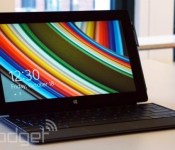
Watch Microsoft’s Surface event livestream right here!

Microsoft is set to announce some Surface related news and we’ll have all the nitty gritty in our liveblog. But you can also watch the event live after the break or right here courtesy of the fine folks in Redmond. So follow along, while still reading our live coverage, of course.
Filed under: Tablets, Microsoft
Source: Microsoft

Engadget giveaway: win an Elite Edition AR.Drone courtesy of Riviera Partners!

Flying a quadcopter around the park all day sounds like fun, but it could be more than just a time killer. Today’s tech toy could be the gateway to tomorrow’s valuable job skill and even piloting a camera-enabled drone could lead to a farming or film career. Helping tech industry folks find work is what Riviera Partners is all about, and it’s graciously provided us with two Parrot AR.Drone 2.0 Elite Edition quadcopters for a couple of lucky Engadget readers this week. Riviera Partners is committed to building up the tech community by getting talented, innovative people like developers and engineers into jobs where they can see their potential blossom. Having someone in the know with clients like Twitter, Dropbox and LinkedIn to help you navigate the notoriously fickle world of tech certainly couldn’t hurt. Whether you’re full time or actively searching the job market, you should always make time for fun. So head on down to the Rafflecopter widget for up to three chances at winning one of these Parrot Elite Editions. An amateur drone camera operator for music videos could always be your fallback skill.
- Entries are handled through the Rafflecopter widget above. Comments are no longer accepted as valid methods of entry. You may enter without any obligation to social media accounts, though we may offer them as opportunities for extra entries. Your email address is required so we can get in touch with you if you win, but it will not be given to third parties.
- Contest is open to all residents of the 50 States, the District of Columbia, and Canada (excluding Quebec), 18 or older! Sorry, we don’t make this rule (we hate excluding anyone), so direct your anger at our lawyers and contest laws if you have to be mad.
- Winners will be chosen randomly. Two winners will each receive one (1) Parrot AR.Drone 2.0 Elite Edition (Jungle; model# PF721802BI).
- If you are chosen, you will be notified by email. Winners must respond within three days of being contacted. If you do not respond within that period, another winner will be chosen. Make sure that the account you use to enter the contest includes your real name and a contact email or Facebook login. We do not track any of this information for marketing or third-party purposes.
- This unit is purely for promotional giveaway. Parrot, Riviera Partners and Engadget / AOL are not held liable to honor warranties, exchanges or customer service.
- The full list of rules, in all its legalese glory, can be found here.
- Entries can be submitted until May 21st at 11:59PM ET. Good luck!
Filed under: Announcements, HD, Mobile, Alt
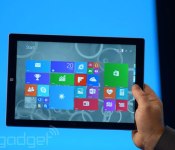
Microsoft announces its biggest tablet yet, the 12-inch Surface Pro 3

When Microsoft invited us to a “small gathering” here in New York City, we thought that meant a smaller-screened Surface Mini was in order. Instead, the company just announced a larger Surface, the 12-inch Surface Pro 3. Like the previous Surface Pro, it supports pen input, making it a good choice for creative professionals, especially with that extra screen real estate. In addition to being the biggest Surface yet, though, it’s also the thinnest-ever product with an Intel Core i7 processor. All told, the thing measures just 9.1mm (0.36 inch) thick, making it about as thick as one of the earlier iPads — incredible when you remember this is more akin to an Ultrabook than a tablet. What’s more, this thing is fanless, promising quiet performance throughout. Pretty standard for a regular slate, sure, but a fricking Core i7 laptop? Not quite.
In addition to being thin, the Surface Pro 3 is relatively lightweight, at 800g (1.76 pounds). And let’s be clear: when we say “relatively,” we mean compared to a comparable 12-inch laptop, or even a 13-inch Ultrabook; those would weigh somewhere in the neighborhood of three pounds. Even the 11-inch MacBook Air comes in at 2.4 pounds. Of course, the new Surface Pro 3 is still heavy next to an iPad Air or Samsung Galaxy Tab. But hey, the Surface Pro was never supposed to compete with those kinds of tablets anyway. No, this is and always was a laptop killer.
OK, so it’s just a bigger, surprisingly lightweight version of the last-gen Surface Pro, right? Not exactly. The third-gen model has a new kickstand on the back that allows the screen to sit at a near-flat angle of 150 degrees. The new Type Cover keyboard (that’s the one with the physical buttons) has been improved as well — especially with regard to the touchpad. Also, though the keyboard cover still “clicks in” the upper portion of the keyboard can now fold up and attach magnetically to the tablet’s lower bezel. We know, we know, this may be difficult to picture, but bear with us: By doing that, you’re effectively elevating the upper portion of the keyboard, creating a wedge profile similar to what you’d enjoy on a proper laptop. So, if you never got comfortable typing on the old Surface’s flat keyboard, maybe this is the ergonomic tweak you’ve been waiting for.
Developing…

Microsoft wants its new pen to be a big part of the Surface Pro 3

Satya Nadella and his team are hosting an event in New York City, where Microsoft has already revealed its Surface Pro 3. Not surprisingly, the company’s placing a lot of focus in the integrated pen. “When you hold it and a pen in your hand, it has to feel light,” said Panos Panay on stage. “When you hold a pen in your hand, it has to be light.” But what is exactly is Microsoft doing to make this happen?
Developing…
Filed under: Microsoft

Apple Predicted to Adopt NFC in iPhone 6 as Core Technology for Mobile Payments System
 Rumors of Apple incorporating near field communication (NFC) technology into the iPhone have become a yearly ritual, but Morgan Stanley analysts believe that Apple may finally be poised to adopt the technology as part of a push to break open the mobile payments industry. In a recent note to investors, analyst Craig Hettenbach points to possible licensing deals, company financial disclosures and patent filings as the basis for this claim.
Morgan Stanley believes NFC is ready to take off, and Apple could be the force that drives its widespread commercial adoption. Though Apple has been publicly silent on NFC and has in fact pursued alternative technologies such as Wi-Fi and Bluetooth for short-range communication features like AirDrop and iBeacons, there is little doubt the company is exploring this short-range wireless technology. A recent patent application describes a secure, NFC-based wallet that allows customers to make purchases wirelessly through their phone, and Apple is in the process of updating its in-store point-of-sale system with one that supports NFC.
According to Morgan Stanley, Apple is choosing NFC as the key technology for its mobile payments system, with semiconductor company NXP likely providing the necessary wireless hardware. NXP has an existing relationship with Apple, supplying the M7 motion-sensing chip found in the iPhone 5s.
NXP is well positioned to participate in Apple’s mobile payments ecosystem. The company signed a licensing agreement with a customer in Q4’13, who we believe is Apple, related to its emerging ID business. A recent patent filing by Apple revealed potential use of NFC and secure element, which we think could be embedded. NXP has also accelerated R&D spend to support a new program related to the IP deal, with revenue expected in 2H, lining up well with the launch of iPhone 6. We see this potentially adding $250mn in sales and EPS of $0.25 in 2015.
A number of rumors have suggested Apple is actively working on a mobile payments system, with Eddy Cue allegedly approaching retailers about the company’s desire to handle payments in retail stores and elsewhere and longtime online store executive Jennifer Bailey shifting role to oversee the payments initiative. While stopping short of confirming mobile payments, CEO Tim Cook also admitted during a recent earnings conference call that mobile payments were “one of the thoughts behind Touch ID.”
Morgan Stanley is certainly not the only source to be sharing rumors of NFC support for the iPhone 6, with Brightwire citing its own sources earlier this month and high-profile KGI Securities analyst Ming-Chi Kuo making his own claims last month.
 AIVAnet