


Sony delivers Android 4.3 to Xperia T, Xperia TX, Xperia V
Sony today announced that the Android 4.3 Jelly Bean update has commenced for the Xperia T, Xperia TX, Xperia V smartphones. The actual rollout, of course, depends on markets and carriers, however it’s officially pushed out the door.
In addition to the standard 4.3 stuff, the update includes updated Sony apps and services, Xperia Themes, security enhancements, and more.
The post Sony delivers Android 4.3 to Xperia T, Xperia TX, Xperia V appeared first on AndroidGuys.
Now Available: Samsung’s Galaxy Pro line touches down in U.S.
As expected, Samsung’s new Galaxy Tab Pro and Galaxy Note Pro models are now available for purchase in the United States. The premium line of Wi-Fi tablets can be purchased through a variety of outlets, including Amazon, Best Buy, Tiger Direct, and Samsung. These Android 4.4 KitKat-powered devices feature Samsung’s latest user interface, a host of services, and include high-end tablet hardware. All are offered in black or white color options.
The Galaxy Tab Pro 8.4 (16GB) retails for $399.99, the Galaxy Tab Pro 10.1 (16GB) is $499.99, the Galaxy Note Pro 12.2 (32GB) is $749.99, and the Galaxy Note Pro 12.2 (64GB) is $849.99.
The post Now Available: Samsung’s Galaxy Pro line touches down in U.S. appeared first on AndroidGuys.

The best alternatives to Google’s own Android apps

As Android has evolved, Google’s worked increasingly hard to keep users locked into its ecosystem. The search giant creates new apps, retains users by giving them a thoroughly decent out-of-the-box experience and then charges device makers for a license to embed them on their phones and tablets. Its constant iteration has helped it stay ahead of the pack for some of its services, but many fall short, leaving users to find something better. The official Gmail app: it’s fine, really it is, but if you want unified inbox support, productivity features or the ability to pull emails from more than one place, you’re left wanting. This sort of limitation can be found across Google’s stable of apps, from messaging to the calendar and camera interface. We’ve trawled Google Play to find software alternatives that — dare we say it — do a better job, at least with certain tasks. So please, whip out your phone and give them a go.
What we’re looking for here is an app that can deliver Google-style levels of reliability, while also being open to non-Google inboxes and offering enhanced features for power users. Luckily for us, there’s no shortage of apps that can do just that.
CloudMagic (Free)

The clue’s in the name, really. Capable of integrating Gmail, Exchange, Yahoo, Outlook, iCloud, Office 365 and IMAP accounts at once, this app uses its cloud algorithms to make your emails easier to find. Unlike Gmail, the clean interface on show here offers a unified inbox that lets you left-swipe emails to perform any one of three actions, a bit like Tinder for the office.
AquaMail (Free/$4.99)

Optimized for both smartphones and tablets, AquaMail offers multi-account support and a simple user interface. Yes, it does look like Gmail, but the team behind AquaMail has constantly refined the interface to make it as easy to use as possible. This includes a dedicated attachments tab at the top of each email, fullscreen modes and a smart inbox. Grabbing the paid version removes the two-account limit and drops the promotional signature attached to all outgoing messages.
We also like: Evomail, Solmail and MailDroid.
Messaging
With the launch of Android 4.4 KitKat, Google ditched its pre-loaded SMS app to let users choose their own. Hangouts became the de-facto starting place, but plenty dislike the app’s inability to properly unify chats and texts under one contact. So here are some solid alternatives.
Textra (Free)

In the migration away from Hangouts, some have resorted to Textra, a messaging app that offers deep customization for notifications and a time-saving quick-reply popup that lets you respond to messages without fully opening the app. Simple in design, Textra handles huge inboxes with no noticeable slowdown, something you’ll appreciate if your friends don’t use Whatsapp.
Hello SMS (Free)

Dropping the inbox for tab-based interface, Hello SMS’ minimalist design puts interactions first with contact names and photos on its left sidebar. If you find yourself in a never-ending group text, the app will intelligently combine messages from up to 15 contacts so you’re not left with a messy inbox. Hello SMS’ one-touch camera interface also lets you send selfies to your friends in double-quick time.
EvolveSMS (Free)

Like Hello SMS, EvolveSMS uses a tabbed interface to showcase your messages. It’s better looking than its rival and displays important information like names, numbers, call options and attachment options inside conversations. While group messaging, message popups, gesture support and notification customization come as standard, additional features are available via in-app purchases. If you decide to upgrade, you’ll get extra theme options, social cover photo integration, scheduled messaging and backup options.
We also like: 8sms and chomp SMS.
Calendar
Calendar apps have pushed forward on iOS in the past year, but Android users have seen little change compared to their Apple-loving counterparts. Google’s own is functional and intuitive, but lacks inspiration. If you’re looking for something that goes beyond the traditional grid-based format, check these apps out.
Cal (Free)

Any.do decided to take a different approach with Cal. Sure, it still features gCal support, but it also includes a number of social and productivity features that stand out thanks to its stylish UI. If you have a task listed in Any.do, it’ll pop up in your schedule beneath your planned events. Connect your Facebook account and you’ll be notified of everybody’s birthday, letting you send them a text, email or post on their wall in celebration.
SolCalendar (Free)

With stickers and various themed widgets, SolCalendar is certainly different than most calendar apps on the Play Store. It might not be to everyone’s taste, but it’ll let you add events with a single touch, litter them with birthday cakes and smiley emoticons and display them using any of its 40 home screen widgets. SolCalendar’s neat weather notification also checks the elements, giving you the chance to pack an umbrella before you head out the door.
Agenda ($2)

Coming to Android a little while after iOS, Agenda’s, erm, agenda, is to display all of your calendars in a single and easy-to-read feed of upcoming events. All of the traditional daily, weekly and monthly views are there, letting you create appointments with a single tap. The simple black-and-white interface might not be for some, but it’s certainly helpful if you like to mix work, play and everything else in between.
Keep an eye out for: Sunrise — expected to launch on Android in the coming months.
Camera
One of the weakest built-in Android apps is the default camera app. Google admited it isn’t as good as it should be, prompting it to improve the camera on the Nexus 5 and roll out additional photography settings on newer Android devices. If you’re stuck with an older phone or want to try something new, try these camera app replacements.
ProCapture (Free/$3.99)

Apps like ProCapture go heavy on features and skimp on glitzy UI to make your photos stand out. It offers a high-quality panorama mode, timer, burst, wide shot mode and noise reduction, keeping the focus on shooting modes instead of after-effects. The full version includes support for higher resolutions and touch-to-focus, so we’d recommend the upgrade.
Camera Awesome ($1.87)

SmugMug’s Camera Awesome looks a bit like Apple’s iOS 6 camera app and comes packed with clever features like two-finger focal adjustments. Even better, you can tweak the ISO, white balance and exposure settings all from the screen. Add in a full screen shutter button, burst shot, HDR mode, timer, panorama and social sharing and you’ve got yourself a whole lot of camera app for very little money.
Camera Zoom FX ($2.99)

If filters and after-effects are exactly what you’re looking for, Camera Zoom FX has more than you could possibly need. Without ruining your original images, the app features over 90 built-in filters, frames and effects that range from the sublime to the ridiculous. If you ever wanted to have a virtual photo taken with the Queen, look no further.
We also like: Instagram, VSCO Cam and Pixlr Express
Productivity
While Google’s Keep is a supremely fast and extensive app, self-confessed productivity nuts may feel its simple approach doesn’t deliver enough features. Although Android is overflowing with apps focusing on lists, notes and photos, many don’t hit the right notes. Here are our recommendations.
Evernote (Free)

Evernote is a heavyweight note-taking app, in terms of both features and actual size, supporting lengthy text input. It provides an easy way to add lists and save audio notes, indexing them for later searching. With apps on every major platform (including the web), you can tweak your grocery list anywhere there’s an internet connection.
Any.do (Free)

Any.do, a to-do list app from the makers of Cal, is an amazingly powerful to-do manager that offers cloud sync, time-saving gestures, missed call integration (ever wanted to turn them into reminders?) and auto-suggestion features as standard. Once you become a little more acquainted with the app, you should try its voice support: not only will it transcribe your words into text, but you can do so in a variety of languages.
We also like: Todoist, Microsoft OneNote, Springpad, Quip and Remember The Milk
Wrap-Up
Before we finish up here, we can’t resist a few more recommendations. Google’s done a great job of porting Chrome from the desktop to mobile, but Dolphin Browser and Mozilla Firefox both offer unique features not found in the search giant’s app. If you wake up one day and find you don’t like the default Clock app, we suggest you check out Timely, even if it is now owned by Google. Also be sure to take a look at QuickPic if you’re after a solid replacement for Google’s Gallery and Photos apps — just don’t ask us why Google decided it needed two apps to handle the same function.
If sampling the best Google Play has to offer isn’t for you, Android’s default apps are constantly being refreshed to deliver additional features. Apps are one of the reasons why the OS has passed one billion activations, after all. Developers focusing only on a handful of apps may be the first to innovate, but it often prompts Google to incorporate features it’s seen elsewhere. While this list won’t stay up-to-date forever, some of these apps have remained popular since Android’s early days and the newer suggestions still have plenty of life in them yet. If you think you have better app recommendations, we’d love to hear them.
Filed under: Cellphones, Tablets, Internet, Software, Mobile

Casio’s new EX-100 camera makes it harder to mess up the shot by taking nine different ones (hands-on)

Casio, famed creator of nostalgic digital watches, calculators and often unremarkable point-and-shoot cameras, just surprised us at Japan’s premier photography show. Its EXILIM EX-100 is arguably the most interesting compact camera we found on the CP+ show floor this year. Keeping a constant f/2.8 aperture while still offering 10.7x zoom should mean plenty of light reaches the point-and-shoot’s imaging sensor — good thing that the show floor had a suitably stylish demo area to zoom into and see how it faired. While we didn’t have samples to scrutinize fully, we were pleasantly surprised by the results we saw on the substantial 3.5-inch screen, which articulates in all the directions you’d expect it to. Underneath, there’s even an extra fold-out stand to prop the camera up both horizontally or vertically, although we’ll admit the device itself is a little chunky compared to the competition.
What really interested us was a new dual-bracketing setting that captures a shot nine times, varying two parameters (white balance, exposure, focus, color saturation, shutter speed) in the process. In short, making it harder to flub a shot if whoever’s holding the camera doesn’t quite get the fundamentals. While there are four presets, you can pick which variables are switched up within the “premium bracketing” mode. The camera launches at the end of March, but the decent fixed lens and unusual software talents don’t come cheap. 89,000 yen ($873) puts the EX-100 in a pricier… bracket than current favorites like Sony’s RX100M2 ($750), and a similarly-specced Olympus Stylus 1 ($700). For now, it also remains a Japan-only prospect.
Zach Honig contributed to this report.
Filed under: Cameras

Apple’s Biometrics Team Continues to Grow Amid iWatch Rumors
Apple continues to add to its team of medical and biosensor experts, with the hiring of Marcelo Lamego, the former chief technology officer of non-invasive patient monitoring company Cercacor. Lamego’s recent change in employment was spotted by Network World.

Before joining Apple in January, Lamego spent the previous eight years as the CTO of Cercacor working on sensor-based medical technologies like those used in the Pronto-7, a portable, non-invasive device which measures hemoglobin, oxygen saturation, pulse rate and more. The Pronto-7 is sold by pulse oximetry company Masimo, from which Cercacor was spun off in the late 1990s.
Lamego worked on the Rainbow SET Technology platform used in the Pronto-7 during his time as a research scientist at Masimo, continuing that work after moving to Cercacor. Rainbow SET is described by Masimo as “a noninvasive monitoring platform enabling the assessment of multiple blood constituents and physiologic parameters that previously required invasive or complicated procedures.”

It is not clear what position Lamego holds at Apple, but he is one of many recent biomedical and sensor research scientists who are now employed by Apple. These new hires allegedly were recruited to join Apple’s iWatch team, which according to MobiHealthnews, has grown to include 200 employees. Lamego isn’t the first Apple hire to come from Masimo either. Last year, Apple also added Michael O’Reilly, M.D., former Chief Medical Officer and EVP of Medical Affairs at Masimo, to its ranks.
Network World‘s report also highlights several other health-related experts who are either confirmed or speculated to be working for Apple, including biosensor algorithm architect Nima Ferdosi from Vital Connect. Ferdosi’s hiring late last year came around the same time that Apple hired Ravi Narasimhan from the same company. A third Vital Connect employee, biomedical engineer Alexander Chan, is alsp speculated to have joined Apple, although his LinkedIn profile lists his employer only as “technology company” in the Bay Area.
Several other health-related companies were reported to have lost employees to Apple last year, including AccuVein and C8 Medisensors. Network World has identified AccuVein engineer Yuming Liu as one of those employees and speculates that C8′s Stephen Waydo may be another.
Details on the iWatch are still elusive, with contradicting reports on the features that’ll make it into the launch version of the device. 9to5Mac stands behind its original report that the iWatch will be able to sense hydration and glucose levels, while MobiHealthNews claims the device will drop these advanced functions and focus on basic health parameters like exercise, diet, stress and medication scheduling.
     |
U.S. Consumer Stockpile of Unused iPhones Valued at $13.4 Billion [iOS Blog]
Almost half of the consumers who buy a new smartphone are storing their older phone instead of recycling it in the used handset market, according to the “Mobile Mountain Study” conducted by research group OnePoll for resale site SellCell (via MarketWatch). These unused phones are worth almost $47 billion, with older iPhone models accounting for approximately $13.4 billion of these hoarded phones.
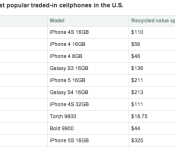
Though many people are storing their iPhones, some owners are taking advantage of the iPhone’s strong resale value by trading them in. A SellCell survey from January 2014 shows that the iPhone 4 and 4S are among the most traded-in cellphones in the US. The most lucrative Top Ten trade-in is the 16GB iPhone 5s, which sells for an average price of $325. The 5s is followed by the Samsung Galaxy S4 16GB at $213 and the iPhone 5 16GB at $211.

Most people (40%) with an old phone sitting in their drawer keep the device as a spare, while others (36%) just don’t know what to do with them. A small percentage (20%) give them away to friends or family or to charity (12%). A surprisingly high number of people are simply “too lazy” to recycle or trade-in their old phones (17%), while others have elected to simply throw theirs in the trash (9%).
The recycling of phones will become increasingly important as the smartphone market reaches its saturation point in the next few years. As customers switch from feature phones to smartphones, iPhone ownership is expected to increase to 68% by 2017 with customers acquiring phones from both new and used sources.
| |

China sees rare drop in smartphone shipments as its market matures

We tend to see China as a hotbed of smartphone growth, but we’re going to have to rethink that belief in light of new figures from IDC. The analyst firm estimates that smartphone shipments to the country dropped from 94.8 million in the third quarter of last year to 90.8 million in the fourth — the first time demand has fallen since mid-2011. Researchers blame the dip on a mix of factors, including the last-minute launch of China Mobile’s LTE network (in mid-December), lower device subsidies and customers who opted for tablets instead. However, the analysts primarily believe that the market has matured; phone makers have mostly courted first-time buyers for the past few years, but they now have to justify more upgrades among existing users. IDC is still optimistic that the Chinese market will grow rapidly in 2014, but it’s evident that companies can no longer take that relentless pace for granted.
Filed under: Cellphones, Mobile
Via: Reuters
Source: IDC China (Translated)
Open source OS Tizen gains 15 more allies; Sprint rejoins the list

In the world of mobile platforms, Tizen’s but a new entry that’s been through some tough times since its inception. The circle of 36 companies (aptly called the Tizen Association) backing up the open source OS is putting up a good fight, though — it even just welcomed 15 new members to its number. These include some big names you might recognize, such as Chinese search engine Baidu, Japanese carrier Softbank, hardware manufacturer ZTE and weather app AccuWeather. The most intriguing addition to the list, however, is Sprint, which first joined the association in 2012 before leaving it in 2013… only to join up yet again. We’ll find out later if these companies are in any way connected to the Tizen devices to be previewed at Mobile World Congress — and if they help the OS finally become a legit Android competitor.
Filed under: Cellphones, Tablets, Mobile, Samsung
Source: Tizen Association

Square Cash makes bill collecting from your friends less of a hassle

Getting your friends to pay you back for dinner just got a lot easier. Square Cash, the company’s super-simple service that lets you pay friends by sending an email, added the ability to request money Thursday. Now you can ask to get paid back by sending an email to your buddy (or reply all to a group of friends) with the amount you need in the subject line and copying request@square.com on the message. When your friends receive the request and tie a debit card to their email, a reply that copies cash@square.com will pay you immediately. If you’re waiting for a group to pay you back you can also track the status of your requested payments, so you know which of your deadbeat friends needs another shake down. Those still waiting to get reimbursed for last weekend’s night out can start their own collection service now using an email address, or Square’s Android or iOS app.
Filed under: Cellphones, Wireless
Skype: Our mobile experience could be better
Skype is a very inconsistent experience, especially when compared to it’s iOS counterpart. It seems, however, that Skype are fully aware of this. They just took to their blog to reassure loyal Android users that they are working hard to improve the service.
We know that as users have started using Skype on multiple devices, they’ve had difficulty keeping conversations in sync, or they’ve missed messages and seen “read” messages on one device that are still marked as “unread” on another. We’ve been working hard to solve these issues while adding other experiences to make an improved Skype chat.
Of most importance is the sync feature of the Skype application, which keeps the chat messages and notifications in sync with the server, and it’s this which is somewhat unreliable on Android. With Skype promising to fix this issue, it will make the experience on Android substantially better.
Skype also mentions that they are working on an update to improve battery usage, and startup/resume times also. It seems the Skype team have been a busy bunch lately. Stick around on AndroidGuys for when this update gets pushed out, plus any additional features that may find their way into it.
The post Skype: Our mobile experience could be better appeared first on AndroidGuys.
 AIVAnet