


Motorola CEO confirms departure in blog post
Motorola CEO Dennis Woodside has confirmed his intentions to take on the role of COO at Dropbox. A post on Motorola’s blog today tells us that he’ll step down on March 31 and will be replaced by “longtime Googler” Jonathan Rosenberg.
I’m excited about what the next chapter in Motorola’s storied history will bring under the new ownership of Lenovo. While Google imbued simplicity and software sensibility into the company, Lenovo will bring it the scale it deserves. I have no doubt the two companies together will be a force for good in the mobile industry.
Woodside is deservedly proud of his achievements and time with Motorola but also understands there’s work to do. We get the sense, however, that he’s confident in Lenovo’s direction and abilities.
The post Motorola CEO confirms departure in blog post appeared first on AndroidGuys.

Muzei Live Wallpaper: The best live wallpaper we’ve ever used
Dashclock Widget creator Roman Nurik is back with a beautiful live wallpaper for your Android phone.
The appropriately named Muzei (or “museum” in Russian) sets a piece of art or custom photo as your phone wallpaper, rotating every night. The default setting adds a slight blur effect to the painting, blending in nicely with whatever you have on your homescreens. If you double tap an empty space on anywhere on your homescreen, it will toggle the blur, turning it back into a full-fledged piece of artwork.
The wallpaper hasn’t even been in the Play Store for more than two days, and it already has upwards of 50,000 installs. Seeing as how it is so popular already, we are going to take a look at just how great it is.
Featured Art

The big feature in this app is the “Featured Art” section. This rotates famous pieces of artwork as your wallpaper, chosen by Nurik and his fiancé. The rotations usually happen at around 9PM ET every night and so far we’ve seen work from Vincent van Gogh and Georges Seurat. There are definitely a lot more to come.
Custom photos

If classic artwork isn’t your thing, you can always choose custom photos to rotate every few hours. You can select entire galleries or just a handful of your favorites.
When I take pictures from my phone, I take a lot at one time. I tend to come back to the gallery and choose the best one, and leave all the others to be forgotten. The custom photo selector is a subtle way to remind you of pictures you once forgot about. Take a look at the original compared to the one with the blur effect.

It’s not a very good photo… at all. But with the slight blur effect that Muzei uses, it doesn’t look half bad. I almost want to go as far as saying that bad quality photos aren’t nearly as annoying to keep in your gallery anymore. Try this feature out – you’ll probably love it.
Extensions
Openness seems to be a common trend in Nurik’s app design philosophy. For anyone who hasn’t yet tried Dashclock, the app comes with a basic set of useful extensions by default. The API is open to other developers, so they can create their own extensions. So far, before hitting the two day mark in the Play Store, Muzei already has countless extensions.

Some of the notable extensions so far are Reddit, APOD, and 500px. Muzei seems to have a bright future already, and let’s hope it’s as popular as Dashclock has grown to be.
Bugs
This app is new… very new… so we are definitely going to expect some bugs. There have already been a few reported issues, but nothing that would completely turn anybody away from using it. And actually, Nurik has already addressed many of them, pushing out an update to the Play Store. We’ll have to see as time passes, but so far there haven’t been any huge issues.
You should download this.
This is usually the part where we review what we liked and didn’t like about the app. But I’m not going to do that. Muzei is too young to gripe about any substantial bugs, especially because it doesn’t have many at all. This app is gorgeous, and is filled with a huge amount of customization options. It’s still very early in the process to make any suggestions or improvements, but what I do know is this – If you want a beautiful and customizable live wallpaper for your phone, the Muzei Live Wallpaper is for you.
The post Muzei Live Wallpaper: The best live wallpaper we’ve ever used appeared first on AndroidGuys.

Windows 8 sales pass the 200 million mark, still trail Windows 7’s success

Back in May, Microsoft announced over 100 million sales of Windows 8, but how much progress has the software made now that we’re in 2014? Today the company reported shipment of more than 200 million Windows 8 licenses. As usual, Microsoft didn’t specify whether or not that figure includes Windows RT licenses as well.
Naturally, those numbers mean nothing without context. Compared to Windows 7 sales a few years back, the latest-gen operating system is lagging. Windows 7 passed the 240 million mark within its first 12 months on the market, while Windows 8 is just hitting 200 million after more than 15 months of availability. Several reasons factor into Windows 8′s slower pace — among them lackluster sales of Microsoft’s Surface tablets and a shortage of touch- and tablet-optimized apps. The company hasn’t said much about the upcoming Windows 8.1 Update 1, but rumors point to better compatibility with budget tablets and an interface that favors the classic desktop over the Start screen. Look for that update to hit the market in April.
Filed under: Desktops, Tablets, Software, Microsoft
Source: ZDNet

This new, low-end AMD graphics card’s meant for budget-conscious PC gamers, and maybe Steam Machines, too

Not every gamer has the desire means to get the latest and greatest graphics hardware. Fret not budget-minded PC aficionados, for AMD’s rolling out a new, more powerful low-end GPU that should suit your financial constraints. Called the Radeon R7 265, it brings twice the memory bandwidth of its predecessor, the R7 260x, which AMD claims translates into a 25 percent performance boost. It’ll cost $149 when it goes on sale in late February, and with its debut, AMD’s also dropping the cost of the aforementioned 260x to a scant $119.
Naturally, those meager price points will appeal to cost conscious consumers, but AMD’s announcement could have an effect on Steam Machine OEMs, too. We saw AMD’s higher-end R9 graphics in several of the Steam Machines at CES, and we’ve been playing with a working iBuyPower prototype packing an R7 260x for awhile now. So, it stands to reason that the 260x and 265 will prove awfully attractive options to manufacturers trying to hit the all-important sub-$500 price point needed to compete with other gaming consoles. And, who knows, maybe these new (relatively) inexpensive options will help drive down the prices of both more powerful cards and the GPUs being offered by AMD’s competition.
Source: AMD

Biggest-ever solar thermal power plant goes online in California

Solar power just hit the big time in the US — BrightSource Energy has confirmed that the world’s largest solar thermal plant, the Ivanpah Solar Electric Generating System in California, is up and running. The array, also backed by Google and NRG Energy, produces a total 392MW of power through 173,500 multi-mirror units. That’s enough to power 140,000 nearby homes, and it represents 30 percent of all the solar thermal energy in the US. The Ivanpah harvester has its drawbacks; with roughly 5.5 square miles of solar panels, it’s creating trouble for birds and other nearby wildlife. Even so, it represents an important breakthrough for delivering clean energy on a grand scale.
Filed under: Household, Science, Google
Via: The Verge
Source: BrightSource Energy

[Breaking] Changes to T-Mobile Jump!

Breaking:
Starting February 23rd: T-Mobile’s Jump! program for tablets and phones will no longer have a mandatory 6 month waiting period before you can upgrade. Also, there no longer be a limit on how many times you can upgrade in a year.
Still developing, more will be posted when made available…

Sigma’s CEO wants you to focus on the dp2 Quattro’s new sensor, not its peculiar design

This was a bit of a shocker to us as well: Kazuto Yamaki, Sigma’s chief executive and lead design guru, doesn’t want you to be distracted by the dp Quattro’s strange shape. The extra-wide footprint is of course what first turned us on to this high-end camera, but the takeaway here should be the shooter’s 29-megapixel Foveon X3 CMOS direct image sensor, which Yamaki says enables a reduced file size and better high-ISO performance. That refreshed chip operates similarly to traditional color film, using multiple layers to capture enhanced detail. That, along with a new processor, should produce sharper, more realistic images with vibrant colors — something Sigma describes as “full-bodied image quality.” Without an opportunity to review full-resolution samples, we can’t really speak to the dp Quattro’s performance, but there’s no question that company reps are very excited about this new device.
The unusual design is what captured our attention, and judging by the long queue at Sigma’s CP+ booth in Yokohama, Japan today, consumers are quite curious as well. Our first thought was that the company widened the body to accommodate a larger display, but the 920k-dot, 3-inch LCD is shockingly ordinary. The model seen here is the dp2, which features a fixed 28mm f/2.8 lens, but Sigma is also releasing the dp1, which includes a 45mm f/2.8 optic and the dp3, which sports a 75mm equivalent lens (yes, you’ll need three cameras to take advantage of all three focal lengths). Since there’s a lot of real estate to work with, the buttons and control dials have plenty of room to stretch out — it literally couldn’t feel less cramped, so if you’re often accidentally tapping more than one button, you’ll love what Sigma’s done here. There’s also a hot shoe, and once you attach a full-size flash, the dp may feel better balanced.

We liked the design overall, though we’re still a bit puzzled, especially considering Sigma’s plea to look past the extra-wide housing. It’s also unclear how much each camera will retail for, or when they’ll hit stores, but our money’s on a price tag north of one grand. As for the internal design, Yamaki brings a bit of clarity in our video interview, embedded below.
Mat Smith contributed to this report.
Filed under: Cameras
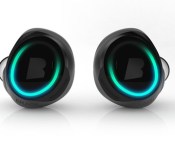
Meet ‘The Dash’: smart headphones that let you listen, train and talk (video)

Got a feature list for your dream in-ear headphones? Get ready to screw it up in a ball and be ashamed at how short it was. Enter “The Dash,” the name given to a pair of wireless smart headphones currently making waves on Kickstarter. The project is only a few days old, has already smashed through its $260,000 target, and is set to reach a cool million before the week is out. What’s all the fuss about? Well that laundry list of features we mentioned. Of course they’re wireless (Bluetooth 4.0, with support for aptX), have touch control (left ear for tracking, right for sound), 4GB onboard storage for media playback (or use your phone), audio training feedback, an accelerometer, heart rate monitor, oxygen saturation sensor, “transparent” mode (so you can hear ambient sounds without removing), oh and they’re also waterproof to one meter. Most of that functionality is on the headphones themselves, though there will be a mobile app for expanded functionality (viewing your training logs etc.). Well, we mean it will be once the funds are released and the real work begins. While that’s still another 45 days away, a new case that doubles as a chargeable battery pack has just been added to the project after meeting its first stretch goal. So the deal (currently $199 if you’re quick), is looking better all the time.
Filed under: Wearables
Source: Kickstarter

Facebook now lets you specify a custom gender in your profile

Many in the queer community identify themselves through genders that don’t fit into binary male and female definitions, but social networks typically don’t allow for that more nuanced take on sexuality. Thankfully, Facebook is more accommodating as of today. You can now specify a custom gender as well as a preferred pronoun. If you’re not always comfortable with sharing that gender, you can limit who sees it. Facebook isn’t accounting for every aspect of gender — you still have to describe family relationships in binary terms, for instance — but this is an important first step.
Filed under: Internet, Facebook
Via: The Next Web
Source: Facebook

Two Days Down With Republic Wireless and the Motorola Moto X
The other day I received a Republic Wireless Motorola Moto X to utilize. Partly to test out how Republic Wireless’s service was and partly to take a look at the Moto X for the first time. Having seen all the talk about the device and how much people who owned one loved it, I needed to see how it really was for myself. Having cleared two whole days, and then some, of using it as much as possible, I thought now would be a good time to offer up a round of initial thoughts.
 Republic Wireless is a no contract monthly service that utilizes Wi-Fi and Sprint’s 3G/4G where available for service. Their devices come preloaded with the Republic Wireless app that helps you setup the device to your Wi-Fi connection and manage your account. In the settings of the app you have various bits of information and things you can adjust. For instance, setting the activity recognition to automatically select the best networks and manage how sensitive the handover from Wi-Fi to Cellular data is. You can even set it to allow you to manually hand off from Wi-Fi to cell or vise versa.
Republic Wireless has 4 plans to choose from based on your needs. (These are just for the Moto X)
- Wi-Fi only for $5 a month – Unlimited calls, text and data so long as you are on a Wi-Fi network.
- Wi-Fi + Cell $10 a month – Unlimited calling & text over both Wi-Fi and Cell connections, but only data when connected to Wi-Fi.
- Wi-Fi + Cell + 3G $25 a month – Unlimited calls, text and data on Wi-Fi plus 3G cell access.
- Wi-Fi + Cell + 4G $40 a month – Unlimited calls, text and data on Wi-Fi plus 4G cellular where available.
For the most part, these plans work out pretty perfectly for me. I spend a great deal of time at home on my Wi-Fi, I would say a good 80% of my day. Part of my day is spent assisting a disabled lady who also has Wi-Fi, so I am connected there too. I am currently using the 3rd plan, Wi-Fi + Cell + 3G. From a two day experience in my more rural, and Sprint supported, area I have above average coverage. The data is obviously fairly slow, but it handles calls, texts, G+, hangouts and emails just fine which is my primary usage when it comes to data when out and about. I have only driven around a little bit, so over the next few weeks I will be running around the area and checking it against my T-Mobile service.

 As for the the Moto X. This is my first hands on experience with it. I didn’t check it out at CES at all and haven’t ventured out to any stores to hold one. My first impression after opening up and turning it on is that it is TINY. It really is a tiny device compared to handling my Xperia Z. That isn’t a bad thing. The physical size is 129.3 x 65.3 x 10.4 mm (5.09 x 2.57 x 0.41 in) as compared to me Xperia Z 139 x 71 x 7.9 mm (5.47 x 2.80 x 0.31 in). In physical tech size the Moto X is nearly a half inch shorter and almost a quarter inch is cut from the width. It is also .10 inches thinner. You really do feel how dramatic the size is when you are holding it.
Where I really get thrown for the loop is the screen size. The Moto X is 4.7-inches while my Xperia Z is 5.0-inches. Going down in size when you have been climbing up in screen size is a bit difficult. What is sort of funny, is that I find myself reaching for the Moto X more than I reach for my Xperia Z. Even though it is smaller, it just feels so darn nice in your hands. After staring at it for a 15 or 20 minutes I can tell the difference between the AMOLED found in the Moto X and the TFT found in the Z. Something about the AMOLED in the Moto X just pops in a very beautiful vibrant way.
 I don’t want to get into too much detail and go over everything just yet; I have only had it in my possession for roughly 56 hours. So I am still learning the active display, playing around with the menu, the settings and getting a good feel for what I like and don’t like. I am also thinking that some of my dislikes might be solved in the KitKat update. I will have to do a little research on that since the KitKat update is only just now rolling out to some of the carrier branded versions.
After having it in my hands for the short amount of time, I can honestly agree with a majority of the people out there. This is a magnificent little device.
 AIVAnet