


Hands-on with Blu Life Pure
Initial Design at a Glance
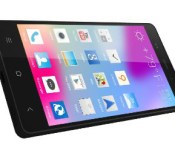
The Blu Life Pure features a 5.0″ 1080p display, 1.5GHz dual-core processor, 13MP rear/5MP front-facing camera, 2GB RAM and more. This device is Blu’s flagship for 2014 and runs Android 4.2.1 Jelly Bean. With no contracts to worry about, the Life Pure works with an unlocked GSM SIM slot.
At first glance it definitely resembles a squared off Nexus 5, with the thin profile, large display, and dual-speakers on the bottom.
For those familiar with globally released devices, you may recognize this device already as the Gionee Elife E6. Gionee is an OEM for regional companies such as BLU meaning this device is not a clone, but rather a twin of the Gionee Elife E6 with minor software changes marketed for the United States area.

Display & Software
At 1080P and about 440ppi this phone has a beautiful 5″ display with great colors. The screen is very sharp with great resolution and brightness. The Life Pure has one of the best and sharpest displays that I’ve seen in a while.
The modified software can give this device a strange iOS/Android cross experience with the launcher and app drawer hybrid. The settings menu has been redesigned like no other and some other options will make you look twice. The software UI layer is different, yet cool, but can take time to get used to it.
Audio Quality, Connectivity, and Networks
The Life Pure has decent and loud call quality and I’ve received the same reception as my other carrier smartphones. The dual built-in speakers, featured on the bottom of the phone are a bit louder than most smartphone speakers. I particularly enjoyed this on phone calls.
This device will pick up 4G HSPA+, 3G, and Edge depending on your provider. While a lack of 4G LTE support is a down side, the HSPA+ runs as well as on another other handsets
For the sake of clarification, all connectivity were tested with T-Mobile USA. WiFi and Bluetooth drivers are just as strong as the cellular drivers, so there are no weak links as far as connectivity goes in my experience.
Processor, GPU, RAM and Battery Life
The hardware that powers the phone include a quad-core Mediatek MT6589T clocked at 1.5GHz. Not a Snapdragon 800 and its powers but it keeps the price point down. When testing with AnTuTu X, the processor made it right in between the Samsung Galaxy S2 and the LG Nexus 4 – not slow by any means.
 My experience has been very snappy while browsing, playing full HD videos, etc. Do note however, that because of the 1080P display, the Mediatek processor and PowerVR SGX-544MP cannot handle graphic intensive games such as Modern Combat, Grand Theft Auto 4, Final Fantasy, etc. If you are an intense gamer stay away from this phone. Playing graphic intensive games will yield a frame rate as low as 6fps. If you handle basic tasks, watch HD YouTube videos, listen to music, stream Netflix, and play games such as Angry Birds, Minecraft, etc. you shouldn’t have any issues.
With a 2,000mAh non-removable battery and its software saving options, life has 5-9 hours. This does all, of course, depend on usage and type of data connection.
Camera Experience
The Life Pure offers a 5MP front facing camera for sharper selfies and video chats. While 5MP may not seem so high-res, most current flagships buzz in at a few megapixels less. The front facing camera (like most these days) doesn’t do too well in poorly lit areas, so be sure to have a good handle on lighting.
Around back you’ll find a 13MP rear camera with a bright single LED flash that honestly takes pretty nice pictures. Even when in lower light conditions without flash the colors are beautiful.
Overall
If you are in the market for an off contract flagship smartphone and are not an intense gamer, check this device out. At $325 it falls closely in line with some of the previous Nexus line, just be cognizant of what your needs might be. The price point is great and the experience works perfectly for the average consumer who doesn’t need high-speed LTE or intense gaming performance.
The post Hands-on with Blu Life Pure appeared first on AndroidGuys.
Samsung sets price and availability for Galaxy Camera 2
At the beginning of the year, Samsung announced their second iteration of the Galaxy Camera. Today, they have officially announced the availability and pricing for the Galaxy Camera 2. It can be yours for $449.99 somewhere around mid-March.
In case you may have missed the original announcement, here are the specs:
- Android 4.3 Jelly Bean
- 16.3-megapixel BSI CMOS sensor
- 21x optical zoom lens
- 4.8-inch HD Super Clear Touch LCD display
- 1.6GHz quad-core processor
- 8GB internal storage
- microSD card slot
- 2GB RAM
- 2000mAh battery
- It also has Wi-Fi, Bluetooth 4.0, and NFC
The post Samsung sets price and availability for Galaxy Camera 2 appeared first on AndroidGuys.
LaCie’s External Drive Lineup Gains New 5TB Drives from Seagate [Mac Blog]
LaCie has launched several new products with Seagate’s new 5TB drives, including a new Thunderbolt 5-bay RAID array that puts up to 25 terabytes of storage in one 5-bay unit. LaCie’s is using Seagate’s new drives featuring ‘Shingled Magnetic Recording’ technology to push the physical boundaries of magnetic storage.
The new drives are also available in LaCie’s d2 Quadra for $350 and the d2 USB3.0 Thunderbolt for $450.
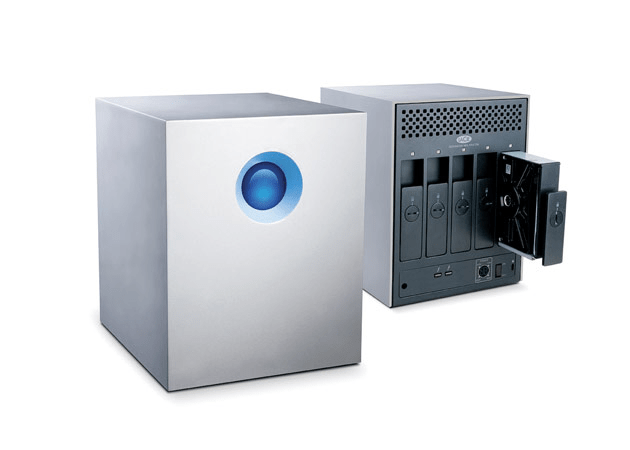
More speed means a leaner workflow. Get 785MB/s* thanks to five 7200rpm/64MB cache hard disks preconfigured in RAID 0. With these speeds, you have all you need for any post-production work. Handle multiple 2K uncompressed 10-bit streams. And with capacities up to 25TB, you have enough storage for today and the future. For example, you could store all your project’s raw daily footage onto a single LaCie 5big. Focus on your creative projects without the hassle of managing multiple storage devices.
LaCie says their new RAID is the largest 5-bay storage product on the market, sporting speeds up to 785MB/s. The RAID is available in three configurations, 10TB, 20TB, and 25TB, for $1000, $2000, and $2500 respectively — Thunderbolt cable included — from LaCie’s website or the Apple Online Store, with the 5TB d2 available for $450 and the 5TB Quadra for $350.
     |

Oral-B smart toothbrush will make sure you’re following your dentist’s advice

Two can play the smartphone-savvy toothbrush game, it seems. Procter & Gamble tells Reuters that it’s releasing an Oral-B toothbrush (not pictured here) that, like its Kolibree rival, will talk to your smartphone via Bluetooth to show how well you’re cleaning your teeth. Dentists will play a more important role here, however — they can program the companion app to make sure you’re cleaning spots you tend to miss. Ideally, this will prevent the tendency to slack off following a check-up. The smart brush will be one of the priciest models in the Oral-B line at £199 ($331) when it ships in June, but it may be worth the expense if spares you from any cavities.
Filed under: Household
Via: SlashGear
Source: Reuters

Engadget’s tablet buyer’s guide: winter 2014 edition

The tablet landscape is changing rapidly. It’s now relatively trivial to find a cheap, full-featured Windows slate, and we’ve seen a number of smaller models that still manage to pack plenty of power. In light of those shifts, our tablet buyer’s guide looks very different this winter. Dell and Nokia are on the list for the first time, and Windows tablets sit shoulder-to-shoulder with their mobile OS rivals. We’ve even brought back an older Nook that’s received a new lease on life thanks to updated software and a significant price cut. Whether you’re looking for a productivity machine or just something to watch movies on, we’ve got a tablet that should fit the bill.
10-inch tablets
Apple iPad Air

After a couple years of playing it safe with iPad designs, Apple pulled out all the stops with the iPad Air. It’s one of the lightest full-size tablets on the market, weighing in at just one pound. It’s one of the fastest, too: Its dual-core A7 processor frequently outperforms the better quad-core chips inside its rivals. You also get to download a free, fairly powerful suite of productivity apps. Buyers may not like the proprietary Lightning connector, and they could miss both the memory card slot and multi-window app support offered on other devices. Still, the new iPad is ideal for gamers and anyone else who wants a big, fast mobile OS tablet without the usual bulk.
The bottom line: A large tablet that doesn’t sacrifice performance or portability.
Key specs: Dual-core A7 processor, 1GB of RAM, 16GB to 128GB of storage, 1.2-megapixel front and 5-megapixel rear cameras, 9.7-inch (2,048 x 1,536) display.
Price: $499 and up
Sony Xperia Tablet Z

The Xperia Tablet Z is an old hand in this group; its Snapdragon S4 Pro is no longer cutting edge, and there are higher-resolution tablets available at slightly higher prices. However, it still has one of the more appealing designs on the market. With its lightweight body, water resistance and infrared blaster, Sony’s design simply has more party tricks than many of its rivals. If your tablet has to double as a TV remote, poolside computer or kitchen assistant, this may be your best choice. Be sure to watch out for its impending sequel, though.
The bottom line: Still one of the best-designed Android tablets, although it’s not the fastest.
Key specs: 1.5GHz quad-core Snapdragon S4 Pro processor, 2GB of RAM, 16GB or 32GB of storage, 2.2-megapixel front and 8.1-megapixel rear cameras, 10.1-inch (1,920 x 1,200) display.
Price: $450 and up
ASUS Transformer Book T100

The Transformer Book T100 is a value champ among larger Windows tablets. For under $400, you’re getting a quad-core slate that runs desktop Windows apps, lasts for up to 11 hours on a charge and comes with its own keyboard dock. The T100 doesn’t have the performance or storage needed for more demanding apps, but it could still be ideal for anyone who wants a tablet that can double as a basic laptop.
The bottom line: One of the cheapest Windows tablets, offering tremendous bang for your buck.
Key specs: 1.33GHz quad-core Atom processor, 2GB of RAM, 32GB or 64GB of storage, 1.2-megapixel front camera, 10.1-inch (1,366 x 768) display.
Price: $393 and up (at Amazon)
Microsoft Surface Pro 2

Microsoft’s Surface Pro 2 is billed as a tablet, but it’s really an Ultrabook without a built-in keyboard — and that makes it one of the most powerful slates on the market. The Core i5 chip inside is quick enough to do some heavy lifting, whether it’s 6K video editing or large Photoshop projects. It also fixes many of the qualms we had with the original Pro. The battery lasts longer; there are more memory options; and the kickstand is more comfortable on your lap. The Pro 2 is far from the most portable tablet in this roundup, so consider the Surface 2 if you want something lighter and thinner. Just be aware that it doesn’t support traditional Windows apps.
The bottom line: The Windows 8.1 tablet for power users.
Key specs: 1.9GHz dual-core Intel Core i5 processor, 4GB or 8GB of RAM, 64GB to 512GB of storage, 720p front and rear cameras, 10.6-inch (1,920 x 1,080) display.
Price: $899 and up
7- and 8-inch tablets
Google Nexus 7 (2013)

The Nexus 7 is no longer the most powerful small tablet on the block, but it still boasts exceptional bang for the buck. It’s fast, and it carries both a very sharp display as well as wireless charging. More importantly: It’s the standard-bearer for stock Android. The Nexus 7 is the only small tablet running Android 4.4 as of this writing, and it should get future updates quickly. While it’s more expensive than 2012′s model, it’s an even better bargain.
The bottom line: Exceptional value for the money, and the definitive Android tablet.
Key specs: 1.5GHz quad-core Snapdragon S4 Pro processor, 2GB of RAM, 16GB or 32GB of storage, 1.2-megapixel front and 5-megapixel rear cameras, 7-inch (1,920 x 1,200) display.
Price: $229 and up
Apple iPad mini with Retina display

While the original iPad mini trailed some competitors in performance, the iPad mini with Retina display comes out ahead — sometimes by a significant margin. It has the highest-resolution display of any tablet with a screen measuring eight inches or smaller, and the A7 processor helps it outperform many larger rivals. It even has a 128GB storage option that’s still extremely rare for tablets this size. Just be prepared to pay a premium: The new mini is one of the most expensive devices in its class, and it doesn’t include extras like a keyboard dock or stylus.
The bottom line: One of the priciest small tablets, but also one of the best.
Key specs: Dual-core A7 processor, 1GB of RAM, 16GB to 128GB of storage, 1.2-megapixel front and 5-megapixel rear cameras, 7.9-inch (2,048 x 1,536) display.
Price: $399 and up
Amazon Kindle Fire HDX (7-inch)

If you value a tablet’s price-to-performance ratio above all else, you can’t ignore the 7-inch Kindle Fire HDX. For $229, you’re getting a small tablet with performance that humbles the Nexus 7 — and, for that matter, many larger competitors. Features like Mayday live support and Second Screen media streaming are nice to have, too. The only catch, as is usually the case with Kindle Fire tablets, is the heavy emphasis on Amazon’s content ecosystem. If you regularly use competing services (including Google Play), you’re better off getting a tablet running regular Android. Consider the 8.9-inch model if you need more screen real estate.
The bottom line: In terms of sheer value for the money, the best tablet here; just make sure you really like Amazon’s media services.
Key specs: 2.2GHz quad-core Snapdragon 800 processor, 2GB of RAM, 16GB to 64GB of storage, HD front camera, 7-inch (1,920 x 1,200) display.
Price: $229 and up
Dell Venue 8 Pro

The Venue 8 Pro is the small tablet for people who want a tiny PC more than anything else. You can run legacy Windows apps, add microSD storage and draw with an optional pen. However, you won’t have to pay a premium for the added sophistication; the Venue costs as much as some of its mobile OS counterparts. It doesn’t have HDMI video output and has suffered from some glitches, but it remains one of the best ways to get the full Windows experience without buying a full-sized device.
The bottom line: A capable, affordable Windows PC in concentrated form.
Key specs: 1.33GHz dual-core Atom processor, 2GB of RAM, 32GB to 64GB of storage, 1.2-megapixel front and 5-megapixel rear cameras, 8-inch (1,280 x 800) display.
Price: $300 and up
Galaxy Tab Pro 8.4

While Samsung launched four new Android tablets at the start of 2014, the tiniest of them — the Galaxy Tab Pro 8.4 — may be the most interesting of the bunch. It has the highest-resolution display of any small slate, and it’s about as fast as its bigger brethren. You may also find its magazine-like interface a refreshing break from the usual grid of app icons. The Galaxy Tab Pro 8.4 is as expensive as the new iPad mini, but it promises a similar level of value for the money.
The bottom line: A very powerful Android tablet in a compact form factor.
Key specs: 2.3GHz Snapdragon 800 processor, 2GB of RAM, 16GB to 32GB of storage, 2-megapixel front and 8-megapixel rear cameras, 8.4-inch (2,560 x 1,600) display.
Price: $400 (16GB; 32GB not available in the US)
3G/4G tablets
Not everyone has the luxury of using their tablet on WiFi; whether you’re on a business trip or a vacation, you may need a cellular-equipped slate to stay connected. Thankfully, there’s an abundance of 4G models to choose from. While there’s often some premium to be paid for either the data plan or the hardware, it may be worth the expense to avoid packing a big, bulky laptop.
Apple iPad Air (WiFi + Cellular)

You know by now that the iPad Air is much faster and lighter than its ancestors. However, its WiFi + Cellular variant provides a few additional improvements for frequent travelers. The new model supports a whopping 14 LTE frequencies; odds are you’ll get full-speed data wherever you go. The tablet also supports T-Mobile USA for the first time, and the carrier’s customers can use up to 200MB of data per month for free. Limited expansion remains a concern, but there are few other big tablets that are so well-suited to life on the road.
The bottom line: Everything we love about the iPad Air, with LTE on top.
Key specs: Dual-core A7 processor, 1GB of RAM, 16GB to 128GB of storage, 1.2-megapixel front and 5-megapixel rear cameras, 9.7-inch (2,048 x 1,536) display, unlocked LTE/EV-DO/HSPA+ data.
Price: $629 and up
Apple iPad mini (WiFi + Cellular)

If you want a small, travel-ready tablet with relatively few sacrifices, the cellular edition of the iPad mini with Retina display is your best bet. It’s just as fast as the iPad Air, and it offers the same broad LTE support. The mini is undoubtedly expensive, but you’re getting a lot for your money.
The bottom line: One of the most popular LTE tablets, in bite-sized form.
Key specs: Dual-core A7 processor, 1GB of RAM, 16GB to 128GB of storage, 1.2-megapixel front and 5-megapixel rear cameras, 7.9-inch (2,048 x 1,536) display, unlocked LTE/EV-DO/HSPA+ data.
Price: $529 and up
Google Nexus 7 (2013, LTE)

The Nexus 7 is already quite capable in WiFi-only form. However, its cellular variant is truly something special. In the US, the tablet offers LTE for AT&T, T-Mobile and (technically) Verizon through one model; American travelers won’t have to sacrifice 4G speeds or carrier support as they have in the past. Combine that with global HSPA+ support, and you have a tablet that will rarely let you down when abroad. The $350 price just makes it that much sweeter.
The bottom line: One of the most flexible cellular tablets on the market, at a price that’s hard to match.
Key specs: 1.5GHz quad-core Snapdragon S4 Pro processor, 2GB of RAM, 32GB of storage, 1.2-megapixel front and 5-megapixel rear cameras, 7-inch (1,920 x 1,200) display, unlocked HSPA+ and LTE data.
Price: $349
Lumia 2520

There isn’t a huge selection of LTE Windows tablets, but Nokia’s Lumia 2520 deserves to be at the top of that list. It has an outdoor-friendly display, brisk performance and epic-length battery life. An optional, battery-equipped keyboard can turn it into a productivity powerhouse. Windows RT will prevent you from running conventional desktop apps, but it’s hard to beat the price — at $500 off-contract, the 2520 is decidedly more affordable than many big LTE tablets, no matter what platform they’re running.
The bottom line: The de facto choice for travel-ready Windows tablets.
Key specs: 2.2GHz quad-core Snapdragon 800 processor, 2GB of RAM, 32GB of storage, 1.2-megapixel front and 6.7-megapixel rear cameras, 10.1-inch (1,920 x 1,080) display, LTE and HSPA+ data for AT&T and Verizon.
Price: $500 at AT&T and Verizon
Budget
ASUS MeMO Pad HD 7

The definition of value for money. The ASUS MeMO Pad HD 7 is no threat to the Nexus 7 or other mid-tier tablets, but it costs much less while preserving some useful features from its higher-end counterparts — namely, a color-rich IPS LCD, dual cameras and a quad-core processor. There’s even a microSD slot, which the Nexus 7 lacks. Never mind the software upgrade challenges that often come with custom Android interfaces; at this price, they’re easy to live with.
Key specs: Quad-core 1.2GHz ARM Cortex-A7 processor, 1GB of RAM, 16GB of storage, 1.2-megapixel front and 5-megapixel rear cameras, 7-inch (1,280 x 800) display.
Price: $149
Amazon Kindle Fire HD (2013)

We liked the original Kindle Fire HD from 2012, so last year’s refresh is virtually a shoo-in for the budget category. Apart from the exterior, you’re not getting anything new. At a lower $139, however, it’s quite the steal; you’re getting a slate with solid performance, a pleasing display and healthy battery life. The 8GB model will do the job if you want a basic device for Amazon Instant Video streaming or Kindle books, and a $169 16GB variant is available if you have a small personal media collection. Just be aware that there are no cameras, and you’re (officially) stuck grabbing software from the Amazon Appstore.
The bottom line: The Kindle Fire HD takes on new life as a budget tablet.
Key specs: 1.5GHz dual-core OMAP 4460 processor, 1GB of RAM, 8GB or 16GB of storage, 7-inch (1,280 x 800) display.
Price: $139 and up
Nook HD

You might wonder why Barnes & Noble’s Nook HD has returned to our list after a long hiatus. Simply put, it’s a good value these days. It’s affordable and boasts a sharper display than most devices in its class. And unlike the Kindle Fire HD, you’re not locked into the manufacturer’s ecosystem — you can download any app you like from Google Play. The base 8GB Nook HD doesn’t afford much space for offline media, but you can spring for the 16GB model (or a Nook HD+) if you need more.
The bottom line: One of the few high-resolution tablets in this price range, and more flexible than some of its peers.
Key specs: 1.3GHz dual-core OMAP 4470 processor, 1GB of RAM, 8GB or 16GB of storage, 7-inch (1,440 x 900) display.
Price: $129 and up
Filed under: Tablets, Apple, Samsung, Sony, Microsoft, Nokia, ASUS, Google, Amazon, Dell

Which Android phones win at gaming?

A simple kind of happiness reigns in the world of mobile gaming. The app stores are brimming over with four-star ratings; popular titles are making billions of dollars for their creators; and folks on the morning commute seem generally content with what they’re playing — sometimes destroying rows of fruit, sometimes rows of candy. Few of us expect or demand anything deeper on a tablet or smartphone, and surely none of us would be crazy enough to choose our next handset based solely on a criterion as narrow as 3D gaming performance. Right?
Well, yes and no. Things certainly get more complicated when you look at the cutting edge — especially on Android. The industry is pushing the boundaries of what a mobile game can be, what a mobile processor can do and what an Android-based gaming device can look like. And as ambitions escalate, so do the risks. The old nemesis of fragmentation means that certain titles may stutter, or cause excessive battery drain, or fail to run at all, so that those glowing reviews turn into one-star complaints and customers go back to playing it safe.
The industry is pushing the boundaries of what a mobile game can be
That’s why we reckon it’s a good time to take stock — to measure how well some current and older Android devices handle a sample of graphically demanding games. We’ve got cold, hard numbers to show you, which should help to pinpoint the most future-proofed products. We also have a secondary aim, which is to set a benchmark against which we can judge the next wave of hardware, soon to be announced at Mobile World Congress. Indeed, it’s already becoming clear that, from a gaming perspective, smartphones don’t always progress in the manner or at the rate that we might expect.
The Test

This bit could have been arduous, but it turned out to be surprisingly simple. An independent, UK-based company called GameBench has taken up the masochistic challenge of collecting real-world gaming performance data and it has kindly given us early access to its raw info. The numbers are based on a sample of four games (Despicable Me: Minion Rush, Real Racing 3, Dead Trigger and Deer Hunter 2014) played by three different players (one beginner, one intermediate and one advanced), with airplane mode switched on and everything else tuned out. Smoothness is measured in terms of the median frame rate, which is the best proxy for the performance as experienced by the gamer. The other key metric is battery drain, measured as percentage lost per hour, because most people will simply avoid games that kill their phones before they get home.
GameBench’s results are a lot more revealing than so-called synthetic benchmarks
The big downside to our test is that it takes a lot of time. GameBench has its own app for monitoring performance and making testing easier, and it’s working on testing more devices with a bigger sample of 20 games, but it couldn’t provide all that data in time for MWC, so we had to make some tough decisions about what to include. The upside, however, is that even though GameBench’s results aren’t totally comprehensive or perfect, they’re still a lot more revealing than the so-called synthetic benchmarks that we’d normally be forced to rely on — i.e., scores collected by dedicated benchmarking apps that are easy to run and difficult to trust.
The devices

Since the biggest determinant of a device’s performance is its processor, GameBench has tested products that represent the major chips currently on the market: two Samsung Exynos processors housed in Asian versions of the Galaxy Note 3 (N900) and Galaxy S4 (I9500); two Qualcomm Snapdragons inside the Western variants of the Galaxy Note 3 (N900x) and Galaxy S4 (I9505); two Tegras from NVIDIA inside a Shield handheld and an old (2012) Nexus 7; and finally an Intel Clover Trail+ chip inside a Lenovo K900.
Yes, there are a couple of non-smartphones in that list. The Nexus 7 is included for curiosity’s sake — we wanted to see how an older device would fare, and whether the benefit of a tablet-sized 4,325mAh battery might be canceled out by the power draw of the larger display. The NVIDIA Shield, meanwhile, is included as our reference device. It’s by far the most powerful device GameBench has tested so far, achieving the maximum possible frame rate of 60 fps (i.e., the refresh rate of the display) in all the sample games except Minion Rush, which the Play store wouldn’t let us install. The Shield also has great stamina, lasting for four to five hours of solid gameplay on a charge.
We can summarize these two metrics for the Shield through a very crude bit of math: by dividing the average median frame rate (60) by the average battery drain percentage per hour (23), which gives us a result of 2.6 — this certainly isn’t an official GameBench score, or an alternative to looking at the raw data, but it’s a handy little way of combining two averages into a single, vaguely representative figure.
The results

So, we arrive at the rankings. If you’ve just joined us, having skipped all the previous sections, that’s OK — we don’t hold grudges, but we’ll take this opportunity to reiterate an important disclaimer: These results relate solely to a device’s game-playing ability, with everything else deliberately factored out, so they don’t reflect our overall ratings of these devices (you need to check out our product pages to get those).
Tier One – the best in the business
|
Galaxy Note 3 (Snapdragon 800) |
Galaxy Note 3 (Exynos 5420) |
Galaxy S 4 (Exynos 5410) |
|
|---|---|---|---|
| Minion Rush | |||
| – Frame rate (median) | 25 | 27 | 29 |
| – Drain rate (per hour) | 22 | 24 | 32 |
| Real Racing 3 | |||
| – Frame rate | 26 | 30 | 27 |
| – Drain rate | 24 | 21 | 22 |
| Dead Trigger | |||
| – Frame rate | 51 | 54 | 57 |
| – Drain rate | 23 | 23 | 28 |
| Deer Hunter 2014 | |||
| – Frame rate | 51 | 54 | 57 |
| – Drain rate | 26 | 28 | 21 |
| Average | |||
| – Frame rate / Drain rate | 1.61 | 1.71 | 1.65 |
Let’s start with the device that most of us will be familiar with: the American and European LTE version of the Samsung Galaxy Note 3, which runs on a Qualcomm Snapdragon 800. Although the phone came in under the other two devices in this tier, based on our approximate average score, it nevertheless had a solid mix of high performance and good stamina. This tallies with something we’ve been noticing about Snapdragon 800 devices in general: Whether it’s a Note 3, Nexus 5, Sony Xperia Z1 or LG G2, the ratio of performance to battery life is healthy. If you can add a big, phablet-sized battery into the mix, preferably 3,000mAh or higher, you should end up with a pretty game-friendly device.
But the big surprise here is the performance of the two Exynos-powered phones, the Asian Galaxy Note 3 and Galaxy S4. These phones top our chart with frame rates consistently close to or above 30 fps and at least three hours of gaming on a charge. This revelation may not be immediately practical to a phone buyer, since these devices are hard to get hold of and they’re not compatible with Western LTE bands, but it leaves us keen to check out future Exynos-powered devices that are coming to the US and UK — including the new Galaxy Note Pro 12.2, which we’re hoping to review shortly.
Tier Two – adequate gamers
|
Galaxy S4 (Snapdragon 600) |
HTC One (Snapdragon 600) |
Nexus 7 2012 (Tegra 3) |
|
|---|---|---|---|
| Minion Rush | |||
| – Frame rate (median) | 28 | 19 | 29 |
| – Drain rate (per hour) | 32 | 20 | 19 |
| Real Racing 3 | |||
| – Frame rate | 27 | 21 | 37 |
| – Drain rate | 26 | 22 | 20 |
| Dead Trigger | |||
| – Frame rate | 51 | 49 | 33 |
| – Drain rate | 29 | 27 | 39 |
| Deer Hunter 2014 | |||
| – Frame rate | 56 | 46 | 41 |
| – Drain rate | N/A | 21 | 33 |
| Average | |||
| – Frame rate / Drain rate | 1.40 | 1.50 | 1.26 |
Next we come to the “ordinary” flagships: the Snapdragon 600-powered Galaxy S4 and HTC One, which are starting to show their age and are soon to be superseded. The first thing you notice is that they’re forced to make a trade-off between frame rates and battery, instead of delivering on both like our top-tier devices did.
As we’ve reported before, the GS4 goes for performance (partly due to having a higher clock speed), while the HTC One goes for stamina. Ultimately, however, GameBench would describe the GS4 as the better device for gaming, despite what our crude average score shows, and also despite what certain synthetic benchmarks might have shown in the past. This is simply because it plays our sample of games at frame rates much closer to 30 fps — the traditional threshold for smooth-looking 3D graphics — whereas the HTC is left rendering games like Minion Rush or Real Racing 3 at just 20 fps.
The same trade-off is visible with the OG Nexus 7, which has very bad drain rates in a couple of games. Its big battery is of little help against a larger display, aging chip architecture and chunky transistors. That said, bearing its age in mind, the Tegra 3 tablet performs surprisingly well within this table, with strong frame rates throughout. In fact, if you prioritize frame rates over battery drain, then you could easily rank this tablet as top of the tier — even above the GS4. We can speculate that other Tegra 3 devices, like the HTC One X+, should still have some life left in them for most Android games, so long as you don’t stray too far from a power source.
Tier Three – the Intel corner
|
Lenovo K900 (Intel Z2580) |
|
|---|---|
| Minion Rush | |
| – Frame rate (median) | 27 |
| – Drain rate (per hour) | 44 |
| Real Racing 3 | |
| – Frame rate | N/A |
| – Drain rate | N/A |
| Dead Trigger | |
| – Frame rate | 38 |
| – Drain rate | 34 |
| Deer Hunter 2014 | |
| – Frame rate | 51 |
| – Drain rate | 40 |
| Average | |
| – Frame rate / Drain rate | 0.98 |
As you can see, the Intel-powered device in this roundup didn’t fare so well. This is the Lenovo K900 with a dual-core Clover Trail+ Z2580 processor — a chip which, thankfully, is soon to be replaced by a new generation, although we won’t see next-gen Intel Android handsets until later in the year.
Intel’s bad score shouldn’t come as a surprise if you’ve seen synthetic benchmarks for this chip, but it highlights just how much of a disadvantage Intel faces when it comes to gaming: Clover Trail+ couldn’t handle Real Racing 3 at all, and with some titles, the K900 burned its battery at twice the rate of an HTC One. In other words: Even if Intel doubles its Android gaming performance in the next generation of devices, it still won’t be able to match that of ARM-based rivals.
The problem, we suspect, is that most Android games are heavily optimized for ARM chips, and Intel’s chip is forced to work harder to make a game run smoothly — an amazing feat when you consider everything the processor must be doing behind the scenes, but one that leads us to the depressing conclusion that Intel is unlikely to be a force in Android gaming anytime soon.
Wrap-up

More Info
Seven devices, three tiers and one unexpected conclusion. When you compare smartphones across a product range (e.g., Galaxy S4 vs. Galaxy Note 3) or across a processor generation (e.g., Snapdragon 600 vs. Tegra 3), raw performance doesn’t appear to change a great deal. That’s not to say that newer or more expensive chips aren’t more capable, but their extra capability evidently isn’t being turned into wildly better frame rates. Minion Rush and Real Racing 3 ran at 20-30 fps on most of the devices we tested, while Dead Trigger and Deer Hunter 2014 mostly generally ran at 40-60 fps.
Instead, the biggest variation in smartphone hardware lies in the less sexy of our two metrics: battery life. Upgrade your phone and games don’t suddenly look better; they just last longer. The most efficient handsets were those running on the latest Samsung Exynos Octa and Qualcomm Snapdragon 800 chips. In the middle, we find devices based on the Snapdragon 600 and premium chips from the previous generation, such as the Tegra 3. At the bottom end we have Intel, whose architecture apparently has to burn extra milliwatts just to keep up with ARM-based chips.
“Upgrade your phone and games don’t suddenly look better; they just last longer”
The big exception to all of this is the NVIDIA Shield, which would have easily won this ranking if it had been born as a smartphone instead of a hand-held console. It somehow managed very high frame rates with equally good stamina, which makes it all the more ironic (but also perhaps revealing) that the Tegra 4 and the Shield itself are widely considered to be niche products and, frankly, commercial flops.
How to explain all of this? It’s tricky, but the answer almost certainly lies in that simple-but-happy image of Android gaming that we painted at the start of this article. If games continue in the same vein that they have, designed to run reasonably well across a majority of devices rather than pushing high-end processors to their limits, then chips and devices that prioritize 3D gaming performance will continue to be dismissed as overkill.
If, on the other hand, 2014 highlights a different sort of Android developer — one who deliberately caters only to a handful of top-end devices and the latest graphics standards, and whose games are amazing enough to justify that sort of attitude — then a full-blown arms race could well ensue. Software creators and hardware makers would be forced to start working together a little more and, for better or worse, Android’s fragmentation problem would be brought to a head. There’s no guarantee that this will happen, of course. Perhaps mobile games are destined to remain as they are. But still, we have a gut feeling that we can’t keep repetitively flapping around or attacking pigs forever.
Filed under: Cellphones, Cameras, Tablets, Mobile, Samsung, HTC, Google, Intel, Lenovo, NVIDIA
iLuv Galaxy MicroUSB Travel Charger review
Need a spare MicroUSB travel charger? iLuv’s new offerings may be just what you need. This is a basic AC travel adapter with a MicroUSB cable but it more than does the job. This can charge any MicroUSB device you might have, including headphones, smartphones, and more.
Design
The iLuv MicroUSB Travel Charger with USB Cable was designed for quick on the fly charging at your nearest outlet. This is a great spare charger to keep with you in your car, backpack, etc.
The AC adapter has a sleek and curved design with blue accents; the included MicroUSB cable is a bit thicker than what you might expect.
This unit charges at a normal 1A-2A rate, depending on your device and is a decent spare charger. This product is intended for charging with Samsung Galaxy devices but will work with plenty of other accessories.
Pricing/Overview
You can find the iLuv MicroUSB Charger for Galaxy devices for $29.99 through iLuv’s website.
The post iLuv Galaxy MicroUSB Travel Charger review appeared first on AndroidGuys.
Apple Registers New ‘.Technology’, ‘Applestore.berlin’ Domain Names
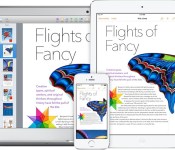
The land rush on new generic top-level domains (gTLDs) continues this week, and Apple has once again staked its claim to some of new domains being made available to the public. The most relevant new gTLD for Apple is “.technology”, and the company has moved to secure several variants related to its products:
– apple.technology
– ipad.technology
– iphone.technology
– mac.technology

This week’s group is the just the latest batch involving hundreds of new gTLDs going live. Other recent domains secured by Apple include those in the .guru and .camera and .photography families.
As with the previously released gTLDs, Apple appears to have taken steps to block registration of other potential domains involving its trademarks, including some directly related to its business such as macbook.technology and other less related such as apple.construction.
While many of the new gTLDs coming online focus on industries and professions, another group includes geographic themes, and Apple has also signaled its interest in protecting relevant domains in these families. In what appears to be Apple’s first move into this area, the company has registered applestore.berlin, listing the address of the flagship Kurfürstendamm store opened last year on its registration.
| |
Apple ID Two-Factor Verification Expanded to Several New Countries
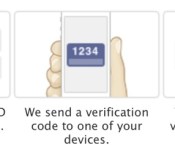
Apple has completed the rollout of two-step verification in several new countries, reports 9to5Mac. As noted on Apple’s website, these new locations include Canada, France, Germany, Japan, Italy, and Spain. Reports from at least one German user suggests Germany already had two-step verification, but lacked the verification through SMS feature, which was enabled today.

Last May, Apple expanded its two-step verification system to several countries in North America, South America and Europe. This feature apparently was launched prematurely and disappeared shortly after it was enabled.
While it’s always possible the feature might disappear like last time, this time around things look more official with users having full SMS support through local carriers and Apple listing the new countries on its support sites. Apple also has a list of supported carriers for receiving SMS messages by country here that was just updated.
Two-step verification is an optional security feature that requires Apple users to verify their identity before making purchases or logging into their Apple ID account. This extra later of protection requires users to enter a 4-digit verification code sent to a trusted device via Find My iPhone or SMS. Once enabled, this system replaces the standard security questions.
Apple introduced this security feature in March 2013 to users in the U.S., U.K., Australia, Ireland, and New Zealand.
| |
Glove’s new Android app finds the best cellphone carrier near you

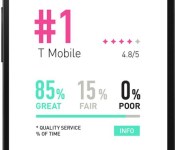
Finding a reliable cellphone carrier is tricky when even a regional performance test can’t prove that you’ll get a good signal in your neighborhood. That’s where Glove’s new Android beta comes into play. The app monitors the areas where you use your phone the most, comparing them with crowdsourced quality reports; after three days, Glove will suggest the carrier with the best-rated service in those areas. Right now, the beta’s US recommendations are limited to New York City and San Francisco, and only with the top four carriers. You’ll also have to wait if you’re looking for the iPhone version. Still, the software may prove a huge boon if you’re thinking of switching providers.
Filed under: Cellphones, Wireless, Mobile, Verizon, Sprint, AT&T, T-Mobile
Source: Google Play, Glove
 AIVAnet