


We’re live from Mobile World Congress 2014 in Barcelona!

We’re embarked upon the capital of Catalonia, where warm and sunny days are a stark contrast to the chilly snows we experienced last year. But we’re happy to brave it for the opportunity to see the latest smartphones, tablets and wearables. While a few companies didn’t want to wait for the show to make their big announcements, there are always at least a handful of surprises hidden within the walls of the Fira Gran Via. Some of the fun begins tomorrow, which is also when you’ll hear more about our liveblog coverage. Keep it locked to our Events page to stay up to date!
Filed under: Cellphones, Wireless, Mobile

Engadget’s smartphone buyer’s guide: winter 2014 edition

You don’t need to cast bones or read entrails to know that smartphones arrive in predictable cycles. February, home of Mobile World Congress, is likely to see the launch of new handsets from heavy hitters like HTC, Samsung and LG. Those new flagships will rule the mobile hill until the fall, when Apple and Google are likely to wheel out next-gen devices of their own. Sony, meanwhile, recently launched its latest handset, the Z1 Compact, which reverses the “bigger is better” trend to great effect.
There may have only been one top-tier phone launching in January, but the phone industry has hardly been hibernating this winter. Two years after Google bought Motorola for $12.5 billion, it sold the rejuvenated handset maker to Lenovo. AT&T, meanwhile, has rejigged its mobile share plans to shrink your monthly data bill; T-Mobile will now pay you to leave your carrier; and we’re inching ever closer to a Sprint/T-Mobile merger, the FCC permitting. If you’re already on the hunt for a new smartphone, or your deal’s only for a few more months left and you like to be prepared, this is your guide to the best handsets on the market.
Android
HTC One

HTC’s 2013-era flagship is due for a revamp, and we’re certain that the gods of irony will ensure that, as soon as we’ve published this guide, the smartphone currently codenamed as “M8″ will officially arrive. In the meantime, however, the HTC One remains a handset that we’re happy to recommend. Combining jaw-dropping unibody aluminum design, powerful BoomSound speakers and an IR blaster, it’s as at home in front of your TV as on the road. The quick performance and general polish of both hardware and software mean that it hasn’t shown its age, and the UltraPixel camera is perfect for low-light shooting. Hopefully the arrival of the One’s replacement will help knock the price down, so we’d suggest keeping your eyes peeled for a bargain in the next few weeks.
Bottom line: Good hardware, good software and some innovative little touches put the HTC One ahead of the Android pack, even though it’s now several months older than many of the other phones on this list.
Key specs: 4.7-inch 1080p (1,920 x 1,080) S-LCD 3 display, 1.7GHz quad-core Snapdragon 600, 4MP rear/2.1MP front cameras, 32GB/64GB non-expandable storage, Android 4.2 (US, to be updated shortly)/Android 4.3 (global edition).
Price: $50 (Verizon), $100 (Sprint) from Amazon and Best Buy or $200 (AT&T)
Motorola Moto X

Since our last guide, the Motorola Moto X went on sale in Europe as an off-the-shelf retail option, and the company went from being Google’s plaything to becoming part of Lenovo. The news of the purchase shouldn’t distract you, however, as the handset is still reasonably new, with much to recommend it. In the US, customization is the name of the game, with the ability to choose colors on the front, back and accent pieces. There’s even an optional wood finish. It may not appeal to those who judge a phone’s performance on its spec sheet, but Motorola (and Google) worked hard to ensure there are some neat tricks under the hood. For example, you just need to say “OK Google” at the device for it to activate and offer up its voice search prowess. Then there’s the Active Display, which will show you your notifications if it feels you holding the handset toward your face.
Bottom line: Rather than cramming in ultra-fast internals, Motorola’s tried to make the phone especially intuitive to use, with Active Display and touchless controls. Oh, and it’s assembled in the USA, which might tug at your patriotic heartstrings.
Key specs: 4.7-inch (1,280 x 720) AMOLED display, 1.7GHz dual-core Qualcomm MSM8960 Pro, 10MP rear/2MP front cameras, 16GB or 32GB non-expandable storage, Android 4.2.2 (upgradeable to 4.4 KitKat).
Price: $50 (AT&T, Verizon) from Amazon and Best Buy, $100 (Sprint) or $330 (unlocked)
Samsung Galaxy Note 3

When Samsung presented the idea of a smartphone with a display larger than five inches, we were more than a little skeptical. The Galaxy Note’s surprise success, however, has forged a trend where colossal devices are now the rule, not the exception. For the Galaxy Note 3, Samsung took everything we loved about its predecessors and turned them up to 11. Instead of mildly useful note-taking, the company has ensured that the S Pen stylus now serves a deeper purpose. It also offers whip-smart performance and a battery that’ll last close to two days with normal usage. The only downside is that you’ll still look a bit silly using one as a phone, but let’s be honest: Who uses their smartphones to make calls anymore, eh?
Bottom line: The third-generation Note is an improvement over its predecessors thanks to a more useful stylus and a longer-lasting battery.
Key specs: 5.7-inch (1,920 x 1,080) Super AMOLED display, 2.3GHz quad-core Snapdragon 800, 13MP rear/2MP front cameras, 16GB/32GB/64GB expandable storage, Android 4.3.
Price: $300 (AT&T, Verizon) from Amazon and Best Buy, $350 (Sprint) or $708 (T-Mobile)
Google Nexus 5

When Google picked LG to produce the Nexus 4, heads and eyebrows were raised, but when it launched, no one could doubt that the duo had pulled off something special. For the Nexus 5, Google raised the price to $349, but for a little extra cash, you’re getting one of the finest flagships for a mid-range price. Since it’s a Nexus device, users are entitled to the latest and greatest version of Android whenever it’s out. And, despite the low price, you’re getting speedy internals and good-quality hardware. Just be prepared for some weak battery life and poor roaming options. Otherwise, we suggest you buy it contract-free, with just a prepaid SIM plan, and don’t look back. Your wallet will thank you for it.
Bottom line: We’re baffled as to why more people don’t just buy Nexus phones over all others. After all, you’re getting a flagship smartphone for $350.
Key specs: 4.95-inch (1,920 x 1,080) IPS LCD display, 2.26GHz quad-core Snapdragon 800, 8MP rear/1.3MP front cameras, 16GB/32GB non-expandable storage, Android 4.4.
Price: $100 (Sprint) from Best Buy, $349 to $399 (unlocked) or $396 (T-Mobile)
Sony Xperia Z1 Compact

We’ve noted that a lot of Android device makers like to release a handset, like the Galaxy S 4, and then release a smaller, more pocket-friendly version shortly afterward. Unfortunately, cramming the same technology down into a tighter package causes a raft of compromises, sending prospective buyers scurrying back to the full-size edition. Sony, however, decided that it would try and produce the Xperia Z1 Compact, a shrunken down, 4.3-inch version of the original Xperia Z1, which has a 5-inch screen. The only differences of note are that the display now has 720p resolution, instead of 1080p, and the battery capacity has dropped by 700mAh due to the hardware’s reduced dimensions. If you’re interested in a top-tier waterproof smartphone, but don’t fancy carrying around a device that can double as a table tennis bat, the Z1 Compact is absolutely worth investigating.
Bottom line: Sony’s struggled to sell its Xperia handsets in the past, but this one deserves to be a hit, thanks to its 20.7-megapixel camera, great build quality and blistering performance. Oh, and it’s waterproof, so if you like dunking your phone in your friend’s drinks, this one’s for you.
Key specs: 4.3-inch (1,280 x 720) Triluminos LCD display, 2.2GHz quad-core Snapdragon 800, 20.7MP rear/2MP front cameras, 16GB expandable storage, Android 4.3.
Price: $625.50 to $689.50 (unlocked, from Negri Electronics)
Motorola Moto G

The partnership between Motorola and Google may have only produced two handsets, but the ones we got were special. Aimed squarely at the lower end of the market, the Moto G is the rare beast that doesn’t feel like it costs just $180. It can beat the HTC One mini and Galaxy S4 Mini in the benchmark stakes; it features a solid camera; and the 4.5-inch display is actually quite fantastic. If you’re not dead-set on LTE or carrying around a big music collection, but want a quick and up-to-date Android smartphone, then this is the device you should be ordering.
Bottom line: If you want a Google handset, but can’t stretch to a Nexus 5, then the Moto G is your next best option. There’s no LTE, no expandable storage and the camera’s just OK, but for this price, who cares?
Key specs: 4.5-inch (1,280 x 720) IPS LCD display, 1.2GHz quad-core Snapdragon 400, 5MP rear/1.3MP front cameras, 8GB/16GB non-expandable storage, Android 4.3 (Android 4.4 KitKat on Google Play edition).
Price: $100 (Verizon), $80 (US Cellular), $130 (Boost) or $179 to $199 (GSM, unlocked) from Amazon
iOS
Apple iPhone 5s

You know the deal by now. Apple’s flagship iPhone 5s is the best iPhone ever made, thanks to improvements both inside and outside. Though it remains dwarfed in size by many rival phones, it benefits from Touch ID, an easy-to-use fingerprint scanner built right into the home button. Then there’s the future-proof A7 chip, which offers fast 64-bit performance. Add in iOS 7, with its stark new design, and you’ve got a seventh-generation iPhone that still manages to look and feel new.
Bottom line: The best iPhone yet, and among the top smartphones, period. However, if you already own an iPhone 5, you’re probably better off waiting for the 6, as nothing here really justifies the early upgrade fee.
Key specs: 4-inch (1,136 x 640) IPS Retina display, Touch ID, A7 chip with M7 motion coprocessor, 8MP rear/1.2MP front cameras, 16GB/32GB/64GB non-expandable storage, iOS 7.
Price: $199 to $399 (AT&T, Verizon, Sprint) from Best Buy or $649 to $848 (T-Mobile)
Apple iPhone 5c

Apple’s middle child is the iPhone 5c, which is basically 2012′s iPhone 5 with a plastic shell. That switch means you’ll now be able to buy the phone in a variety of bright, Lumia-esque colors, but in every other respect, it’s the same phone that came out in 2012. So, you’ll sacrifice the headline-grabbing features you’d otherwise get with the 5s, like the aluminum shell and fingerprint recognition, but if your wallet won’t stretch the extra $100 to get the higher-end model, this is a fine choice.
Bottom line: For $100 less than the iPhone 5s, it’s 2012′s best phone in a choice of fun colors.
Key specs: 4-inch (1,136 x 640) IPS Retina display, 1.3GHz dual-core A6, 8MP rear/1.2MP front cameras, 16GB/32GB non-expandable storage, iOS 7.
Price: $99 to $199 (AT&T, Verizon, Sprint) from Best Buy or $549 to $649 (unlocked or on T-Mobile)
Apple iPhone 4s

It’s a testament to the iPhone 4s that Apple can still sell it as an entry-level device more than two years after it first went on sale. Of course, it’s missing a few key specs that early adopters will be lusting after — namely, it rocks a smaller 3.5-inch display, and makes do with a slower chip and 3G-only data. That said, it still has a fantastic camera and that 3.5-inch display is at least Retina-quality. More importantly, the phone will still run iOS 7, so you won’t feel too behind your friends on more modern hardware. Of course, you’re not eligible for every new iOS feature, and there’s no guarantee your handset will be supported in a year’s time. Still, for a free-on-contract offering, it’s tremendously compelling.
Bottom line: Despite being more than two years old, the iPhone 4s can still hold its own with brand-new budget models from its rivals — and it’s a steal if you can get it for free. Speed freaks and LTE fans won’t be interested, but it’ll beat plenty of other smartphones you can get for nothing.
Key specs: 3.5-inch (960 x 640) IPS Retina display, 1GHz A5, 8MP rear/VGA front cameras, 8GB non-expandable storage, iOS 7.
Price: Free (AT&T, Verizon, Sprint) or $450 (unlocked on T-Mobile)
Windows Phone
Nokia Lumia 1520

A handset that exists in the corridor of uncertainty between a phone and a tablet, Nokia’s Lumia 1520 is the company’s first attempt at a 6-inch device to rival the Galaxy Note. With the first 1080p display on a Windows Phone device, as well as a Snapdragon 800 processor, the 1520 offers plenty to love. Pairing this massive device with a 20-megapixel PureView module puts most other devices to shame, and it’s even reasonably comfortable in a pocket — assuming you’re not wearing skinny jeans, anyway. If you’re a Verizon customer and feel left out, then the Icon, which combines similar internals with a 5-inch display, could be right up your street.
Bottom line: It’s too early to tell if Windows Phone 8 will flourish on a massive device that sits between a fully fledged tablet and a smartphone, but nonetheless, this stands as the best Windows Phone device we’ve ever seen.
Key specs: 6-inch (1,920 x 1,080) IPS LCD display, 2.2GHz Snapdragon 800, 20MP rear/1.2MP front cameras, 16/32GB expandable storage, Windows Phone 8.
Price: $150 (AT&T) from Amazon and Best Buy or $750 (unlocked)
Nokia Lumia 1020

When Nokia announced the “experimental” 808 PureView, it set the hearts of gadget fiends afire. The device came with a 41-megapixel sensor and some clever number-crunching that gave your photos much greater depth and clarity. Best of all, you could even zoom into them to a much greater level, finally bringing a CSI-style “enhance” to your images. The common consensus was that as soon as Nokia could put that 41-megapixel sensor onto a regular Windows Phone device, people would start paying attention to the platform. Well, that phone has arrived: The Lumia 1020 combines staggering imaging technology with Windows Phone’s user-friendly interface. Moreover, now that Microsoft and Nokia are filling the holes in Windows Phone’s app catalog, a flagship like the 1020 is more appealing than ever.
Bottom line: If you want to take amazing images with a smartphone, this is the device you need.
Key specs: 4.5-inch WXGA (1,280 x 768) PureMotion HD+ AMOLED display, 1.5GHz dual-core Snapdragon S4 Plus, 41MP rear/1.2MP front cameras, 32GB non-expandable storage, Windows Phone 8.
Price: $50-$100 (AT&T) from Amazon and Best Buy
Nokia Lumia 1320

When it comes to Windows Phone devices, Nokia’s (and Microsoft’s) strategy has been easy to understand, if a bit scattergun. Produce a high-powered phone, and then whittle out features to produce sequentially cheaper versions from the 925 all the way down to the 520. The company adopted a similar approach to 6-inch units, with the 1520 acting as the “flagship,” and the 1320 being a cheaper, lower-powered version for the masses. It keeps the large display and battery, but ditches the PureView camera, large internal storage and high-power internals. That said, if you’re actively seeking out a phone/tablet hybrid, but aren’t thrilled at spending the thick end of $800, this is probably your first port of call.
Bottom line: Despite its size, this 6-inch device isn’t an all-powerful phablet — it’s more like the Lumia 620 after a bout of elephantiasis. If you want a big phone without a big price tag, however, this is probably where you’ll end up.
Key specs: 6-inch (1,280 x 720) ClearBlack LCD display, 1.7Ghz dual-core Snapdragon 400, 5MP rear/VGA front cameras, 8GB expandable storage, Windows Phone 8.
Price: $390 (unlocked, from Amazon)
Nokia Lumia 520

Nokia’s Lumia 520 (and 521) are the Windows Phone handsets that lurk at the very bottom of the company’s bargain basement. In fact, this handset is so cheap, it’s often handed out as a sweetener when you buy other Microsoft products. The price, combined with the user-friendliness of Windows Phone 8, makes it a pretty easy purchase for smartphone virgins. On the downside, the handset doesn’t have much going for it in the spec department — with a weak display, OK-ish camera and a short battery life. If, however, the purse strings are tight and you’re only browsing Twitter, then this is a reasonably safe bet.
Bottom line: It’s cheap to the point of being free, and while it may not be the greatest phone out there, Nokia has always known how to knock out a solid device for those on a budget. Take advantage of the right deal, and you’ll even be able to grab one of these for free as a party favor.
Key specs: 4-inch (800 x 480) IPS LCD, 1GHz dual-core Snapdragon S4 Plus, 5MP rear camera, 8GB expandable storage, Windows Phone 8.
Price: $29 (521, Metro PCS), $100 (520, AT&T) or $126 (521, T-Mobile) from Amazon
BlackBerry 10
BlackBerry Z30

The Z30 is, in our opinion, the best BlackBerry 10 device on the market. Thanks to the handset’s 5-inch display, BB10 suddenly feels much more comfortable than on the cramped Z10, and while it’s still just a year old, the operating system at least feels mature now. Then there’s the battery, which lasts more than a full day with intermittent usage and nearly 13 hours with nonstop use. Thankfully, the company has now moved to address the weak app selection — BB10 will now install and run plenty of Android apps at the push of a button. If you’re dead set on buying a touchscreen BlackBerry, this is the one that we’d recommend.
Bottom line: We doubt BlackBerry virgins will find anything to convince them to buy this device, but enthusiasts will find plenty to like. The bigger display and better internals make for a more comfortable experience, but beware that the usual BlackBerry issues remain.
Key specs: 5-inch (1,280 x 720) Super AMOLED display, dual-core 1.7 GHz Qualcomm MSM8960T Pro, 8MP rear/2MP front cameras, 16GB expandable storage, BlackBerry OS 10.2.
Price: $100 (Verizon) from Amazon, $520.50 (unlocked, at Negri Electronics)
BlackBerry Q10

Who can count themselves among BlackBerry devotees? Security fans and those for whom only a real QWERTY input will do. The Q10 is the only BlackBerry 10 device with a keyboard that’s worth getting. Combining BlackBerry 10′s beefy operating system with smooth, but imperfect performance, the real star of the show here is that comfortable and easy-to-use QWERTY layout. If you’re eyeing the Q5, we’d suggest saving up a little more cash and going for its bigger brother; you’ll get a significantly better handset for the money.
Bottom line: In a world where the physical keyboard is an endangered species, the Q10 is the only place you can turn to, so be glad that it’s got the best of the old Bolds with a modern spin.
Key specs: 3.1-inch (720 x 720) Super AMOLED display, 1.5GHz dual-core Snapdragon MSM8960, 8MP rear/2MP front cameras, 16GB expandable storage, BlackBerry OS 10.
Price: Free (AT&T) from Amazon, $50 (Verizon), $150 (Sprint) or $500 (unlocked)
Please note, all prices are contract unless otherwise stated. T-Mobile pricing is for full handset cost rather than subsidized.
Filed under: Cellphones, Mobile, Apple, Samsung, Sony, Microsoft, HTC, Nokia, Google, Verizon, Sprint, AT&T, LG, Blackberry, T-Mobile, Lenovo

Thule Crossover 32L Backpack review
The Thule Crossover 32L for 17″ laptops, tablets and more is a great spacious multimedia backpack.
Design
This backpack is designed with refined precision. It is very stylish with the unique black/white pattern with blue accents. The backpack may appear large, but it can expand and compress to fit your individual needs.
Storage
This backpack has compartments everywhere. They are strategically designed and placed, so you there’s room for all of your gadgets. The best things are the water resistant fabrics, the heat molded safezone for your glasses, cell phone and more. You have perfect room for your laptop, tablet, and much more still.
The capacity of this bag is simply wonderful; you can fit any type of gadget inside. The center compartment can hold an extra set of clothes for your weekend adventure and more. There’s even what I like to call a “quick stash zone” which lets you stuff your hoodie or other items.
SafeZone
The SafeZone Protects your cell phone, glasses, and more from possible damage with the heat molded hard shell protective compartment.
Charging Zone
The one thing that I hate about many laptop bags is they they don’t really give you a great place to put your laptop’s AC adapter.This bag has the solution thanks to its bottom compartment. In the main compartment there are also little pockets that are great for placing your own external battery to charge your tablet, smartphone, and other wireless devices.
Tablet Sleeve
This bag even has a plush lined dedicated sleeve for your tablet, something I really enjoy!
Laptop Sleeve
This amazing Thule bag has a spacious sleeve just for your laptop. The great thing is that this can fit your smaller netbook, Chromebook, MacBook, 15″ Laptop, and up to a 17.3″ Laptop.
Overview
The build quality of this bag is spectacular, it’s very strong yet very comfortable on your shoulders. I must say this is very supportive and perfect for long trips just as much as everyday use, and it is as close to perfect as you’ll get. You can find the Crossover for $129.95 at Amazon.
The post Thule Crossover 32L Backpack review appeared first on AndroidGuys.

4 Second Screen Apps Expanding the Video Game World
Second screen usage occurs when you use a mobile device, such as a smartphone or tablet, alongside another activity. Nielsen reports that 43 percent of tablet owners and 46 percent of smartphone owners put their devices to work as second screen providers. Video game companies are taking the leap into second screen companion applications for their games, from Battlefield 4′s Battlescreen to Xbox One’s Smartglass experience.
Battlefield 4
Battlefield’s first person shooter experience, available on Origin.com, has long set itself apart from other franchises through the use of a Battlefield map for the commander’s use. You call in artillery strikes, help coordinate squads, and drop supplies to soldiers. In older versions of the game, you switched to a separate screen on your television or computer monitor to access this mode. With Battlefield 4‘s Battlescreen app, you use an app on your tablet or smartphone to give you access to commander mode, as well as squad and loadout management. This prevents you from getting killed because you’re stuck in the commander screen, and you don’t see what’s going on in your general proximity.
Xbox One Smartglass
Xbox One has split its focus between performing as a video game console and setting itself up as a media powerhouse in your living room. One step Microsoft took in this direction is the Smartglass companion app. This app gives you an additional way to control the Xbox One dashboard, look up information on the game you’re playing or the shows you watch, and provides additional content from the developer for games that provide second screen support.
Playstation 4 Companion App
The Playstation 4 app isn’t as media focused as the Xbox One, but one feature that is particularly useful is the ability to purchase and start game downloads directly from the app. It starts the download on your PS4, as well as downloading any needed updates, so you aren’t waiting an hour for a download when you get home to try a new game. It also provides you with an easier interface for instant messaging with your PS4 friends, as you aren’t limited by the on-screen keyboard or voice chat through your console.
Assassin’s Creed
Assassin’s Creed IV: Black Flag shipped with a companion app that exists to supplement the main experience and contribute to immersion. Many handy resources such as the world map were shifted to the companion app, so you don’t have to leave the main screen to check your location. In addition, you have access to the lore and story database to get more involved with the game even when you’re not playing. Finally, this app offers fleet management so you send your ships off for trades and treasure while you’re away from the console.
Dead Rising 3
Dead Rising 3 has a Smartglass compatible app that is actually integrated into the game world itself. Since your character uses a phone, you essentially use the phone that they are toting around ingame. NPCs give you missions by calling you up, and you also have maps and hints to help out.
Facebook starts testing Highlights, a feed that shows only important life events

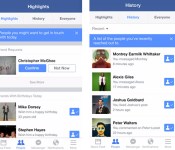
For some people, Facebook’s latest iOS update doesn’t only come with bug fixes in tow, it also replaces Requests with the experimental People section. According to TechCrunch, three tabs reside within the People section, including Highlights, which displays your friends’ birthdays and important life events. It’s the place to check if you want to know if someone just had a baby, for instance, without having to go through Candy Crush invites. Other than Highlights, there’s also the Everyone tab, which lists your friends in alphabetical order, and History, which shows Messenger convos from the latest to the oldest. Of course, not everything Facebook tests becomes an official feature, so those hankering to test People out will just have pray for a second round.
Filed under: Cellphones, Mobile, Facebook
Source: TechCrunch, iTunes

Apple and Samsung headed for another patent trial in March after they fail to reach a settlement

It’s back to court for Apple and Samsung. After an attempt at settling their latest patent dispute, the two companies will begin another trial in March, according to a filing with the US district court in San Jose. To be clear, this isn’t a re-trial of the case that Apple brought back in 2011 — you know, the one where Samsung was made to pay nearly a billion dollars in damages. No, this is a different case, one that addresses a different set of patents, and one that names more recent devices, like the GS3. For now, it’s unclear how much money is at stake, though experts cited by The Wall Street Journal claim that the damages could be higher this time around, given that the case includes newer Samsung devices that sold even better than the products named in the earlier suit. All will be revealed in March, we suppose. We’ll be back then reporting any major developments — even if we’re as sick of these patent wars as you are.
Filed under: Cellphones, Mobile, Apple
Source: Wall Street Journal

Samsung’s new Galaxy Gear wearable will come in two models, according to fuzzy leaked images

It definitely looks like a new Galaxy Gear. There’s definitely two of them and… that’s most of what we can discern from what appear to be some cannily sniffed-out thumbnails from, well, somewhere. According to @evleaks, they’ll be known as the Galaxy Gear 2 and the Galaxy Gear Neo. Samsung’s branched off its Galaxy phone range in a similar way, and if that’s any indicator, the Neo smartwatch will be a cheaper model with presumably some hardware drawbacks to go alongside that discount price tag. If you squint extra hard, you should be able to make out a physical button below the screen, with the one on the left (presumably Gear version two), getting more of the metallic design love than its stablemate. Are they really running on Tizen? Has Samsung solved the battery gripes of its first smartwatch launch? These important answers (alongside some higher res images, please) should be mere days away.
Filed under: Wearables, Samsung
Source: @evleaks
The Qualcomm Toq smartwatch is now down to $249.99 after taking a $100 Discount
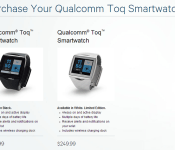
 When the Qualcomm Toq smartwatch was announced and released late last year, it showcased some very intriguing features for a smartwatch, particularly its colour e-ink screen, known to us as Qualcomm‘s proprietary Mirasol screen technology. This e-ink screen both served as a touch screen as well as a battery saving measure which saw the Toq able to last almost a week on a single battery charge. The only issue with all this wonderful technology was the price tag, which at $350 proved to be quite a large hurdle for even smartwatch enthusiasts despite the limited nature of the wearable device. Well, that might not be an issue anymore as Qualcomm has knocked $100 off that original price and brought the watch (available in black or white) down to $249.99 USD.
It doesn’t look like a temporary deal either, so this might just be Qualcomm’s way of quickly clearing out their remaining stock. Furthermore, we heard earlier in the week that HTC might be announcing a smartwatch at MWC 2014 next week which may be based on the Qualcomm Toq, which can only be a convenient coincidence with Qualcomm discounting their first wearable device. While $249.99 still sounds like a lot for a smartwatch, if you compare this to the newly released Pebble Steel, the Toq ends up being only 99 cents more expensive while offering a touchscreen, a colour e-ink display, and arguably more functionality, which isn’t too shabby when you think about it.
If you feel like picking up a Qualcomm Toq smartwatch, you can hit the store link which will be provided below. Who’s interested in getting a Toq now that the price has dropped to something a bit more reasonable? Let us know what you think in the comments below.
Source: Qualcomm Store via Android Police
Why should you shred computer hard drives?
Data shredding and destruction services are offered by various companies. You should want to subscribe to the best service provider in the market. You should Shred Hard Drives to Small Bits so that data cannot be retrieved from them anymore. The data present in various hard drives should be tracked in a careful way. From the time of installation of systems to the final destruction, every step should be recorded. As a matter of fact, you should maintain a detailed catalogue through which the monitoring of hard drives will be made easy.
Data elimination services
Data elimination will be carried out by professional agencies. There is great need to destroy the data in an efficient manner. The professional agency will use mobile shredders and software tools through which data destruction will be done in small bits. You will be able to comply with the protection, privacy and security of the data when you undertake the services of a reputed data destruction agency. CESG approved wiping services will let you make the most from your time and money.
The data will be erased by using Degaussers. Degaussers will produce a magnetic field to the tune of 18,500 Gauss. The media will be erased at a rapid rate. The varying levels of magnetic storage will be overwhelmed through the electromagnetic pulse created through the degausser. The data destruction will be complete. The degausser that is used by the agency should be certified by CESG. Physical data destruction will be carried out through shredding and degaussing services. When you go for degaussing, the destruction will take place without physical damage. The casing of the hard disk will not be damaged.
Data wiping
Data wiping is done so that there will not be a complete destruction of hard disks. Before shredding, you should let the hard disks to go through the data wiping operation. Kroll On Track and Tabernus are certified tools and approved by CESG. Lower as well as higher levels of erasing can be done by using these tools. These are the best products that are available in the market. The data overwriting should be economical and it should be secure as well. The software can be used on Linux as well as Windows based systems.
Skilled engineers will carry out the data wiping operation on hard disks. The data destruction can be carried out through shredding, degaussing or overwriting of drives. The shredder will reach your location and the shredding will be done to your utmost satisfaction. You can shred Hard Drives to Small Bits that are present in working as well as non-working condition. After shredding, the size of the hard disk can be brought to 25 mm which is the standard size. If there is top secret information, you can go for shredding that goes up to 6 mm. As the destruction will happen at your premises, there will not be any possibility of further leakage of data.
High quality destruction services
Computer hard drives will be destroyed in an efficient manner by using high quality equipment. The shredding will be done in small bits so that there will not be any trace of data. By investing money on high quality destruction services, it is possible to prevent the leakage of information at any cost. You will not want to face any legal battles as the destruction will be carried out as per established standards. The success rate will be 100% and you will have absolute peace of mind. You should select the right kind of package so that data destruction will happen as per your requirements.
HTC One KitKat update finally hitting T-Mobile and AT&T

We aren’t far from HTC One owners on every major US carrier having access to Android 4.4.2 KitKat. T-Mobile’s over-the-air update is rolling out now, and AT&T’s will be out “soon,” according to HTC’s executive director of product management Mo Versi. As with its appearance on Verizon and Sprint, this update brings the latest version of the Sense UI (5.5) and all that that entails. Namely, a more customizable Blinkfeed and several appearance tweaks. The process is a little behind schedule, to be sure, but it’s nice to see that carriers haven’t slowed it down too much.
[Thanks for sending this in, everyone!]
Another Great News! We have received AT&T’s technical approval for the HTC One w/4.4 + Sense 5.5. Looking to get the OTA out soon. Thanks!
– Mo (@moversi) February 21, 2014
T-Mobile HTC One Owners! We have received technical approval for 4.4 OS + Sense 5.5! Expect the OTA out shortly! Thank you for your patience
– Mo (@moversi) February 21, 2014

Filed under: Cellphones, Mobile, HTC, Google, AT&T, T-Mobile
Source: Mo Versi (Twitter) (1), (2)
 AIVAnet