


Project Tango 3D Mapping Gets Shown Off in New Video

Project Tango came out of Google HQ the other day, and us tech nerds drooled about its potential. To create a 3D map of your environment using your phone, has many advantages in the life of a normal everyday Joe, or those who are within the tech world.
Tech Crunch uploaded a video on how this Project Tango technology works, and it works pretty well considering it is still in its fairly early stages. To have the ability to have a 3D map of say your house, you can actually be furniture shopping and take an image of a piece of furniture and place within your map just to see if it fits right with your set up. That is only one of the ideas behind Project Tango, but check out the video below to see it in action.
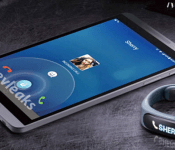
[LEAK] Evleaks tweets a picture showing Huawei smartwatch next to mystery Device
 It seems like we’re approaching saturation point for leaks even before MWC 2014 has even started; master of leaks, evleaks, has posted yet another picture today, this time simply accompanied by the caption “WOW-wei”. Assuming evleaks was making a joke on Huawei‘s oft-mispronounced name, the photo does show the Huawei smartwatch that was leaked just a few days ago by a Huawei executive, accompanied by a mystery device. The device looks almost like the love child of a HTC One and Huawei’s own Ascend P6, and most confusingly, does not resemble any of the devices expected to be announced by Huawei at MWC 2014 including the Ascend P7 and MediaPad X1. It’s also been pointed out that it does look awfully computer generated, but I guess we’ll have to wait and see if Huawei ends up announcing this mystery device in Barcelona.
Mystery device aside, this is a pretty good indication that the Huawei exec actually leaked a production model of the Huawei smartwatch. It looks like Huawei has taken a slightly different approach to smartwatches than say Samsung, instead opting to go with a fitness themed wearable, though how much it is able to do is unknown so far. With all these rumoured devices, Huawei’s press conference at MWC 2014 should be a good one and we can’t wait to see what they have up their sleeves.
What do you think that mystery device is? And do you like the route that Huawei has gone with their first smartwatch? Let us know what you think in the comments.
Source: Twitter

Influx Icon Pack Review, by Alex Miller: an invasion of very detailed, great-looking Icons
 There are almost too many fantastic icon packs available on the Play Store, with something seemingly appropriate for people of any and all tastes. Influx is an icon pack that I think appeals to people who like very detailed and precise icons; created by Alex Miller, the pack features icons that look like have been painstakingly created, each with their own attention to detail, making for something that is incredibly impressive to see in its entirety. The Influx icon pack utilizes square icons with very rounded corners and an artistic shadow to really bring all the logos off the background. Let’s take a closer look:
As you can see, it’s all very artistic and detailed, and the included app makes the whole pack a very complete package. As I mentioned in the video, my only issue with the pack is the masking of unthemed icons which could possibly use another colour besides teal, but in general you might not notice that much as there does appear to be quite a big emphasis on teal in the pack as a whole.
The Influx icon pack is currently on sale for $0.99 and is compatible with all the usual custom launcher support that you’d expect. The pack started with 630 icons, but that number is likely to be much higher as Alex continues to update the pack on a regular basis. Ifyou want to pick up the Influx icon pack, Play Store links will be below, or if you want to follow Alex on Google+ where he is extremely active, you can visit his page here.
Icons: Influx Icon Pack
Price: $0.99
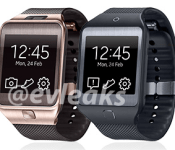
[LEAK] Samsung Galaxy Gear 2 and Galaxy Gear 2 Neo featured side-by-side in a family Portrait
 In recent weeks, there has been increased talk of Samsung’s expected follow-up to last year’s Samsung Galaxy Gear smartwatch. We’ve heard that the new smartwatch will bear almost no resemblance to the original Gear, and there have been rumours that the device won’t be running Android, instead making use of Samsung’s other software project, the Tizen OS. If the latest leak from evleaks is anything to go by, that might not just be a device, but devices; a tweet from evleaks today has shown a picture of two very similar smartwatch devices accompanied by the label “Samsung Galaxy Gear 2 and Galaxy Gear 2 Neo”.
 Probably more intriguing is the fact that only a few hours later, evleaks redacted part of his tweet saying:
I misspoke. Those watches are not Galaxy-branded.
— @evleaks (@evleaks) February 22, 2014
This might just be the strongest evidence that Samsung’s smartwatches are in fact running Tizen and not Android as the ‘Galaxy’ nomenclature is typically reserved for its Android products. We can only assume that Samsung is offer two tiers of wearable devices, probably along the lines of the Note 3 and Note 3 Neo with the Neo providing slightly less performance, though if they aren’t Galaxy branded, this might suggest Samsung will be making this a completely new line of smartwatches. And if these photos are the real deal, it does look like Samsung has completely revamped their watch design, even bringing their almost patented ‘Home’ button to the device. There haven’t been any specifics leaked about the device yet, but then again we only have a few days to wait before we get the official word at the Samsung Unpacked event at MWC 2014.
What do you think of the design of these Samsung smartwatches? Would you be interested in one if they were running Tizen instead of Android? Let us know your opinion in the comments.
Source: Twitter (1), (2), (3) via Phone Arena

Samsung teases the Samsung Exynos Infinity processor ahead of MWC 2014 with bulls and a Giveaway
 Ever since Apple announced their iPhone 5S with a 64-bit processor, we’ve been wondering when Android would be catching up. Perhaps ironically, Samsung actually provides Apple with the 64-bit chip, so clearly it has the means to produce this technology, but has opted to wait before releasing their own iteration. That wait might be over as Samsung has started teasing something called the Samsung Exynos Infinity, which we can only speculate is the long-awaited 64-bit processor. From the teaser above, we can only assume that there will be an announcement at MWC 2014 that will properly detail this Exynos Infinity processor.
 Today, Samsung has also decided to further tease the Exynos Inifity on Twitter from the handle @SamsungExynos with a giveaway: entering is easy enough, simply follow @SamsungExynos and also tweet #ExynosInfinity for the chance to win a Samsung Galaxy Note Pro, which naturally possesses an Exynos processor itself. Not a bad way to promote the new processor, and with only a few days before the Samsung Unpacked event when this will undoubtedly be announced, it does have us all giddy.
What do you think the Samsung Exynos Infinity processor will be? Let us know what you think in the comments below.
Source: Twitter (1), (2) via Phandroid, Phone Arena

IRL: Singtrix karaoke machine

When the Singtrix karaoke machine made its debut at Engadget’s Expand NY event, its creators boldly claimed the diminutive device could make “bad singers sound great.” So what can it do for absolutely terrible singers like yours truly? I spent a few days with the volume set high and the shades drawn low to find out.

The company behind Singtrix is initially offering the vocal processor module as part of a $300 “Party Bundle.” Inside a 27-pound box, you’ll find the processor module, a 40-watt floor speaker, a mic stand, microphone, a collection of cables and a smartphone tray. A second microphone (for backing vocals), a tablet holder and additional pre-installed voice effects are also included as part of a first-run, limited edition bundle.
The front face of the Singtrix sports a backlit display and large controls, which should prove handy in places like bars where visibility and coordination may not be plentiful. A center-mounted knob lets users scroll through the hundreds of presets and adjust volume. While the module can be mounted to the mic stand via an adjustable clamp, access to the rear bank of cords can be a bit tricky when attached. Both the effects unit and mics feature a prominent “Hit” button that triggers an additional, usually more dramatic variant of whatever preset is in use. In several songs, the option proved useful during choruses or especially epic bridges.
Out of the box, Singtrix is loaded with 350-plus vocal presets (including spots for favorites), many of which are tailored and named after specific songs. Song-based names vary from immediately obvious (No. 156: “TGIF”) to riddle-like (No. 313: “9×11 Problemz”). Despite the song-specific titles, singers are encouraged to mix and match effects and songs to find settings they like. Only a small handful of presets are hard-coded to a specific key signature, limiting their usefulness outside their intended songs.
The effects themselves range from subtle to dramatic. Depending on the preset, Singtrix can add a simple delay or reverb to your voice or crank things up with pitch correction or “Bohemian Rhapsody”-esque harmonies. I found comfort in many of the presets that added some stability and improved timbre to my shaky crooning. Many of the more pronounced presets are a great fit for modern pop songs that feature heavily processed vocals, giving live performances a more authentic feel.
As for song support, Singtrix works with basically any device with YouTube access and a headphone jack. An optional app (available on Android and iOS) boasts access to 13,000-plus songs, though most require a $12 monthly subscription and/or the use of in-app credits to stream or download songs. While some might balk at paying for karaoke content that could be found elsewhere, businesses in particular might value the consistency of the app’s library over the hit-and-miss nature of manually searching YouTube.
Overall, the Singtrix makes good on its promise to improve bad singing. It’s a digital security blanket for those of us not blessed with golden pipes. I’d personally be far more inclined to sing in public with the Singtrix on hand than without. At $300, though, you’d likely need to be more than just a casual karaoke fan to justify the cost. While other pricing tiers haven’t been announced yet, offering the effects processor as a standalone product seems like a no-brainer, enabling those with existing karaoke rigs to incorporate the module into their setups. For early adopters, bars/restaurants or, perhaps, small businesses looking to spruce up company parties, the Singtrix will likely be a worthy investment.
– Philip Palermo
Filed under: Misc

Waze for Windows Phone 8 promises not to drain your battery anymore

Windows Phone 8 fans got a pleasant surprise when social GPS app Waze arrived on the Marketplace after Google snapped it up. That’s why it’s such a shame that it caused massive battery drain issues for some users. After months of people airing grievances on various forums, the service has finally unleashed a new version that promises improved battery life along with the usual bug fixes. Unfortunately, the WP8 app stills lags behind its iOS and Android brethren, lacking Facebook and calendar integration, among other features. If you’re cool with what the app can do and could use the battery fix, though, head on over to the Windows Phone Marketplace.
Source: Waze, Windows Phone Marketplace

OS X Vulnerable to SSL Bug Patched in iOS 7.0.6 Update
Yesterday’s iOS 7.0.6 update provided a fix for an SSL connection verification issue, which turned out to be a major security flaw in the operating system. In a support document, Apple noted the patch repaired a specific vulnerability that could allow an attacker with a “privileged network position” to capture or modify data protected by SSL/TLS.

In other words, iOS was vulnerable to a man-in-the-middle attack where an attacker could pose as a trusted website to intercept communications, acquiring sensitive information such as login credentials and passwords, or injecting harmful malware.
According to security firm CrowdStrike, OS X may be vulnerable as well, because it exhibits the same authentication flaw. OS X users are open to an attack on any shared wired or wireless network as SSL/TLS verification routines can be bypassed.
To pull off the attack an adversary has to be able to Man-in-The-Middle (MitM) network connections, which can be done if they are present on the same wired or wireless network as the victim. Due to a flaw in authentication logic on iOS and OS X platforms, an attacker can bypass SSL/TLS verification routines upon the initial connection handshake.
This enables an adversary to masquerade as coming from a trusted remote endpoint, such as your favorite webmail provider and perform full interception of encrypted traffic between you and the destination server, as well as give them a capability to modify the data in flight (such as deliver exploits to take control of your system).
The bug, which has been detailed by Google software engineer Adam Langley, may have been introduced in OS X 10.9. According to Hacker News users, it remains unclear whether the issue is fixed with the latest version of the software, OS X 10.9.2, which is currently only available for developers. Users can check whether or not their computers are affected by the vulnerability by visiting gotofail.com in Safari.

It is likely that Apple plans to release a fix for OS X in the near future to repair the vulnerability, but in the meantime, CrowdStrike recommends avoiding untrusted WiFi networks while traveling. The site also recommends an immediate update to iOS 7.0.6 for users who have not yet installed the newest version of the operating system on their iOS devices.
     |

Samsung Galaxy Note Pro 12.2 review: a tablet that proves bigger isn’t always better

How do you fit 12.2 inches of tablet into your life? That’s a question I’m sure Samsung must have pondered at some point before greenlighting its Galaxy Note Pro 12.2, a device that stretches the upper limits of what we can easily call a tablet. It’s also something I’ve wondered myself, given that its size puts it within uncomfortably close competition with 11- and 13-inch laptops. That increase in screen real estate comes at a high price, too: $750 for a 32GB model and $850 for 64GB, both WiFi-only. LTE-capable models are coming soon, but Samsung hasn’t announced pricing yet. As you might imagine, then, the Note Pro 12.2 isn’t intended for your average consumer. No, the Galaxy Note Pro 12.2 is aimed at the prosumer niche of the market — whoever and whatever that actually means.
The Galaxy Note Pro 12.2 isn’t a complete departure for Samsung, though. Cosmetically, it’s near- identical to the Note 10.1 2014 Edition, except larger. There’s that same faux-leather back replete with “stitching,” and 2,560 x 1,600 display. What, then, aside from a massive screen, makes the Note Pro 12.2 different enough to justify the price? On paper, the answer to that would center around the version of Android it ships with (4.4.2 KitKat), its ability to connect remotely to your PC, as well as Samsung’s Flipboard-like Magazine interface. Let’s be real, though. When it comes to the Note Pro 12.2, size clearly matters most. But that begs the question, can you and your prosumptive tendencies handle it?
Hardware
I’ll admit I was initially skeptical of Samsung’s decision to counter complaints about its cheap-feeling, plastic design with — wait for it — cleverly disguised plastic. More specifically, I’m referring to that faux-leather back we first encountered on the Galaxy Note 3, which appears to be the new build standard for Samsung’s flagship mobile products. It’s something that sounds awful in writing, and seeing it in photos doesn’t do it much more justice.
And yet, my misgivings were unfounded. What I assumed would be a tacky design workaround is actually a sly coup on Samsung’s part. Somehow, with that one change, Samsung’s managed to make this 12.2-inch tablet look professional; a device befitting that “Pro” moniker. The black, textured matte back feels comfortable in-hand and looks like something you’d pull out of your attaché case. It elevates the Note Pro 12.2 to a premium perch other Note tablets fell short of — a place where you could almost forgive its exorbitant price tag. Almost.

As I’ve mentioned before, the Note Pro 12.2 could easily be mistaken for a stretched-out Note 10.1 2014 Edition. It bears an uncanny resemblance that extends even to the port layout. The dual speaker setup occupies both edges of the device, high up enough that your hands won’t muffle the sound. A redesigned, more stylish S Pen (denoted by its grooved, faux-metal cap) remains holstered in the upper-right edge of the device. Below that is where we find the only significant change. Whereas this spot used to house just a covered microSD slot, it now also houses a USB 3.0 port for fast data transfer and charging, though you can still connect via micro-USB if you like. Apart from that, you’ve got a 3.5mm headphone jack on the upper left edge, plus power and volume up top alongside an IR blaster.
The Note Pro 12.2′s front face is similarly unchanged. Samsung’s logo appears in the upper portion of the bezel, while the physical home button resides below and is flanked by soft keys for task management and navigating backward. Speaking of bezels, Samsung appears to have found a sweet spot size-wise that leaves just enough space for users’ thumbs to rest without overtaking the rest of the screen. It’s a decision made out of necessity, as well. At 295.6 x 203.9mm (11.6 x 8 inches), the Note Pro 12.2 is big enough that Samsung didn’t have the luxury of adding to its dimensions. That said, at 750g (1.65 pounds) and 7.95mm (0.31 inch) thick, it’s surprisingly light and thin — two buzz words that are practically a must for outsized mobile products.
Different connectivity options mean different processors for the Note Pro 12.2 line and since this particular model is of the WiFi-only variety, it’s imbued with an octa-core Exynos 5 SoC. The LTE model, on the other hand, will ship with a Snapdragon 800 chip inside. Regardless, both are paired with a healthy 3GB of RAM, and include radios for Bluetooth 4.0 and dual band WiFi a/b/g/n/ac MIMO. Additionally, both come with either 32GB or 64GB of built-in storage. It’s worth noting that, out of box, only 25GB of the 32GB of storage on our unit was available for personal use. Thankfully, you can expand that capacity via microSD, so that internal storage constraint shouldn’t cause much concern. There’s also a massive, non-removable 9,500mAh battery to power that equally massive 12.2-inch, 2,560 x 1,600 display.
Display

For the Note Pro 12.2 and the Note 10.1 2014 Edition before it, Samsung used a TFT LCD, abandoning the hyper-saturated Super AMOLED panels that have always been a hallmark of Galaxy products. The trade-off here are relatively muted colors that makes gazing upon the 12.2-inch panel more relaxing on the eyes. That 2,560 x 1,600 resolution also translates to a high pixel density of 247 ppi, which means greater detail in everything from icons to videos. There’s not a visible pixel in sight, nor should there be. Viewing angles are fantastic, as well, but considering the size of the Note Pro 12.2, I don’t expect you’ll have much need to view it on slant with while you’re lying in bed. Oh, and if you take this thing outside, I’d advise you to seek out shade — even at full brightness, it was very difficult to make out the screen in direct sunlight.
Software

There’s a good amount of third-party software pre-installed on the Galaxy Note Pro 12 — about 27 apps, in total — but thanks to some deft organization on Samsung’s part, you don’t really notice it. You need only access the app drawer for evidence of this tidy housekeeping. The first two icons displayed on the grid are dedicated folders for Google and Samsung apps. Although, in the latter case, there’s a mix of non-Samsung associated third-party apps included like Evernote and Flipboard. Because of this streamlining, the Note Pro 12.2′s app layout takes up just over two screens. Even the default homescreen layout seems a bit cleared up: only one row of apps and two widgets occupy the two default homescreens.
The Note Pro 12.2′s bloat may seem like overkill on Samsung’s part, but the vast majority of it is useful and includes common apps most users would have downloaded anyway. Things like Twitter, NYTimes, Evernote, Dropbox and Netflix, to name just a few examples. The same goes for productivity software like Hancom Viewer (for document viewing/editing), e-Meeting (a conference app) and Remote PC which allows users to mirror and remotely control their PC or Mac. Samsung’s Smart Screen eye-tracking features (i.e., Stay, Pause and Rotation) also make an appearance on the Note Pro 12.2, but they’re disabled by default; you’ll need to dive into the settings to turn them on.
Of course, this being a Note, Samsung’s also bundled in its requisite suite of S Pen apps. The usual gang’s all here: Action Memo (a rebranded S Memo) for quick note-taking; Scrapbook, which collects articles, images or videos you highlight from the web; Sketchbook; and finally, S Note, which integrates directly with Evernote or Samsung account. In truth, this collection of apps serves more as a neat demo of what the S Pen can do, than as useful justifications for having the stylus.
The S Pen’s functionality hasn’t changed from when we last saw it on the Note 10.1 2014 Edition. Removing it from its holster immediately triggers the onscreen Air Command display, a palette-like control for quick access to Action Memo, Scrapbooker, Screen write, S Finder and Pen window. You can also enable the Air Command display by depressing the S Pen’s built-in button when hovering over the screen. Of the lot, only Pen window and Scrapbooker require the user to draw onscreen to effect the desired action. For example, after selecting Scrapbooker, users will need to draw a circle around any items of interest to add to a personal collection. The same goes for Pen window, which launches a pop-up application when a square is drawn onscreen.
Swiping left from the bezel, either with the S Pen or your finger, will slide out an app panel for Multi Window shortcuts. To start filling the available four quadrants of the Note Pro 12.2′s screen, you need only drag and drop the app of your choosing. These windows can resized however you like, granting other onscreen apps more or less space, depending on your needs. On top of this, you can even select apps from the slide out panel to appear as pop-up windows over your Multi Window selections. And in a neat UI flourish, Samsung’s made it so that minimized pop-up windows appear as floating circles, not unlike Facebook’s Chat Heads.

Let’s talk about Magazine UX, the Flipboard-like homescreen/news feed that Samsung designed in collaboration with Flipboard for the Note Pro 12.2. It’s nearly identical to Flipboard, but isn’t officially Flipboard. And it’s made all the more confusing by the fact that specific topic feeds (e.g., Science and Technology, Arts and Culture, Sports, etc.) are not only navigated using the same page flip animation, but also offer Flipboard as a curated news source. So, it is Flipboard… kinda.
Whether or not you’ll appreciate this addition to the Note Pro 12.2 depends on how much you use Flipboard to begin with. Don’t despair if it’s not your cup of tea, though. Unlike on the demo model we previewed at CES, Magazine UX is not set as the default homescreen and is also not mapped to the physical home button. So you can effectively ignore it if you like, but be warned there’s no way to completely disable it.
Remote PC

Perhaps the neatest feature Samsung’s debuting here is Remote PC, which, as the name suggests, allows you to remotely access your PC or Mac. The setup process is fairly straightforward, and Samsung’s step-by-step onscreen guide should take all of three minutes to complete. To get started, you’ll need to download and install Samsung’s dedicated remote access software to your computer, launch the corresponding app on the Note Pro 12.2 and enter an authentication key which will appear on your PC’s screen.
After that, mirroring your PC on the Note Pro 12.2 is as easy as selecting your computer icon from within the app. Remote PC does give you full access to your PC, but it’s not without its quirks. Navigation is split up between a mouse-and-pointer setup, accessible from a submenu, or the default gesture controls. While you’d think it’d be more natural to use the touch inputs for control, I found the traditional pointer control scheme to be more precise. There’s also an understandable bit of lag between what’s being mirrored on your Note Pro 12.2 and the computer. Depending on your wireless connection, though, your experience may vary.
While Remote PC does have its advantages, there is one aspect of it users will find frustrating, and that’s text input. As the Note Pro 12.2 is a tablet, its onscreen keyboard will take up a significant portion of the lower half of the screen — the exact place where most dialog boxes for text entry would appear. The unfortunate result is that you can’t actually see what you’re typing, which made for some unintentionally amusing messages on my part. It’s by no means a dealbreaker — remote access to your PC is an incredible boon in and of itself — but you do need to adapt to its quirks.
Performance

When a reviewer forgets to notice a new product’s performance shortcomings, you know it’s a going to be a solid workhorse. And that’s exactly the experience I had during my initial honeymoon phase with the Note Pro 12.2. Apps loaded quickly, screen transitions were smooth and stutter-free. Everything worked as gracefully as I expected it to with an octa-core Exynos 5 chip and 3GB RAM.
That is, until I began pushing the Note Pro 12.2 to its moderate limits. I say “moderate” because I don’t think enabling one instance of Multi Window on this device should cause it to significantly slow down. It’s a performance hiccup that only grew worse with the addition of more windows. Yes, the Note Pro 12.2 is technically capable of displaying four open apps plus floating pop-ups on top of that, but there’s no real benefit for the user. How could there be when the experience is marred by a noticeable lag? In fact, there’s a pervasiveness slowness to the Note Pro 12.2 that ruins any sense of rapid-fire multitasking. It’s the opposite of what the device’s prosumer customer would want.
As a media viewer, however, you can’t really go wrong with the Note Pro’s considerable screen size. That 12.2-inch screen’s an ideal venue for showing off presentations and high-res photos. It’s similarly fantastic for watching Netflix or any other streaming media, so long as you can find a comfortable way to position it. If you can find a suitable way to prop it up, the Note Pro 12.2 can even serve as a solid replacement for viewing media on your laptop. The dual speakers are powerful enough that you should be able to comfortably watch with chatty friends or even in a moderately noisy environment. As a bonus, there’s also no distortion when the volume is pushed to the max.
And now, back to that Exynos 5 chip. As noted earlier, this WiFi-only model comes equipped with 3GB of RAM and Samsung’s octa-core processor inside; that of the big.LITTLE architecture. So you’re not exactly getting all eight cores firing simultaneously, but a setup wherein the best suited set of four cores, be it for light tasks or heavy processing, takes over. It’s likely the reason the Note Pro 12.2 seems to take its time cycling through tasks when activity ramps up.
From the table below, you can see that the Note Pro 12.2 stands up well in benchmark tests compared to its smaller sibling, the Note 10.1 2014 Edition, or the Tegra-4 powered HP SlateBook x2. And really, those are the only fair comparisons we can make as there aren’t many other tablets that push past the 10-inch mark. What’s curious is that, despite both Galaxy Note devices sharing the exact same processor and RAM allotment, the Note Pro 12.2 underperformed in two areas where it should’ve achieved parity. Then again, even the stronger benchmark results don’t truly reflect our real-world experience with the Note Pro 12.2 and its tortoise-like pace.
| Galaxy Note Pro 12.2 | Galaxy Note 10.1 2014 | HP SlateBook x2 | Nexus 10 | |
|---|---|---|---|---|
| Quadrant 2.0 | 16,639 | 19,530 | 13,660 | 5,363 |
| Vellamo 2.0 | 1,786 | 2,735 | 3,237 | 1,854 |
| AnTuTu 4 | 33,967 | 31,859 | N/A | 19,253 |
| SunSpider 0.9.1* (ms) | 1,044 | 1,069 | 654 | 989 |
| GFXBench 2.7 HD Offscreen (fps) | N/A | 22 | N/A | 12 |
| CF-Bench | 33,250 | 31,567 | 32,725 | 10,096 |
| *SunSpider: scores were run on Chrome using v0.9.1 for consistency. Note 10.1 scored 1,063 on v1.0.1. Nexus 10 scores were run on 10/1/13 using Android 4.3. | ||||
The Note Pro 12.2′s 9,500mAh battery is a significant bump over the 8,220mAh one used in the Note 10.1 2014 Edition. Which makes sense, since it needs more juice to power all the pixels on that 2,560 x 1,600 display. If you’ve ever taken a look at your power management tab in Android’s settings, you know that the display is the biggest drain on battery life. Knowing that, you should temper your expectations for longevity. During a normal eight-hour workday, the Note Pro 12.2 lost just under 50 percent of its charge and that was with what I’d consider normal usage — some light browsing, emailing and monitoring of my Twitter feed. I’m sure it’d retain that charge even longer, perhaps for two days, if power-saving were enabled and it was left to mostly idle under light use.
Compared to the Note 10.1 2014 Edition, the Note Pro 12.2′s formal battery result is a little more promising, but nowhere near impressive. With a locally stored video running on a loop, Twitter set to sync at 10 minutes, one push email account active, as well as WiFi and GPS enabled, the Note Pro 12.2 lasted 10 hours and four minutes. That’s about two and a half hours longer than the Note 10.1 2014 Edition. It’s an improvement, for sure, but as with any formalized test, it’s not really reflective of actual consumer usage. Your personal consumption habits and dedication to power management will dictate just how long you can keep the Note Pro 12.2 powered up.
Camera

Never before in my history of product reviews have I felt sillier than when I walked around Brooklyn taking photos and video with a 12.2-inch tablet. People stared. I could feel them judging me, and rightly so. Not only does it feel ridiculous to take photos with the Note Pro 12.2′s 8-megapixel rear camera, it’s also really difficult. As I mentioned earlier, it’s hard to see the screen in bright sunlight, so oftentimes I wasn’t fully aware of how my shot was framed or if it was in focus. Then there’s the simple matter of maneuvering the Note Pro 12.2 so you can access the camera settings menu or scroll through the mode select wheel. It’ll make you feel clumsy and corny, and don’t you have a smartphone for this purpose anyway?
The Note Pro 12.2 snaps photos at a resolution of up to 3,264 x 1,836 in 16:9 ratio or 3,264 x 2,448 for 4:3 shots. Samsung’s included menu options for burst mode and image stabilization — both of which are disabled by default — as well as the ability to customize the volume key function for video, photos or zoom. That mode scroll I mentioned before offers up the same suite of settings we saw debut on the Galaxy S4: Beauty face, Best face, Sound and Shot, Drama, Eraser, et cetera. During my neighborhood walkabout, I stuck to Auto mode as that’s what most consumers will probably resort to, anyway.
I don’t have any real complaints about the Note Pro 12.2′s photo imaging performance, nor do I have any raves. My final batch of shots were above average. Color reproduction was fairly accurate, although shots with a greater depth of field tended to appear less finely detailed. My sample 1080p video, however, is unwatchable, even with image stabilization enabled. As you’ll see below, the Note Pro 12.2 records ambient audio clearly, but utterly fails to maintain a smooth framerate when the camera or objects are in motion.
Configuration options and the competition

First things first: when it comes to the Note Pro 12.2, you need to decide how much internal storage you need. If you do go down the higher-end route, then you’ll be paying a $100 premium for 64GB of storage, totaling $850. Keep in mind, there is a microSD slot, so you can cheaply augment that storage with up to a 64GB card. In comparison, the 64GB Note 10.1 2014 edition, whose screen is 2.1-inches smaller and bears the same S Pen, Exynos 5 processor, screen resolution and functionality, can be had for $600. That a steep discount of $150 for what is essentially an identical tablet made by the same company.
You don’t need to narrow your choices down to just Samsung’s Galaxy Note line for a high-res Android tablet. There are alternatives like Google’s Nexus 10, which gets you stock Android, a 2,560 x 1,600 resolution and 32GB of storage for $500. Or you can explore something like HP’s Tegra-4 powered SlateBook x2, a 10-inch full HD convertible tablet that comes with a keyboard dock for $480. Although, take note, the SlateBook x2 is only offered with 16GB of internal storage.
When it comes to iOS options, the 9.7-inch, WiFi-only iPad Air looks like a relative steal next to the Note Pro 12.2. For $600, you’re getting a marginally lower resolution (2,048 x 1,536), 32GB of non-expandable storage and access to Apple’s ecosystem. A $100 price bump gets you all that and a roomier 64GB of internal storage. Then again, it doesn’t have an active digitizer pen input, so there’s that. All told, the iPad Air is still the more expensive option compared to the kitted-out Note 10.1 2014 Edition, but it offers a reliable user experience. That’s something neither the Note Pro 12.2 or Note 10.1 2014 Edition can guarantee.
Wrap-up

To me, the Galaxy Note Pro 12.2 is quintessential Samsung. It’s emblematic of that spaghetti-to-the-wall approach we’ve seen the company indulge in time and again. I don’t know that the Note Pro 12.2 needs to exist because I don’t know that there’s actually a niche hungry enough for this product. With its same-y internals and feature load, the Note Pro 12.2 seems more like an endorsement of the cheaper and smaller Note 10.1 2014 Edition. Forget the Flipboard-ish Magazine UX and Remote PC functionality — its only two standout features — everything the Note Pro 12.2 can do, the Note 10.1 can do just as well, or even better if we’re taking benchmarks into consideration.
Then there’s that price. An MSRP of $750 or $850 is hard to swallow considering you’re mainly getting two more inches of screen space and a performance that tends toward a more leisurely pace. The Note Pro 12.2 is also too big to hold comfortably. Yes, it’s a great go-to for media consumption, but you either have to prepare for wrist fatigue or MacGyver a rig to prop it up independently. It’s just not worth the trouble. Prosumer or not, there are better, more cost-effective ways to do what the Note Pro 12.2 aspires to do.

WhatsApp experiencing global outage

No, it’s not just you. WhatsApp, the popular messaging service just bought by Facebook, has been down for about two hours. The company confirmed the outage via its Twitter account, and we’ve been receiving loads of emails from disgruntled users in India and the UK. WhatsApp neglected to say when service will be restored, though it did blame the problem on “server issues.” So no, Facebook isn’t the culprit here, but we’ll chuckle politely anyway if you make that joke in the comments.
Source: WhatsApp (Twitter)
 AIVAnet