


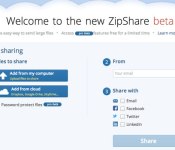
ZipShare from WinZip lets you manage all your cloud storage from one place

WinZip’s long been the go-to .zip file manager for many PC users, but no longer is it just a tool for freeing up some hard drive space. The desktop client embraced cloud storage around the same time it tiptoed into mobile, and now it has a new service based entirely on the web. ZipShare, currently in beta, is a portal for managing data you keep in the cloud on platforms like Dropbox, Google Drive, Box, OneDrive and others. Through the ZipShare site, files uploaded to cloud services are automatically compressed, and can be password protected. They can then be shared by means of an URL, which you can publish straight to social networks, and downloads of that file can subsequently be tracked. Being able to access all your files also means you can easily manage and move them between different storage providers. It’s not the best it can be on mobile devices just yet, but should be when it drops the beta tag within the next few months. Go check it out for yourself before that happens, though: all advanced features are currently free, but could cost up to $10 per month when the service launches for real.
Filed under: Storage, Internet, Software
Source: ZipShare, TechCrunch

Lumus and eyeSight deal brings gesture control to DK-40 smart glasses (hand-on)

Imagine a pair of Smart Glasses that you didn’t need to fondle just to dismiss notifications, or worse, speak out loud to like a crazy. It’s that exact thought that brought Lumus and eyeSight together. If you know each company’s respective products, you don’t have to imagine too hard what’s going on, but if you don’t? Basically Lumus makes a Google Glass-like product that has a see through display in one lens that shows notifications, calendar entries and so on. EyeSight makes software that allows gesture control through existing cameras (like that one in your laptop or phone), and has, for example, just penned a deal with Oppo that sees it baked into its phones native controls (wave to browse the gallery etc.).
The collaboration between Lumus and eyeSight was announced here at MWC, and we just swung by to take a look. The Lumus glasses we saw back at CES are unchanged, but this time around you can dismiss email and social media notifications (for example) with a simple flick, or pull out reminders and calendar entries from the side with a swipe. We were mighty impressed with how well it worked, and how fluid and responsive the interaction was. Of course, this is only a simple demonstration of what is possible, but it’s not hard to imagine more creative applications for it further down the line (games, media control etc). Of course, some might argue that waving around in the empty space in front of you is no less conspicuous than talking to yourself, but once you’ve tried it for yourself, we think you’ll agree it’s a much easier way to interact with a HUD than an out-of-sight touchpad or unreliable voice command. Lumus still hasn’t confirmed commercial plans for its glasses, so it could be a while before you decide for yourself.
Filed under: Wearables
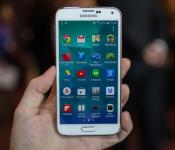
Samsung Galaxy S5 review (hands-on)


BARCELONA, Spain — Metal body design? Nope. Eye-wateringly crisp 2K+ display? Nuh-uh. Overhauled Android interface? Only a little. After all the rumors and hype, the Samsung Galaxy S5 revealed with much fanfare at Mobile World Congress is more an iteration on the Galaxy S line than the fresh, whiz-bang package we’d all come to hope for and even expect.
Yes, it has a fingerprint scanner, and a heart rate sensor, too, not to mention Android 4.4 KitKat and a roster of muscular specs. From what I’ve seen, the Galaxy S5 shapes up to be an excellent device that will keep Samsung at or near the top of the smartphone heap. Yet the been-there, done-that design isn’t novel enough to trample rivals the way Samsung might hope.
Samsung still has a ways to go to reinspire jaded followers and fans, and those who value luxury materials and crafted designs over Samsung’s stamped-out phones should keep the door open for Apple’s iPhone 6 and HTC’s forthcoming sequel to the beautiful HTC One.
Design: More of the same
In designing the Galaxy S5, Samsung didn’t go very far for inspiration. In fact, the Galaxy S5′s body looks even more like the Galaxy S4 than the GS4 did the Galaxy S3. It has rounded edges, the same steep sides with shiny and ridged silvery trim, and a slightly more rounded central home button shape to the S4′s more rectangular outline.
The back panel motif is different, I’ll give Samsung that. Tiny dimples cover the rear, and in addition to white and black (oh excuse me, Charcoal Black and Shimmery White), the GS4 will also launch in enticing copper and bright blue. Not every market or carrier will sell each shade, but at least Samsung has decided to expand its color palette to some more lively hues.
At the end of the day, the phone still feels like it always has: like plastic. That’s not necessarily a bad thing, but if Samsung is at all striving for loftier ambitions, it hasn’t reached those heights.
Samsung has also slightly redesigned the Micro-USB housing on the bottom of the phone; it now has a cover. Up top the IR blaster makes it triumphant return, and on the back, the heart rate monitor cleverly integrates with the camera’s LED flash.
 Samsung will initially launch the Galaxy S5 in four colors.(Credit: Andrew Hoyle/CNET)
The GS5 is only a fraction larger than the Galaxy S4 — 5.1 inches versus the GS4′s 5-inch display. This new phone, too, has a 1080p HD AMOLED display, so the screen’s pixel density will be just a breath looser, though you’ll never notice the difference.
The Galaxy S5 measures 142mm by 72.5mm by 8.1mm — or 5.59 inches tall by 2.85 inches wide by 0.32-inch deep — and weighs 145 grams, or 5.1 ounces. It’s taller and heavier than the Galaxy S4 as a result of its extra hardware.
Break out the supersoakers, kids. Feedback about the waterproof Galaxy S4 Active prompted Samsung to make the Galaxy S5 waterproof and dust-proof in alliance with military spec IP67, which means that it can take a bath for up to 30 minutes at about 3 feet down.
TouchWiz gets a face lift
We’d heard rumors that Samsung was overhauling the TouchWiz interface that rides over Android, something I’ve been wanting for a long time now. While the changes are’t sweeping, there are some tweaks that freshen up the look and feel, and one area that gets a complete visual redo.
 Samsung reskinned a few menus, like this Setting menu, for the Galaxy S5.(Credit: Andrew Hoyle/CNET)
First, though, you’ll want to know that the GS5 runs Android 4.4 KitKat and has all the same functions as Android’s OS. It also carries over Galaxy S4 elements like the expandable quick access settings in the notification tray.
What is different is mostly subtle, like a Google services folder loaded onto the home screen of the demo unit I saw, and new icons in the notifications panel, including new quick access buttons for Quick Connect and S Finder. Likewise, the homepage overview you see when pinching in on a home screen now appears as panels, not a grid.
You still swipe right in the app tray for your list of programs and widgets. Any rumors of Samsung cutting back on its own apps have been greatly exaggerated, at least in this phone.
Samsung Hub looks like it’s changed names to Samsung apps, as has WatchOn to SmartRemote; my demo unit still has S Health, S Voice, S Planner, S Note, and the Knox security app.
One area was drastically altered: the Settings Menu. Instead of settings broken out into four tabs, you see a vertically scrolling menu of round icons that float over a black backdrop, organized by collapsable sub-categories. It’s the boldest new design, but I find the infinitely scrolling list a lot more space-consuming and visually confusing than the GS4′s tidy tabs.
Another new area is a Kid’s Mode, which creates a sandbox for tykes to play with approved apps while keeping the rest of the phone’s contents out of bounds.
Core components
Samsung has blessed its GS5 with top-of-the-line specs befitting a flagship device. There’s the 2.5GHz quad-core Snapdragon 801 chipset for a start, a 16-megapixel rear-facing camera (up from 13 megapixels), and a 2-megapixel sensor on the front.
A 2,800mAh battery may not be the largest in all of smartphonedom, but it’s a little larger than the Galaxy S4′s 2,600mAh ticker. Then again, the new phone is a bit bigger, too. Samsung says that it’s Ultra Power Saving Mode will double battery life when you’re running low. It also promises 21 hours of talk time and over 16 days of standby time on a single charge.
 Samsung’s Galaxy S5 looks a lot like the Galaxy S4. The real changes are inside.(Credit: Andrew Hoyle/CNET)
As in past years, there are 16GB and 32GB storage options, with an SD card that supports up to 128GB. Other incidentals include 2GB RAM, NFC, Wi-Fi, USB 3, Bluetooth 4.0 low-energy, and support for the fifth-generation Wi-Fi 802.11ac standard for faster Wi-Fi delivery.
In fact, Samsung says that its Galaxy S5 will combine Wi-Fi and LTE to download items even faster, theoretically up to 600-650Mbps (they’re calling this marvel Download Booster).
Fingerprint and heart rate scanners
Following in the footsteps of Apple, HTC, and Motorola (the wayyy distant footsteps), the Samsung Galaxy S5 has its own fingerprint scanner for unlocking privileges and mobile payments.
The scanner integrates into the screen above the home button, so that you swipe your finger down half over the bottom portion of the display and home button. You can add profiles for three fingerprints, and you get a backup password in case the identification fails. The fingerprint reader scans your finger eight times when before up your profile.
I locked and unlocked the phone at least a dozen times. It worked well most of the time, but didn’t read my finger in every case. You do need to keep your finger centered on the screen, which would make thumb swiping more of a challenge.
I didn’t see it set up on a phone, but this partnership with PayPal means that Galaxy S5 owners will be able to authenticate transactions with the brief press of a finger after signing onto PayPal’s program.
Fitness fiends get a friend in the heart rate monitor that’s part and parcel with the camera flash. You hold your finger over it to take your pulse; the area glowing red when activated when you launch it from the S Health 3.0 app. As a reminder, S Health also gives you a pedometer, fitness coach, and exercise tracker.
 You wouldn’t know it, but there’s a heart rate monitor built into that camera flash.(Credit: Andrew Hoyle/CNET)
Camera and video
Samsung’s cameras are typically very good, especially outdoor shots. What hasn’t typically been so great is low light. Samsung didn’t address that in the briefing we got here at MWC, but the company did tout a whole mess of new fun performance boosts and software trinkets.
The one I care about most is the lickety-split autofocus, just 0.3 second, which Samsung cites as being three times faster than autofocus on the Galaxy S4. This is due to the addition of what Samsung calls Phase Detection autofocus, a feature usually found in DSLR cameras making its first appearance in a smartphone. That means you’ll have a higher success rate capturing the moment with squirmy dogs and kids.
A new on-screen control comes to the camera app, and it’s a pretty good one. Tap it and you’re turning on real-time HDR, so you can preview the results before committing. It works for stills, video, and even burst mode pictures, thanks to an extra chip within. Samsung also notes that the GS5 uses a more sophisticated HDR technology that makes images look even better.
Selective focus is a post-editing trick that Samsung gives you, and on that you may find familiar if you’ve seen the Lytro and the Nokia Lumia 1020. With it, you’ll set the area of focus after you take a photo, say for a shallow or long depth of field. There’s also a new tool called Virtual Tour, which cobbles together a 360-degree view. It isn’t clear yet how this might differ from Google’s Photo Sphere.
It looks like Samsung took a hint from Windows Phone OS with this last highlight, the ability to download other modes to and through the native camera app.
 Check out those dimples…on the Galaxy S5′s back panel.(Credit: Andrew Hoyle/CNET)
When can I get it and how much does it cost?
Samsung will sell the Galaxy S5 on April 11 in over 150 countries. In the US, it’ll come to AT&T, Sprint, T-Mobile, and Verizon Wireless; MetroPCS and U.S. Cellular. You’ll also be able to pick it up at retail stores like Best Buy, Amazon, Costco, RadioShack, Sam’s Club, Target, and Walmart.
We are still waiting on pricing details, which carriers and retailers will release on their own.
How does it stack up?
It may not be the most exciting new smartphone there is, but from what I’ve seen so far, the Galaxy S5 earns keeps Samsung’s legacy of high-end Samsung smartphones strong. The specs are high end, and enough has changed on the hardware and software fronts to seem worthy of an upgrade when your contract runs its course.
However, those tiring of Samsung design sameness and looking for a radical new look and feel don’t have as many reasons to stay if they aren’t moved by the phone’s fingerprint scanner or heart rate monitor. Samsung, perhaps a victim of its own hype machine, opens the door for phone buyers to hold off on making plans until HTC announces its One 2.
We’ll keep you posted with what else we learn about the Galaxy S5. In the meantime, catch all the mobile news from Mobile World Congress 2014.
Article updated February 22 at 1:08AM PT to reflect Samsung’s correction of a previous statement about the processor version.
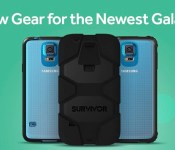
Griffin launches their Samsung Galaxy S5 cases which either cover, or don’t cover, that dimpled Back
 With the release of the Samsung Galaxy S5, it’s now time for all the accessory manufacturers to out their Samsung Galaxy S5 cases and one of the first to launch their’s is Griffin Technology. Griffin is probably best known for its Survivor line of cases which provide very heavy-duty protection of whatever phone happens to be inside the case. Naturally, Griffin is bringing out a Survivor series case for the Galaxy S5 as well as two other slightly less protective cases.
 If you haven’t heard of the Griffin Survivor before, it is “designed to meet military standards” and as you can see, it certainly looks the part. The Survivor for the Galaxy S5 will have a polycarbonate frame on the inside with a silicone jacket to give your device protection from 6-foot drops onto all manner of surfaces including concrete. There is also a built in screen protector to add further protection for your touchscreen. Griffin is bringing the Survivor out for $49.99 USD (to find out more you can visit the product page here).
 While some of you may prefer the Survivor as it hides the dimpled back cover of the Galaxy S5, some of you might actually want to show off exactly which colour you ended up getting, though don’t want to compromise on protection. For that, Griffin also has a solution with the Survivor Clear, a case that still retains the 6-foot drop protection of the Survivor but can still bask in all its naked glory thanks to its transparent polycarbonate shell. If this is your cup of tea, the Survivor Clear will be sold for $29.99 (see more on its product page here).
 The last case for the Galaxy S5 that Griffin launched today is the Reveal. While it doesn’t have the protective qualities of the Survivor and Survivor Clear, it is only 1.6mm thick all over and is still able to show off the rear of your Galaxy S5. And being made from polycarbonate, it’s likely to be able to take a few bumps and bruises during day-to-day use. The Reveal will be sold for $24.99 (check out its product page here).
So there you have it, three great new Samsung Galaxy S5 cases from Griffin Technology, so you better get in quick as it looks like they’re selling quite well; the Survivor’s estimated shipping time-frame has blown out to 8-10 weeks. Let us know if you’re eager to get one of Griffin’s new cases and which one.
Press Release
Griffin Launches New Accessories for the Highly Anticipated Samsung Galaxy S® 5
Griffin’s new collection includes the best-selling Survivor, Survivor Clear, and Reveal Cases
Nashville, Tenn. – February 24, 2014 – Griffin Technology, one of the world’s foremost creators of innovations for everyday life, releases a new lineup of cases for the newly announced Samsung Galaxy S 5 that features unique, stylish and protective designs suited for every taste.
“Griffin’s new accessories for Galaxy S 5 offer a variety of options allowing users to showcase their individuality,” said Chris Paterson, General Manager of Design and Product Marketing at Griffin Technology. “Our cases for Galaxy S 5 provide the perfect combination of style, protection, functionality and convenience to highlight the new features of the phone.”
Leading the line-up of Samsung Galaxy S 5 accessories are the best-selling Survivor and Reveal collections. Survivor for Samsung Galaxy S 5 is Griffin’s most protective case, designed to meet military standards and synonymous with extreme-duty protection. Built on a shatter-resistant polycarbonate frame and clad in rugged, shock-absorbing silicone, Survivor provides an added layer of water and dust resistance to the phone while also protecting against a 6-foot drop onto concrete, shock, vibration, dirt, sand and a host of other environmental factors. A built-in screen protector seals Galaxy S 5’s touchscreen, and a detachable heavy-duty clip secures the phone to a belt or bag strap. Survivor for Samsung Galaxy S 5, $49.99, is available for order today atstore.griffintechnology.com/survivor-for-samsung-galaxy-s5.
Survivor Clear for Samsung Galaxy S 5 is a crystal-clear polycarbonate case that offers ultimate protection while displaying the beauty of the Galaxy S 5. The case is engineered to withstand bone-shaking vibration, and extra-tough, resilient TPE rubber at corners and edges offers impact protection that can withstand a 6-foot drop onto concrete. The edges are molded for a secure grip, with openings for easy access to connectors and controls. Survivor Clear for Samsung Galaxy S 5, $29.99, is available for order today at store.griffintechnology.com/survivor-clear-for-samsung-galaxy-s5.
The ultra-thin Reveal for Samsung Galaxy S 5 is a one-piece polycarbonate shell that shows off the new phone’s good looks. Reveal adds just a little over a millimeter in thickness, yet its slim rubber lining cushions and grips tight to hug the Galaxy S 5. Reveal for Samsung Galaxy S 5, $24.99, is available for order today at store.griffintechnology.com/reveal-for-samsung-galaxy-s5.
Survivor, Survivor Clear and Reveal will initially be available in black, with new colors rolling out over the following few months. Current orders for Survivor will ship in approximately 10 weeks, and current orders for Survivor Clear and Reveal will ship in 4-6 weeks.
Other popular collections from Griffin, including Identity, KaZoo, wallets, and armbands for Galaxy S 5 will be available soon. Griffin’s current range of world-class charging solutions and cables are also compatible with Samsung Galaxy S 5 and are available today. To view all of Griffin’s current accessories for the Samsung Galaxy S 5, visit store.griffintechnology.com/smartphone/galaxy-s5.
For more information about Griffin Technology visit www.griffintechnology.com.
About Griffin Technology
Founded on Paul Griffin’s kitchen table in 1992, Griffin Technology Inc., is today one of the world’s foremost creators of accessories for home, mobile, and personal technology. Unique products such as iTrip®, PowerMate®, iFM®, iMic® and Evolve® Wireless Speaker System have broken new ground in consumer electronics and created loyal fans the world over. Today, Griffin products are conceived, designed and developed in-house and continue to push the envelope of the industry they helped create. Learn more about Griffin’s entire range of ingenious designs atwww.griffintechnology.com, www.facebook.com/griffintech and on Twitter, @griffintech.
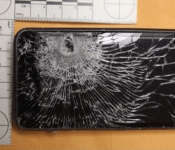
HTC EVO 3D saves man’s life by stopping a bullet from killing Him
 While we’ve been clambering all over the new Samsung Galaxy S5, HTC phones are out there saving lives. This HTC EVO 3D (wrongly reported as a HTC One in the source article) saved a Florida man’s life today after it managed to stop a bullet that might otherwise have killed him. The phone was in his front shirt pocket when he was shot at manning a gas station in Florida, and it appears that the battery managed to take the brunt of the bullet without letting it pierce through.
 While the man certainly has Lady Luck on his side, HTC has also decided to chime in on the whole event, sending the main a “Glad You’re OK” care package which includes a HTC One and assorted HTC accessories. That might sound like a good deal to you, but don’t go around getting shot at in case your phone doesn’t quite have the bullet stopping abilities of the HTC EVO 3D.
 If you have a HTC EVO 3D, you can probably sleep a little better tonight knowing your phone is protecting you. Do you think your phone could stop a bullet? Let us know what you think of this story in the comments.
Source: Phone Arena



BlackBerry could turn BBM into a payments platform

BlackBerry’s showing off its plans to woo back all of the customers who ditched it during the BB10 transition. In addition to two new handsets, the Canadian outfit is also considering turning BBM into a mobile payments platform in the emerging markets where it still has traction. In a chat with Re/code, enterprise chief John Sims said that BlackBerry is meeting with partners and “exploring the market.” It wouldn’t be the first time the company has waded into the mobile money lake either, considering that it teamed up with an Indonesian bank to test BBM-based peer-to-peer fund transfers back in 2012. As long as it’ll enable us to split the dinner bill without looking up from our phones, we’re up for it.
Filed under: Cellphones, Mobile, Blackberry
Source: Re/code

Netflix mocks Amazon Prime Air with hilarious ‘Drone 2 Home’ video

Netflix’s not-Qwikster DVD-by-mail business doesn’t get the same amount of attention as the company’s streaming arm, but as this video (embedded after the break) shows, it still has some imagination. Dug up by Hacking Netflix, the Drone 2 Home demo video imagines Netflix’s famous red envelopes being delivered by quadcopter — wherever you may be (camping, in the office, in the bathroom — wherever). Posted by a couple of employees, it was apparently produced for the DVD division’s annual meeting. We’re still not sure if Jeff Bezos’ holiday-timed Amazon Prime Air drone-delivery reveal was anything more than a publicity stunt, but GM Hank Breeggemann’s tongue is firmly in cheek as he announces Netflix’s “return to our creative roots.” Of course, there are some drawbacks to spending “literally days” working out the bugs — but you’ll have to watch to find out.
Filed under: Home Entertainment, HD
Source: Hacking Netflix, YouTube (1), (2)

We get touchy-feely with Fujitsu’s haptic sensory tablet (video)

Since Fujitu’s prototype Haptic Sensor Tablet revealed yesterday is all about touch, describing it will be like trying to explain how a steak tastes. But here goes: it works by emitting ultrasonic vibrations below the touchscreen, which can be pulsed with varying force on any region of the screen. Those oscillations actually push your finger off the surface of the tablet and, depending on the force, can give different tactile sensations. For instance, a high pressure layer of air can reduce friction, making the surface of the screen seem slippery. By contrast, rapidly varying the pulses can make the display seem rough or even bumpy.
At least, that’s the theory. After trying it, we found some illusions like the slippery surface to be very convincing, for instance. But the rough texture sensation feels more like the screen is just sticky, and the bumpy experience is even less convincing. When touching the crocodile skin, it just felt like I was moving my finger over slippery and then clingy patches. There’s also a strong buzzing sensation, which is mildly disconcerting. All that said, though, it was still a lot of fun, and it’s hard to see how you could get much more realistic than that with a smooth, 2D surface. There’s a video after the fold showing it in action, but we apologize for the occasionally poor sound quality — as you’ll see, each time the haptics activated, it messed up our camera’s microphone.
Filed under: Tablets

Are Social Apps Key to Smart Phone Business Promotions?
The smartphones are the most prominent portable mechanisms, utilized by individuals far and wide. Individuals of all ages are pulled in to the smartphones as they profit a ton from the extensive variety of characteristics accessible with these portable gadgets. It is of no shock that nowadays, the advancement of apps for the advanced cells has turned into an essential venture in the versatile promoting fights of generally associations. Given the way that countless utilize these portable units, it is extremely useful to include shrewd mobile phone apps advancement in all limited time methods.
 Here are the reasons why creating apps for these mechanisms will be helpful for your business
– It is the pattern in today’s reality, accompanying the pattern is extremely essential for the achievement of any business. Since most businesses nowadays are included in application advancement for the Pdas, it is paramount that your business additionally takes after this pattern so individuals don’t feel that your business is not progressive. Since most individuals are tech keen, they anticipate that businesses will think of innovation based showcasing fights. Those businesses which neglect to do so need to endure in the long run.
– Viral showcasing potential – through the procedure of application improvement, you will have the ability to make viral advertising battles that will focus on all the clients of advanced cells. Such crusades can make your business exceptionally prevalent inside a brief time of time. Assuming that the clients revel in the characteristics accessible with the requisitions, they won’t just download and utilization it, however they will additionally urge other individuals to do so. The crusade will have the capacity to make a great and enduring impression of your business on the personalities of the individuals.
– Cost successful when you need to select different types of advancements, for example, TV notices, ads on daily papers and so on you will be using a ton of cash all the while, without getting any true outcomes. Then again, through application improvement for the Pdas, you will have the capacity to accomplish a great deal from your limited time deliberations without needing to use a fortune on commercial. When the requisition is created, you won’t need to use any more cash on it.
– Connect through online networking all the advanced mobile phones like iPhone, Samsung Galaxy Tab and so on accompany online networking modules for Facebook, Twitter and so on. Consequently, application improvement will permit you to interface with an extensive variety of individuals through online networking. The point when the clients of these versatile gadgets will join with their companions through social networking, they will have the ability to impart the smartphone provision your organization has created. The fame of your business will expand and your site will profit from higher measure of activity.
With our present innovation driven social order, it might be trying to stay aware of the most recent devices and advancements. It’s turned into a fixation, particularly with smartphones, because of their potential for business development and connections. It doesn’t make a difference assuming that you’ve been utilizing a smartphone or tablet for quite some time, or in the event that you are simply bouncing on the temporary fad, this technology is without a doubt staying put.
To keep making an effect or achieve your crowd on a more extensive level, once in a while the main alternative is to uncover how new innovation can absolutely affect your business and grasp it using phone system direct.
 AIVAnet