


OS X update closes networking security hole, brings more FaceTime features

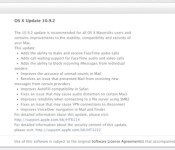
Just days ago, Apple released an update for iOS that closed up a web networking security hole, and today Macs running OS X Mavericks have gotten similar treatment. The update to 10.9.2 doesn’t explicitly list the SSL vulnerability patch among its updates in the download notification, but we’ve confirmed its presence with Apple. The update also brings along a slew of other security fixes as well. And, if you aren’t running Mavericks just yet, Apple tells us not to fret, for separate security updates tailored to other affected versions of OS X will be coming along shortly.
Along with the peace of mind knowing your laptop is more secure than it was yesterday, the update also delivers FaceTime audio calling and call waiting to desktop voice chats, plus iMessage is getting the power to block folks from sending you messages. Naturally, 10.9.2 also brings various audio, Safari and email bug fixes, too. The update’s available now, so don’t let us keep you from it. Stay safe, folks.
Filed under: Software
Oral-B’s smart toothbrush wants to fix our dumb hygiene habits (hands-on)

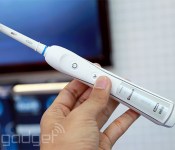
Were we expecting to find a Bluetooth-enabled toothbrush here at MWC? No, we weren’t. Did we physically put it to the test, after a long line of other exhibition goers? No, we certainly did not. However, we’d be more than pleased to show you how the Oral-B’s SmartSeries 7000 might earn its keep. As you’re about to see, the $220 gizmo can do plenty of things that normal toothbrushes can’t.
The 7000 is about the same size and weight as any other fancy electric toothbrush (if a bit heftier than its crowdfunded rival), and is compatible with any ol’ Oral-B brush heads you may have in your medicine cabinet. It’s handsome enough, but really: it’s a toothbrush, not a fashion statement. Anyway, as soon as the toothbrush and your phone have forged a connection over Bluetooth, firing up the 7000 will start a countdown to oral cleanliness in the companion smartphone app.
You (or your dentist, if you’re the responsible type) can add and tweak those timers as desired, though the default timer will have you scrubbing different areas of your mouth for two minutes. In case the sheer boredom of brushing your teeth for that long is too much to bear, you can also thumb through a stream of news articles or local weather reports (no, really) to help you hang in there. Turns out, just furiously mashing those bristles into your teeth isn’t great either, so the timer will blink red if you’re pressing too hard.

Oh, but the fun doesn’t end once you’re gleaming. The 7000 sends over your personal brushing data to the app, where it’s turned into pretty graphs and accolades for prolonged brushing. Your dentist can specify certain areas you should focus on while brushing too, which appear during the countdown to keep you moving in all the right ways. And if you don’t have a dentist to meet regularly? The app will find and list local ones, though you’ll have to deal with all that insurance stuff on your own (unless you live in Europe, but let’s not get into that).
Matt Brian and Sharif Sakr contributed to this report.

Motorola confirms Moto Maker service coming to Europe in Q2, starting in the UK and Germany

We’ve seen and heard plenty from most of the main players here at MWC, but one company has remained eerily quiet, until now. Motorola’s situation has changed significantly in recent weeks, and that change of plans has taken attention away from hardware releases, and back onto how it plans to reinvent itself post-Google. But, there is news. Rick Osterloh, SVP Product Management has just announced that its popular Moto Maker service will be coming to Europe in Q2. First in the UK and Germany, but more countries to follow. Mark Randall, SVP Supply Chain & Operations also revealed that while its Texas plant will continue to handle the US side, they are exploring options for Europe. This could involve a mix of local sourcing, or order merging with standard orders from Chine. At the very least, if you weren’t happy with the default color options it launched with, there’s hope for you yet!
Filed under: Cellphones, Mobile

Motorola: ‘We’re working on (another) a watch too’

Well, well well. Guess who’s back in the watch game? Motorola. Of course, it already did the watch thing, but Rick Osterloh, SVP of product at the firm, has just confirmed that the company is working on another smart watch, and it will be coming in the next few months. At a press conference at MWC, Osterloh commented that the problem with current watches is that no one wants to wear them (hear that Samsung?), and it’s a problem they are tackling head on. It also might not just be another straight up sports watch this time, with Osterloh asserting that “it’ll solve some real user problems.” Good looks and brains? Surely not.
Filed under: Cellphones, Wireless, Mobile

Nominate your favorite gadgets for the 2013 Engadget Awards

No, that 2013 isn’t a typo. With CES 2014 already behind us, it may seem silly to take a look back at the previous year in tech. But let’s not get too ahead of ourselves — 2013 brought plenty of innovative products, and we want to hear which were your favorites.
It’s time for the 2013 Engadget Awards, so submit your nominations for the 12 categories below. You don’t need to fill in a pick for each one, but make sure your selections are from the 2013 calendar year. (Helpful hint: just disregard anything from CES 2014, and you’ll be good.) Nominations will be open until 11:59PM ET on Friday, March 7th, and then we’ll narrow down your submissions to the most popular picks for final voting. Now, get to it!
var _polldaddy = [] || _polldaddy; _polldaddy.push( type: “iframe”, auto: “1”, domain: “engadgetpolls.polldaddy.com/s/”, id: “engadget-awards-2013-reader-s-choice”, placeholder: “pd_1393347540” ); (function(d,c,j)if(!document.getElementById(j))var pd=d.createElement(c),s;pd.id=j;pd.src=(‘https:’==document.location.protocol)?’https://polldaddy.com/survey.js’:’http://i0.poll.fm/survey.js’;s=document.getElementsByTagName(c)[0];s.parentNode.insertBefore(pd,s);(document,’script’,’pd-embed’));

Samsung unveils Knox 2.0, lets users run Google Play apps even more securely

Exactly a year to the day after it first announced its Knox security solution, Samsung’s returned to Mobile World Congress with news that it’s making it even easier to secure and manage Galaxy devices. With the launch of Knox 2.0 today, Samsung’s changed the way the platform handles Google Play apps, digitally securing their data without the need to run them in a dedicated Knox workspace. Before, personal and work-related apps were separated, but Samsung says “most” Google Play apps can now live in Samsung’s secure world. It’s certainly serious about its new features, as CEO JK Shin popped up at the event to drive home Samsung’s desire to nail the enterprise market.
Samsung wants more secure apps across the board, so it’s also launching Knox Marketplace, a dedicated cloud-based app store that lets tech managers grab apps and install them on all employee phones with a few clicks of a button. Box and GoToMeeting are already on board, and there’s plenty of enterprise companies already working to make their apps available. Samsung tells us that the new features will begin rolling out in the second quarter, and it’ll comes pre-installed on the newly unveiled Galaxy S5. First generation Knox users will get an upgrade to the new version as soon as their device gets an upgrade to Android 4.4 KitKat — whenever that may be.
Filed under: Cellphones, Internet, Software, Mobile, Samsung
Breaking the smartphone mold isn’t easy. Just ask Jolla

Jolla’s got a big problem, and the company knows it. The small Finnish startup has grand plans to upend the smartphone paradigm with its modular phone and unique gesture-based OS, but that foreign approach has left some users confused. The MeeGo-derived Sailfish OS relies entirely on swipe navigation — there are no soft keys onscreen — and the current tutorial does a poor job of explaining how it all works.
“Many people have difficulties because we suck,” said Senior Designer Jaakko Roppola here at Mobile World Congress in Barcelona. “We’re not very good at the first-time user experience.”
That candid admission may ring true for the startup now, but what Jolla is exceedingly good at is listening to and quickly addressing community feedback. That eagerness to please has not only led to recent improvements in battery life and connectivity for the nascent operating system, but also the integration of a user-created WiFi hotspot option.
Marc Dillon, Jolla’s co-founder and an ex-Nokia engineer, paints the operating system’s rough edges as a by-product of getting the first Sailfish device, a modular, two-part design that adds customization via swappable backplates, out to market within six months from announcement. He sees the launch commitment as paramount to the company’s current success and traction with users. That tight turnaround and focus on the core OS experience is mainly why Sailfish’s gesture tutorial left users confused. Although, Dillon’s quick to point out that Jolla’s not entirely to blame for the lack of clarity.
“I did find that a lot of people didn’t go through the tutorial for one reason or other,” he said, adding that the company might just keep the tutorial persistently exposed to alleviate concerns.
“[Jolla’s] ultimate target is to make a device that is powerful enough for a power user, but simple enough that anyone can use it after they learn just a couple of tricks.”
So who is the typical Sailfish user? “They know who they are,” Roppola told me with a big smile; a response that indirectly points to early adopters. Dillon corroborated this take, saying that “[Jolla’s] ultimate target is to make a device that is powerful enough for a power user, but simple enough that anyone can use it after they learn just a couple of tricks. And [for] people that are becoming frustrated with their smartphone ruling their life.” If that sounds like a neat marketing message, it is, but it’s also not entirely off the mark. Though Dillon might want to rethink that latter bit, as Sailfish’s deeply invested community is responsible for some clever software hacks and hardware innovations.
That end-user experimentation has led to the creation of e-ink, wireless charging and physical keyboard covers for its Other Half smartphone, some of which are on prominent display at Jolla’s MWC booth. It’s one of the reasons why future incarnations of Jolla’s Sailfish devices will retain that two-part modular design. As Roppola explained to me, the company wants to avoid the “culture of throwaway devices,” which a shift to a unified design might encourage. He believes that the Other Half’s unique design, which imparts new software functions via swappable backplates, leaves it open to repairs and augmentation not possible on the current crop of smartphones.

Though Jolla is focusing its attention on the existing Other Half smartphone, Dillon assured me there is a device roadmap for Sailfish. New form factors are on the way, but much of the heavy lifting will be done through manufacturer partnerships. “The way that we as a company scale out to lower price points and higher price points is by partnerships,” he explained, hinting that Sailfish could be scaled down to work on a smartwatch. Dillon even took some potshots at manufacturers caught up in Android’s market dominance, saying that those companies have no choice but to compete either “with price or go with flash.” Sailfish, then, offers big-name manufacturers an alternative: uniquely branded Sailfish devices that highlight their content on a dedicated home screen pane.
Jolla’s partnerships with Angry Birds maker Rovio, Finnish clothing company Makia and cloud storage company F-Secure — all announced just this week — are the first concrete examples of these planned partner tie-ins. Dillon wants to position Sailfish as a platform for app integration and cited Facebook and Twitter on iOS and Android as an example of this strategy. Rather than merely host apps, Dillon hopes Sailfish will offer developers a mobile platform that allows for a deeper platform integration, not just a redundant app port.
“What I’m looking for now and what I believe the smartphone world is going to is a level of integration where … [users] can actually have a seamless integration inside of the device so they can go beyond the application,” Dillon said.
New form factors are on the way, but much of the heavy lifting will be done through manufacturer partnerships.
It’s an ambitious strategy that, unfortunately, isn’t bolstered much by the three companies currently on board. Rovio’s back cover prominently features an Angry Birds illustration, and imparts a themed wallpaper, as well as a content stream featuring user comments and photos. It’s not really all that exciting. Makia’s implementation is much the same and comes off as a direct-to-consumer promotional channel. There’s certainly potential for manufacturers and developers to really take advantage of Dillon’s app-integration proposition, but nothing’s achieved that vision yet.
To spread the Sailfish message beyond early adopters, Jolla has an Android launcher in the works. The idea behind this is to encourage users to make a switch by offering a custom Sailfish-like home screen on top of Android. And in the event that hook is enough to convert some users over to Jolla’s side, the company’s also planning to release the entire OS as a free, flashable download for Android devices. Understandably, that option — currently set to release before Q3 — will target more advanced users. And in the interest of avoiding bricked phones and tablets, Dillon said the company’s restricting that rollout to select devices to ensure an optimized experience.
Sailfish is still in its early days and despite talk of future form factors, flashable ROMs and partner tie-ins, Dillon claims its number one priority is the Other Half and “continuing to deliver software updates.” To that end, Jolla’s fourth software update for Sailfish should be hitting devices sometime in the first week of March, bringing with it several UI refinements and stability fixes. Dillon wasn’t able to fully elaborate on just what exactly that entailed, but if the company’s dedication to its vocal user base is any indication, it’s likely the fulfillment of a long wish list.
Filed under: Cellphones, Mobile

MukuLabs Shuttr review
This review was brought to you in part by BiteMyApple.
First Glance & Design
The MukuLabs Shuttr is a Kickstarted Bluetooth connected remote control shutter for your Android or Apple device’s camera app. Compact enough to fit on your key-chain, it allows you to take your favorite pictures without the need of finding the shutter button on your cell. This is great for those who want to take high quality rear facing selfies without a hassle.
For some reason today’s smartphone manufacturers have forgotten about the shutter release button. The Muku Shuttr comes to save the day – right from your keychain. Forget timers and guessing, simply place your phone on a stand and go over to your group and take the picture remotely. You can even start/stop recording videos (in video mode) on most devices.
Compatibility & Power Source
The Shuttr works with the Apple iPhone, iPad, and most modern Android devices. You can use a simple switch on the side to connect via iOS or Android. The Shuttr is powered by a long lasting coin cell battery, so that means that you won’t have to deal with more wires to recharge. I was able to test the Shuttr on both the Apple iPhone 5 and my Samsung Galaxy S3 without difficulty after connection.
Some older devices that don’t utilize the later versions of iOS and Android may not be compatible (such as the iPhone 3G or Samsung Galaxy S). Battery life an extend up to over a year depending on use.

Portability
The Shuttr is a bit larger than your standard miniature flash drive. The lanyard hole works great to keep this on your keychain. This allows you to take pictures on the go with ease.
Overview
Android Guys and BiteMyApple are big supporters of crowd-funded projects such as the Shuttr.
The MukuLabs Shuttr is an amazing little gadget! You can pick up yours (in both black and white color variants) with fast shipping directly from BiteMyApple.co, a premium retailer of mobile related products.
The post MukuLabs Shuttr review appeared first on AndroidGuys.
Sony Xperia Z2 gallery
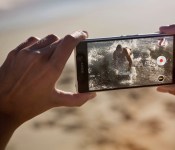
Sony’s got a brand new flagship experience that sounds tremendous on paper. The questions, of course, is what this bad boy looks like. Spoiler alert: it’s sexy as always. Check out the following gallery of images of the upcoming smartphone from a variety of angels.


The post Sony Xperia Z2 gallery appeared first on AndroidGuys.

Lenovo ups the game with the Yoga Tablet 10 HD+
Shortly after CES 2014 we offered up a review of the Yoga 8 and Yoga 10 tablets from Lenovo. They met and exceeded many of my expectations especially in the look, the feel and the performance department. They offered the many things that a lot of tablets currently on the market didn’t. One of the big wins in my opinion was the built-in kickstand with the dual front facing speakers. Being able to prop it up at will and watch a movie with ease and without needing a second accessory to tote around is great.
 There was one disappointment in the Yoga 10, the screen resolution. The Yoga 10 offered the same 1280 x 800 resolution as the 8-inch variety. That resolution looks clean and pretty crisp on the Yoga 8, but it is clearly not enough for the Yoga 10. While movie viewing and basic time killing gaming is just fine, those used to high screen resolutions will immediately be irritated.
Lenovo took that to heart and made a number of changes in the new Yoga 10 HD+. Giving the tablet a much needed boost in a few departments that kept this wonder tablet design out of the hands of more people. The Yoga 10 HD+ Kicks up the screen resolution from the fore mentioned 1280 x 800 to 1920 x 1200. That alone makes me smile, but Lenovo kept pushing a little further. They moved the processor from the MediaTek, to the Qualcomm Snapdragon 400 quad-core at 1.6GHz.
Other Specs that are important to know:
- Android 4.3 at launch with Android 4.4 OTA coming
- 1920 x 1200 20/20 Vision display
- 1.6 GHz Qualcomm Snapdragon 400 quad-core
- 2 GB RAM
- 178 Degree Viewing Angle
- 16GB or 32GB internal storage options
- Micro SD card support up to 64GB
- Bluetooth 4.0
- 8MP HD+ rear camera 1.6MP front facing camera
- 9000 mAh Battery up to 18hour rating
- Dual front facing speakers
- 10 point multitouch
- USB port supporting on-the-go technology
- 10.28 x 7.09 x (.12 – .32) inches (261 x 180 x (3.0-8.1) millimeters)
- 615 grams
Lenovo really listened and kicked the Yoga 10 HD+ up a notch. It also has a couple great accessories as well, like a Bluetooth Keyboard cover, various colored sleeves and MiraCast Dongle.
Lenovo has also kicked in some “Doit” apps that they have just released and are pre-loaded.
- SHAREit: Rapidly share photos, apps, contacts, music and more with up to 5 devices with direct P2P transmission. Share files 300MBs+ in size. Is 40X faster than Bluetooth.
- SECUREit: Anti-Spam, Anti-Virus, Anti-Theft and device optimization.
- SYNCit: Backup and restore all contacts, SMS,
- SNAPit: New camera app with various effects, one-touch filters and animated GIF creations.
- SEEit: A new photo album app that is clean, intuitive and offers one touch photo editing. It also has facial recognition.
The new Lenovo Yoga Tablet 10 HD+ will become available for purchase in April with a retail price tag of just $349.
 AIVAnet