


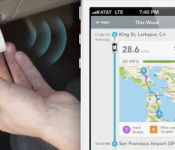
Automatic Link driving assistant can now auto-post to Facebook, other apps

One of the greatest benefits of Automatic’s Link driving assistant dongle is that it finally made it possible to hook your car’s metadata to the web. You could then use your smartphone to do things like track your trips, note your parking spot and even figure out your Check Engine light problem without going to a mechanic. Well today, it’s about to go one step further thanks to a partnership with IFTTT. IFTTT, if you’re unaware, is a service that hooks up a variety of apps and services together with a series of “If This, Then That” formulas. Now with Automatic, you can create recipes that’ll prompt an action once it detects certain information from your car.
For example, you can set it so that you get a text message every time the car starts up, or send a push notification to your spouse whenever you’re running late. You can automatically post trip summaries to Facebook, tweet if you’re ever in an accident or keep track of your mileage in a dedicated Google Spreadsheet. It even works with other Internet connected hardware — a possible recipe is to turn on all your Philips Hue lights as soon as you get home.
IFTTT’s Automatic channel already has a pretty healthy set of triggers, but Ljuba Miljkovic, Automatic’s chief product officer, tells us they’re hoping to build more around activities like speeding or braking hard. “We see this as a step toward Automatic really being connected to the wider world,” says Miljkovic. “For example, we announced that the Link now has iBeacon thanks to a software update. We really see third party integration as a big thing in our future […] We’re making it possible to add your car to the Internet of Things.” If that sounds like an exciting proposition to you, head on over to the source to find out more about the Automatic Link, IFTTT and its plans for an even more connected car.

NASA discovers 715 alien planets by looking for them in groups

We know that it’s no longer rare to discover alien worlds, but NASA just made it downright commonplace. The space agency has confirmed the existence of 715 exoplanets discovered using the Kepler space telescope, ballooning the number of verified planets to nearly 1,700. Scientists validated the huge number of celestial bodies by looking for targets in batches — the more objects were clustered together, the more likely it was that there would be multiple exoplanet candidates. The bonanza helps illustrate the frequency of planets among the stars, and it has also uncovered four more potentially habitable worlds. Researchers might not but much closer to finding the Holy Grail of a life-bearing planet, but they’ll at least know where to focus their attention.
Via: Space.com
Source: NASA
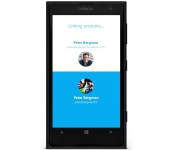
Skype now lets you sign up with a Microsoft account, updates its Windows Phone app

It’s been a long time coming, but Skype’s revealed that folks can finally sign up for service using a Microsoft account. Skype believes this feature is perfect for users who perhaps want the least amount of logins possible, and it also points to Microsoft’s two-step verification as a benefit for having such an account. Meanwhile, the Windows Phone app has been updated with a number of security improvements, plus an indicator which lets you know when the person on the other side is typing. As part of the integration with its parent company, Skype will now require a Microsoft account (like the one used to set up your WP device) when registering for a new account through the application. This new version is only available for Windows Phone 8, however — as you might recall, support for the app on earlier versions of the OS was cut off months ago.
Filed under: Internet, Software, Mobile, Microsoft
Via: The Next Web
Google will begin teaching you how to build your own smartphone
In a series of three conferences, Google plan to show developers what they’ll be able to do with the company’s modular phone that they have been working on. The initiative is part of Google’s Ara Developers’ Conference and will run this April.
The first conference will be an online live webstream and will feature an interactive Q&A for developers to ask their questions to those involved at Google with the modular phone project.
The conference will focus on the alpha release of the Ara Module Developer Kit and will provide developers with all the information they require to make an Ara Module. Google will also walk through the current status of the Ara project, the platform itself, and the various features that it will encompass.
There was some relative uncertainty with what would happen to the Ara project after Motorola’s sale to Lenovo, but Google since stated that they were keeping the group where the project originated and would accelerate the program.
It seems Google are really looking for engaging developers into bringing Ara to life, and making the modular phone a reality.
The post Google will begin teaching you how to build your own smartphone appeared first on AndroidGuys.
Have a Nexus or GPE device? Download the Google Now Launcher OFFICIALLY from Google Play
When the Nexus 5 was announced the launcher looked a bit different from what people are used to seeing on a stock Android device.We’re used to seeing the same launcher on basically every Nexus device, so it was a bit of a shocker when Google unveiled the new look.It was running the Google Now Launcher with a few more features than the original “stock” look.
Well, Nexus and Google Play Edition device owners rejoice – the Google Now Launcher is finally official! You can grab it from the Google Play Store today, but only if you have a Nexus or GPE device running Android 4.4.
With the GNL, you can swipe left to access Google Now from your main homescreen. Long press on a blank space to access wallpapers, widgets, and settings. And the app drawer is now only used for apps.
No word yet as to whether or not they will release it to non Nexus/GPE devices, but I couldn’t see that happening.
The post Have a Nexus or GPE device? Download the Google Now Launcher OFFICIALLY from Google Play appeared first on AndroidGuys.
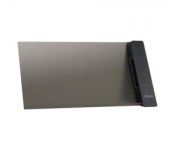
Official 2013 Nexus 7 Wired and Wireless Docks Launched by ASUS
We all sit on pins and needles, not really, for the next Nexus tablet to come to fruition. Rumors have talked about an 8-inch variety, an announcement at Google I/O, HTC being the winner of the design for the next one and plenty more. Heck, I was just reading over at IBTimes that the Nexus 8 will be at I/O with Android 4.5. June is a long ways away. For those living in the real world right now, ASUS has finally brought forth two docks for your coveted 2013 Nexus 7. Both should help you bide the time until we see what Google is up to.
The first is a charging stand
- Slide-in Design for horizontal or vertical viewing.
- HDMI out to view content on your TV or PC monitor
- Comes in Black
- Dimensions: 218 x 106 x 77 mm
- Weight: 142g


Next up is the wireless charging PW100
- Pyrimid design
- Qi Standard
- LED status light
- Comes in black
- Dimensions: 75 x 65 x 84 mm
- Weight: 115g


The wired dock will set you back a modest $50. Which isn’t bad considering it offers the HDMI out and two view options. The wireless PW100 goes up a bit for the wireless aspect to $90. Both via Amazon.
amzn_assoc_ad_type = “product_link”;
amzn_assoc_tracking_id = “wwwandcom-20”;
amzn_assoc_marketplace = “amazon”;
amzn_assoc_region = “US”;
amzn_assoc_placement = “B00IAMEGPU”;
amzn_assoc_asins = “B00IAMEGPU”;
amzn_assoc_show_border = true;
amzn_assoc_link_opens_in_new_window = true;
amzn_assoc_ad_type = “product_link”;
amzn_assoc_tracking_id = “wwwandcom-20”;
amzn_assoc_marketplace = “amazon”;
amzn_assoc_region = “US”;
amzn_assoc_placement = “B00IAAD0MW”;
amzn_assoc_asins = “B00IAAD0MW”;
amzn_assoc_show_border = true;
amzn_assoc_link_opens_in_new_window = true;
Head over to ASUS for a closer look at the wired dock and the wireless PW100.
Via Liliputing
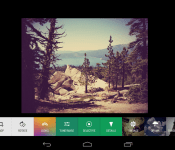
Google+ Updates, Aims at Photo Editing and Creations Mostly [Download]
 Today is shaping up to be a pretty nice day indeed, at least on the Google front. We caught Google pushing the Google Now Launcher to the Play Store earlier this morning. Now we are seeing a nice little update rolling out in its traditional stages for Google+. The Play Store doesn’t elude to a heck of a lot, at least not until all the updated text decided to populate. Luckily Vic Gundotra was kind enough to share Todd Kennedy’s post on G+ to let us all know what was coming. In the latest update, which will move you to v4.3, you can expect to find some great things in the way of photo editing, filters, better browsing and some more.
Non-destructive photo editing across devices
Starting today you can start your edits on one device, and continue (or start over) on another. This means you can backup full-resolution photos from your desktop, edit them in seconds on your phone, then add some finishing touches from your tablet. (And you can revert to your originals at any time!) The technical term for this experience is non-destructive editing in the cloud, and we think you’ll really enjoy it.Brand new filters and creative tools
Now when you edit your photos, you’ll have a powerful set of tools (like crop and rotate), 1-touch filters, and Snapseed-inspired enhancements (like Drama, Retrolux, and HDR Scape). Mix and match to make your photos look their absolute best.A single view of all your photos
The new ‘All’ view displays your entire photo library — whether it’s on your current device, or backed up in the cloud. If your library is really large (> 10s of thousands of photos), the app won’t show all your photos initially. But stay tuned, because we’re supporting larger and larger libraries over the next few weeks.An easy way to browse your photos by date
In addition to search, there’s now another way to find your photos fast. Just swipe through your photos in the ‘All’ view, and look for the scroll bar on the right. Dragging the scroll bar up or down will quickly move you forwards or backwards in time.
Seems Google is really taking an amazing approach at helping aspiring photographers, and those that just plain suck, and giving them easy to use tools right in their social channel. Pretty cool really. You can hit the Play Store and see if you have the update yet, or you can swing by our sister site that has the apk all ready for your download enjoyment.

Google+ v4.3.0 APK Download

Apple Releases Firmware Update for 2013 Mac Pro to Fix Power Nap Issues [Mac Blog]
Apple today released Mac Pro SMC Update 2.0 enabling a Mac Pro to enter Power Nap mode without running the fan for Power Nap activities. The update also includes a fix for an issue that caused a low-speed USB device not to be detected at startup.

This update is recommended for all Mac Pro (Late 2013) models. This update enables Mac Pro to enter Power Nap without running the fan for most Power Nap activities, and addresses a rare issue where a low-speed USB device may not be detected at boot.
The Mac Pro update is recommended for all Mac Pro models from late 2013 and can be downloaded from Apple’s support site or via the Software Update tool in the Mac App Store.
     |
iOS 7.0.6 Usage Tops 25% Four Days After Emergency Fix for SSL Issue
Apple on Friday released iOS 7.0.6, fixing a then unknown SSL verification bug that turned out to be a glaring security issue that also affected OS X 10.9.
Following the extensive amount of media coverage on the SSL vulnerability that left users open to having sensitive information like login credentials and passwords stolen, iOS users exposed to the news rushed to upgrade their devices.
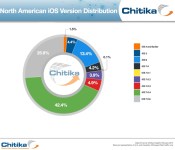
On Sunday, iOS 7.0.6 adoption was at 13.3 percent, according to analytics firm Chitika. Yesterday, four days after iOS 7.0.6′s release and following a slew of stories that were released over the past few days, iOS 7.0.6 adoption rates have climbed to a total of 25.9 percent, based on ad impressions from tens of millions of iOS-based devices in the U.S. and Canada.

The security update for iOS 7.0.6 appears to be propagating to iOS 7 users much more quickly than a similar 2012 iOS 5.1.1 update that also included a notable security fix. iOS 5.1.1 was installed on just 12 percent of devices after the first week, indicating iOS 7.0.6 adoption is roughly twice as fast.
MacRumors readers have been particularly quick to upgrade to iOS 7.0.6 in order to patch the SSL vulnerability. According to our data, 61.1 percent of iOS visitors to the main site were running iOS 7.0.6 as of yesterday, while 43.6 percent of forum users had updated to iOS 7.0.6.
iOS 7 users who have not yet upgraded should do so immediately in order to keep their devices and data secure. Apple yesterday released a 10.9.2 update for OS X Mavericks that patches the vulnerability on desktops, which Mavericks users should also download as soon as possible.
| |

HTC teases the ‘all new HTC One’ in official video
I remember how everyone was excited that HTC will reveal the successor to HTC One at the Mobile World Congress, but instead they decided to unveil the new flagship on March 25th in New York and London. Why? Probably HTC didn’t want the Samsung Galaxy S5 to steal their thunder, however delaying it is making us even more curious, but that’s not it for HTC as they decided to come up with a teaser. They are calling it the “all-new HTC One”, and in the video below, you will see a guy telling you about BoomSound on HTC One, and then he will take out the ‘all new HTC One’ from his pocket. Want to know more? Check out the video below.
Well, what we know that the successor will feature a better sound quality, but that’s not at all. Anyway, still a month to go, so you better stay tuned.
Do you think the latest HTC flagship will be good enough to take on the Samsung Galaxy S5?
VIA: HTCSource
The post HTC teases the ‘all new HTC One’ in official video appeared first on AndroidGuys.
 AIVAnet