eBay Canceling Listings for iPhones With Flappy Bird Installed [iOS Blog]
 Following the removal of Flappy Bird from the App Store, some entrepreneurial iPhone owners have listed their phones — with Flappy Birds installed — on eBay.
The listings have attracted attention from major media outlets, but eBay is actively canceling the listings because all smartphones and tablets sold on the auction site are required to be restored to factory settings. One user gave MacRumors the email that eBay sent him when it removed his listing.
After reviewing your eBay account, it appears that you have not followed eBay’s guidelines to list a device that can hold media or software. As a result, we’ve taken the following action:
– Listings have been removed.
– We have credited all associated fees except for the final value fee for your listing(s).Smartphones and tablets must be restored to factory settings before they are allowed to be sold on eBay. Please remove all content from your device, including the game Flappy Bird, before you attempt to list your item again. Please be sure your current and future listings follow these guidelines, keeping in mind that additional listing violations could result in the suspension of your account.
We understand that you may have been unaware of these guidelines, and we encourage you to learn how to keep your experiences on eBay successful.
We appreciate your cooperation.
Thanks,eBay
Flappy Birds creator Dong Nguyen said in an interview earlier today that his game became “an addictive product” and he removed the app to protect users from the game. iPhone owners who have already downloaded Flappy Bird can continue to play it as Nguyen cannot delete the app from phones where it is already installed.
Thanks Blake!
     |

Whole Foods Adopts Square for iPad Cash Registers [iOS Blog]
Whole Foods has partnered with Square to deploy its iPad checkout system inside the grocery store chain at counters selling ready-to-consume products like pizza, coffee and sandwiches, supplementing the chain’s traditional checkout lanes at the front of the store.

The company has signed a deal to put its iPad-based payment systems inside Whole Food Market grocers in the U.S., where they’ll be used at counters that sell ready-to-consume products — from pizza and sandwiches to coffee, beer and wine — as a supplement to the conventional checkouts at the front of the store. Customers will be able to pay with credit and debit cards, cash and, in some locations, by using the Square Wallet smartphone app. The idea is to expedite things both for people making a quick purchase from one of these venues and for those who are at the checkouts with a cartful of groceries.
It’s unclear if Whole Foods will use the Square Stand cash register or some other iPad solution, but TIME says some locations will support the Square Wallet app.
The deal makes Whole Foods the second major retailer to roll out Square’s technology. In 2012, Square and Starbucks formed a partnership that saw Square take over credit card processing at Starbucks stores in the U.S.
| |
Geeksphone Revolution comes with Android and Firefox OS
Internet users around the world are familiar with the name of Mozilla Firefox, but they probably don’t know that Mozilla also introduced an OS for mobile known as Firefox OS. Just like Android, it’s based on Linux, and now a company known as Geeksphone introduced a smartphone, which is first of its kind. Geeksphone Revolution, a smartphone with dual-boot option, featuring Firefox OS and our favorite mobile OS i.e. Android. It will be available in Europe starting Feb. 20 for €289 ($304).
 It’s not a cutting edge smartphone like the HTC One and Samsung S4, but Geeksphone promises that it will deliver. About the specs, it’s running a dual-core 1.6GHz Intel CPU, 1GB of RAM, 4.7-inch qHD display with a resolution of 2560×1440 pixels, 8MP camera with 1.3MP front-facing camera, 4GB of on-board storage with a microSD card slot expanding up to 32GB, and 2000 mAh battery.
So if it comes to US, will you grab one? Tell us about it in the comment box below.
Source: Geeksphone
The post Geeksphone Revolution comes with Android and Firefox OS appeared first on AndroidGuys.

Windows Phone 8.1 leak reveals new messaging and storage settings, and more

Up until now, the most we’d heard about the next rumored update to Microsoft’s Windows Phone OS centered on two features: Cortana, the company’s Siri-like digital assistant, and Action Center, its native notification center. Today, however, we have a clearer idea of where Windows Phone 8.1 could be headed thanks to a Reddit user who’s allegedly gained access to the new SDK as part of Microsoft’s developer preview program.
Despite both Cortana and Actions Center reportedly being marquee features of the new WP OS, neither are present on the leaked list of new WP 8.1 tweaks. That’s likely due to secrecy surrounding the features and Microsoft’s desire to unveil both publicly at BUILD this coming April 2nd, a date the dev mentions quite often in the thread. What this leak does give us confirmation of is how Microsoft is working to unify development between Windows RT 8.1 and Windows Phone 8.1 on the back end; something it’s calling Universal Apps. Developers using the new SDK will be able to create applications for both app storefronts using a shared JavaScript/HTML code and provided templates.
Windows Phone 8.1, which according to the provided SDK documentation has been relabeled WinPRT, also ushers in a critical change to SD card functionality that should please longtime critics of the platform. Namely, users can now install apps to SD card and not just sideload from it, thus freeing up internal storage. Bing apps are now apparently pre-baked into the OS, as are a trio of “sense” apps to monitor battery power, data and storage. SkyDrive, as previously reported, has been rebranded to OneDrive and there’s even a new Music app on deck (said to resemble Xbox Music) to replace the former Music+Video.
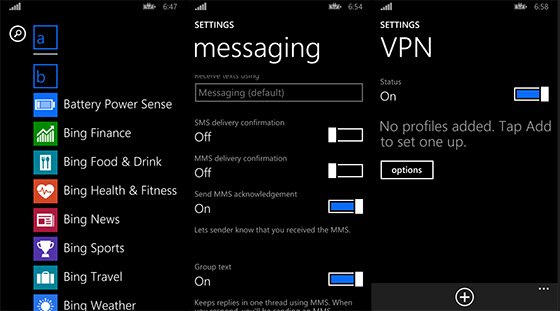
One of the more surprising changes Microsoft’s made to the Windows Phone platform focuses on how it handles SMS receipt and delivery. With WP 8.1, text messaging will no longer be restricted to the native SMS app. The messaging settings submenu includes the ability to specify which third-party app routes that communication by default.
Users expecting new live tile sizes will be disappointed since this update doesn’t include any options beyond the three already available in the OS. Although, there are apparently plenty of minute cosmetic overhauls packed into the 8.1 update. Among these are new default transitions for moving between apps and homescreens, a navigation bar with color settings to match backgrounds or accents, gestures to hide and reveal the onscreen navigation buttons, as well as the addition of Windows RT’s progress ring. Back button functionality now also falls in line with WinRT in that it simply sends applications into a ‘suspend’ state, as opposed to terminating them. To actually close apps out, users will have to enter into multitasking view and swipe down to end the process.
This long list certainly represents a heady mix of some overdue and even unexpected OS tweaks; tweaks that could help Microsoft catapult its struggling mobile OS to prominent market share. But it’s likely just a preview of what Microsoft has planned for WP 8.1, so don’t expect this to be the last we hear of the platform’s next iteration. We’ve still got a couple of months to go before Microsoft BUILD can reveal most, if not all of Windows Phone’s new direction, leaving ample time for like-minded devs to pull back the curtains even further.
Filed under: Cellphones, Software, Mobile, Microsoft
Via: The Verge
Source: Reddit

Make ‘business connections’ with Virgin America’s new in-flight social network ;)

Haven’t had much luck buying alluring strangers a drink on your last few Virgin America flights? What you need, my friend, is a service to expand your circle of potential prospects and make the in-flight connection you deserve. At least that’s what the airline must be thinking with its announcement of the “first-ever” in-flight social network, developed with Gogo Wifi and the Here on Biz geo-location app.
Once you’ve downloaded Here on Biz from the App Store (sorry, no Android types need apply) and connect through Gogo, the service lets you register via Facebook, LinkedIn or Twitter to contact fellow travelers at the gate, on your plane and even on other Virgin America flights. But don’t think the social network is all about helping you get lucky at 35,000 feet (the sexy skies are the furthest thing from Richard Branson’s mind, after all); Virgin America says the service is targeted at business travelers who want to “take advantage of downtime in-flight to build or renew their professional connections.” It’s unclear, though, whether Virgin will claim rights to any startup ideas hatched on board.
Filed under: Transportation, Internet
Source: Virgin America, Here on Biz (iTunes)

Watch Valve’s vision of our virtual reality future (and other Steam Dev Days talks) right here

We did our best to break down and explain talks given by Valve’s virtual reality leaders at Steam Dev Days, but there’s no replacing the real deal. As such, we’d be silly not to share news that Valve’s published to YouTube all 28 talks given at its first ever developer’s conference — including the two virtual reality talks from Michael Abrash and Joe Ludwig, not to mention Oculus VR founder Palmer Luckey’s talk. We’ve embedded all three of those below, but the whole shebang is available right here for your marathoning pleasure.
Filed under: Gaming, Wearables, HD
Source: Valve

MightyText Android app goes Pro, adds extra features for monthly cost

Three years ago, MightyText started out as a clever app that, when paired with a Chrome extension, could sync your texts and incoming call alerts to your computer. Since then, it’s blossomed into a web app in which you can access your SMS/MMS, calls, contact list and photos/videos from any browser. Next up in the app’s progression: a Pro version. It’s technically been in a limited beta for the past few weeks, but the developers of MightyText have wiggled most of the bugs out and are ready to open Pro account access to any and all who are willing to pay a monthly or annual fee.
The Pro account, which is launching at an early bird price of $2.50 per month (or a flat annual rate of $30, if you know you’ll hang onto it for a while), comes with a rather large list of additional features. A Pro’s arsenal of software weaponry will include eternal message storage, number blocking, mass group messaging (up to 25 people), themes, the ability to sync older texts from your phone to the app, message templates, 50GB storage space for photo and video uploading and a scheduler. If Pro isn’t your thing, the free version will continue to be available — MightyText plans to always have one.
Filed under: Cellphones, Wireless, Mobile, Google
Source: MightyText (Play Store link), MightyText

Radiohead’s PolyFauna app will make you feel like a subterranean homesick alien

Radiohead has a new app for iOS and Android. It’s called PolyFauna, and here’s how Thom Yorke describes it:
Your screen is the window into an evolving world.
Move around to look around.
You can follow the red dot.
You can wear headphones.
Filed under: Misc, Portable Audio/Video, Internet, Mobile
Source: App Store, Google Play

New HTC M8 Image Surfaces Showing its Face Again

The HTC M8 seems to be showing up on camera every other day, and today we get the very image you see above. This comes from @HTCFamily_RU again, that leaked that first image of the HTC M8 showing that it had a dual-camera sensor. They just tweeted this image out today and it seems legit to me. We got all the signs that it is a polished Sense UI with those lovely on-screen buttons on the bottom of the screen. The location of the front-facing camera is slightly different from the HTC One, but other than that, the phone looks pretty much the the same. Give us your thoughts about this new image.
Source: @HTCFamily_RU

Play Flappy Bird on your Mobile Device Without Jailbreaking or Rooting It
The popular indie game Flappy Bird has been dominating the news mills for the last two weeks especially when its founder, Dong Nguyen, decided to pull it off the iOS and Android app store. The reason? Apparently it took a whole out of his time, and did not like the fact that players misused the game. Nguyen wanted people to play his game whilst relaxing, not all day long.
Nguyen told The Verge that the app was rucking up $50,000 per day from ad revenue. That’s insane. Let’s suppose he has been making this amount for three weeks now, then Nguyen put more than 1 million dollars in his pockets. In addition, the app had been downloaded 50 million times and accumulated 47,000 reviews on the app store.
Furthermore, people started making use of people’s addiction to the particular title by selling iOS and Android devices with the game pre-installed for whopping price tags.
With that said, in case you accidentally deleted app or can’t access it whatsoever, there is a way of actually rocking that bird again. And no, we are not referring to the hundreds of Flappy Bird mock ups. This is the real thing.
All you got to do is head up to FlappyBird.io. The website features a simple interface. It includes the game in HTML 5 form, thus being compatible to mobile devices, and can also be accessed via PCs as well. We found the game a bit luggy on mobile browsers, though the PC version performed fair enough.
 So what do you guys think? Let us know of your experience while using the platform by leaving a comment down below.
Huge thanks to Jordan over Jailbreak Matrix for the tip!
Via: Jailbreak Matrix
 AIVAnet