


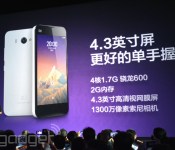
Xiaomi shipped over 15 million MI2 series phones, lowers MI2s to $210 in China

While Xiaomi’s been pushing its budget Redmi Android phone into Singapore recently, it’s also managed to reach a new shipment record for its mid-tier MI2 series, which includes the MI2, MI2s and MI2a. According to the company’s announcement, it has now shipped over 15 million of these devices, which is a notable jump from the 9.19 million figure announced at the MI3 launch back in September. To celebrate this occasion, Xiaomi has reduced the price of the 16GB, 8-megapixel MI2s in China from CN¥1,699 (about $280) to just CN¥1,299 (about $210). The 32GB version with a 13-megapixel camera remains at CN¥1,799 ($290), which is just less than the 16GB, CN¥1,999 ($330) MI3. All of these are still very attractive prices of their specs, of course.
In response to this price drop, Meizu swiftly announced that its 16GB MX2 RE (refurbished edition) is now also priced at CN¥1,299, whereas the MX2 enhanced edition is now at CN¥1,599 ($260). It’s unclear how long this bloody fight will last for, but here’s hoping that these price drops will be applied outside China as well.
Filed under: Cellphones, Mobile
Via: Engadget China
[Download] Chrome Browser for Android updated to version 33, brings only minor Improvements
 It’s definitely a field day for Google apps updates today with Google+ and the Google Now Launcher getting updated earlier today, now being joined by the Chrome Browser for Android. Chrome gets updated to version 33, with the change log on the Play Store shows only “stability and security updates”, but the full change logs includes:
- Download progress notification for file downloads using the Chrome network stack
- Updated help and feedback UI
- Support for <datalist> tag
The update should be rolling out to wherever you are as of yesterday, but if you can’t wait that long, you can download the apk from the link below:
Chrome Browser for Android version 33.0.1750.132.apk
Or if by chance you don’t have Chrome yet, you can pick it up from the Play Store link below.
Source: Droid Life
Applicaton: Chrome Browser for Android
Price: Free

[VIDEO] Check out the Nokia X running Nova Launcher
 The Nokia X’s launch at MWC 2014 has been bittersweet for Android fans everywhere; while we’ve been waiting quite some time for a Nokia device that runs the Android OS, that reality was snatched away from us when it was revealed that the Nokia X would instead run a forked version of Android that would use Nokia’s own app store instead of the Google Play Store. Thankfully though, as it is Android at its heart, you can still sideload apks on the device, as demonstrated by Tech Reporter English who installs several apks during this video and shows us the Nokia X running Nova Launcher; skip forward to 2:23 if you want to jump straight to the Nova Launcher part:
As expected from a device with a 1GHz processor and only 512 MB RAM, it’s definitely not the smoothest we’ve ever seen Nova Launcher run, but it’s definitely a more familiar sight to see the Android homescreen rather than Nokia’s Windows Phone inspired dock. As you can probably expect as the phone starts being sold around the world, clever boffins will be trying everything they can to get “real” Android onto the Nokia X, which should hopefully start trickling out in the near future.
Are you considering a Nokia X or is the forked Android OS a bit much for you? Let us know what you think in the comments.

Tip: How to speed up your Samsung Galaxy S4
With Samsung having announced the new Galaxy S5, you may have begun to feel like your Samsung Galaxy S4 is already out-of-date, and might begin to think that it’s running a bit slow, especially if there’s a lot of content on it.
Luckily, we have a tip for you that will help speed up your Samsung Galaxy S4 and have it feeling brand new, and it’s as simple as having developer options enabled.
The little hack revolves around the animations applied to transitioning between windows and turning the device on or off. By simply turning this off, it contributes to making the device seem extremely snappy and fast.
First, you’ll need to enable the Developer Options hidden menu. To do this, go into Settings -> About Device and scroll down to “Build Number”. Now, tap on “Build Number” five times and you’ll see a notification saying that “Developer mode has been enabled”.

With that hidden menu now enabled, we can head on into it to begin fastening up our Samsung Galaxy S4.
- Head on in to Developer Options in Settings.
- Scroll down to the Drawing section.
- Of interest here is the Window Animation Scale, Transition Animation Scale, and Animator Duration Scale.
- Click on them individually to change the scale.
You are able to turn the animations off completely, or set them to 0.5x (default is 1x) so the animations will be double speed for those who would like to retain them.
You’ll notice your Samsung Galaxy S4 feels substantially quicker. Let us know your comments in the section below.
The post Tip: How to speed up your Samsung Galaxy S4 appeared first on AndroidGuys.

Apple to Construct New Retail Store in Dayton, Ohio [Mac Blog]
Apple is preparing to open a new retail store in Dayton, Ohio by the end of the year, according to the Dayton Business Journal and ifoAppleStore. The company is expected to occupy a space formerly held by women’s clothing retailer Lane Bryant at The Greene outdoor shopping center, as a black construction barricade was recently spotted at the location. Apple also posted 12 job listings for the area ranging from Store Leader to Specialist on Tuesday.

A site tracking future Apple Store locations reports it has confirmed by unofficial sources that The Greene is the next location and will open later this year, and sources have told the Dayton Business Journal that The Greene is expected to get the Apple Store.
A large space, formerly occupied by Lane Bryant at 4422 Cedar Park Drive, is currently under construction behind large black barriers. Greene County records list building permits for tenant work at the site, but don’t name the tenant.
Crews from Miller-Valentine Group were seen inside the construction site Wednesday morning, and said they didn’t know what retailer was going to use the space.
An Apple Store in Dayton would be the company’s seventh retail location in the state of Ohio, which also includes stores in Akron, Cincinnati, Columbus, Westlake, and Woodmere.
As part of its annual 10-K filing [PDF] with the U.S. Securities and Exchange Commission, Apple revealed that it plans to open 30 new retail stores in 2014, with approximately two-thirds of those to be located outside of the United States. A report last week stated the company is also planning to open a new retail store in Lansing, Michigan by the end of the year.
     |
Apple Tops Fortune’s ‘Most Admired Companies’ List for Seventh Consecutive Year
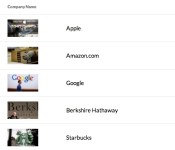
Apple again topped Fortune’s annual list of the “World’s Most Admired Companies”, claiming the title for the seventh year in a row. Apple’s ranking on the list was followed by Amazon, Google, Berkshire Hathaway, and Starbucks.

The ranking was based on a survey taken by corporate peers including executives, directors, and industry analysts who graded each company based on key attributes such as innovation, people management, social responsibility and more. Apple earned an overall score of 7.94, beating out Amazon which scored a 7.09.
The iconic tech company known for the iPhone and other stylish and user-friendly products is back in the top spot on this year’s list, for the seventh year in a row. Apple, the most valuable brand on the planet according to Interbrand, brought in $171 billion in revenues in FY2013 and is flush with cash, but fan boys and girls (not to mention the market) are getting antsy to see its next big product. Bets are on a smartwatch or AppleTV, but the company is also reportedly turning its attention to cars and medical devices. — Erika Fry
Apple was also ranked number one in seven of the nine key attributes of reputation listed in the poll. It ranked number five in social responsibility and number two in global competitiveness, following rival Google in the latter category.
| |

Plex update adds Chromecast support for audio streaming and content mirroring
Despite offering limited compatibility support for audio streaming, Chromecast has been a hit amongst Android users, and now Plex has just announced an update to its media player system that enhances Chromecast support.
Users of the Plex Android App are now able to play music and push photos via the Chromecast to your TV. In fact, anything in your Plex library can be pushed over to the Chromecast, and even audio transcoding is supported.
Plex has also been updated for content mirroring so when you’re browsing your library on your device, extra information is pushed to the Chromecast.

Not only this, but Plex also promises better streaming of media to the Chromecast. It promises to stream 1080p content without the need for transcoding, which means your streamed media now looks better than ever.
You’ll need the latest version of the Plex App, and also obviously a Chromecast, and you’ll be good to go. Let us know what you think of the update and added support in the comments section below.
[Via Plex]
The post Plex update adds Chromecast support for audio streaming and content mirroring appeared first on AndroidGuys.

Japanese cable provider launches on-demand gaming service, will stream Sonic and PES titles

Sony’s PlayStation Now streaming game service is still months away from launch, but Japanese cable company KDDI is testing the idea with the app-based GameNow service, through cable. It’s the same company responsible for LG’s Smart TV game service, although judging from the title lineup, J:Com and JCN cable subscribers might not see games at the level of Devil May Cry 4 and Dead Rising 2, at least to start with. Temper that enthusiasm a little, and expect several puzzle games and sports titles, including PES, WRC3 and Sonic Adventure DX. KDDI’s Smart TV Box launched in 2012, but its new gaming service will go live at the start of March. And hey, know where you could play Sonic over cable, just over 20 years ago? The Sega Channel, that’s where.
Source: KDDI

Game makers can now start their own Steam sales, to your wallet’s chagrin

If you’re like many of the PC gamers we know, you wait eagerly for Valve’s Steam sales; they’re chances to stock up on games that were previously unaffordable. Thanks to a new Steamworks update, you won’t necessarily have to be so patient. Game makers can now start their own Steam sales, determining both the size of the discount and its duration. If they opt into one of Valve’s week-long campaigns, they can still determine the pricing. The move doesn’t address complaints that the game industry leans too heavily on price cuts for competition. However, it should prove a big boost for indie developers and players alike. Creators will have more opportunities to stand out in a crowded field, and customers may have more chances to splurge… even if their bank accounts suggest otherwise.
Source: Reddit
Tip: How to hide the notification bar on Nova Launcher
Installing Nova Launcher opens up a whole load of customisation possibilities for your Android device; first we explained how to use Nova Launcher gestures to quickly activate Google Now, and now you’ll see how to hide the notification bar.
Hiding the notification pane on your device can change the look of your home screen entirely, for the better – not only do you get more screen space, but you don’t have a solid black bar spoiling your nice new minimal wallpaper.
The requirement is that you’ll need to be on KitKat 4.4, or any phone that supports transparency in the navigation bar, of which includes:
- Samsung Galaxy S3 (on Android 4.3)
- Samsung Galaxy S4
- Sony Xperia Z
- Motorola Moto X
- HTC One (rooted)
- Any Android 4.4 device ( Nexus 5)
You’ll also need the Beta release of Nova Launcher to get the option to hide the notification bar. To get the Beta, simply join this Google+ community, then head here to opt-in to the beta.
Then to activate the transparent notification bar, head into Settings -> Look and Feel -> Transparent Notification Bar.
And that’s all there is to it. Enjoy.
The post Tip: How to hide the notification bar on Nova Launcher appeared first on AndroidGuys.
 AIVAnet