



Apple Worked to Open Brazil Retail Store Ahead of World Cup [Mac Blog]
As noted this morning, Apple has plans to open its first retail store in Brazil on Saturday, February 15. The store is located in the Village Mall luxury shopping center in Rio de Janeiro’s famous Barra Da Tijuca borough.
Brazilian news site The Globe [Google Translation] had an opportunity to speak with Apple Chief Financial Officer Peter Oppenheimer about the store opening, which has been in the works for several years.
 The Village Mall in Rio
According to Oppenheimer, Brazil is an increasingly important market for Apple. The company first launched an online store in the country in 2009 and is “very excited” to bring a physical store to Brazil.
Brazil has been a tough market for Apple as prices on iOS devices in the country have been prohibitively high. Apple cut the price of the iPhone 4 and 4s in Brazil back in early 2013, and just recently announced plans to continue selling the low-cost iPhone 4.
The new Apple Store in Rio de Janeiro takes on unique “pavilion” design with a single floor and a long, curved glass exterior, which Oppenheimer says is one of the few stores to have the design worldwide. The concept is based on two spaces, with the front dedicated to product testing and the back focusing on sales of accessories and services.
Apple recently opened a similar store in Palo Alto at the Stanford Mall. The one-story location features a glass enclosed front room filled with iPads, iPhones, and MacBooks for people to test out along with a spacious back room for accessory sales, Workshops, and Genius Bar appointments.
In the interview, Oppenheimer also confirmed Apple was indeed aiming to open the first Brazilian Apple Store ahead of the FIFA World Cup, which will take place in Rio this summer, and ahead of the 2016 Olympics.
The first Brazilian Apple Store will open on Thursday, February 15, and Oppenheimer says there are already plans for additional retail stores in Brazil, where Apple sees “great opportunities.” “We are already planning the opening of new stores in the country, continuing our investments in Brazil,” he said.
     |
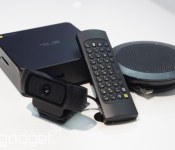
Google takes on the conference room with Chromebox for meetings

Been trying to figure out just what you’d do with a Chromebox? Google has an idea: build a new video conferencing system. At least that’s what Google VP of product management Ceaser Sengupta announced in Mountain View this morning. It’s called Chromebox for meetings and, well, it’s a Chromebox bundle designed to outfit meeting rooms with a robust, easy to use meeting solution powered by the Google Cloud. On the surface, the $999 bundle doesn’t seem that different from the devices ASUS has already announced — it includes a Core i7 box, a HD camera, a microphone / conference speaker and a keyboard-equipped remote. Plug the setup into your existing conference room monitors, log into the Google management platform, and you’re ready to go. How about in use? Well, that looks like a mash up between Google Hangouts and Chromecast.

Gesturing to a screen behind him, Sengupta showed us a screen that looked suspiciously like Chromecast does on our home TV set. Gorgeous splash photography over a few small blurbs of useful information — but rather than merely displaying the time and connected network, Chromebox for meetings shows the schedule for its assigned meeting room. Sengupta explained that the data is pulled directly from Google Calendar, and should make it easy for employees to look at a room, glance at the screen, and instantly know if it’s available for use. Click into a meeting, on the other hand, and another familiar interface pops up: Google Hangout’s existing video interface.
Like the meeting solution’s standby mode, these meetings borrow heavily from the existing product it’s modeled after. Users speaking are automatically focused on, for instance, and meetings can be attended from Chromebox-equipped conference rooms, laptops, tablets and even mobile phones. There are some new tricks, however — years of interrupting latecomers have prompted Google to automatically mute attendees as soon as they join a session. Each meeting can sustain up to 15 connections too, broadcast from any combination of device. Although businesses will need to outfit all of their conference rooms with Google’s kit to get the ideal experience, a tool from Vidyo will allow Chromebox for Meetings to connect to traditional conference systems, and an Uberconference connection will allow participants to dial in from regular phones.

Although regular old Chromeboxes won’t be available until March, US customers can order the box today, with an international availability (to Australia, Canada, Japan, New Zealand and the UK) rolling out over the next few months. Businesses who contact their Google rep will be able to chose between ASUS, HP and Dell Chromebox packages, all for $999 each. In addition to the microphone, camera and remote accessories, each box comes with 24/7 customer support, including a (required) maintenance fee of $250 a year per device. Still, if you’re itching to get a Chromebox right away, they are available.
Filed under: Google
Source: Chromebox for Meetings
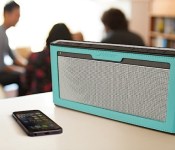
Bose’s new SoundLink III has improved sound, battery life

Today Bose unveiled the SoundLink III, a pint-sized speaker the company says is its best-performing Bluetooth model yet. Designed to be used primarily while you’re out and about, the $300 portable speaker comes packing a longer-life 14-hour battery than its predecessor, as well as some sound improvements under the hood.
Inside the three-pound speaker you’ll find four neodymium transducers and dual-opposing passive radiators, a combination that makes it louder than previous models, while still maintaining “balanced and natural” sound. Music is streamed from your favorite mobile device to the SoundLink III using Bluetooth A2DP, and the speaker remembers the last six devices to connect, so you don’t have to worry about constantly pairing. Five optional $35 cases keep it protected during your travels. Hit the source link for more details.
Via: Slashgear
Source: Bose
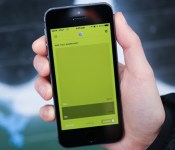
Reporter for iOS tracks your life through mini surveys and pretty graphs

Nicolas Felton is something of a data nut. (Hopefully he won’t take umbrage with that characterization.) The man has been reporting various metrics of his personal life since 2005 in the annual Feltron Report. Eventually he created Daytum so that others could join in his obsessive tracking, but while the web and iOS apps were slick, they could be quite daunting for the uninitiated. A person needed to make a habit of tracking their habits — counting how many cigarettes they smoke, how often they make it to the gym, etc… So, after a stint at Facebook, the world’s premier self quantifier went back to the drawing board with a few friends and came up with Reporter.
The new app is iOS only, sadly, but does offer a much lower barrier to entry while maintaining the nearly infinite level of customization that Daytum did. Instead of aiming for completeness, Reporter asks you at random times to track specific things with “lightweight surveys.” This allows the app to still monitor broad trends in your lifestyle, without worrying about ruining your data by forgetting to log each cup of coffee you drink. Felton says that through randomized push reminders that “sample your life” you can still learn a lot without becoming a slave to meticulously monitoring your every act. Reporter still requires plenty of manual tracking, but the creator argues it’s the best way answer the most interesting questions. There is some help provided through data harvested from Foursquare and your contacts for autocompletion, and it can also tap into the power of the M7 processor for tracking your steps.
While there are no concrete plans at the moment, Felton left open the possibility of expanding the number of sources that Reporter can pull data from. For instance heart rate or sleep tracking information from a wearable, or the media you consume on your Apple TV. Reporter is available now in the iTunes App Store for $3.99.
Source: Reporter
Dayframe updates to v2.0 with Chromecast Support, Prime Users are NOT in Jeopardy
 Cloud.tv has just released an update to thier Dayframe app this morning that adds in support for Chromecast. Now you can not only seamlessly cast your photos from your device to your TV, but you can feed a huge number of sources to it as well. Dayframe lets you sign in with Dropbox, Facebook, Google+, Twitter, Instagram and many others. Take all your favorite photo locations and set them up in a playlist and kickback and let the show unfold in front of you.

 While you can “just sit back and watch” the magic unfold, you are also in full control of everything that is being displayed on your TV. You can swipe forward, backwards, zoom to fit or fill, pause, shuffle and even like photos directly from your device. Did we mention it also plays animated GIFs as well, and yes, Autoawesome as well.

 While seeing images are nice, video is a bit better for showing off how this all works out and how versatile it really is. So take a quick watch.
The update brings quite a bit more than just Chromecast support though. While that might be the headlining feature of the update, cloud.tv also gave the whole app a UI overhaul.
– new library organization
– view and play individual photostreams
– better album playlisting
– library shortcuts in left menu
– playlists in the right menu
– favorite streams
– PRIME now IAP
– Chromecast shows animated gifs!
I messed around with it for about 20 minutes to take a couple photos and see if it worked and it seems to work just fine. It is particularly nice to see G+ photo integration build-in right alongside animated GIF support.
On to the more pressing topic at hand. Cloud.tv removed the Prime version of the app from the Play Store this morning as well. They have now switch to an in-app purchase system for going from the free version, to the PRIME version. The Prime version of the app is $2.99 and is what you will need to pay for if you want Chromecast support, other wise the free version will give you good function, but it will only be on your phone/tablet.
With this move there has been a HUGE influx of upset customers who bought the PRIME version of the app. Now that it is gone from the Play Store, they don’t get any updates or the new Chromecast support. Not true actually. Cloud.tv isn’t giving the supporters who paid the middle finger at all. You should be able to install the new Daydream free app and have instant access to the Prime features if you are using the same email/Play Store account that you bought the Prime app with. If not, then all you have to do is shoot them an email at hi@cloud.tv and they can whitelist you for PRIME access again. A minor inconvenience, but not the end of the world. Cloud.tv isn’t expecting, or wanting, previous owners to pay twice for the same app. We are in contact with Cloud.tv on the whole thing and they are looking at other solution to make sure Prime users keep Prime.
One final note, seems people are still forgetting that any new app that can support Chromecast also needs to have the latest Google Play Services installed. You can check your version in Settings>Apps>All Apps> Google Play Services. The latest version is 4.2.39. If you don’t have that installed, then most anything new won’t work. You can read up on the new Google PLay Services apps in one of our previous articles. You can also head to GappsEarly and download the newest Play Services apk and install it now.
If you want to check out the app, hit up the Play Store button down below. Give it a whirl and, if you like it, feel free to pick up the Prime version.
Dayframe by Cloud.TV. Free with $2.99 IAP for Chromecast support.

Steve Wozniak suggests Apple to make Android phones
Apple founder Steve Wozniak has found himself in a bit of a fanboy brouhaha after this week suggesting that Apple should consider make an Android smartphone.
Speaking with WIRED at the Apps World North America conference in San Francisco, Woz said:
“There’s nothing that would keep Apple out of the Android market as a secondary phone market.
We could compete very well. People like the precious looks of stylings and manufacturing that we do in our product compared to the other Android offerings. We could play in two arenas at the same time.” – Apple co-founder Steve Wozniak
This is not the first time Wozniak has looked at Android as a viable platform; he told us nearly 4 years ago that Android will win at the end. He’s also advised that Android does things better than the iPhone.
Obviously this isn’t something that’s going to happen, but it’s fun to think of the potential device. Hardware as polished as Apple’s, paired with a platform as robust as Android sounds like a recipe for great things. While we’re somewhat keen on the idea, die-hard Apple fans are getting their knickers in a twist. Take a look at the comments in WIRED and you’ll see fun banter on all sides of the argument.
Don’t forget to share your thoughts with us in the comment box below.
Source: Wired
The post Steve Wozniak suggests Apple to make Android phones appeared first on AndroidGuys.
Boost Mobile offering limited time $35 unlimited 4G LTE plan
Carriers are constantly coming up with new way to get smartphone users to change their provider and Boost Mobile just unveiled a new promo offering unlimited talk, text and data for new customers for only $35 for the first six months of service.
The deal is good from now until March 31 for any customers that activate a Boost Mobile 4G LTE smartphone. Boost has numerous LTE smartphones, both Android and iOS, but some of the Android devices you have to choose from include the now dated Samsung Galaxy S3, Boost Max, a rebranded ZTE Iconic Phablet, LG Optimus F, Boost Warp 4G, HTC One SV and Boost Force. Sadly, this doesn’t include the Motorola Moto G since its a 3G only smartphone.
Most of these aren’t the newest devices like the HTC One or Galaxy S4, but you are getting Sprint 4G LTE prepaid and with no contract.
Boost also mentions that by choosing their service, customers get Boost Mobile Wallet, an app to send money and pay bills “around the world,” plus there’s a referral program where a customer can earn $25 for each friend they refer to Boost Mobile and they are eligible to receive $500 a year.
Via Boost Mobile
The post Boost Mobile offering limited time $35 unlimited 4G LTE plan appeared first on AndroidGuys.

Sony to transition its Reader base to Kobo’s e-book platform in ‘late March’

With its eye firmly fixed on a return to profitability, Sony’s been making extensive cuts to its business arms in recent days (bye bye, VAIO!). So it’s no surprise the company would train that cost-cutting eye onto another underperforming unit — its e-reader business. Sony announced today that it’ll be shuttering its Reader store in the US and Canada come “late March” and that all Reader accounts (including library content) would be moved to Kobo’s platform during that time. Existing users shouldn’t have much to worry about though, as Sony claims the “migration process” should be painless and that it’ll issue a how-to email to walk users through it. The deal will also see Kobo’s app pre-installed on select Xperia devices, which should give Kobo a significant boost in audience reach. That’s assuming consumers start buying Xperias in bulk.
Update: Sony contacted us to clarify that the Kobo app will only come pre-loaded on select Xperia devices.
Filed under: Sony
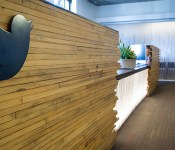
Twitter wants government permission to share specifics about national security requests

Twitter released a new transparency report this morning, and it’s just as much about what the company can’t disclose as what it can. You can check out the full data dump here, but in short Twitter received a total of 1,410 information requests between July 1 and December 31, 2013. That’s a 66 percent bump in requests over the last two years, and it shouldn’t come as a shock to hear that 833 of them came from the U.S. government. Second and third place? Japan and Saudi Arabia, with 213 and 110 submitted requests, respectively.
What you won’t see Twitter talking about are the national security-related requests it’s received from the U.S. government, unlike a handful of tech giants did after they reached an agreement with the Department of Justice. To hear Twitter global policy manager Jeremy Kessel tell it, the nebulous numbers those companies are able to share aren’t specific enough to be meaningful. He may have a point. Yahoo, Google, and Facebook all confirmed that they received somewhere between zero and 999 FISA requests during the first half of 2013. A little openness is better than none at all, but Twitter’s position is that gag orders like this fly in the face of its “First Amendment right to free expression and [an] open discussion of government affairs.” The company is weighing legal options in case the Justice Department doesn’t quite see things its way. We’ll have to wait and see how those plans pan out.
Source: Twitter

Initial Phase of Apple’s Expanded Austin Operations Center Ready for Occupancy [Mac Blog]
The first two buildings in Apple’s new Austin, Texas campus are ready for occupancy, with the company having been issued temporary occupancy permits for two office buildings that span 290,000 square feet, according to a report in the Austin Business Journal. Photos published last year showed the buildings under construction along with a landscaped pond, fences and sidewalks, while new photos accompanying today’s report show the initial phase of the campus appearing essentially complete.
The Cupertino, Calif.-based technology company has been issued temporary certificates of occupancy for two buildings totaling 290,000 square feet. Another four buildings are in early stages of permitting review, totaling 513,000 square feet. Two parking garages are in the city’s planning review process and two other buildings are planned, according to city officials.
 Apple’s two new buildings on Austin campus (Nick Simonite/Austin Business Journal)
The plans for the expanded campus were announced in March 2012 and include two major phases of development with an expected completion date of 2021. Apple agreed to invest $56.5 million to build the new facility in the first phase of the project, while the second phase includes a $226 million expansion. Apple is expected to finish the entire first phase of construction before December 31, 2015.
Apple committed to spend approximately $304 million on the project and will hire 3,600 employees for the 38-acre operations center when completed. The city of Austin and Texas’s Enterprise Fund have agreed to contribute $30 million in incentives to the project. Apple, thus far, has invested $27.1 million in the design and construction of these first two buildings, which are adjacent to Apple’s original operations campus in the city.
| |
 AIVAnet