


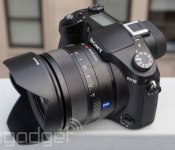
Sony Cyber-shot RX10 review: impeccable performance and versatility make this cam an industry leader

To many photographers — amateurs and professionals alike — digital SLRs represent quality. The fact that you can remove the lens and swap it for another is inconsequential to those who never buy a second optic, and it’s that segment of the market that Sony’s targeting with its Cyber-shot RX10. Everything about the RX10 is DSLR-like — its form factor, built-in EVF, focusing performance and image quality are all on par with many higher-end SLRs — but its mighty 24-200mm lens is permanently attached. By opting for this comparatively inflexible design, Sony’s able to deliver a constant f/2.8 aperture and very high-quality optics in a comfortable package, with a price tag far below what a similar removable lens would command, were it to exist in the first place. The result, put simply, is spectacular, but as $1,300 is at the high end of even deep-pocketed consumers’ budgets, you’ll want to catch our full review before making a purchase.
Hardware

Aesthetically, the RX10 is similar to a digital SLR in nearly every way. There’s a pronounced grip, a top-mounted monochrome LCD, a pop-up flash, a hot shoe (in this case, Sony’s Multi Interface Shoe), dedicated mode and exposure-compensation dials, an XGA OLED viewfinder, a 3-inch 1.23M-dot LCD that tilts up 84 degrees and down 43 degrees and a relatively large SLR-like lens up front. Internally, however, the RX10 is akin to its smaller counterparts, the RX1 and RX100 Mark II. In fact, the 10 features the same 20.2-megapixel 1-inch BSI CMOS sensor as that latter model, which, while still quite large, is smaller than the APS-C and 35mm chips in conventional DSLRs. It also includes Sony’s powerful new BIONZ X processor, which can also be found in the Alpha 7 and 7R, along with Sony’s recently announced A5000.
But back to that lens. The 24-200mm Zeiss Vario-Sonnar T* optic is undoubtedly the star of the show, thanks in no small part to its constant f/2.8 aperture. Why is that significant, you ask? Most zoom lenses, especially those permanently attached to a camera, include variable aperture lenses. While some may let you shoot at f/2.8 at the widest focal length (24mm in this case), you won’t find many point-and-shoots that offer that same aperture at the tele end as well. Typically, a lower-end lens supports apertures no larger than f/5.6 or f/6.3 at 200mm, and with f/2.8 available instead, you’ll be able to snap much sharper images in low light, or shots with creamy bokeh (shallow depth of field) during the day. You still have f/5.6 (all the way up to f/16) at your disposal, of course, directly accessible using the dedicated ring dial around the base of the lens, should you be after different imaging effects, instead.
We’ll speak more to the camera controls in the next section, but there are still plenty more hardware components to explore, too. Sony’s put a lot of emphasis on connectivity with the RX10. On the audio front, you’ll find headphone and mic jacks, stereo microphones up top and compatibility with Sony’s advanced audio accessories using the accessory port that doubles as a hot shoe — for mounting wireless receivers and shotgun mics. There’s an HDMI port with clean, uncompressed output, a micro-USB port for data transfers and charging the camera’s 1,080mAh battery pack (the same cell included with NEX cams and select recent Alphas), a dual Memory Stick/SDXC card slot and a tripod socket on the bottom. The camera is very comfortable to hold, and while it’s heavier than you’d expect, it won’t weigh you down as it dangles from the neck strap.
User interface

Sony hasn’t changed its UI much since the NEX series’ inception in 2010, but like the other RX models and recent Alphas, the RX10 features a tab-based interface that we much prefer. Settings are easy to locate and with everything presented in a linear format, it’s easy to jump from category to category to make all the adjustments you require without first returning to a home screen. Shooting options like file size, ISO and SteadyShot are presented in the first tab; custom key adjustments and display options are in the next tab, followed by wireless-connectivity features, then playback; and finally general settings like volume levels and monitor brightness are in the fifth tab.
There are also plenty of dedicated controls on the camera, so you won’t actually need to spend much time in the main menu at all. A function button to the right of the LCD launches a quick-adjust mode, with direct access to drive mode, flash options, ISO, white balance, metering, et cetera. A display button cycles through different display modes, including a full-screen live feed, an advanced settings panel with histogram and physical alignment indicators and an image preview screen with a comprehensive settings readout positioned at the border. There’s also a dedicated video capture button, a secondary settings dial and a control ring on the rear. Up top, there’s a backlight button for illuminating the monochrome LCD, a flash release button, a user-configurable button, an exposure-compensation dial and a zoom toggle around the shutter release. There’s also a focus-mode selector on the front of the camera, just below the lens.
With built-in WiFi, you can also control the camera using a smartphone or tablet running Sony’s PlayMemories Mobile app. After connecting to the camera’s wireless hotspot, you can only shoot in auto mode through the app — as soon as you connect, auto will override any of the current camera settings. Images are transferred to the connected device immediately after capture. While this is a decent solution for group self-portraits or other tripod shots, due to the lack of control options, we’d recommend shooting directly on the camera then transferring images to the app either from the camera’s playback mode or the live gallery viewer in the app. Wireless connectivity makes sharing images online a breeze, however — your Instagram account will benefit tremendously from the RX10′s large sensor and powerful lens.
Performance and battery life

At launch, Sony’s RX100 came along with an ambitious price tag — $650 was a tremendous sum for a point-and-shoot, particularly one that didn’t look much unlike a model half its price to the untrained eye. But phenomenal performance — for any camera, really; not just a pocketable compact — made this the must-have everyday cam of 2012. You could make the same argument here. The RX10 brings that level of performance to a significantly larger, albeit more versatile form factor. Shutter lag is more or less nonexistent and the camera’s speed overall is virtually flawless. Even wireless transfers are more seamless than we’ve experienced with most other cameras, including past models from Sony.
The camera can power on and capture its first shot in a hair over 1.5 seconds. When moving the frame between a dark wall six feet in the distance and a computer-based stopwatch inches from the lens, the RX10 was able to expose and refocus in about 0.25 second. Meanwhile, in the speed-priority continuous mode, we were able to shoot 20 consecutive JPEGs at nine frames per second, compared to the “approximately 10 fps” that Sony quotes in its specifications. As for transferring images wirelessly, it took 17 seconds from selecting an image on the camera to receiving a 2-megapixel image on the phone, including the time required for the phone to connect to the RX10′s WiFi. Transfers were much speedier when selecting images on the phone instead, as the two were already paired. A 2-megapixel image took about one second to transfer, while a full-resolution shot took just five seconds.
Battery life, as you’d expect from a camera this large, is excellent. The RX10 uses the same cell as every past NEX camera and the recent Alpha mirrorless cams, so you may already have spare NP-FW50 1,080mAh packs sitting around. Cheap knockoffs are available for less than 20 bucks, or you can pick up an OEM Sony model for roughly twice that price — if you’re planning to be away from an outlet for a few days, it wouldn’t hurt to grab a spare. Still, we managed to make it through each full day of shooting with plenty of juice to spare. For the sake of completing this review, we spent two days shooting without recharging the battery. The power meter reflected a 31 percent charge remaining after capturing more than 700 images and five minutes of 720p video, along with several WiFi transfers and a few on-camera image reviews.
Image quality
As if you didn’t already have enough to look forward to with the RX10… Image quality, no surprise, is spectacular. Really, with a $1,300 price tag, we wouldn’t settle for anything less. Regardless of whether you’re shooting in bright daylight or a night street scene lit by a single dim lamp, shots are sharp and free of noise, even at ISO 6400. Video looks fantastic as well, even when captured at night. Let’s take a look at some samples.

The RX10′s fast power-on and focus times make it easy to get the shot. In this case, I heard the helicopter approaching just moments before, and after a quick adjustment on the mode dial, I was able to snap this frame without delay. The exposure and color balance are accurate, and details are relatively sharp (keep in mind that both the chopper and the bird were flying along very quickly).

The tilt-up display and 24-200mm lens give you a lot of flexibility. For this shot, I was able to shoot from the waist and at a distance, allowing me to avoid alerting my subjects. For street photographers, this is a must. Details are very sharp, and while the colors appear muted here, they do accurately reflect the diffused light caused by cloudy conditions in Zurich.

This shot, from a Tel Aviv park, is accurately exposed. Again, colors don’t appear to be terribly vibrant, but they do accurately reflect what I saw at the scene. With the camera selecting a sensitivity of ISO 1250, the noise-reduction processing kicked in, resulting in slightly soft details around the dog’s eyes and nose.

ISO 3200 enabled a sharp capture in this relatively dim alcove in Jerusalem’s Old City. Colors are accurate (if you forgive the abundant fluorescent light), and details (such as the text on a cloth bag) are quite clear and noise-free, despite the high sensitivity.

The RX10′s aperture ring, mounted around the lens, lets you access specific f-stops directly. I selected f/16 for this star sun effect, but the small aperture also resulted in slightly blurry details, as you can see with the electricity poles in the inset image. The frame looks great otherwise though, with excellent exposure and color balance.

The RX10 handled these snowy Zermatt conditions with ease, snapping hundreds of photos on the slopes with excellent exposure. This frame is no exception, and with the aperture set at f/8, details in both the foreground and background are quite sharp. The camera also held up very well in the cold weather conditions — it didn’t skip a beat, even in heavy snow.

Look at that detail! The RX10 is a master of focus and exposure, as evidenced by this shot through a Swiss jewelry store window. Elements throughout the foreground are incredibly sharp, despite the relatively high ISO, while the watches in the background are properly blurred, as you’d expect with an f/2.8 aperture.
Video quality is equally impressive. We shot the majority of our sample clips at 1,440 x 1,080 with MP4 encoding for easy uploads, but the RX10 is able to capture at resolutions of up to 1080/60p with AVCHD encoding. Exposures were spot-on across the board, and even video captured at high sensitivities (ISO 12,800) looked better than expected. We stuck to ISO 3200 for the sample reel, however, which you can see embedded above. You can also click through our full gallery of images below, and download full-res samples for evaluation at the source link.
The competition
As with Sony’s QX10 and QX100 lens cameras, the full-frame Alpha 7 and 7R and even the RX100 Mark II and RX1, the RX10 doesn’t have a lot of competition from other manufacturers, particularly if you’re looking for very similar specifications and performance. That’s not to say you don’t have other options, but if an integrated, fixed-aperture, telephoto zoom lens paired with a 1-inch sensor are what you’re after, there’s ultimately nowhere else to look. You can, of course, opt for a traditional digital SLR, and if you already have a collection of lenses (or you’re planning to build one), an interchangeable-lens camera is probably your best bet.
Canon’s 70D and the D5300 from Nikon both offer serious still photo and video chops, and they include integrated WiFi, to boot. You’ll need to bring your own lens into the mix, and at $1,200 body-only for the Canon and $800 for the Nikon, plus the cost of lenses, you’ll far exceed the RX10′s $1,300 price tag once you’ve added in the necessary optics. As for superzooms, Panasonic’s Lumix FZ200 also includes a lens with a constant f/2.8 aperture, with a whopping 25-600mm focal length, but the 1/2.3-inch 12.1-megapixel sensor is considerably less capable than what you’ll get with the Sony. The FZ200 does have affordability on its side, though — it’ll run you just shy of 600 bucks.
Wrap-up

Ultimately, we love the Sony RX10. In fact, we struggled to populate the cons section down below with anything other than a high price tag. But your $1,300 goes a very long way here, and if you need to capture sharp images and full-HD video clips in pretty much any lighting condition, with a vast focal range, you’d be hard pressed to find a more suitable shooter. This is the best fixed-lens camera we’ve ever used, and we wouldn’t be surprised if the RX10 Mark II, whenever that comes about, is the only comparable model worth considering.
Source: Sample Images (Dropbox link)

Toshiba Chromebook arrives in the US and UK, slightly pricier than expected

Back at CES, Toshiba told us that its new Chromebook would be shipping on February 16th. It appears, though, the company has decided to make it available ahead of time, as the 13-inch Chrome OS laptop is now up for grabs in the US and UK. In a small twist, however, Toshiba is listing the Haswell-powered Chromebook for $300 on its website, a small bump over the $279 price it was announced with earlier this year. That said, retailers like Adorama and Amazon do have it for around $280, so you could still enjoy that lower price after all. Meanwhile, in the United Kingdom, Amazon’s selling the Toshiba Chromebook for £249, with shipments expected to begin February 10th.
Filed under: Misc, Laptops, Google
Via: Android Community
Source: Toshiba

Oculus to co-publish EVE:Valkyrie as launch title for Oculus Rift VR headset

EVE:Valkyrie is no longer just a neat proof-of-concept demo for Oculus’ prototype VR headset — it’s now an exclusive launch title. Today, Oculus announced that it’d be entering into a co-publishing agreement with developer CCP Games to make its space dogfighter one of the Rift’s first AAA “made-for-VR” games.
That Oculus would seek to back EVE:Valkyrie in this way shouldn’t come as much surprise to those following the nascent VR outfit’s saga. The two companies have had a closely intertwined relationship that reaches back to Oculus’ Kickstarter days. So when CCP revealed plans to develop the VR shooter as a standalone title within its EVE Online universe back in August of last year — previously a go-to demo for the Rift — it seemed likely the title was destined for Oculus. At the time, CCP had even mentioned 2014 as a target for the games’ commercial release, a date which coincided neatly with the same vague release window Oculus had set for a commercial launch of the Rift.
Filed under: Gaming
Source: Oculus VR
BBM for Android updated with “find friends” functionality
Blackberry is rolling out an update to BBM for Android and iOS that lets users search and find friends from their contacts. Previously, there wasn’t really a decent way to find other users. Now, it will read your contacts and let you know who is using the service.
Also, if your contacts haven’t yet experienced the wonders of BBM, you can send them a quick (and non-spammy) email or SMS message, inviting them to do so! So, for the few who are using BBM for Android, look for an update sometime this week.
Source: Inside Blackberry
The post BBM for Android updated with “find friends” functionality appeared first on AndroidGuys.

Apple Acknowledges Airplay Mirroring Issues for Late 2013 MacBook and Mac Pro on Slower Wi-Fi Networks [Mac Blog]
Apple today released a new support document that offers a solution for Late 2013 MacBook Pro and Mac Pro owners having difficulty with Airplay mirroring when connecting to an 802.11 b or g network.

The company suggests that users who are experiencing issues with dropped connections and frozen images on the television when using Airplay mirroring should turn off Bluetooth.
Turning off Bluetooth can enhance the performance of Airplay considerably. To turn off Bluetooth, locate the Bluetooth icon in the menu bar on the upper-right corner of your screen. Click the icon and choose Turn Bluetooth Off.
While it is unclear how widespread the Airplay mirroring issue is, there have been complaints about Airplay performance with the newly released MacBook Pros on both our forums and the Apple Support Communities. Users have noted both image freezing and significant lag when attempting to use Airplay mirroring.
Complaints about Airplay picked up in November, shortly after the October release of the latest Retina MacBook Pro models. Though there have been few complaints about the Mac Pro due to its limited availability, it is also displaying the same problem.
Because the issue is limited to b or g networks so another fix could include a router replacement supporting the n or ac standards.
     |
Apple Enforces Adobe Flash Player Security Upgrade with Updated Malware Definitions [Mac Blog]
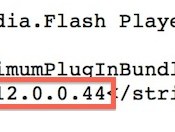
Following Adobe’s release of a “critical” update for Flash Player yesterday to address a security issue that is currently being exploited in the wild, Apple has updated its “Xprotect” anti-malware system to disable older versions of the plug-in. The move forces users to upgrade to the latest version of Flash if they wish to continue using the still-common media plug-in.
 Updated Xprotect definitions requiring new 12.0.0.44 version of Flash Player
Apple’s Xprotect for OS X was introduced as part of OS X Snow Leopard in 2009 as a rudimentary anti-malware system that allowed Apple to block installation and running of the relatively rare cases of known malware targeting Mac systems. By 2011, Apple had upgraded the system to allow users’ Macs to automatically check for updated definitions every 24 hours, ensuring up-to-date protection.
While primarily targeted specifically at malware protection, the Xprotect system also allows Apple to enforce minimum versions of plug-ins such as Flash and Java, and the company has on occasion blocked older versions of both of these plug-ins to ensure that users upgrade their systems.
Apple’s use of the Xprotect system has, however, declined in recent months, perhaps signaling a slowdown in malware and other security issues affecting Mac systems. The most recent significant update to Xprotect definitions prior to yesterday came in mid-September to address the OSX/Leverage.A malware.
| |
Jelly Bean powers three in five Android devices
It’s a new month which means new Android platform figures. We like to check in once every few weeks to see how the Android landscape looks and get a sense for which versions of the platform are growing and which are waning.
According to the latest numbers, Jelly Bean (Android 4.1+) now accounts for 60.5 percent of all devices accessing the Play Store in the last seven days. Gingerbread remains in second place at 20 percent of the platform; Ice Cream Sandwich pulled in 16.1 percent. As for the newest release of Android, 4.4+ KitKat, it’s now at 1.8 percent, up slightly over the last month.
Considering how many Android devices are sold and activated each day, we expect Jelly Bean to hold strong for most of 2014. That is, of course, until the new flagship models begin rolling out. Nearly every major manufacturer has key KitKat models in the pipleline today.
The post Jelly Bean powers three in five Android devices appeared first on AndroidGuys.
OtterBox Preserver case for Galaxy S4 review
The first thing that I noticed about the OtterBox Preserver case for the Samsung Galaxy S 4 is that the size difference between it and the defender case is negligible. Which is great if you’re upgrading, however the cons in moving up are; the back is plastic rather than the grippy rubber of it’s little brother, the back isn’t curved, so it may feel a bit awkward at first, and it doesn’t come with the incredibly stylish belt clip.
In comparison to other waterproof cases, the plugs for the headphone and charging port covers are really nice and easy to open and close, but not to the point of them popping open on their own. However, I did notice that the foam covering the inside of the charging port cover sticks up a little too high, when inserting the device into the case you’ll want to put the bottom in first or you risk ripping that foam off.
When you’re securing the back onto the case, you’ll notice a lot of resistance, there’s a nice gasket going around the inner edge of the back plate. All of the holes are covered by reassuring plastic covers attached by what appears to be more rubber gaskets. The speaker covers are mesh on both inside and outside, presumably with some sort of black magic trapped in between to prevent moisture from getting through.
Opening the case will be frustrating at first, it will make you want a tiny little crowbar you might even be worried that you’re going to damage the case, but once one of the clasps releases, it’s fairly easy to liberate the phone without worrying about accidentally throwing it across the room.
The volume and power buttons are just as stiff as you’d expect from the OtterBox brand, although the home button isn’t quite as hard to depress.
The one thing I was worried about with the size and fortitude of the case was maintaining the functionality of the IR blaster, but it actually seems to work better and more consistently than with any of the other cases I’ve used. As far as the functionality you might expect to be hindered, for the most part, the device behaves the way you’d expect. Speaker and mic during phone calls are acceptable although the earpiece buzzes on low tones. The camera doesn’t seem to be impeded at all, they did the right thing separating the sensor and flash windows. The only one of the port or sensor covers that doesn’t quite live up to expectations is the proximity sensor, it seems to always think your face is next to the device. Literally the moment you tap “call” or “answer” the screen shuts off leaving you to fiddle with your home key to startle the device awake if you need to utilize the display while on a call.
All-in-all, if you’re in need of a waterproof case, and you don’t mind the size of the OtterBox Defender series, At an MSRP of $89.99 this is a totally viable option. It doesn’t offer the color customization options you’ve come to expect from the defender series as the case is only 2 pieces, but to have complete protection is a give and take.
The good:
- The size is comparable to their Defender series
- Strong build quality
- Very small amount of functionality lost
- The price, Sub $100 to protect your $600 phone
The Bad
- The proximity sensor issue might be a deal-breaker for some
- Slight sound distortion from earpiece speaker
The post OtterBox Preserver case for Galaxy S4 review appeared first on AndroidGuys.
Samsung partners with Swarovski for limited edition Galaxy Note 3 cover
“At Samsung, we embrace the creativity of fashion and enable it through our technology. Together with Swarovski, we’re celebrating that creativity with a specially-designed backstage lounge and a limited-edition custom cover for one of our latest smartphones during this season’s Mercedes-Benz Fashion Week. The gorgeous, Swarovski crystal-covered cover adds a glamorous touch to the beautifully designed Galaxy Note 3 to make it the must-have device this MBFW.”
The post Samsung partners with Swarovski for limited edition Galaxy Note 3 cover appeared first on AndroidGuys.

Sky’s Now TV beta lets you stream shows on most Android devices

Android-toting Sky subscribers won’t have to worry about what hardware they use to catch up on their favorite shows. The British broadcaster has just launched a new Now TV beta that runs on most devices using Android 4.0 or higher, including tablets like the Nexus 7. It also introduces support for the £5 Entertainment Month Pass, which offers 10 live channels that include Comedy Central and Sky1. You can still use the earlier Now TV app if you’re running an older Android version, but don’t count on the software hanging around — Sky plans to phase it out later this year.
Filed under: Cellphones, Home Entertainment, Tablets, HD, Mobile
Source: Google Play, Now TV
 AIVAnet