


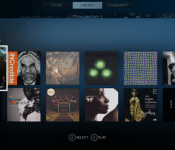
SteamOS gets a native music player in Steam Music

SteamOS still isn’t really in wide use, and it’s very firmly still in beta. Heck, the latest version still carries the disclaimer, “don’t install it on any machine you are not prepared to lose.” With Steam Music, though, SteamOS is one step closer to being a multifunctional operating system: it takes your locally-stored music and makes it playable directly in the Steam UI. There’s a version for Steam’s Big Picture Mode as well, if you’d like to give it a shot on your non-Steam Machine gaming rig.
Valve says that random beta participants (culled from group members here) will get access soon, and a desktop version of the player is on the way as well. There’s no ability to purchase music, nor can you pipe in music subscriptions/Google Play accounts — we’ve asked if (and when) that’s coming — but it’s a pretty major step toward offering multimedia functionality on the upcoming Steam Machines. Like every Valve initiative, Steam Music is an evolving one. The intro page says it all: “Our next steps for the feature will be influenced by your beta feedback.”
Source: Valve

Sprint’s push-to-talk app adds support for six new phones

Sprint is bringing push-to-talk functionality to six new devices today: the Samsung Galaxy S4, Galaxy Note 3, LG G2, LG G Flex, LG Optimus F3, and the Kyocera Hydro Edge. The feature comes by way of Sprint’s Direct Connect Now Android app, and allows user to chirp at friends who are using Sprint’s Direct Connect services (and annoy everyone around in the process), as long as both have their feet firmly planted on US soil. In addition to today’s announcement, support for the Galaxy S4 Mini, Galaxy Mega, and Sprint Spark edition Galaxy S4 are expected to arrive soon.
Filed under: Cellphones, Wireless, Mobile, Sprint
Via: Mobile Burn
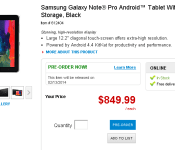
64GB Galaxy Note Pro 12.2″ up for pre-order in the US, available on February 13th
Last week we reported that the gigantic Note Pro was available for pre-order in the UK from Samsung’s e-store for £649, along with a $99 gamepad for free.
Well, the much anticipated tablet that made its debut during CES 2014 will be hitting US shelves in less than two weeks. The product has been added to the Office Depot list, and is available to pre-order for $849.99 — 64GB version only. I have to admit though, the pricing is sort of whopping. If you ask me, I would wait until the rest of the retailers came on board as well, just in case there is a better deal than this one. In the end, you can always buy your electronics for a lower price from Amazon.
 The Note PRO packs a selection of high-end specs including a gigantic 12.2-inch display with a resolution of 2560×1600, Exynos 5 Octa core processor clocked at 1.9GHz, 3GB of RAM, 32 or 64GB of storage with a microSD slot, an 8-megapixel rear camera and a massive 9,500 mAh battery. The device also supports LTE and ships with Android 4.4 KitKat with Samasung’s Magazine UX on top.
Let us know if you pre-ordered one in the comments below.
Source: Office Depot

The NFL’s new digital network is a step forward, but still not what cord-cutters want

Many people were excited by the announcement that this year’s Super Bowl would be streamed online. But this came with a catch on smartphones — the need to go through Verizon’s NFL Mobile service rather than the Fox Sports Go app. And that’s nothing new, as most networks often require some sort of subscription for access to live or on-demand content. A&E, CNN, MTV, NBC Sports — they all do it, and the list goes on and on.
Last week, the NFL announced Now, its new network tailored for the era of the internet. However, despite the league trying to do something novel, a quick look at the comments from our recently published article about the release tells you that on-demand content isn’t enough, particularly for those who have decided to cut the [pay-TV] cord. For those people, the lack of live games overshadows most everything NFL Now will bring to the table when it launches in July — namely, an online channel with a personalized experience accessible on different platforms all over the world.

While there won’t be any games to stream live, NFL Now will have them available a la carte. Although that is, indeed, a nice option, it’s just not one avid football fans are pleased with. The NFL does have a couple of solutions for this, but they are attached to either Verizon or DirecTV, and therein lies the main problem. (Of course, services like Aereo do exist, but that won’t match the all-things-football type of immersion that you’ll get with NFL Now.) Accordingly, and not surprisingly, Yahoo, Microsoft and Verizon were involved in the presentation of NFL Now, which goes to show that the NFL wasn’t willing to tackle its new venture alone and without the help of these A-list players.
“This new digital offering provides our trusted partners and sponsors a valuable new vehicle to reach our passionate fan base,” said the NFL in a statement. Put simply, Yahoo will offer integration with Screen; Microsoft’s going to have apps across its platforms; and Verizon is said to be a very important partner in the distribution process of Now, which it plans to deliver to subscribers using its new LTE Multicast tech. Despite the real-time shortcomings of NFL Now, the digital network won’t depend on cable providers for anything else — full games on demand, original programming, news and live press conferences will be available to everyone, cord-cutter or not.
When asked if we could ever expect live games to come to NFL Now, a few league representatives told us… well… nothing. It was one of those ubiquitous “no comment” questions. In the end, the NFL is a business, and that’s a rather key factor to remember. It needs Comcast, Time Warner Cable, DirecTV, U-Verse, Dish, Verizon and many others as much as they need it — but, if only for the sake of folks who’ve made a choice to leave cable TV behind, let’s hope the mutual reliability doesn’t last forever. And believe, because there is hope.
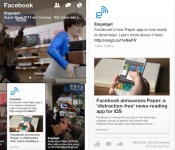
Paper news-reading app makes Facebook prettier, a bit less functional (hands-on)

Upon installing Facebook’s newest app, you’re greeted by a friendly female voice. “Welcome to Paper,” she says. And, for many folks, Paper will be a welcome change indeed. But, before we tell you why Paper may be preferable to the full Facebook app, let’s establish just what Paper is — it’s only been a few days since it was revealed to the world, after all. Generally, Paper is a news-reading app that shows users the stuff they already get in their News Feed, in addition to stories pulled from content partners (including Engadget, of course) by Facebook’s in-house team of tastemakers.
After its verbal welcome, Paper shows you a beautifully shot, superfluous bit of marketing video. (We’ve already downloaded the app, right? We don’t need to be sold on it a second time.) It then tells you how to set things up. Should you already have Facebook installed on your phone, there’s no need to punch in your login info again; Paper knows who you are and takes you straight into your notifications. We thought that was a bit odd, but we suppose seeing your notifications first is something that some users might appreciate.

Regardless, upon dismissing the notifications window, the app then asks you to select the sources of news that you’d like to see. Your News Feed is, of course, selected by default, but you also get 19 other topics to choose from. Most are the usual subjects — news, tech, sports, food, photography, etc. — but there are some more unique choices, such as Ideas, which Facebook describes as “a daily, in-depth look at one standout idea, event or personality,” and Equalize, which is news about eliminating gender bias and discrimination. Naturally, you can shuffle these topics any time you want in the settings, and you can also arrange them in any order you prefer.
Once you’ve chosen the stuff you want to read about, Paper takes you to its central navigation screen. The top half is occupied by the aforementioned topics, and will be very familiar to users of Facebook Home’s Cover Feed. It cycles through stories from a particular feed every five seconds, and a tap takes you directly to the full post, where you can like, share or comment on it. The lower half is made up of a series of cards that are the full feed for a particular topic. Navigating through topics and individual stories is accomplished by swiping left to right, and switching back from individual stories to the main feed is done by swiping down from the top of the screen. After the app informed us how to navigate, it became second nature within a few minutes. We found the UI to be well thought out and intuitive. Our only quibble? We wished we could navigate among the posts that were cycling through the topic pane, instead of having to wait for the seemingly endless seconds required for the app to show posts we wanted to read, but missed the first time round.
In the lower carousel, individual stories are presented in a trio of ways: a white card with a tap-able link and an image, a card that is all image (truncated, à la Facebook Home) or a white card with a sub card that can be unfolded to view the full story. We’ve been unable to detect any rhyme or reason as to which posts get which stylistic treatment, and each type of card behaves a little differently. For instance, the two types of white cards look similar — the only differences are that the first type I mentioned has a grayed-out “Continue Reading” link and there’s an absence of text immediately beneath the image — but they behave differently enough to be annoying. The first style requires tapping on the link to open up the full story on its associated web page, while swiping up on the picture simply moves the image around until you release, whereupon you get the full, non-truncated version of the image. Performing the swipe on the second style of white card allows you to unfold the story into its web page directly (similar to its competition, Flipboard).
Meanwhile, the full-image cards incorporate some motion control: Users can tilt their phones left and right to see the undisplayed portions of the picture. It’s a largely useless addition to the app, in our opinion, simply because you have to turn the screen away from your eyes to view the far edges of an image, which means you’re seeing it at an oblique angle. Plus, you can simply tap the image or turn your phone (or iPod touch, in this editor’s case) to landscape mode to see the full picture head-on.

Aside from providing you with news to read, Paper also gives you limited access to Facebook in general. You can post to the social network, of course, and it lets you view your and your friends’ photos, pages and posts. There’s also search functionality and access to Groups, Events, notifications, messages and friend requests. Plus, you can change your account and privacy settings from within Paper, too.
We think that for many folks, Paper can serve as a main mobile Facebook access portal. As far as its UI is concerned, Paper puts the regular Facebook app to shame. Its swipe-based navigation is easy to use, and Paper reduces the amount of visual clutter on screen to a fraction of what you see in the full FB app. Because of that, it’s better able to highlight the content that most users come to Facebook to see in the first place. That being said, Paper doesn’t give power users full access to FB — we couldn’t find a way to access our Groups and apps, or Pages we administer, and that’s just the shortcomings we found in our first few hours using the app.
In short, Paper’s perfect if you’re looking for a more beautiful way to consume News Feed content, but it may not suit your all your needs if you require more out of your social networking app.

Grand Theft Auto 5 is the best-selling game of 2013

Between a $1 billion debut and rave reviews, it’s probably not a huge shock to you that Grand Theft Auto 5 was the best-selling game of 2013. Regardless, Rockstar Games’ parent company Take-Two Interactive confirmed suspicions today in the company’s financial earnings release. “Grand Theft Auto V finished as the best-selling video game of 2013,” the release states, attributing that claim to NPD. “To date, Grand Theft Auto V has sold-in more than 32.5 million units.”
Even with the game’s mass popularity and somewhat staid approach to world-building, we can’t help but commend Rockstar Games on the achievement — we loved our time in GTA5‘s single-player and (occasionally troubled) online worlds. Now all we can do is hope for an even prettier version on these new game consoles (or PC, for that matter) in 2014, though we don’t expect a repeat performance in the “best-selling game” category. Let’s not get too crazy.
 AIVAnet