



LG G Pro 2 to get 4K recording from a 13MP camera with OIS Plus
 Just over a week ago, LG confirmed that it would officially be releasing the LG G Pro 2, the successor to yesteryear’s LG Optimus G Pro which did a decent job of joining Samsung in the phablet space. Since they, we haven’t had too many solid hardware suggestions beyond the fact that it will be bigger and most likely better than the LG flagship device, the LG G2. Well, today, LG itself has dropped some sneak-peek features which include 4K recording and a new image stabilization that LG has dubbed “OIS Plus”.
All of this will apparently be possible with the G Pro 2‘s 13MP rear camera, and will also possess a 2.1MP front camera which allegedly has “improved performance”. One sticking point for millions of smartphone photographers is inherently the issue of image stabilization, so perhaps LG has finally nailed it. Whatever LG has achieved with the G Pro 2′s cameras will be unveiled some time in February, presumably at MWC 2014 where Samsung has just revealed it will unveil its new flagship, the Samsung Galaxy S5. That’s definitely a tough crowd to compete with, but let’s hope that LG has something to surprise us with.
Is anyone considering getting a LG G Pro 2? Did anyone here have a LG Optimus G Pro and enjoy it? Let us know in the comments below.
Source: LG Social via Phone Arena

Smart Dock with Orientation-Aware Functionality, Induction Charging Detailed in Apple Patent
Apple has been awarded a patent by the U.S. Patent and Trademark Office (via AppleInsider) detailing a flat smart dock that would be able to determine the orientation a device is placed in and perform actions such as induction charging, data syncing, diagnostics testing, and more.

The patent, which was originally filed in 2012, details a dock that includes components such as a processor, memory, internal power supply, and multiple sensors among other components. The dock is described as being a central point in the transfer of data between a user’s device and a host device such as a computer. Data itself would transfer between two devices through a wire such as a Lightning cable or through wireless networking.
In terms of identifying different orientations, the patent states that the flat dock would be able to recognize factors including the rotational position and the proximity of a device. For example, if a user leaves a device face down, the dock would perform charging, whereas leaving a device face up would allow for data syncing and charging at the same time. A device on the smart dock would provide on-screen information about the current action being performed as well.
In some embodiments, a physical orientation of a user device placed on a surface of a docking device may be determined. The physical orientation may include a translational position (e.g., Cartesian coordinates, polar coordinates), rotational position (e.g., an angle value about a suitable axis), a facing direction (e.g., face-up, face-down), any other suitable physical orientation relative to any suitable reference, or any combination thereof. For example, a physical orientation may be a position of a user device on a surface of a docking device.

Support for multiple devices on the dock is described in the patent, as the dock would be able to perform actions such as data transfers and charging on devices in close proximity to each other. Transfers between a host device and a primary device placed on the charging surface are also described as a capability of the smart dock.
It is unknown whether Apple plans to create such product or not, but the company has shown strong interest in some of the technologies described in the patent. It was reported earlier this week by The New York Times that Apple was testing induction charging among other methods for its upcoming “iWatch” project. This, coupled with past rumors stating that the iWatch will serve as an accessory to iOS devices would make it a prime candidate to benefit from the functionalities of the smart dock described in the patent.
Apple also filed a patent for a separate smart dock last December, which emphasized voice recognition and single-device use through a regular multi-pin connector. The existence of either device would be of a new effort for the company, as Apple currently sells docks with limited functionality for the iPhone 5c and iPhone 5s. Other accessories such as the iHome family of clock-radios and speaker systems offer a bit more functionality, but very little in the context of deep interaction with a device.
     |
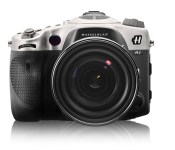
Hasselblad remakes a Sony DSLR out of aluminum, quadruples the price

Do you love your Sony A99 full-framed DSLR, but find it’s just not… aluminum-y enough? For an extra $8,700 (or $11,500 in total), you can score a Hasselblad HV remake with a Carl Zeiss 24-70mm F2.8 lens instead. That’ll get you a “much tougher” machined, high-grade aluminum body instead of the original’s garden-variety magnesium. It also benefits from something called “physical vapor deposition hardening,” comes in a “high performance” case and, well, that’s about it. You’ll otherwise be taking the same (nice) snaps as Joe Sixpack with his regular A99, thanks to the original camera’s 24.3-megapixel sensor and 25,600 max ISO. Still, what the deuce, Jarvis, fetch my checkbook.
Filed under: Cameras
Via: Sony Alpha Rumors
Source: Hasselblad

Pacemaker DJ app for iPad swaps your record bag for your Spotify password

Third time lucky? The team behind Pacemaker clearly thinks so. What was originally ambitious hardware, had to reinvent itself as an app after a complex business arrangement meant things didn’t work out. Sadly, the app chose a platform that limited its scope, when it launched as a BlackBerry-only offering. Today, Pacemaker is back, and perhaps where it most logically belongs — as an iPad app. The totally reinvented interface is much cleaner than before, and operates on a freemium model (unlock extra features like effects at a small cost). Most notable though, is the partnership with Spotify, giving you instant access to the streaming service’s entire library. You’ll need a premium account, but there’s a free trial included in the app. This is something that was attempted before, albeit in breach of Spotify’s terms and conditions. Perhaps the most pleasing part of the story though — at least for owners of the original hardware — is that Pacemaker the device hasn’t been forgotten. Today, it receives a new firmware update which brings new features and improvements to the now, cult gadget. So whether you’re hardware or software, it’s time to dig out those headphones.
Filed under: Tablets
Source: Pacemaker device, iTunes

Congress’ new report tells you where Bitcoin is legal

Unfortunately, you can’t assume that Bitcoin is legal everywhere you go — it’s safe to use the digital cash in some countries, but it’s mostly verboten in others. However, you won’t have to travel blind. The US’ Law Library of Congress has just published a report (PDF) that outlines Bitcoin’s legal status in 40 countries. In short, the currency mostly exists in a gray area. While countries like Germany and Finland have cleared Bitcoin for legal use in some conditions, most nations either haven’t regulated it or see it as too risky. Don’t leave your physical wallet at home on your next vacation, then.
Filed under: Internet
Via: The Verge
Source: US Senate (PDF)

Mozilla makes it a lot easier to sync Firefox bookmarks and passwords

Firefox users keen to keep their browsing data up-to-date across devices will soon have one less headache to worry about. Mozilla, makers of the popular open-source browser, has decided to do away with synchronization keys for its Firefox Sync service, opting instead to utilize a simple email and password combo similar to Google Chrome accounts. The change comes after users were forced to store an auto-generated authorization code, which, if lost, would render their bookmarks, passwords and browsing history inaccessible. While it means Sync accounts are a little more traceable, in that Sync data will be directly linked with a user’s email address, the new process will enable Firefox users to quickly restore their browsing data in the event of a catastrophe like a hard drive failure. Mozilla is currently testing the new version of Firefox Sync in Nightly browser builds, meaning you’ll need to install a beta version of Firefox to try it, but we expect it to make its way to a public release in the not-too-distant future.
Filed under: Internet, Software
Source: Mozilla Blog, Firefox Nightly

4 essential tips for Successful Mobile Apps
The last few years saw myriads of mobile apps in the Android Mobile Application Development. While many came with a bang but lost appeal the very next moment, few survived the tide. Lack of insight and planning lead to hundreds of apps becoming obsolete. So what is it that needs to be looked into to make a successful app? Read on to know.
 The craze of the app industry brought about a flood of apps in the market in the past few years. In the context of the Android Mobile Application Development especially, setups of different sizes, big or small, were found to be investing heavily on app development. In the process what was compromised on was its utility. App stores are now jam packed with apps that have been rendered useless and waste. While this was a discouragement enough for some to just put a stop to the venture, others used this catastrophe as a learning experience to come up with better apps in future.
So what is it that Mobile Applications Developers need to consider in order to make a successful app? Well, the experts have spilled the beans and this is what they have to say:
Utility:
The app should be solving a problem or an issue. It makes little sense otherwise. There should be some benefit that your app wishes to offer. For instance, the very popular Whatsapp, actually allows you to connect with anyone and everyone across the country, exchanging messages, pictures, videos and emote, free of cost. Well it may be quite a strain on your pocket otherwise! So there is a problem solved here, that of communication across huge distances. Note however that web apps should not be considered as a substitute for the web. An app cannot substitute for official website.
Focus on the concept:
The importance of the idea should not be compromised with at all. Focus on the core concept is therefore essential. Amidst all the focus in design and features, the core idea itself is lost. There should of course be a good amount of brainstorming because ideas will be innumerable and you will have to reserve the best two or three only for the final choice of plan.
Create awareness:
If it’s your brainchild and you want others to know about it, you will have to take up a fair share of promotions for it. For a well known brand in the app industry, things may come a little easy but if you’re anyone but the reputed, you will have to get your idea across yourself. Keeping them updated with notifications as and when required is also vital, once they start using your app.
Updates:
Apps become obsolete if they are not updated. No matter how good and useful your app is there is always scope for more improvements. Though most apps require them to be run to be updated, if there is scope for notifications otherwise, the opportunity should definitely be utilized.
While the above tips can be used as per the discretion and wisdom of the Mobile Applications Developers, or those considering the option, they should ensure that apps should never be a replacement of websites. Users should never be forced to run apps rather than visiting your website. With the above pointers in mind, and a rock solid idea, there should be no room left for your users not to be intrigued by your app!
Is there anything else that qualifies to be an important consideration in app making? What challenges have you faced in the process? Share your thoughts with us.
Author Bio
Ashish Sharma works at WebApps Techmagnate as a software developer but spends his spare time to writing useful posts about Professional Website Development. He has spent over 5 years in this Industry and still curious to adopt and learn new things quickly.

AllCast Android media streamer and Chromecast are friends again now that the SDK is here

Google’s Chromecast has teased seemingly limitless potential since its release last year, but until the Cast SDK came out yesterday most developers couldn’t take advantage of it. That includes Koushik Dutta, creator of the AllCast app that we’ve already seen featuring screen mirroring or streaming music, video and pictures from Android devices to the dongle, but that’s all changed. He reports that adding Chromecast support to his existing app (previously limited to streaming with Apple TV, Roku, Xbox, Playstation and other DLNA/AirPlay ready devices) took about 20 minutes in a “trivial” procedure requiring almost no extra code. A video demo of the feature is embedded after the break, and while it loads a little slower than other devices, pushing media from phone to TV is now just a button press away.
That bodes well for other apps we’d like to see supporting Chromecast, and hopefully means that tiny button will pop up everywhere soon. As for AllCast, an update with Chromecast support is coming “soon,” interested users can grab a free version that works for one minute to try it out, or upgrade to the unlimited premium edition for $4.99.
Filed under: Home Entertainment, HD, Mobile, Google

Facebook reminds you of the good times, bad haircuts with personalized 10-year anniversary video

We’re not usually one for nostalgia (unless it’s of the 8-bit variety), but Facebook evidently is. With 10 candles in its birthday cake today, the social networking giant hopes to make all of its users a little misty-eyed, too, with its “look back” highlight video reel. To see yours, head to the link below and cringe at your first post, most liked update and a whole host of other things you’d probably long forgotten. If nothing else, it’s possibly a good reminder to revisit those privacy settings.
Filed under: Internet
Source: Facebook

Spotify-Compatible DJ App ‘Pacemaker’ Launches for iPad [iOS Blog]
DJ app Pacemaker has launched, bringing a minimalistic mixing interface with various features to the iPad. The app allows users to connect a Spotify account to access and mix any song from the music service’s catalog, with the app also including support for tracks from an iTunes library. Once songs are loaded up, Pacemaker allows basic mixing effects including “Scratch”, “Crossfade”, and “Loop” to be performed with swipe and tap gestures, while extra effects such as “Reverb”, “Echo”, and “Roll” are available as in-app purchases.

– Mix millions of tracks with Spotify
Pacemaker is the first DJ app connected to Spotify. This gives you millions of tracks at your fingertips and endless possibilities to create something new or simply find and mix the music you love. Pacemaker for iPad offers a Spotify Free Trial to fully enjoy a world of music and DJing.
– Reverb
Size matters. Reverb lets you control the size of the room, from a small hut to the largest of cathedrals.
– Loop
Shoop da loop! Create synchronized loops on the fly; Split or double, exit and re-loop. Also included is the exclusive Pacemaker Loop Travel which produces a glitchy effect by making a small loop travel along the soundwave.
– Beatskip
Jump around! Jump around! Skip a pre-determined number of beats forwards or backwards to create stutter and jumps in the playback.
– Sync the beats
One of the most appreciated features amongst both beginners and professionals is automatic beat syncing. It gives you the possibility to instantly sync tempo and phase of two tracks by tapping the SYNC button.
Pacemaker is a free download for the iPad and can be downloaded through the App Store. [Direct Link]
| |
 AIVAnet