


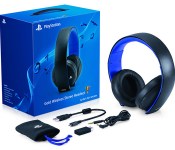
PlayStation 4 update supports Sony’s pricey headsets, including a new model

PlayStation 3 owners who quickly moved to the PS4 couldn’t take their expensive Pulse headsets with them, but that won’t be a problem for long. A version 1.6 update reaching the newer console late this evening will bring full support for both the regular Pulse and its Elite Edition, giving players 7.1-channel virtual surround sound and voice chat through Sony’s official hardware. Elite Edition owners will also get to use a Headset Companion App (due later this month) that sets custom audio profiles. To mark the occasion, Sony is launching some new audio gear: the Gold Wireless Headset offers 7.1-channel audio, voice and game profiles in a travel-ready, foldable design. It should sell for $100 when it hits store shelves early this month.
Filed under: Gaming, Peripherals, Sony
Source: PlayStation Blog

Social Sharing Sends ‘Flappy Bird’ Developer to Top of the iOS App Store [iOS Blog]
Indie developer Dong Nguyen has achieved an App Store first — he has three apps in Apple’s Top Free Apps list including the viral hit Flappy Bird [Direct Link], the now #2 Super Ball Juggling [Direct Link] and the #8 Shuriken Block [Direct Link]. Dong is unable to explain his recent success, chalking it up to luck and not any particular effort on his part. As a result, it likely wasn’t Dong’s activity but the power of the social Internet that propelled his games to the upper echelon of the App Store.

Dong notes in an interview with Elaine Heney of Chocolate Lab Apps (via TechCrunch) that he did zero promotion for Flappy Bird and claims he doesn’t even own the social network accounts for the app.
“I didn’t use any promotion methods. All accounts on Twitter, Facebook and Instagram about Flappy Bird are not mine. The popularity could be my luck.”
What Heney did notice about Flappy Birds was a viral campaign to write the best review for the game. As a result of this challenge, the app now has over 47,000 reviews and almost a half a million ratings. These statistics put Flappy Bird on par with powerhouse apps like Evernote and Gmail.
Flappy Bird launched in May 2013 and only recently topped the iOS App Store charts. The app challenges players to keep a flying bird from running into pipes by tapping the screen. Its 8-bit graphics give the appearance of simplicity, but it is a deceptively difficult game that is so hard to master that most people score in the single digits and brag about their failure. Dong’s other two hits are equally basic and are likely receiving attention due to the popularity of Flappy Bird. 
     |
Sketchy Report Claims Full iPhone 6 iPhone Details: Larger IGZO Screens, More RAM and Storage [iOS Blog]
A sketchy new report [PDF] from analysts at KDB Daewoo Securities Research shared by OLED-Display.net (via BGR) claims to have full details on Apple’s iPhone 6, but there are several issues with the claims that call the entire report into question.
According to the report, the iPhone 6 will be available in two sizes, one with a 4.7-4.8 inch display and a second at 5.5 inches. These displays are said to run at 1920×1080 (440 ppi) and 2272×1280 (510 ppi) respectively, using indium gallium zinc oxide (IGZO) technology rather than the low-temperature polysilicon (LTPS) technology used in current iPhones.
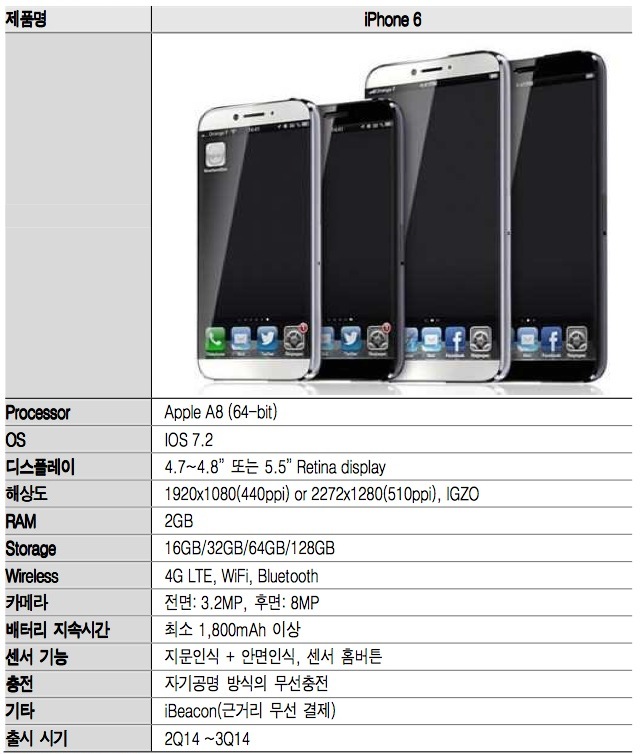
While the claimed display sizes are in line with circulating rumors, the claim of IGZO over LTPS raises some doubt given that LTPS offers better electron mobility and thus greater efficiency than IGZO. IGZO is starting to gain popularity in larger devices such as tablets due to technical limitations with creating LTPS displays at those sizes, but LTPS remains the preferred technology for many high-end smartphones. Still, it is possible that larger displays at higher pixel density for the iPhone 6 could spur Apple to change its display technology.
Other claims in the report include a bump in RAM to 2 GB alongside a new A8 chip, a new 128 GB storage option at the high end, and an upgraded 3.2-megapixel front camera. In line with a previous claim, the analysts predict that the rear camera will remain at 8 megapixels, although it could gain other improvements.
Another questionable claim of the report comes with regard to the device’s operating system, with the analysts pegging the device as running iOS 7.2. Each new iPhone model has been accompanied by a major iOS update, and so the iPhone 6 would be expected to run iOS 8 at launch. iOS 8 has been observed in web logs and other sources, but there has been no evidence yet of Apple working on an iOS 7.2.
Finally, the report gives a fairly wide launch window of the second or third quarter of this year. iPhone launches have come at the tail end of the third quarter or even early in the fourth quarter over the past several years, with repeated rumors of Apple possibly returning to the mid-year launch window used for early models failing to come to fruition.
| |

Apple Releases Mac 30th Anniversary Video ‘1.24.14’: Filmed on iPhones, Edited on Macs
On January 24, Apple commemorated the 30th anniversary of the Mac with a “Happy birthday, Mac” promotion on its website, 30th anniversary t-shirts for its employees, and executive interviews with both ABC News and Macworld. Just ten days later, the company now has released an anniversary video, recorded on the anniversary using iPhones and edited on Macs, that shows how the the promise of the Mac has been fulfilled by putting “technology in the hands of the people.”
Produced by Apple’s longtime ad agency TBWA\Chiat\Day headed by Lee Clow, the “1.24.14″ video includes footage from 10 countries spanning 5 continents. The video was directed by Jake Scott, son of filmmaker Ridley Scott, who was behind Apple’s iconic “1984″ ad, and showcases current generation Apple products being used in fashion design, musical performances and more.
On January 24, 1984, Apple introduced the Macintosh. And with it a promise that the power of technology, put in the hands of everyone, could change the world. On January 24, 2014, we sent 15 camera crews all over the world to show how that promise has become a reality.
From sunrise in Melbourne to nightfall in Los Angeles, they documented people doing amazing things with Apple products. They shot over 70 hours of footage — all with the iPhone 5s. Then it was edited and scored with an original soundtrack. Thanks to the power of the Mac and the innovations it has inspired, an effort that normally takes months was accomplished in a matter of days.
Apple was rumored to be working on a Super Bowl commercial, but the company instead partnered with U2 and Bank of America in a new (Product) RED promotion announced in an advertisement broadcast during the game. For every free iTunes download of U2′s new single “Invisible” [iTunes Store], Bank of America will donate $1 to (Product) RED’s fight against AIDS. The promotion will end 11:59 PM EST on February 3.
| |
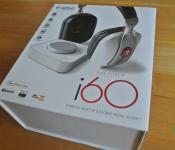
Turtle Beach Ear Force i60 Wireless Desktop Media Headset Review: a very complete package, even for the PC/Android user
 The world of premium gaming headsets is a very slippery slope; when you start paying north of $300 USD for a headset, you expect it to do quite a lot and sound absolutely orgasmic. Turtle Beach has of course been part of this world for some time now with its plethora of premium gaming headsets, though with a definite focus on gaming console solutions for some time now. Thankfully, Turtle Beach has started gravitating towards premium mobile solutions too, and the latest result of that endeavour is the Ear Force i60 Wireless Desktop Media Headset. On the surface, a thing beauty and sleekness; let’s dive in and check it all out.

The headphones
 The i60 is actually, first and foremost, a headset optimized for Mac and iOS use with several additional features (and an app) available to you if you use this headset with either one of those platforms. Being a humble Android and PC user then, I didn’t get to use some of the additional features, but as we’ll find out, there’s still a lot of headset to go around.
When I get a premium set of gaming headphones, I want the unboxing to be an experience, and thankfully, Turtle Beach has gotten that part of the deal down pat. Check out some of the photos as I dismantled all the gear in the wonderfully packed box:


The official list of items in the box include:
- Power Cable: Transmitter USB Cable(Micro)
- Charging Cable: Headset Charging Cable(USB Micro)
- Guide: Quick Start Guide
- Sticker: Turtle Beach Sticker
- Headset: i60 Headset
- Transmitter: i60 Transmitter
- Manual: Product Brochure
- Mobile Device Cable: 3.5mm Male to Male 4 pole
- Case: Carrying Pouch
So you’ll see there is quite a hefty amount of gear included with the i60, and ironically enough, given that this is a headset optimized for Mac and iOS, there is an overwhelming presence of micro-USB cables; do I sense a closet Android headset? The pouch is a nice touch, particularly as it’s quite a heavy, thick bag, which also has a small pouch on the inside which will allow you to take your transmitter with you whether you go.
 The i60 also comes with a lot of the little things that aren’t on the official list which make the i60 really convenient in multiple situations including a 6.3mm adapter which can be used with the mobile adapter cable for recording purposes, or my personal favourite, the airline adapter plug which turns the i60 into a plane-friendly headset.
 The first thing you’ll notice about the i60 headset is that it’s quite the looker; white earcups and brushed aluminium arms highlighted by black and red. It’s definitely not an inconspicuous headset; somehow I feel Turtle Beach headsets are never designed with that in mind, and perhaps rightly so. The colours of the i60 seem to scream for attention, but in a very subtle way, commanding your respect, and after spending a few minutes listening to them, you’ll understand why.
As was said at the beginning, the i60 is usable with both desktop computers and mobile; in desktop mode, the i60 uses the included transmitter to pair with the headset, whereas on mobile, you can use the standard method of pairing with Bluetooth. In wireless modes, the headset’s battery will last over 10 hours, which in my experience can last well over 15 hours if you’re using it on and off. You can, of course, also use the headset wired with the included mobile adapter cable, however, the i60 still requires battery power to operate in this wired mode. I think this is a bit of an oversight which restricts the i60 a little as an option for long-distance travellers.
 Charging is achieved via a micro-USB port on the bottom of the right cup, and the input audio jack is located on the left cup. You can operate the i60 while it is charging, but the standard 1m cable could be a bit short in some desktop configurations.


The interface buttons for the i60 can be found on the rear of the earcups. This can be a little weird to get used to at first, but it’s actually quite a lot easier to manipulate the controls on the back with your thumbs than it would have been fiddling around the front with your fingers. The buttons are comprised of a power button, EQ preset toggle up + down, and voice distortion button on the left side, and Bluetooth on/off, Bluetooth volume up + down and mic on/off button on the right side.
 And now moving onto the transmitter: the i60 transmitter, pictured above, is only used when you want to connect your headset to either a PC or a Mac. I think it’s a really sleek package, particularly with its brushed plastic and perspex face-plate. The dial in the middle controls two things: the outer dial controls the main volume of what you’re listening to, while the inside dial exclusively adjusts the chat volume that you’re hearing. It’s actually incredibly handy to be able to dynamically adjust volumes on the fly with this transmitter, and for some added pizazz, the ring around it lights up to show you either the main or chat volume, switching between the two when you start adjusting the dials.

The comfort
 The over-the-ear earcups of the i60 are incredibly comfortable; the memory foam fits to your head perfectly, and although the swivel on the earcups can be a bit stiff, once you find the right angle for the earcups to face and sit on your head, you’ll be in heaven. Likewise, the headband of the i60 uses a soft foam, though not quite as much as the earcups. If anything, the headband cushion might be a bit too narrow, potentially causing a single pressure point when wearing the headset for longer sessions.
 I have to say that my own experience with the comfort of the i60 has only been mediocre. Don’t get me wrong though; it is still an incredibly comfortable headset, and I have had multiple expressions of adulation from colleagues who have also tried the i60 (or its little brother, the i30) and absolutely loved how comfortable they were to wear. And I think I would mostly agree, but there is one limiting factor on the i60 which may make it less enjoyable for some people.
 The i60, like every other headset on the market, is adjustable in length, achieved by the earcups moving along a track in the headset arm, as pictured above. Unfortunately, even in most extended position, this was still just a tiny bit too short for my head. What this caused was my head to be rammed up against the cushion at the top of the headset and the narrow headband caused quite a lot of soreness after wearing it for long periods of time. While many other headsets on the market have far more extension on the earcups, it looks like the overall aesthetics of the headset might have influenced the way this was designed.
 The i60 was designed with some weight saving techniques in mind, like the lightweight cast metal headband and the aluminium headset arms. Unfortunately, this is all undone as the sheer amount of technology in the earcups makes the entire headset quite heavy, which in turn causes addition stress to occur at the headband. I also feel that the fit of the i60 is a bit too tight, causing some discomfort about the ears, though again, my colleagues who have also tried the headset have expressed no such discomfort; it increasingly seems that the i60 is an absolute dream for people with small-to-normal sized heads and for people with taller or larger heads, it could be a bit of a tighter fit. I’d definitely suggest trying one on if possible if you are considering it because for those who do fit it, you definitely will not be disappointed.
The sound
On a PC
 Unfortunately (or fortunately, depending on your platform), as the i60 is technically designed as a Mac headset, the included instructions are only directed to Mac users. Veterans of PC gaming headsets may know what to do already, but thankfully, Turtle Beach does have very straightforward instructions to set up the i60 on your PC which can be located on their support website. Once I had those, it was incredibly simple to set up the 7.1 surround sound and be listening to the fantastic DTS enhanced audio that the i60 provides.
 The i60 headset uses dual-band Wi-Fi to communicate with the transmitter so that loss is less likely and I’ve got to say that I did not once encounter any audio loss while testing it while gaming or listening to music. The i60 transmitter is quoted for a range of 30 feet, though I found that to be closer to about 15-20 feet, particularly if you’re going to be walking somewhere a few walls away.
 While using the i60, you’ll have access to some really nice inbuilt features such as preset EQ settings which you can vary using the up and down bumpers on the back of the headset. You are also able to morph your voice chat to one of 3 preset settings if you fancy being a bit sneaky on game-chat.
 The 50mm drivers in the i60 give it an incredibly full and rich sound. There really isn’t much to fault in the sound of the i60, and if you really turn in up, you’re in for something special. From pop to rock, rap to classical, I was nothing less but amazed at the sound that came from the i60; it’s clear, bassy, and all the articulated sounds are very sharp. If there’s one thing I need to point out, the high end of pitch scale did appear to get a bit dulled out which became extremely obvious when listening to violins in classical pieces; apart from that, the sound was faultless. And married with the preset EQ settings, which provides options for bass booster, treble booster or whatever else you could possibly dream up, you have a headset that can cater to pretty much any listener in one package.
 You might have been wondering, since the i60 is a headset, where’s the mic? Turtle Beach has been smart about the mic in the i60, particularly for mobile users who don’t appreciate multi-platform gaming headsets that have a large mic boom jutting out all the time. The mic is located on the left earcup as shown in the image above, and despite not looking like much provides fantastic quality voice audio for the receiver on the other end. One weird thing that does happen, though, when the mic is on and you touch the mic orifice, you will get some feedback in the headset; an easy fix for this is to mute the mic most of the time, which is a simple button press on the right earcup.
On an Android device, via Bluetooth
 As we mentioned earlier, the i60 is intended to be a iOS optimized headset. With an iOS device, you are able to answer calls or use Siri with a simple touch control and additionally, there is an iOS app which can be downloaded to manage the EQ presets as well as customize the headset controls. Unfortunately, Android has not been afforded this luxury; while it’s very clear that the i60 is targeted at and designed for Mac and iOS users, as an Android purist, I still can’t help but feel a bit disappointed that there is no Android app.
 It’s obviously not all bad; you still get the benefits of the fantastic i60 sound, the mic to be used in calls and naturally the fantastic looks and design of the headset itself. All Android users are missing out on are the customization options, which while nice to have, aren’t all that necessary (and for the audio savvy, this isn’t a downside at all). Connecting to the i60 via Bluetooth is very easy with the dual-pairing Bluetooth 4.0, and Turtle Beach claim that the headset is capable of simultaneously being connected to 8 different devices at once. While I wasn’t able to test this claim myself, I did have the i60 hooked up to my PC, my Note 2 as well as my Nexus 7 at the same time; this is definitely handy if you want to game on your PC without needing to check your Android device for notifications or taking calls when a battle is raging in-game.
 As with the sound with the i60 connected to the PC, the i60 had no troubles with lossy audio when connected to my Android device via Bluetooth, which I was incredibly impressed with. The lack of a answer call button (iOS only) is a slight downside, but the call audio was as good as you can expect from something just transmitting the audio from your phone to your headset.
The practicality
The battery power of the i60 is a pretty impressive affair; we’ve tested the i60 on full volume with Bluetooth on and found that it actually exceeds the quoted 10 hours on the box. It partially achieves this by mainly just being awesome, but also because it has some really intelligent power-saving measures programmed in; the i60 has an auto-off function which switches your headset off if there is silence for 5 minutes or does not detect movement for 5 minutes, but only if Bluetooth is off.
 This is pretty handy as you can run off to do some errands and be sure that your battery hasn’t been wasted away. Unfortunately, this can sometimes also be a detriment as sometimes you can be sitting very still listening to music and the headset will turn itself off. I can’t exactly fault the feature as it does conserve a lot of battery, however it can be annoying for your headset to randomly turn off if you’re a particularly statuesque person. This of course only occurs when you’re using it with the PC, so mobile users won’t have this issue.
 One thing I really like about the i60 is that it utilizes pre-recorded voice prompts when you use the buttons; this is particularly important seeing as the buttons are located on the back of the earcups and there is no visual indicator for when you are fiddling with your EQ settings. This makes switching between the EQ presets and toggling various features a breeze as the prompts simply dictate the current setting you are on in a pleasant lady’s voice, however, the voice can be occasionally jarring as its volume appears to be at an independent default level and cannot be changed; I jumped out of my skin quite a few times when sitting in silence for 5 minutes when out of the blue, a decently loud voice in my head exclaims “powering off”.
 I also particularly like the inclusion of a carry pouch which even has a dedicated pouch for the transmitter, and makes the i60 a prime candidate for all the gamers out there who are always on the move and need their premium sound with them all the time.
The verdict
Rating: 4.5/5
I really wanted to give the i60 full marks: it looks fantastic, sounds fantastic and is jam-packed full of technology that is cutting edge in the premium gaming industry. However, on a personal level, the i60 lost some marks on comfort as a result of its lack of size accommodation. Please let me restate though that this is not an issue if you have a smaller or normal-sized head.
For a headset that is optimized for Mac and iOS, the i60 offers a surprising amount to PC and Android users; you get full use of the i60′s features, bar only a handful, most of which aren’t essential anyway. It obviously would have been nice to also have an Android app to control the EQ presets, but it’s clear the i60′s main target is Mac and iOS users. Regardless, PC and Android users will be more than satisfied should they get the i60.
And then there’s the price: $399.95 USD. That is a lot of money but when you think about it, the i60 is essentially a set of premium audio headphones with extra technology built in that allows it to not only be used wirelessly in multiple scenarios with multiple platforms, but also able to dynamically change its audio quality on the fly, and sounds fantastic doing it. Veterans of Turtle Beach products will understand: the i60 costs what it does because it does what it says it does and it does it exceptionally well.
We hope this review has given you a better idea of what to expect with the Ear Force i60 headset; to check out the Turtle Beach Ear Force i60 Wireless Desktop Media Headset, you can visit its product page here, or for more information about Turtle Beach’s other products, you can visit their website here.
Full gallery of photos


Bank of America Donating $1 to Product (RED) for Every Free iTunes Download of U2’s ‘Invisible’ [iOS Blog]
During yesterday’s Super Bowl broadcast, a new ad featuring rock group U2 announced that Bank of America would donate $1 to (Product) RED‘s fight against AIDS for every free iTunes download of the band’s new single “Invisible” [Direct Link]. The promotion will be active until 11:59 PM EST on February 2.
Product (RED) was co-founded by U2 lead signer Bono and activist Bobby Shriver in 2006, with Apple raising more than $65 million for the charity since then through special products. Last year, one-of-a-kind products designed by Apple’s senior vice president of design Jony Ive and designer Marc Newson were sold off at Sotheby’s charity auction to benefit Product (RED), which raised over $13 million.
(Product) RED is also affiliated with several other companies in addition to Apple, including American Express, Nike, and Starbucks, raising more than $200 million to date.
| |
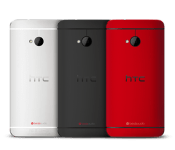
[LEAK] HTC M8 launch will apparently be in late March in New York City
 Almost daily leaks about HTC One’s successor, the HTC M8, have kept many of us salivating over what is yet to come, the latest leak suggesting that the M8 will have on-screen buttons instead of capacitive ones. One thing we haven’t had confirmed yet, apart from how the device actually looks, is the date for its announcement. Many pundits had been assuming the HTC M8 launch date would be similar to the One’s announcement at a U.K. event in mid-March. Not so, according to leak extrordinare, evleaks:
Starting to look like a late March, NYC launch for HTC M8.
— @evleaks (@evleaks) February 2, 2014
If what Mr evleaks is saying is correct, the announcement and presumed launch of the M8 will occur a little later than we expected and almost halfway around the world. This puts the launch around about a month after the expected launch of the Samsung Galaxy S5, and as far as replicating what happened last year, that’s not such a bad thing, particularly considering HTC‘s fortunes of late.
We really can’t wait to see more of HTC’s next flagship device, and something tells me that we’ll be seeing a lot more of it before the fateful and vague “late March” deadline rolls by. What are your thoughts about the HTC M8 so far: is it a device that you want to get? Let us know what you think in the comments below.
Source: evleaks via Phone Arena
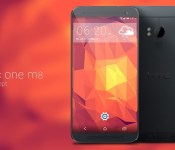
Nikolai Prettner says: try this HTC M8 concept on for Size
 Not that we’re pretty confident that the HTC M8 is going to have on-screen buttons instead of capacitive buttons, it’s probably worth taking a look at some HTC M8 concepts to try and visualize it. The one in the image above comes to us courtesy of designer Nikolai Prettner who gives us is take on what he thinks the HTC One successor will look like.
The concept of course includes the use of on-screen buttons, though we’re unsure if HTC is going to go with solid-black buttons as suggested in today’s leak, or if they’re going to utilize the transparent bar provided in Android KitKat. Nevertheless, it’s nice to put a picture to the image that we’ve all been forming in our heads. The concept design looks like a pretty good guess at what the M8 will look like except for one key feature that we are quite certain will be present in the final product; that of course is the dual-sensor rear camera that has been suggested by multiple leaked cases for the device.
What do you think of this latest HTC M8 concept? Do you see anything missing or something extra you didn’t expect? Let us know in the comments below.
Source: Google+ via Concept Phones
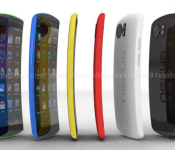
Yet another Nexus 6 concept, this time courtesy of 91mobiles
 It looks like since Eldar Murtazin suggested there may be an end to the Nexus line of devices approaching in 2015, designers everywhere have been on overload churning out concept designs for what future, and potentially final, Nexus devices might look like. One favourite device appears to be the Nexus 6 concept, the latest one of which comes to us from 91mobile, accompanied by a nice little concept video; check it out:
As you can see, 91mobile has elected to go with a very LG G Flex overall design with the curved screen format, which actually looks pretty good. In addition to its looks, 91mobile has said that their ideal Nexus 6 concept would also have the following specifications:
- Qualcomm Snapdragon processor giving 3GHz
- 3GB RAM
- variants with storage capacity ranging from 32GB to 128GB
- 13MP rear camera, allowing for 4K recording
- 5MP front camera
- Android 4.5 Lollipop
I would love to see a smartphone one day have 128GB, but I can’t imagine that happening any time soon. All the same, it’s nice to dream, and this concept is very nice indeed. What do you think about 91mobile’s take on a Nexus 6 concept? Let us know in the comments below.
Source: 91mobile via Phone Arena
Candy crush saga: Careful planning and strategizing for winning level 33
Candy saga crush is considered to be the Number One unofficial levels cheats and tips bugs to the world’s number one game, the Candy Crush Saga. It is easily available free to download on iOS (iPod Touch, iPhone and iPad), Android devices and Facebook. There are helpful tips for every level, including the Candy crush saga level 33, which is regarded to be the toughest of all levels. The solutions, cheats and bugs are sure to assist the player in the game. This is regarded to be the initial major test for the individual on his voyage in this game.
It has been noticed that by playing Candy crush saga for just several minutes is enough to make the person addicted to it. This particular match three puzzler tends to feature strategic play, several delicious looking candies and melodious music that is sure to put the player in happy mood. However, the game is bit tricky, the reason why, it is necessary for the player to go through the tips guide and heats, for helping him to get the maximum from the game and to win it.
Strategy
- Working from the bottom
It is necessary for the player to look for matches at the bottom, most probably the vertical matches. This actually optimizes the chances to cascade matches, thus clearing plenty of jellies, in just a single move. However, the only exception in this case would be if the player could use the power candy.
- Working on a particular side of this board
At a time, the player needs to focus on a particular side of this board. It is quite easy to plan the next move, if the player just thinks on the board half.
- Planning the next move
In order to get the benefit in this level of the game, the player needs to plan much ahead.
- Shooting two jellies in one point of time
It would be better to clear over a single jelly in one time for beating level 33. The cascading matches are considered to be a wonderful way for accomplishing this task, which also includes power combos.
- Matching 3 candies is excellent, but 4 and more would be awesome
Matching 3 same colored candy pieces is considered to be a child’s play. But for boosting the score, it is necessary to match 4 or 5. By matching 4, helps in generating a special candy, which when combined with the other 2 same colored pieces, eliminates an entire row. But, 5 does produce a special candy, which when matched, eliminates every same colored pieces that are present on the whole board. The tip here is to combine the special candies to get screen clerking effects.
- Keeping close eye on the number of turns
The player has only a particular number of turns for completing a particular stage, in which the game shows at the screen bottom. Tabs should be kept every time and that number needs to be considered with every turn.
- Not wasting the turns
Matching the candies is not an easy job. In case, the left over jelly piece is present on the lower left-hand corner of the gigantic puzzle, then the player should not waste his turns by trying to match the candies present at the top right. He needs to reach a specific point number for beating the puzzle.
- Jelly does not move
It is undoubtedly an easy mistake committed. The player always need to find out ways for removing the jelly through strategic placing of the various candies in place.
- Losing does come with a greater consequence
While starting the play, this game supplies the player with a specific number of turns. This needs to be considered as ‘lives’. On running out of these, the player just has 3 options remaining, giving up, and waiting for more lives or to make some purchases.
- Buying charms
These are special items and impact the game tremendously.
Therefore, with these tips, it is possible for the player to enjoy the Candy crush saga level 33 game and to win it.
 AIVAnet