


Facebook, Google and Yahoo now say when the US government requests user content

Last week, the US government finally relented on letting technology companies publish more detail about national security requests; today, some bigger firms are taking advantage of the looser rules. Facebook, Google, LinkedIn and Yahoo have updated their transparency reports to reveal the range of FISA requests that covered user content like posts and photos, not just user names and other basic information. As is often the case with national security affairs, there are strict limits involved. The reports still have to cover broad ranges that aren’t very helpful, and reports must be delayed by six months — we won’t get request numbers for the last half of 2013 until the middle of this year. None of the companies are completely happy with the government’s move, and they’ve promised to keep pushing for greater accountability. It’s not a perfect solution, then, but it will shed at least a little more light on the US’ online surveillance activities.
Filed under: Internet, Google, Facebook
Source: Facebook, Google Official Blog, Yahoo, LinkedIn

Facebook’s ‘Paper’ Now Available for Download Despite Protests From FiftyThree [iOS Blog]
First announced last week, Facebook’s new news creation and curation tool, Paper, is now available for download in the United States.
Paper is a news reader that obtains content from a user’s Facebook News Feed and from well-known online news sites and publications. Like competing apps such as Flipboard and Zite, Paper features a magazine-style layout with individual section categories for content.

Your Paper is made of stories and themed sections, so you can follow your favorite interests. The first section in Paper is your Facebook News Feed, where you’ll enjoy inspiring new designs for photos, videos, and longer written posts. You can customize Paper with a choice of more than a dozen other sections about various themes and topics—from photography and sports to food, science and design. Each section includes a rich mix of content from emerging voices and well-known publications.
Designed to replace the traditional Facebook News Feed, stories within Paper are card-based and can be flipped through by swiping. Content like status updates from friends appears alongside news stories and photos in a simple layout aimed at enhancing readability.
Though newly introduced, Facebook’s Paper app shares its name with the popular Paper sketching app from FiftyThree, which has been available in the App Store since 2012.
Earlier today, FiftyThree published an open letter on its website, noting its surprise with Facebook’s naming choice. The company asks Facebook to stop using its brand name and to “build a brand name of their own.” According to FiftyThree co-founder Georg Petschnigg, who spoke to The New York Times, Facebook has thus far opted to continue with the app launch.
“We have, in writing, asked Facebook to refrain from using the name,” Mr. Petschnigg said. “But their response was that they apologized for not letting us know sooner, but as it stands, they are continuing with their launch.”
“Paper by FiftyThree” is trademarked in the United States and in several additional countries, which could lead to a legal standoff between FiftyThree and Facebook in the future.
Paper by Facebook can be downloaded from the App Store for free. [Direct Link]
     |

Pebble Debuts New Appstore for Pebble Smart Watches
First announced back in December, Pebble today launched a dedicated Pebble appstore featuring an array of apps that can be downloaded onto the company’s line of smart watches.
The appstore, which functions similarly to other app repositories from companies like Apple and Google, aggregates all of the third-party apps developed for the Pebble Smart Watch. While apps have existed for the smart watch for quite some time, having a central download location will improve content discovery on the device.
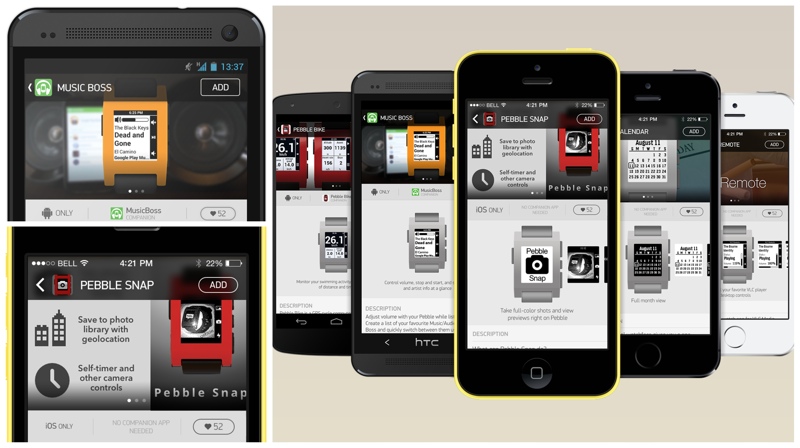
Pebble’s mission is to make products that mesh easily with your life. Until now, Pebble users discovered apps and watchfaces through several awesome third party resources like MyPebbleFaces. The Pebble appstore changes all this by providing a simple one-stop-shop for you to discover, manage, and install apps and watchfaces.
Pebble’s original Pebble Smart Watch and the Pebble Steel can both access the appstore, which organizes apps into individual categories complete with ratings. The Pebble appstore is the first official Pebble app and can be accessed directly on the Pebble watch following an iOS app update that is currently rolling out.
Pebble owners can use the appstore to download and manage their smart watch apps, as the Pebble watches are limited to eight apps each. Though there is an app limit, Pebble does incorporate a Pebble Locker allowing frequently used apps to be installed and uninstalled quickly.
The appstore is organized into six different categories, including Daily, Tools & Utilities, Notifications, Remotes, Fitness, and Games. Like Apple’s App Store, each category features a selection of both new and top apps.
Watchfaces are also available in a separate category and at the current time, all Pebble apps are available for free as the appstore does not support paid applications. Developers can, however, create apps that work alongside an iOS companion app.
More than 1,000 apps are published in the Pebble appstore, including apps from major companies that Pebble has partnered with, including ESPN, Yelp, GoPro, and Foursquare.
As part of its Pebble Steel review, Engadget took an early look at the Pebble appstore and was satisfied with the number of apps available.
As is, we were wholly satisfied with the number and scope of available apps — even in its beta stage, we don’t feel there are any “must-haves” missing.
Pebble’s line of smart watches can be purchased from the Pebble website for $150 to $249. The accompanying Pebble Smartwatch app can be downloaded from the App Store for free. [Direct Link]
| |
Sprint adds more devices to PTT list
Sprint has expanded the number of devices with Direct Connect push-to-talk service, adding multiple Android handsets into the fold. Effective immediately, those with the following smartphones can take advantage of the Direct Connect Now application.
- Samsung Galaxy S4
- Samsung Galaxy Note 3,
- LG G2
- LG G Flex
- LG Optimus F3
- Kyocera Hydro Edge
Looking down the road, Sprint plans to add more devices to the list, including the Samsung Galaxy S4 Mini, Galaxy Mega, and Galaxy S4 with Sprint Spark.
Sprint’s Direct Connect Now app has been updated with the following features:
- Sprint Direct Connect on 4G LTE capable devices
- New enhanced user experience
- Interoperable with Sprint Direct Connect devices
- Convenient touchscreen controls
- TeamDC and Opt-In TeamDC closed group calling
- Call alerts to notify others you want to talk without interrupting
- Displays contact image for speaker
- Synchronizes contacts with device’s address book
- Create favorites for most contacted Direct Connect® contacts
The app and service are free to download for LTE 4G smartphones; Sprint charges $5/month for select handsets.
The post Sprint adds more devices to PTT list appeared first on AndroidGuys.
AT&T drops price of 10GB shared data plan
AT&T recently adjusted their Mobile Share Plans for the 10GB (an up) data plans, making for a more affordable experience. Effective yesterday, February 2, users with two smartphones can purchase unlimited voice and messaging with 10GB of data for $130/ month. Adding additional smartphones results in a $15 per line, per month; this rate applies for up to 10 lines of service. This is, of course, for AT&T’s Next plans, and does not apply toward GoPhones.
Learn more at AT&T
The post AT&T drops price of 10GB shared data plan appeared first on AndroidGuys.
Sprint delivers KitKat update to HTC One
Sprint, over the weekend, announced that the HTC One will soon receive its Android 4.4.2 KitKat update. Starting February 11, the update will be available by manual download through the smartphone’s settings. As the first carrier in the United States to offer the update, Sprint’s model trails only the unlocked, Developer, and Google Play edition HTC One. In addition to the latest version of Android, this update also delivers the newest version of HTC Sense.
To learn more about the HTC One updates and HTC’s general update process, check out the handset maker’s website.
The post Sprint delivers KitKat update to HTC One appeared first on AndroidGuys.
A closer look at the Blackmagic Pocket Cinema Camera

Okay, that’s it. You’ve had enough of highly compressed video codecs that crap out on detailed shots and make decent color grading a pipe dream. Now that Blackmagic’s $995 Pocket Cinema Camera (BMPCC) is RAW-ready, isn’t it time to make the jump to higher bitrate video? Perhaps. The company’s latest pint-sized weapon does produce magnificent images using a downsized version of its first Cinema Camera sensor, yes. But it’s not quite as simple as laying down the money and raking in the 12-bit video. There are limitations to the camera itself, plus a steep learning curve and the likely need for further investment that could more than double the price of the camera. As you’ll see, whether it’s worth that depends completely on your needs and, particularly, your expectations.
Hardware
Like the original Blackmagic Cinema Camera, the Pocket version sports a unique, all-metal design that feels solid — hugely out of proportion to its low price. It’s also hefty, which adds to the feeling of quality and makes handling easier by damping small movements during filming. The all-important sensor is 12.5 x 7mm, making it a touch smaller than the “Super 16″ standard, and considerably less than a 17.3 x 13mm Micro Four Thirds chip. The end result is a 2.88x crop factor, meaning you’ll need a very wide lens just to get a normal perspective — and there aren’t many out there, even for regular MFT cameras.
There’s a 1/8-inch mini microphone input jack, headphone output and micro-HDMI connector, but unlike the BMCC, no Thunderbolt port. You also get playback and recording buttons on top along with a 1/4-inch threaded hardware connector, and another on the bottom for tripods or other rigs. Otherwise, its form factor is similar to Sony’s NEX cameras, which you may find handy or awkward, depending on the situation. If you’re trying to shoot stealthily, for instance, you’ll probably never get hassled in sensitive locations. On the other hand, if you’re trying to impress production clients, they may actually wonder if you’re joking when you arrive at the shoot with it.

The Pocket Cinema Cam also lacks the larger model’s touchscreen, requiring arrow key pushes to navigate the 3.5-inch LCD. I didn’t mind that, but given the aforementioned fiddling required to get exposure and focus right, it would have been nice to have some dial controls to set ISO or shutter “angle” or speed more rapidly. The LCD is also on the dim side, which can make critical focus difficult. Cranking up the brightness helps, but it also drains the battery quicker. If I owned the camera and used it a lot, I’d seriously consider an external LCD to plug into the micro-HDMI connector — another potential expense that could easily match the price of the camera.
If you use the camera to record sound, you’ll definitely need to purchase an external microphone like this one, as the internal unit is woefully inadequate for anything but guide sound. If you do, the 1/8-inch external mic jack records at very low levels, meaning you may also need a pre-amp. By contrast, most DSLRs also have pitiful mics on board, but many purpose-built camcorders like Sony’s NEX-VG20 are excellent in that regard.
There’s a few other things to think about before ordering one. First of all, the BMPCC comes with a single Nikon EN-EL120-compatible battery that lasts an hour at best during shooting. As such, an external charger and a load of extra batteries should likely also be on your list. As for the SD card, you’ll need something fast to record RAW. Like, really fast. Only a 95MB/s Sandisk Extreme Pro SDHC card worked for me. 64GB holds about 18 minutes of RAW video, so plan accordingly. You’ll also want to consider a fast USB 3.0 SD card reader and a whole bunch of new hard drives for your editing computer — again, the faster the better.
Workflow
If you’re used to cranking away in “auto” mode on your DSLR or mirrorless camera, you’ll have to reboot your brain for the BMPCC. There’s an extremely slow autofocus mode that only works with a few MFT lenses, so manual focus is the only real choice — and doing it well for moving subjects takes a lot of practice. It also has no auto-exposure other than an “iris” button that sets your camera’s f/stop, but again, only for select lenses. Instead, for best results you’ll be relying on the zebra mode to gauge exposure by adjusting the aperture until the lines disappear. In bright light, you may not be able to stop the lens up high enough thanks to a minimum ISO range of 200, making ND (darkening) filters another accessory you may need. On the other end of the scale, it only hits 1,600 ISO max compared to, say, 102,400 ISO on the Canon 5D Mark III. That means you’ll require fast lenses for low-light situations, though there is another solution: the $489 Metabones Speedbooster custom-built for the BMPCC.
Update: As commenter duophonix pointed out, changing the ISO in the BMPCC past its native ISO of 800 doesn’t change light sensitivity, but just increases the digital gain. As long as you shoot in RAW, it’s possible to shoot in very low-light situations (equivalent to 6400 ISO and higher) and still get usable footage in post as shown here. You may need to add significant amounts of digital noise reduction, however.
Luckily, I also had that device on hand to test, which proved very handy. Because of its small CCD, the Pocket Camera has worse low light performance and a significantly higher crop factor than regular MFT cameras. For instance, a Panasonic GH3 has a 2x crop factor, but the BMPCC magnifies images by 2.88x, making a 16mm ultra-wide angle lens about 45mm, and a 50mm lens a 140mm super telephoto. The Metabones Speedbooster solves both of those problems by adapting Nikon ‘F’ lenses to fit on the camera, which concentrates more light onto the sensor. As a result, crop factor is reduced by 0.58x to a much more manageable 1.75x — close to that of a Nikon DX or Canon EF-S camera. In addition, the Speedbooster will give you one and a third more stops of light, meaning an f/2.8 lens will “become” a superlative f/1.8 model with more than double the light sensitivity. Though rather pricey at $489, Metabones products also have excellent optics.
Post-production

Despite some snags with the BMPCC, the footage is what actually counts, isn’t it? There are two recording modes, namely ProRes and RAW, both of which produce robust images with superb dynamic range. Data rates are much higher than typical AVCHD or MPEG video, with ProRes clocking in at 22MB/s, and RAW about three times that (a Sony NEX-VG20 records at about 3.1MB/s, max). That’s likely why the camera heats up significantly during use and why it burns the battery so quickly — pumping so much data through a small body isn’t a trivial matter. As for which codec you may decide to use in the first place? Since 10-bit ProRes is already an enormous improvement over standard DSLR footage, RAW may be overkill — it requires much more storage and a skilled color expert to get the most out of it.
Once you’ve finished gathering footage, there are several ways to process it. A notable difference between the Pocket and full Cinema Cameras is that the latter shoots 2.5K, uncompressed RAW DNG files, while the BMPCC shoots 1080p video for all formats, with RAW compressed losslessly to about half its original size, like a ZIP file. Unfortunately, that format is unreadable (for now) by Premiere Pro and Final Cut Pro X, unlike the Cinema Camera’s uncompressed RAW files. The workflow therefore recommended by Blackmagic Design for RAW is to use DaVinci Resolve Lite (the full version is only free with the bigger camera). That’ll let you import your clips, grade them and export them in a format like QuickTime for use with Final Cut Pro or other editors. You can also load its compressed RAW Cinema DNG files directly into Adobe After Effects for processing, but working with clips is much slower. However, such a method might still be more comfortable for those familiar with Adobe’s Camera RAW utility. If you’ve shot with ProRes, of course, you can grade in Resolve, or just edit and grade all at once in your editor of choice.
Image quality
As mentioned, the BMPCC produces 1080p files from its CMOS sensor. However, like any other CMOS camera including most DSLRs, the effective resolution is actually about 70-80 percent of that after image sensor data is converted to RGB. That means it’s probably a shade better than 720p video (though no charts were harmed in the making of this review). The larger Blackmagic camera’s sensor records at 2.5K resolution, on the other hand, therefore delivering true 1080p resolution after downscaling, give or take.
Despite that, with 12 bits of color accuracy, the resulting images on the Pocket Camera appear extremely sharp even in detailed areas — unlike the artifacts and “mosquito noise” seen from, say, a Canon 7D. There’s also impressive dynamic range, with Blackmagic claiming 13 stops max in RAW and slightly less with ProRes files — no exaggeration, in my opinion. On the downside, the pocket camera can also produce a bit of moire and aliasing, particularly on finely spaced line patterns, likely because of its sensor size. It’s also very susceptible to rolling shutter, meaning fast pans and shakiness are not recommended. Overall, I achieved the best results at about ISO 800, with dynamic range dropping off below that, and grain increasing above.

Assuming you’ve got a computer with a fast CPU, graphics and hard disks, working with 12-bit RAW or 10-bit ProRes video is a dream compared to MPEG. If you choose the “film” dynamic range setting and your exposures are good, you can stretch the video in nearly any direction color-wise. Even if you over- or under-exposed, it’s often possible to save a shot thanks to the extra latitude. Another plus is that on green screen FX shoots, the high bitrate footage allows more precise keying than, say, the AVCHD files from a DSLR. Conclusion? While the footage isn’t as good as that produced by an Arri, Red or Canon C300 camera, it’s in the ballpark and the BMPCC is 1/10th to 1/50th the price of those cameras. Compared to most DSLR’s, there’s no comparison — thanks to the superior codec, it’s worlds better, unless you’re willing to do a little hacking.
Wrap-up
The Blackmagic Pocket Cinema Camera is a weird little beast. It’s hard to tell who it’s for exactly, since it costs the same as a mid-range DSLR but seems more suited to pros who could afford to spend a lot more. Also, the larger BMCC camera is now only $1,995 after a recent price drop, making it another tempting option and the Blackmagic Production Camera 4K will hopefully be on the market soon for $3,995. If you are tempted, there are a lot of hidden costs to consider. For a basic package, including a lens, extra batteries, microphone, charger and top-end SDHC cards, you can easily spend the price of the camera again and then some. If you really want to kit it out with a Metabones BMPCC Speedbooster (a must, in my opinion), an LCD monitor or other accessories, you’re looking at high-end DSLR money.
All that aside, the BMPCC lets you shoot jaw-dropping video while looking like a tourist. That’s ideal for indie filmmakers or, well, tourists who are really into good-quality video. Its small size and price might also suit production companies looking for a way to shoot in tight places, on UAVs or in stunt vehicles as a “crash-cam,” for instance. The educational market is another possible niche, since its workflow is similar to pricey digital cameras like the Red Epic or Arri Alexa, making it a good student learning tool. As for you and me? If you’re looking to take your video to another level and have the savoir-faire or patience to learn the Pocket camera’s ways, why not, for $995? Once you’ve shot and edited the footage it produces, going back to regular DSLR video is just painful.
Filed under: Cameras

Watch Felix Baumgartner’s epic jump all over again in GoPro’s Super Bowl commercial

Remember when Felix Baumgartner had the world on the edge of its seat with his daredevil Red Bull Stratos jump? Well, if you don’t, and you’re watching the big game this weekend, you’ll likely get a good reminder thanks to a new GoPro ad. The 30 second spot shows some of the footage caught with its HD Hero 2 cameras, but is merely tease. The main event? A freshly uploaded 8-minute mini-documentary that recaps the ambitious jump from start to finish. After the break you can watch the tense moment when Baumgartner complains that he might pass-out, and then have your stomach gently return from your throat with relief at him finally, safely deploying his ‘chute. The only thing is, after all that, the game might seem a little… tame?
Filed under: Cameras
Source: GoPro

Weekly Roundup: Pebble Steel review, Google Glass prescription frames and more!

You might say the week is never really done in consumer technology news. Your workweek, however, hopefully draws to a close at some point. This is the Weekly Roundup on Engadget, a quick peek back at the top headlines for the past seven days — all handpicked by the editors here at the site. Click on through the break, and enjoy.

Google Glass gets prescription frames
Google’s making good on its promise to deliver a headset with prescription frames. The eyeglasses are currently available as a $225 upgrade for Google Explorers, but early adopters will be able to pick up a pair as early as this afternoon. Click the link for details about styles and insurance options.

Apple iWatch and iOS 8 rumors
We’re still waiting for Apple to make its official appearance in the smartwatch/wearables market. In the meantime, recent reports are hinting at a focus on fitness for the rumored “iWatch” (or whatever it’s officially called) and a “Healthbook” app for iOS 8. Click through for details.

Facebook unveils Paper for iPhone
Earlier this week Facebook introduced yet another news aggregator into the world. Dubbed Paper, this (as of now) iPhone-only app promises a distraction-free layout with curated news from well-known sites and “emerging voices.” Follow the link for more information.

Pebble Steel review
Smartwatches aren’t typically known for their sleek design, but the Pebble Steel is certainly a looker. At $249, Pebble’s new all-metal wearable may cost a bit more, but it’s got the right amount of bling to make up for it. Follow the link for our review.
Filed under: Misc

Apple reportedly testing inductive, solar and motion charging for its unannounced smartwatch

We’ve heard that when Apple reveals its first smartwatch product, there’s going to be a heavy focus on health and fitness, but There might also be a way to charge the wearable without plugging it in, according to a report from the New York Times. Inductive charging came in a wave of smartphones last year, including Google’s Nexus 4 and Nokia’s Lumia 920 range, although we don’t often see it in anything smaller than a phone (or camera) form-factor. Apple, however, is looking into cramming the same technology into its iWatch, or whatever it eventually calls its debut wearable.
It works like this: electromagnetic fields are generated from a charging base, which are then picked up by metal coils and transformed into for-real electricity that charges your device. The Cupertino company is experimenting with other new charging methods too, although these are apparently years away from consumer products. Sources close to the matter also mentioned the inclusion of a solar layer beneath the device’s display, while the company has also looked into kinetically charging its wearables — something that is already used in many modern (non-smart) timepieces.
Source: New York Times
 AIVAnet