


Valve VR knuckle controllers can squish, track fingers, navigate with thumbstick
Valve’s prototype controllers for future interaction in virtual reality have a much more nuanced and varied approach to VR inputs thanks to some neat design choices. Alongside finger tracking and trackable squeezing, the thumbstick allows for intuitive navigation options. To help test out these new features, Valve has rolled out a new tech demo called Moondust to its developer base, giving them a chance to try out these new input options themselves.
Although Oculus’ Touch controllers came out a few months later than the original HTC Vive controllers, they offered a few unique features which suggested that the extra development time was worth it. While the Vive controllers still don’t support some of those features, Valve’s “Knuckle” controller design appears to be an attempt to change that. Although not officially affiliated with HTC, the controllers could well end up as an optional upgrade for owners of the Vive and Vive Pro headsets in the future.
The new knuckle design features better ergonomics, a new layout of buttons — including a thumbstick — and a strap system that allows the users to let go of the controller while keeping it within reach. They also have new sensors which add support for SteamVR tracking 2.0 and enable finger tracking and the ability to squeeze and grip virtual items, as per UploadVR. Battery life is said to be improved, too, with charging now handled via a USB-C connection, rather than the MicroUSB found on the standard Vive controllers.
Finger and palm tracking sensors mean that developers will be able to detect the entire range of hand positions, from a tightly closed fist to an entirely open palm. That is designed to enable much more nuanced interactions with objects in virtual reality, letting users squeeze things, pick them up gently to avoid ‘breaking them, or even throw them by physically letting go of the controller at the opportune moment.
To help test out these new abilities, Valve has shipped out a tech demo called Moondust to knuckle controller developers. Set in the Portal universe, players are tasked with spearheading a new initiative to manufacturer increased supplies of “conversion gel” using all of the new interactive potential of the knuckle controllers.
Valve remains tight-lipped on when the general public will be able to buy the new controllers, but as designs are solidified, we should be getting closer to a general release.
Editors’ Recommendations
- HTC brings AR to VR with new Vive Pro tools for dual cameras
- Pimax takes notes from Valve for its prototype ‘knuckles’ VR controller
- Oculus Rift review
- 8 Amazing accessories that could make virtual reality even more immersive
- How gaming company Unity is driving automakers toward virtual reality
Pop-up cameras are just the evolution of the slider phone

A necessary evil before getting everything we want.
Phone companies make a lot of design decisions that, in retrospect, are very bad. We’ve seen some poor smartphone designs over the last decade, and most of them can be boiled down to an attempt to be exciting, innovative and interesting, only to backfire spectacularly because they led to massive compromises or didn’t work as intended.
So I don’t blame anyone for being skeptical when the last week brought about the latest trend in hardware innovation: pop-up cameras. First with the Vivo NEX, with its periscope-like front-facing camera, and later with the Oppo Find X, making use of a large sliding mechanism to reveal both front- and rear-facing cameras.
Some have dismissed these movable structures for hiding cameras as a fad and poor attempt at being innovative with no real benefit. I see it somewhat more pragmatically — this is a necessary development, given today’s available technology, to offer consumers all of the things they want. Not unlike the early 2000’s, when flip phones and sliders dominated the landscape of feature phones and smartphones alike.

Look deep into history, back to the early 2000’s, when feature phones we evolving at a rapid pace. Early on, just about every feature phone had a “candy bar” form factor with a small screen and a majority of the face of the phone dominated by a keypad. The phones were pretty simple.
Movable components were integral to new feature phone developments, and they’ll rise again.
As our demands for phone features changed, so did the priorities of the hardware. We wanted large color screens and better cameras, so phones got a little bigger. But small phones were still a priority, so flip phones arrived that incorporated both a larger screen and a keypad. Soon we wanted an even larger display, and were willing to accept a keypad that took a backseat, so we got vertical slider phones. In the latest stages of feature phones as we transitioned to smartphones, we got landscape slider or hinged phones with full QWERTY keyboards.
Throughout this expansion of feature phone and early smartphone hardware development, we saw all sorts of retractable antennas, various screen swivel mechanisms and new keyboard designs. Phones back in those days were still highly mechanical. They were heavily reliant on physical buttons and many moving parts for basic operation of the phone. Most of it came out of necessity — components just weren’t small enough and technology wasn’t good enough to have a fully solid-state device that did everything we wanted.

Today, we face a very similar dilemma — this time with smartphones, coming from the other direction. Modern phones are now entirely solid state and permanently fused together, eschewing as many ports and movable parts as possible in the name of cramming as much technology into a single slab as possible. Sliders and flip-style phones are all but dead. Back panels and batteries are no longer removable. Buttons have been reduced to a bare minimum. SD card slots are very rare. With eSIM on the horizon, there won’t be a single opening on a phone bigger than a USB-C port. On the new HTC U12+, the only thing that actually physically moves in the phone is the OIS module of the camera. But this trend is at odds with consumers’ other demand: to not give up core hardware features like conveniently placed cameras.
People want smartphones that have a larger display, but in a proportionally smaller device. They don’t want bezels, apparently, and have a disdain for display notches. Yet they don’t want the compromises of an oddly-positioned camera, small speakers or missing sensors. What’s the result? We return to movable components on phones. A feature that used to be a core tenet of “advanced” feature phones circa 2004, now modernized and automated to bring us the hardware features we both don’t want to see but also can’t live without.

Image credit: The Verge
Engineering a little module or even a whole segment of the top of the phone to rise up and show your cameras is not something to be taken lightly. It’s a seriously impressive feat, both on the tiny scale of the Vivo NEX and the larger side with the Oppo Find X. And to be clear, these two phones have other small compromises, like the NEX’s relatively large size and slower fingerprint sensor, and the Find X’s lack of a fingerprint sensor altogether.
But when people say they want huge screens, small bodies and no bezels, companies answer the only way they know they can: with these new movable parts. While they may not be a permanent fixture of smartphone designs going on in perpetuity, they’re more than a fad — this is what we’re going to have to get used to from at least some smartphone companies that want to offer it all.
HTC’s already having shipping problems with the U12+
Amazon orders might not go out until August 3.
The HTC U12+ is an — interesting — phone. The design is striking and the cameras are top-notch, but the buggy, fake power/volume buttons create for an often frustrating experience.

Even so, that hasn’t stopped a few die-hard HTC fans from picking up the phone for themselves. Some members of the AC forums reported that their pre-orders are now shipping, but for those that purchased the U12+ through Amazon, things aren’t looking too hot.
holz75
06-21-2018 12:31 PM“
I know it’s hard to trust anything the Amazon customer service people say, but the one I just spoke to said the phone was never in stock to begin with! No idea why they’d say it would be released on June 21. I do know people on XDA who ordered the phone direct from HTC without financing are starting to receive theirs.
Reply
X1tymez
06-21-2018 03:46 PM“
Wow! They told me nothing is in stock. If I cancel my order then I might lose my spot lol.
So they us to go with HTC.com? I get cheaper deal on shipping cost with Amazon.
Reply
zwagni
06-21-2018 03:52 PM“
that’s where I’m at aswell this is a big fumble on there part right now I hate Samsung but it may be a must to switch my htc10 is on its last leg and I need a new phone for work asap.
Reply
msm0511
06-21-2018 04:24 PM“
I spoke with an HTC rep through chat and he kept reiterating something about an investigation into all the cancelled orders, and apologized. When I told him the previous rep I spoke to said if I reordered I wouldn’t lose my place, but the chat rep told me if I reordered today it would be July before it ships. When I mentioned not losing my place in line all he would say is that there is an…
Reply
Basically, people that pre-ordered a U12+ through Amazon are now being told that the phone was on backorder the whole time. So, instead of the phone shipping on June 21 like it was expected, it’s now looking like shipments won’t go out until August 3.
With that said, we’d love to hear from you. If you pre-ordered a U12+, what’s your shipment status looking like?
Join the conversation in the forums!
Anker’s popular Bluetooth speakers are on sale today for as little as $17
Get that boom boom pow!

As part of its Gold Box deals of the day, Amazon has a pair of Anker’s Bluetooth speakers on sale for as low as $16.88. The most affordable option is the Anker SoundCore Mini, which has 15 hours of battery life, and this price is the lowest it’s ever gone. This option is super portable thanks to its cylindrical design but still offers a great sound.
If you want something a little bigger and more powerful, the Anker Premium Portable Bluetooth Speaker is the option for you. It has two passive subwoofers, dual 10W drivers, and 6 hours of playback per charge, all for $33.99. Both of these discounts only apply to the black versions of each speaker, though there are other colors available for more money.
Anker backs both with an 18-month warranty.
See at Amazon
Alcatel 1X review: It’s Android Go time

You can have everything Android has to offer for just $100.
Smartphones are expensive. They have always been expensive, but as they approach the $1,000 mark it becomes more obvious. In the long-term, maybe $1,000 isn’t too much to pay for a year or more of the convenience and helpfulness that a smartphone has to offer, but not everyone has that kind of money to spend. The good news is that several companies are trying to fix that by making affordable smartphones that are worth buying.
Google and Alcatel are two of them. Together, Android Go and the Alcatel 1X become one of those inexpensive smartphones that are worth taking a closer look at, and that’s what I’ve been doing for a week or so. Here’s my take on what a modern $100 smartphone has to offer.
Alcatel 1X (Go Edition)

Price: $100
Bottom line: This is the first $100 smartphone that’s worth buying.
The Good
- Oreo Go as the operating system
- Solid and comfortable construction
- Delivers all the smartphone basics at reasonable performance levels
- All-day battery life
The Bad
- 1 GB of RAM can be a problem for some tasks
- Not able to effectively run all apps from Google Play
- Touch input is less than spectacular
- The camera is a potato
See at Amazon

Alcatel 1X Build and construction
| Processor | Mediatek MT6739Quad-core 1.3 GHz Cortex-A53PowerVR GE8100 GPU |
| Display | 5.3-inches16:9 aspect ratio480 x 960 resolution (204 ppi) |
| Battery | Li-Ion 2460 mAh battery |
| Camera | 8 MP, (f/2.0, 1/4″, 1.12µm)5MP 720p front-facing camera |
| RAM | 1 GB |
| Storage | 16 GB |
| Ports | microUSB (no fast charging) |
| Connectivity | GSM / HSPA / LTE802.11 b/g/n Wi-FiWi-Fi DirectBluetooth 4.2 LEGPS ? A-GPS FM radio |
| Dimensions | 147.5 x 70.6 x 9.1 mm (5.81 x 2.78 x 0.36 in) |
| Weight | 151 g (5.33 oz) |
Remember the Nexus 5X? It was a great cheap smartphone that was built like a great cheap smartphone. The Alcatel 1X is very similar to the Nexus 5X in almost every way when it comes to how it’s made and what it’s made of.
It’s not covered in suede, unfortunately. The photos make it look that way and several people have mentioned that it looks and feels a bit like suede, but it’s the same soft-touch plastic we’ve seen before. The back of the phone is pleasantly round and wraps the sides to the edge of the display, making it comfortable to hold and use.
The fingerprint sensor is placed on the rear where we’ve seen many times before, and it works surprisingly well — it’s every bit as fast to activate as a phone like the Nexus 5X or LG V30. You’ll find a decent camera above the sensor that protrudes ever so slightly, and not much else. Volume and power switches are on the right side, a 3.5mm headphone jack is up top with a noise-canceling microphone, and a Micro-USB port sits alone at the bottom. The sole external speaker is the earpiece on the front of the phone, but it’s constructed in a way that you can hear sounds fairly well through the front of the phone and not just the tiny slit across the top.

Overall the phone is built well, with no unsightly seams or sharp edges. The gap where the glass meets the body is super tight, so you won’t get it filled with lint or whatever else lives in your pocket or at the bottom of your purse. Just because the phone only cost $100 doesn’t mean it has to feel that way.
What you won’t find are extra and expensive options like aluminum alloy or glass. It’s all plastic with the same soft coating except for the 5.3—inch display. There’s nothing to get hyped up about here, but more importantly, there’s nothing to dislike. It’s a solid and unassuming phone that’s comfortable to hold and use.
Notice the Alcatel 1X isn’t exactly a barn-burner when it comes to the components. In fact, on paper it looks pretty weak; there is less power here than you would find in a good calculator. That’s why the phone is so inexpensive, and also why I wanted to have a closer look at how this level of hardware can run Google’s Android Go Oreo operating system.

Alcatel 1X Software
The phone runs what’s known as Oreo Go. It’s part of the Android Go program from Google that was designed to make a smartphone that’s inexpensive and affordable for everyone on the planet still be able to do the things we want a smartphone to do. Since this version is Oreo Go, it’s built on Android 8.1.
Android Go tries to fix the experience of a cheap smartphone. It does a good job.
Android Go is a novel approach to a big problem. I’ve touched on that a bit, but a quick version is in order. Google wants to build a smartphone (technically it wants another company to build it and it will supply the software) that will sell at or around $30. Much of the company’s attention is on India at the moment, but Google knows that the 1.5 billion current Android users represent just the beginning, and there are parts of the world with almost zero smartphone penetration, like Africa and South America as well as rural India.
One thing these places have in common is that the economy isn’t the same as we would see in a more industrialized nation like the U.S. That means, essentially, that a lot of people are “poor” by U.S. standards and will never be able to afford a $1,000 smartphone. Yes, that’s a bit of a predatory way to look at things, but that’s how companies strategize growth in the third world.
Instead, I can focus on the great thing that may happen through this initiative: someone will build a phone so inexpensive that people in Ghana or rural Ecuador or India can afford it, and it will offer the same help and convenience that more expensive phones in the west can offer. That’s a win for everyone.
Everyone can benefit from having a smartphone. But not everyone can afford one, until now.
How Google is doing it is the fascinating part. Android is still Android, but everything you can see has been trimmed down. Android Go comes with a complete set of Go apps that have the same treatment, and together the package works on the Alcatel 1X’s anemic hardware. And it works a lot better than you would think even if it’s not perfect or up to the standard of a Pixel 2 or Galaxy S9.

Go Apps
Oreo Go comes standard with a handful of Go apps designed to run on slim and cheap hardware. The list of what you’ll find on the 1X:
- Google Go is a lighter version of the standard Google search app that also steers you towards light mobile-friendly web apps when available.
- YouTube Go is a YouTube client that focuses on the content rather than a fancy interface or features most users never touch.
- Gmail Go delivers your Gmail without the extras like themes or labs yet retains the familiar look and feel of its more bloated standard version.
- Assistant Go brings the familiar Google Assistant to life with most of the same features you see in a fuller version.
- Maps Go brings Google Maps to a phone like the 1X without bringing the system to a screeching halt or eating all of the battery.
- Files Go is the ultra-light file browser that so many with phones like the Galaxy S9 love and use, and it runs great on the 1X.
HTML5 apps are a great way to bring a service to a phone without the guts to run a bloated app.
Of all the apps that have been tailored for Android Go on the Alcatel 1X, the Google Go app is the most intriguing. It’s a standard Google search — you type in whatever it is you’re looking for and it finds you web links to content based on it. A secondary feature is a little cooler, though. It has a listing tab for apps and should you choose one from the list you’ll be taken to a mobile-optimized web app from the company in question. If you use the Chrome browser (it’s enabled by default here) you can keep login and payment information saved and anytime you return you’ll be signed in and ready to go, just as if it were an app on the phone itself.
Google has been interested in HTML5 apps for years. So have companies like Apple and Microsoft. While we’re holding a phone like the OnePlus 6 that sports better hardware than my first MacBook Air, it’s hard to understand why anyone would care about a browser app when there is a better looking and fuller featured option in Google Play. But when you’re holding an Alcatel 1X in your hand, you get it.
You can’t help but get it because it leaps out at you and you suddenly realize that the web is more than Imgur and Reddit (which also have great Android apps, by the way) and banking, shopping, news, socializing and everything else can be done right through the browser. And it can be good.
 The suede-like finish shows greasy spots. Don’t touch your nose!
Alcatel 1X Daily Use
Not everything here is perfect. I’ll start by saying the Alcatel 1X is a lot better at being a smartphone than I thought it would be, and if you only had $100 to spend and needed a smartphone I’d wholeheartedly recommend it. Ditto if you only want to spend $100 on a smartphone.
Most everything is “good enough”. Calls sounded passable, battery life gives about a full day on average, the apps designed for the Oreo Go platform perform really well and apps from Google Play that are not uber-demanding also perform reasonably well. With these things, there is nothing to complain about and several areas where I am delighted by how well they work on this level of hardware. Gmail Go and Assistant Go are two highlights; the apps offer everything I have ever used in either and are responsive. Whatever extras and options that were trimmed are things I never wanted to begin with.
You simply can’t overlook the price; this is a $100 phone.
Some things are borderline acceptable, though, and if this was not a $100 phone they would have been reason enough for me to just say no and put the phone back in the box without spending the time to review it.
Touch response is not as user-friendly as I would like to see. There is a slight visible delay between the time I tap or press a thing and the system doing whatever should happen when I tap or press it. It’s not a real problem most of the time, but it’s also evident in the keyboard, and that’s a little rough to use if you like to type fast and furious like I do.
Tactile feedback for touches suffers, too. The vibration motor is weak, and coupled with a delay (it fires when the phone does its thing, not when you touch) means it’s best turned off from the start.
It’s also not difficult to lag the phone down until it crawls. You probably can’t do it with the included apps (and that’s counting Chrome the memory hog), but it doesn’t take much to jam traffic up when you start using apps from Google Play designed for fancy and more expensive phones. And I’m not talking about apps that are known to run poorly like the Facebook app. I mean apps that don’t appear to have much impact on a phone like the BlackBerry KEYone, which has mid-range specs itself. Thankfully, clearing the apps from memory can fix everything, but clearing apps from memory in any Unix-like operating system means something is broken.


The camera is about what you would expect from a budget Android phone. It’s completely passable if you want to snap a quick picture to post on Facebook or Twitter, but you won’t get a once-in-a-lifetime memory that you want to print and hang on the wall. Here are a few samples.
Alcatel 1X Should you buy it?
That’s going to be both a Heck Yeah! and a probably not at the same time. It depends on what you’re looking for from a phone.
If you’re the type of person who lives on their phone, the kind that PSAs about texting while walking are made for, you won’t like what you find here. No beating around the bush — you would drive this phone to its knees with Facebook and Snapchat and Instagram and Twitter all running while it’s also trying to do the regular phone things. You would end up hating the Alcatel 1X and wishing you had bought something else that cost a lot more.
The Alcatel 1X does exactly what it was supposed to do: offer a usable and enjoyable experience on a smartphone that only costs $100.
On the other hand, if you want a phone that can also check your mail, text or chat with friends and family, grab a photo when it needs to, or even Facebook once in a while the Alcatel 1X is perfect. A step further and playing light games or watching a video and the like, the Alcatel 1X is still a decent phone, regardless of the price. I could get by with the Alcatel 1X as my everyday phone because that’s the type of user I am when I’m not trying to push things with something for work.
Finally, if $100 is the price you can afford to pay and you want a phone that can do more than calls and SMS from that T9 keyboard, the 1X is a godsend. Literally. Android Go may be designed for that emerging market that companies like to talk about condescendingly from a stage, but it’s also a boon for plenty of people in the west as a phone they can afford or as a backup to keep around in case that expensive model meets the pavement and cracks.
3
out of 5
I love that a phone like this is made and available and can’t wait to see what’s next from both Alcatel and Google in this market segment.
See at Amazon
What’s new on Hulu for July 2018
And what’s leaving, too.
Tucked inside the monster that is Hulu’s July schedule is Ballet Now, a documentary about Tiler Peck, principal dancer with the New York City Ballet. That title hardly does her justice, though, as you’ll see in the trailer.
That’s beyond impressive, right? Ballet Now lands July 20.
What else to look forward to on Hulu in July? Well, it’s a long list.
Sign up for Hulu
Coming to Hulu on July 1
- Alone (Complete Season 3)
- American Pickers (Complete Season 17)
- American Ripper (Complete Season 1)
- Ancient Top 10 (Complete Season 1)
- The Curse of Oak Island (Complete Season 4)
- Doomsday Preppers (Complete Season 2)
- Forged in Fire (Complete Season 4)
- Gangland Undercover (Complete Season 2)
- Hoarders (Complete Season 8)
- The Hunt for the Zodiac Killer (Complete Season 1)
- Intervention (Complete Season 17)
- The Librarians (Complete Season 4)
- Little Women: Atlanta (Complete Season 3)
- Little Women: Dallas (Complete Season 1 & 2)
- The Murder of Laci Peterson (Complete Season 1)
- Pawn Stars (Complete Seasons 13 & 14)
- Project Runway (Complete Season 16)
- When Sharks Attack (Complete Seasons 1-3)
- Who Killed Tupac? (Complete Season 1)
- Wicked Tuna (Complete Season 5)
- 20 Weeks (2017)
- A.I. Artificial Intelligence (2001)
- The Adventures of Buckaroo Banzai across the 8th Dimension (1984)
- All Is Lost (2013)
- Alpha and Omega (2010)
- Alpha and Omega: Dino Dogs (2016)
- Alpha and Omega: The Big Fuhreeze (2016)
- Alpha and Omega: The Great World Games (2014)
- American Psycho (2000)
- American Psycho 2 (2002)
- An Inconvenient Sequel: Truth to Power (2017)
- Analyze That (2002)
- Analyze This (1999)
- And God Created Woman (1988)
- Angel Heart (1987)
- Assassination (1987)
- At Middleton (2013)
- Avenging Force (1986)
- Bad News Bears (2005)
- Barbie and the Three Musketeers (2009)
- Barbie in a Mermaid Tale 2 (2012)
- Barfly (1987)
- Beautiful Boy (2018)
- Before Midnight (2013)
- Beyond Borders (2003)
- Bill & Ted’s Excellent Adventure (1989)
- Billy Madison (1995)
- Bloodsport (1988)
- Body Count (1997)
- Bound (1996)
- Braveheart (1995)
- The Brothers Bloom (2009)
- Cadillac Man (1990)
- Chasing Amy (1997)
- Clear and Present Danger (1994)
- Closing Gambit (2018)
- Clue (1985)
- Cyborg (1989)
- Dead Man Walking (1995)
- Delta Force (1986)
- Disaster Movie (2008)
- Double Jeopardy (1999)
- Dr. T and the Women (2000)
- Election (1999)
- The Eternal (1998)
- Everybody?s Fine (2009)
- Evolution (2001)
- The Fourth War (1990)
- Get Real (1999)
- Go (1999)
- The Honeymooners (2005)
- House Arrest (1996)
- Hustle & Flow (2005)
- Incident at Loch Ness (2004)
- The Indian in the Cupboard (1995)
- Invaders from Mars (1986)
- Jay & Silent Bob Strike Back (2001)
- Jeepers Creepers (2001)
- John Grisham’s The Rainmaker (1997)
- Just Before I Go (2014)
- Killer Klowns from Outer Space (1988)
- The Ladies Man (2000)
- Ladybugs (1992)
- Last Castle (2001)
- The Legend of Bagger Vance (2000)
- Le Ride (2016)
- The Lost Wife of Robert Durst (2017)
- The Manchurian Candidate (2004)
- Masters of the Universe (1987)
- Maximum Overdrive (1986)
- The Mechanic (1972)
- Midnight in Paris (2011)
- Mimic (1997)
- Monkey Shines: An Experiment in Fear (1988)
- The Monster Squad (1987)
- Murphy’s Law (1986)
- Next (2007)
- Number One with a Bullet (1987)
- One Direction: This is Us (2013)
- Oscar Pistorius: Blade Runner Killer (2017)
- The Phantom (1996)
- P.O.W. the Escape (1986)
- Patriot Games (1992)
- Pawn (2013)
- Pretty in Pink (1986)
- Rabbit Hole (2011)
- The Rundown (2003)
- Sahara (2005)
- Sex Drive (2008)
- Six Shooter (2013)
- Sleepers (1996)
- Snake Eyes (1998)
- Stephen King’s Graveyard Shift (1990)
- Stephen King’s Silver Bullet (1985)
- Street Smart (1987)
- Superstar (1999)
- This is Spinal Tap (1984)
- Trade (2007)
- Vicky Cristina Barcelona (2008) (*Showtime)
- War Horse (2011) (*Showtime)
- Witness (1985)
- Wooly Boys (2004)
Coming to Hulu on July 2
- “UnREAL (Complete Season 3)
Coming to Hulu on July 3
- Borg Vs. McEnroe (2018)
Coming to Hulu on July 6
- Beat Bobby Flay (Complete Seasons 4 & 5)
- Bobby Flay’s Barbecue Addiction (Complete Season 4)
- Burgers, Brew & Que (Complete Seasons 1 & 2)
- Chopped Junior (Complete Seasons 2 & 3)
- Diners, Drive-ins and Dives (Complete Season 24 & 25)
- Food Network Star Kids (Complete Season 10)
- Keeping up with the Kardashians (Complete Season 14)
- Kids Baking Championship (Complete Season 3)
- Kids BBQ Championship (Complete Season 1)
- The League of Gentlemen (Complete Seasons 1-4)
- Man Finds Food (Complete Season 1)
- Man Fire Food (Complete Seasons 4 & 5)
- Teen Titans Go! (Complete Season 4B)
- You’re the Worst (Complete Season 4)
- Heart of Nuba (2016)
Coming to Hulu on July 7
- Justice League (2017) (*HBO)
Coming to Hulu on July 8
- Mary Kills People (Complete Season 2)
- Sharp Objects (Series Premiere)
- Alpha and Omega: Journey to Dog Kingdom (2017)
Coming to Hulu on July 9
- In a World (2013)
- Serena (2014)
Coming to Hulu on July 10
- Along with the Gods: The Two Worlds (2017)
- Cover Versions (2017)
- Zombie Spring Breakers (2016)
Coming to Hulu on July 11
- Harlots (Season 2 Premiere)
Coming to Hulu on July 13
- Build Small, Live Anywhere (Complete Season 1)
- Chopped (Complete Seasons 18 & 29)
- Cutthroat Kitchen (Complete Season 10)
- Flea Market Flip (Complete Season 5)
- Ghost Adventures (Complete Season 7)
- Home Town (Complete Season 1)
- House Hunters (Complete Season 109)
- Iron Chef Gauntlet (Complete Season 1)
- Letterkenny (Complete Seasons 1 & 2)
- Love It or List It, Too (Complete Seasons 6 & 7)
- Property Brothers: Buying & Selling (Complete Season 5)
- Restaurant: Impossible (Complete Seasons 12 & 13)
Coming to Hulu on July 14
- Better Things (Complete Season 2)
- Battle of the Sexes (2017) (*HBO)
- Home Again (2017) (*Showtime)
Coming to Hulu on July 17
- Sharp Edges (2018)
Coming to Hulu on July 20
- Ballet Now (Hulu original documentary)
- The Last Ship (Complete Season 4)
- Outkast (Season 2 Premiere)
- This Country (Complete Seasons 1 & 2)
- Trial & Error (Season 2 Premiere)
- Embrace of the Serpent (2015)
Coming to Hulu on July 22
- Leaning into the Wind (2018)
Coming to Hulu on July 24
- The Thundermans (Complete Season 4)
Coming to Hulu on July 25
- Alone Together (Season 2 Premiere)
- Castle Rock (Series Premiere)
- Real Humans (Complete Season 2)
- Black Cop (2017)
Coming to Hulu on July 27
- The Glass Castle (2017)
Coming to Hulu on July 28
- Friends with Kids (2012)
- Victoria & Abdul (2017)
Coming to Hulu on July 30
- Before We Vanish (2018)
- The Wrecking Crew (2008)
Coming to Hulu on July 31
- Casual (Complete Season 4 Premiere)
- Into the Blue (2004)
What’s leaving Hulu on July 31
- 3 Ways to Get a Husband (2009)
- A Very Brady Sequel (1996)
- Baby Boom (1997)
- Barefoot (2014)
- Body of Evidence (1993)
- Bride and Prejudice (2004)
- Bridget Jones: The Edge of Reason (2004)
- Cheech & Chong?s Next Movie (1980)
- Dirty Pretty Things (2002)
- Dirty Rotten Scoundrels (1988)
- Eight Millimeter (1999)
- Emperor (2012)
- Felony (2014)
- Flashback (1990)
- Foxfire (1996)
- Funny about Love (1990)
- Hackers (1995)
- Hellbenders 3D (2012)
- Love is a Gun (1994)
- Malena (2000)
- Man of the House (2005)
- Mansfield Park (1999)
- Never Back Down (2008)
- New Guy (2002)
- Ninja Masters (2009)
- Planet of the Apes (1968)
- Race for your Life, Charlie Brown (1977)
- Rustlers’ Rhapsody (1985)
- School Ties (2003)
- Starting out in the Evening (2007)
- Steel Magnolias (1989)
- Strategic Air Command (1955)
- Swan Princess: Royally Undercover (2017)
- Throw Momma from the Train (1987)
- To Rome with Love (2012)
- Traffic (2000)
- Ultimate Avengers 2 (2006)
- Untamed Heart (1993)
- Wayne’s World 2 (1993)
- Windwalker (1980)
- Xxx (2002)
- Xxx: State of the Union (2005)
- Z for Zachariah (2015)
Introducing CordCutters.com
- The hardware you need
- All about streaming services
- What channels are on which service
- FREE over-the-air TV
- How to watch sports
- Join the discussion
Get the latest deals
Evoland 2 is another nostalgic gaming masterpiece, now available for Android! [GotW]

Update June 22, 2018: Evoland 2 is a brilliant game that will keep you entertained and engaged for hours. Get it on sale right now from the Google Play Store!
Evoland 2
Evoland 2 is one of those premium games for Android that you won’t want to miss out on. Initially released in 2015 on Steam, Evoland 2 is a sprawling RPG that features graphics and gameplay that evolves as you progress through the world.
I thoroughly enjoyed the first Evoland game for Android and one of my few criticisms of the game was that the story was a bit short. That won’t be the case with Evoland 2, which the developers say features over 20 hours of gameplay. I’m just over four hours into the game and it barely feels like I’ve scratched the surface.
While the first game in the series explored the evolution of RPGs, Evoland 2 has expanded its nostalgic scope by playing with even more gaming genres. It starts out as a pretty typical action RPG, but as you progress through the story both the graphics and gameplay take dramatic shifts which always keep the game feeling fresh and engaging.
The game will have you laughing as it constantly breaks the fourth wall and there are more gaming and pop culture references than you can shake a stick at. The game is currently on sale to celebrate its launch and there are no ads or in-app purchases to deal with — only nostalgic gaming bliss.
Download: Evoland 2 ($6.99)
Android Gaming

- Best Android games
- Best free Android games
- Best games with no in-app purchases
- Best action games for Android
- Best RPGs for Android
- All the Android gaming news!
How to set up Android Messages for web
Who’s ready to start texting from their computer?

After years and years of patiently waiting, Google finally launched a way for users to natively send and receive text messages from their computer. This functionality is being rolled out as part of Android Messages, and once everything’s set up, you can stay in touch with friends and family without having to constantly pick up your phone.
However, how exactly does that setup process work?
That’s exactly what we’re here to figure out, so without further ado, here’s how to set up Android Messages for web!
Open Android Messages.
Tap the Try It button on the pop-up at the bottom of your screen (or tap the three dots at the top right and then Messages for web).
Go to https://messages.android.com on your computer
Tap Scan QR Code on your phone to scan the code shown on your computer

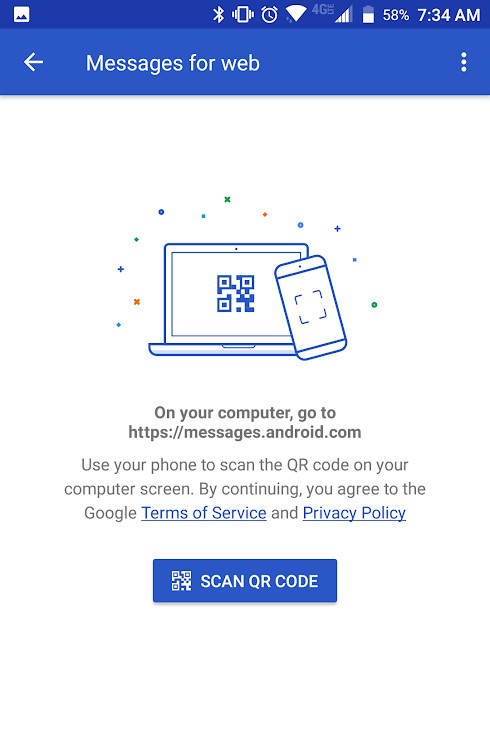

After scanning your code, you’ll ready to start using Android Messages for web!

Before you dive too deep, however, there are a couple things we recommend checking out.
For starters, the Settings page on the Android Messages website has a lot of helpful tools. Here you’ll find toggles to enable or disable notifications, message previews, and whether or not you want Android Messages to keep you signed on to that computer.
Heck, there’s even a dark mode that you can turn on!
After playing around with the settings for a bit, there’s one more thing on your phone you’ll want to configure.
By default, Messages for web shows a persistent notification on your phone whenever you’re connected to a computer. This can quickly become an unwanted eyesore, but thankfully, Google makes it easy to shut this off.
Open Android Messages and tap the three dots at the top right.
Tap Messages for web.
Tap the three dots again.
Tap Notifications.
Tap Show persistent notification to disable it.


With that knowledge under your belt, you’re ready to start using Android Messages for web like a pro!
Need further assistance or just want to chat? Head on over to the comments down below.
Download: Android Messages (free)
Where to buy the Moto E5 series in the U.S. and Canada
Your ultimate guide for buying the Moto E5 in North America.
Motorola first introduced its Moto E series in 2013 as an even cheaper alternative to the already affordable Moto G line. Moto E phones aren’t the most powerful or flashy around, but Motorola’s used this product line year after year to offer quality phones at wickedly low prices.

This year’s Moto E5 series is no different, with Motorola offering three different options in the forms of the Moto E5, E5 Play, and E5 Plus. The regular E5 isn’t being sold anywhere in North America, but there are plenty of carriers offering the E5 Play and E5 Plus throughout the United States and Canada.
United States
Boost Mobile
If you rely on Sprint’s network but want to get cheaper monthly rates, Boost is the way to go. Motorola says that Boost is carrying both the Moto E5 Play and Moto E5 Plus.
The E5 Play has a regular price of $99.99, but right now Boost is selling it for just $79.99.
Pricing details for the E5 Plus have yet to be announced, but that information should be made available soon.
See at Boost Mobile
Cricket Wireless
Alternatively, Cricket Wireless is one of the go-to pre-paid carriers in the States if you prefer AT&T’s network without the company’s high monthly rates.
Similar to Boost Mobile, Cricket Wireless is selling the E5 Plus and E5 Play. However, Cricket’s altering the naming so that the E5 Plus is the E5 Supra and the E5 Play is the E5 Cruise. Despite the different names, these are still the same versions of the phones everyone else has.
The Moto E5 Cruise/Play is available now and costs $99.99 for customers adding a line or upgrading an existing one. If you want the E5 Supra, you’ll need to pay $179.99.
See at Cricket Wireless
Sprint
Pre-paid networks are great for some customers, but for others, traditional post-paid plans still reign supreme.
Sprint is the only U.S. carrier selling the Moto E5 series through post-paid options, and it’s got both the E5 Plus and E5 Play. The Play isn’t available quite yet, but the Plus is on sale for $288 outright or $0 down and then $12/month for 18-months on a Sprint Flex lease.
See at Sprint
Verizon
Verizon’s own pre-paid service has seen some solid upgrades over the past few months, and it’s definitely one of your best bets for getting Verizon service with affordable month-to-month rates.
Unlike all of the carriers we’ve talked about so far, Verizon is only selling the Moto E5 Play. The phone costs $69.99 and comes with 16GB of expandable storage.
If you’re searching for the E5 Plus, you won’t find it here.
See at Verizon
Virgin Mobile
Similar to Verizon, Virgin Mobile will only sell the Moto E5 Play on its network.
See at Virgin Mobile
Xfinity Mobile
Xfinity is one of the newest brands to enter the wireless space, and just like Verizon and Virgin, is only selling the cheaper Moto E5 Play. Xfinity Mobile uses Verizon’s towers for its service and is a pretty compelling deal for folks that already get their internet and TV through the Xfinity.
If you’re interested in getting the E5 Play through Xfinity, it’ll set you back either $119.99 upfront or $5/month for 24 months with 0% APR.
See at Xfinity Mobile
Canada
Moving over to our friends in the Great White North, you’ll only find the Moto E5 Play in these neck of the woods.
The Moto E5 and E5 Plus won’t be coming to the country at all, and while that’s a bummer, the E5 Play is available at a variety of carriers in the area.
According to Motorola, you’ll be able to pick up the E5 Play at Bell Canada, Chatr Mobile, Fido, Lucky Mobile, Rogers, SaskTel, and Virgin Mobile through pre-paid plans. Additionally, Videotron will sell the phone post-paid and Freedom Mobile will offer the option of getting the E5 Play pre or post-paid.
Moto E5, E5 Plus and E5 Play: Everything you need to know!
Updated June 22, 2018: Added the Moto E5 Supra from Cricket Wireless to the list.
Turner Classic Movies Launches ‘Watch TCM’ tvOS App With Thousands of Classic Films on Demand
Alongside a major version 3.0 update that rolled out to its iOS app [Direct Link] earlier this week, Turner Classic Movies has also expanded support for its “Watch TCM” app to tvOS devices. Now the app can be downloaded to the fourth-generation Apple TV and fifth-generation Apple TV 4K, with thousands of classic films available on demand.
You’ll need to have TCM already on your current cable or satellite TV package, and then once you sync the app to your log-in information you’ll get access to its content. This includes two live streams for the east and west coast feed of Turner Classic Movies in addition to the on-demand movies.
Turner Classic Movies presents WATCH TCM, a “TV Everywhere” service that lets you enjoy unlimited access to the best of TCM, at no additional cost with your TV subscription. Not your ordinary “TV Everywhere” service, WATCH TCM is a content rich and in-depth movie companion that lets you experience the richly textured world of classic movies that only Turner Classic Movies can bring you.
The company says this back catalog includes “nearly every title playing on TCM,” including introductions by special hosts like Ben Mankiewicz. Both live and on-demand movies are presented uncut, commercial free, and in their original aspect ratios.
The app also features articles, cast and crew information, photo galleries, short films, film collections (“Birthday Tributes”, “31 Days of Oscar”, “Silent Sunday Nights”, etc.) and more. All of the films can be added to your Watchlist so you can keep an organized list of what you want to watch next, but the app doesn’t appear to integrate with Apple’s TV app as of yet.
Watch TCM differs from Turner Classic Movies’ film streaming service “FilmStruck” since it connects to your pre-existing cable subscription. FilmStruck is a standalone subscription service that starts at $6.99/month and raises to $8.25/month ($99 billed annually) and includes most of TCM’s classic films as well as the Criterion Collection. The app first debuted on the fourth-generation Apple TV in late 2016.
Related Roundups: Apple TV, tvOS 12Buyer’s Guide: Apple TV (Neutral)
Discuss this article in our forums
 AIVAnet