


Popular Instagrammer caught using photos from image libraries
Successful Instagrammers don’t win followers by accident. Unless they’re already famous in some other arena, their success on the platform usually comes from snapping consistently striking shots.
Take Singapore-based Daryl Aiden Yow. His images have been wowing fans and brands — Sony and Uniqlo are among a number that have worked with him — earning him more than 104,000 followers. But just recently, news site Mothership spotted something a little odd about a number of his posted pictures.
After some careful research, the site realized that some of Yow’s photos were, in fact, from image libraries like Shutterstock. But Yow had put nothing in the photos’ captions to suggest they weren’t actually his images.
Mothership confronted Yow with more than 10 examples of shots on his Instagram account that appeared to have been bought from image libraries, and he admitted it was true. While some had been slightly altered in terms of color and contrast, others had been photoshopped to include Yow in the shot.
Well and truly rumbled, he removed all of his photos from his account over the weekend and replaced them with a single black image and a long apology.
“The outrage regarding how I have conducted myself is justified and I accept full responsibility for my actions and all consequences that arise from those actions,” Yow wrote.
He said he was “wrong to have claimed that stock images and other people’s work were my own. I was also wrong to have used false captions that misled my followers and those who viewed my images.”
Yow added that having promoted himself as a photographer, he had “fallen far short” of what was expected of him and “disappointed those who believed — or wanted to believe — in me. For all of that, I apologise.”
He even appeared to suggest that a number of friends had earlier pulled him up on his actions “whenever they felt that something was not right about my images,” but he said he ignored their advice to change his behavior.
As noted by the BBC, Sony had promoted Yow’s work on its Singapore website as part of a marketing campaign for one of its mirrorless cameras, and described him as a #SonyCreativeAlly.
Yow’s follower count has dropped by about 3,000 in the last few days, and it’s not clear if he plans to start posting images again.
Of course, it’s not the first time a photographer has been exposed for using fake images that claim to be otherwise. Take this effort that won a Nikon contest before the Japanese company had a chance to realize it was a composite. Another competition-winning image — this one of an anteater next to a termite mound — also ended up being disqualified, though the photographer has always insisted it’s genuine. See what you think.
Editors’ Recommendations
- I ordered tea from Amazon, but got a box from Walmart. What happened?
- Simon Pegg on humor, horror, a ‘Hot Fuzz’ TV show, and a Tarantino Star Trek
- 5 modern inventions that are way older than you think
- Meet Explorest, the photo-scouting app curated by real photographers
- Camera lost at sea for two years reunited with its owner after Facebook post
Apple Maps Now Supports Transit in Estonia and Rome, Italy
Apple Maps now includes transit information for Estonia and the city of Rome, Italy, enabling users in the areas to navigate with public transportation.
In Rome, transit data covers the city’s public metro lines, buses, and tram routes, as well as the local Trenitalia network which includes the Leonardo Express that connects Roma Termini station and Roma Fiumicino airport in Lazio.
Transit coverage across Estonia includes the capital Tallinn’s bus, tram, trolleybus, and Elron train services, as well as local links to the country’s national rail network reaching through Tartu, Pärnu, and Narva.
The public transport information can be accessed by tapping the Transit tab or button in Apple Maps on iPhone, iPad, Mac, or Apple Watch.
Apple started adding transit information to Apple Maps three years ago, starting with Baltimore, Berlin, Boston, Chicago, London, Los Angeles, Mexico City, New York, Philadelphia, San Francisco, Sydney, Toronto, and China. Apple has since expanded transit coverage to additional cities around the globe.
Apple is gradually catching up with Google Maps’ public transportation navigation coverage, which already includes Rome and cities in Estonia. Apple also recently revealed that CarPlay will support Google Maps, Waze, and other third-party navigation apps with a paired iPhone running iOS 12.
(Thanks, Ram!)
Tags: Apple Maps, Italy, transit, Estonia
Discuss this article in our forums
Which Samsung Galaxy outlasts the rest on battery life? Not the one you expect
Ever wonder if newer phones actually boast better battery life than their predecessors? To find out, we to put the Galaxy S9 Plus and several other Samsung phones — specifically the S8, S8 Plus, and Note 8 — to the test. The company’s website claims that the S9 Plus lasts longer than the standard S9, but does it outperform previous Galaxy models?
To ensure no outside variables hindered our experiment, we made sure that each phone was connected to the same Wi-Fi network and the same social media accounts, and receiving notifications in the same way. The display brightness on each device was also identical. To test the overall longevity of each battery, we played a continuous loop of the beloved Nyan Cat video, and waited patiently to see which phone would last the longest.
Battery test results
1st: Galaxy S8 Plus
2nd: Galaxy Note 8
3rd: Galaxy S8
4th: Galaxy S9 Plus
Three hours in, there wasn’t a noticeable difference; the Note 8 still had 74-percent battery life, the S8 and S8 Plus were hovering around 72 percent, and the S9 Plus was in the middle with 73 percent. Fast forward an impressive 12 hours and 7 minutes, and we have our winner, the S8 Plus. The Note 8 came in second at 11 hours and 13 minutes, while third and fourth place went to the S8 and S9 Plus, respectively.
It’s hard to say why the S8 Plus lasted significantly longer than the other models — especially since they all sport similar battery sizes and identical processors — but clearly, it’s the S8 Plus has something going for it. In another recent battery battle, we put a host of flagships, including the Galaxy S9 Plus and S8 Plus, to the same test. The Galaxy S8 Plus was again victorious, with the S9 Plus coming in at a close second.
Keep in mind, however, the battery test is just a simplified overview of how long your phone may last. The S9 Plus is still a fantastic device… even if the battery life could be better.
David Cogen — a regular contributor here at Digital Trends — runs TheUnlockr.com, a popular tech blog that focuses on tech news, tips and tricks, and the latest tech. You can also find him over at Twitter discussing the latest tech trends.
Editors’ Recommendations
- Battery battle: Samsung Galaxy S9 Plus vs. iPhone X, Pixel 2 XL, and more
- Samsung Galaxy S9 and S9 Plus: Here’s everything you need to know
- Speed test: Galaxy S9 Plus vs. S8 vs. S8 Plus vs. Note 8
- We put the last 4 iPhones through a battery beatdown
- Samsung Galaxy S9 Plus review
Apple Celebrates Pride in San Francisco Parade
Apple this weekend participated in the annual San Francisco Pride Parade, as part of its longstanding support of the LGBTQ community.
Photo: Trey Forgety
Apple’s CEO Tim Cook, environmental chief Lisa Jackson, and health and fitness director Jay Blahnik were among the many Apple employees who marched in the parade, wearing Pride-themed t-shirts with rainbow-colored Apple logos.
Happy Pride to the Apple employees marching today in San Francisco and to everyone celebrating #Pride2018 across the country! pic.twitter.com/UUoZDAWjnC
— Tim Cook (@tim_cook) June 24, 2018
Apple also had a dedicated area at One Market Plaza where people could leave their signature or a message, take Animoji photos, and more.
#applepride pic.twitter.com/c4r8q2jrvw
— Lisa P. Jackson (@lisapjackson) June 24, 2018
#applepride pic.twitter.com/rvq0oqpeP3
— Bill Zhao (@cybermaster) June 24, 2018
Apple has been celebrating Pride throughout the month of June, introducing a new Pride-themed Apple Watch band and watch face at WWDC. The company routinely supports laws that protect LGBQT rights, and opposes laws that discriminate.
Note: This discussion thread is located in our Politics, Religion, Social forum. All forum members and site visitors are welcome to read and follow the thread, but posting is limited to forum members with at least 100 posts.
Tag: Pride
Discuss this article in our forums
Bluetooth headphones, USB-C monitors, Philips Hue lights, and more are all discounted today
Whether you’re looking for new tech gear or household items, we’ve got you covered.
We found plenty of great deals today that include big discounts on LG’s 4K USB-C monitor, Sony’s Bluetooth headphones, Philips Hue multi-color smart bulbs, and much more! Time’s running out to take advantage of these prices, so hurry!
View the rest of the deals
If you want to know about the deals as soon as they are happening, you’ll want to follow Thrifter on Twitter, and sign up for the newsletter, because missing out on a great deal stinks!
Researcher claims to bypass iPhone security limits, but may have spoken too soon
Julian Chokkattu/Digital Trends
For a brief moment, it seemed as though a security researcher had found a way to get past the security limits on iPhones and iPads by entering an infinite number of passcodes in order to hack into a device. The purported vulnerability was apparently even present in the latest version of iOS, 11.3, but Apple has now pushed back on these claims, and the researcher also appears to be backtracking on his initial findings.
When attempting to access a locked iPhone or iPad, users generally have a set number of passcode attempts to make before being locked out. You can even set your Apple device to automatically erase its contents if a hacker continuously attempts to guess your passcode. But according to Hacker House cybersecurity firm co-founder Matthew Hickey, if an iDevice is plugged in and a hacker tries to send keyboard inputs, it sets off an interrupt request that supersedes all other commands on the device. This, Hickey said, would allows hackers to send every single possible passcode combination in a single string, and because it wouldn’t give Apple’s software any respite, the inputs would take priority over any data-erasing security feature.
“Instead of sending passcode one at a time and waiting, send them all in one go,” Hickey explained. “If you send your brute-force attack in one long string of inputs, it’ll process all of them and bypass the erase data feature.”
However, Apple’s spokesperson countered these claims, noting simply, “The recent report about a passcode bypass on iPhone was in error, and a result of incorrect testing.”
And a bit later, Hickey seemed to concede that his method may not have been entirely accurate. In a tweet, the security researcher explained that not all of the tested passcodes are ultimately sent to an iPhone or iPad’s secure enclave, which is responsible for guarding against these sorts of attacks.
“The [passcodes] don’t always go to the [secure enclave processor] in some instances — due to pocket dialing [or] overly fast inputs — so although it ‘looks’ like pins are being tested, they aren’t always sent and so they don’t count, the devices register less counts than visible,” he noted.
Hickey said that when he attempted to verify his methods, he found where he may have gone wrong: “I went back to double check all code and testing. When I sent codes to the phone, it appears that 20 or more are entered but in reality it’s only ever sending four or five pins to be checked.”
In any case, Apple will soon be debuting another security feature called USB Restricted Mode, which should make it much more difficult for folks to access an iPhone or iPad.
Editors’ Recommendations
- It took them 15 years to hack a master key for 40,000 hotels. But they did it
- BMW racing to patch 14 security vulnerabilities found in its cars
- After the San Bernardino iPhone fiasco, lawmakers introduce the Secure Data Act
- Intel, Microsoft using integrated graphics to thwart next Meltdown-style threats
- Telegram app is a favorite of Kremlin officials, but Russia wants to block it
PopSockets vs. Spigen Style Ring vs. Ringke Ring: Which grip is best?

Sometimes you just need to get a grip on your phone.
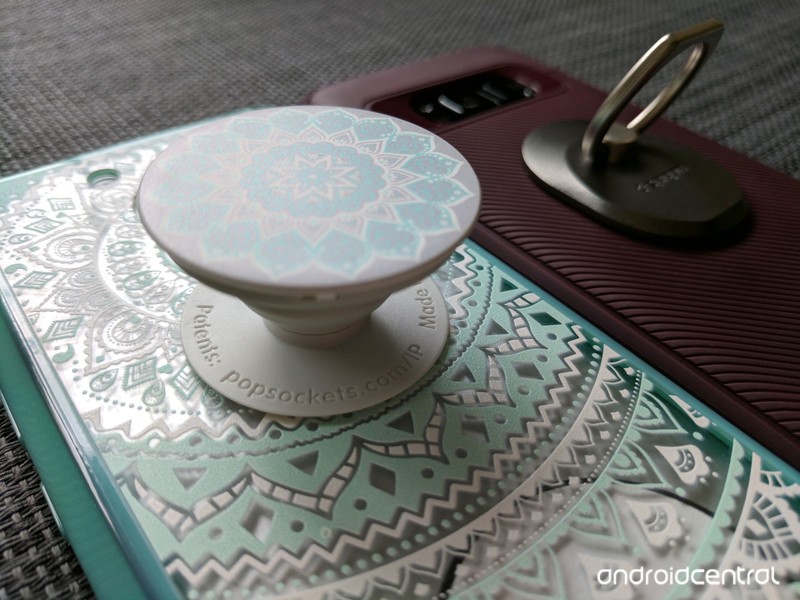
We can white-knuckle grip our phones all day while we carry them around, but let’s face it: phones get slippery. Hands get sweaty. Sometimes we just need something a little easier to hold on to. Smartphone grips can help with this, as well as giving us an easy-access kickstand, a secure mounting solution, and even a little style. There’s a variety of smartphone grips out there, but a few styles have risen to the top — accordion-style PopSockets and two ring-based styles, the beefier Spigen Style Ring and the flatter Ringke Ring.
There are many solutions on the market to help us get a grip, but there can only be one on the back of your phone. So which one should you slap on yours?
Popping plastic or bending metal
Accordions vs. bearings and hinges
PopSockets are perhaps the most recognizable smartphone grip on the market in hundreds of styles — including licensed versions featuring Star Wars, Harry Potter, Marvel and DC superheroes, and even My Little Pony. A PopSocket can be customized for company swag or personal pride, and most styles are $10-$15, depending on how fancy a design you get.
No matter the color or branding, all PopSockets use the same plastic assembly of “poppable” and collapsible levels to let you have the PopSocket at one of three levels: flat, halfway (one level popped open) and full (both levels popped open). There’s no adjusting the angle of your grip or kickstand here, but there’s also no bearings or hinges to wear out, either. A PopSocket’s plastic can wear out, but that’ll take tens of thousands of pops in and out.
See at PopSockets

Among ring smartphone grips, there are two prevailing styles: Post-style rings and flat-style rings.
The original phone ring — the Spigen Style Ring — features a raised, 360-degree rotating center post and a ring that rotates 180 from it. It’s a bulkier grip, but one that’s easy to slide on and balance with one finger. The Spigen Style Ring also offers a very stable kickstand thanks to two rounded corners on its ring. Spigen’s grip works so well that the market is now filled with post-style grips in every conceivable color, size, and shape, from Batman logos to bedazzled rose gold rings. Whether original or knockoff, all post-style rings have the same repeated complaint: they don’t lay flat on your desktop or nightstand, and can rattle around when your phone rings on Vibrate. Spigen sells the Style Ring at $14 with one included wall/car mount.
See at Amazon

This complaint gave rise to the flat-style ring grip used by the Ringke Ring. Featuring a flat back, the Ringke Ring folds down securely around its circular base, which houses the bearing that the grip rotates 360 degrees upon. This keeps the grip at the desired angle for your finger, rather than being knocked or slipped back to straight as frequently happens with post-style rings. While a flat back doesn’t guarantee that the phone will actually sit flat on a table, the Ringke Ring won’t rattle around the way Spigen’s does.
Some flat-style rings slip a magnetic plate into this flat back so that they can be used with the ever-popular magnetic car mounts, but Ringke has not gone this route. Considering how quickly I’ve scuffed up magnetic versions of flat-style rings, I’m okay with the omission. Ringke Rings sell at $10 with two Ringke Hooks included in the box, which can serve as mounts for your ring or cable grips.
See at Amazon

How your grip gets its grip
Application and Adhesive
All three of these grips — nay, the vast majority of all smartphone grips — use 3M-style adhesives to stick to the back of your phone or phone case. While the adhesive doesn’t quite last forever, it sticks really well while leaving little to no residue when removed. If you need to reposition it once or twice, it can be moved between cases or between phones without losing its strong grip. The only drawback to these adhesives is that they have a tendency to not stick to a couple of styles of phone cases:
- Silicone cases
- Cases with deep/uneven textures
- Some waterproof cases
I’ve used these grips with some cases with shallow texturing, but other textured cases were just too uneven for the adhesive to get a good grip. As a general rule of thumb, if your case has a flat back and isn’t a softer/slipplier silicone, these grips should work just fine.
If you like it, then you shoulda put a ring on it
In-hand grip
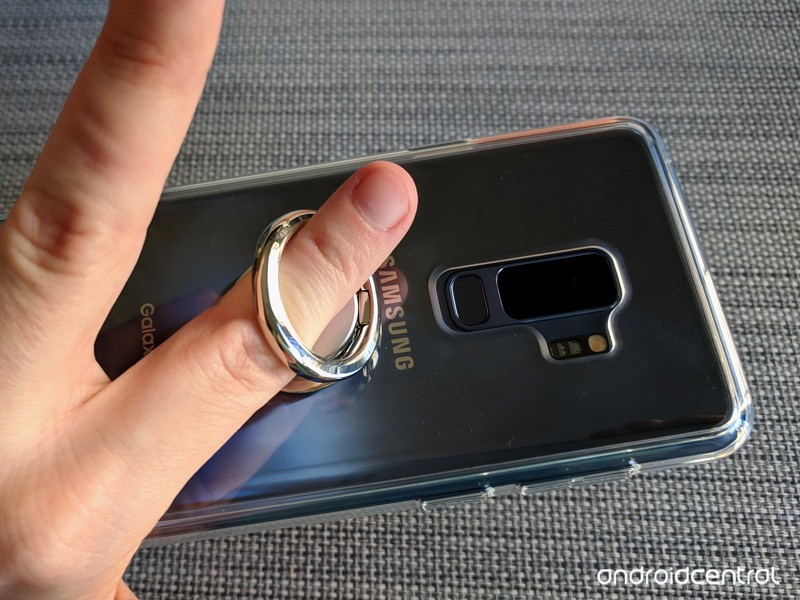
When it comes to holding your phone with one of these grips, the difference between the rings and PopSockets is clear: a PopSocket requires two fingers to grip each side of its accordion body, while the Spigen Style Ring and Ringke Ring has users slip one finger through the grip to keep ahold of your phone.

Ring grips take a little getting used to, but the grips you can get with them are more diverse and more secure. You can adjust the angle of the ring to reach a wider area of the screen, and you can swing the phone around 180 degrees to wear your phone like the biggest bling ever, allowing you to hold the phone on the back of your hand while you carry beers back from the bar. If your wardrobe is often lacking in phone-sized pockets, this can be a lifesaver.

If you have thin, petite fingers, ring grips can feel huge, whereas a PopSocket’s halfway open mode can provide excellent grip. The fully open mode also keeps things grippy while giving you a little leeway in how closely you grip the phone, but the grip is still not as secure as those on the rings. PopSockets frequently double as a phone-mounted fidget toys for many users, allowing you to pop it in and out and wiggle it around between levels when you need distracting.
Not that I would know anything about that.

Running rings around the competition
Kickstands, stability and mounts
These grips all double as kickstands, but unlike our other categories, there is a clear loser here. The adjustable hinges of the Spigen Style Ring and Ringke Ring allow you to set your kickstand at a variety of heights, both horizontally and vertically. The kickstand ability on a PopSocket, on the other hand, is painfully basic: if your PopSocket is fully extended, it should hold your phone up in landscape mode at a single angle to watch a movie. That’s it.

Whether you use one PopSocket or two — PopSockets began life as headphone cord organizers, wrapping the wire between two PopSockets and then pushing the accordion down to hold them in place — it won’t prop your phone up vertically, something ring-style grips do easily. It may not seem like much, but being able to prop your phone up in portrait mode makes it far easier to see, use, and reference your phone while it sits next to your laptop or keyboard.

That said, being able to prop your phone up vertically is something not everyone needs to do with their phone grip, but every user wants their phone to be stable when its laying on a flat surface, and with a Spigen Style Ring, that just doesn’t happen. It’s the biggest strike against it, but at least you can prop the Spigen Ring up in a low-angle portrait mode to compensate for it. The Ringke Ring will lay flat depending on how balanced the phone sits on top of it, but once you need to start tapping it, expect a little wobble here and there when tapping near the edges of the screen, like the nav bar.

Proprietary mounts aren’t worth the hassle.
If you want to use the designated mounts for these systems, be prepared to shell out. PopSockets sell its mounts separately, and said mounts cost as much as PopSockets themselves. The Spigen Style Ring includes a car/wall mount with purchase, but if you need more than one, you’ll have to buy another Style Ring, too; mounts aren’t sold separately. Ringke doesn’t sell Ringke Hooks separately, either, but at least it put two in the box.
That said, these proprietary mounts are a pain and expensive if you want to use them in multiple cars or rooms of your house, so skip them and reach for those magnetic car mounts that I mentioned earlier. If you place your grip high enough on your phone, you’ll have enough room at the bottom of the phone for the magnetic plate or sticker to get a grip.

Which should you buy?
These grips are fairly close on pricing. The Ringke Ring (with 2 mounting Ringke Hooks) and more basic styles of PopSockets are $10 a pop, while the Spigen Style Ring (and one car mount) is $14 and the most of the Premium or Licensed PopSockets are $15. Which mount you buy then depends on your style…

A PopSocket is a more stylish-looking accessory, adding a pop of flair to your device, but it’s not just not as versatile as ring grips. What it lacks in productivity, though, it makes up in longevity: Popsockets take a long time to wear out, while the bearings that let ring grips hold their angles have a tendency to wear out after a year or less, depending on how hard you are on it.
See at PopSockets

Ring grips are more adaptable and more productive. I use their adjustable kickstands to prop up my phones in portrait mode next to my Chromebook all the time, and I’ve used the steadfast grip of a ring grip to use my phone one-handed while hula-hooping. The Spigen Style Ring is the original and is still just as sturdy as ever, still going strong after three or four different flat-style rings have worn out their bearings, and its pointed ring makes it a more stable, sturdy kickstand.
See at Amazon

But part of why my Spigen Style Ring has held out as long as it has is that I don’t really like using it on tables since its uneven nature makes it rattle around. The Ringke Ring is more stable laying on its flat back and $4 cheaper. Being able to lay the ring down without losing the angle that matches my finger perfectly also makes it easier to slip the Ringke Ring on and off repeatedly without wearing out its bearings too quickly, and it has a cleaner look overall.
So the grip I’ll be trusting as I head out into the world trying to text one-handed with my massive Samsung Galaxy S9+ is without a doubt the Ringke Ring.
See at Amazon
Updated June 2018: We’ve expanded this guide to include the Ringke Ring as a flat-style ring grip and our new winner.
 AIVAnet