


DJI Osmo Mobile 2 review: get your smooth on
DJI remains one of the most recognizable names in tech, primarily for their drones, but their aerial devices make use of a very important aspect of photo and video – stabilization. For full size cameras, DJI has a slew of gimbal solutions, but last year they shrunk these products down to size for smartphones. The DJI Osmo Mobile has become the gimbal of choice for many smartphone-based content creators, but it definitely had a few annoying quirks and did not take into full consideration the next frontier of visual content: social media.
DJI’s New Drone
DJI Mavic Air announced: the drone you were waiting for?
Head over to our partner site Drone Rush for all the details on the new DJI Mavic Air.
The top drone manufacturer in the world took the wraps off a new machine this morning— the all-new …
With the newest version of the Osmo Mobile, DJI has not only made the gimbal more accessible in terms of handling and even price, it has also updated what could be considered a niche device into something anyone can benefit from. This is the DJI Osmo Mobile 2 review.

As a content creator, I got my hands on the original Osmo Mobile for smooth footage and further creativity after hitting the record button. With a little bit of work, DJI’s gimbal allowed for lovely timelapse footage and even hands-off video recording. That way, I would be able to get out in front of the camera rather than always being behind it.
There were some issues in the design of the gimbal though. It was small enough to fit in a backpack and wasn’t difficult to maneuver in one hand for long periods of time, but mounting the Osmo to existing places like a tripod required a very specific part that screwed into the side of the handle. This was odd and cumbersome to do. In the Osmo Mobile 2, this is one of the first issues that is directly addressed – with a ¼ 20’ thread found in the bottom portion. This makes for much easier and more intuitive setups where users can just screw a plate on the bottom and securely stand the Osmo up.

This does change the way the Osmo is charged and handled, however – DJI has now eliminated the need for battery packs. For better or worse, spare batteries are a thing of the past as the entire unit is now charged by the micro-USB port to the side of the control area. While a USB Type-C port would have been preferred, eliminating this part of the gimbal’s power features also made everything even lighter than before.
DJI has eliminated the need for battery packs but the gimbal’s built-in battery can now power your phone
Speaking of power features: there is a full USB port on the back that can power the mounted phone. That’s right, the 15-hour battery within the handle can be used as a power bank, which works in a pinch when your smartphone needs some juice to do stuff like livestreams.
The updated Osmo Mobile 2 is light as a feather – this further benefits the handling experience and takes away the little bit of strain felt after long periods of usage. Some users might have preferred hot swapping batteries but the Osmo Mobile 2 can go for a long 15 hours – plenty of time for a super long recording or livestream. Unless you’re looking to use the gimbal for hours daily, it should last for several days between charges.
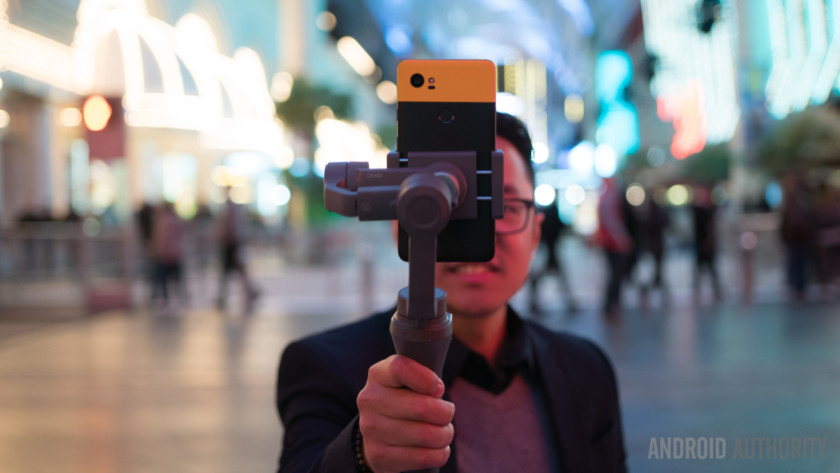
But that mention of livestreaming brings us to the other big design change of the Osmo Mobile 2 – portrait mode. People might not generally be big fans of vertical video, but the fact remains that social media platforms like Instagram and Snapchat thrive on it. And DJI has outfitted this gimbal with a rotating clamp that can hold the phone upright for content that is meant for these platforms. Simply loosen the back portion of the clamp, rotate it accordingly, and portrait mode stabilization is achieved. This also answers the question of the Osmo Mobile 2’s usefulness when smartphone video stabilization is continuously improving. While true, OIS and EIS are features typically afforded to rear cameras, but not front-facing shooters.
A new rotating clamp enables portrait mode stabilization, but it too isn’t perfect
There is one big peeve I have here, however – the rotation of the clamp should have been designed to be done with the phone inside. Going from portrait mode to landscape requires users to remove the phone, rotate the plate clockwise 90 degrees and then mount it again so that the rear camera is not obstructed. The ability to rotate the plate counter-clockwise 90 degrees would have solved this issue easily and allowed the phone to remain mounted, even if rebalancing would still be needed. It honestly astounds me that the engineers at DJI didn’t seem to think that one through.
Despite this extra step when moving between different orientations, changing the clamp to a spring loaded mechanism does help the balancing process. A fastener for the rear arm still needs to be used for horizon balancing, but smartphones can slide and adjust within the clamp if further adjustments have to be made. One just has to find the sweet spot for their own phone so that it remains steady when the gimbal is powered off. Once, found, power it up and the motor does the rest.

Buttons and controls on the new stabilizer have seen a few changes, with the main difference being the removal of the trigger button. This took a bit of getting used to, as the trigger on the original Osmo Mobile was used to keep the phone locked on its current plane when needed. What used to be easily accessed by the index finger for locking the plane and resetting the horizon is now done by one’s thumb on the main button panel. Changing modes and tracking functions, then, is a bit less comfortable than before.
Editor’s Pick
A closer look at the LG V30 in Raspberry Rose (and the $2K Signature Edition)
When LG released the V30 back in August 2017, it was available in four colors: Aurora Black, Cloud Silver, Moroccan Blue, and Lavender Violet. Just a few days before CES 2018, the company announced an …
Otherwise, the rest of the buttons and controls will feel familiar to any previous Osmo users. The joystick smoothly moves the gimbal on any axis and there is a zoom slider on the side. These controls work with the DJI Go app, which has improved significantly since the original Osmo Mobile.

But unfortunately this is where DJI’s app makes or breaks the experience. I should mention that for this review, I have been using an unreleased beta version of the DJI GO app, though it is important to note that the Play Store updates show support for this new product already. So, although the promise of fully updated software is something to consider, DJI’s history of shoddy Android development still has to be mentioned. Back at CES, the app worked well enough for me to use it on the show floor and around Downtown Vegas, but during the filming of this review the app would either crash when opening up the camera or simply not connect at all to the gimbal.
DJI’s history of shoddy Android development still has to be mentioned
However, this is not an isolated incident – I own a Mavic Pro and have had the same issues on most Android phones aside from Samsung Galaxy devices. So, if you are not using the latest phones you might have a bit of a hard time getting the app to work consistently. Harsh as it might be, this is a reality that DJI/Android fans have wrestled with for some time now. It almost makes perfect sense why this gimbal is starting out as an Apple Store exclusive – there are a lot of kinks to work out with the Android side of things.
When the app does work, it is very nice to use the physical controls to their fullest extent. As mentioned before, the M mode button is used to change the gimbal’s behavior – one press changes the horizon lock, two presses resets the gimbal position, and three presses changes which camera is being used.
Snapchat
Snapchat will soon let you share Stories on Twitter, Facebook, and across the web
Snapchat is taking a step out of its walled garden with a new feature that will enable the sharing of Stories with other users outside of the main app.
If this all sounds a little familiar, …
That last feature is one that only works with the DJI Go app, which is required for users to get the full experience. However, plenty of users will probably be happy to just use the gimbal as a stabilizer with some control via the joystick when using other apps like Snapchat or the built-in camera app.

The DJI Go camera app affords a lot more control over exposure and color, which is nice – but the modes are really what opens up the creativity. The motors can move the phone around automatically for effortless panoramas, for example. ActiveTrack allows the user to set a point that the camera app and gimbal will continuously follow.
This is on top of the Timelapse mode, which has the gimbal keep the phone steady as it stays put and records a scene’s movement over time. Or, you can put these two together for a Motionlapse or a Hyperlapse – whereby tracking keeps the camera trained on a subject while being moved around, marrying the aesthetic of a timelapse with dynamic movement.
It’s important to note that users will have to be aware of the gimbal’s limits. ActiveTrack in particular gave us a few headaches as the gimbal occasionally went nuts on even slow moving subjects. We’ve been told this is getting fixed and refined in firmware updates leading up to its full retail release and shortly after.
See Also
Google Pixel 2 and Pixel 2 XL review (Updated: addressing some issues)
This review is brought to you by MNML Case, an ultra-thin case that showcases the beauty of your new phone and fits like a glove! Get 15% OFF your Google Pixel 2 case or Google Pixel …
We also noticed that the gimbal could get pushed over the edge, quite literally – in portrait mode especially, a top heavy phone like the Pixel 2 XL would just keel over under the lack of strength in the motors. Remember to counteract any movements with corrections via the joystick.
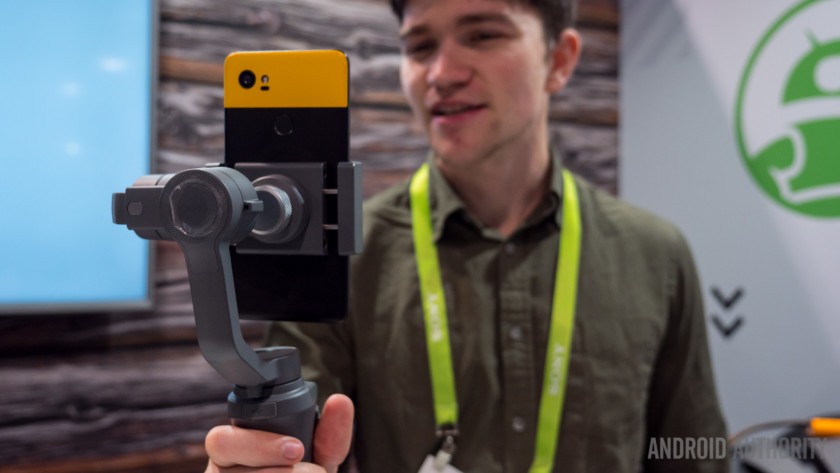
Despite some of its flaws and specific use case scenarios, plenty of people took to the original Osmo Mobile as a productive tool in one’s creative toolbox. If you’re a smartphone creative, you probably already have the original Osmo Mobile and if it works just fine, upgrading may not be necessary. The new edition builds upon the first by adding focus to today’s biggest video content platform – social media – despite maintaining its somewhat steep learning curve.
But DJI’s greatest change in the Mobile 2 is in the price – at $129 (on pre-order now), this gimbal shifts from being a tool that made sense for prosumer creators to one that could benefit just about anyone. As DJI states, this device is made to “share your story.” DJI squarely targets new, perhaps young users who really want to step their social game up with the Osmo Mobile 2.
PRE-ORDER NOW FROM B&H
Are you a user of the original Osmo Mobile? Does DJI’s new gimbal add to your social media game? Let us know what you think of the new edition in the comments below!
The best Sony Xperia XA2 Ultra cases for peace of mind
With a massive 6-inch screen and the incredible new dual-lens selfie cameras on the front of the phone, the Xperia XA2 Ultra may not have brought the design refresh fans were looking forward to, but it still looks set to take the midrange phone market by storm. Sometimes you need shelter from that storm, and while the XA2 Ultra is tough, its not without its weaknesses. Thankfully, they can be shored up with a little bit of help. That’s why we’re here with the best Sony Xperia XA2 Ultra cases that you can buy to keep your pride and joy safe from the hazardous world out there.
AVIDET Ultra-Clear Gel Case ($8)
So you’re in a quandary — you want to keep your phone protected, but you’re in love with the XA2 Ultra‘s design, and want to be able to see it. What do you do? Thankfully, the answer for this clearly important question is right here: A clear gel case. It might not be as protective as a bulky, rugged case, but the soft TPU material provides good protection against minor falls and bumps, and keeps the body of your phone safe from scratches and other similar hazards. Best of all, since it’s completely clear, it won’t block your view of your phone’s design.
Buy one now from:
Amazon
Roxfit Ultra Precision Hard Shell ($16)
Roxfit is the case-maker for Sony Xperia phones, and it wears its “Made for Xperia” label proudly. As well it should, because Roxfit cases are among the best you can get for your Xperia phone. The Ultra Precision Hard Shell case clips around the outside of your phone, protecting the body from scratches and damage. While the hard material won’t be the first choice for anyone worried about drop damage (it lacks the shock-absorption of TPU “gel” cases), it will offer great protection against most other damage, including bumps against hard materials and scratches from keys or coins in the same pocket. A raised bezel at the front of the phone keeps the screen from touching surfaces, and the slim minimalist design ensures that you’ll easily forget it’s on there once applied.
Buy one now from:
Mobile Fun Roxfit
TOPAce Shock Resistant Carbon Fiber-Style Case ($9)
Who says protection can’t be stylish? Style is very subjective, but we think you’ll agree that this case from TOPAce looks pretty good. The brushed metal look of the body gives way to carbon fiber-style panels at either end of the case — but don’t be fooled by the looks. You’re dealing with shock-resistant and durable TPU here, so don’t think this case is hard and lacks in drop protection. Quite the opposite, in fact; airbag-like pockets at each of the corners distribute shock around the absorbent material, and away from your phone. A raised edge keeps your phone from touching dirty surfaces, and the case itself adds grip and prevents unsightly fingerprints from forming.
Buy one now from:
Amazon
Olixar Armadillo Rugged Case ($15)
How about adding some extra utility to your phone? Olixar‘s Armadillo isn’t just an excellent protective choice, with a dual-layer construction that offers the best of hard cases and gel cases by combining TPU and polycarbonate (PC) — it also comes with a handy kickstand on the rear. The kickstand is flicked out easily, perfect for media viewing on the go, or simply for people to prop their phone up where they can see it. The rugged looks will appeal to anyone who wants a case that looks like it belongs in a post-apocalyptic survival flick, while the textured TPU materials means it’s even easier to keep a hold of your phone.
Buy one now from:
Mobile Fun
Official Sony Style Cover Stand Case ($46)
If you really want the best possible quality and fit, why not go straight to Sony itself? The company offers some great cases for the Xperia XA2 Ultra, including this Style Cover Stand Case. It’s a combination of a hard, PC inner case that clips onto your phone and protects the sides and back, and a softer, bifolding cover that wraps around the front of your phone to protect the screen when it’s not in use. You can fold the cover into a horizontal stand for your phone, and when you’re done with watching a film, YouTube, or whatever, flipping the cover over your screen puts your phone into sleep mode, pausing whatever you were watching automatically. It’s slim and form-fitting to the XA2 Ultra, and provides great protection. It’s on the pricey side, but you’ll struggle to find a quality flip case like this anywhere else.
Buy one now from:
Mobile Fun Sony
Editors’ Recommendations
- The best Sony Xperia XA2 cases to keep your smartphone looking ‘Xcellent’
- The best Honor View 10 cases to keep your midrange monster beautiful
- Keep your shiny bezel-less phone safe with the best LG G6 cases and covers
- Best Honor 7X cases to keep your budget phone beautiful
- The best Xperia XZ1 Compact cases to safeguard your small smartphone
U.S. government will investigate fraudulent net neutrality comments
The furor surrounding the net neutrality repeal that took place in December 2017 is continuing to be a strong political punching ground. The U.S. Government Accountability Office (GAO) will investigate claims that millions of comments provided to the Federal Communications Commission in support of the repeal were in fact made by bots impersonating real people.
The investigation comes after weeks of pushback against the FCC’s ruling, with challenges coming from the attorneys general of multiple states, Firefox creator Mozilla, and the Internet Association. Political strength has also been leveraged in this fight, with many congressional Democrats backing net neutrality regulations, which ensured internet access was treated as a utility and could not be exploited by internet providers. Supporters believe such regulation is needed to ensure a free, open internet for everyone.
One of the major issues surrounding the repeal has been the matter of the millions of anti-net neutrality comments that were allegedly made by bots impersonating millions of Americans. This comment system, supposedly used to inform the FCC of the public feeling towards bills, has been accused of being broken by these bot accounts, and forced a representation of the American people’s feelings that was not truly reflective.
This particular challenge to the repeal, launched by an open letter from U.S. Rep. Gregory W. Meeks, D-N.Y., and other representatives, asked the GAO to investigate the impact that these comments had on the process, and to discover the extent of the comment fraud on the FCC’s eventual decision. A reply, published by the Energy Commerce Dem Twitter account, reveals GAO’s acceptance, and the time frame that the investigation is expected to complete within, no less than five months.
NEWS: GAO has accepted 10 Democrats’ request for an investigation of the pervasiveness of fraudulent comments made during a federal rule making process. pic.twitter.com/fVlBIxBAVG
— Energy Commerce Dems (@EnergyCommerce) January 23, 2018
The issue of the fake voters is a particularly thorny issue in the net neutrality battle. One study estimated that removing the fake comments left a comments section that was 98.5 percent against the FCC’s repeal. With the supposedly bot-driven comments, that divide drops to 60 percent against. While this indicates the scale of the possible bot problem, it also shows that the FCC was already willing to go against 60 percent of the comments anyway, raising the question of how much impact the comments truly had on the decision.
Editors’ Recommendations
- Multiple challengers take on the FCC’s net neutrality repeal
- FCC officially repeals 2015 Net Neutrality regulations by a narrow margin
- What you need to know about net neutrality
- Study: Social media bots aren’t just annoying, they’re used to sway opinions
- Is this why FCC chairman Ajit Pai canceled his CES appearance?
U.S. government will investigate fraudulent net neutrality comments
The furor surrounding the net neutrality repeal that took place in December 2017 is continuing to be a strong political punching ground. The U.S. Government Accountability Office (GAO) will investigate claims that millions of comments provided to the Federal Communications Commission in support of the repeal were in fact made by bots impersonating real people.
The investigation comes after weeks of pushback against the FCC’s ruling, with challenges coming from the attorneys general of multiple states, Firefox creator Mozilla, and the Internet Association. Political strength has also been leveraged in this fight, with many congressional Democrats backing net neutrality regulations, which ensured internet access was treated as a utility and could not be exploited by internet providers. Supporters believe such regulation is needed to ensure a free, open internet for everyone.
One of the major issues surrounding the repeal has been the matter of the millions of anti-net neutrality comments that were allegedly made by bots impersonating millions of Americans. This comment system, supposedly used to inform the FCC of the public feeling towards bills, has been accused of being broken by these bot accounts, and forced a representation of the American people’s feelings that was not truly reflective.
This particular challenge to the repeal, launched by an open letter from U.S. Rep. Gregory W. Meeks, D-N.Y., and other representatives, asked the GAO to investigate the impact that these comments had on the process, and to discover the extent of the comment fraud on the FCC’s eventual decision. A reply, published by the Energy Commerce Dem Twitter account, reveals GAO’s acceptance, and the time frame that the investigation is expected to complete within, no less than five months.
NEWS: GAO has accepted 10 Democrats’ request for an investigation of the pervasiveness of fraudulent comments made during a federal rule making process. pic.twitter.com/fVlBIxBAVG
— Energy Commerce Dems (@EnergyCommerce) January 23, 2018
The issue of the fake voters is a particularly thorny issue in the net neutrality battle. One study estimated that removing the fake comments left a comments section that was 98.5 percent against the FCC’s repeal. With the supposedly bot-driven comments, that divide drops to 60 percent against. While this indicates the scale of the possible bot problem, it also shows that the FCC was already willing to go against 60 percent of the comments anyway, raising the question of how much impact the comments truly had on the decision.
Editors’ Recommendations
- Multiple challengers take on the FCC’s net neutrality repeal
- FCC officially repeals 2015 Net Neutrality regulations by a narrow margin
- What you need to know about net neutrality
- Study: Social media bots aren’t just annoying, they’re used to sway opinions
- Is this why FCC chairman Ajit Pai canceled his CES appearance?
From 50 Cent to $8M — rapper’s forgotten stash makes him a bitcoin millionaire
Curtis “50 Cent” Jackson has announced that he’s been a bitcoin millionaire for quite some time and just didn’t know it. Or at least, he’d forgotten he was. The rapper and actor revealed that he forgot he was sitting on a stack of 700 bitcoins, having taken them from some fans as payment for his 2014 album, Animal Ambition.
Citing at the time that he wanted to “stay with the times,” according to IBTimes, when 50 Cent released said album four years ago he allowed fans to pay for it with the flagship cryptocurrency. At the time bitcoins were worth around $660 each and ultimately represented a reasonable portion of the rapper’s earnings from the album: Around half a million dollars. Today though, with bitcoin worth north of $10,000 each, that’s a much more sizable amount.
Indeed with around 700 bitcoins in total, 50 Cent’s cryptocurrency fortune is worth close to $8 million, a fact that he recently celebrated on his Instagram account, citing the TMZ article that broke the story.
“Not bad for a kid from South Side, I’m so proud of me,” he said.
Although 50 Cent has been one of the more successful rappers in recent decades, he has faced his own share of financial difficulties. He famously filed for bankruptcy in 2015, though maintained hold of properties and even posted images of himself around the time with stacks of cash. Although he still had that 700 bitcoin then, it was actually worth less than when he was first paid with it, equating to less than $200,000.
Today though, 50 Cent is very firmly part of the bitcoin millionaires club. He may want to hold on to it too, as some experts we recently spoke to believe that within the next few years it could be worth upwards of 10 times what it is today.
50 Cent isn’t the only person to find themselves surprise millionaires thanks to early cryptocurrency investment. Some of the saddest cases, however, are when people realize too late. Bitcoin lost to landfill due to owners scrapping old computers is not uncommon. It’s why estimates suggest as much as $30 billion worth of bitcoin may have been lost over the years.
T-Mobile is helping customers stay connected throughout the Olympics
If you’re lucky enough to be headed to South Korea in a few weeks to catch the Winter Olympics, you’re practically required to share your good fortune with folks back home. And while that doesn’t mean buying everyone you know a plane ticket to Pyeongchang, it does mean keeping all your friends and family members abreast of the action taking place in the world’s greatest sporting event.
With T-Mobile, you’ll quickly become the most popular person around, as you take advantage of the Un-carrier’s free unlimited high-speed data, free unlimited calls to the U.S., and free texting. So whether you’re watching figure skating, hockey, or downhill skiing, you can pretend that your friends and family are with you.
The free data and unlimited calls within South Korea are available throughout the winter games, while free texting is already including for T-Mobile subscribers in more than 140 countries and destinations. Conveniently, you won’t have to do anything at all to reap these rewards (except, of course, be a T-Mobile customer). Beginning February 7 and continuing through March 20 following the closing ceremonies of the Paralympic Games, unlimited data and calling will automatically kick in across South Korea for T-Mobile customers with postpaid plans, absolutely for free.
“The Winter Games are full of unforgettable moments, and now, T-Mobile customers in South Korea can snap, tweet, and share those big moments without worrying about bill shock when they get back home,” said John Legere, president and CEO of T-Mobile. “And while the carriers gouge you and make you jump through ridiculous hoops, the Un-carrier makes it easy! Free and unlimited data and calling just HAPPEN from the moment you step foot in South Korea.”
T-Mobile can also help you with your communications needs as you make your way from the U.S. to South Korea. Thanks to T-Mobile’s partnership with Gogo, Un-carrier subscribers can access free texting throughout their flights, along with a free hour of smartphone Wi-Fi. Bear in mind though that this only works on domestic flights, so if your trip to South Korea includes a layover somewhere in the U.S., you’ll be able to enjoy this additional perk.
Editors’ Recommendations
- The best unlimited data plan: Verizon vs. T-Mobile vs. AT&T vs. Sprint
- Don’t listen to the guy at the mall. How to pick the best smartphone data plan
- Sprint wants to pull you in with free Hulu under its unlimited data plan
- Google Project Fi will no longer charge you for more than 6GB of data
- The best cheap phone plans save you cash without sacrificing service
Twitter is using A.I. to ditch those awful auto-cropped photos
The Twitter auto crop feature functions like a tweet’s character limit in order to keep images on the microblogging platform consistent with the rest of the feed — but now Twitter is getting better at those crops, thanks to artificial intelligence. Twitter is now rolling out a smarter auto crop based on neural networks, the company announced in a blog post on January 24.
The previous auto crop feature worked by using face detection to keep faces in the frame. When no faces were detected in the image, the software would simply crop the preview at the center, while a click on the image allowing users to see the entire shot. Twitter says the crop option without faces would often lead to awkward crops, while sometimes the software didn’t correctly identify faces.
To fix those awkwardly cropped previews, Twitter engineers used what’s called salient image maps to train a neural network. Salient maps use eye trackers to determine the areas of an image that most catch the viewer’s eye. Earlier research in the area showed that viewers tend to focus on faces, text, animals, objects, and areas with high contrast.
Twitter used that earlier data to train the program to understand which areas of the image are the most important. Using that data, the program can recognize those features and make that auto crop in a place that will leave the most visual areas inside the crop.
But Twitter wasn’t done — while saliency software works well, it’s also slow, which would have prevented tweets from being posted in real time. To solve the awkward crops problem without a slowdown, Twitter refined the program again using two different techniques that improved the speed tenfold. The first trained a smaller network using that first good but slow program in order to speed up those crops. Next, the software engineers determined a number of visual points to map on each image, effectively removing the smaller, less important visual cues while keeping the largest areas intact.
Before
After
The resulting software allows images to post in real time, but with better crops. In a group of before and after pictures, Twitter shows images with faces that the earlier system wouldn’t detect properly cropped to face rather than feet. Other examples show images of objects that were cut out in the first program because they didn’t sit in the middle of the image, but were more appropriately cropped using the updated algorithms. Another example shows the program recognizing text and adjusting the crop to include a sign.
The updated cropping algorithm is already rolling out globally on both iOS and Android apps as well as Twitter.com.
Editors’ Recommendations
- These are the 20 best PS4 games you can buy right now
- Here’s what social media giants are doing to keep extremism off your screen
- Tweet-analyzing algorithm can detect depression sooner than a human doctor
- Social giants to testify before Congress on extremist content
- 8 things you need to know about the Russian social media election ads
Google introduces Allo’s Smart Replies on Android Messages
Despite being adopted by at least some users, Google’s Allo chat app hasn’t exactly been the resounding success that Google may have been hoping for. Thankfully, Google seems to believe in reincarnation, as some of Allo’s more useful features are being brought into other Google platforms. Announced yesterday by the Google Project Fi Twitter account, Allo’s Smart Reply feature is being brought to Android Messages — but only for phones on Google’s Project Fi.
Messaging on the go? Smart Reply for Android Messages lets you text with a tap, rolling out starting today on Project Fi. pic.twitter.com/FRYO4hu9Ah
— Project Fi (@projectfi) January 24, 2018
Allo’s Smart Reply suggests quick replies that show up above your keyboard that can be tapped to be sent quickly and easily. It might seem like a minor addition, but it will likely appeal to anyone in a rush, or anyone who lives in a cold climate — less time with fingers tapping on a screen is more time said fingers can be kept warm. The process takes advantage of Google’s A.I. machine learning, the same learning that allows Google Assistant to reply contextually to your voice queries, and Allo’s Smart Reply analyses your conversation, noting the tone and content of the chat, and suggests a number of replies, based on what it think you’ll be wanting to say. It will mostly be suggesting simple replies like “okay,” “nice,” and simple questions — but having the ability to more quickly tap your answer is a neat little addition to the standard Android Messages app.
But as we mentioned, Smart Reply support in Android Messages is currently restricted to phones currently on Google’s Project Fi network — and that’s an unfortunately small pool to pick from; the Pixel range, the Nexus range, or the Moto X4.
Still, it’s a step in the right direction for Google. Allo was announced back in 2016 alongside three other chat apps, and despite the fact that Allo worked pretty well, Google failed to provide any real distinction between the six available chat apps that it had out at one time. As such, it never really took off, despite desktop support and continued patches to allow for more language support. Given the disaster that Allo, Duo, and Spaces have been, we’re hoping that we start to see more features from each bleeding into the mainstream Android apps soon.
Editors’ Recommendations
- Here’s everything you need to know about Google’s Project Fi
- Moto X4 review
- Win a free phone or Chromecast with Google’s Project Fi holiday promotion
- Google replacing Project Fi Nexus 5X with an Android One Moto X4 for subscribers
- Google Project Fi will no longer charge you for more than 6GB of data
Which is best — Pixel 2 or Pixel 2 XL?
If you need some advice when deciding between the Pixel 2 and Pixel 2 XL, our forum users are ready to help.
Of all the phones talked about in the Android Central forums, one that seems to get some of the most discussion is the Google Pixel 2. The Pixel 2 is not a perfect phone, but it’s the one that I (and many members of our little community) choose to rock on a daily basis.

One forum user created a new thread saying that they currently own the Pixel 2, and while they like it, are thinking about making the jump to the larger Pixel 2 XL. Here are some of the top responses.
Zendroid1
01-24-2018 01:51 PM“
I’ve had both and prefer the regular. It’s all subjective. But for me I like the smaller form factor and the smaller has a nicer screen in my opinion. I had horrible blue shift on all 3 Pixel 2 XLs I tried. My coworkers and friends have models with much less blue shift. My opinion might be different if I got a perfect 2 XL but alas, I didn’t get one.
I love the size, weight, and capabilities…
Reply
Morty2264
01-24-2018 04:39 PM“
I’ll take your Pixel 2! 🤣
In all seriousness though, if you are wanting some peace of mind and are willing to switch, go for it! See if you like the differences that the 2 XL have to offer. And, if something happens that you do not, at least you know for sure! Let us know what you decide!
Reply
ptkelly
01-24-2018 06:46 PM“
I went from the Pixel to the Pixel 2. I have no regrets over the move and no regrets for not getting a Pixel 2 XL. I won’t use an expensive phone without a very good case and the XL with a good case is a big item. I like the slightly smaller Pixel 2.
The camera is a hoot. A few years ago when photo software started handling DNG files I tried it out but the wait between shots was horrible. Now,…
Reply
bxrider117
01-24-2018 10:44 PM“
I’ve had the Panda Pixel since it was released and I ordered the smaller Pixel. I really liked it but for me it just came down to battery life. Both are great but my office has not the best reception and the smaller Pixel would make it till I got home but I would have to charge it before bed. This is not the case with the larger Pixel. so sent the smaller one back to Google within 14 days.
Reply
Now, we want to hear from you – Do you prefer the Pixel 2 or Pixel 2 XL?
Join the conversation in the forums!
Google Pixel 2 and Pixel 2 XL
- Pixel 2 FAQ: Everything you need to know!
- Google Pixel 2 and 2 XL review: The new standard
- Google Pixel 2 specs
- Google Pixel 2 vs. Pixel 2 XL: What’s the difference?
- Join our Pixel 2 forums
Best Buy
Verizon
Google Store
Project Fi
It’s not perfect, but Google Play is still the best place to get all your apps

Android allows you to install apps you downloaded from anywhere and everywhere, but most people should stick to Google Play.
As smartphone users and general citizens of the internet, we’re all used to seeing headlines telling us how the app store for our phones was found to have a handful of apps with malware and that they were downloaded a few million times. These stories come from security companies who spend 100% of their time looking for this sort of thing, and it’s great that those companies are out there doing all this dirty work — the more eyes on the things we can install on our phones the better. But it’s also just as important to put everything in perspective; not to downplay the risks involved when downloading any application to any type of computer, but to reinforce it and find out what’s best when it comes to the things we do.
And when it’s all said and done, Google Play is still the best place for almost everyone to use when they want to download an app. Sure, it’s not perfect. Even Google knows this. But when it comes to minimizing the risks involved when you share anything with yet another company or individual who wants to profit from your data, it is your best bet.
What is malware?

The first thing you need to consider is that the definition of malware varies. To you and I (and security companies like Sophos or Lookout), malware is any app or part of an app that does something we don’t think it should be doing. A game that harvests information from your address book or an app that has ads that track your location and internet history is crap, and they are malware. But there is another factor in the equation, and that’s asking for permission.
Malware is that thing we all hate talking about, but we need to do it anyway.
Android’s permissions make it possible for an app to do really crummy things and not be classified as malware by an automated scanner or by Google itself. And that sucks. But it’s also perfectly acceptable on another level because all the rules are being followed. This is why Google regularly changes those rules and makes things like screen overlays forbidden. When your favorite screen dimming app or that sidebar on your Galaxy S edge phone changes how it works and you don’t like it, blame shitty developers who used an overlay to trick people into clicking things. And there are a lot of those.
Actual malware is an application that does a thing you didn’t give it permission to do. Those exist, and sometimes they can end up in Google Play. But they don’t last very long and Google has secondary checks that block them from being installed on your phone even if they are being hosted in the Play Store and you downloaded them. Even if an app does something tricky to get you to add something from a different source via a direct download, Google Play Protect scans all your apps regularly and will find it, provided you have it enabled. And you totally should have it enabled.
Malware in Google Play
As mentioned above, it happens. You will see a headline everywhere when it does (which is a good thing) to let you know that malware was found in your app store. You’ll also see how many millions of times it was downloaded, and seeing that 5 million people downloaded an app that can exploit their phone’s software and send data back to some server is scary. But again, some perspective is in order; Google says there are over 2 billion active Android devices using Google play every month. 5 million people is 0.25% of them, so that means that 99.75% of Android users weren’t exposed.
Any malware in an app store is too much malware for our tastes. Google’s, too.
That 0.25% is still too high. Google agrees and it has the lofty goal of zero instances of malware in its store. They also know that’s not going to happen, but they still aim high. And they should because they are asking for our trust. Trust should never be given freely and should also be quickly revoked when necessary. Remember that Google is a huge company and the people who want to do whatever they can to collect your data are not the same people who want to do everything they can to protect your data. Thankfully, Google embraces both departments.
Most of the “malware” found in Google play is that other kind of malware. Apps that follow the rules but depend on you not reading app permissions (or not even knowing about them) and installing their crap anyway. This is a bigger problem because there is no easy fix.
An open app store

We want and embrace an “open” app store. That means anyone can spend just $5 and register with Google Play and upload an app for you and me to download. We’ve seen some amazing apps from people who might not afford to be able to write apps for iOS because of the fees and necessary equipment (you need a modern Mac computer to write iOS apps) and Google Play doesn’t have those same restrictions. But with the good, there is always bad.
Google Play places some of the responsibility on you when it comes to app permissions. Read them.
The other side of an open app store isn’t as pretty. Anyone with an iPhone can tell you that all the apps in the App Store have the same level of attention to the user interface, and Apple vets every single submission to make sure it meets its standards for both the user experience and what data the app is able to collect, and what it can do with it. This causes some headache for developers, but all hyperbole aside, it does benefit the users. That’s you and me.
Google doesn’t use the same submission methods. Instead, it lists what Android’s capabilities are, how a developer can use them through exposed APIs, and forces the app to ask for permission to do any of it. This puts the onus on you and me when it comes to allowing apps that aren’t technically malware to live on our phones. This is good and bad; we should be able to install anything we like since we paid for the device, but most people don’t even know or understand app permissions let alone read through them.
What those scary App Permissions mean
Google has done a good job of breaking out the permissions from the install process, and since Android 6.0 you’ve been able to go into your settings and revoke any or all the permissions for an app. But that’s still not good enough because we really need to know what the permissions actually entail and why an app would have a legitimate need for it. We should hold the bulk of responsibility when it comes to what apps we install on our phones and what those apps can do. But we also should be properly informed about it all. Right now, the information available needs some technical expertise to wade through and that’s not good enough for a product aimed at the general consumer.
Other app stores
 I’ve been using F-Droid since 2012, but it’s not a replacement for Google Play for most people.
Other app stores exist, and we’re not trying to say they aren’t safe to use. Samsung, LG, Amazon and other names everyone knows all have their own market for Android apps. Another popular service is F-Droid, which hosts 100% free software (the kind of free that means you can get the source code and build it yourself) for Android devices. Generally, you can trust that the apps you get from any of these stores will be safe to use. Amazon and F-Droid scan apps that are uploaded and Google Play Protect also scan them regularly, but there are other things to consider.
You know Samsung or F-Droid offer safe apps because you’re reading an Android blog; not everyone reads Android blogs.
Companies like Samsung or Amazon are also in the data business and have their own policies when it comes to what can be collected, how it can be collected, and who it can be shared with. F-Droid requires you to disable a well-known security feature and allow apps from “unknown sources” on your phone to install apps. Neither of these situations is bad, but it puts an extra burden on the user.
I have used all the above-mentioned stores, and really like F-Droid in particular because it appeals to my love of Free, Open-Source Software. Plenty of people reading this will have done the same. But if you’re online reading an Android blog you are not that “average consumer” that Android and the phones running it are designed for. Many people with an Android phone aren’t technically inclined, and even those that are might not be interested in changing security settings or sorting through yet another EULA to use a different app store. We are here to help inform anyone, but our reach is extremely limited when you go back to that 2 billion monthly user number.
Google Play works for everyone
We’re not cheerleading here, but Google Play remains the best place for anyone to get apps for their phone. Google has a vested interest in the Android platform, and it knows the app store is the reason why it has 2 billion users. It spends plenty of money and time to make it as safe as it can be or at least try to do so.
We want Google to work hard to make the Play Store even better for users and developers.
It has plenty of room for improvement, though. Go back to the two different definitions of malware and how most of it ends up installed on someone’s (including yours and mine) phone. Google’s current policies allow things like unnecessary data collection or sketchy ad injection to happen because users don’t know about or understand the rules. The offenders know the rules and are very good at skirting the edges of them so they can profit from our data. They depend on uninformed consumers making illogical choices when it comes to installing apps, and it needs to come to an end, finally.
All things considered, though, Google Play is still your best bet for a huge selection of safe apps. The small percentage that falls under either of the definitions of malware are a thing that needs to be addressed but those are few and far between, and might very well be in other app stores, too. “Advanced users,” for lack of a better term, can benefit from other open markets like F-Droid, but as a general recommendation all of us here at Android Central would point anyone towards Google Play and have faith that it’s the right decision.
 AIVAnet