


Sprint CEO to join Uber’s board of directors
SoftBank has more than just a large stake in Uber — it’ll soon have some direct control as well. Recode sources understand that Sprint CEO Marcelo Claure is taking one of SoftBank’s two slots on Uber’s board of directors in the “next few weeks.” The other slot is reportedly slated to go to Rajeev Misra, the leader of the SoftBank Vision Fund that took charge of the Uber deal. Neither Uber nor SoftBank has commented on the apparent scoop.
Uber is still looking for both an independent chairman and three independent directors.
It’s not completely surprising that Claure would grab a spot on Uber’s board. As the head of Sprint, he’s arguably SoftBank’s most prominent American executive. However, it also raises the possibility of further collaboration between Uber and one of the largest American carriers. Sprint has preloaded Uber’s app in the past, and it wouldn’t be out of the question to see more tie-ins or policy decisions that serve Sprint’s interests.
Source: Recode
After Math: CESpocalypse Now
Get hyped everybody, it’s CES week! This is the high holy holiday of tech geekdom, a pilgrimage through the hallowed halls of the Las Vegas Convention Center. Everybody’s going to be there. LG will be showing off an 88-inch 8K TV, Neutrogena is debuting its skin-grading iPhone accessory, and Honda has all of the adorable mobility bots. Numbers, because how else will we count down to the show’s opening?
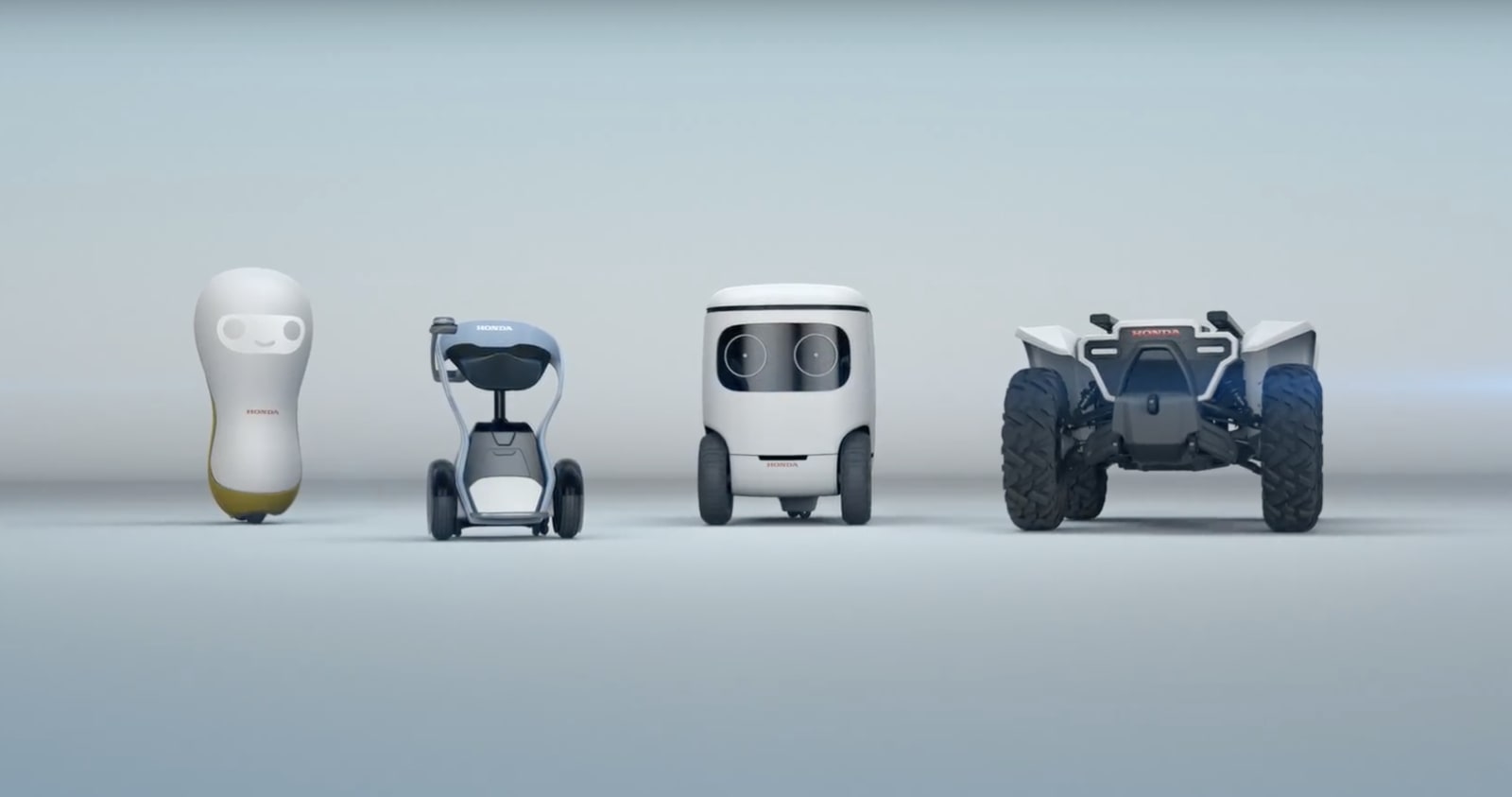
4: That’s how many of its concept mobility robots Honda is showing off at CES this year. They’ve got a companion-bot, wheelchair-bot, a wheeled pack-bot, and an autonomous ATV. 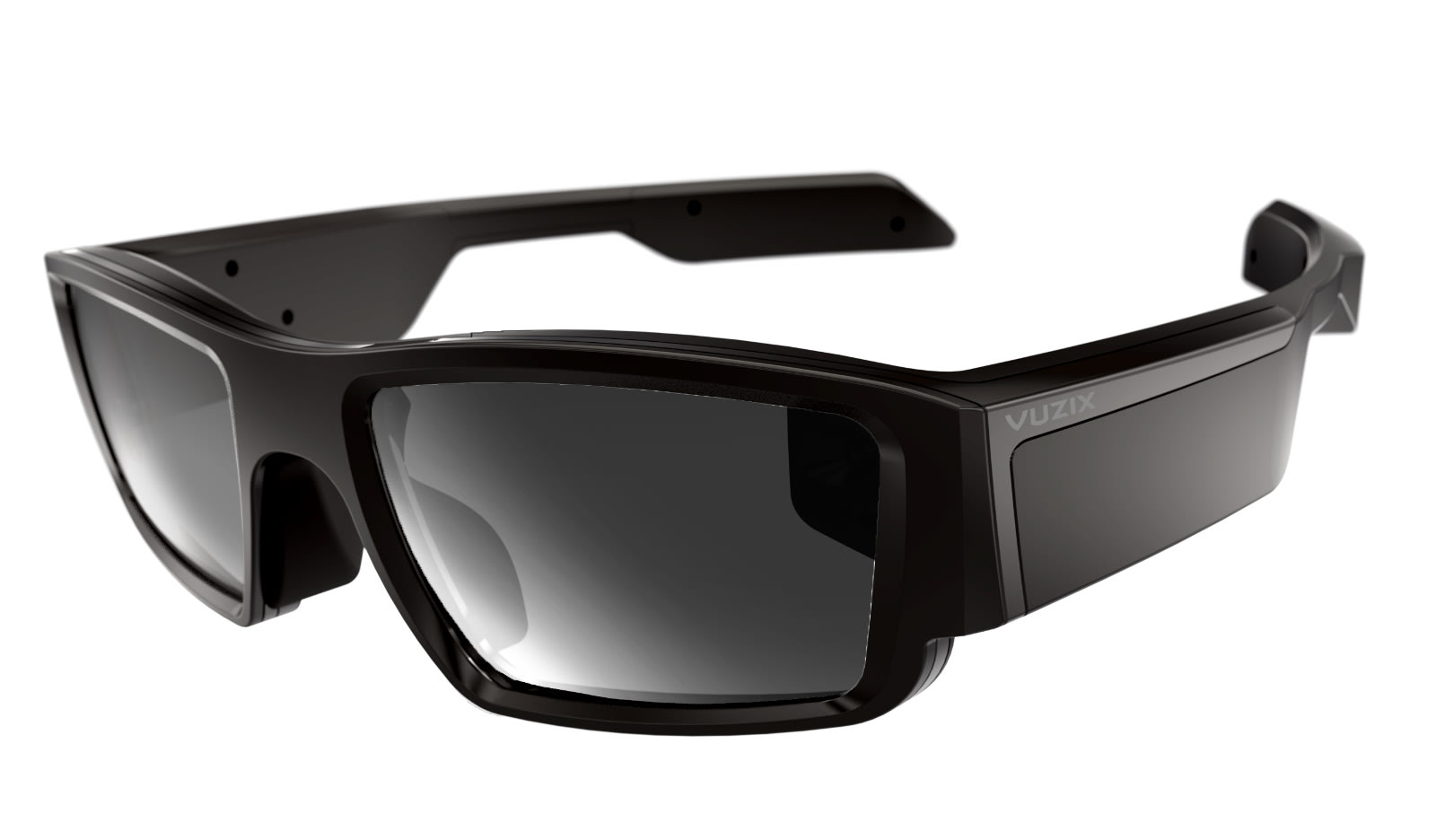 $1,000: That’s how much Vuzix’s Alexa-enabled AR glasses will set you back, assuming you’re the sort of person who needs a pair of Alexa-enabled AR glasses right friggin’ now. Or you could wait until 2019, when the company figures the price will drop by half.
 3: That’s how many 3D printers XYZPro will be displaying at CES. There will be the $45 da Vinci 3D Pen Cool, which promises not to burn the heck out of your fingers with molten plastic; a $230 tablet-controlled da Vinci Nano printer, and the burlier $4,000 da Vinci color AiO for small businesses that can both scan and print items in full color.

Also 3: Is the number of new service robots that LG plans to unveil at CES this year. You’ve got the Serving Robot, Porter Robot and Shopping Cart Robot — each doing exactly what its name implies.

88: That’s how many inches diagonal LG’s ludicrous 8K OLED display is. That’s 11 inches and an extra 4 K’s bigger than the ginormous monitor LG showed off at last CES. Oh the difference a year makes.

0-100: That’s the scale by which Neutrogena’s SkinScanner concept iPhone accessory will grade the quality of your skin. Should your epidermis be found lacking, the scanner’s app will direct you to Neutrogena’s website where you can buy various tinctures and topicals to “fix” the “problems” with your skin. Or you can just love yourself for who you are on the inside and not worry about meeting some unobtainable societal standard of beauty.
Click here to catch up on the latest news from CES 2018.
DJI’s second smartphone gimbal gets improved controls and a lower price
DJI’s Osmo Mobile set the standard for shooting stabilized smartphone videos, and now the time is right for a follow-up. The company officially revealed the new DJI Osmo Mobile 2, a redesigned sequel meant to make mobile videography more accessible to the masses. And the best part? It’ll only set you back $129.
The new Osmo uses the same three-axis gimbal for stabilization that the originals did, but DJI gave the rest of the body a substantial redesign. In a bid to keep costs down — and make the whole package less pricey — the new Osmo is made of “high-strength modified nylon” instead of metal. We’ve only spent a few moments with a non-final Osmo Mobile 2, but we’re cautiously optimistic about the change: it feels more than sturdy enough, especially considering it’s slated to sell for much less than the original. Also new is a 1/4-inch mount on the bottom of the Osmo for sticking it onto a tripod for more complex or prolonged shoots.
What else? Well, a modified clamp that swivels to accommodate landscape AND portrait shooting, a must for folks looking to capture super-smooth Instagram stories without having to tilt their hands. More potentially concerning is the switch from removable batteries to a sealed cell since you’ll lose the option to swap batteries while out in the field, but the company says the new Osmo will last around 15 hours on a single charge.
Beyond those design changes, DJI also tried to simplify the controls users would have to grapple with. The trademark trigger is gone, the power switch has been replaced with a mode button on the front of the grip and the shutter and record buttons have been combined into a single key. The addition of a zoom slider also means you can get in nice and tight on a subject without having to use your other hand. Some of these changes don’t exactly sound game-changing, sure, but they do serve to make the gimbal just a little more intuitive for people who have never picked one up before.
You won’t have to wait too long to pick up a second-generation Osmo Mobile, but there’s a catch: it’ll debut as an Apple Store exclusive on January 23 before going on sale on through DJI and its retail partners in early February.
Click here to catch up on the latest news from CES 2018.
DJI built a one-handed stabilizer for your SLR or mirrorless camera
DJI hasn’t just been working on smartphone stabilizers ahead of CES — it also built its first single-handed stabilizer for SLRs and mirrorless cameras. As with the refined Osmo Mobile, the new DJI Ronin-S is all about keeping things simple in the field, and it’s set to launch in the second quarter of this year.
While the original Ronin system required users to build potentially complex rigs to mount cameras on, the Ronin-S is essentially an Osmo Mobile built to accommodate bigger cameras and lenses. Exactly how much weight the Ronin-S can handle is still a mystery, though — the company says its high-torque motors can work with “the most popular camera and lens combinations” and specifically cites compatibility with Canon’s 5D line, Panasonic’s GH-series mirrorless shooters and Sony Alpha systems. While you probably shouldn’t throw a massive telephoto lens onto a Ronin-S, DJI’s stabilization system should work fine with more standard zooms.
We haven’t tried the Ronin-S yet so we can’t vouch for how smooth it is, but DJI’s trademark three-axis gimbal has been a life-saver on shoots in the past — consider us cautiously optimistic. Actually controlling the thing seems like a pretty simple affair though: you’ll use a tiny thumbstick for panning and framing shots, while intelligent shooting features like Panorama and Hyperlapse modes have been offloaded to the Ronin’s mobile app. New to the mix are a Sport mode meant to handle frenetic motion while remaining locked onto a subject and a Push mode so you can (as DJI puts it) “adjust the pan and tilt axis by hand” while the Ronin is on. Even better, the Ronin-S is compatible with certain DJI Pro accessories in case you need additional control over your focus or want to attach other components with a cheese plate adapter.
While the idea of handling an SLR on a stick sounds a little clumsy, DJI already has some competition in Chinese rivals like Zhiyun and Feiyu, which offer seemingly similar gimbals for about $399. Here’s hoping we get a little hands-on time with the Ronin-S this week to see how well this thing really works.
Click here to catch up on the latest news from CES 2018.
This three-year time-lapse of Seattle is like a real-life Sim City game
The city of Seattle has experienced some explosive growth over the past decade, largely due to the influx of tech companies to the area. To illustrate how quickly the city has changed over the past three years, Google engineer Ricardo Martin Brualla put together a time-lapse video of stills captured from one of Seattle’s most iconic landmarks.
The web camera was installed in 2015 on top of the 605-foot-tall Space Needle — a relic of the 1962 World’s Fair — and it captures a 360-degree panorama of the city every 10 minutes. In a post at Medium, Brualla described the process of creating the video, which was compiled from thousands of individual images.
“I used 2166 panoramas that correspond to two photos a day, taken at 10:30 a.m. and 2:30 p.m., every day for the last three years,” he explained. He then stabilized the images to account for movement of the camera, and then smoothed the sequence to remove the effects of lighting and weather.
If you look carefully, you can see a ghostly cruise ship at the waterfront. “In the summer months, large cruise ships dock into the Seattle’s waterfront for one or two days a week” Brualla wrote. “Because the cruise ship is only about a quarter of the time there, the temporal smoothing represents it as it was a 75 percent transparent.”
Bruella told the GeekWire that he used custom code for the smoothing and stabilization to process the raw images to the time-lapse format. A former PhD student at the University of Washington, Bruella and his colleagues have used “time-lapse mining” to sort and classify millions of photos and then present them in time-lapse sequence from a common viewpoint. These techniques can illustrate long-term diverse changes such as glaciers shrinking or changes to a city skyline.
The video has already drawn comparisons to the animated opening sequence of HBO’s Silicon Valley and perhaps that’s not unwarranted, considering that Microsoft and Nintendo are long-time residents and giants like Amazon, Google, and Facebook have recently set up shop.
Bruella has lived in Seattle for seven years and marvels at the dramatic changes that have taken place.
“It’s been super interesting. I am amazed at how much Denny Triangle and South Lake Union have changed since I got here. I still remember the car dealerships that were 10 minutes away from Westlake,” he said. “Seeing the changes through the Space Needle webcam is really cool, and my video just makes them a bit easier to watch.”
Editors’ Recommendations
- Check out this stunning time-lapse of SpaceX’s final rocket launch of the year
- Rylo Camera takes a software-first approach to 360-degree video
- Microsoft pokes fun at Apple’s panoramas with new multidirectional tool in Pix
- Hands-On: Sony RX10 III
- Rylo 360 camera review
Why the OnePlus 5T is the best Android for Windows phone converts

Is the OnePlus 5T the right phone for those coming from Windows phones? Yes.
Last year I reviewed the OnePlus 3T as a Windows phone user, and I called it the best Android phone for Windows phone converts. Its price, software, and design made it a no-brainer for Android newcomers, and it was a great option for those who are looking to switch from Windows phone.
But it’s been almost a year, and OnePlus is now selling a new flagship: the OnePlus 5T, which improves upon the older OnePlus 3T in almost every way. This is Windows Central’s OnePlus 5T review.
See at OnePlus

OnePlus 5T Specifications
| OS | Android 7.1 (upgrade to 8.0 coming soon) |
| Display | six-inch Optic AMOLED, 2160 x 1080 (18:9 aspect ratio) |
| Processor | Qualcomm Snapdragon 835 octa-coreAdreno 540 GPU |
| Storage | 64/128GB UFS 2.1 |
| RAM | 6/8GB LPDDR4X |
| Rear camera one | 16MP (IMX 398), 1.12-micron pixels, f/1.7Dual LED flash, 4K 30 FPS, 1080p 60 FPS,, 720p 120 FPS, video |
| Rear camera two | 20MP (IMX 376k), 1-micron pixels, f/1.7 |
| Front camera | 16MP (IMX 371), 1-micron pixels, f/2.01080p 30 FPS, video |
| Battery | 3300mAhNon-removable |
| Charging | USB-CDash Charge |
| Water resistance | No |
| Security | One-touch fingerprint sensor |
| Connectivity | 802.11ac Wi-Fi, 2×2 MIMO, Bluetooth 5.0, aptX HDUSB-C (2.0), NFCGPS, GLONASS, BeiDou, Galileo |
| Network | 3xCA, 256QAM, DL Cat 12, UL Cat 13FDD-LTE Band 1/2/3/4/5/7/8/12/17/18/ 19/20/25/26/28/29/30/66TDD-LTE Band 34/38/39/40/41TD-SCDMA Band 34/39HSPA Band 1/2/4/5/8 |
| Dimensions | 156.1 mm x 75 mm x 7.3 mm162 g |
| Colors | Midnight black |
| Price | $499 (6GB/64GB)$559 (8GB/128GB) |

OnePlus 5T Design
The OnePlus 5T doesn’t look or feel that different from the OnePlus 3T. A few things have changed, with the 5T looking a little more like an iPhone 8 Plus from the back, and the front featuring a more modern 18:9 aspect ratio display, trading the dedicated hardware buttons for on-screen navigation keys.
I’m a real big fan of this new 18:9 aspect ratio found on a lot of flagship phones these days. I love how it gives you more screen in a phone size that’s not stupidly large. The OnePlus 5T is around the same size as the OnePlus 3T, even though the 5T is rocking a six-inch screen compared to the 3T’s 5.5-inch display. The front of the device looks great, with slim bezels and a small but equally sized head and chin, which makes everything look symmetrical and nice. The display is a 2160 x 1080 OLED display, which isn’t the sharpest screen in the world. For $500, though, you can’t really complain.
Because of the taller display, OnePlus had to move the fingerprint reader from the front to the back of the device. I actually prefer this placement. It makes more sense in most scenarios. It’s placed in the upper center of the device, which makes it easy to reach. Of course, that means you won’t be able to unlock the phone with your finger if the device is laying flat on a table, but in that case you can just use your PIN or Face Unlock. On that subject, there’s a new Face Unlock feature which is blazing fast. It’s faster than the Face ID on an iPhone X or Windows Hello on a PC, but it’s not nearly as secure.

Along the sides of the device, we find a power button and volume rocker on the right and a three-position switcher on the left. The switcher is handy, allowing you to flip between normal, Do Not Disturb mode and muted mode, kind of like on an iPhone. Not many Android phones have this switcher, so it’s nice to see on the OnePlus 5T. We’re also rocking a USB-C port that supports Dash Charge, and a 3.5mm headphone jack. I’m all for moving the industry forward, and in a lot of cases I use Bluetooth headphones anyway, but it’s nice to have the option of using an old headphone jack when you need it.
The body of the device is aluminum, which feels premium in the hand. It wraps around the edges of the phone, which gives it that unibody appearance which I really like. Admittedly, the smooth aluminum body does make for one slippery phone. I rarely put cases or skins on my phones, but in the case of the OnePlus 5T I feel like I have to. It’s just too slippery in the hand otherwise. Other than that, I really like the design of the OnePlus 5T.

OnePlus 5T Software and Performance
As I said in my OnePlus 3T review, Android is Android. It’s the same OS on all Android-based smartphones, but each manufacturer does something different to the software that can sometimes alter the experience in major ways. Sometimes this is for the best, and other times it just makes for a terrible experience. In the case of OnePlus, the maker did the right thing. OxygenOS on the OnePlus 5T is a fantastic version of Android, remaining relatively stock and lightweight while offering lots of configurable and customizable features. It also isn’t a Pixel, meaning not every app is tied in with Google; that’s helpful if you’re someone in the Microsoft ecosystem.
The phone comes with Google software pre-installed, which is fine. If you really don’t need the Google stuff, you can disable or uninstall most of it. Of course, you need to have a Google account to use the Play Store, so keep that in mind. OxygenOS being relatively stock means there’s so much more space for customizing the phone. You can install Microsoft’s launcher, as I did, which replaces the stock OnePlus Launcher. I prefer Microsoft’s launcher because of its integration with my Windows 10 PC.

Another benefit of OxygenOS being stock is that it’s lightweight on CPU and RAM. This phone absolutely flies. It might even be the fastest Android phone on the market, thanks to its quick animations and super lightweight software. This also means battery life is great; I’m getting almost two days on a single charge very often. And even on days where I don’t, the Dash Charger means I can charge up the 5T in about 30 minutes.
One thing I really like about OxygenOS is that it has dark and light modes, just like on Windows phone. Not every app will tap into this dark or light theme option, but some of the default system apps do. Messages, Phone and Settings do, and they all look great. There are some other nice additions, as well, including double-tap to wake and sleep, an ambient view mode that acts kind of like Glance screen, and custom gestures.
The beauty of Android is that you can also set third-party apps as defaults for select tasks. For example, I use Microsoft’s Outlook app as my default email app, Microsoft Edge as my default web browser, Cortana as my default voice assistant, and OneDrive for my photos backup solution. Just like on a Windows phone. Overall, I think OnePlus’s Android is the best Android you can get. It’s customizable, clean, lightweight, and simple.
Using an Android in the Microsoft ecosystem

The 6GB or 8GB of RAM in the OnePlus 5T is no slouch, keeping apps open in multitasking for longer than most other smartphones. This means resuming open apps is quicker on the OnePlus 5T, and it makes the experience feel quicker overall. Devices like the iPhone like to put apps to sleep after they haven’t been used for some time to free up RAM, but this means those apps take a little longer to open. This doesn’t happen on the OnePlus 5T.

OnePlus 5T Camera and Sound
I’m not big on smartphone photography. I take maybe one or two photos a week. But I understand that the camera on a smartphone is a big deal for many people. The 16MP camera on the OnePlus 5T is good; not amazing but not bad either. I found the camera to be mostly quick at snapping photos, and images look crisp and clear in well lit scenarios.
In low light, the camera falls short a bit. OnePlus uses a dual-lense setup, with the second lens being a 20MP shooter designed for better low-light photography. I can’t say this camera does low-light better than a Pixel or iPhone, with photos often coming out a little grainy and dull. The selfie camera also is not bad but not great either.


The camera on the OnePlus 5T is good enough for most smartphone users. If you take your smartphone photography more seriously, however, I’d suggest looking at more expensive smartphones like the Google Pixel. If you’d like a more in-depth review of that phone, make sure to check out Android Central’s review.
In regards to sound, the OnePlus 5T features a single downward firing speaker. It’s passable, but I’d recommend using headphones if you’re planning to do any serious music listening or movie watching.

OnePlus 5T review Final Thoughts
The OnePlus 5T is the best Android for Windows phone converts. It comfortably and confidently takes that crown from its older brother. The OnePlus 3T was a great device for the price, and the OnePlus 5T brings that up to 2018 standards. It has a taller, bigger display, a better processor, and a better camera. It has the same great software and Dash Charge capabilities, too, two staple features of the 3T. And it still starts at $499, which is a very reasonable price.
If you’re still using a Windows phone and looking to switch, I highly recommend the OnePlus 5T. It’s affordable, the software isn’t a confusing mess, and the phone feels great in the hand.
See at OnePlus
Pros:
- Premium build quality.
- Lots of RAM means great performance.
- Clean, relatively stock Android.
Cons:
- Slippery.
- Camera is only OK.
Merge made a VR headset for kids and a Blaster you put your phone in
Everyone should be able to have fun with VR and AR!

If you like squishy foam and having fun with either VR or AR, the folks at Merge have been serving up goodness for a couple of years now. Following the success of the AR-based Merge Cube and the recent availability of the Merge VR headset in every color under the rainbow, Merge is at CES this year with two new goodies.
For the AR-focused among us, the new Merge Blaster turns your phone into a futuristic shooter for tons of new games. For VR fans, the new Merge Mini takes the original squishy VR headset and shrinks it down to be better suited for smaller heads. Here’s a quick look!
Merge Blaster
This is augmented reality at its most accessible. The Blaster is, as the name suggests, a simple gun-shaped controller for feeling like you are a part of the game. Put your phone in the slot, and use your screen as your Heads-Up Display for multiple games. When you see incoming fire through the screen, dodge out of the way in the real world.
It’s a simple setup, something anyone of any age can do, and super easy to feel like you are a part of the game. Merge plans to start shipping the Blaster later this summer.
Merge Mini

Take everything that makes the Merge VR headset cool, including the super-durable construction and comfortable fit on your face, and imagine it redesigned for ten year olds. The lens adjustment buttons, have been moved to make it easier for smaller hands to get the perfect fit, and the spacing is better suited for smaller faces.
Merge plans to make this headset available later this summer for $30, making it one of the more affordable VR headsets out there on top of being the only one specifically aimed at kids.
It’s been clear for a while now the Merge lineup has been aimed at kids. The Merge Cube has tons of interactive and educational purposes, and has been advertised like crazy on channels like Disney over the last holiday season. Expect these new accessories to be a big hit with kids later this year.
Thieves swipe a portion of China’s solar road
Solar roads have plenty of potential problems, such as damage and snow, but theft? Apparently that’s a concern, too. China’s Qilu Evening News reported that thieves carved out a small (5.9in by 73in) portion of an experimental road in Jinan on January 2nd, a mere five days after its December 28th debut. While it’s tempting to suggest this was an accident, officials said the missing segment was “neatly cut,” and didn’t appear to have come loose on its own.
The segment has since been repaired. An investigation is ongoing, but there aren’t any identified culprits as of this writing.
Just why someone would slice off a portion of the road isn’t certain. While solar roads are relatively expensive to make, the actual solar panels aren’t worth that much. The thieves aren’t going to make a fortune, and this wouldn’t be enough for personal use — especially not when there’s a layer of transparent concrete on top. The most plausible explanation is that someone wanted to see how the technology worked and, for some reason, couldn’t just ask the developers.
This probably won’t be an ongoing problem. However, it’s reasonable to say that this isn’t a significant issue for ordinary roads. So long as solar roads remain novelties, there are bound to be people curious about how they work. It’s just a matter of whether or not someone let that curiosity get the best of them.
Via: TechNode, TechCrunch
Source: Qilu Evening News (translated)
Florida phishing attack exposes data for 30,000 Medicaid recipients
Large-scale medical hacks are horrible in themselves, but sometimes it’s the ease of the hacks that’s scary — and Florida knows this first-hand. The state’s Agency for Health Care Administration has warned that a phishing attack compromised data for as many as 30,000 Medicaid recipients. One of its staffers fell for a “malicious phishing email” on November 15th, giving hackers access not only to identifying info like names, addresses and Medicaid ID numbers, but also diagnoses and medical conditions. A would-be fraudster would theoretically have almost everything they could want.
The agency claimed there was “no reason to believe” the info had been abused, but that’s not much consolation. It’s not clear who was responsible for the attack or what their motivations might be. At least some previous attacks were conducted by Chinese hackers hoping to learn about American health care, but this could also be the work of private scammers or state-sponsored agents with alternate methods.
The breach illustrates how medical networks continue to be fragile: an email is all it took to directly expose the most sensitive data of thousands of users. The AHCA is taking a step to resolve this by training staff on security measures, but you might not see a lasting solution until private info is further separated from the outside world.
Source: Associated Press
RightEye EyeQ uses eye tracking to test for vision problems, brain injuries
Unveiled at the Consumer Electronics Show in Las Vegas, the RightEye EyeQ system hopes to revolutionize vision and brain healthcare. By using a bespoke, ruggedized portable computer with custom eye-tracking hardware and software, it automates the testing procedure, leading to faster analysis and diagnosis. The computer is able perform a multitude of tests in the form of eye-tracking “video games,” each taking only a few minutes to complete. The resulting reports are uploaded to the cloud and provide valuable insight into how a patient’s eyes and brain are functioning.
One of the key benefits of the EyeQ system is that it provides repeatable, realtime tests that replace slower, manual testing performed by a doctor. The tests can be administered anywhere, are derived from established standard practices, and reports are generated instantly. In addition to basic vision testing, which can be used to improve reading comprehension in children, the system also provides tests that can accurately identify Parkinson’s, autism, and various brain injuries, like stroke.
“It’s the first system of its kind that can generate such amazing insights about the state of a person’s health, vision and performance abilities in this kind of rapid, accurate and objective manner,” RightEye CEO and co-founder Adam Gross said in a statement.
There are obvious uses for health care providers, but the system also holds the potential to be a game changer in the world of sports, particularly football and other contact sports where concussions are common. The Brain Health EyeQ test takes just six minutes and could potentially be administered right on the sidelines. The report can be shared with doctors, coaches, and trainers and accessed remotely. For general training, a Sports Vision EyeQ test analyzes various aspects of an athlete’s eye movement and offers up personalized exercise recommendations to improve his or her eyesight.
Beyond the doctor’s office and the locker room, RightEye plans to eventually make the EyeQ system available for in-home use, saving patients time while still generating cloud-based reports that a doctor can access from anywhere.
Editors’ Recommendations
- The Mazda Vision Coupe is achingly beautiful
- Amazon Cloud Cam review
- As self-driving cars evolve, so will your car stereo. Here’s how
- With batteries that last 2 years, Blink’s Video Doorbell has no need for wires
- Walmart reportedly explores cashier-free stores to keep pace with Amazon

