


Hulu now boasts 17 million subscribers
Hulu announced today that it ended 2017 with over 17 million subscribers, a whopping 40 percent growth compared to the numbers it released in 2016. That’s a pretty big jump and not only did the streaming service close out last year on a high note, it started this year off with two Golden Globes for its original The Handmaid’s Tale. The show also helped get Hulu 10 Emmys in September and was one of Hulu’s top three watched dramas last year.
Hulu added a lot of content to its lineup in 2017 including the entirety of Futurama, a slew of 90s throwbacks and a selection of NBC favorites like 30 Rock and Parenthood. In total, Hulu’s library now holds 1,700 TV titles and 75,000 episodes. The company also launched its Live TV service, all of which is likely to have attracted more users.
The company plans to keep its growth going this year. CEO Randy Freer said in a statement, “The year ahead is going to be even bigger, as the company invests more in content – live, library and original – as well as technology and data to make Hulu the leading pay TV choice for consumers.”
Overwatch League’s first two seasons will air on Twitch
Blizzard has been putting a lot of work into its upcoming Overwatch professional league it introduced in late 2016. The company spent all of 2017 building it up, announcing teams based in large cities in the US, England, South Korea and China. Days before the league’s first-ever match on January 10th, the publisher announced it’s formed a partnership with Twitch, which will broadcast every match of the first two seasons.
Fans across the world (except those in China) can see the Overwatch League (OWL) games live on Twitch, including playoffs and championship matches, with streams in English, French and Korean. Naturally, the streaming company and Blizzard have cooked up exclusive in-game rewards, likely in the vein of the jerseys the latter recently released within Overwatch to hype up the league.
Blizzard has been aggressively promoting OWL in the past year. The company wants Overwatch to be a flagship eSports title and has added tools to improve the spectating experience as well as introducing an amateur league that will likely feed into OWL. Like all content on Twitch, the OWL matches won’t cost anything to stream. If you want to watch the matches in person, that’s a different story: Every game during the first season will be played at the new Blizzard Arena Los Angeles, which charges admission.
Catch up on all of Sony’s CES 2018 news in 5 minutes
The big names at CES had rather tame press conferences this year, but that doesn’t mean they didn’t make any important announcements. If you missed Sony’s event yesterday, don’t worry: We’ve distilled all of the noteworthy news down to a 5-minute clip. Catch up on all the info around TVs, cameras, headphones, autonomous cars and, of course, that cute little robopup.
Click here to catch up on the latest news from CES 2018.
Ford and Postmates team up to deliver orders with self-driving cars
Ford announced at CES today that it has entered a partnership with delivery service Postmates and will begin piloting various programs to see how self-driving vehicles and on-demand delivery can work together. This is the first on-demand delivery app to partner with Ford on a pilot like this and the two will be looking at what both merchants and customers need when it comes to sending and receiving deliveries via self-driving cars.
This isn’t the first delivery test for Ford though. Last year, it began using an autonomous Ford Fusion to deliver Domino’s orders in Ann Arbor, Michigan. With this new partnership with Postmates, Ford says it could not only change consumer experiences but also allow retailers to expand their customer base. “The way commerce is moving around in cities is dramatically changing, and emerging technology will undoubtedly have an impact on the future of on-demand delivery,” Ford said in a Medium post. “With the knowledge we’ll gain from our partnership with Postmates, we anticipate we’ll be able to better deploy self-driving technology in a way that can help people get what they need faster, while also supporting local businesses that are a big part of communities around the world.”
Click here to catch up on the latest news from CES 2018.
Source: Medium
Yahoo Sports starts streaming NFL playoff games this weekend
Last month, Verizon signed a new deal with the NFL, exchanging its rights to be the exclusive wireless carrier for NFL games for rights to air games on a wider range of devices. That has led to a few new options for NFL fans when it comes to how they can watch games on their phones and today, Verizon announced that playoff games will be available for viewing on the Yahoo Sports app starting this weekend as will the Super Bowl next month. “Consumers in the US will be able to watch all four playoff games with one click on the Yahoo Sports app,” Oath CEO Tim Armstrong told CNBC.
Following Verizon’s new agreement with the NFL, NBCUniversal was granted rights to stream Sunday Night Football on smartphones and ESPN snagged mobile streaming rights to Monday Night Football. Next season, Verizon says it will also stream preseason games, Thursday Night Football, Sunday Night Football, Monday Night Football, local market games and playoff matches.
Via: CNBC
Dell and Nikki Reed harvest gold from old laptops for jewelry
Dell’s no longer just an electronics company — it now makes jewelry too (sort of). It has teamed up with actor and activist Nikki Reed on The Circular Collection, which comprises pieces made from gold recovered from Dell computer motherboards. These are 14- and 18-carat gold rings, earrings and cufflinks, mind you, and don’t look like they’ve been remade from waste material at all.
The pieces themselves have a dainty, skinny aesthetic and, true to the collection’s name, each accessory features a round motif. The earrings, for instance, showcase round opals, while the Circle ring is studded with little orbs. The cufflinks are circular, too.
Whether you like the design or not, it’s still nice to see Dell recycle precious materials that would otherwise likely have gone to waste — even if it is for a decent profit. Pieces from the Circular collection start at $88, and will be sold via Reed’s store Bayou With Love.

Dell is also using recycled gold in new motherboards, through a recently verified closed-loop gold process. These reclaimed components will ship in the company’s new Latitude 5285 2-in-1s in March. Dell says it aims to use 100 million pounds of recycled material in its product portfolio by 2020. If you’d like to contribute a laptop to the cause, you can drop it off at any Goodwill that’s participating in the Dell Reconnect program.
Click here to catch up on the latest news from CES 2018.
Dell XPS 15 2-in-1 hands-on: A sleek showcase of firsts
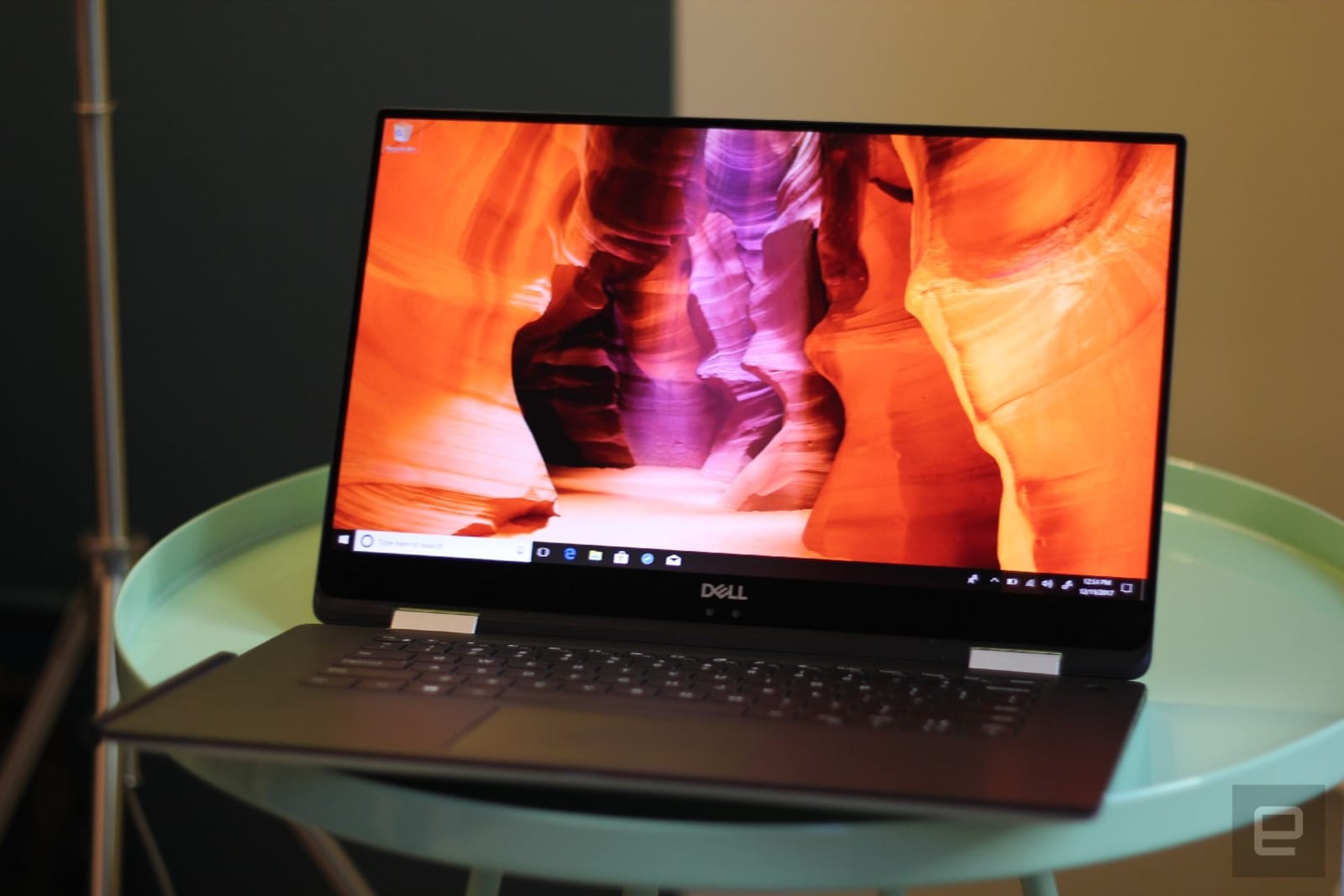
Last CES, Dell unveiled its first XPS convertible — the XPS 13 2-in-1. This year, the company is expanding its hybrid lineup. In addition to being the first convertible of its size for the series, the new XPS 15 2-in-1 is also one of the first laptops to pack Intel’s Core processor with Radeon graphics. That chipset was teased in November, and incorporates an AMD Radeon GPU with dedicated RAM and Intel’s CPU, allowing for smaller motherboards and thinner devices overall.
Indeed, the XPS 15 2-in-1 is slimmer than its 15-inch competition — its 16mm profile is thinner than devices from HP, Lenovo and ASUS. Since it’s just 1mm less than the clamshell XPS 15, the new hybrid didn’t strike me as noticeably skinnier than before, but it’s still a pleasant device to hold and behold.
Dell managed to whittle away at the profile not only because of the space gained from Intel’s new chipset, but also because the XPS 15 2-in-1 has a maglev (magnetic levitation) keyboard. The setup uses opposing magnets instead of switches or membranes to push buttons back up and makes for very thin keyboard designs. When I tried it out, I found the experience similar to using the butterfly keyboard on my Macbook. Both systems provide satisfyingly “clicky” response despite having close to no travel, although Dell’s version offers slightly more depth.
It’s a feeling you’ll probably get used to over time, and it didn’t affect the accuracy of my typing. Traditionalists who dislike shallower keyboards like this may want to consider the clamshell version or the smaller XPS 13, which got a makeover this year. Speaking of, like the XPS 13, Dell’s new convertible also uses Gore Thermal insulation around the CPU to keep the system cool.
In addition to slimmer profiles, the Intel processor is supposed to provide graphics prowess that’s comparable to systems with discrete GPUs. Dell said that the chipset delivers performance similar to NVIDIA’s mobile 1050 card. I didn’t get to run my own tests at my demo, but the videos that Dell was playing did appear smooth.
The XPS 15 convertible also comes with the “InfinityEdge” display that’s been a hallmark of the series since the first XPS. Like the clamshell, the new 2-in-1 goes up to 4K for its screen resolution, and now supports 100 percent of the Adobe RGB color spectrum. It also features Dell Cinema tech that enables things like HDR playback, surround sound and prioritizing video streaming to prevent lag.

I liked the XPS 15 2-in-1’s display — images looked vibrant and crisp during my hands-on. The narrow bezels also added to its appeal, making the screen look more visually arresting. You can also draw on the display with Dell’s Active Pen, which supports up to 4,096 levels of pressure sensitivity as well as tilt detection. The stylus was responsive when I briefly tried it out, although I didn’t test it enough to see if the tilt support allows for more nuanced shading.
The XPS 15 2-in-1 will be available in spring, starting at $1,300. While it’s not entirely a surprise to see a larger sequel to last year’s 13-inch XPS hybrid, it’s certainly refreshing to see Dell offer more than just incremental upgrades. The 15-inch convertible category has strong competition from HP, Lenovo and ASUS, but by the looks of it, the new XPS 15 could very well hold its own.
Alienware’s control hub redesign folds in your game library
It’s “New year, new me” for Dell’s Alienware Command Center. The software control hub that comes preinstalled in Alienware computers now has a unified gaming library that pulls all your titles regardless of source, so you can see them all in one place. You can also set profiles for specific games, tailoring your system’s thermals, power management, overclocking, lighting and peripheral controls to your favorite first person shooter or RPG. Those who have been curious about overclocking but worried about breaking their computers can also experiment with the redesigned tool that lets you toy with clock speeds and voltage. Before you can save your custom overclocking profiles, Alienware’s system will test your settings and won’t let you use your new setups unless they’re safe.
Dell also updated the Area 51 desktop slightly by removing a USB port from the front as well as using LEDs that can now show up to 16.8 million colors. You can also use the revamped Alienware Command Center to set the lighting effects not just for your tower, but for your attached mouse and keyboard, should they have lights as well.
The redesign also lets you pick between a light or dark color scheme – the latter of which should be popular with those who like gaming in the dark. The new Command Center will be available this month at no extra cost.
Dell also unveiled a version of its Inspiron gaming desktop, which is available for $799 starting today. It’ll be equipped with eighth-generation Intel processors, and you now get the option of NVIDIA’s GTX 1050 Ti, 1060 or 1080 graphics chips in addition to the AMD configurations that were available before. This is a modest set of updates for Dell’s gaming products this year, but 2018’s only just beginning and we expect to see more soon.
Click here to catch up on the latest news from CES 2018.
Pioneer’s autonomous driving tech includes LiDAR and driver monitors
Pioneer is well-known for its audio devices, but at CES, it’s showing off some of its other, and maybe less expected, tech. The company has been working on Level 3 and Level 4 autonomous driving technology — or conditional and high automation, respectively, meaning the driver still has to be prepared to take over from the automated system at some point — entering an already very populated field while making sure to bring along some of the entertainment products its already known for.
With the demonstration of its Advanced UX Cockpit — Pioneer’s Level 3 autonomous driving system concept — Pioneer displays three features it says will be important as self-driving vehicles enter the market. The first is its Driver Monitoring System, which will keep track of a driver’s attentiveness through a facial recognition camera, heart rate monitor, steering wheel sensor, seat sensor and seat vibration feature. Pioneer’s Sensory UI, on the other hand, will help prepare a driver to take over for the automated system by using features aimed a stimulating their senses. A driver display and dash LED will provide visual stimulation, seat vibration and active feely — a feature that changes the shape of the steering wheel padding — will provide touch information and a fragrance UI will offer a bit of aroma to help the transition from passenger to driver. Lastly, entertainment will be key when drivers have less driving to do. In that regard, Pioneer is also demonstrating a multimedia display, a sound and aroma generator and automated seat position control.
Pioneer is also developing four types of LiDAR and is working on LiDAR systems that are more compact and low-cost. Additionally, by combining digital signal processing and prior object recognition, Pioneer aims to create LiDAR that is better than conventional LiDAR at detecting faraway objects, dark objects and objects among snow and rainfall.
Further, Pioneer’s Head-Up Display aims to convey information to drivers with quality images featuring higher contrast, extended color gamut, better brightness and minimized distortion. And Pioneer has partnered with Here in its efforts to create a global standard for mapping data.
Pioneer might not be a company you expected to jump into the autonomous driving scene, but with nearly every automaker and transportation company aiming to get their own versions of self-driving vehicles on the road in the next few years, these sorts of accessories are probably a smart direction in which to move.
Click here to catch up on the latest news from CES 2018.
Dell’s new Mobile Connect software puts your phone on your PC
Having to look at your phone while you’re in the middle of writing an important report can be incredibly distracting. You pick it up to see who texted, and end up browsing the 300 other alerts that accumulated. There’s tools that lets you receive your text and call alerts on your Macs or PC, but it’s mostly limited to Apple and Samsung devices. The rest of us don’t have a good catch-all solution yet. Dell hopes to change that with its new Mobile Connect software, which will come preinstalled in all new XPS, Inspiron, Alienware and Vostro laptops in 2018.
The new system uses a proprietary blend of Bluetooth and WiFi to let you control your smartphone from your laptop, so you can answer texts, make and receive calls and run full apps on your PC. But, as expected, functionality is limited on iPhone — you can only receive and start calls and messages — apps are limited to Android, which will even show a mirror of your phone.
During a recent demo, I watched as a text sent to an Android phone arrived on both the handset and the connected XPS 13. I could reply from the laptop, or even pull up contacts to message or call. If you initiated a phone call from your laptop, you’d be using the PC’s microphone and speakers for your conversation. On iPhones, you’ll be able to see and reply to incoming calls and messages, but receiving alerts from other apps like Facebook and Whatsapp is limited to Android.

Since the iPhone compatibility won’t be ready until the end of January, I wasn’t able to verify how well it works. But based on what I’ve seen so far, Dell’s Mobile Connect software is a powerful and useful way to keep up with your smartphone notifications as you work on your PC. While other companies have made similar software in the past (Samsung Sidesync, anyone?), none have offered as many features and as much cross-platform compatibility. Mobile Connect could end up being a feature that draws people to Dell laptops in the future, that is, until other companies start offering something as capable.
Click here to catch up on the latest news from CES 2018.
 AIVAnet