


DuckDuckGo Launches Redesigned Privacy Browser Extension and Mobile App With Anti-Tracking Features
Privacy oriented search engine DuckDuckGo today launched revamped versions of its browser extension and standalone mobile app, promising users seamless built-in tracker network blocking and smarter encryption.
The headline feature in both the DuckDuckGo browser extension and mobile app is a Privacy Grade rating (A-F) information card whenever a user visits a site. The rating aims to let them see at a glance how protected they are, while providing additional options to dig deeper into the details of blocked tracking attempts.
The generated Privacy Grade score for a website is based on the prevalence of hidden tracker networks, encryption availability, and any existing privacy practices, according to the internet privacy company.
The vast majority of websites across the Internet contain hidden tracker networks, with Google trackers now lurking behind 76% of pages, Facebook’s trackers on 24% of pages, and countless others soaking up your personal information to follow you with ads around the Web, or worse. Our Privacy Protection will block all the hidden trackers we can find, exposing the major advertising networks tracking you over time, so that you can track who’s trying to track you.
Together, the privacy rating and tracking breakdowns aim to provide a more effective solution than installing multiple add-ons and apps on each device, while offering a more upfront level of privacy than common private browsing modes. Elsewhere, a new encryption protection feature automatically sends users to an encrypted version of a website when available, rather than defaulting to a non-encrypted version.
As expected, the new software releases also include DuckDuckGo’s private search engine by default. The updated macOSbrowser extension is available now for Safari, Firefox, and Chrome, with the mobile iOS app a free download from the App Store. For further details on privacy measures implemented in the new releases, check out the DuckDuckGo website.
Tag: privacy
Discuss this article in our forums
Pornhub branches out into interactive sex toys
Before the sex robots take over, we still have time to get our rocks off with one another (and ourselves). And Pornhub is here to lend a hand, or an interactive sex toy, or three, to be precise. The largest pornography site on the net has been syncing its interactive adult movies with the Fleshlight Launch and Kiroo’s Onyx since June, and now it’s adding its own, brand-spanking new haptic toys (the Virtual Rabbit, Virtual Blowbot Turbo Stroker, and Virtual Blowbot Stroker) to the list.
Just pull up a video, connect your device, and sit back as it jerks and thrusts along to the onscreen action. You can also ditch the smut and sync up with another person’s interactive toy to mimic its movements using the Feel Connect app.
As its name suggests, the Virtual Rabbit is a vibrator with seven vibration patterns, which will set you back $200. The guys get a couple of options: there’s the pricier Virtual Blowbot Turbo Stroker ($330), a masturbator that works automatically and manually with touch sensors that ratchet up the speed, and the pared-down Virtual Blowbot Stroker ($208). All three toys are exclusively made by British retailer Ann Summers and pack Kiroo’s interactive tech. You can grab them at select adult retailers and online from Pornhub.
The pornography behemoth’s interactive category now boasts over 200 videos, with Pornhub claiming that it adds five new clips each day. So, you should have a decent sample selection to play around with — although, last time we checked, it was lacking variety. If you’re still not satisfied, there’s always VR porn.
The Galaxy A8+ gives us an early look at Galaxy S9 design cues

Samsung’s 2018 mid-ranger reveals a more accessible location for the fingerprint sensor.
Samsung introduced the Infinity Display design language last year with the Galaxy S8 and S8+, drastically cutting down on the front bezels. To accommodate a full-screen front, the company had to eliminate the physical home button and move the fingerprint sensor to the back of the phone.
While the thin-bezel display made for a more immersive experience while using the phone, the position of the fingerprint sensor next to the camera module wasn’t ideal. The S8 and S8+ sported large displays, and the tall form factor meant it was awkward to reach the fingerprint sensor.
The close proximity to the camera module also meant that users often got finger grease all over the camera sensor when they were looking to unlock the phone. The Note 8 didn’t make things any easier — the phone was taller and wider than the S8+, making it even harder to reach the fingerprint sensor.

However, if the design of the Galaxy A8+ is any indication, the Galaxy S9 will feature a much more intuitive location for the fingerprint sensor. Samsung switched to the Infinity Display design for its mid-range series with the Galaxy A 2018 series, and the A8+ features a 6-inch FHD+ display. Crucially, the fingerprint sensor round the back is located below the camera module, making it easy to reach one-handed.
It’s still fairly high up on the phone and isn’t quite as comfortable to access as the sensor on the back of the OnePlus 5T (which also has a 6-inch 18:9 display), but it’s leagues better than that of the S8+ and Note 8. This is the design that Samsung is likely to adopt in its upcoming flagship, as early CAD renders of the S9+ reveal a fingerprint sensor located below the camera unit.

The Galaxy S9+ is set to feature dual cameras at the back, and as you can see in the render above, it looks like the cameras will be arrayed vertically. That should bring the position of the fingerprint sensor even further down and make it convenient to access. The latest rumors suggest the S9+ is the only variant to pick up dual cameras, with the standard S9 is set to come with a single rear camera. However, as the regular S9 will be smaller in size, it shouldn’t be any more difficult to access the fingerprint sensor from the back.
Whether the Note 9 will even feature a dedicated fingerprint sensor remains to be seen. In-display fingerprint sensors are finally viable, with Vivo set to be the first manufacturer to introduce the tech in a new variant of the X20 Plus, which is slated for an official unveil later this month.
Samsung was heavily rumored to go with an in-display sensor as a replacement for the physical home button with the S8, but the tech wasn’t ready last year. While the time frame suggests it’s unlikely we’ll see it in the S9, we could see an in-display fingerprint sensor in the Note 9. That’s just conjecture at this point, but what we can look forward to is a fingerprint sensor that’s actually usable in the Galaxy S9 and S9+.
With an official unveil set for February 26 at Mobile World Congress, we’re just a month away from the launch of the S9, so we should know more in the coming weeks.
Acer has a powerful new Chromebox and a pair of great new Chromebooks
Two new Chromebooks and a new Chromebox are headed our way!
Acer brings some news from the BETT show in London this week, and it’s filled with Chrome OS goodies.
A trio of Chrome devices designed so they meet the high standards of the education and commercial markets were announced, and they bring the great features we expect to see from these kinds of products.
Acer Chromebox CX13
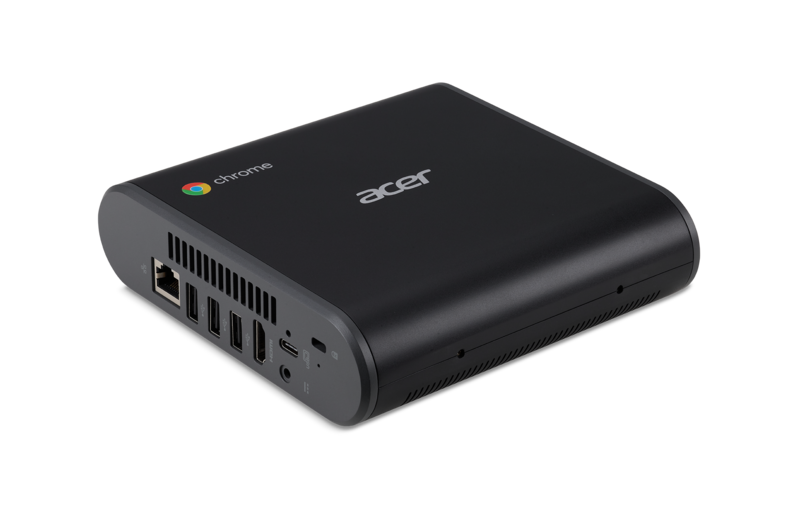
Like its predecessor the CX12, the new CX13 is designed for businesses that need a durable and high-performance Chromebox. It’s chock full of specs that make us want to give this one a try:
- 8th generation (Coffee Lake) Intel Core desktop processor
- 1 USB 3.1 Type-C port
- Five USB Type-A ports supporting USB 2.0 and USB 3.1 (configuration depends on the model)
- 1 HDMI port
- 1 Gigabit Ethernet port
- MicroSD card reader
- Bluetooth 4.2
- 802.11 ac 2x2MIMO Wi-Fi
- Optional VESA mounting kit
Pricing and availability aren’t being announced today; that comes when regional announcements are made. We expect to see final details about CPU and memory specifics announced at the same time. Hopefully, we see a wide range of models spanning the range of Intel CPUs so that “economy” pricing combined with excellent performance from Intel’s Celeron series is available alongside screamers with high-end Core-i processors. We’ve got our eyes on these, for sure.
Acer didn’t forget about the Chromebooks, either. Two models were announced: the Chromebook 11 and a refresh of the Chromebook Spin 11.
Acer Chromebook 11
First up, the Chromebook 11, which hits North America in March and starts at just $279.99
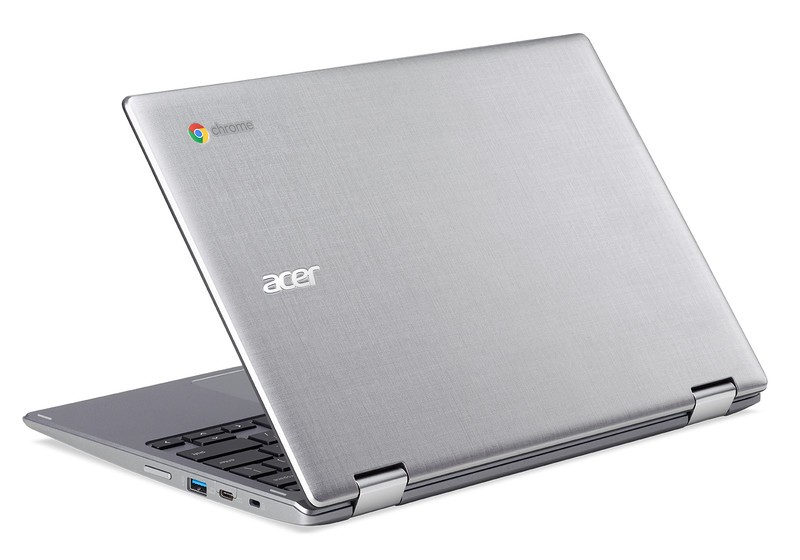
The Chromebook 11 was designed to meet the needs of the educational and commercial customer, which means it has to be built tough and worry-free. Seeing it with a price under $300 is a very pleasant surprise. Some spec highlights are in order:
- IP41 rated (protected against objects larger than 1 mm and splashed liquid ingress)
- Fully MIL-STD 810G approved
- Drop tested from 122cm (48 inches) with a reinforced body that withstands up to 60kg (132 pounds) of force on the top cover
- 180-degree hinge
- A spill-proof keyboard design
- Fanless 8th generation Intel Celeron processor (dual-core N3350 or quad-core N3450)
- Two USB 3.1 Type-C ports
- MicroSD card reader
- HDR-enabled HD webcam
- Google Play support
- Bluetooth 4.2
- 802.11 ac 2x2MIMO Wi-Fi
- 11.6-inch IPS display (1366 x 768 resolution, available in both a touch and non-touch configuration)
- 302 x 209 x 21.3 mm (11.88 x 8.23 x 0.84 inches) and weighs only 1.26kg (2.78 pounds)
And (get ready for it) 4G LTE support will be available for some models, based on region. We’ve been waiting for another Chromebook with LTE support, and we’re confident that North America will see one. The new Chromebook 11 will be available to education and commercial customers in North America beginning in March with prices starting at $299.99 for touch models and $279.99 for non-touch models.
Acer Chromebook Spin 11
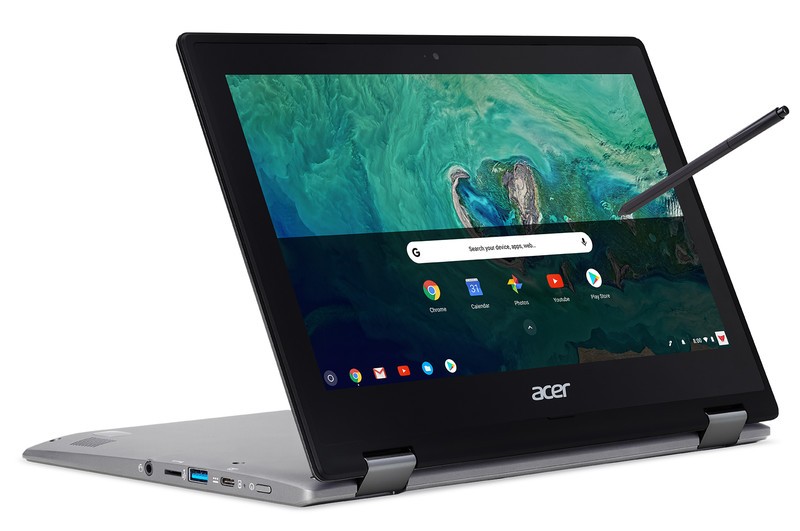
A hot new Chromebox and a rugged Chromebook with (possibly) LTE support is more than enough for anyone, but Acer isn’t done. They’ve also released a new Chromebook Spin 11, this time with the same slick silver crosshatch patterned design we see in the Chromebook 11 above.
I loved the “ruggedized” version of last year’s Spin 11 when I had some time with one to review back in October. You can (and should if you’re interested) read about it right here. Seeing a new model that includes a high-end quad-core Intel N4200 paired with 8GB of RAM is awesome. Seeing it without the extra bulk that comes with all those toughness ratings is even more awesome. The full details:
- Full 360-degree hinge for use in laptop mode, display mode, and tablet mode
- Optional second HD webcam to use while in tablet or presentation modes
- Optional Wacom EMR stylus for natural note-taking and drawing
- 11.6-inch IPS (1366×768 resolution) HD display with touch support
- Two USB 3.1 Type-C ports
- Two standard USB 3.0 Type-A ports
- MicroSD card reader
- Bluetooth 4.2
- 802.11 ac 2x2MIMO Wi-Fi
- 8th generation Intel processor (quad-core N4200, quad-core N3450, dual-core N3350 depending on model)
- 4GB or 8GB LPDDR4 RAM
- 32GB or 64GB onboard eMMC storage
- Google Play support
The Chromebook Spin 11 will be sold through Acer’s retail channels and comes to North America in March, starting at $349.
I’m excited to see these products coming from a name like Acer. The original Chromebook R11 and Chromebook R13 were highlights of the Chromebook market throughout 2017 and these new models look like they will once again be products that are easy to recommend and fun to use. I’m especially happy to see the 11-inch category broken into both a rugged and “standard” version, especially at these prices. And a new high-end Chromebox with an 8th generation socket Z370 Intel chip is icing on the cake!
Anyone in the market for a new Chromebook or Chromebox needs to have a serious look at these. We’ll keep our eyes on them and when they are released will take our own long look, too.
Chromebooks
- The best Chromebooks
- Should you buy a Chromebook?
- Google Play is coming to Chromebooks
- Acer Chromebook 14 review
- Join our Chromebook forums
Facebook ‘Flicks’ last slightly longer than a nanosecond
Facebook has just launched something new, and it’s not a product you’ll be able to buy or a feature we’ll all be able to enjoy. It’s a unit of time called “Flicks,” which is 1/705600000 of a second. That’s slightly longer than a nanosecond, but still much too short to become a part of every day life. Flicks was never conceptualized to be a time unit you’ll see on a watch anyway — nobody will ever say “it’s 859,900 flicks until midnight.” It was created for films, video games and other types of visual media.
Movies, for instance, run at 24 frames per second, which means each frame is .04166666667 seconds long. You can round up those numbers in many ways, like .04167 or 0.417 or 0.42, making things hard for the people working in visual effects and post-production — the CGI artists and programmers who need to make sure everything is in sync. The idea behind Flicks is to simplify those numbers to keep everyone in the same page. 24 FPS is 29,400,000 flicks. 60 FPS for video games is 11,760,000 flicks. Much simpler, right? In short, Facebook is trying to set a new standard for industries working with units like FPS and kHz that tend to have decimal points.
Flicks was created by Christopher Horvath, a former Facebook employee part of Oculus’ Story Studio, with help from a lot of people. You can find out more about Flicks through its Github documentation, which explains:
“When working creating visual effects for film, television, and other media, it is common to run simulations or other time-integrating processes which subdivide a single frame of time into a fixed, integer number of subdivisions. It is handy to be able to accumulate these subdivisions to create exact 1-frame and 1-second intervals, for a variety of reasons.”
Source: Christopher Horvath (Facebook), GitHub
Acer’s Spin 11 hybrid Chromebook supports Android apps
You can add Acer’s new Spin 11 to the list of Chromebooks to choose from if you’re looking for one that can run Android apps. It’s a laptop-tablet hybrid/convertible with flexible joints, so you can fold it if you want to use it as a tablet and have no need for a keyboard. The device has an 11.6-inch touchscreen display, two USB Type-C ports, two USB 3.0 ports and a microSD card reader. Its other features and components, however, are much more customizable. You can choose to equip it with an Intel Pentium quad-core processor N4200, an Intel Celeron quad-core processor N3450 or an Intel Celeron dual-core processor N3350. You can also choose between 4GB and 8GB of RAM, as well as between 32GB and 64GB of onboard storage.
If you’re willing to pay a bit more for them, you can also get one with an optional Wacom stylus or one with a world-facing camera on its cover on top of a traditional webcam. Some of Spin 11’s models (it’s unclear which ones, though) will land in North America in March with prices starting at $349. The Chromebook will be available in Europe, Middle East and Africa a month later.

In addition to Spin 11, Acer has also announced the Chromebook 11 C732 series and the Chromebox CXI3 for education, both of which come with Google Play support. Like many Chromebooks for classrooms, the Chromebook 11 was designed to be able to take a beating. It’s been drop-tested, is dust-proof and has a spill-resistant keyboard. Some variants will have 4G capability, but unfortunately, Acer doesn’t have any configurations with LTE for the North American market. The ones that will be available in the US will come out in March, with prices starting at $300 for touch models and $280 for non-touch models.
Murdoch’s Sky takeover blocked by UK competition watchdog
Rupert Murdoch has been blocked by the UK’s competition watchdog from completing a full buyout of Sky. The media tycoon, which already owns 21st Century Fox and a range of newspapers including The Times, The Sunday Times and The Sun, launched a £11.7 billion ($14.6 billion) takeover bid in December 2016. If successful, it would give the Murdoch family full control of Sky News, as well as the company’s extensive TV, internet and phone businesses in the UK. The Competition and Markets Authority (CMA) rejected the idea, however, due to “media plurality” concerns, or how much power the resulting company would have over public opinion.
“We have provisionally found that if the Fox/Sky merger went ahead as proposed, it would be against the public interest,” Anne Lambert, chair of the independent investigation group said. “It would result in the Murdoch family having too much control over news providers in the UK, and too much influence over public opinion and the political agenda.” Murdoch already holds a 39 percent stake in Sky. He tried to buy the remaining piece in 2010, but abandoned the deal after News Corporation (which is now 21st Century Fox) was swept up in a hugely damaging phone hacking scandal.
The CMA is consulting on its decision and has proposed business “remedies” that could change its mind. These are unlikely to appeal to Murdoch and 21st Century Fox, however. The first is a complete ban on the transaction, which would preserve the status quo. The CMA is worried, however, that such a move would encourage Sky to close Sky News — if the company’s newsroom disappeared, the concerns about “media plurality,” or a journalistic monopoly, would arguably go with it. The second is a spin-off or divestiture of Sky News, thereby limiting the impact of a takeover.
The proposed merger has already been approved by Ofcom and the European Commission. Karen Bradley, then culture secretary, referred the bid to the CMA in September last year. Since then, 21st Century Fox has agreed to sell its media empire to Disney for $52 billion. That has complicated the CMA’s decision. The regulator says the Disney deal is unlikely to go through before its own inquiry has been completed. As a result, it cannot assume that the transaction will be approved and make recommendations accordingly. It can, however, assess the possible implications and use them to guide its business concessions or “remedies.”
The CMA has until May 1st, 2018 to finalise its report. The regulator will submit its findings to Matt Hancock, the secretary of state for Digital, Culture, Media and Sport, who will then make the final decision.
Source: CMA
Apple to Release New Entry-Level 13-inch MacBook This Year, Likely Replacing MacBook Air
Apple plans to release a new entry-level 13-inch MacBook in the second half of 2018, according to industry sources. The rumor stems from a DigiTimes report on Tuesday that General Interface Solution (GIS) is expected to win more LCD display orders from Apple for the planned new model, after it began supplying the modules for existing MacBooks in the fourth quarter of last year.
Touch panel maker General Interface Solution (GIS) is expected to land more LCM (LCD module) orders from Apple, which reportedly plans to release an entry-level 13-inch MacBook in the second half of 2018, according to industry sources.
With new orders for MacBooks and other models, GIS is expected to ramp up its LCM shipments to 600,000 units a month by the end of 2018 compared to 300,000 units currently, said the sources.
Extrapolating from today’s report, which is light on detail, Apple’s next entry-level MacBook will likely replace the 13-inch MacBook Air, Apple’s lowest-cost notebook starting at $999. Apple’s long-term aim was for the 12-inch MacBook to replace the MacBook Air, which was first introduced in 2010, but sales of the Air have remained strong mainly thanks to its affordability. In 2016, Apple tried to position the 13-inch MacBook Pro with no Touch Bar as a viable MacBook Air alternative, but the Pro starts at $1,299, which is $300 more than the entry-level Air model.
With its signature tapered design, the MacBook Air is the only notebook the company still sells that does not have a Retina display. To keep it viable for a while longer, Apple bumped the base model’s processor from 1.6 GHz to 1.8 in June 2017, but it has only seen similar minor updates since its last major revision in March 2015. The 11-inch MacBook Air has been discontinued entirely, and we do not expect to see further substantial updates to the line.
It’s unclear what form a new entry-level 13-inch MacBook would take, although Apple would likely make efforts to clearly distinguish it from any existing 13-inch MacBook Pro models. Apple is known to be exploring the possibility of using fullscreen OLED displays in a future MacBook series, which could see the company retain LCD display technology in any new entry-level machines, similar to the OLED/LCD differentiation strategy it will take for this year’s upcoming iPhone line-up.
Apple is also reportedly looking into using ARM-based core processor chips for future MacBooks, which would reduce the company’s dependence on Intel, especially given the recent Spectre and Meltdown troubles. Apple’s interest in building its own core processors for notebooks could also enable it to control next-generation display technology and some related key components, according to sources, which would further differentiate the company’s computers from others on the market.
Related Roundups: MacBook Air, MacBookBuyer’s Guide: MacBook Air (Neutral), MacBook (Neutral)
Discuss this article in our forums
Video Assistant Referee technology set to call the shots at World Cup 2018
Video Assistant Referee (VAR) technology has been calling difficult decisions in U.S. sports for years, but now the global game of soccer is finally set to fully integrate the system with its first use at a World Cup.
The International Football Association Board (IFAB) on Monday gave the technology the nod fir Russia 2018 following extensive testing over the last two years, paving the way for a final seal of approval at a vote at IFAB’s annual general meeting in March.
Adding to the likelihood of VAR being used during the World Cup, Philippe Le Floc’h, FIFA’s chief commercial officer of FIFA, the sports governing body, said on Monday that VAR will “definitely” happen at this summer’s soccer extravaganza, adding, “It’s great to have technology in football because this is also a fairness thing.”
As with American sports, VAR gives a booth-based official the chance to view video showing what’s just happened on the field, but from a variety of different angles. This allows the official to quickly review a play and communicate with the referee to help with important, sometimes game-changing decisions.
England’s goal that wasn’t a goal.
Four types of decision can be looked at by VAR, namely goals (and any incidents shortly before), penalties, red cards, and cases of potential mistaken identity regarding the giving of red and yellow cards. A review can be instigated either by the on-field referee requesting it, or by the VAR official if they feel a clear error has been made.
Goal-line technology was used for the first time at the 2014 World Cup, four years after a famous incident where a referee failed to spot a clear goal by England’s Frank Lampard in a knockout game against Germany, which the Germans went on to win. Different technologies exist for goal-line technology though most use multiple high-speed cameras and computer algorithms that quickly detect the ball’s location, sending an alert to the referee’s watch when the ball crosses the line.
Some argue that VAR causes too many interruptions, causing disruption to the flow of the game. But disruptions already take place as angry players crowd around a referee following a controversial decision. VAR should serve to eliminate such scenes and get the game moving again once the indisputable decision has been made by technology. And the fact is, the referee will continue to make the majority of decisions on the field of play, turning to VAR only very occasionally during a game.
Editors’ Recommendations
- Major League Soccer and ‘FIFA 18’ team up to create an esports league
- EA Sports kicks off global FIFA eWorld Cup 2018 online competition
- Super Bowl champ Reggie Bush never left football, he just went to VR
- World’s largest aircraft tears itself apart
- High school players get access to the Zero1 football helmet used by some pros
Android 8.1 now shows how fast public Wi-Fi networks are before you connect
The latest feature in Android 8.1 Oreo introduces speed labels for public Wi-Fi networks.
Google has enabled a new feature in Android 8.1 Oreo that lets you see how fast a public Wi-Fi network is before you connect to it. Previously, all you could see was the signal strength indicator, so you had to manually connect to a network to gauge its speed. With the speed labels now in place, you can now get that information without having to connect to a public Wi-Fi network.
Public Wi-Fi can be spotty. For the first time, #AndroidOreo 8.1 lets you take out the guesswork & see the speed of networks before you hit connect. Rolling out now: https://t.co/lSzvCFgNk7 pic.twitter.com/60EmoPxUX4
— Android (@Android) January 22, 2018
If you’re on a phone running Android 8.1, you should be able to see the speed of public Wi-Fi networks in your vicinity along with their signal strength. The labels are broken down into four categories, as noted below:
- Slow: If you can use Wi-Fi calling, you can make phone calls and send texts (0 – 1 Mbps)
- OK: You can read webpages, use social media, and stream music (1 Mbps – 5 Mbps)
- Fast: You can stream most videos (5 Mbps – 20 Mbps)
- Very Fast: You can stream very high-quality videos (20 Mbps+)
The feature certainly comes in handy as it takes the guesswork out of connecting to public networks. That said, it doesn’t work with Wi-Fi networks that are protected by a password. If you don’t want to use the feature, you can turn it off by heading to **Settings -> Network & Internet -> Wi-Fi -> Wi-Fi preferences -> Advanced -> Network rating provider -> None*.
Android Oreo
- Android Oreo review!
- Everything new in Android Oreo
- How to get Android Oreo on your Pixel or Nexus
- Oreo will make you love notifications again
- Will my phone get Android Oreo?
- Join the Discussion
 AIVAnet