


The Autel EVO packages 60 fps 4K video in a compact folding drone
The folding DJI Mavic Pro may have just lost a competitor, but another company is bringing a new portable drone to the market — the Autel EVO. The recently announced EVO drone sports a 4K 60 fps camera mounted on a compact drone with a 30-minute battery life rating.
While 4K may be increasingly common, the EVO captures that higher-resolution video at 60 fps, which is tougher to find. The camera is mounted on a three-axis gimbal for steadier shots. The camera also uses computer vision to help the unmanned aerial vehicle (UAV) avoid obstacles, while an infrared sensor at the back adds more crash-prevention technology.
The EVO can fly for up to 30 minutes on a charge, with a recharge taking a little over an hour. Speeds top out around 65 feet per second, while the drone can remain in range for about 4.2 miles. Intelligent flight mode options include object tracking, as well as following the drone’s flight path using a GPS. The ability to preset waypoint mission coordinates, along with flight patterns designed for 3D mapping tasks, is also slated to be included in the EVO.
The drone can be controlled with the Autel Explorer App on both iOS and Android — or with a controller that also has a 3.3 inch OLED screen that streams the drones viewpoint live in 720p resolution.
Based in Washington state, Autel is a relative newcomer to the drone scene — we included them in a list of new drone companies to watch in 2016. The EVO, once launched, will be the company’s new flagship, following the X-Star line launched in 2016.
The EVO appears to be a close competitor for DJI’s folding drone, the Mavic Pro, offering another compact option now that GoPro is withdrawing from the drone market and ceasing production of the Karma. The EVO has similar gimbal specs to the Mavic Pro, but a faster frame rate for 4K video and a slightly longer battery life, though DJI’s longer history, rugged design, and intelligent flight options at the same price point are still likely to sway many buyers.
Autel hasn’t released a launch date yet, but says the price point will sit right around $1,000.
Editors’ Recommendations
- DJI’s limited-edition Mavic Pro will be hard to spot in winter weather
- Yuneec unveils three new drones, including an updated Typhoon H Plus
- The best drones we saw (and flew) at CES 2018
- A drone you can’t crash? It’s finally here, thanks to AR and smart glasses
- Using simple code, kids can teach the $99 Tello drone their own tricks
New pressure sensor for medical uses dissolves in the patient’s body
A biodegradable pressure sensor that has been developed by engineers at the University of Connecticut can make certain medical procedures much less invasive.
The small, flexible device is designed to monitor the forces at work within a patient’s body, including those related to chronic lung disease and brain swelling, before dissolving completely. The degradable quality means surgeons won’t have to dig back into the body to retrieve the sensor once its job is done.
“A lot of current devices used to monitor internal pressures are bulky and invasive,” Thanh Duc Nguyen, a UConn engineer who worked on the project, told Digital Trends. “They need to be removed after the implantation and such removal can damage the organs and delicate tissue.”
The sensor developed by Nguyen and his team is composed of an electrical film squeezed between two electrodes. This is then coated with a biodegradable material called polylactic acid, often used in medicine for things like bone screws.
“We wanted to make something that could be implanted and monitor the organ pressure and then just disappear without having to be removed,” Nguyen said. “To do that you can implant a soft and degradable sensor so that it could directly interface with soft tissue and then you have a wireless electronic implanted in a [place] far away from such delicate tissues.”
In other words, the sensors could be attached directly to the sensitive area that needs monitoring while the electronics that wirelessly transmit the sensor’s data are left nearer to the skin’s surface. After the sensor’s work is complete, the electronics can be removed through minimally invasive procedure while the sensor itself dissolves.
“You won’t have to remove these sensors that interface with the soft tissue so you don’t damage these delicate tissues,” Nguyen said. “And you only need a minimally invasive surgery to remove the electronic circuits based far away from the tissue you want to monitor.”
In a paper published in the journal Proceedings of the National Academy of Sciences, Nguyen and his team demonstrated the device at work transmitting information about the contractions of a mouse’s diaphragm over the course of four days, before dissolving.
Moving forward, Nguyen and his team hope to develop circuitry that can itself degrade within the body.
Editors’ Recommendations
- Implantable miniature robot helps correct defects in internal organs
- Dirty display? Here’s how to clean a laptop screen without risk of damage
- Awesome tech you can’t buy yet: Better gaming keyboards, wrist phones, and more
- MuscleSound uses ultrasound to help athletes perform at their peak
- Modified silk could be used to repair damaged spinal cords
First Hawaii, now Japan issues a missile warning in error
Many Japanese people had their dinner rudely interrupted on Tuesday night when their smartphones buzzed with a missile attack warning. But the alert, sent by the country’s national broadcaster, had been sent in error.
The blunder comes just days after Hawaiian authorities did the vey same thing, sending to islanders’ smartphones a warning of imminent attack.
Ten minutes after the Japan alert was issued, the broadcaster, NHK, confirmed on TV that North Korea had not launched a missile in its direction after all, and that the message, sent to everyone with the NHK app, had been sent by mistake.
It’s not yet clear how the alert came to be issued, though there were no reports of the kind of panic seen in Hawaii at the weekend. A spokesperson for NHK later apologized, saying a member of staff had “mistakenly operated the equipment to deliver news alerts over the internet.”
Missile alert
The warning went out at 6.55 p.m., telling people: “North Korea likely to have launched a missile…The government urges people to take shelter inside buildings or underground.”
With tensions on the Korean peninsula recently reaching crisis point, many who saw the warning may have feared the worst. Parts of Japan are just 350 miles from North Korea, so any missile attack would give those in the targeted location only minutes to take evasive action.
On Saturday, officials in Hawaii made the same mistake, sending an alert to smartphones in the state warning of an incoming missile. News shows played video clips of terrified people running for cover in the belief that something terrible was about to happen. Like NHK, the warning was sent by mistake, though it took officials in Hawaii 38 minutes to inform islanders of the gaffe.
The error was reportedly the fault of a worker at the Hawaii Emergency Management Agency who sent the warning to handsets after selecting the incorrect option on a computer during what was supposed to be a training exercise.
The message read: “Ballistic missile threat inbound to Hawaii. Seek immediate shelter. This is not a drill.”
The U.S. House Energy and Commerce Committee said in a statement this week that a subcommittee will examine issues of safety communications, adding that the public “needs to be able to trust that the emergency alert they receive is legitimate. We need to make sure that a mistake like what happened in Hawaii never happens again.”
Editors’ Recommendations
- FCC to investigate Hawaii’s erroneous missile warning
- Wireless Emergency Alerts system needs improvement and the FCC has a plan
- Kill annoying alerts! Here’s how to turn off notifications on an iPhone
- Make sure your boiling pot never overflows again with the BoilingBeeper
- Afraid that your pipes will burst? Here are the best water leak detectors
Video offers peek at ultra-wide Large Synoptic Survey Telescope
The Large Synoptic Survey Telescope has been a long time in the making when work on its mirrors started in 2007. It’s finally coming together, though. The LSST team has released a brief clip showing progress on the Chilean facility as of the end of 2017. Not surprisingly, it’s huge — that giant 3.2-gigapixel camera (potentially the largest in the world) and ultra-wide optics (3.5 degrees in diameter) take up a lot of space by themselves, let alone the rest of the complex.
As far as the LSST has come, it has a long way to go. It won’t see engineering first light (that is, first actual use) until 2019, and its 10-year survey won’t start until January 2022. This is more a preview of what astronomy will be like in the next decade. Between this and the Giant Magellan Telescope, scientists will capture an unprecedented level of detail that promises to reveal elements of the universe that just weren’t detectable before.
Source: LSST (YouTube)
‘Scribblenauts’ returns with a party game for consoles
Innovative wordplay-based game Scribblenauts debuted on the Nintendo DS at the end of the last decade, but we haven’t heard from the franchise since it headed to mobile for a semi-sequel in 2015. But today we got news that a new entry in the series, party game Scribblenauts Showdown, is coming to PS4, Xbox One and Nintendo Switch on March 6th.
Starting March 6th: Party with the newest #Scribblenauts game! Build your own avatar and face off on #NS #PS4 & #XB1 with 25+ awesomely cool mini games! #ReadySetParty #ScribblenautsShowdown pic.twitter.com/pvb5pOc0DO
— Scribblenauts Showdown (@ScribbleMaxwell) January 16, 2018
According to the Scribblenauts website, the new title will have 25 minigames and support up to four players. Players will be able to use the franchise’s signature Mad Libs gameplay to pit your favorite weird word against your opponent’s, so long as both are among the game’s 35,000+ word dictionary.
Source: Scribblenauts Showdown teaser (YouTube), Scribblenauts Showdown (website)
How to organize your PlayStation 4 game library and make custom folders
Between physical game installs, all those digital games you’ve picked up on sweet deals, and a steady stream of PlayStation Plus freebies, your PlayStation 4 library can become rather cumbersome to navigate over time. If you’re anything like us, you may browse your PS4 games list from time to time and come across a title you forgot you even owned. Thankfully, there are a few things you can do to ensure your PS4 game library remains relatively painless to navigate, each of which can be tailored to what makes sense to you.
Gaming the ‘recently played’ bar
By default, your game library will show up on the home screen carousel in order of when you last interacted — played or just downloaded — with your games. This standard system can get bothersome come PlayStation Plus time each month. Just because you downloaded a new game, doesn’t mean you want to play it right away. Eventually, the games you have actually been playing slink all the way to the end of the carousel, or worse, into your full library.
It sounds pretty basic, but one quick way to stay on top of the games you are playing in your library is to always keep them in the first few slots. If Destiny 2 starts to slide but you know new content drops soon, simply open and close the game to move it up to the front of the batch.
Making sense of your library
Sometimes you want to browse your whole library of games. At the end of the home screen carousel, you’ll find the library icon. Organized by category and certain other parameters, the library holds all your PS4 games and applications. On the right hand side, you’ll see five categories below the search bar.
- All: Every game and app currently installed.
- Games: All games currently installed.
- Apps: All apps currently installed.
- Purchased: All games and applications you own, including those not installed on your hard drive.
- Folders: More on this in the next section, but if you’ve set up folders (which we’ll explain how to do), you’ll find that category between “All” and “Games.”
Unless you’ve created a system of folders, you’ll want to view by either “games” or “purchased.”
Game library
By default, the “games” section is sorted alphabetically. Three other filtered views are available to choose from in the dropdown menu.
- Reverse alphabetical order: Why not go Z to A
- Recently used: Display games by use. Freshly downloaded and recently opened games rise to the top here.
- Install date: Games will be organized by the time they were installed, disregarding your recent play sessions.
The default A-Z view seems like the most universally intuitive, but if you want to check out your recent gaming habits or peruse downloaded games you may have forgotten about, each of the other views each has its own appeal.
Purchase library
When sifting through the purchased category, you can use two helpful views in addition to the pair of alphabetical parameters.
- Purchase date: Displays recent purchases first.
- Install status: Our favorite is purchased view, as this places all games not currently on your PS4 first, allowing you to peruse potential downloads without having to scroll past legions of installed titles.
Folders are your best friend
This is where things get interesting. If you want to take control and organize your game library, the PS4 gives you the ability to create custom folders that divide and store games using whatever organization system makes sense to you. I, for example, separate my games into four categories: “currently playing;” “to play;” “evergreen” for games like NBA 2K18, which I play intermittently throughout the year; and “VR” for my PSVR games.
Making a folder is very simple. We’ll show how right here:
Step 1: Press options (+) on your PS4 controller and choose “Add to Folder.”
Step 2: Choose “Add to New Folder.”
Step 3: Name the folder and click OK. Your new folder will now appear at the front of the carousel.
Editing folders
You can edit the name and content in each folder at any time by pressing options (+) on the folder icon.
Step 1: Select “Edit Folder.”
Step 2: Press “Select” to bring up a grid of all games on your PS4. Checked boxes above icons means a game is currently in that particular folder.
Step 3: Choose the game(s) you’d like to add to the folder and press “Confirm.”
Step 4: From here, you can shift icons around to place games in the desired order within each folder.
Step 5: Enjoy the peace of mind that comes with having your PS4 library curated exactly to your liking.
Editors’ Recommendations
- Libraries, not SNES Classic, might be the best place to preserve old games
- Steam saw more than 7,500 titles added to its library throughout 2017
- Your tweets will no longer be archived by the Library of Congress
- A library at your fingertips: The best free Kindle books
- How to delete and reinstall games on your PS4
Here’s how to set up a virtual private network (VPN) on your Xbox One
As the 21st century slides into cyberpunk dystopia, online privacy is (or should be) on everyone’s mind, particularly given the United States Federal Communications Commission’s recent ruling on net neutrality. Virtual private networks (VPNs) are an increasingly popular way to assert a bit more control over your traffic, protecting your data from the prying eyes of nefarious hackers and greedy telecom monopolies alike.
For the purposes of this article, we will assume you know what a VPN is and how it works. If you have questions about them, or simply need a refresher course before digging in, we recommend checking out our handy-dandy VPN explainer.
Why use a VPN for your gaming console? The same reasons that you would use one in general: To protect your identity and activity from those who want to track you, including corporations, hackers, and the government; circumventing different countries’ versions of streaming services and storefronts; and — particularly key for gaming — preventing your internet service provider from throttling your bandwidth.
Before we begin, you need to find and sign up for a VPN service. (If you’d like a recommendation, we keep a running list of the the best VPN services available). Once you’ve found one you like and signed up, you’re ready to bring your console on board. Here’s our quick guide on how to set up a VPN for your Xbox One.
Connecting to a VPN through your router
There are two methods for setting up a VPN on Xbox One — through your router or through your PC. We recommend doing setting it up through your router, as the PC-based method requires you to keep your Xbox connected to your PC via Ethernet cable.
Step 1: Log in to your router’s control panel and enter the details provided by your VPN
Generally, this entails entering your router’s IP address into a web browser connected to your local network, but refer to your router’s operating instructions for the particulars. Find the tab for controlling your router’s connection to the outside network. (The name varies, but it’s generally called something like “Basic,” “Network,” or “WAN Setup”). Enter the details provided to you when you signed up for your VPN (IP, Subnet Mask, username and password, etc.). Again, the particulars will vary: When in doubt, follow the instructions provided by your VPN for getting your router hooked up.
Step 2: Connect your Xbox to the router
Press the Xbox button to bring up the Guide, go all the way to the right into Settings, then go to Network, highlight Network settings, and press A. Select “Set up wireless network” and configure your Xbox to use the router we connected to your VPN in Step one. If your layout allows, you can opt to connect your Xbox to the router directly via Ethernet, which we recommend for the most stable connection if online gaming is important to you.
That’s all you need to do! You’re now ready to browse, stream, and game in anonymous safety.
Connecting to a VPN through your computer
Note that running your Xbox One through your PC’s VPN connection requires that your PC have two network adapters — one for the internet, and a second for the console. Laptops typically have both a wireless and a wired adapter, but desktop PCs vary more, especially if they were home-built. If you don’t have two network adapters ready when you begin the process, some of the relevant configuration options will not even appear. Between that and the fact that hooking up your system this way requires you to keep your PC on whenever you use your Xbox One online, we generally recommend the above method as far simpler in the long term, if it’s feasible for you.
Step 1: Connect your computer to your VPN service
The particulars will vary depending on what VPN you use but generally, this entails downloading and running a software client that lets you easily manage which server you’re connecting to.
Step 2: Connect your Xbox directly to your computer’s network adapter via Ethernet cable
Step 3a (Windows): Enable Internet Connection Sharing
Make sure you are logged in as a user with administrator-level privileges. Press the Windows key plus “X” to open the Power User menu and select Network Connections. Select “Change adapter options” from the menu, then right-click on your VPN connection and select Properties. Open the Sharing tab and check the box to “Allow other network users to connect through this computer’s Internet connection. From the dropdown menu that appears select Ethernet or Local Area Network. Press “OK” and your Xbox should now be able to get online through your computer’s VPN connection.
If your Xbox is not recognizing the network, go to Network settings (Step 2) and make sure it is set to connect through a wired network.
Step 3b (Mac): Enable Internet Connection Sharing
Click the apple icon in the top-leftmost corner of the screen and select System Preferences, then open Sharing. Select Internet Sharing from the list on the left. From the “Share your connection from:” dropdown menu choose your VPN’s network, then under “To computers using:” select Ethernet. With these options set you should now be able to check the box next to Internet Sharing to enable it and will see a green circle icon confirming that it’s active.
If your Xbox is not recognizing the network, go to Network settings (Step 2) and make sure it’s set to connect through a wired network.
Editors’ Recommendations
- From the Roku Ultra to Amazon Fire TV, these are the best streaming devices
- Nintendo Switch review
- Here’s how to record a gameplay video on Xbox One
- The Best Luxury Cars You Can Buy
- Score a bargain with the best PS4 game deals under $20
The upcoming Lenovo Moto Z3 apparently leaks online in all its mod-packing glory
Another year, another set of Motorola devices from Lenovo. This year, we’re looking forward to seeing the Moto G6, Moto X5, and Moto Z3 — the latter of which is the flagship Moto device. Previous iterations of the Moto Z have done pretty well. Not only do they seem to offer flagship hardware, but the original Moto Z also kickstarted a new ecosystem of modular add-ons that can help make your phone both more functional and more unique.
But exactly what will the new Lenovo Moto Z3 offer? Will it be all that different from previous Moto Z phones? So far it seems as though there will be at least two Moto Z3 phones — the Moto Z3 and the Moto Z3 Play. We may not know everything there is to know about the new phones just yet, but here’s everything we do know, thanks largely to a new leak from Droid Life.
Design
In a major leak from Droid Life, we got our first images of what will reportedly be the new Moto Z. The images show a few differences from previous generations of the phone. For starters, the display on the Moto Z2 Play seems to be a little larger, and accompanying text says it will measure 6 inches — up from 5.5-inches on both the Moto Z2 Force and Moto Z2 Play. The result of that larger display is that it covers much more of the front of the phone, and means there’s no home button at the bottom. The resolution of that display will come in at 2,560 x 1,440, with an aspect ratio of 18:9. The phone will also feature rounded corners.
The standard Moto Z3 will feature an even more modern look, with images showing that the display may curve slightly around the edge. The resolution will reportedly be the same as the Moto Z3 Play. On the display, the images also seem to show a new white software button that we assume is for navigation.
The back of the phone looks much the same as previous Moto Z phones. That makes sense — Lenovo will want to ensure that the Moto Mods already available will fit on new Moto Z phones The camera bump is presumably the same size, and shows a dual-sensor camera. Both of the phones have a dual-lens cameras on the front of the device, too, meaning the fingerprint sensor could be ditched in favor of facial recognition. Neither of the phones seem to sport a fingerprint sensor, though it’s possible that one could be located under the display, like the new Vivo phone that was shown off at CES 2018.
Speaking of Moto Mods, an image of the Moto Z2 shows what looks to be a “5G” mod. What that means remains to be seen, though if we had to speculate, we would assume that the mod includes the radios necessary to connect to 5G networks.
Specs
We don’t know too much about the specs of the phone just yet, but the Droid Life leak suggests that a third Moto Z3 is planned down the road when the Qualcomm Snapdragon 845 is made available. That seems to suggest that the first two devices will instead feature the last-generation Snapdragon 835 — which is still a very respectable chip. We don’t know anything else about the specs just yet — though the Moto Z2 Force last year featured up to 6GB of RAM and up to 128GB of storage, so we expect to see up to the same levels or even higher on the new phones.
Price and release date
We don’t know much about pricing or availability for these phones just yet. Lenovo announced the Moto Z2 Play early in July, with the Moto Z2 Force coming just a few weeks later. We’ll likely see the new phones at similar times this year.
Editors’ Recommendations
- Confused on what Motorola phone to buy? Our guide breaks it all down
- Essential Phone (PH-1) Review
- Alcatel Idol 5 vs. Lenovo Moto G5S Plus: Clash of the budget smartphones
- Moto X4 Android Smartphone: News, Specs, Pricing, and More
- The best smartphones you can buy
Trouble counting sheep at night? Try the new sleep app, Shleep
Yes, it has a funny name but in an emerging tech field from Alibaba to Zenith, the new sleep app Shleep is getting a lot of attention for its clever interface, its complex approach to assessing energy and sleep, and a platform backed by hard science and a Dutch team’s deep background in sleep studies.
Debuting at CES 2018, Amsterdam-based Shleep held its own against a raft of sleep-related apps and technologies ranging from to a four-part system that includes a visor, a cream, and neuroacoustic software.
Instead of gadgets and gizmos, the Shleep app offers a cool, comforting interface featuring company mascot “Shleepy,” but it’s one built around a philosophy involving understanding and behavior change. In short, the company believes the better a person understand that certain behaviors lead to disturbed sleep and increased risk of disease, the easier it is for them to change their behavior.
Once a user opens the app, users see a questionnaire after a short animated introduction. After viewing the video, users can respond to questions about their age, screen time, lifestyle and sleeping habits. Then the app builds a tailor-made program that sets out to improve that person’s individual sleeping habits including mindful relaxation exercises and detaching from technology. The information is presented in a series of videos, combined with targeted exercises.
“The mission of Shleep is the help the world sleep better — and it is also my personal mission,” said Dr. Els van der Helm, the founder and CEO of Shleep. “I dream of making a measurable contribution to a more harmonious society with energetic people who feel good about themselves.”
In addition to helping individual users through their new app, Shleep also provides digital training, personalized assessments, tailored workshops on sleep health, individual and group consultants and policy recommendations to improve health, leadership, effectiveness, and engagement.
Sleep is a major problem in the modern age, so it’s no wonder so many companies are producing products and apps tailored to better sleep. More than one-third of American adults sleep less than seven hours a night during the work week, and Allied Market Research values the global sleep market at nearly $80 billion by 2022. But that is a drop in the bucket compared to the $411 billion per year in lost productivity due to sleep deprivation.
The issues around sleep devices are so prevalent that the National Sleep Foundation recently requested that monitoring companies create a set of standards so that consumers can decipher the information being collected.
The problem has increased in recent years due to a number of quantitative factors, not least consumers’ use of technologies at night and in the bedroom. It’s well documented that the lighting coming off most digital devices has a negative impact on a user’s ability to fall asleep. Add in stress, a media-rich environment, ample video platforms and the ever-present threat of FOMO (fear of missing out) and it’s no wonder so many of us remain wide-eyed at night.
Editors’ Recommendations
- Put your health first and get into shape with the best iPhone fitness apps
- Keep tabs on how the air affects your sleep with Awair
- Nokia Sleep mattress pad analyzes your sleep patterns to improve slumber
- To sleep, perhaps — new SleepScore Labs partnership will guide you to dreamland
- Opter Pose wearable tracks your overall wellness in a stylish, organic package
These are all the Moto phones Motorola is releasing in 2018

2018 is shaping up to be a big year for Motorola.
Ever since its acquisition by Lenovo, Motorola’s turned into a company that’s not shy about releasing a lot of different phones each year. This allows for a lot of choices, but it can also make trying to pick the perfect phone a bit headache-inducing. No matter your opinion on Motorola’s release cycle, however, there’s no denying that 2018 is already shaping up to be an exciting year for the company.
Our friends at Droid Life recently got their hands on full device renders of Motorola’s 2018 lineup, and while we can’t yet verify if any of this is legit just yet, some of what we’re seeing lines up nicely with another leak that came out before these.
In any case, here’s what we might see from Motorola in 2018.
Moto Z3/Z3 Play
Kicking off this list, let’s talk about Motorola’s highest-end and most premium phones for 2018 – the Moto Z3 and Z3 Play.
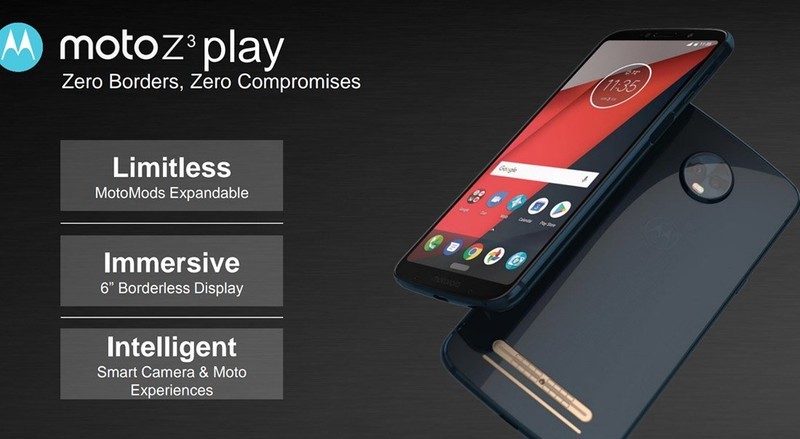
Just like last year, we’re expecting Motorola to release two entries in its Z-series in 2018. The regular Moto Z3 will be the most powerful of the two, whereas the Z3 Play will come with slightly lower specs and a more affordable price tag. Specifications for these two phones are mostly up in the air, but what does seem like a sure bet is slimmer bezels.
Both the Moto Z3 and Z3 Play will supposedly come with 6-inch FHD+ displays, and like we saw through a lot of 2017, bezels surrounding these panels are going to be cut down considerably. The Z3 (pictured below) has the slimmest bezels of the two, but the Z3 Play still looks a lot more modern when compared to the Z2 Play.
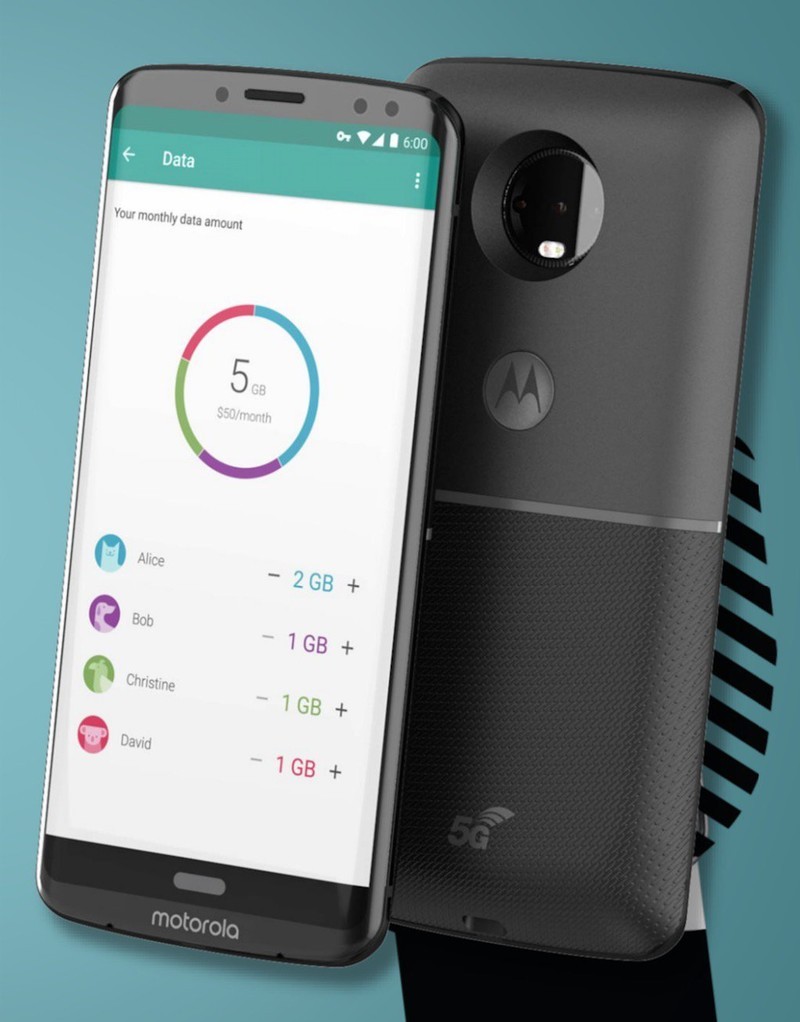
Something that’s got our attention with these two renders is the lack of a physical fingerprint sensor. It’s possible that Motorola will be opting for one that lies underneath the display like we saw with Vivo at CES 2018, a facial recognition system, or a combination of the two. It’s too early to say for certain, but we’ll likely see at least one of these things make an appearance.
Along with showing off the phone itself, the image of the Z3 also reveals a new Moto Mod. It may not look like anything at first glance, but the “5G” branding near the bottom suggests that this Mod will allow the Z3 to get 5G data speeds. Furthermore, the monthly data allotment page is taken right from the Project Fi app and could be a hint that more Moto phones will find their way to Google’s MVNO.
Moto X5
If you’re not about the Moto Mod life but still want a quality phone from Motorola, the X series has proven to be the way to go. Our first look at the Moto X5 shows a very similar design compared to the X4, but there are a couple key differences.

Just like the Z3/Z3 Play, we’re looking at a tall display with slim bezels on all sides. However, unlike those two phones, the X5 appears to have a notch near the top just like another phone with an X in its name. This is one trend I was really hoping wouldn’t catch on, but if it has to make its way into one Moto phone, so be it.
The screen on the X5 is said to measure in at 5.9-inches with a FHD+ resolution, there are dual cameras on the front and back, and there’s also mention of “Moto’s Smart AI.”
Also, like the Z3/Z3 Play, there’s no visible fingerprint sensor. Our guess about the under-display module or facial recognition remains the same, but once again, it’s too early to say for certain.
Moto G6/G6 Play/G6 Plus
Motorola’s G-series has been its most popular (and profitable) since the very first Moto G that came out in 2013, and this year’s entries are shaping up to be the best we’ve seen yet. There will be three G-series phones in 2018, including the Moto G6, G6 Play, and G6 Plus.

The G6 Play will be the weakest of the three, but that doesn’t necessarily mean it’ll be a bad phone. All G6 handsets are adopting the Moto X4’s glass design, and it adds a nice premium touch to the budget lineup. A 5.7-inch FHD+ display with a 16:9 aspect ratio will be present on the G6 Play, and it’ll carry a massive 4,000 mah battery.

The G6 and G6 Plus will adopt the new 18:9 aspect ratio, with the G6 offering a 5.7-inch FHD+ display and the G6 Plus going for a 5.93-inch one with the same resolution. The G6 will come with a Snapdragon 450 processor, 3,000 mAh battery, 3GB/4GB RAM, 32/64GB storage, 12MP + 5MP rear cameras, and a 16MP front-camera. The G6 Plus ups the processor to the Snapdragon 630, will offer up to 6GB RAM, and feature 1.4um pixels on the rear camera. All its other specs are shared with the G6.
Pricing isn’t mentioned for the G6 Play, but it’s said that the G6 will cost $240 and the G6 Plus will go up to $330.
Moto E5
Last but not least, we’ve got the Moto E5. The Moto E4 proved to be a truly excellent phone for $129 (or cheaper) in 2017, and based on what we’ve seen from the E5 so far, it looks like we’ll have a similar situation this year.
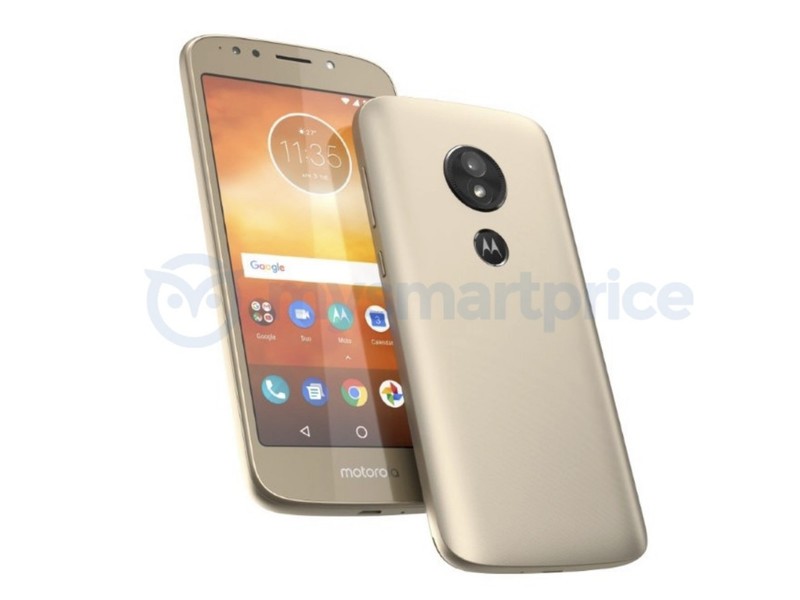
The overall design appears to be mostly unchanged, but what is worth noting is that the fingerprint sensor has been moved from the front to the back. This results in the Moto dimple doubling as the E5’s fingerprint sensor, and this is something that’s found on the G6 Play as well.
I’m expecting the phone to stick with a traditional 16:9 aspect ratio, but even so, it looks like we’ll be getting rounded corners to help give it a little modern flair. Exact price and specs are still unknown, but if you’re going to be in the market for an affordable phone this year, this will probably be one that you’ll want to have on your shortlist.
 AIVAnet