


Byton unveils its first EV with a focus on in-car ‘experience’
As we get closer to a world where the car is doing most of the actual driving, traditional automakers are trying to figure out what passengers will be doing when they’re not driving. Car startup Byton thinks it already knows what people want and and unlike most automakers isn’t burdened by tradition while building its electric SUV of the future.
Byton showed off the near-production version of its upcoming electric SUV at CES. According to the company, the “Concept” (which will start at ¥300,000 in China or approximately $45,000) on stage at the Mandalay Bay is 85-percent done and will launch in China in 2019 and the United States and Europe in 2020.
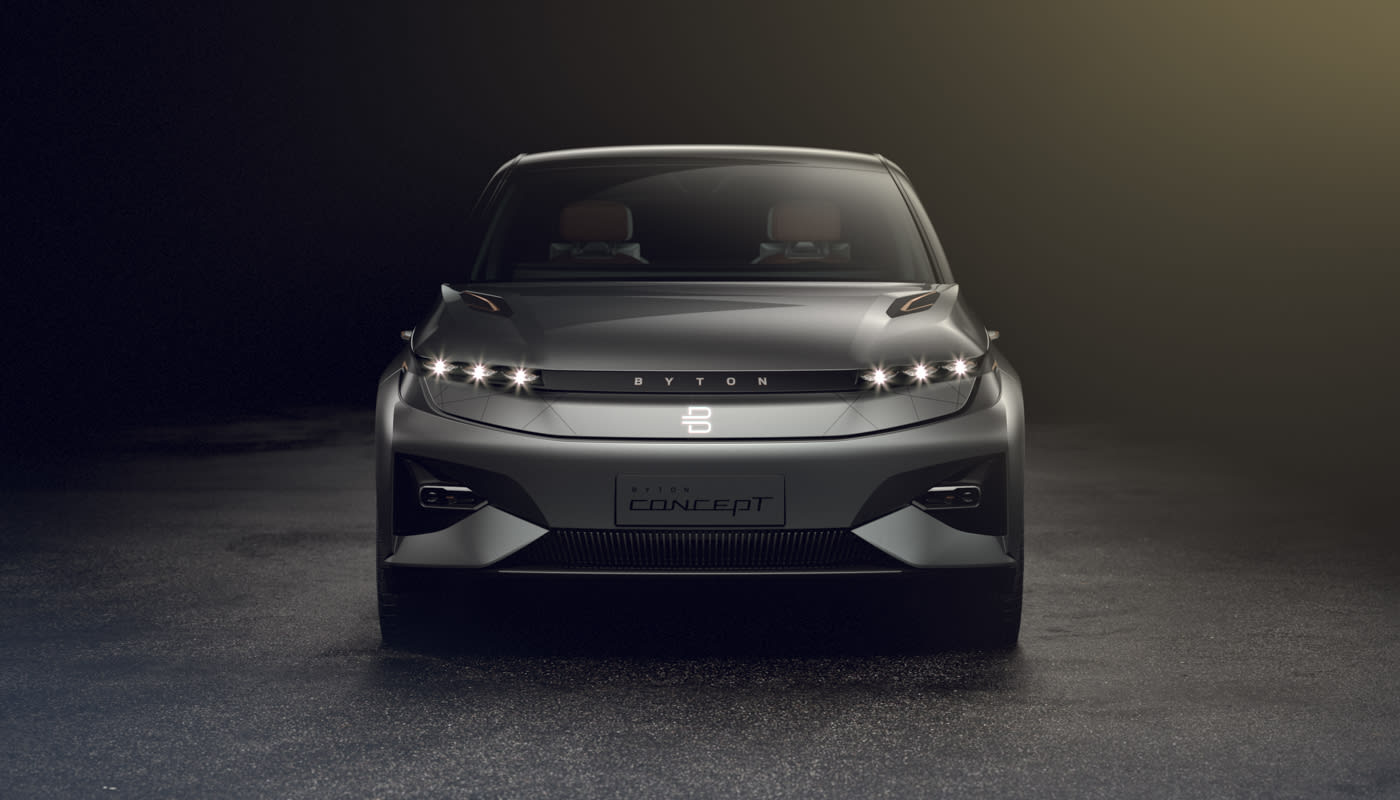
The slick looking (and it does look slick with no door handles or mirrors) car rolled onto the stage amid flashing lights and loud music. The vehicle and company may be new, but introducing cars still requires an elaborate lighting system and techno beat. In addition to slightly futuristic-looking head and tail lights, there’s a thin spiderweb of illumination on the front and rear of the SUV that can be used to convey the car’s status to pedestrians. There are facial recognition cameras in the B-pillars (the pillar between the front and rear side windows) that are used to unlock the car. Those missing mirrors have been replaced by cameras (if allowed by regulators) that are merged with rear-view camera to create a panoramic view of the world behind the car on the dash.
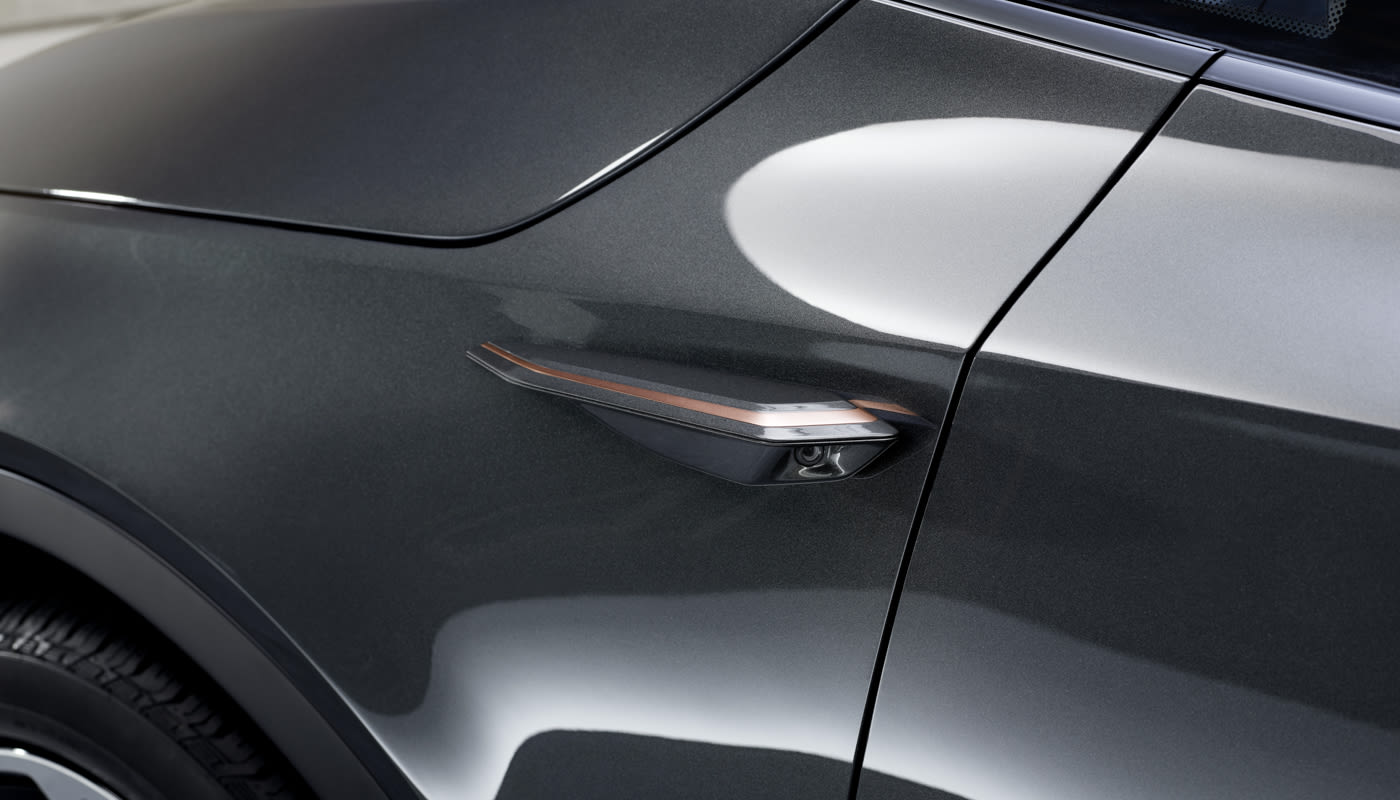
The company is going for futuristic without being polarizing. It wants a vehicle everyone likes to look at that’s also sleeker than other SUVs on the market.
But it’s not the outside that really counts with Byton (even though I’m actually a fan of the design). The interior and systems it houses are what the automaker is hoping will make its vehicles stand out from the rest of the automotive world. It’s about changing the experience of driving. Byton CEO Dr. Carsten Breitfeld told Engadget “if you want to create something new then you have to change the paradigm.”
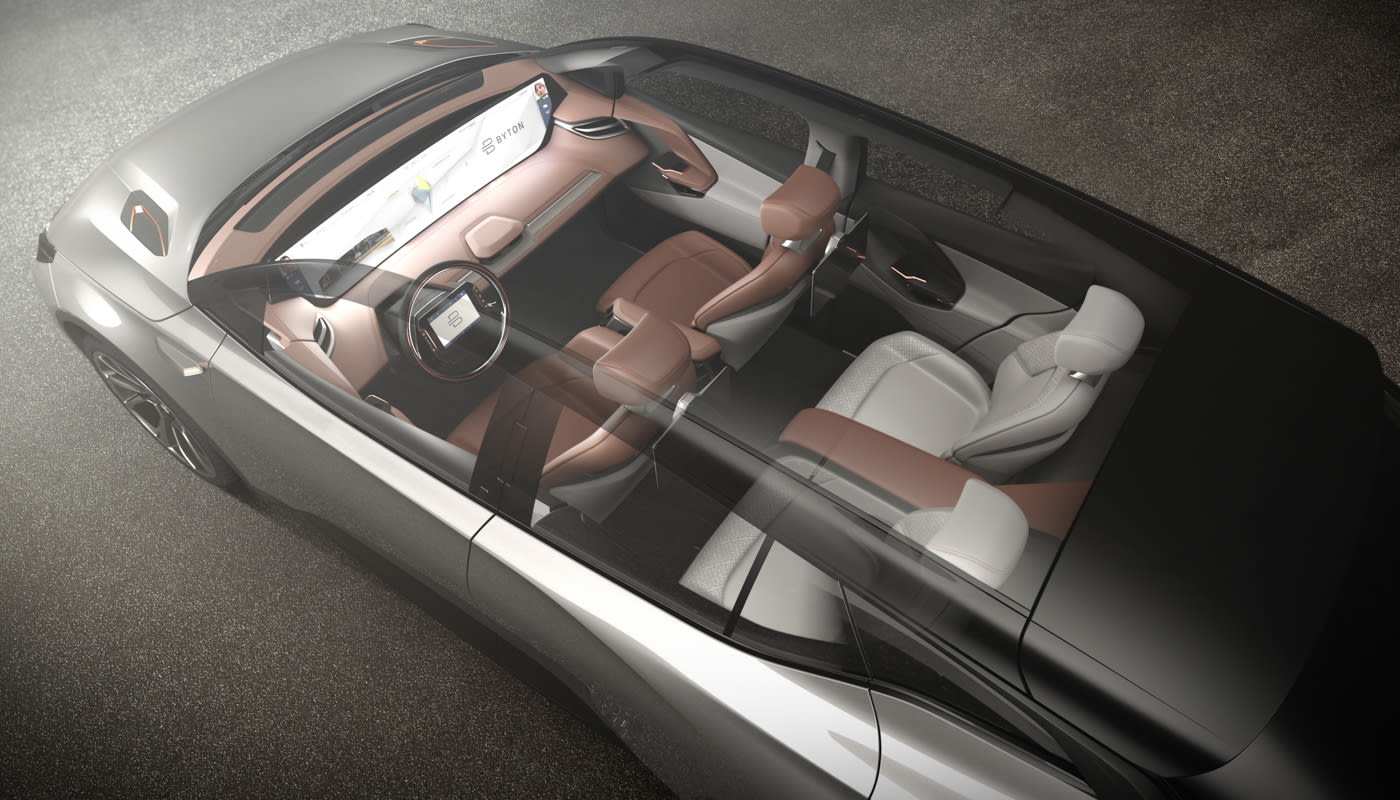
That change includes a gigantic 40-inch Shared Experience Display that runs the width of the dash, and front seats that swivel towards the center by 12 degrees, so passengers in the back have a clearer view of said screen. Optional rear displays will also be available at launch.
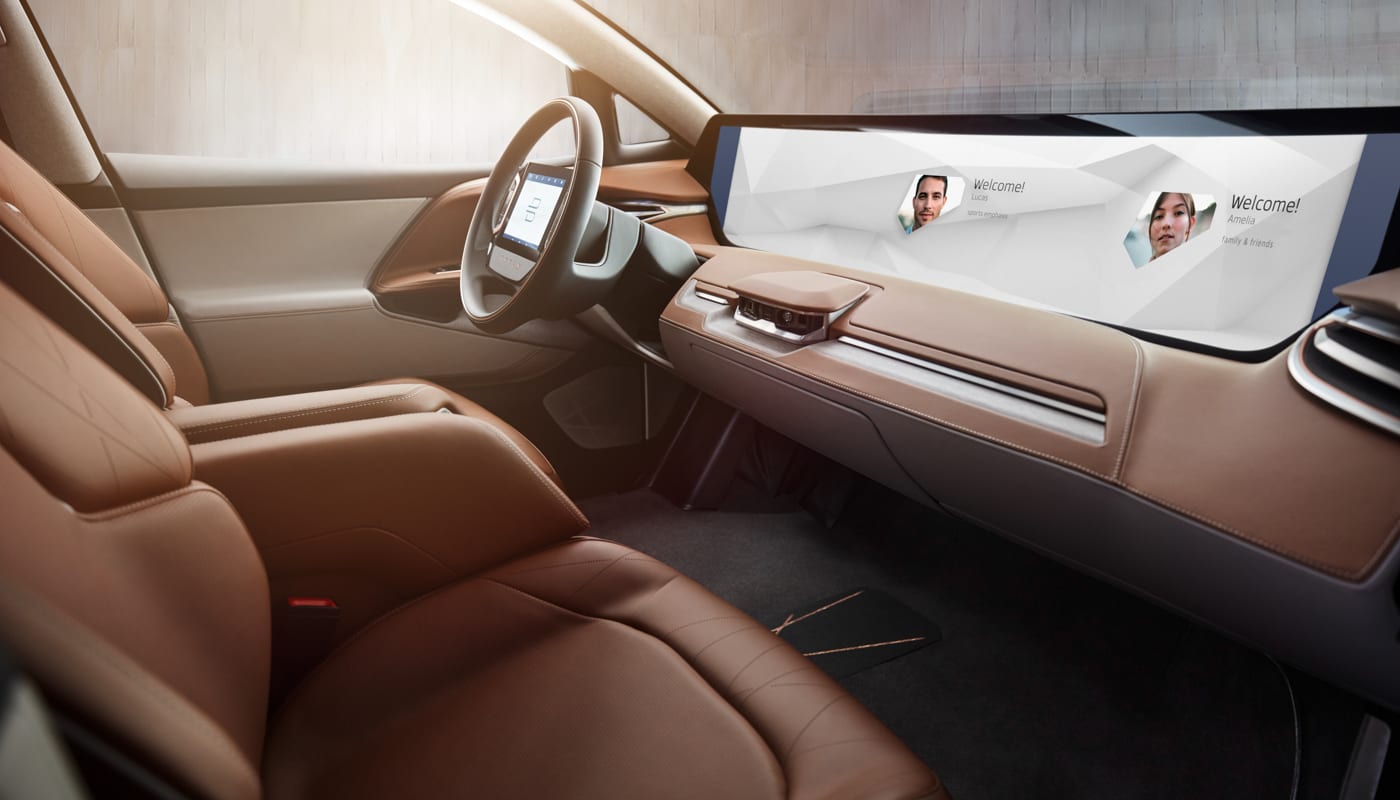
Controlling the infotainment system, climate control, and media are handled by gestures (thanks to a camera installed in the dash), the driver’s voice, and a touchscreen tablet installed in the steering wheel. It’s basically an Android tablet that can be used as such when the car’s doing all the driving.

The vehicle also has facial-recognition sensors in the dash for driver profiles. But it’s more than just setting up your seat the way you like it and tuning to your favorite station, it’s part of Byton’s mobility plan . Your facial data and vehicle info (Byton ID) is sent to the cloud (if you want) and when you enter another Byton vehicle, the car conforms to your preferences. So if these cars end up in a local shared fleet or as part of a nationwide rental company, the Bryton automobile you sit in will adjust to your liking. That, like the rest of the features, sounds great. But it’s not all that far-fetched.
Audi, BMW and other automakers are investigating how to keep drivers and passengers entertained when their cars are driving themselves. What Byton is hopes is that its lack of car-building history means they can build something from scratch that appeals to automotive and consumer electronics folks.
CES and Silicon Valley are littered with the crushed dreams of automotive startups. At last year’s CES, Faraday Future showed off its FF 91 SUV and has since bled executives while toning down its launch and factory-building plans.
Even the companies that are succeeding, like Tesla, are finding it difficult to bring a car to the market at scale. Building one car is easy. Building 100,000 cars is harder than people realize.
Breitfeld says that Byton has learned from the mistakes of those that came before them. He also notes that the core of the company comes from the auto industry including his 20 years with BMW. Before he left the German automaker he was the project manager of the i8.
The company will build its cars in China where it’s easier to get a factory up and running than in the United States. It’s also launching in China first with level 3 autonomy in its SUV. The US and European market will see the car sometime in 2020. While level 4 autonomy is expected to roll out to the cars via a software update in 2021.
The Concept will have a range of 250 miles for the rear-wheel drive version and 325 miles for the all-wheel drive version, with 71 and 95kWh battery packs respectively. Both vehicles will support fast charging to 80 percent in 35 minutes or less. And even though it’s not supposed to be that important, the entry level SUV will have 272 horsepower while the more powerful version will push out 476. Even if you’re a fan of an immersive user experience, you still might want to go fast.
All those specs are for naught if the company can’t deliver. It sounds like Byton is on the right track, but a lot of other new car companies seemed to be ready to take on the automotive world then fizzled out.
Onstage vice president of marketing, Henrick Wenders talked at length about the user experience. A new way people will be transported from point A to B. People clapped when they were supposed to and as the vehicle appeared on stage, we all pulled out our cameras. We’re either taking photos of the future or something we’ll never see again.
Click here to catch up on the latest news from CES 2018.
Live from CES 2018!
We’re on the ground in bright and dry Las Vegas for CES 2018 and ready to get this party started. We’ll be stuffing your eyes and ears with all the latest news from the world’s biggest tech conference this week. Google is already the talk of the show, but it won’t be hosting a press event of its own (at least not this year). But there are still plenty of big name companies taking the stage to tell you about their latest gadgets. We’ll definitely see tons of laptops and TVs for sure. But don’t be surprised if there’s a few oddball smart home products and more than few car-related announcements. Of course, we’ll be covering the big press conferences live. So make to come back for all our liveblogs starting bright and early Monday morning. Check out the full liveblog schedule below.
Monday 1/8
LG: 11am ET / 8am PT
HTC: 4pm ET / 1pm PT
Samsung: 5pm ET / 2pm PT
Sony: 8pm ET / 5pm PT
Intel: 9:30pm ET / 6:30pm PT
Tuesday 1/9
Ford: 11:30am ET / 8:30am PT
Click here to catch up on the latest news from CES 2018.
CES 2018: Elgato Announces New Thunderbolt 3 Mini Dock
Elgato is adding to its Thunderbolt 3 dock lineup with a new Thunderbolt 3 Mini Dock, which comes equipped with HDMI, DisplayPort, USB 3 and Gigabit Ethernet ports with up to 40Gb/s throughput for full performance for every port.
A built-in Thunderbolt 3 cable powers the Mini Dock, and when not in use, the cable tucks away to make the Mini Dock easy to transport.
“Thunderbolt 3 is the only standard that offers full performance and stability when simultaneously running 4K video and high bandwidth data signals over a single port,” said Markus Fest, General Manager, Elgato Systems. “With Elgato Thunderbolt 3 Mini Dock, building sure-fire setups becomes possible whenever and wherever you work.”
“Thunderbolt3 delivers unrivaled single-cable docking solutions”, said Jason Ziller, General Manager, Client Connectivity Division at Intel(R), “the Elgato Thunderbolt 3 Mini Dock introduces a whole new category by packing Thunderbolt 3 performance into a sleek, portable design.”
Elgato plans to release the Thunderbolt 3 Mini Dock in the spring of 2018, and pricing has not yet been announced.
Tags: Elgato, CES 2018
Discuss this article in our forums
CES 2018: Elgato Debuts New ‘Eve Room’ and ‘Eve Button’ HomeKit-Enabled Accessories
At this year’s Consumer Electronics Show, Elgato is adding to its HomeKit accessory lineup with two new Bluetooth HomeKit-enabled devices, which include an upgraded Eve Room and a new Eve Button.
The second-generation Eve Room, a followup to the original released in 2015, uses the latest sensor technology from Sensirion to track air quality, temperature, and humidity. Eve Room has a new aluminum enclosure, an update over the original plastic enclosure.
A new e-ink display allows you to see the Eve Room measurements when a smartphone isn’t available, and it now features a built-in battery that can be charged using any USB power source.
Like the original, the updated Eve Room is able to determine indoor air quality by measuring volatile organic compounds (VOC), plus it tracks the humidity and temperature of an indoor room. While the data can be read on the e-ink display, it’s also available in the Eve app, Apple’s dedicated Home app, and from Siri thanks to HomeKit integration.

Eve Button, Elgato’s first remote-style device, is designed to allow users to activate up to three HomeKit scenes without the need for a smartphone. Eve Button fits right in with the Eve lineup, with a sleek aluminum enclosure and a single button.

A single press, a double press, and a long press are each able to trigger a different HomeKit scene. Comparatively, the Eve Button isn’t offering as many physical buttons as some other options, but it is a simple, standalone device that’s works with all other HomeKit products and is priced affordably at $49.95.
Eve Room will be available in March of 2018 for $99.95, while Eve Button will be available starting later this month from the Elgato website and from Apple Stores.
Tags: HomeKit, Elgato, Eve, CES 2018
Discuss this article in our forums
‘What the Forecast?!!’ is the honest weather app you didn’t think you needed
App Attack is a weekly series where we search the App Store and Google Play Store for the best apps of the week. Check out App Attack every Sunday for the latest.
For those of us living in areas that experience freezing temperatures, opening your weather app can ruin your day. No one really wants to know the weather is in the single digits, especially when you have no choice but to go outside in order to get to their next destination. This week, we have an app that will make checking the weather a little more pleasant — even if the laughter only lasts a few seconds.
What the Forecast?!! takes a different approach when it comes to informing you of the weather. Rather than simply displaying the temperature, you’re also greeted with a description that’s brutally honest about how it feels outside. Let’s just say it’s far more useful when it comes to picking out your clothes for the day than any other weather app will ever be.
Regardless of the level of vulgarity you’re comfortable with, it’s customizable to suit everyone. With over 7,000 phrases that range from obnoxious to hilarious. I found myself constantly refreshing the app just to see what joke would come up next. Having experienced low temperatures these past few days, these descriptions are also spot on.
When checking the weather, it’ll show you the day’s current temperature along with its high, low, and wind speeds. By scrolling up, you’ll find the forecast for the upcoming days ahead, in-depth information about the current conditions, and the hourly forecast. The more fun description of exactly how it feels outside appears in the middle.
Even though the weather app itself is basic, there are a large amount of personalization options. You can change the radius, color settings, time format, and more. There’s also the option to change the level of profanity for those who want to keep it more PG. Through your settings, you can change it from “some” profanity to “on” for the curse words and all, or you can turn it off completely.
Another feature includes voice, which will read the funny phrases out loud for you when you first open the app. To hear it again, all you need to do is tap on the screen. Under voice settings, you can alter the volume, accent, rate, and pitch. You can also bypass the mute switch so that it will still read the phrase to you even if your phone is on silent.
What the Forecast?!! is available on iOS and Android. While the app is free to download, you can also purchase the ad-free version for $2 and can add extra voices for $1.
Editors’ Recommendations
- With Facebook Local, you’ll never have that fear of missing out
- If you’re looking for a good laugh, here are 39 questions to ask Siri
- Japan’s king of cute wants to develop a lovable A.I. you can’t live without
- ‘Reigns: Her Majesty’ lets you rule as Queen and slyly addresses gender roles
- Oh She Glows is the most stunning recipe app you’ll ever see
Awesome tech you can’t buy yet: Better gaming keyboards, wrist phones, and more
At any given moment, there are approximately a zillion different crowdfunding campaigns happening on the web. Take a stroll through Kickstarter or Indiegogo and you’ll find no shortage of weird, useless, and downright stupid projects out there — alongside some real gems. We’ve cut through the fidget spinners and janky iPhone cases to round up the most unusual, ambitious, and exciting new crowdfunding projects out there this week. That said, keep in mind that any crowdfunding project — even the best intentioned — can fail, so do your homework before cutting a check for the gadget of your dreams.
January 6th
MyFirst Fone — wrist-borne communicator for kids
In addition to being a solid contender for 2018’s Worst Product Name of the Year Award, MyFirst Fone is the newest addition to the growing category of kid-friendly smartphones. Now before you lose your mind and go into an impassioned rant about how young kids shouldn’t have cellphones, take a deep breath, rub your earlobes, and hear me out. This is actually a pretty decent idea. I too agree that young children shouldn’t have cellphones — especially those of the “smart” variety. Spending so much time staring wide-eyed at an LED screen, texting, and playing games all day removes kids from the real world, robs them of meaningful social interaction with other people, and screws them up developmentally. That being said, having a way to communicate with your kids no matter where they are is a huge plus, and can help keep them safe.
MyFirst Fone is a little wearable device that aims to reconcile these problems. It’s essentially a minimalist wearable smartphone designed to be worn on a child’s wrist, thereby giving kids a direct line to their parents, and giving parents the ability to check up on their kids’ whereabouts via GPS. It does this while keeping games, internet browsers, and other distractions out of the equation — so your kids can focus on being kids, and enjoy the world around them.
Hudly – HUD for your car
It only takes a glance at distracted driving statistics to drive home the fact that smartphones were not designed for the car. The apps that run on these devices tempt drivers to take their eyes off the road, which is dangerous, even if it’s just a glance. So how do you help drivers stay focused on the road, but still give them access to essential navigation and communication apps? Hudly thinks it has the answer. The company’s newest product is arguably one of the most advanced dashboard HUDs to date, and boasts a unique set of features that aim to solve the problems that other HUDs suffer from.
Instead of forcing you to look directly at your smartphone map (and away from the road), the Hudly app beams your smartphone nav info to the Hudly HUD, which projects it onto a reflective (but still transparent) piece of glass. This allows you to see navigation info without taking your eyes off the road ahead of you. Plus, since the HUD itself is a standalone unit that relies on a wireless connection to your smartphone, you don’t have to surrender your device to a dock every time you go for a drive. Just hop in, fire up the app, and hit the road.
Yeti Touch — quick defrosting tray
Defrosting your food is a lot like saving for retirement. If you plan ahead, it’s not a big problem — but if you don’t think about it until the last minute, you’re screwed. Generally, you have two options if you forget to pull the steaks out of the freezer: you can toss them in the microwave and turn them into rubber with a quick defrost cycle, or you can leave them on the cutting board, let them thaw naturally, and have dinner at midnight. Neither of those options are ideal. But what if there was a better way? What if you could thaw food quickly without compromising its flavor or texture?
That’s precisely where the Yeti Touch defrosting tray comes in. Thanks to some brilliant design and smart materials choices, the tray is able to defrost a frozen steak (or whatever you’re trying to cook) in a fraction of the time it would take to thaw on a normal cutting board. For example, while an ice cube typically takes about 20 minutes to melt completely while sitting on a cutting board at room temperature, the same ice cube will be reduced to a puddle in under four minutes on the Yeti. The key is the raised aluminum tray and vented lower chamber, which work together to draw the cold out and away from your food.
Dygma Raise — ergonomically optimized gaming keyboard
Keyboards and mice weren’t originally designed with PC gaming in mind, and despite the fact that gaming-focused keyboards and mice are widely available these days, many of them still suffer from the same drawbacks and shortcomings that their non-gaming counterparts do. So Luis Sevilla created a solution. The Dygma Raise, as it’s called, was designed from the ground up with professional gamers in mind.
First of all, it addresses ergonomics. “A normal keyboard forces the wrists to bend towards the pinky side of our hand,” Sevilla says on his Kickstarter campaign page. “Rotating Raise’s halves lets you keep your wrists at a neutral angle, decreasing pressure and strain over time. You can also adjust the width between the [keyboard’s] two halves, placing them in front of your shoulders to reduce internal shoulder rotation.”
The Raise is also completely customizable, and features additional buttons that normal keyboards don’t have. “The giant space bar is one of the things that we’ve inherited from the typewriter that doesn’t make sense any more,” says Sevilla. “We’ve divided the spacebar into 4 and added 4 extra keys under it. They are comfortable to use because they are in the area where our thumbs naturally rest.”
Vinci 2.0 — smart wireless headphones
We covered this one a few weeks ago, so I’ll let DT’s Nick Hastings give you the scoop.
“Leonardo da Vinci was the original Renaissance man, a brilliant polymath whose expertise in various arts and sciences often outclassed even the leaders of those fields. New York-based Inspero Inc.’s Vinci 2.0 smart earphones hope to offer enough versatility and flexibility to live up to their inspirational namesake. Following up on the company’s crazy Vinci over-ear headphones that impressed us at the 2017 Luxury Tech show and received nearly $1 million in Kickstarter funding last year, the Vinci 2.0 pack an impressive array of features into a unique, angular-neckband design. The band itself is pentagonal, featuring a small OLED touchscreen — we’re not entirely sure why — and the whole package weighs a shade over three ounces (90 grams).”
“The Vinci 2.0 are equipped with onboard flash storage — 8GB for the Lite model, 16GB for the Pro, and 32GB for the Super — so you can leave your phone in your bag while working out. Baked-in support for not one but two virtual assistants, Amazon’s Alexa and Inspero’s proprietary Vinci, means you can rely on voice commands to do just about anything, including controlling your music playback, calling an Uber, or checking the weather forecast. The Vinci 2.0 support both Bluetooth and Wi-Fi, allowing you to utilize Alexa and Vinci without an anchor device. If you’re out on a run — and therefore outside of Wi-Fi range — the headphones even support 3G (something we’ve never seen before), so you can access voice assistants or even streaming services from virtually anywhere.”
Awesome tech you can’t buy yet: Better gaming keyboards, wrist phones, and more
At any given moment, there are approximately a zillion different crowdfunding campaigns happening on the web. Take a stroll through Kickstarter or Indiegogo and you’ll find no shortage of weird, useless, and downright stupid projects out there — alongside some real gems. We’ve cut through the fidget spinners and janky iPhone cases to round up the most unusual, ambitious, and exciting new crowdfunding projects out there this week. That said, keep in mind that any crowdfunding project — even the best intentioned — can fail, so do your homework before cutting a check for the gadget of your dreams.
January 6th
MyFirst Fone — wrist-borne communicator for kids
In addition to being a solid contender for 2018’s Worst Product Name of the Year Award, MyFirst Fone is the newest addition to the growing category of kid-friendly smartphones. Now before you lose your mind and go into an impassioned rant about how young kids shouldn’t have cellphones, take a deep breath, rub your earlobes, and hear me out. This is actually a pretty decent idea. I too agree that young children shouldn’t have cellphones — especially those of the “smart” variety. Spending so much time staring wide-eyed at an LED screen, texting, and playing games all day removes kids from the real world, robs them of meaningful social interaction with other people, and screws them up developmentally. That being said, having a way to communicate with your kids no matter where they are is a huge plus, and can help keep them safe.
MyFirst Fone is a little wearable device that aims to reconcile these problems. It’s essentially a minimalist wearable smartphone designed to be worn on a child’s wrist, thereby giving kids a direct line to their parents, and giving parents the ability to check up on their kids’ whereabouts via GPS. It does this while keeping games, internet browsers, and other distractions out of the equation — so your kids can focus on being kids, and enjoy the world around them.
Hudly – HUD for your car
It only takes a glance at distracted driving statistics to drive home the fact that smartphones were not designed for the car. The apps that run on these devices tempt drivers to take their eyes off the road, which is dangerous, even if it’s just a glance. So how do you help drivers stay focused on the road, but still give them access to essential navigation and communication apps? Hudly thinks it has the answer. The company’s newest product is arguably one of the most advanced dashboard HUDs to date, and boasts a unique set of features that aim to solve the problems that other HUDs suffer from.
Instead of forcing you to look directly at your smartphone map (and away from the road), the Hudly app beams your smartphone nav info to the Hudly HUD, which projects it onto a reflective (but still transparent) piece of glass. This allows you to see navigation info without taking your eyes off the road ahead of you. Plus, since the HUD itself is a standalone unit that relies on a wireless connection to your smartphone, you don’t have to surrender your device to a dock every time you go for a drive. Just hop in, fire up the app, and hit the road.
Yeti Touch — quick defrosting tray
Defrosting your food is a lot like saving for retirement. If you plan ahead, it’s not a big problem — but if you don’t think about it until the last minute, you’re screwed. Generally, you have two options if you forget to pull the steaks out of the freezer: you can toss them in the microwave and turn them into rubber with a quick defrost cycle, or you can leave them on the cutting board, let them thaw naturally, and have dinner at midnight. Neither of those options are ideal. But what if there was a better way? What if you could thaw food quickly without compromising its flavor or texture?
That’s precisely where the Yeti Touch defrosting tray comes in. Thanks to some brilliant design and smart materials choices, the tray is able to defrost a frozen steak (or whatever you’re trying to cook) in a fraction of the time it would take to thaw on a normal cutting board. For example, while an ice cube typically takes about 20 minutes to melt completely while sitting on a cutting board at room temperature, the same ice cube will be reduced to a puddle in under four minutes on the Yeti. The key is the raised aluminum tray and vented lower chamber, which work together to draw the cold out and away from your food.
Dygma Raise — ergonomically optimized gaming keyboard
Keyboards and mice weren’t originally designed with PC gaming in mind, and despite the fact that gaming-focused keyboards and mice are widely available these days, many of them still suffer from the same drawbacks and shortcomings that their non-gaming counterparts do. So Luis Sevilla created a solution. The Dygma Raise, as it’s called, was designed from the ground up with professional gamers in mind.
First of all, it addresses ergonomics. “A normal keyboard forces the wrists to bend towards the pinky side of our hand,” Sevilla says on his Kickstarter campaign page. “Rotating Raise’s halves lets you keep your wrists at a neutral angle, decreasing pressure and strain over time. You can also adjust the width between the [keyboard’s] two halves, placing them in front of your shoulders to reduce internal shoulder rotation.”
The Raise is also completely customizable, and features additional buttons that normal keyboards don’t have. “The giant space bar is one of the things that we’ve inherited from the typewriter that doesn’t make sense any more,” says Sevilla. “We’ve divided the spacebar into 4 and added 4 extra keys under it. They are comfortable to use because they are in the area where our thumbs naturally rest.”
Vinci 2.0 — smart wireless headphones
We covered this one a few weeks ago, so I’ll let DT’s Nick Hastings give you the scoop.
“Leonardo da Vinci was the original Renaissance man, a brilliant polymath whose expertise in various arts and sciences often outclassed even the leaders of those fields. New York-based Inspero Inc.’s Vinci 2.0 smart earphones hope to offer enough versatility and flexibility to live up to their inspirational namesake. Following up on the company’s crazy Vinci over-ear headphones that impressed us at the 2017 Luxury Tech show and received nearly $1 million in Kickstarter funding last year, the Vinci 2.0 pack an impressive array of features into a unique, angular-neckband design. The band itself is pentagonal, featuring a small OLED touchscreen — we’re not entirely sure why — and the whole package weighs a shade over three ounces (90 grams).”
“The Vinci 2.0 are equipped with onboard flash storage — 8GB for the Lite model, 16GB for the Pro, and 32GB for the Super — so you can leave your phone in your bag while working out. Baked-in support for not one but two virtual assistants, Amazon’s Alexa and Inspero’s proprietary Vinci, means you can rely on voice commands to do just about anything, including controlling your music playback, calling an Uber, or checking the weather forecast. The Vinci 2.0 support both Bluetooth and Wi-Fi, allowing you to utilize Alexa and Vinci without an anchor device. If you’re out on a run — and therefore outside of Wi-Fi range — the headphones even support 3G (something we’ve never seen before), so you can access voice assistants or even streaming services from virtually anywhere.”
Awesome tech you can’t buy yet: Better gaming keyboards, wrist phones, and more
At any given moment, there are approximately a zillion different crowdfunding campaigns happening on the web. Take a stroll through Kickstarter or Indiegogo and you’ll find no shortage of weird, useless, and downright stupid projects out there — alongside some real gems. We’ve cut through the fidget spinners and janky iPhone cases to round up the most unusual, ambitious, and exciting new crowdfunding projects out there this week. That said, keep in mind that any crowdfunding project — even the best intentioned — can fail, so do your homework before cutting a check for the gadget of your dreams.
January 6th
MyFirst Fone — wrist-borne communicator for kids
In addition to being a solid contender for 2018’s Worst Product Name of the Year Award, MyFirst Fone is the newest addition to the growing category of kid-friendly smartphones. Now before you lose your mind and go into an impassioned rant about how young kids shouldn’t have cellphones, take a deep breath, rub your earlobes, and hear me out. This is actually a pretty decent idea. I too agree that young children shouldn’t have cellphones — especially those of the “smart” variety. Spending so much time staring wide-eyed at an LED screen, texting, and playing games all day removes kids from the real world, robs them of meaningful social interaction with other people, and screws them up developmentally. That being said, having a way to communicate with your kids no matter where they are is a huge plus, and can help keep them safe.
MyFirst Fone is a little wearable device that aims to reconcile these problems. It’s essentially a minimalist wearable smartphone designed to be worn on a child’s wrist, thereby giving kids a direct line to their parents, and giving parents the ability to check up on their kids’ whereabouts via GPS. It does this while keeping games, internet browsers, and other distractions out of the equation — so your kids can focus on being kids, and enjoy the world around them.
Hudly – HUD for your car
It only takes a glance at distracted driving statistics to drive home the fact that smartphones were not designed for the car. The apps that run on these devices tempt drivers to take their eyes off the road, which is dangerous, even if it’s just a glance. So how do you help drivers stay focused on the road, but still give them access to essential navigation and communication apps? Hudly thinks it has the answer. The company’s newest product is arguably one of the most advanced dashboard HUDs to date, and boasts a unique set of features that aim to solve the problems that other HUDs suffer from.
Instead of forcing you to look directly at your smartphone map (and away from the road), the Hudly app beams your smartphone nav info to the Hudly HUD, which projects it onto a reflective (but still transparent) piece of glass. This allows you to see navigation info without taking your eyes off the road ahead of you. Plus, since the HUD itself is a standalone unit that relies on a wireless connection to your smartphone, you don’t have to surrender your device to a dock every time you go for a drive. Just hop in, fire up the app, and hit the road.
Yeti Touch — quick defrosting tray
Defrosting your food is a lot like saving for retirement. If you plan ahead, it’s not a big problem — but if you don’t think about it until the last minute, you’re screwed. Generally, you have two options if you forget to pull the steaks out of the freezer: you can toss them in the microwave and turn them into rubber with a quick defrost cycle, or you can leave them on the cutting board, let them thaw naturally, and have dinner at midnight. Neither of those options are ideal. But what if there was a better way? What if you could thaw food quickly without compromising its flavor or texture?
That’s precisely where the Yeti Touch defrosting tray comes in. Thanks to some brilliant design and smart materials choices, the tray is able to defrost a frozen steak (or whatever you’re trying to cook) in a fraction of the time it would take to thaw on a normal cutting board. For example, while an ice cube typically takes about 20 minutes to melt completely while sitting on a cutting board at room temperature, the same ice cube will be reduced to a puddle in under four minutes on the Yeti. The key is the raised aluminum tray and vented lower chamber, which work together to draw the cold out and away from your food.
Dygma Raise — ergonomically optimized gaming keyboard
Keyboards and mice weren’t originally designed with PC gaming in mind, and despite the fact that gaming-focused keyboards and mice are widely available these days, many of them still suffer from the same drawbacks and shortcomings that their non-gaming counterparts do. So Luis Sevilla created a solution. The Dygma Raise, as it’s called, was designed from the ground up with professional gamers in mind.
First of all, it addresses ergonomics. “A normal keyboard forces the wrists to bend towards the pinky side of our hand,” Sevilla says on his Kickstarter campaign page. “Rotating Raise’s halves lets you keep your wrists at a neutral angle, decreasing pressure and strain over time. You can also adjust the width between the [keyboard’s] two halves, placing them in front of your shoulders to reduce internal shoulder rotation.”
The Raise is also completely customizable, and features additional buttons that normal keyboards don’t have. “The giant space bar is one of the things that we’ve inherited from the typewriter that doesn’t make sense any more,” says Sevilla. “We’ve divided the spacebar into 4 and added 4 extra keys under it. They are comfortable to use because they are in the area where our thumbs naturally rest.”
Vinci 2.0 — smart wireless headphones
We covered this one a few weeks ago, so I’ll let DT’s Nick Hastings give you the scoop.
“Leonardo da Vinci was the original Renaissance man, a brilliant polymath whose expertise in various arts and sciences often outclassed even the leaders of those fields. New York-based Inspero Inc.’s Vinci 2.0 smart earphones hope to offer enough versatility and flexibility to live up to their inspirational namesake. Following up on the company’s crazy Vinci over-ear headphones that impressed us at the 2017 Luxury Tech show and received nearly $1 million in Kickstarter funding last year, the Vinci 2.0 pack an impressive array of features into a unique, angular-neckband design. The band itself is pentagonal, featuring a small OLED touchscreen — we’re not entirely sure why — and the whole package weighs a shade over three ounces (90 grams).”
“The Vinci 2.0 are equipped with onboard flash storage — 8GB for the Lite model, 16GB for the Pro, and 32GB for the Super — so you can leave your phone in your bag while working out. Baked-in support for not one but two virtual assistants, Amazon’s Alexa and Inspero’s proprietary Vinci, means you can rely on voice commands to do just about anything, including controlling your music playback, calling an Uber, or checking the weather forecast. The Vinci 2.0 support both Bluetooth and Wi-Fi, allowing you to utilize Alexa and Vinci without an anchor device. If you’re out on a run — and therefore outside of Wi-Fi range — the headphones even support 3G (something we’ve never seen before), so you can access voice assistants or even streaming services from virtually anywhere.”
DJI Ronin S is a one-hand gimbal for DSLRs; Osmo Mobile 2 embraces vertical video
DJI revealed two new stabilizers at the Consumer Electronics Show today, the Osmo Mobile 2 for smartphones and the Ronin S, the company’s first single-handle, 3-axis stabilizer for DSLRs and mirrorless cameras.
The Osmo Mobile 2 offers a refined user interface to make controlling your phone’s camera easier than before. Integrated ISO and shutter speed controls let you set your phone just like a DSLR, enabling you to lock in the exposure for consistent time-lapse sequences or perfect panoramas. Long exposure, light trail, and subject tracking modes are also offered through the DJI Go app for iOS and Android.
Additionally, the Osmo Mobile 2 contains a completely new battery with up to 15 hours of operation time, an impressive three-fold increase over the original Osmo Mobile. It is also the first DJI phone stabilizer that allows for portrait orientation, making it easier to create super smooth Snapchat and Instagram stories. A standard 1/4-inch tripod mount lets you connect the stabilizer to a variety of tripods and other accessories.
The Osmo Mobile 2 will initially be available for preorder exclusively through Apple starting on January 23. It will be available from DJI and Apple retail stores starting in February for a price of $129.
Ronin S: A smaller, sleeker stabilizer
As its first single-handle DSLR and mirrorless camera stabilizer, the Ronin S joins a bevy of popular options from companies like FeyuTech and Zhiyun, putting 3-axis stabilization in a compact form factor. Two different frame sizes are available, one geared for larger DSLRs and the other for mirrorless bodies. High-torque motors support a variety of popular cameras, including the Panasonic GH5, Sony A7R Mark III, and Canon 5D Mark IV .
The Ronin S uses an angled control arm that raises the camera above the roll axis, allowing for an unimpeded view of the rear LCD. This isn’t the first gimbal to employ this clever trick, but we’re glad to see it.
Beyond simply stabilizing your footage, the Ronin S offers several ways to direct your shot via DJI’s mobile app. Just like the Osmo Mobile 2, you can set up time-lapse and panorama shots, track subjects, or use CamAnchor to set predetermined camera positions for the gimbal to automatically rotate to throughout the shot. A new sport mode also allows the gimbal to rotate more quickly to keep up with fast-moving subjects.
DJI has said the Ronin S will be available in the second quarter of 2018, but has not yet announced pricing.
Editors’ Recommendations
- Ikan DS2-A Beholder review
- The best GoPro accessories to make the most of your next adventure
- VR Stabilizer plug-in brings 360 stabilization to Adobe Premiere Pro, After Effects
- GoPro Hero6 Black review
- With world’s fastest autofocus, Panasonic Lumix G9 is a mirrorless powerhouse
DJI Ronin S is a one-hand gimbal for DSLRs; Osmo Mobile 2 embraces vertical video
DJI revealed two new stabilizers at the Consumer Electronics Show today, the Osmo Mobile 2 for smartphones and the Ronin S, the company’s first single-handle, 3-axis stabilizer for DSLRs and mirrorless cameras.
The Osmo Mobile 2 offers a refined user interface to make controlling your phone’s camera easier than before. Integrated ISO and shutter speed controls let you set your phone just like a DSLR, enabling you to lock in the exposure for consistent time-lapse sequences or perfect panoramas. Long exposure, light trail, and subject tracking modes are also offered through the DJI Go app for iOS and Android.
Additionally, the Osmo Mobile 2 contains a completely new battery with up to 15 hours of operation time, an impressive three-fold increase over the original Osmo Mobile. It is also the first DJI phone stabilizer that allows for portrait orientation, making it easier to create super smooth Snapchat and Instagram stories. A standard 1/4-inch tripod mount lets you connect the stabilizer to a variety of tripods and other accessories.
The Osmo Mobile 2 will initially be available for preorder exclusively through Apple starting on January 23. It will be available from DJI and Apple retail stores starting in February for a price of $129.
Ronin S: A smaller, sleeker stabilizer
As its first single-handle DSLR and mirrorless camera stabilizer, the Ronin S joins a bevy of popular options from companies like FeyuTech and Zhiyun, putting 3-axis stabilization in a compact form factor. Two different frame sizes are available, one geared for larger DSLRs and the other for mirrorless bodies. High-torque motors support a variety of popular cameras, including the Panasonic GH5, Sony A7R Mark III, and Canon 5D Mark IV .
The Ronin S uses an angled control arm that raises the camera above the roll axis, allowing for an unimpeded view of the rear LCD. This isn’t the first gimbal to employ this clever trick, but we’re glad to see it.
Beyond simply stabilizing your footage, the Ronin S offers several ways to direct your shot via DJI’s mobile app. Just like the Osmo Mobile 2, you can set up time-lapse and panorama shots, track subjects, or use CamAnchor to set predetermined camera positions for the gimbal to automatically rotate to throughout the shot. A new sport mode also allows the gimbal to rotate more quickly to keep up with fast-moving subjects.
DJI has said the Ronin S will be available in the second quarter of 2018, but has not yet announced pricing.
Editors’ Recommendations
- Ikan DS2-A Beholder review
- The best GoPro accessories to make the most of your next adventure
- VR Stabilizer plug-in brings 360 stabilization to Adobe Premiere Pro, After Effects
- GoPro Hero6 Black review
- With world’s fastest autofocus, Panasonic Lumix G9 is a mirrorless powerhouse
 AIVAnet