



The Big Picture: Accurately replicating Tutankhamun’s tomb

The image above isn’t Tutankhamun’s tomb, but the most accurate large-scale facsimile ever made. The replica was created by Factum Arte, from Madrid, Spain, in conjunction with the Supreme Council of Antiquities in Egypt. The real tomb has been open to the public for many years, and suffered gradual decline as a result. The replica has recently opened to the public, and will soon take all the tourist foot-fall strain, while the original is retired for conservation purposes. Factum Arte used a low intensity red light laser with a resolution of 100 microns, a 3D white light scanner (250 – 700 microns resolution), along with hundreds of man hours (and patience) to take detailed scans of everything in the chamber. A milling machine then used the data to carve out incredibly detailed 3D surfaces of the walls and sarcophagus. High resolution cameras, color-matching and digital stitching techniques were used to re-create the art and imagery on the walls. The same techniques will also be used to create replicas of the Tombs of Seti I and Nefertari — both of which currently closed to the public.
Filed under: Science
Source: Factum Arte

Latest Snowden leak reveals the NSA intercepted and bugged Cisco routers

As promised, the release of Glenn Greenwald’s new book, No Place to Hide, has brought plenty more Snowden leaks, and one document is particularly mind-blowing. The photo above shows an NSA team intercepting and bugging a Cisco router before it’s sent to a customer who’s been targeted for surveillance. In the document, an internal newsletter from June 2010, the chief of the NSA’s Access and Target Development department explains the process of intercepting routers, servers and other internet hardware to install beacon implants, then resealing them and sending them on to targets.
A quote from the document follows:
Here’s how it works: shipments of computer network devices (servers, routers, etc,) being delivered to our targets throughout the world are intercepted. Next, they are redirected to a secret location where Tailored Access Operations/Access Operations (AO-S326) employees, with the support of the Remote Operations Center (S321), enable the installation of beacon implants directly into our targets’ electronic devices. These devices are then re-packaged and placed back into transit to the original destination. All of this happens with the support of Intelligence Community partners and the technical wizards in TAO.
Pretty crazy, right? It’s not clear how often the agency has used this technique, but the document has prompted a response from Cisco. According to Mark Chandler, the company’s SVP of General Counsel and Security, Cisco has never cooperated with the government to “weaken products.” Still, we’ve reached out to the company for more info and will update the post with any additional comment.
Filed under: Networking
Via: BoingBoing
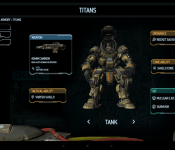
Titanfall companion app now available, XBox One gamers Only
 Companion apps to our favorite games can be a good thing, or an annoyance. It all depends on what platform you are playing on and what you think a companion app should do or be. EA has just recently released a new companion app for a game that I am sure many of you are very familiar with, Titanfall. Regardless if you have it or not, you have probably heard about it. If you do happen to be a Titanfall gamer, then you might be interested in the new app.
 The app is free to install and offers up a variety of things for gamers. Such as some back story to the game that wasn’t present. It also lets you keep up with your total kills, favorite weapons and time spent playing. Much like the Battlefield 4 Battlelog and Commander companion apps, the Titanfall companion also offers up a second-scree map when it is connected with your Xbox one. Wit it you can see a real-time interactive mini map of your current game. You can also see and track your team mates, focus on key areas of the battle field plus a few other special filters to gain access to additional map info that can’t be found anywhere else.
 The Titanfall companion app is free for all who wish to download it, but if you don’t have the game on Xbox One, you shouldn’t waste your time as the app is only for Xbox One players. That obviously got the console vs PC comment battles going in the Play Store. Feel free to get all bent out of shape over it, but it won’t do you any good. If you are a Titanfall Xbox One player though, you might want to pick this up and give it a whirl.
//<![CDATA[
ord = window.ord || Math.floor(Math.random()*1E16);
document.write('’);
//]]>

Pioneer’s NEX In-Dash Systems to Receive CarPlay Firmware Update in a ‘Few Weeks’
Pioneer announced earlier this year that its latest aftermarket NEX infotainment systems will be compatible with CarPlay, allowing customers to install the Apple technology in an existing automobile. The hardware requires only a firmware update that is expected to be available in “a few weeks”, putting the company on or even slightly ahead of its original “early summer” schedule.

Pioneer was in San Francisco this week showcasing the technology, which provides drivers with an integrated experience for placing phone calls, using maps, listening to music and messaging via Siri. As noted by Macworld, demo cars included the high-end $1400 Pioneer AVH-8000NEX system, which contains an in-dash capacitive touchscreen that allows the driver to tap on the infotainment screen to interact with the CarPlay system. CarPlay also supports hands-free operation using Siri to control many of the available functions.
Macworld did note some issues with Siri’s ability to handle background noise in the car, but Pioneer’s Ted Cardenas pointed out that with Siri’s ability to learn and improve over time, those background noises will become less of a distraction as Siri learns to pick out the driver’s voice.
The current version of Apple’s Carplay technology requires a Lightning cable connection between the iPhone and the receiver, limiting its usage to the iPhone 5, iPhone 5s and iPhone 5c. Rumored wireless support over Wi-Fi connection has not been confirmed by Apple, but even then the feature would require updated hardware for Pioneer, as the current NEX systems do not support Wi-Fi connectivity.
Pioneer is one of the first automobile electronics companies to offer an aftermarket CarPlay system to customers who don’t want to purchase a new car in order to experience the feature. Alpine also announced its own series of aftermarket CarPlay receivers, but they are expected to arrive later this year.

Flappy Bird multiplayer? Oh God

Noooooooo!
That might be the first thing that comes to mind; it did for us. Everyone’s favorite love/hate game is coming back later this summer. Get ready for the return of Flappy Bird.
Even though the game was removed from the Google Play Store and iTunes many are still playing it. It is almost impossible to love this game. Yet people keep playing, right? Personally, I hate it and I was rather addicted to it (443 i my personal best).
Flappy Bird’s creator, Dong Nguyen, said 2 months ago that the game will return, but not soon. Well it’s coming back in three months – in August. Dong Nguyen said in a recent interview that he’s working on a “less addictive version of the game”, whatever that means, and that the game will get a multiplayer mode. We can’t imagine how will the game be less addicting this way though. Oh well, we’ll just have to wait until August to find out.
What do you think the game will look like sporting a multiplayer mode and what does the developer mean by less addicting? We personally think it will function like the PC clone did, it will throw a bunch of players in the game and they’ll all play it at the same time. If you (for some reason) can’t wait for the game to return, you can always amuse yourself with parody games like Flappy Jeremy – Wrecking Ball or by playing the original game (if you still have it on your phone).
VIA: Phandroid
SOURCE: TheVerge
The post Flappy Bird multiplayer? Oh God appeared first on AndroidGuys.
Shutterbug Delight! Amazon giving away 9 paid photo apps for free today

Each app comes with $1 worth of credit towards other apps, too
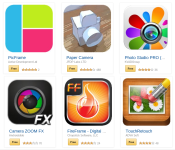
In what is becoming an almost weekly occurrence, Amazon is giving away a number of applications for free on Friday. As part of its Free App of the Day program, Amazon is offering up 9 apps centered around a common theme: photography. If you’re the type who likes to take unique photos or edit them with cool effects and filters then you’ll want to hop on these immediately.
And, as if that was not incentive enough, each of these apps comes with 100 free Amazon Coins. Yes, you get a $1.00 worth of credit to be used on other Amazon apps and games. A free app plus credit to be used on something else? Sign us up…nine times!
- PicShop – Photo Editor
- PicFrame
- Paper Camera
- Photo Studio PRO (Kindle Tablet Edition)
- Rhonna Designs
- Perfectly Clear
- Camera Zoom FX
- FireFrame (Digital Picture Frame)
- TouchRetouch
The post Shutterbug Delight! Amazon giving away 9 paid photo apps for free today appeared first on AndroidGuys.
HOW TO: Score $22 worth of Amazon Coins for free

Simple method earns you free credits plus 10 apps in the process
So you like free stuff, eh? How would you like to earn $22 worth of Amazon Coins? What if we threw in 9 premium photo apps and Grand Theft Auto: San Andreas, too? It’s easy, doesn’t long at all, and works like a charm. The catch? You have to act fast! Like today, May 16th fast! Here’s how you do it.
Head to Amazon and download the free app of the day. It just so happens that today (May 16) sees Amazon giving away 9 apps for free. On top of that, they are hooking you up with 100 Amazon Coins for each app. So, nine apps for free plus nine bucks worth of credit.
900 Amazon Coins = $9.00 CREDIT
Use 699 of those coins to purchase Grand Theft Auto: San Andreas. Once you do you’ll earn another 2,000 Amazon Coins.
900 – 699 = 201 Amazon Coins ($2.01 CREDIT)
When you are all said and done you will end up with 2,201 Amazon Coins which can be used to purchase other games and apps in the Amazon Appstore!
201 + 2,000 = 2,201 Amazon Coins ($22.01 CREDIT)
What will you buy with all of those credits?
The post HOW TO: Score $22 worth of Amazon Coins for free appeared first on AndroidGuys.
What you need to know about online advertisers tracking you
 Spend lots of time online? Then perhaps you’ve heard of targeted advertising, “Big Data” analysis and complaints of privacy violations by advertising companies. The ads above your Gmail inbox? Yeah, those. As it turns out, most people don’t like being tracked by advertisers. Surprise! As such, a variety of tools exist to protect individuals. But what about a solution that anyone could use, that didn’t require knowledge of cryptography or even a software install? That’s where the Do Not Track initiative comes in.
Do Not Track (DNT) is explained by its own name: Don’t track what I do online, including what I buy, what I read, what I say and who I communicate with. But how should it work? Therein lies the controversy. Since the subject is still being debated, now’s the perfect time to learn about it, voice your opinion and request more control over your data. If you want more control, that is.
What is it?
The idea of Do Not Track (DNT) was initially conceived in late 2007. Several groups, including the Center for Democracy and Technology (CDT) and the Electronic Frontier Foundation (EFF), asked the Federal Trade Commission (FTC) to help with the creation of something similar to the National Do Not Call Registry: a system to limit the amount of personally identifiable information a company can obtain without express authorization from an individual. More directly, DNT is a system to protect individuals from advertisers eager for personal info on consumers.
The proposed technology asked for online advertisers to submit web address information to the FTC, which the agency would publish and make accessible to the public. Why a list? So that web browsers (Firefox, Safari, Internet Explorer, etc.) could effectively block advertiser tracking on a wide scale. The list concept, however, was ultimately flawed: Every time an advertiser changed its web info, the DNT function became obsolete. It would require extreme vigilance to keep the system 100 percent effective. As such, it died.
In 2010, the idea of Do Not Track came back to life, albeit in a completely different form. Instead of relying on a list, web browsers would simply ask the advertising software (instantly, in the time it takes to load a webpage) to not track personal information. This is the Do Not Track initiative as we know it today.

Why should I care?
If you don’t care that websites and companies monitor your behavior, share what they know about you and generally act creepy about personal information, well, we’re impressed you got this far into a piece about Do Not Track. If you don’t want Amazon to show you ads about swimsuits, towels and sunblock because you mentioned you were excited about going to the beach on Facebook, you should care.
Not freaked out enough by that example? What if they know your daughter is pregnant before you know? For some people, this isn’t a big deal. For others, it’s extremely important.
We aren’t going to get into the implications of governments knowing everything about you; the Do Not Track initiative is only aimed at advertising companies. However, it’s not crazy to think that a government could request all the data an advertising company has in order to collect taxes, or worse: infringe on free-speech rights.
How does it work?
Modern browsers, such as Firefox, currently send something called “headers” to web servers (computers where websites are hosted). Say you’re visiting, I don’t know, this website. Say you’re on a PC, running Windows 7, and you’re using Firefox to read all about whatever happened to Netscape. The server hosting Engadget’s content needs to know how to present information (in this case, our website), to your particular setup. So your computer tells our web server how it’s set up and in turn, our web server returns a readable website. It also returns ad-tracking software.
The Do Not Track initiative simply adds an additional piece of information (the DNT header) to the initial request, which is set to 0 or 1. If the DNT header equals 1, the web browser knows it should not track the user’s behavior on the site, and a company knows not to use that data for advertising purposes.
You can see the DNT header turned on in the highlighted text below:

Most popular web browsers and at least the two most popular web servers (IIS and Apache) already offer support for Do Not Track. To enable this option on your browser of choice, just follow the steps dictated by the developers, linked below:
Firefox
Internet Explorer
Safari
Chrome
Opera
Can I start using it right now?
Yes — but not so fast, cowpoke. While the system is implemented in browsers and web servers, it’s not actually being used by advertising companies right now. A list of websites that honor the system is on donottrack.us, but not all advertising companies have agreed to abide by it. There are even conflicts between browser and web server developers as to how it should be used.
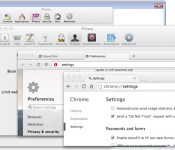
For example: Google, one of the biggest advertising companies on the internet, provides a warning about the Do Not Track setting in Chrome (seen below). Not exactly reassuring, is it?

What’s the argument?
One major point of contention is a concept known as “the tyranny of the default.” This idea is that a great majority of users never change the default settings, and thus, whatever the default settings were will most likely stay that way. Should browsers assume that users want DNT enabled by default? Microsoft thought so, and proceeded to enable DNT on Internet Explorer without user interaction. However, many believe that in order for the initiative to have any type of weight on advertising companies, the user should intentionally enable it.

Because of Microsoft’s decision to enable DNT by default in IE, the people behind the Apache web server patched out the setting. Wait, what? You see, according to the rules of DNT, the service can only be implemented if it “reflect[s] the user’s preference, not the choice of some vendor, institution or network-imposed mechanism outside the user’s control.” If there is “misuse” of the technology — such as Microsoft, an institution, turning it on by default — web servers can decide to ignore the header and the tool is useless.
The debate about enabling DNT by default started in 2012 and it hasn’t ended yet. Google, Facebook and now Yahoo all ignore DNT requests (at least for now).
Want even more?
Everything about Do Not Track is still open for debate. Technology companies are still discussing proper ways to implement it. Advertising companies are deciding if they want to respect it. There’s an ongoing debate as to whether DNT means “don’t save this information” or “don’t use this information.” And, of course, governments are considering enforcing the technology. This means that, as of right now, DNT is useless.
For now, the best you can do is precisely what you’ve already done by reading this article: Learn about Do Not Track. If you do want this technology or something that serves a similar purpose, be vocal about it. Take it directly to advertising companies on social networks. Contacting your senator wouldn’t hurt either! Maybe you love the benefits of targeted advertising and personalized web browsing? Express your opinion and let people know! The subject is still wide open for debate.
Filed under: Networking, Internet, Software, Microsoft
BBC brings its revamped iPlayer to Sky+HD boxes

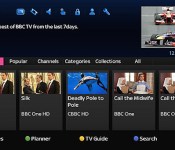
Sky’s in the middle of rolling out a big electronic programme guide (EPG) update to connected Sky+HD boxes. Part of that overhaul will see it present new ways to deliver online content, which has opened the door for the BBC to extend its latest iPlayer revamp beyond the desktop. The Beeb says it has worked closely with Sky to overhaul and update its aging iPlayer UI, making it easier for you to access programmes and navigate through listings, but also provide access to iPlayer exclusives and premieres (think Glastonbury or Radio 1′s Big Weekend) for the very first time. You’ll need to have the new ‘Homepage’ update installed to take advantage of the new streamlined interface — if you haven’t got it yet, sit tight, Sky says it will have completed the rollout by the end of May.
Filed under: HD
Source: BBC Internet Blog

Microsoft brings home automation app and devices to the Windows Store

Unlike Google with its new $3.2 billion Nest, Microsoft doesn’t have a lot of home automation products yet despite some interesting research. Redmond has now made a move to stock its shelves, albeit indirectly, via a partnership with home automation specialist Insteon. The pair just announced that an enhanced Insteon app will soon be available on Windows and Windows Phone 8.1 devices. It’ll feature multiple, full-screen video feeds, device control, a visitor mode to give limited control to others and Live Tile integration for status updates. In addition, Insteon will sell standalone devices in the Windows Store including a leak sensor, LED bulb and WiFi camera for $30 – $80, with kits starting at $200. Unlike Nest Products or the Philips Hue, Insteon’s system uses RF frequency and your home’s existing wiring (PowerLine) to communicate with devices. The app will arrive on June 1st, with the devices hitting Windows Stores in July, complete with educational demos and displays.
Filed under: Wireless, Microsoft
Via: CNET
Source: Insteon
 AIVAnet
