


Apple Being Sued Over Phone-Switching iMessage Issue
 Apple is facing a lawsuit over a long-standing issue that prevents iPhones from sending text messages to the Android phones of former iPhone users, reports Bloomberg (via BusinessInsider). Filed by a former iPhone customer, the lawsuit alleges that the user ceased getting messages from iPhone owners after she switched to a non-Apple device.
This is a problem that has afflicted many former iPhone users that switch from an iPhone to another device. After an iPhone is disabled, the users face an issue where iMessages sent from other iPhone owners are routed to a deactivated iPhone rather than being forwarded as a text message to an active phone, causing text messages to disappear.
Earlier this week, former Lifehacker editor-in-chief Adam Pash claimed that Apple is aware of the iMessage issue and unable to provide a fix. An Apple customer support representative told Pash that the iMessage bug is “a problem a lot of people are facing” and that the company’s engineering team “is working on it but is apparently clueless as how to fix it.”
These errors with iMessage have been a known issue since 2011, which is when the messaging service was first introduced with iOS 5. Apple advises iPhone owners to disable iMessages before deactivating their phones in order to remove the device from their system, but some users have experienced problems even after disabling iMessage.
Some users have had success calling in to Apple to have their numbers removed from the iMessage system and in 2012, TechCrunch detailed a fix involving unregistering products on a user’s Support Profile, which has also worked for some people experiencing iMessage issues after switching to a non-Apple device.
Filed in San Jose California, the lawsuit is currently seeking class action status.
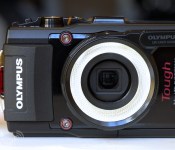
This $40 plastic ring is the first point-and-shoot accessory you actually need to own

There’s a lot of junk you can buy to stick on your camera. Point-and-shoot enthusiasts are likely acquainted with those pricey screw-on lenses that let you capture at a slightly wider angle or zoomed a bit further in, while action cam owners probably have bags of expendable mounts. You can also add on a case or customize your wrist strap, or purchase a mélange of other rubbish that won’t make even the slightest difference when it comes to your photography. But Olympus has managed to create an aftermarket gadget that’s actually a must-have: a plastic ring diffuser that provides killer light for your macro shots.
The LED Light Guide, a $40 accessory for Olympus’ Tough series of ruggedized cameras, redirects light from the point-and-shoot’s integrated LED, surrounding the lens with beautiful diffused illumination. The result is gorgeous macro shots that look like they were captured with a thousand-dollar rig, not a $350 waterproof compact with a screw-on plastic ring. Now, Pentax may have been first to market with a ruggedized camera that sports lights around the lens, but the Olympus version is far superior for macros. It’s a brilliant, yet incredibly simple accessory. Because the LG-1 simply moves light from the camera’s front-mounted LED, it’s compatible with three generations of Tough cams, including the TG-1, TG-2, and this year’s flavor, the TG-3.
I spent a few days shooting with that latter model this week in New Orleans, capturing perfect macros everywhere from French Quarter restaurants to a gift shop that sells alligator heads (don’t worry, they’ve scooped out the ‘stuff’). The guide is meant to be used with the camera’s Microscope mode, which provides more than 40x magnification. That’ll let you get very up close and personal with a world invisible to the naked eye, capturing a tremendous variety of everyday objects, from flowers to paper fibers, and — with the LED turned off — individual pixels on high-density smartphone screens, with incredible detail.

With the LG-1 attached, you can get as close as one centimeter (less than half an inch) away from your subject, with the camera’s full 4x optical zoom range at your disposal. For the first few days, you might find yourself shooting macros of every object in sight, but once the novelty wears off, it’ll still be quite useful for, say, evaluating a piece at a jewelry store or reading small printed text. It can even be used for scientific purposes (Olympus also has an enormous business selling professional microscopes), letting you examine specimens on the go.
The Tough TG-3 and LED Light Guide accessory are set to ship in late June, but you can get more acquainted with the duo (and Louisiana’s flourishing microscopic scene) in our gallery of samples up above. It can be a bit challenging to identify objects without the context we’re used to seeing, but it’s definitely worth a shot. If you give up, you’ll find a description written upside down just below each pic.

Filed under: Cameras
Source: Olympus

Google Now gets billing integration, reminds you when payment is due

Google Now, with cards displaying info for your upcoming flights and shipment tracking, is becoming more and more useful. The latest improvement to Mountain View’s virtual assistant integrates billing reminders based on your emails. A tipster sent screens of the new feature to Android Police, though it doesn’t look like billing has rolled out to all users yet. If you do see it on your phone, you’ll only get basic information about your accounts, such as when a bill is due and how much you owe.
Based on a teardown of the Google Now APK, which reveals other options such as viewing minimum payments and previous balances, we’ll probably see new billing features added to Google Now at the time. Most helpful would be an option to head to your account via a “Pay now” link, and there’s no reason to think Google wouldn’t add in such functionality. Some billing providers have deeper integration than others, though, so the amount of information you’ll see will vary.
To check if you’ve received the update, head to the “Everything Else” section in Google Now. The service will ask you if you’re interested in information in bills based on messages in your Gmail. And let us know if you’re seeing the feature by commenting below.
Via: Android Police

The Otto is an adorable point-and-shoot for making GIFs

It looks like a baby’s first camera, but the blue and black plastic Otto camera is more than just a toy-like point-and-shoot. It’s a camera made specifically with the intention of creating instant GIFs — you know, these things? — and it’s pretty delightful. It operates a lot like Vine or Instagram video, in that you simply turn the crank (yes, really) to record. When you’re done capturing silliness, you push the GIF directly to your phone over a shared WiFi network. Easy! There’s a video of the Otto in action just below, as well as a pretty great GIF with Shaquille O’Neal looking sassy. Can you resist?

Filed under: Cameras, Software
Source: Kickstarter

Google acquires Word Lens makers to improve Translate

Remember Word Lens, the impressive mobile app that would translate foreign text on menus and street signs right in front of your eyes? Well, that incredibly sweet translation tech has just found a new home – a post on creator Quest Visual’s site confirms that Google has acquired the company.
Here’s the thing: Google and Quest Visual haven’t exactly been strangers these past few years. The startup launched Word Lens just a few months after Google gave its Goggles app some similar functionality, and the two eventually worked together to bring seamless text translation to devices beyond just smartphones. Case in point: the team got Word Lens running on Google Glass last year (with the search giant’s permission, natch), and it wouldn’t be a surprise to see that head-mounted wearable get even better at translating languages on the fly down the road. That doesn’t seem to be their biggest priority, though: according to Quest Visual’s announcement, their translation tech will be incorporated into “Google Translate’s broad language coverage and translation capabilities in the future.”
Alas, the team seems to be in the midst of dismantling the rest of its site, and the future of the standalone Word Lens app is hazy at best. For what it’s worth, a Google spokesperson confirmed the deal and expressed admiration for the QV team’s technical chops, but wouldn’t going into further detail. We’ve also reached out to Quest Visual founder Otavio Good for comment – stay tuned for more as we get it.
Source: Quest Visual

HTC One M7 (2013) Unlocked and Developer Editions Getting Sense 6 Update
A new round of updates is being pushed out by HTC today. The Unlocked and Developer Edition versions of last years HTC One M7, is seeing an update that tosses on the more recent Sense 6 software. Along with Sense 6 you can also expect to find personalized font styles, new camera and gallery interface, BlinkFeed improvements, and the Extreme Power Savings mode.
 The update will weigh in at 668MB’s so you will want to make sure you have over 50% battery life, a solid Wi-Fi connection and a little time to kill while it downloads and installs. For everyone else in the U.S. with a carrier branded version, kick back and be jealous for now. They are still listed as being in the ‘Certification’ stage. At least you know it will be coming, eventually. President of HTC America, Jason Mackenzie, seems to be making god on his word when he tweeted out in April that the HTC One would get Sense 6 in May though. Keep it up HTC, you are making users happy.
Source: AndroidCentral
//<![CDATA[
ord = window.ord || Math.floor(Math.random()*1E16);
document.write('’);
//]]>

OS X 10.9.3 Bug Hides ‘/Users’ Folder for Some Users
Apple yesterday released OS X 10.9.3 with support for 4K displays, contact and calendar syncing improvements, and more. Many (but not all) users are, however, experiencing a bug in the update that hides the /Users folder.
The /Users folder is a top-level folder that contains the home folder and personal files for each user on a Mac. It’s not clear why only some OS X users lose access to the /Users folder, but the inability to browse this folder could be problematic for some Mac owners affected by the glitch.
A range of solutions for the bug have been suggested with varying degrees of complexity, with perhaps the simplest noted by Kirk McElhearn and Chris Breen of Macworld:
Launch Terminal (/Applications/Utilities), enter “sudo chflags nohidden /Users”, and press the Return key. You’ll be prompted for your user password. Enter it, press Return again, and the Users folder will be visible as it once was.
This solution is not, however, a permanent one, as the issue will reappear if the machine is restarted and the fix will need to be applied again.
Breen goes on to outline a more permanent solution that involves creating an AppleScript for running the Terminal command and saving it as an application to run at login.
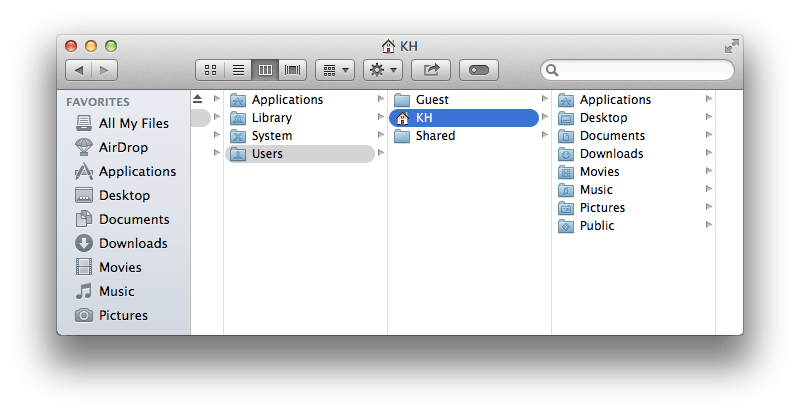
Another recommendation comes from The Loop‘s Dave Mark, who suggests creating an alias for the folder that will remain accessible even with the folder itself hidden.
For a more permanent solution, [after manually navigating to the hidden folder] control-click on the /Users folder and select Make Alias from the contextual menu that appears. Though the /Users folder will become hidden again when you close your Finder window, the alias will stick around.
For many users, the bug will not have a significant impact on their Mac usage, as they can still access their own home folders through shortcuts in the Finder sidebar. Consequently, some users who are not inconvenienced by the bug may prefer to simply wait for Apple to address it in a future update.
Alleged ‘iPad Pro’ Model Shows What the Giant Tablet Might Look Like In-Hand
A model said to be an industrial prototype of the upcoming 12.9-inch “iPad Pro” has surfaced, giving a look at what the larger tablet might look like in-hand. Discovered on Chinese Twitter-like site Weibo by Nowhereelse.fr [Google Translation] the machined aluminum is said to be a reference for creating cases and other accessories.
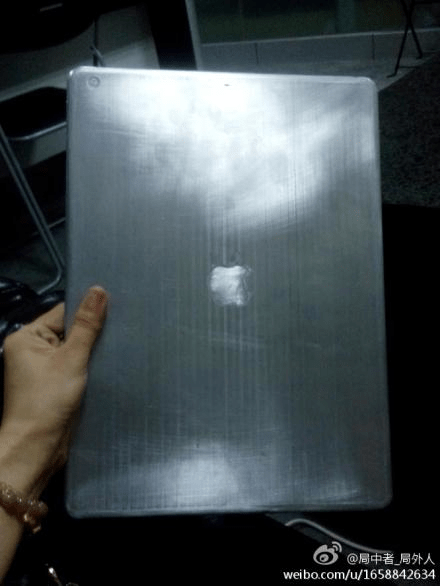
The design of the mockup is very rudimentary and while it is said to be the iPad Pro, it is impossible to determine the exact size of the prototype from the photos. It is also not clear if this “prototype” is based on any type of legitimate specifications as Apple is said to be multiple months away from releasing a larger tablet. Along with a larger size, the model also has an Apple logo and a rear camera cutout. At 12.9-inches, the iPad Pro would be similar in size to a 13-inch MacBook Air and quite a bit larger than the existing 9.7-inch iPad Air.
 Rendering of a 12.9-inch iPad next to a 13-inch MacBook Air
News that Apple was testing displays for a larger 12.9-inch iPad first surfaced in July of last year in a report from The Wall Street Journal. While initial rumors suggested Apple could release the device in 2014, reliable analyst Ming-Chi Kuo has pointed towards a possible 2015 launch date for the device, while Digitimes indicated in March that development on the tablet had been shelved in favor of other projects.
Rumors have suggested the iPad Pro, if released, will adopt many of the same design elements offered in the current iPad Air and Retina iPad mini, including an ultrathin chassis and narrow side bezels. It is also rumored to include an ultra high-definition display.

The Engadget Podcast is live at 12PM ET!

It’s been another whirlwind week here at Engadget Towers. Microsoft suddenly dropped Kinect from the Xbox One (along with $100 from the price tag), the United States government voted in rules on net neutrality that are…let’s just call them “disagreeable,” and my podcast co-host Terrence O’Brien dug into the world of smart guns. We’ll be talking all three on this week’s show, as well as a smattering of other, assuredly goofy things. Perhaps you’ve got questions/comments/excellent reaction GIFs to share? Drop them in the chatroll below, or get at us on Twitter!
Filed under: Podcasts

Don’t worry, the Pentagon’s got a plan to deal with a zombie apocalypse

What would happen if the plot of The Walking Dead, or any other TV show with “Dead” in the title, came true? It turns out that the Department of Defense already has a plan for that, in a folder marked CONOP 8888 Counter-Zombie Defense. The document explains what to do should regular zombies, space zombies or, wait for it… evil magic zombies begin to attack the United States and beyond. In case you’re wondering, the title page of the file does open with the phrase “This plan was not actually designed as a joke.”
Planning documents like these are, instead, used to train and prepare military analysts and tacticians. Normally, the students would discuss real-world scenarios, like an invasion of the US by the Republic of San Marino. Politically, however, it can land a country in hot water if your allies know that you’re planning defense strategies against them. That’s why the Pentagon opted for a more, erm, fictional scenario, but while it was an intellectual exercise, it’ll remain on file, just in case.
Some of the contingencies and rules that have been decided upon make for some pretty fascinating reading, too. For instance, someone has ruled that Zombies aren’t protected under the Geneva Convention. Oh, and even better, is that if there’s a religious element to the creation of the evil magic zombies, then the US Military will expect the Chaplain Corps to main the front lines.
Filed under: Misc
Via: Foreign Policy, Washington Post
Source: Scribd
 AIVAnet