



Happy 54th Birthday, Laser Beams

We imagine that on May 16th, 1960, when the first laser was fired, no-one involved was particularly concerned with the invention’s impact upon pop culture. After all, proving Albert Einstein’s 1917 theory about amplifying light by the stimulated emission of radiation was probably seen as a bigger deal back then. In the decade that followed, the technology was used to verify the veracity of the moon landings, remove a tumor from someone’s eye and threaten the survival of James Bond’s “gentleman’s area” for ever.

Nowadays, lasers are everywhere, from our optical mice and optical disc readers all the way through to industrial cutting machines, barcode scanners and on military vehicles. We decided, therefore, that to celebrate the 54th birthday of the simple, gentle laser, that we’d compile a few of our favorite moments from pop culture over the last half-century in tribute. And yes, if we miss your favorite, feel free to shout it out in the comments.
Filed under: Science

Comcast has ‘no plans’ for internet caps despite testing them

Those statements that Comcast’s David Cohen made about possible nationwide data caps within the next five years? He’d like you to forget them, please. As he explains in follow-up statement, the company has “no plans to announce” such a policy. The company doesn’t want to implement plans that hurt your internet experience, he says, arguing that reports took what he said “out of context.” With that said, it’s clear that Cohen has a narrow definition of what a data cap is. He claims that the company has no caps whatsoever despite running trials where customers are charged extra for usage beyond a bandwidth limit — at last check, that’s still a cap.
The executive is quick to note that these trials aren’t necessarily a sign of things to come. If they are, however, you may have to pay extra to get unfettered service; Cohen notes that the company is “looking at” adding unlimited plans to the trials. It’s unclear just what those would entail, although the overage-based model from the trials suggests that you’d pay a premium over normal offerings. That’s in sharp contrast to Comcast’s acquisition target Time Warner Cable, which offers you a discount if you accept a cap. It’s entirely possible that Comcast will forego usage-based pricing, particularly if it wants to please regulators worried about attempts to stifle online video, but it’s obvious that the business model is at least under serious consideration.
[Image credit: Getty Images]
Filed under: Networking, Internet
Source: Comcast

MIT harvests fog to make water in one of the driest places on Earth

The climate is so arid in some corners of the globe that virtually any source of water is crucial to survival; even the fog rolling over the hills could make a big difference. MIT is well aware of this, and has been testing an advanced form of fog harvesting in Chile’s Atacama Desert (one of the driest places on the planet) to see how the technology can help communities in very harsh regions. By taking inspiration from fog-collecting organisms like beetles and grass, researchers built large meshes that are 500 percent more efficient at turning fog into drinkable water than previous systems. In the Atacama experiment, they’re good enough to produce half a gallon of water a day for every 10 square feet of mesh. That’s not a lot, but it’s sufficient for watering gardens of edible plants like aloe vera.
This is just the start, too. In time, MIT hopes to boost efficiency to the point that a mesh can collect three gallons of water in the same surface area. More importantly, the technology is already cheap and easy to maintain. If the mesh technology reaches mass production, it could quickly improve the quality of life for some desert dwellers — they wouldn’t have to worry as much about basics like clean water and healthy crops.
Filed under: Science
Via: Motherboard
Source: MIT

Let us fund your hardware dreams: Submit your project for the 2014 Insert Coin competition

It’s May 16, and you know what that means? You only have 133 days to submit your Insert Coin entries and get the chance to win some serious cash to fund that childhood dream or that brilliant idea you just know will be huge. We want to hear about that innovative creation — and we’d love if you can send it in before the submission deadline on September 26th.
Just like last year, the Judge’s Choice will get a $10,000 prize, while the Reader’s Choice will get $15,000. This time, though, we don’t only accept pre-crowdfunded projects: those currently being crowdfunded or in their post-crowdfunding stages are very much welcome, as well. Engadget editors will also review the winning products to drum up interest and hopefully help you reach your funding goal like DiWire Bender and Ziphius (our first ever Insert Coin winner!) did in 2013.
Before we crown those two projects that embody the innovation we’re looking for, however, we’re first choosing 10 that stand out the most among the crowd. If you end up as one of the 10 semi-finalists, we’re giving you Expand New York tickets, a $1,000 travel stipend, a space on the show floor and a chance to demo your invention in front of live and online audiences. Hopefully, you’ve got your stage fright under control by November to win both readers and judges over.
Now that we’ve got you pumped to share your brainchild with everyone, get that project ready for victory and head over to our submission page.
Filed under: Misc

Halo: The Master Chief Collection coming to Xbox One this year, collects Halos 1-4

Master Chief is getting a facelift with an HD collection of his exploits. We’ve learned that Halo: Combat Evolved, Halo 2, Halo 3 and Halo 4 are being collected in a Master Chief-focused HD remaster coming from Microsoft. Our sources say that the set will zero in on Halo‘s most famous soldier to refresh audience’s memories ahead of Halo 5‘s release, so curiosities like Halo 3: ODST and Halo: Reach likely won’t be a part of the package. The game’s developer is unknown at this point, but considering that Saber Interactive handled Combat Evolved Anniversary and is also working on an unannounced Xbox One project, the team is a likely suspect. Also unclear are plans for digital distribution, resolution and frame-rate (Microsoft bragged that will run at the next Halo will run at a “blistering” 60fps), piecemeal releases, or if the games will surface on other platforms as well (PC, anyone?).
Microsoft has gone on record saying that it would love to have Halo release more than once every three years. Its used different developers to fill that task since, but we’re still pushing two years since Halo 4 launched. To commemorate the first game’s tenth birthday, Microsoft released Halo: Combat Evolved Anniversary for the Xbox 360, which served as a stop-gap for the 343 Industries-developed Halo 4; there’s precedent for this sort of thing. This remake makes a lot of sense for Redmond for a couple of different reasons: it satisfies the more-frequent release desire and it helps fans get caught up on the story. It also gives them the chance to re-experience some of the best console shooters with better looks and sound — everyone wins!
We reached out for official word from Microsoft and are waiting to hear back, but we’re not expecting much beyond the usual, “We don’t comment on rumors or speculation.”
Filed under: Gaming, Home Entertainment, HD, Microsoft
Apple Details Expanded 4K Display Support Included in OS X 10.9.3
Apple today updated its 4K display support page following the OS X 10.9.3 update, detailing the enhancements that have been made to 4K display support.
Running OS X 10.9.3, the 2013 Mac Pro and the 2013 Retina MacBook Pro now support several new 4K displays, including the Sharp PN-K321, ASUS PQ321Q, Dell UP2414Q, Dell UP3214Q, and the Panasonic TC-L65WT600. Previously, only the Sharp and ASUS displays were officially supported.
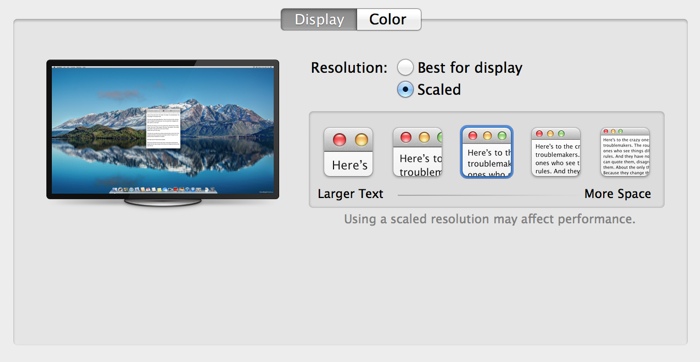
There’s a new section on display adjustments and Retina scaling, introduced to allow the resolution of 4K displays to be adjusted much like the display of the Retina MacBook Pro, improving the size and readability of text and other on-screen elements.
The revamped support page also notes that both the Mac Pro and the Retina MacBook Pro are now able to support 60 Hz 4K output for the five supported displays, using multi-stream transport, a feature previously limited to the Mac Pro. With the higher refresh rates, response times for tasks like game playing and video editing will be improved. Detailed instructions are given for enabling the option:
MacBook Pro (Retina, Late 2013) or Mac Pro (Late 2013) also support 60 Hz displays using multi-stream transport (MST). These displays need to be manually configured to use MST. Follow the steps below to use the display’s built-in controls to enable this feature.
– Sharp PN-K321: Choose Menu > Setup > DisplayPort STREAM > MST > SET
– ASUS PQ321Q: Choose OSD menu > Setup > DisplayPort Stream
– Dell UP2414Q and UP3214Q: Choose Menu > Display Setting > DisplayPort 1.2 > Enable
– Panasonic TC-L65WT600: Choose Menu > Display Port Settings > Steam Setting > Auto
Your Mac will automatically detect an MST-enabled display. However, your display may require a firmware update to support 60Hz operation. Please contact your display vendor for details. If your specific DisplayPort display is not listed above, check with the display’s manufacturer for compatibility information.
First released yesterday, OS X 10.9.3 with enhanced support for 4K displays can be downloaded via the software update tool in the Mac App Store.

Titanfall’s second-screen app is neat, if you ever remember to look at it

The companion app for Xbox One’s Titanfall is finally available, free of charge, over at the the App Store and Play store. Ironically, it offers a second-screen gaming experience without any need for Microsoft’s Smartglass app, which was originally meant to be a hub for this sort of thing. Anyway, we’ve just whiled away two hours some time with the Android version and it all seems to work pretty smoothly — although it hasn’t done anything much for our K/D ratios.
We loaded the up the hefty (612MB) app and, for some reason, had to inform it the Xbox One’s IP address (accessed via Settings — Network — Advanced Settings), because it wasn’t automatically detected on the network. Once connected, the main screen on your mobile device offers access to a wiki about the game and to your all-important personal stats. It’s only when you load up the game on your console that the second-screen function kicks in, showing a zoom-able live map of the entire arena, including the names of players on your squad.

EA Mobile reckons the extra info on this map could give second-screen users an advantage, but for this writer it was more of a distraction, and it was quickly forgotten about in the midst of an overriding desire to not get killed in the “real” game playing out on the main screen. If you have any tips on how to actually make use of this thing, do us all a favor and them in the comments, otherwise we’ll just have to hold out for compelling second-screen app for a slower-paced game.
Filed under: Cellphones, Gaming, Tablets, Software, Mobile, Microsoft
Source: Google Play, Apple App Store

My week with LeBron… the app

LeBron James is the best NBA player… to follow on Instagram. Whether you’re a superfan of the Miami Heat forward or not, scrolling through the carefully curated mix of courtside action, Lanvin outfits and video tributes to Dwayne “The Rock” Johnson is pretty freaking endearing. He — with some help from his publicist, no doubt — is a master at communicating with us normals through social media, and even as someone who isn’t rooting for Miami this season, I’ve missed his updates since they stopped around the beginning of the playoffs. It’s not like I need to suffer major withdrawals, though; Samsung has an exclusive LeBron app with original content to keep Galaxy phone users attuned to his every move and outfit change.
I spent this past week, in which the Heat handily defeated the Brooklyn Nets, checking this app several times a day. I didn’t exactly have a good time. For one, I had to trade my non-Samsung phone for a Galaxy Note II to even get access to the app, and then there’s the fact that checking updates across the app’s four sections becomes pretty time-consuming. Still, I ended up fascinated — and also very confused.
So why does this app exist, you ask? Just because.
So why does this app exist, you ask? Just because. There’s no real point — for the user, at least — other than to look at pretty things and appreciate how awesome this guy’s life is. That means no links for buying LeBron’s sneakers or anything like that — it’s just perfect photo after perfect photo. There’s also no option to share posts on Twitter or Facebook, so it’s not intended to be a social experience. Maybe that’s meant to make the updates feel more intimate; look at you, lucky Galaxy S5 owner, getting exclusive access to your personal hero.

I expected celebrity cameos and selfies on private jets, but the LeBron app is more about video from recent games and behind-the-scenes photos of James at Samsung photo shoots. Best of all, if you want to watch game highlights, you’ll be treated to some of the highest-quality video you’ll ever see on your phone. Samsung clearly optimized clips for the app, and they look amazing.
The “Style” and “Journey” sections of the LeBron app do give you a look at pregame meals and snapshots with captions such as “Sunday reading,” but Samsung’s heavy hand feels very apparent in the presentation of these. The upside is that the app looks fantastic, especially compared to the official Miami Heat application with its omnipresent, pixelated TigerDirect ads.
When asked exactly how involved James is with the daily updates, a Samsung rep made it clear that the app is a team effort.
When asked exactly how involved James is with the daily updates, a Samsung rep made it clear that the app is a team effort. (And the company really doesn’t want any one person taking credit; the spokesperson wouldn’t even let me print his or her name.) “While LeBron is focusing all of his energy on the playoffs, Samsung is working closely with his team and the NBA to capture exclusive content,” he (or she) said. I confirmed that James is in charge of curating the radio feature, though, so you can listen to “HeadBand” by B.o.B and 2 Chainz knowing it has his stamp of approval.

The LeBron app does serve up some amusing stuff — you can pretty much eat vicariously through it, considering how many amazing photos of breakfast you’ll see — but it’s basically a publicist in app form. Samsung’s version of LeBron is a lot less entertaining than the one offered through the hashtag-heavy Instagram account that’s clearly run by him. I’m happily removing this app, switching back to my favorite LG phone and patting myself on the back for not being an obsessive celebrity stalker.
Filed under: Software, Samsung
Source: LeBron (Google Play)

3D printing shows why sharks are so deadly efficient

A shark’s fearsome teeth don’t end in its mouth, as its skin is also made up of millions of sharp, microscopic “denticles.” That roughness helps sharks slip through the water more efficiently by reducing drag, but how exactly? To better understand, Harvard researchers studied a Mako shark’s skin, then figured out how to 3D print a simulated version onto a flexible substrate (see below). As expected, the faux sharkskin reduced drag significantly at slower speeds, but surprisingly increased drag in faster currents. After adding a simulated swimming motion, however, efficiency improved dramatically — showing that denticles only work in concert with a shark’s sinuous movement. All that helps them swim seven percent faster and burn six percent less energy than if their skin was smooth. That might not seem like a lot, but let’s see you hunt down and kill a seal with your bare teeth. (A decoy seal is pictured above.)
[Image credit: Discovery Channel]

[Image credit: James Weaver]
Via: iO9
Source: Journal of Experimental Biology

Quest Visual, The Minds Behind Word Lens, Has Been Picked Up By Google, All Launguage Packs Free
 I remember when Word Lens was first starting out and how amazingly brilliant I thought it was at the time. After a quick search in our history I found that it was clear back in January of 2011 when the app was first demoed. It didn’t make its way to Android until July of 2012. Seem like ages ago. In case you are lost, Word lens is an augmented reality app that take text viewed on your screen through your devices camera and translates it to and from different languages visually without user input. The app has done quite well for itself over the years with a number of updates, additions of languages and UI tweaks. It would seem that they have finally caught the attention of Google and the developer company behind the app, Quest Visual, has been scooped up.
A statement that was discovered on the company’s website by AndroidPolice is as follows:
With Word Lens, we’ve seen the beginnings of what’s possible when we harness the power of mobile devices to “see the world in your language.”
By joining Google, we can incorporate Quest Visual’s technology into Google Translate’s broad language coverage and translation capabilities in the future.
As a thank you to everybody who supported us on our journey, we’ve made both the app and the language packs free to download for a limited time while we transition to Google.
We’re looking forward to continuing our work at Google – stay tuned!
Sounds pretty good to me. I mean, why spend the time and money to develop a similar application when you can just buy people that have already done it? What does this mean though? Well, for now if you download the app you get all the language packs for free. The packs, if memory serves, were $4.99 each in the past. So it is a huge savings. While many of us might not need them all, you will have them. The statement clearly indicates that at some point in time their work will make its way into Google Translate. Google Translate has already gone under a ton of work and offers camera translations, but not real time live translations like Word Lens. Near as I can tell, I haven’t used Google Translate in a while, the visual side requires relaying information to Google thus needing a data connection where as Word lens is offline.
It all seems like it could be a win win for Google, Word Lens and consumers who need both online and offline translations in a variety of formats in one simple app. For now though, you can grab the Word Lens app along with the suite of languages for completely free. never hurts to have it around and, really, why not?
//<![CDATA[
ord = window.ord || Math.floor(Math.random()*1E16);
document.write('’);
//]]>
 AIVAnet