



Psst, Secret’s anonymous sharing app finally arrives on Android

Up until now, Android users had to stew in envy as their iOS colleagues delighted in juicy rumors and salacious stories revealed on Secret, an app that lets you share confidential information under the veil of anonymity. Other anonymous sharing apps, like Whisper, exist on Android already of course, but few have had the clout that Secret has, especially in Silicon Valley. Thankfully, however, Android users can now jump on the Secret bandwagon, as the app is finally available on Android starting today. And that’s not all. As a special treat for waiting so patiently, Android users are getting an exclusive feature — two streams instead of one. That’s right, only the Android app will let you view either a Friends stream, which includes posts from Friends or Friends of Friends (the people in your phone’s contacts list plus the folks in their contacts lists), or an Explore stream, which casts a far wider net.
According to Secret, iOS users might get the split stream eventually, but the team wanted to give Android fans a head start. “I think it’s really awesome that we’re at a point now in Android development that we can launch features on Android like this,” said Sara Haider, an Android engineer that Secret hired away from Twitter a couple of months ago. “It doesn’t always have to be iOS first. We can lead with Android.” Chrys Bader, Secret’s co-founder, agreed, stating that the company considers Android a first-class citizen. “We’re testing the waters to see how people like the two streams, and it might show up on iOS if successful,” he said.
I tried out the Secret for Android app briefly and it really does mirror what’s on iOS, except of course that the river is divided in two. The design looks very similar, except for a few minor UI differences and you can heart posts and leave comments in the same way. From just a few minutes playing around with it, I have to admit I really enjoy having my Friends stream separate from Explore. I get a far better signal-to-noise ratio on the Friends stream and I don’t have to scroll through a mess of strangers’ posts just to see ones from people I know. As for the Explore tab, Bader told us that Secret is looking to improve and expand upon it.

“The posts on Explore [are] still through the lens of your initial social circle,” he said. “But what we’ve learned is that even if the posts are through your network, it doesn’t carry the same weight as those from your friends. If a secret is from someone who’s three degrees connected to you versus one, that’s not connected to you at all; the sense you feel is pretty similar.” Explore, he said, is a whole playground of content that’s beyond a few degrees. “Right now, it’s a mix of relevant posts your friends have liked, ones from people nearby, plus popular posts in general.”
Aside from releasing a new Android app, the other big news from Secret today is that it’s now available worldwide, so now everyone who has an Android or iOS 7 device can download it and start confessing their innermost desires. As part of the global rollout and the influx of fresh users Android adoption might bring, Secret has also come up with a couple of new features that’ll make things more engaging for new and old users alike. First, both iOS and Android users will now be able to see their Friend count, to see just how many fps they have on the service. Next, if you have less than three or 10 friends, you’ll see that you need to get more buddies in order to unlock posts. Bader said this is to protect people’s identities more than anything — otherwise, it’s too easy to guess what secret is from whom.

Secret is also planning on introducing prompts, or questions, in order to get people talking. For example, it recently asked on Twitter if there’s a secret you never told your mom, and it caught on like wildfire. That sort of question will now be integrated into the app itself. You can also choose to involve your friends by sharing that question on Twitter or Facebook, though you obviously don’t have to reveal your answer if you don’t want to.
As for what’s next for Secret, Bader said the company hopes to keep building features that’ll help people connect. “We’re still continuing to learn how people use Secret. … We’re focused on engagement, and one of the things we’re interested [in] is to see how people can close the loop.” He reiterated what he said at Disrupt NY, that the company is looking into building an anonymous messaging service within Secret so that users can look into meeting each other offline. It’s something that a third-party spinoff site, anonyfish, already does, but bringing it in-house might better serve Secret’s users. “We’re all about facilitating real human connection,” said Bader.
Filed under: Mobile
Source: Google Play, Secret
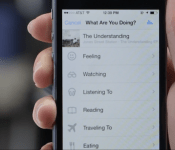
Facebook app will soon identify songs and TV shows just by listening to them

If you’ve ever wanted to tell your Facebook friends what you’re listening to — say, REM’s “It’s The End of The World And We Know it (And I Feel Fine)” — without having to spell the whole thing out, well, now you can. Facebook has just announced a new option in its mobile app that can detect the song, TV show or movie that’s playing in the background just by using the phone’s microphone. Once it names that tune (or show), you can simply insert that info into your post with just a few taps — no typing required.
Songs will appear as 30-second previews linked to Rdio, Spotify or Deezer depending on your preference (if you don’t have a preferred service, Facebook will select one at random), while TV shows will indicate not just the name of the program but also metadata like the season number and episode title. Once you choose to turn the feature on — and yes, it’s opt-in — the microphone will kick in whenever you’re in a compose window. You’ll know it’s working when you see a blue audio bar animation either in the top right corner or over the smiley icon at the bottom.
Having the app listen in to your environment sounds like a rather creepy proposition, but Facebook assures us that the app is only scanning for song and TV info and no sound is ever recorded or stored on its servers. You’ll also always have full control over your posts and can decide not to share what it detects. In other words, you don’t have to reveal that you were just watching My Little Pony if you don’t want to.

Aryeh Selekman, a product manager at Facebook, tells us that the audio recognition feature was born out of the “feelings and activities” selector tool that the company rolled out last year. “We’ve seen over 5 billion feelings and activities posted just in the past year,” he said. “We just wanted to make it faster and easier to do.”
The team at Facebook spent a little over a year dedicated to the project, eventually coming up with a unique audio recognition algorithm built entirely in-house and from scratch. A Facebook spokesperson tells us a lot of that time was spent establishing partnerships with content providers, resulting in millions of songs in its catalog and the ability to recognize programming from 160 TV stations.
When asked how the technology worked, Selekman said that it functions at a millisecond level. “As audio comes into the device, it immediately gets converted into these unique codes that we can use to identify properties that’s specific to the content […] It then looks up the code in the database and finds a match.” The technique appears slightly different from Shazam, another popular audio recognition service. “For every Shazam, the application analyzes the audio and generates a tiny unique fingerprint based on the audio characteristics found within the sample,” said Charles Henrich, Shazam’s Executive Vice President of Engineering. “It then uses this fingerprint to search against our database of tens of millions of audio tracks until it finds a match.”

I had a chance to preview the new song and TV show identification feature a few days ago, and I was overall quite impressed by its speed and accuracy — bearing in mind that I was testing it in a quiet conference room, which is very much an ideal setting. Identifying songs took mere seconds and naming TV shows didn’t take much longer. Indeed, the app only needed the first ten or so seconds of a Game of Thrones clip before nailing down that it was from the sixth episode of the fourth season. The audio recognition even works for live TV — it figured out we were watching CNN within a few seconds. Though we didn’t have a chance to test it, Facebook tells us it’s able to recognize live sporting events as well.
“This lets you add a soundtrack to your posts,” said Selekman, stating that you can use it to bundle photos with songs you heard at an event, like during a wedding or a concert. TV show recognition can also help foster conversation about a certain episode, and maybe help you avoid spoilers. Of course, we had to ask if Facebook’s thinking of using the feature for targeted ads, and the company told us that while that’s certainly a possibility down the road, it probably won’t happen just yet as it continues to test the service. Facebook plans to roll out the update to Android and iOS over the coming weeks, so keep a look out for it. In the meantime, check out a brief preview of it below.
Filed under: Facebook
Source: Facebook

Old console, new tricks: Getting the most out of your Xbox 360

Whether you’re holding out for the Kinect-less Xbox One or you’ve already unpacked a new system, there’s still plenty of life left in the Xbox 360. Microsoft will have its new system properly on track after another half dozen or so software updates, but until then, it’s all about getting everything we can out of older hardware. Nearly nine years later, here’s how to make sure your Xbox 360 is aging gracefully.
Cancel your Xbox Live subscription

You’ve probably heard that Microsoft is switching up how Xbox Live Gold works next month, but if your 360 is more of a Netflix machine than an online gaming portal, then you can start saving money right now. If you cancel your Xbox Live subscription before August 31st, you’ll get a prorated refund for the time remaining — this FAQ has more details.
Keep your Xbox Live subscription

But wait! Before you hit that button, maybe it’s time to see if you’ve been getting your money’s worth from Xbox Live Gold. It’s about more than just multiplayer gaming or apps like Netflix and Vudu. The first way to save money is by checking for deals on the subscription itself. Regular pricing for Xbox Live Gold is $10 per month or $60 per year. Keep an eye out for deals from retailers like Best Buy, Amazon, eBay or even the Microsoft Store that cut the entry fee by $10, $20 or even $25. Next, check out this chart that lays out what’s available to everyone, and what will still require Xbox Live Gold after June.

Protip: Check out our deals updates for a heads-up, or keep an eye on websites like CheapAssGamer, FatWallet or SlickDeals to find out when sales are happening. Otherwise, double-check any new games you buy, as they frequently are either available as bundles that shave some of the cost, or include a trial card inside that’ll help you sate that weekend craving for some Halo.
Games with Gold

After Sony introduced an Instant Game Collection with PlayStation Plus that doles out free games every month, Microsoft responded by adding Games with Gold to its package. Sure, the monthly freebies are coming to Xbox One, but the Xbox 360 version has one big advantage over the XB1 and PlayStation offerings: You can keep the games. That’s right, all you need to do is check in twice a month (on the 1st and the 16th), start a download of whatever is currently being offered and it’s yours for good, even if you cancel Xbox Live Gold later. The only downside? So far, they’ve usually included older and lower-profile titles than the competition, but you can see a complete list here. This month’s games were Dust: An Elysian Tail and Saints Row: The Third, and in June, subscribers can snag Dark Souls, Charlie Murder and Super Street Fighter IV: Arcade Edition — not a bad haul for zero additional cost.
Protip: There’s an additional benefit of Deals with Gold that adds a monthly rotation of discounted games, videos and DLC — check Major Nelson’s blog to find out what’s going on sale and when.
Xbox 360 SmartGlass

In the years since the Xbox 360 launched, Microsoft added a new way to interact with the system other than just gamepads and remotes: your phone or tablet. The SmartGlass app (formerly known as My Xbox Live) can control apps, games and movies on the Xbox 360, and even search content using Bing. The simplest way to use it is with Xbox Live. Sending messages to friends or checking their Xbox Live status is often quicker from the second screen, and your phone likely has a better keyboard than using an add-on for the 360′s controller. The apps are free to install and are available on Android, iOS, Kindle Fire and Windows 8/Windows Phone.
Protip: Get a full list of SmartGlass-enabled games, apps and movies right here.
Clear your cache

Occasionally, issues with your Xbox 360 (glitches in the dashboard, sign-in errors, problems with certain games) can be solved just by clearing its cache. On the Xbox, clearing the cache just removes temporarily downloaded game updates, but it doesn’t affect system updates, game files or anything else on your hard drive. After clearing, you’ll be asked to download game updates again the next time you’re on Xbox Live. To do it, just go to the Settings page, highlight any storage device (cache will be cleared on all devices), press Y, select clear and say, “Yes.” See how easy that was? So easy.
Xbox Live Arcade

Microsoft may have thrown indie games in with the big boys on Xbox One, but on Xbox 360, there are probably still a few smaller gems you haven’t played yet. Over 600 games were pushed to XBLA since launch, including well-known hits like Braid, The Walking Dead, Castle Crashers, Limbo, ‘Splosion Man and Minecraft. Better yet, they have demos, and probably only cost a few bucks to try out. Unfortunately, Microsoft’s Destination: Arcade visual browser hasn’t returned after a short beta test in 2010, but we suggest trying out The Bridge, Bastion, N+, Super Meat Boy, Ascend: Hand of Kul and keeping your eyes peeled for upcoming titles like AirMech Arena and Slender: The Arrival. Know some hidden gems we’ve missed? Leave us a note in the forums so we can try them out.
[Image credit: momo_leif / Alamy]

Amazon’s Prime Instant Video gets its first HBO shows, right on cue

If you’ve been waiting for the day you could marathon The Wire without buying a DVD set or an iTunes pass, your moment has come: as promised, Amazon has rolled out the initial wave of HBO shows on Prime Instant Video. Those shelling out $99 per year (or $79 if you’re lucky) can now stream every season of older series like Deadwood, The Sopranos and The Wire as well as a handful of seasons from ongoing productions like Boardwalk Empire and True Blood. You’ll also get a smattering of comedy specials, documentaries and movies. While you’ll have to remain patient if you want to watch fresher shows, such as Girls or Veep, this is still a big deal if you want to see what you’ve been missing on premium cable TV — or if you’d just like to revisit a favorite episode.
Filed under: Home Entertainment, HD, Amazon
Source: Amazon (1), (2)

Apple Updates WWDC App for 2014 with iOS 7 Design and New Orange Theme
Apple has updated its WWDC app for this year’s developer conference in San Francisco, with the app confirming that WWDC will kick off with the usual keynote address scheduled from 10 AM to noon Pacific Time on Monday, June 2.
Unlike last year’s update that brought new features such as video integration, today’s update appears to include no significant feature additions, although it does include a new orange theme and a new look more consistent with Apple’s iOS 7 design language.

WWDC 2014 will kick off on June 2, and CEO Tim Cook is expected to lead the keynote with other executives pitching in to help share the latest news on Apple’s hardware and software. Apple’s WWDC app is available free of charge from the App Store. [Direct Link]

Apple Among Highest-Ranking Brands in Latest Workers’ Rights Report [Mac Blog]
International aid organization Baptist World Aid Australia released its Electronics Industry Trends report that examines working conditions for employees throughout the technology supply and manufacturing chain (via ZDNet). Apple was one of the highest-ranking brands in the report, which includes suppliers in all facets of the supply chain starting with mineral extraction and extending to the end stage of product assembly.

According to the report, Apple scored a B+, placing it just below Nokia, which was the leader with a B+ score on the basis of being able to prove it was paying workers a living wage. Paying a living wage was a key metric, with most of the surveyed companies (97 percent) not able to confirm they were paying workers at a rate that would meet their basic needs for food, water and shelter.
“Apple’s inclusion in the top tier may come as a surprise given the public attention it has received for poor working conditions and child labour at Chinese suppliers like Foxconn and Pegatron. In fact, Apple itself reported finding eight facilities using child labour in 2014,” said the report.
Apple has made significant progress in addressing poor working conditions in supplier factories, following several high-profile reports of labor violations at manufacturers such as Pegatron and Foxconn. Apple now routinely audits supplier factories and documents working conditions in a yearly report published on the company’s Supplier Responsibility section of its website.
Apple has pledged to prevent excessive work hours, unethical hiring policies, and the hiring of underage workers at the factories that supply Apple with parts. The company takes this commitment seriously, dropping suppliers when they are found to be violating its Supplier Code of Conduct.

Samsung Galaxy S5 Active posing on pictures and videos

There’s hasn’t been much info regarding the Galaxy S5 Active, all we had so far were the apps leak. This leak is going to make up for all that though, we’ve got pictures, videos, the whole shebang, courtesy of TK Tech News. So, let’s get started.
This leaked material definitely reminds us of the Galaxy S4 Active, it’s not that hard to believe this is the Galaxy S5 turned Active. It’s definitely beefed up, it look quite resilient. I guess there’s less point in releasing the S5 Active considering the S5 is water-resistant, but S5 Active should be water proof and quite less prone to damage if dropped or something to that effect. There are still people out there who will appreciate the ruggedness of the S5 Active, especially if they’re extremely clumsy or the S5 Active suits their lifestyle, job or something to that effect.
Do you plan on getting the S5 Active? Pictures and videos look quite legit, you can check all that out below.


VIA: Pocketnow
SOURCE: TK Tech News (Twitter 1, 2)
The post Samsung Galaxy S5 Active posing on pictures and videos appeared first on AndroidGuys.
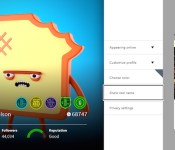
Xbox One’s June update adds your friends’ real names and external drive support

Here are some hard facts: regardless of how proud you are of that Xbox Live handle combining your love for Halo, the Deftones and Arrested Development without subbing in numbers for letters, it’s probably hard for online pals to tell you apart from xXC0rtanaSl4ve69Xx. With the June Xbox One update, though, you’ll have the option to add a real name to your profile, and thus, friend notifications. Not entirely cool with the rest of your Titanfall squad knowing your given name? No sweat: you can cherry pick who sees the name your parents gave you from who doesn’t. And yes, you’re right: this is something that the PlayStation 4 has offered since it launched in November. This patch finally allows using external drives for storage too, so long as they’re USB 3.0 and are at least 256GB. The update also implements an auto sign-in feature, which should especially come in handy if you pick up a Kinect-less console next month. Previously, you’d either have to manually select a profile and sign in or let Kinect scan you and activate your account.
If you didn’t use SmartGlass much before, push notifications when your friends start broadcasting via Twitch, and the ability to watch said streams on your device could change that. What’s more, the One Guide’s TV listings are coming to the companion app in addition to a universal remote. While it might seem like these updates are happening more and more often, that’s all according to plan. Back in January, Microsoft said that frequent patches would roll out to help the console become “better faster,” and well, that’s what we’re seeing.
Filed under: Gaming, Home Entertainment, HD, Microsoft
Source: Xbox Wire

Google ads could be coming to thermostats, refrigerators and car dashboards

Targeted ads have popped up in Facebook, Instagram and Twitter feeds as well as inside mobile apps and more. That said, it shouldn’t really be a surprise that Google has seemingly explored the possibilities of beaming those advertising bits to some rather unique places. In a letter to the Securities and Exchange commission concerning mobile revenue disclosure, the folks in Mountain View said flashing ads and services on “refrigerators, car dashboards, thermostats, glasses, and watches” is quite plausible. This isn’t a huge leap as many items on that list are powered by Android to some degree, and Google nabbing up Nest back in January locks down the remainder. Audi, Honda and other auto makers have ported the mobile OS into vehicles, Android Wear is set to sort smartwatches and we’ve being seeing smart friges and ovens at CES for years now. And of course, Google Glass. So when you’re AC craps out in the heat summer, perhaps that learning thermostat will show you the best local HVAC contractor in the near future.
Via: Wall Street Journal
Source: SEC

Spotify stays ahead of its streaming rivals with 10 million paid subscribers

Spotify has no shortage of competition, but it looks like the streaming music service is managing to stay ahead of the pack. The company has just notched up its 10 millionth paid subscriber, doubling the number of Premium customers it had a year and a half ago; the growth rate has been clearly accelerating, since it took four years for Spotify to land its first five million. Plenty of free customers have hopped aboard, too, as the total active base has doubled since late 2012 to hit 40 million.
Comparing against rivals is tricky, since they’re not always as eager to boast about major milestones. However, it’s clear that there’s still a significant gap. Rdio, one of Spotify’s best-known challengers, had 6 million paying listeners as of late 2013; Deezer had 5 million at that time. Whether or not Spotify can keep up its current pace is another matter. Part of the music provider’s lead comes from launching in some regions ahead of its peers. While it’s still one of the most widely available services, with access in 56 countries, opponents like Rdio are quickly expanding their reach — it’ll soon take more than broad coverage to stand out from the crowd.
Filed under: Internet
Source: Spotify
 AIVAnet