



Engadget Daily: Microsoft Surface Pro 3 review, hacking Watch Dogs and more!

We put Microsoft’s new Surface tablet through the review ringer, took a look at vaporizer technology, found out just how realistic hacking in a video game can be, and discovered that Sony’s new console’s raking in the cash. Read on for Engadget’s news highlights from the last 24 hours.

Surface Pro 3 review: Has Microsoft finally made a tablet to replace your laptop?
Microsoft surprised us with by announcing the Surface Pro 3. We got to spend some quality time with the device and shared impressions in our review. Can this laptop / tablet hybrid take on the latest and greatest tablets and computers from Apple, Lenovo and others?

The real-life hacking behind Watch Dogs’ virtual world
Ubisoft’s Watch Dogs is finally going to be released next week. How realistic is its portrayal of the world of hacking and cyber-espionage? To make it as real as possible (while keeping gameplay fun), the publisher consulted with digital security firm Kaspersky Labs.

What you need to know about vaporizers
Smoking’s a tough habit to break, but there’s a number of products available to help cope with nicotine addiction. One way that’s grown exceedingly popular in recent years is vaping. Our own Sean Cooper takes a closer look at the world of vaporizers and the questions surrounding the technology.

Sony’s PlayStation 4 is already profitable and on course to beat the PS2′s success
The PlayStation 4 is already turning a profit and the current rate of sales means that it’s on track to best even the PlayStation 2. That’s huge news for a company that has been having some financial struggles as of late.
You also might like:

Apple’s Acquisition of Beats Could Be Delayed Because of Valuation, Roles, and More
Last week, reports indicated that Apple’s acquisition of Beats would not be finalized until this week. With the week ending and no deal having been announced, a new Billboard report offers insight into what could be holding up the deal.
 Billboard’s sources indicate the deal “is complicated”, as it would be Apple’s largest acquisition. In addition, the news apparently leaked “too early”, with Apple nowhere near ready for news to break despite publications like Re/code and The Financial Times reporting that the deal is close to completion.
A video that was uploaded to YouTube of actor/musician Tyrese alongside Beats co-founder Dr. Dre is another possible reason for the delay, with Dre claiming that he was the first billionaire in hip hop after the deal. The video apparently “freaked Apple out” and had the Cupertino company outraged.
Apparently, the Apple family near imploded with outrage when that video went up on Facebook of an ‘excited’ Dr. Dre with R&B singer/former Coca Cola pin-up Tyrese. In the video they share, in language perhaps unsuitable for a family blog, how Dre will be hip-hop’s first billionaire and other nice things about Compton.
Fourth, Apple allegedly isn’t sure whether to give Beats co-founders Jimmy Iovine and Dr. Dre roles as permanent consultants or whether to give them full-time executive roles. Apple is also apparently unsure whether the two of them would fit into the company’s corporate climate, despite reports that Iovine and Dre are the “big prizes” of the acquisition.
Finally, another rumored sticking point is Apple’s valuation of Beats Music, which has around 200,000 subscribers and has been speculated as one of the main reasons behind the acquisition. Apple is apparently planning to keep Beats Music separate entity from iTunes in order to avoid cannibalization of iTunes music sales.
Apple pundit John Gruber of Daring Fireball offered another scenario, discrediting the Billboard report and speculating that Beats may have leaked to the deal, angering Apple and scuttling the acquisition before it could be completed.

Analog Synthesis: The life and legacy of Bob Moog

For many, the name Robert Moog may only sound familiar due to the synthesizer company that bears his name… if at all. However, chances are you’ve likely heard one of the instruments that carry that label during the course of your Spotify or Rdio streaming sessions. Acts ranging from Nine Inch Nails to Chvrches, Deadmau5 and Dr. Dre employ Moog’s synths, so hearing one of his iconic synthesizers blast from your headphones is just a matter of time. As you might expect, the story of the brand begins with its eponymous founder and the first keyboard-driven synth back in 1964. On what would’ve been his 80th birthday, we take a look back at the lineage and legacy of Bob Moog.
The Lineage

Even if you’re familiar with the name, you might not know that Moog largely began as a theremin company. In 1954, when he was 19, Moog started building and selling custom theremins with his father, tallying up sales of 1,000 units by 1961. Two years later, he was knee-deep in constructing voltage-controlled oscillators, voltage-controlled amplifiers and pitch modulators with composer Herb Deutsch — all key components for modular synthesizers and the sound that would become synonymous with the name. “Mind you, neither of us had any idea where this was leading,” Moog would say in a later interview.
“Mind you, neither of us had any idea where this was leading.”
From there, Moog debuted the aforementioned keyboard-powered synth in 1964 and never looked back. At the time, few other synthesizers wielded a piano-esque set of keys as the primary method of input. Prior to then, patch cables, nobs, sliders and touch keyboards were the primary means of manufacturing sounds. Of course, one of the main issues remained size. Keith Emerson’s Moog Modular System debuted that same year and was quite a load to move from venue to venue for Emerson, Lake & Palmer shows.
That all changed in 1970, though, with the introduction of the Minimoog Model D, one of the first somewhat affordable and, most importantly, portable analog synths. The model would be continually improved and re-released in several different versions down the road. Moog would leave the company in 1977 and between 1983 and 2002, the rights to the brand were held by multiple owners while its founder pursued other projects. It was in 2000 that a Voyager prototype was shown off at the winter NAMM, an option that would go on to become an electronic music staple in the years to follow, and the first to be released once rights to the name were resecured and Moog returned.
Moog Music, as the company has been known since those rights were retained, didn’t let up on the innovation when its founder passed away in 2005. The company’s workshop-like factory is nestled on the edge of downtown Asheville, North Carolina, and houses engineering, design, production and a retail store, plus an in-house studio for traveling musicians passing through. The latest product, the Sub 37, is due to roll out this summer and, as with the Voyager before it, had its introduction back at NAMM in January. Engineer Amos Gaynes told me during a recent visit that the 37 was really born out of pushing the boundaries of last year’s popular $1,000 Sub Phatty. “The Sub Phatty set a high bar, but the excitement was multiplied by all of the possibilities that you could see right in front of you,” Gaynes says.
The goal for the Sub Phatty was for it to be the most affordable keyboard-integrated offering that Moog had released. With that in mind, controls and panels were kept simple and straightforward with only the necessities included on the surface. Gaynes continues, “In the process of implementing what was on the panel, there was sort of an exploratory process of, ‘Well, if it can do that, it can probably also do this.’” Those tweaks became the primary additions for the full-featured Sub 37; things like linear detuning, snappier envelopes and an extended keyboard. This habit of revising and improving synthesizer models has become a habit at Moog over the years.
The Instruments
Those new releases aren’t all that’s keeping the momentum, either. Moog synths like the Voyager have nabbed the delicate sonic sensibilities spanning genres and generations through regular revisions and reissues with expanded capabilities. The exploration never stops at the factory, and it’s quite evident when you speak with anyone who works there. It’s thanks to Bob Moog’s work on more compact and portable instruments that every electronic musician doesn’t have to cart around a massive unit like Emerson’s for live shows. Here’s a brief primer on a small portion of that instrument heritage in pictures.

The First Moog Modular Synthesizer (1964): Debuted at the Audio Engineering Society (AES) convention, this unit was the first voltage-controlled synth to use a keyboard as it’s primary input method.

Minimoog Model D (1970): This way the first compact and (somewhat) affordable portable synthesizer for musicians. It also laid the groundwork for the popular Minimoog Voyager line that debuted in a few decades later. The Minimoog was also the first unit to hit store shelves, as most were made-to-order custom-built affairs prior to its arrival.

Moog System 55 (1973): If you ask folks what a “vintage synthesizer” looks like, they’re likely to give you a description of this. The larger cabinets allowed buyers the ability to tweak the instrument to suit their audio needs with patch cables and more.

Micromoog (1975): While it only packed a single oscillator, this was meant to offer the performance that Moog was known for on a budget as a more affordable alternative to the Model D. Of course, it’s compact build made it super portable, too.

Minimoog Voyager (2002): The Voyager was the first synthesizer released after Moog retained the rights to the brand and based on the Minimoog Model D. This time around, a touch control surface was included on the panel with MIDI interface to boot.

Minimoog Voyager XL (2012): A mash-up of nearly all of the sounds found in both the original Minimoog Model D and the Voyager, the larger model brought back front-panel patching from the classic modular units.

Sub Phatty (2013): Designed to be the most affordable analog synth ever offered by Moog, the instrument offers the bare essentials for creating thick tones on it’s front panel.

Sub 37 (2014): Based on the Sub Phatty sound engine, the Sub 37 serves up a Duo Mode that allows the dual oscillators to be played independently with the iconic Moog Ladder Filter and an extended keyboard.
The Legacy

When looking to gauge the impact of Moog’s work across the current music landscape, it’s important to seek out opinions of those who have experience with a wide range of instruments. Paul Meany of the New Orleans-based outfit Mutemath is one such option. The band employs quite the array of sounds on each record they produce, layering parts to make the whole. Meany himself has wrangled all kinds of keyboards, organs, synthesizers, keytars and even homemade hacked gadgets to get just the right sound.
He remembers his first encounter with a Moog instrument well. Thanks to a friend who thought they had a broken piece of gear, he inherited a perfectly functional Realistic Concertmate MG-1 — a synth made by Moog for RadioShack back in 1981. “All of a sudden, I had this real-sounding thing,” he says, after previously only toying around with Yamaha and Casio offerings.
“Ever since those early days, I’ve tried to keep Moog instruments a part of whatever we’re doing.”
“Ever since those early days, I’ve tried to keep Moog instruments a part of whatever we’re doing,” he continues. He’s rather quick to point to the Voyager as the unit that sticks out most. “Is there ever a band on TV that doesn’t have a Voyager?” he asks. If you happened to tune in to the Coachella live streams, you undoubtedly caught a glimpse of one of many such synths on stage. There’s no denying that the Voyager has certainly become a staple in modern music. Meany explains, “It’s such a great, solid, dependable analog keyboard, and we have one of those that we play a lot.”

He says the new Mutemath record is probably more synth-laden than others, partially influenced by the band’s time spent in the Moog Sound Lab last fall — that in-house studio of sorts at the factory where musicians reimagine tunes using only Moog gear. But their last effort, Odd Soul, has plenty of the iconic sounds layered in, too. “The Moog and the synth bits that we did on Odd Soul [are] what made it sound like more than just a three-piece rock band record,” says Meany. You can get a taste of those tones on tracks like “Allies,” “All or Nothing” and “In No Time” off of that album.
So what is it about that Voyager, or any of the modern Moog synths for that matter, that draws so many musicians to them? “It’s hard to screw up,” he confesses. Indeed, these instruments are quite easy to begin making sounds with and there’s really no wrong way to go about it, so they’re ripe for amateurs and experimenters alike. He explains, “It’s kind of a sound safety net for us” — when songwriting hits a snag, a lick from the synthesizer pulls them out of it.
The Future

Moog’s tech has graced guitar pedals and even mobile apps, making the tones that have driven the synthesizers accessible to anyone with an iPhone or iPad for a minimal investment of just a few dollars. Theremins still play a sizable role as well, with the Theremini that’s suited for players of all levels to get in on gesture-controlled action. With the introduction of the Sub 37 after pushing the boundaries of the Sub Phatty before it, it’s quite clear that the mindset that drove Moog’s instrument building and constant experimentation is still alive and well. The company remains focused on analog systems while looking to bring its legendary sounds to more folks. As a result, Moog stands to be a staple in studios and on stages for decades to come.
Image credits: Ileana Grams-Moog (Bob Moog photos); Moog Music (synthesizers); Getty (Mutemath/Paul Meany)
Filed under: Misc

X-Men enthusiast turns himself into a real-world Magneto (sort of)

Sure, we’d all love to have at least a few super powers, but finding the right scientific “accident” to make your dreams comes true can be such a hassle. One British inventor, Colin Furze, is taking matters into to his own hands, and has started designing projects that give him some of the same abilities as X-Men characters. He started with real-world Wolverine claws, and now he’s channeling metal-master Magneto with shoes that let him walk on the ceiling. It’s not exactly the same experience you might have if your whole body was able to control magnetic fields, but it’s still pretty impressive to watch.
Creating the mutant footwear was pretty complicated, and involved a few trials and a lot of errors. Furze’s first idea involved placing small electromagnets inside the soles of his shoes, a solution that wasn’t strong enough to hold his 177-pound frame. Strapped for cash and on the hunt for something stronger, his search eventually led him to a junkyard. Turns out, the transformers in microwaves can actually work as pretty powerful magnets when electrically charged. They’re so strong in fact he needed to strap just one of them to each foot in order suspend himself from a metal rod in the ceiling of his garage.
After figuring that out, the final step was working out how to move, a problem he solved with handheld switches that power the current on and off temporarily releasing the magnet’s hold. Ultimately Furze was able to take a pretty epic upside-down stroll, complete with a not-so-successful snack break. While impressive, the magnetic trick is also far from his last attempt at mutant glory. Furze plans on posting his next, currently secret, creation on May 29th. After seeing his success so far, we’d love for him to take on one of the female X-Men. Controlling the weather like Storm can’t be that hard, can it?
Filed under: Wearables
Via: The Creators Project
Source: Colin Furze
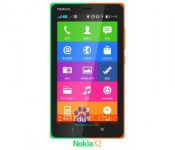
Nokia X2 will be slightly bigger, slightly more powerful

When the Nokia X, originally known as the Nokia Normandy, was announced, most were disappointed by its entry-level specs. The device rocks a 4-inch 800 x 480 display, 1GHz dual-core Snapdragon S4 processor, 512MB RAM, 4 GB internal storage, 3-megapixel rear camera with fixed focus and dual-SIM cards while running a heavily-skinned version of Android with no sign of Google services.
According to Digital Trends, a mystery device listed as the Nokia X2DS (RM-1013) recently showed up on the AnTuTu benchmarking site along with a spec sheet. The device they’re calling the X2 seems like a slightly updated version with a 480 x 800 pixel resolution 4.3 inch display, dual-core MSM8x10 processor clocked at 1190MHz, an Adreno 305 GPU, 1GB RAM, 4 GB storage onboard, a 5-megapixel back camera and a 0.3-megapixel front-facing camera and still offers dual SIMs.
With an AnTuTu score of 11,827, the X2 will be no flagship device, but may be a little bit better option for emerging markets, although you may want to consider the Moto E or G instead.
VIA Digital Trends
The post Nokia X2 will be slightly bigger, slightly more powerful appeared first on AndroidGuys.

Samsung hopes ‘respected older generations’ will dig its new flip-phones

It may be a tad ageist to presume that some older folks prefer simple flip-phones to souped-up smartphones, but Samsung isn’t making any apologies. In fact, the firm’s just introduced a new line of clamshell phones in South Korea that’s aimed at “respected old generations.” Dubbed “Samsung Master,” the class of handsets keeps things tame (and decidedly 2008) with 2G and 3G radios, a 3-inch screen, pedometer and FM radio. Of course, even a feature phone would’t be complete without some flair. Not only are the phones available in black, red and silver, but their backs and keypads wear the faux stitched leather that’s become a staple in the company’s other hardware. If you happen to find yourself in South Korea with 240,000 won (roughly $234) to spare, you can snap up the distinguished-looking flip-phone for yourself.
Filed under: Cellphones, Samsung
Source: Samsung (Flickr, 1), (2)
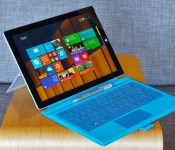
Surface Pro 3 review: Has Microsoft finally made a tablet to replace your laptop?
It didn’t last long, but there was a moment earlier this week when I was sure Microsoft would unveil its own laptop. At a press event, Surface chief Panos Panay took the stage to remind the reporters in attendance how they once said tablets would make laptops obsolete. A quick scan around the room revealed rows of journalists, all typing on Ultrabooks — including the MacBook Air, no less. For a moment, it seemed like Panay was conceding defeat.
Indeed, Microsoft has had multiple chances to prove it can bridge the divide between slates and laptops: Both the first- and second-gen Surface tablets were intended as do-it-all devices. And both times, the company fell short of its mission. The Surface Pro in particular was powerful enough to rival Ultrabooks, but suffered from several usability flaws: It was awkward to use in the lap, and also unwieldy as a tablet. For most people, a touchscreen laptop was still the better choice.
Even so, that wasn’t Panay conceding defeat up there on stage — that was him being persistent. When he finally did get to the point, he unveiled not a laptop, but a tablet, the Surface Pro 3. Most notably, this third-gen device steps up to a larger, 12-inch screen, bringing it in line with contemporary Ultrabooks. The keyboard has been born again too, this time with a larger, more responsive touchpad and the ability to prop it up at a more comfortable angle. As a tablet, meanwhile, the Surface Pro 3 is thinner and lighter than the Surface Pro 2, despite having a bigger display. Just as important, the device will start at $799 when it goes on sale next month — that’s a hundred dollars less than last year’s model. All told, the Surface Pro 3 is Microsoft’s biggest, fastest, thinnest, lightest, best tablet yet. Panay even went so far as to say, “Today we take the conflict away.” Did they, though?
Hardware
Physically speaking, the Surface Pro 3 has more in common with the Surface 2, which runs Windows RT, than with previous Surface Pros. This year, Microsoft ditched the old carbon-black color in favor of a more playful silver, though the chassis itself is still made of sturdy magnesium alloy, with chamfered edges making it easy to wrap your fingers around. It’s not just the color, though, that makes me think of the Surface 2: The Surface Pro 3 measures just 0.36 inch thick, making it only a tad fatter than the Windows RT model; that guy comes in at 0.35 inch wide. This is stunning when you remember the Surface 2 is a traditional tablet, comparable to the iPad, whereas the Surface Pro is basically an Ultrabook without a built-in keyboard. In fact, Microsoft says this is the thinnest machine with an Intel Core i7 processor. It may also be the lightest too, at 1.76 pounds. And even if it’s not, it’s still a meaningful improvement — both the first- and second-generation Surface Pros weighed two pounds.
The Surface Pro’s thinness seems even more impressive when you compare it to its peers: full-fledged Ultrabooks. Most 13-inch Ultras come in at around three pounds and half an inch thick (if they’re lucky). Even the 11-inch MacBook Air, which benefits from a smaller footprint, tips the scales at 2.38 pounds. Next to those systems, the Surface Pro 3 is impossibly compact. In fact, I was loath to go back to my 13-inch MacBook Air after my review was over; the new Surface is just so much lighter. Truly, why can’t all Ultrabooks be this easy to carry?
As a tablet, of course, the Surface Pro still doesn’t feel particularly light; you don’t just forget what it feels like to use a lighter device like the iPad Air. That said, it’s definitely lighter than a 12-inch tablet has any right to be. Also, there’s this: Despite that bigger screen — or maybe because of it — the Surface Pro 3 handles better than its predecessors. For one thing, blowing up the screen size actually allowed Microsoft to slim down the proportions. Think about it: With more internal space to work with, the engineers were able to rearrange the components, laying some items side by side instead of stacking them on top of each other. The result is a substantially thinner device that might not have been possible had Microsoft stuck with a 10.6-inch screen size.
Additionally, the new Surface Pro has a different aspect ratio: 3:2, instead of the usual 16:9. During his keynote, Panay said the company was actively trying to mimic the dimensions of a legal pad, the sort of object humans are already used to holding, and working with. It was a smart move, I think: With this new shape, the tablet feels less top-heavy in portrait mode, and it’s easier to reach things with your thumbs in landscape. Goes to show that weight reduction isn’t everything (though it definitely helps).

There’s one more design change I haven’t yet talked about, and that’s the kickstand. As it is, the Surface 2 and Surface Pro 2 have dual-stage kickstands that can be arranged in one of two positions. The Surface Pro 3 goes a step further — literally — with an option to pull out the kickstand at a near-flat 150-degree angle. This is useful if you’re playing a board game or using a drawing app, and an upright angle won’t do. All in all, too, the kickstand feels well-built, if a little rigid. Granted, I wouldn’t want the hinge to move so easily that it verges on snapping off. But the kickstand here is so tightly wound that I actually feel a bit naughty every time I push it back into that 150-degree position; there’s so much friction that when I push the stand back, I feel like I’m doing something I’m not supposed to. It’s also still a bit awkward to pull the kickstand out, since there’s only a notch on one side of the tablet. Again, though, it feels durable, and still makes that soft “click” sound every time you snap it shut.
Despite the bigger size, the port selection is the same as ever. That means: a power button on the top landscape edge; a Mini DisplayPort and USB 3.0 connection on the right; and a volume rocker and headphone jack on the left. The bottom, of course, is home to the magnetic guides that allow it to click into the optional Type Cover keyboard (more on that in a moment). There’s also a microSD slot tucked under the kickstand, supporting cards as large as 128GB. Microsoft also upgraded the cameras so that both go up to 5-megapixel resolution. Meanwhile, there’s a proprietary charging port on the right side, just below the USB socket. Though the charger stays put, it’s still awkward to insert — a minor annoyance you’ll surely get used to, should you choose to buy this. As for the front-facing speakers, said to be 45 percent louder than last year’s model, they pass my “Dolly Parton rundown test” with flying colors. (They make other kinds of music sound good, too.)
Finally, there’s one thing you won’t find on this device: a place to stow the pen. Rather, you’re supposed to slip it inside a loop that attaches to either the Surface or the optional Type Cover keyboard. Unfortunately, the thing fell off after just a few days of use, which means you’re probably on your own when it comes to making sure you don’t lose your writing implement.
Display and pen input

The Surface tablets have always had lovely displays, and the third-gen Pro is no exception. What we have here is a 12-inch, 2,160 x 1,440 IPS panel, with text so sharp you’d have to put your nose up against the screen to see any pixels. Colors are punchy, but balanced, and the viewing angles are good too, though even a low-glare screen like this isn’t immune to reflections from overhead light. In general, I had little trouble reading the screen, but using the Surface in my lap was sometimes challenging; the most stable kickstand position doesn’t necessarily mean the best viewing angles.
Under the hood, Microsoft used some different pen technology this time around: an active digitizer made by N-trig, as opposed to Wacom. While it might sound like I’m harping on specs there, hear me out: You’ll be making some trade-offs. On the one hand, Wacom’s digitizer offered more nuanced pressure sensitivity: 1,024 degrees, versus 256 from N-trig. On the other hand, N-trig’s setup allows for a thinner glass display and thus, a slimmer overall design. Additionally, N-trig’s pen was designed to feel more like a proper, ink-based pen, and is therefore more natural to hold. Likewise, the screen has just enough friction that drawing on it feels more like dragging a pen across paper — or as close as you can get, anyway. Personally, I’d choose a thinner, lighter device over more precise pressure sensitivity, but hey, don’t let me set your priorities for you.
As you’re using the pen, you’ll notice it does some old tricks, along with some new ones too. It supports hovering, for instance, and you can use the top button as an eraser in select apps. On a more surprising note, you can press that top button to wake the tablet from sleep, at which point OneNote will open above the lock screen. Kind of like how you can already use the camera app from the Windows 8.1 lock screen. Also, OneNote now sends your scribbles to the cloud as you’re writing them — not unlike how you’d expect Google Drive to immediately save your work.
Typing experience

Just so you know, I’m typing this sentence from a Surface Pro 3. The thing is sitting in my lap, even. And you know what? I’m doing alright. This isn’t my favorite laptop keyboard — not by a long shot — but I’m doing OK. And I think you will too. But before I get ahead of myself, let me explain what you’re getting here. The first thing you should know, perhaps, is that there’s just one keyboard option: a backlit Type Cover keyboard built specifically for the Surface Pro 3′s bigger frame. For now, at least, the flat Touch Cover keyboard is not an option. Frankly, I always preferred the physical buttons anyway, just because the learning curve is so much smaller. The only thing you’ll miss, maybe, is the Touch Cover’s lighter-weight design. But given the choice, I’ll take a more natural typing experience over a lighter keyboard any day. And hey, the tablet’s already pretty light; you can deal with a few extra ounces.
What I like best about this new keyboard is that I don’t have to type on a completely flat surface if I don’t want to. Unlike previous Type Covers, this one has a magnetic strip on the top, allowing you to fold up the upper piece of the keyboard so that it attaches firmly to the tablet’s lower bezel. The end result is sort of a wedge profile, similar to what you’d find on a proper laptop. And it goes a long way in making the thing more comfortable to use. Mind you, nobody’s forcing you to pick the propped-up option; you can go flat if you want to. I just don’t understand why anyone would.

The problem is that the keyboard is flimsy, and it’s nowhere as sturdy or comfortable as “real” keyboards. As I type this, I can see the keyboard cover giving a bit under the weight of my fingers; it’s enough to make me not want to use it in my lap (though I do it anyway, out of necessity). With every keystroke, I make a loud “clack,” letting anyone around me know I’m getting stuff done. The keys are also bunched close together — the opposite of your standard chiclet layout. That means it’s a little too easy to hit the wrong key. Luckily for me, I have a copy editor, so you can’t tell how many typos I actually made while writing this review. Suffice to say, it was enough that I eventually started to type more gingerly, in the hopes I wouldn’t make quite as many mistakes.
The Surface Pro 3′s Type Cover also brings an improved touchpad. And that’s good timing, because the latest Windows 8.1 update made the OS much more mouse-and-keyboard friendly. In brief, the trackpad here is bigger, with a built-in touch button you can press down on. It’s also said to be more responsive, but I’ll be the judge of that, not Microsoft. Even if the trackpad is more precise than it used to be, it’s still many steps behind the sort of glass touchpad you’d find on the MacBook Air or many Windows Ultrabooks. It sometimes takes multiple tries to get two-finger scrolling to work. Ditto for clicking and dragging windows and other objects around the screen. Other times, I accidentally navigated backward out of a web page when I was really trying to do some other sort of gesture. If you’re serious about having a mouse, especially in desktop mode, you might be better off using a Bluetooth one, especially if you intend the Surface Pro to be your daily driver.
Performance and battery life
| PCMark7 | 3DMark06 | 3DMark11 | ATTO (top disk speeds) | |
|---|---|---|---|---|
| Microsoft Surface Pro 3 (1.9GHz Core i5-4300U, Intel HD 4400) | 5,010 | 5,053 |
E1,313 / P743 |
555 MB/s (reads); 252 MB/s (writes) |
| Microsoft Surface Pro 2 (1.6GHz Core i5-4200U, Intel HD 4400) | 4,922 | 6,236 |
E1,906 / P997 / X303 |
534 MB/s (reads); 167 MB/s (writes) |
| Lenovo ThinkPad X1 Carbon (2014, 1.6GHz Core i5-4200U, Intel HD 4400) | 4,773 | 5,881 |
E1,727 / P930 / X284 |
555 MB/s (reads); 137 MB/s (writes) |
| HP Spectre 13 Ultrabook (1.6GHz Core i5-4200U, Intel HD 4400) | 4,786 | 6,005 |
E1,837 / P962 / X293 |
527 MB/s (reads); 327 MB/s (writes) |
| Lenovo IdeaPad Yoga 2 Pro (1.6GHz Core i5-4200U, Intel HD 4400) | 4,676 | 5,688 |
E1,713 / P914 / X281 |
546 MB/s (reads); 139 MB/s (writes) |
| Samsung ATIV Book 9 Lite (1.4GHz “quad-core” processor, AMD Radeon HD 8250) | 2,060 | 2,814 |
E749 / P530 |
550 MB/s (reads); 139 MB/s (writes) |
| Samsung ATIV Book 9 Plus (1.6GHz Core i5-4200U, Intel HD 4400) | 4,973 | 5,611 |
E1,675 / P867 / X277 |
547 MB/s (reads); 508 MB/s (writes) |
| Acer Aspire S7-392 (1.6GHz Intel Core i5-4200U, Intel HD 4400) | 5,108 | 5,158 |
E1,724 / P952 / X298 |
975 MB/s (reads); 1.1 GB/s (writes) |
| Sony VAIO Pro 13 (1.6GHz Intel Core i5-4200U, Intel HD 4400) | 4,502 | 4,413 |
E1,177 / P636 / X203 |
1.04 GB/s (reads); 479 MB/s (writes) |
| Sony VAIO Pro 11 (1.8GHz Core i7-4500U, Intel HD 4400) | 4,634 | N/A |
E1,067 / P600 / X183 |
558 MB/s (reads); 255 MB/s (writes) |
Make no mistake: When it comes to performance, the Surface Pro has always been able to go head to head with traditional laptops. Still, it’s nice to know that as other Ultrabooks have experienced modest performance gains, Microsoft has kept pace. Armed with a Haswell processor (a 1.9GHz Core i5-4300U chip), 8GB of RAM, a Samsung-made solid-state drive and the usual Intel HD 4400 graphics, the Surface Pro 3 holds its own in synthetic benchmark tests, with scores that fall in line with the competition. It also boots quickly, taking just 10 seconds to get to the lock screen and then one more to load the Start Screen. My WiFi connection was consistently fast too, thanks to the 802.11ac radio inside (there’s also Bluetooth 4.0, if you need it).
Accordingly, the Surface Pro 3 can do everything an Ultrabook can do. One of my favorite things about working on a Windows machine is the Snap feature, so I routinely have two programs laid out side by side — usually Chrome and HipChat. In particular, I often have a dozen tabs open at once, including Gmail, my calendar, Engadget, Facebook, Twitter and the publishing software we use to write stories, not to mention the odd Wikipedia page and music-streaming service. In addition to the usual multitasking, you could also edit photos if you wanted, or maybe even cut together some video.
Throughout, the metal surfaces stayed relatively cool, and I didn’t hear much noise coming out of the thin vent that surrounds the perimeter of the device. As with every other Ultrabook, though, the new Surface wheezes a bit during gameplay. Load up a game and the thing gets quite warm — almost hot — to the touch. Hot and noisy, too. At one point, the fans started exhaling so loudly that I heard them even in a loft space with various coworkers milling around nearby. If I can hear it over all that ambient noise, well, that’s not good. Fortunately, it takes a lot to make the system pipe up like that. And if you do, it could be that you’re doing something Ultrabooks weren’t actually designed for.
|
Battery life |
|
|---|---|
| Microsoft Surface Pro 3 | 7:08 |
| MacBook Air (13-inch, 2013) | 12:51 |
| MacBook Pro with Retina display (13-inch, 2013) | 11:18 |
| Sony VAIO Duo 13 | 9:40 |
| Samsung ATIV Book 9 Plus | 8:44 |
| HP Spectre 13 | 8:30 |
| Sony VAIO Pro 13 | 8:24 |
| Lenovo IdeaPad U430 Touch | 7:53 |
| Acer Aspire S7-392 | 7:33 |
| Acer Iconia W700 | 7:13 |
| Sony VAIO Pro 11 | 6:41 |
| Lenovo IdeaPad Yoga 2 Pro | 6:32 |
| Microsoft Surface Pro 2 | 6:27 |
| Lenovo ThinkPad X1 Carbon (2014) | 6:18 |
| Lenovo IdeaPad Yoga 13 | 5:32 |
| Lenovo ThinkPad X1 Carbon (2013) | 5:07 |
| Lenovo ThinkPad X1 Carbon Touch (2013) | 5:00 |
| Samsung ATIV Book 9 Lite | 4:33 |
Microsoft describes the Surface Pro 3′s battery life in two ways: You can get up to nine hours of web surfing (WiFi on, auto-brightness turned off), or you can simply expect a 15 to 20 percent increase over previous models. Translation: Your mileage will vary, but battery life will be improved either way. And improved it is. In our video-looping test (also with WiFi on and auto-brightness disabled), the tablet managed seven hours and eight minutes. Compare that with the Surface Pro 2, which couldn’t crack six and a half hours.
Now, let’s put that seven-hour battery life in context. In short, it’s not great, but it’s not bad, either. Other ultraportables that are either small in size or super lightweight have tended to last a similar amount of time (see: the Acer Aspire S7-392 or the Sony VAIO Pro 11). Even some larger Ultrabooks, like Lenovo’s Yoga 2 Pro and ThinkPad X1 Carbon, deliver less runtime despite having room for bigger batteries. The thing is, of course, there are many Ultrabooks that last much, much longer on a charge. The HP Spectre 13, Sony VAIO Pro 13, Sony Duo 13 and Samsung ATIV Book 9 Plus all last around eight and half hours, if not closer to 10. (The MacBook Air can go even longer, though I’ve never tested the 11-inch model.)
Though the Surface Pro 3 is lacking in battery life compared to larger Ultrabooks, it at least charges quickly. After pushing the battery to its limits, I got back up to 72 percent in around 90 minutes. So, even if you only have a short time to recharge, you should still recover enough juice to last you through a couple hours of work. And by the time that runs out, you probably will have found another outlet.
Configuration options and the competition

The Surface Pro 3 can be either sorta expensive or really expensive, depending on the specs you choose. At the low end, there’s a Core i3 model with 64GB of storage, priced at $799. The next step up is a Core i5 configuration with 128GB of storage; that’ll sell for $999. To get that same Core i5 unit with 256GB of storage instead, you’ll pay $1,299. Rounding out the list are two Core i7 models: one with 256GB of storage and the other with 512GB. Those will cost you $1,549 and $1,949, respectively. As of this writing, the two Core i5 models were slated to ship on June 20th. The Core i3 and Core i7 configurations, meanwhile, aren’t shipping until August 31st, according to Microsoft’s online store. Either way, you can pre-order any of them now, if you like.
Unfortunately, whichever you pick, the $130 Type Cover keyboard is sold separately, which means the Surface Pro 3 immediately suffers in comparisons with proper Ultrabooks, like the Yoga 2 Pro ($1,199), Dell XPS 12 ($1,000), Acer Aspire S7-392 ($1,300) and the Samsung ATIV Book 9 Plus ($1,400). For instance, if you wanted the Surface Pro 3 with a Core i5 processor, 8GB of RAM and a 256GB SSD, you’d pay $1,299 for the laptop and $130 for the keyboard, for a total of about $1,430. The Yoga 2 Pro with comparable specs is currently going for $1,399, with an online price of $1,199.
And there’s the rub: With a subpar keyboard, how can the Surface Pro truly be a laptop killer? And if the idea is for the Surface Pro to go head to head with Ultrabooks, the keyboard should also be included gratis. But it’s especially bad if that $130 keyboard isn’t even that comfortable to type on. So what do you end up with, then? A device that’s slightly more expensive than comparable laptops, with an inferior typing experience. When you put it that way, it’s tough to give this a glowing recommendation.
Wrap-up

With each generation of Surface devices, Microsoft gets closer to building a device that can replace both your tablet and laptop. Unfortunately, though, the company’s progress has been gradual, and even after three attempts, it still hasn’t addressed some serious usability flaws. This time around, the biggest problem is the keyboard. It’s tough to say who should buy the Surface Pro 3 as a laptop alternative when the very thing that makes it a notebook replacement — its optional keyboard — offers a subpar typing experience and a frustrating trackpad. Adding insult to injury, it’s not even included in the box; it’s an optional $130 accessory that helps drive up the cost compared to similar PCs.
The good news is that despite its larger screen size, the Surface Pro is easier than ever to use as a tablet, thanks to a thinner, lighter design and more sensible aspect ratio. If Microsoft could just figure out the keyboard thing (and start throwing it in for free), I’d be more inclined to recommend this as a laptop replacement. For now, unless you want a tablet and laptop in equal measure, and sincerely enjoy using Windows Store apps, a touchscreen Ultrabook is still your best bet.
Edgar Alvarez and Zach Honig contributed to this review.

Fiat’s CEO still telling people not to buy his electric car

If a company convinces you not to buy its products, it’s normally destined for a spot on some “Worst Business Decisions” list. Sergio Marchionne, however, is a master of the art when it comes to dissing his own electric vehicle. The Fiat Chrysler CEO isn’t a fan of the law that requires car makers to produce EVs, and has again gone on record to ask people not to buy the Fiat 500e. Last year, he told press that the company lost $10,000 on each compliance car that’s sold, and now that figure’s apparently bumped up to $14,000. This time out, the executive added that as soon as the EV has sold the minimum quantity required by law, it’ll be withdrawn – or the Fiat Chrysler would soon be going back to Washington looking for another bailout. Then again, telling people not to do something could be a very dangerous tactic, since we all know how that worked out for Barbra Streisand.
Filed under: Transportation
Via: Slashgear
Source: Reuters

Gaming deals of the week: 5.23.14

Starting of the weekend with a gaming purchase could set the tone for a stellar few days off. For those looking to do just that, we’ve compiled a smattering of gadgets on the other side of the break to fill the void. Hand-held, laptop, console and headset options are all there, so a range of shopping sensibilities should be adequately catered to.
If there are other gaming purchases that you’re after that we haven’t included here — join us and add them to your “Want” list. Every time there’s a price cut in the future, you’ll get an email alert!
Razer Blade (2013)

Price: $1,499
Regular Price: $1,999
Engadget Score: 84
Buy: Amazon
Last year’s 14-inch Razer Blade is seeing an expected discount now that the 2014 model has broken from cover. Specs remain respectable, and the price tag is now $1,000 less than that shiny new option. This is also the lowest sticker we’ve seen on the 2013 unit in the past three months.
OUYA Console

Price: $75
Regular Price: $100
Engadget Score: 69
Buy: Amazon
The Android-driven OUYA console is now available for the lowest price we’ve seen over the last month. While the console hasn’t taken quite the gaming hold many thought it would, it still offers an affordable living room option for the frugal.
Nintendo 2DS

Price: $120
Regular Price: $130
Engadget Global Score: 80
Buy: Dell
The Nintendo faithful that haven’t yet splurged for last fall’s handheld may find this $10 discount tempting enough to take the leap. The 2DS was available for a mere $99 as recently as last month, so those who can hold their horses may be in for more savings.
Mad Catz F.R.E.Q.5 Headset

Price: $42.65
Regular Price: $150
Engadget Global Score: 81
Buy: Amazon
The F.R.E.Q.5 made its debut just over a year ago, and now the PC and Mac headset is offered up with a $100 price drop. Of course, when you’re not playing that RPG or FPS, the cans double as a rather flashy-looking pair of headphones for mobile music streaming.
Filed under: Gaming

German court rules that you can’t keep your homemade porn after you break up

If you’re with someone and own a smartphone, you’ve at least considered aping those arty monochrome shots on Tumblr by making some homemade erotica. What happens to those images, however, when you and your significant other part ways? A German amateur photographer has found out after his ex-girlfriend took him to court, which ruled that the subjects of smutty pictures can withdraw their consent if they’re naked. The shutterbug was able to keep the clothed pictures, however, as they weren’t considered to compromise the reputation of the woman in question. It’s certainly a blow to the burgeoning “revenge porn” industry, and will hopefully ensure that private smut remains, you know, private.
Filed under: Internet
Via: GigaOM
Source: The Local
 AIVAnet