


Samsung shows a smartwatch concept you control by waving your hands

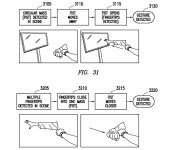
Touchscreens on smartwatches are limited by their very nature; there’s only so much you can fit on a tiny piece of glass. However, Samsung might overcome that surface area limit if it ever implements a recently published patent application. Its smartwatch concept would let you perform relatively complex tasks just by waving your hands in front of a built-in camera. You could send content to a TV just by flicking your hand, for example, or select something by pointing your finger.
That wouldn’t be the only party trick. The watch would recognize wrist gestures beyond the simple screen activation you find in Samsung’s Gear line, for a start. It would also have a Moto 360-style circular display with both an optimized touchscreen interface and a rotating ring for tasks like scrolling. It’s an ambitious, do-it-all design, and it won’t be surprising if Samsung only uses some of the technology — if it’s used at all. When Samsung is already big on gesture control and plans to support Android Wear, though, there’s a real chance that future smartwatches will let you do much more than poke at buttons and issue simple voice commands.
Filed under: Wearables, Samsung
Via: Android Authority, Sammy Today
Source: USPTO

Malware Scanning Tool ‘VirusTotal Uploader’ Released for OS X [Mac Blog]
Google subsidiary VirusTotal announced (via The Next Web) and launched a version of its VirusTotal Uploader for OS X, bringing the popular malware scanning tool to Apple’s platform for the first time.

After a quick installation, the program allows users to drag and drop any file, folder, or application to preform a malware scan. VirusTotal Uploader utilizes over 50 different databases to search for any traces of malware.
Hopefully this will lead to VirusTotal receiving more Mac applications, diving deeper into an increasingly targeted OS by attackers and allowing antivirus companies and researchers making use of VirusTotal’s backend to build stronger defenses against these threats.
VirusTotal Uploader for OS X can be downloaded for free from the utility’s official website.

Engadget Podcast 398 – 5.26.14

It’s all happening in San Francisco this week, as your hosts are joined by Tim Seppala and Mat Smith to talk NSA reform, Surface Pro 3, burritos and.. Guy Fieri? Terrence takes the time to detail the recent bill that passed in the house, which makes steps in the right direction to rein in the NSA’s snooping, but fails to make a serious impact. There’s also Microsoft’s new “slate-top,” a combination of tablet and laptop that’s much improved over the previous Surface generation, but at a wallet-busting price. We have plenty more fun and news packed into this edition — and at least one office dog — so join us at the streaming links below for our slightly delayed, but worth-the-wait episode of the Engadget Podcast.
Hosts: Ben Gilbert, Terrence O’Brien
Guests: Timothy Seppala, Mat Smith
Producer: Jon Turi
Hear the podcast:
02:52 – ‘Gutted’ NSA reform bill passes the House, but sheds supporters
13:40 – Samsung is making a VR headset for its phones and tablets
28:02 – Surface Pro 3 review: Has Microsoft finally made a tablet to replace your laptop?
44:04 – The real-life hacking behind Watch Dogs’ virtual world
Subscribe to the podcast:
[iTunes] Subscribe to the Podcast directly in iTunes (enhanced AAC).
[RSS MP3] Add the Engadget Podcast feed (in MP3) to your RSS aggregator and have the show delivered automatically.
[RSS AAC] Add the Engadget Podcast feed (in enhanced AAC) to your RSS aggregator.
Download the podcast:
Contact the podcast:
Connect with the hosts on Twitter: @terrenceobrien, @realbengilbert
Email us: podcast [at] engadget [dot] com
LG G3 compared in size to HTC One (M8) ahead of launch

It’s been kind of hard to keep up with all LG G3′s leaks lately, the closer the release date gets the more leaks came to us.
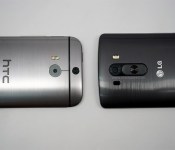
We’ve seen how the device will look already and this time we have it compared to HTC One (M8) in size, at least to some degree, we can see the width of LG G3 compared to HTC’s flagship in the picture above. It seems noticeably wider than HTC One (M8), thanks to its rumored 5.5″ screen we believe, despite those thin bezels. On the picture below you can clearly see the back of the device along with what is leaked to be a laser autofocus sensor which should improve focus speed and be more accurate while doing that.

LG G3 announcement is due tomorrow, May 27 and these are the rumored specifications. Do you think LG G3 will be too big?
SOURCE: PhoneArena
The post LG G3 compared in size to HTC One (M8) ahead of launch appeared first on AndroidGuys.
Moto E review: Where very good meets very cheap

After Motorola released the well-received Moto X into the world last year, most of us had just one question: What’s Google’s expensive mobile division doing next? Then-chief Dennis Woodside was surprisingly forthcoming for a tech CEO — he said Motorola wanted to reinvent the experience of using a low-cost smartphone. When the Moto G appeared later that year, I thought the company had done what it set out to do. Oh, how wrong I was. Motorola still hasn’t given up on its dream of putting smartphones within reach of anyone who wants one, and the latest weapon in the company’s arsenal is its cheapest yet.
The Moto E costs a scant $129 here in the States, and Motorola seems confident that its low-cost formula will do some real good for the people of the world (not to mention the company’s bottom line). Now we’re left with another set of questions: Does the Moto E live up to Motorola’s lofty goals? Can it stand out against a clamoring crowd of competitors? Are you actually getting what you pay for? Read on for our take.
Hardware
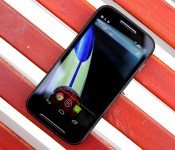
The Moto E is one of those curious devices that’s unassuming and yet immediately recognizable at the same time. That sounds a tad paradoxical, but hear me out. Its face is spartan, to put it politely, and the E’s 4.3-inch qHD screen (swathed in Corning’s Gorilla Glass 3 no less) is bounded by some unobtrusive bezels. Your eyes can’t help but be drawn to the two silver strips that run in parallel above and below the screen, comprising the speakers and microphone. Together, they make for a very tasteful touch of personality that gives the E a sense of self without much extra visual noise.
Flipping the Moto E over reveals that the company’s design DNA hasn’t been diluted at all. The recessed Motorola logo, the swooping curve around the 3.5mm headphone jack — if Superman took hold of a Moto G and compressed it a bit (you know, without turning it into a diamond or something), you’d basically have the Moto E. Meanwhile, a 5-megapixel camera sans flash sits high on the E’s rear and selfie fanatics will be crushed when they discover there’s no ego-stroking front camera here. The E skews toward the chubbier end of the size spectrum (compared to the lithe Moto X, at least), but its curved rear means it’ll fit quite comfortably in your mitts. During my testing, I actually found myself cursing at my otherwise trusty iPhone 5s and its prominent edges. The E is awfully nice to hold, even when compared to premium gadgets like HTC’s One M8.
| Moto E | |
|---|---|
| Dimensions | 124.8 x 64.8 x 6.2 – 12.3mm (curved) |
| Weight | 5.01 oz. (142g) |
| Screen size | 4.3 inches |
| Screen resolution | 960 x 540 (256 ppi) |
| Screen type | IPS LCD |
| Battery | 1,980mAh Li-Polymer (non-removable) |
| Internal storage | 4GB |
| External storage | Up to 32GB |
| Rear camera | 5MP with 4x digital zoom |
| Front-facing cam | None |
| Video capture | 854 x 480/30 fps (rear) |
| NFC | No |
| Radios |
Global GSM Model: North America GSM Model: CDMA Model: |
| Bluetooth | v4.0 |
| SoC | Qualcomm Snapdragon 200 |
| CPU | 1.2GHz dual-core |
| GPU | Adreno 302 |
| RAM | 1GB |
| Multimedia | FM radio, Digital TV tuner (Brazil only) |
| WiFi | Dual-band, 802.11b/g/n |
| Wireless Charging | No |
| Operating system | Android 4.4.2 (near stock) |
Our review unit pairs a glossy, black plastic face with a curvaceous, matte rear. Those of you itching for something more chromatically pure can pick up the white-on-white model, and you can replace those default backs with more colorful ones for another $15 a pop. Prying off those back plates reveals… not much, aside from the non-removable 1,980mAh battery, the SIM slot and the microSD card slot. That expansion slot is downright crucial, too, since this little guy comes with a paltry 4GB of internal storage — easily the surest signifier of the Moto E’s wallet-friendly ambitions. Once you factor in all of the preloaded bits, you’re actually left with just north of 2GB of open space for your apps and media; suffice to say, a hefty memory card (the E can handle up to an additional 32GB) should be on your shopping list too. Diving further still reveals the E’s brains: a dual-core Snapdragon 200 clocked at 1.2GHz, paired with 1GB of RAM and a single-core Adreno 302 GPU.
The North American version I’ve been playing with is slightly boring compared to some international variations. Models for other markets include a digital TV tuner or dual SIM slots. The vanilla US model is pretty sparse in terms of niceties, though it does (like the Moto G) have a built-in FM tuner for when you need some music that didn’t come from the Google Play Store. There’s no LTE to be found here, alas — just a GSM radio that plays nice with the 850/900/1800/1900MHz bands, and UMTS/HSPA+ support for 850/1700 (AWS)/1900MHz frequencies. Really, though: For $130 off-contract, what did you expect? It’s less than half the price of the Nexus 5 and the Moto X, but as you’ll see, cheap doesn’t always equate with crappy.
Display

For a phone of such humble means, the 4.3-inch IPS LCD sitting front and center still manages to impress… even if it’s the lowest-resolution display I’ve laid eyes on in a long time. In a bid to keep costs as low as possible, Motorola ran with a qHD (960 x 540) screen — if you’re doing the math, that works out to a pixel density of 256 ppi. The number by itself isn’t very exciting, but I think we can agree that the quality of a screen hinges on more than just how many pixels a manufacturer can squeeze in there.
Sure, you can pick out individual pixels if you peek closely enough. Taking a step back offers up a different, more positive perspective, though. The display itself is plenty bright, with crisp whites and passable blacks (we’re not in AMOLED territory, after all), though I wish it fared better under the blazing sun. Colors are vivid and manage to pop without dipping into lurid, oversaturated territory. Viewing angles are similarly solid — just be warned: Images can take on a peculiar cast when you peer in from an angle that’s oblique enough. You’ll also have a tough time trying to obscure that screen with your greasy fingers thanks to the anti-smudge coating Motorola has liberally applied. Is this screen perfect? Hardly, but its strong showing helps make the entire Moto E package that much more enticing.
Software

Like its brethren before it, the Moto E runs a nearly stock build of Android 4.4.2 KitKat, which means there isn’t anything terribly exciting to report on the software front. That’s just fine by me — I hate clunky, overwrought interfaces and “features for the sake of features” as much as the next elitist nerd. What you’re ultimately left with is a clean-ish slate that stays true to Google’s mobile vision, but still retains a few of Motorola’s curious software fingerprints.
Take Motorola Migrate, for instance. It first appeared on the Droid Ultra, and it still lets phone switchers transfer their existing data (e.g., contacts, messages) to their new E’s once the app has been installed on the original phone. Assist is still around too, though it lacks some of the smarts it packed when it first appeared on Moto’s most recent Droids. As always, it can monitor your calendar to deflect callers at inopportune times, as well as let only VIPs reach you in your slumber, but there’s no way for the E to detect when you’re driving and auto-respond to folks texting you. As it happens, though, Motorola’s newest preloaded app is also its most curious. The new Alert is of two minds: You can use it to blast your location so a curated list of friends will know where to meet you, and it packs an emergency mode that starts reaching out to those contacts (and emergency services) if you find yourself in trouble. Alert is a surprisingly thoughtful addition to Motorola’s software mix, but with any luck, you’ll never need to touch that emergency feature.
Motorola also promises that it’ll get the next big version of Android in a timely fashion, even with a divorce from Google on the horizon. We’ll see just how well Motorola can keep this promise soon enough — for now, it’s heartening to see a budget smartphone running the latest and greatest version of Google’s mobile OS.
Camera

Smartphone cameras are tricky enough to get right when you’re trying to cobble together a top-tier device, so you’ve got to have the proper expectations when you go downmarket. In the case of the Moto E, I expected very little and I got it. That may sound a bit harsh, but the Moto G’s camera was a pleasant surprise and I was quietly hoping for the same to happen here. Instead, the 5-megapixel rear shooter consistently turned in soft shots with colors that seemed muted at best and downright lifeless at worst. That last issue can be mitigated a touch if you fire up HDR mode — it’s set to auto by default, so you’ll occasionally find a vibrantly colored photo mixed in with the rest of the mud. Low-light performance left plenty to be desired too: The E’s camera isn’t great at sucking up photons, so there’s smudginess and grit all over the place, a situation that isn’t helped by the lack of a rear flash. Oh, and in case you already forgot, there’s no front-facing camera to be found at all here.
If anything, Motorola’s dead-simple shooting interface is the camera’s saving grace. Quick refresher if you haven’t used it before: Snapping a photo requires just a single touch anywhere on the screen, which means it’s nearly impossible to screw up in the heat of the moment. Sliding my finger up and down the screen to digitally zoom in and out feels remarkably graceful too, even if digital zoom by nature makes for lousier shots. You may not absolutely love the shots you end up with, but I suspect you’ll at least enjoy the process of taking them. My only major niggle is a strictly personal one: Despite using the E for over a week, I still had trouble remembering that touching the screen snaps a photo instead of focusing the camera where I wanted. That’s a particular sort of muscle memory that’s only really taken hold after a (shortish) career manhandling high-end phones, so the Moto E’s target audience may not have the same trouble.
Video leaves much to be desired too, which is hardly a shocker. The Moto E is incapable of shooting HD video — resolution maxes out at 854 x 480, which is good enough for Instagram, but slightly less so when trying to capture important moments as they unfold.
Performance and battery life

Ah, now we’re getting to the meaty part — what’s the Moto E actually like to use? Despite a spec sheet that looks like it was pulled from the headlines two years ago, the E has more than managed to keep up with my daily grind. I can’t in good conscience call the Moto E a speed demon, but it’s still been a worthy companion during my week of testing.
And what exactly did that week consist of? Plenty of frenzied swiping between pages of apps and widgets, to start. The whole process was consistently and pleasantly buttery, with nary a hint of stuttering or visual slowdown to be seen (though in fairness, KitKat probably deserves some of the credit for that). Scrolling down long websites was generally smooth, too… most of the time, anyway. An abundance of images on a web page (like Engadget!) occasionally threw the E’s modest brains for a bit of a loop. The act of actually firing up apps usually took a few seconds more than on some premium handsets, but that’s just par for the course considering what we’re working with. The games I did manage to install on the Moto E (I’m looking at you, Minecraft: Pocket Edition) fared rather nicely considering the dearth of sheer processing power they had to work with. This is all anecdotal, of course — here are some hard numbers, if that’s more your speed.
| Moto E | Moto G | Moto X | HTC One mini | |
|---|---|---|---|---|
| Quadrant 2.0 | 5,264 | 8,723 | 8,958 | 5,200 |
| Vellamo 2.0 | 1,173 | 1,962 | 2,427 | 2,118 |
| AnTuTu 4.0 | 12,510 | 17,364 | 20,292 | 10,048 |
| SunSpider 1.2 (ms) | 1,626.2 | 1,377 | 1,023 | 1,442 |
| GFXBench 2.7 Offscreen (fps) | 4.4 | 16 | 15 | 15 |
| CF-Bench | 6,483 | 15,030 | 14,092 | 6,542 |
| SunSpider: lower scores are better | ||||
The funny (or sad) thing about downloading games for testing was that, well, it was more troublesome than it should’ve been. It had nothing to do with network connectivity (though I only hit down/up data speeds of 1.82 Mbps and 0.84 Mbps, respectively in San Francisco over AT&T’s HSPA connection). Those headaches were all because of a dearth of storage space. Like I mentioned before, the E ships with just 4GB of internal storage, and only about half of that is available for your stuff right out of the gate. It didn’t take long to almost completely fill up that modicum of space with just our usual suite of test apps and files. And those two-stage game downloads from the Google Play Store? The ones (like Need For Speed: Most Wanted, for instance) that prompt you to download an installer that then downloads more stuff once it’s in place? Yeah, good luck with that. Picking up a microSD card is damn near a necessity, and even then, you can’t move all of your apps from their current homes onto an external card. I get that it’s a concession Motorola made to keep the E’s price under a certain threshold, but I can definitely see some cost-conscious consumers ruing that decision.
On the upside, the Moto E’s modest spec sheet means that its 1,980mAh battery can hang in there longer than you might think. When Motorola says it’s got an “all-day” battery, it actually means it. I spend my days dealing with a barrage of emails, chatting with colleagues, taking phone calls and generally running my device into the ground. There wasn’t a time when the E failed to hang in there for a full 12-hour day, despite my best efforts. Things were a bit more subdued when it came time for our standard video rundown test (screen brightness set to 50 percent with a 720p video set to loop indefinitely): It stuck around for 5:45 before it needed to be lashed to a wall outlet.
The competition

There’s no shortage of cheap hardware out there, and more than a few competitors may wind up duking it out with Motorola over first-time smartphone shoppers. Take older, pint-sized versions of high-end phones like the HTC One mini and the Samsung Galaxy S4 Mini — both of them offer more oomph, but even now they’ll cost close to twice what the E does. Speaking of Samsung, you can nab a dual-SIM Galaxy S Duos 2 for close to the same price as the E– you can juggle multiple phone numbers and enjoy a camera with a flash, though TouchWiz could bog things down a bit. There’s the LG L40, too, a cheapo device the Korean company showed off at MWC. It hovers around the same price range as the Moto E, but its screen is markedly worse and a shortage of RAM doesn’t exactly bode well for performance.
The Nokia X will also give the Moto E a run for its money in certain locales. It’s a curious little thing with its peculiar Finnish pedigree, offbeat launcher and €89 (about $141) price tag, but a weaker spec sheet and Nokia’s control over its own app store means the experience it offers is limited in some key ways. Not all of the E’s competition comes from outside Motorola, either. The Moto G packs more power and performance into a bigger body, and it’s still only $50 more than its little brother. I’d wager that a decent number of shoppers on a budget will gravitate toward the more impressive G, but the difference in price could be too much for some to swallow.
Wrap-up

There’s no two ways about it — the Moto E is exciting, if not in the way most mobile buffs would like. You really shouldn’t underestimate the sort of world-shaking power that can come from making something that’s both very good and very cheap. So what if the spec sheet is a bit passé? For all its minor shortcomings, the Moto E still represents a level of power and quality that’s become even more accessible to people the world over, and that’s something worth celebrating. If all you need is a smartphone that can take you to Facebook, capture fodder for Instagram or fire off missives on Twitter (or WhatsApp or Weibo), the Moto E will make a worthy sidekick. Not every important device has to be a flashy flagship.
If Motorola ever manages to offer the $129 Moto E for under $100 (and I bet it will eventually), we could be looking at a game changer; a device that could really help bring the next billion people into an age of connectedness most of us already take for granted. Until then, the E’s value is obscured a touch — the superior balance of performance and price means the Moto G will be worth the extra $50 for most people.
Daniel Orren and Edgar Alvarez contributed to this review.
LG G3 leaks leave nothing to the imagination

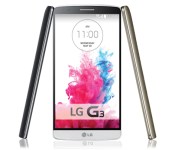
LG hasn’t been particularly guarded about its G3 smartphone, but the latest leak, coming from an official company site, really lets it all hang out. We’ve already seen plenty of the phone, slated for launch tomorrow, but this is by far the most detailed and official glimpse we’ve seen thus far. As previously reported, the phone will contain a 5.5-inch QuadHD display. According to the leaked product page, the phone will also contain a 12MP rear camera with optical image stabilization, a removable 3,000mAh battery and wireless charging support, and what appears to be an intuitive new software program called “Smart Notice.”
While the full spec sheet is not available, the site does show a Qualcomm Snapdragon processor on board, though the specifics there are not clear. However, Droid Life reports the previously available spec sheet showed a Snapdragon 801 with 2GB or RAM. A spec sheet from LG UK, meanwhile, reveals the G3 will contain 16GB of on-board storage and support for up to 2TB of external storage via microSD cards. We’ll have whatever details there are left to unveil tomorrow, but in the meantime, check out our source links and gallery for more.
Filed under: Cellphones, Mobile
Via: GSM Dome, Pocket Lint
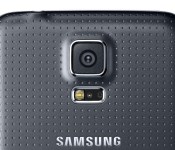
Tip: Speed up the slow Samsung Galaxy S5 camera

Are you finding that the Samsung Galaxy S5 takes a longer than usual time to focus on a subject and actually take a picture? If so, then you’re not alone.
Whilst the Samsung Galaxy S5 has a decent camera and theoretically should take pretty good pictures, the bundled camera app Samsung ships with the Galaxy S5 is hindering the performance of the camera by doing some behind the scenes stuff.
Samsung have included a feature called Picture Stabilisation which is designed to improve the quality of low light pictures by increasing the shutter speed. Unfortunately it seems the Galaxy S5 doesn’t reserve this feature for only low light pictures, and is instead increasing the overall shutter speed, making the camera seem like it is lagging even in sufficiently lit pictures.
Therefore, to speed up the camera, fire up the camera app and hit the gear icon in the bottom left and turn Picture Stabilisation off.
If you’ve got sufficient lighting when taking pictures then you’ll not notice a difference, only that the shutter will be quicker. With low light pictures it may be worth turning the feature back on when required, or trying to frame the subject to optimise the light available.
Let us know in the comments section below if you’ve noticed an speedier camera in everyday capturing by turning off this feature.
The post Tip: Speed up the slow Samsung Galaxy S5 camera appeared first on AndroidGuys.

Apple may enter the smart home business

Forget those rumors of an Apple smartwatch for now — home automation may be where it’s at. The Financial Times hears from sources that the crew in Cupertino is going to unveil a smart home platform at its Worldwide Developer Conference kicking off next week. While there aren’t many details, proximity will reportedly play a big role; your house lights would switch on as soon as you come home with your iPhone in your pocket. Apple would also have a Made For iPhone-style program to guarantee that devices work with its system, and it would put a strong emphasis on privacy to counter fears about both its ad-driven competition and government surveillance.
The FT is quick to note that Apple is known for scrapping announcements at the last minute, so don’t be shocked if the tech giant is mum on the subject at WWDC’s June 2nd keynote. However, a smart home strategy would make sense. Apple may want a platform of its own now that Google owns Nest, and it already sells home automation tech like Philips’ Hue lighting at its retail stores. Assuming the claims are true in the first place, we’ll get the full scoop next week.
Filed under: Household, Mobile, Apple
Source: Financial Times
Apple to Launch New ‘Smart Home’ Platform at WWDC
Apple will launch a new software platform that will let the iPhone directly control lights, security systems and other household gadgets at WWDC next week, according to a report from The Financial Times.
The piece claims Apple will make a “big play” in smart home technology by working with device makers give them official approval, like the “Made for iPhone” program does for some accessories like headphones and speaker docks, and software support in iOS 8.
The scheme will be similar to Apple’s existing “Made for iPhone” label, given to compatible headphones, speakers and other accessories, but with a new brand and logo. Apple may also provide additional checks and assurances that certified products are not vulnerable to hackers.
The Cupertino-based company was likely to emphasise the privacy protections built into its smart home system, one person familiar with Apple’s plans told the FT, given heightened sensitivity about technology companies’ access to personal information amid revelations about US intelligence agencies’ online surveillance programmes.
The piece notes that plans can always change, but that Apple has launched a number of initiatives over the past year or two, including CarPlay and iBeacon, to expand the reach of the iPhone and have it interact more with the real world and other electronic devices in it.
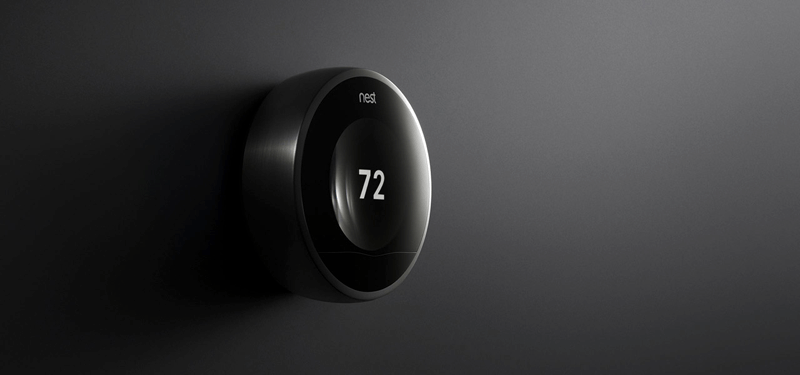
Apple’s retail stores sell a number of different components of the so-called “Internet of Things”, including the Google-owned Nest Thermostat (pictured above), Philips Hue lightbulbs and Belkin WeMo Wi-Fi enabled light switches.
LG G3 wireless charging dock leaks

After months of rumors, the LG G3 announcement is due tomorrow, May 27. Thus far we’ve had a lot of leaks and we (think we) know basically everything about the phone – how it will look, its specifications and even what one of G3′s accessories will be.
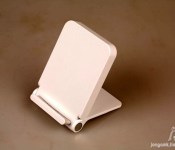
This time around we have another of LG G3′s accessories that have leaked ahead of time, its charging dock. This dock is kind of different from the rest in that it is a wireless charging dock that also serves as a multiple angle stand. You can use it to prop-up your phone in portrait and landscape mode. The dock has leaked in white color but that doesn’t mean it won’t be available in multiple colors. No pricing or availability just yet but hopefully we’ll hear more tomorrow at the official announcement of LG’s new flagship.

Are you excited for tomorrow’s big event? Do you like this dock?
VIA: PhoneArena
The post LG G3 wireless charging dock leaks appeared first on AndroidGuys.
 AIVAnet