



Aviary for iOS appeals to tweens with blemish-removing selfie tools

You know what veritable selfie addicts would love to get for their birthday? A fairy godmother to magically erase their flaws — or a darn good photo editor. Aviary claims the newest version of its Photo Editor for iOS is a cross between the two. After all, it has a brand new selfie suite that people can use to edit their photos to the nines before uploading them to Facebook to be judged by their peers. This wondrous suite features a Blemish tool that can magically zap those zits into oblivion with just one tap of its virtual wand and a Blur tool to soften the lines and wrinkles of more mature selfie enthusiasts. It also has an upgraded Red Eye Remover, as well as a Teeth Whitening Tool that can instantly bleach those yellowing chompers. Other than making users look good, the updated app also comes with new one-tap enhance tools and an undo/redo option that’s absolutely necessary in people’s quest for selfie perfection.


Source: iTunes

Twitter’s working on a ‘Whisper mode’ to make conversations private

When sharing gossip on Twitter, there’s always that moment when you have to boldly announce that the conversation will have to continue over DM. Sadly, as well as killing the mood, it means that group discussions get broken up in favor of individual messages behind the veil. It’s a problem that Twitter boss Dick Costolo is aware of, and told Bloomberg that the company would look to build a “whisper mode” that lets you grab whole conversations with friends (plural) and make them private at the push of a button. Naturally, an off-hand by a CEO can’t be taken as gospel, and we don’t know if this is instead of, or beside, the long-mooted private messaging app that would break out Twitter DMs to another platform. Given the rise in real-time messaging platforms like WhatsApp and the anonymity afforded by apps like Secret, however, it looks as if Twitter’s going to muscle up so that we never again have to type “Let’s take this to DM, k?” ever again.
Filed under: Internet
Via: The Next Web
Source: Bloomberg

Lenovo ThinkPad 8 review: sharp screen, worst-in-class battery life

Not long ago, I vowed to review every 8-inch Windows tablet. That’s partly because they’re popular, sure, but there was another reason, too: Their specs are so similar that you’d have to actually use one to know which is best. In a field full of same-y options, though, the Lenovo ThinkPad 8 would seem to stand out: It’s the only one with a full HD screen, not to mention a 128GB storage option (good news for folks who’d rather not store stuff on a microSD card). Other bonus points include an aluminum casing — a step above other tablet designs — as well as optional 4G. Of course, premium doesn’t come cheap; the ThinkPad 8 starts at $429, whereas competing models can be had for around $300. The question, then, is: Could it still be worth it?
Hardware
Chalk it up to the fact that I’ve spent a lot of time with this tablet, or maybe just blame the subjective nature of reviews. However you want to explain it, I’m less enamored with the ThinkPad 8 than my colleagues Mat Smith and Richard Lai were when they handled it back at CES. My theory: I’ve had more time to break it. OK, not break it, exactly; just scuff it up. After shoving the skinny tablet in my bag one too many times, I’ve managed to scratch both the aluminum back, as well as the Gorilla Glass screen, which should, in theory, be impervious to a simple set of house keys.
And that’s a shame: If it weren’t for those durability issues, this would otherwise be a well-designed tablet. That metal casing makes it feel more premium than other 8-inch tablets, as does its especially slim shape. Indeed, at 0.35 inch thick and 0.89 pound, it’s thinner and lighter than both the Toshiba Encore and Acer Iconia W4. In terms of portability, the closest contender is the Dell Venue 8 Pro, which is just as thin, but weighs two-hundredths of a pound less (not that you’ll notice). The downside to having such a skinny frame? Worst-in-class battery life. But hey now, let’s not get ahead of ourselves here. More on that in a bit.

For now, let’s finish our tour of the device. Like pretty much every other 8-inch Windows tablet, the ThinkPad 8 was designed to be used in portrait mode. The giveaway: its button layout. Both the power button and volume rocker sit on the upper right-hand side, making them easy to reach when you’re holding the thing vertically. Nearby, you’ll also see a proprietary charging port, which works with a surprisingly big, chunky connector — not the sort of thing you’d expect on a mobile device. The headphone jack, meanwhile, sits on the lower portrait edge, just where you’d expect to find it. As for everything else — the micro-HDMI socket, the covered microSD port and SIM slot — all that’s tucked out of sight on the left side.
Over on the front, there’s a 2-megapixel webcam up top, with the standard Start key tucked into the lower bezel. Speaking of bezels, they’re remarkably narrow, at least on the portrait ends, though they’re still wide enough that my thumbs weren’t covering the 8.3-inch screen (I have small hands, mind you — those of you with hammier hands might have less luck). Around back, meanwhile, you’ll find an 8-megapixel camera and accompanying LED flash, along with Lenovo’s signature ThinkPad logo, with the “i” that glows red. There are also two small speaker grilles on the bottom of the back lid; they’re so tiny, in fact, that I actually missed them on first glance. As small as they are, though, they deliver decent audio. Pharrell’s “Happy,” for instance, sounded quite pleasant, even if the volume didn’t get very high.
Display

It’s one of the main reasons to buy this, really: The ThinkPad 8 is the only 8-inch Windows tablet with a full HD, 1,920 x 1,200 display. And yes, the difference over regular 1,280 x 800 screens is actually pretty obvious. Even in modern Windows apps, where everything is bigger and more finger-friendly, on-screen objects look noticeably crisper. The same is even truer on the desktop, though that’s perhaps not such a great thing. Items are harder than ever to hit with your finger, even the Windows Store icon that now comes pinned to the Taskbar in Windows 8.1. Obviously, if you’re using any Windows tablet in desktop mode, you’ll probably want a mouse anyway, but that’s a little more of a hassle here, since there isn’t an in-box dock or keyboard accessory.
The occasional un-optimized app aside, it’s a pretty good display. Even more than the crispness, I’ve enjoyed the viewing angles — I only lose a little bit of color accuracy when I place the tablet face-up on a table to watch a movie. Also, thanks to the use of a direct-bonding manufacturing technique, the Gorilla Glass panel reflects relatively little light, so that even when I’m looking at the display from an off-angle, with harsh office lights overhead, I can still make out what’s on the screen. As a trade-off, though, the display is on the dim side, so there’s that to consider, especially if you think you might be using this outdoors.
The only other potential caveat? It doesn’t support pen input. For that, you’ll have to look at Lenovo’s bigger ThinkPad Tablet 2 (or the rumored ThinkPad 10). Otherwise, you might want to consider Dell’s Venue 8 Pro, one of the only 8-inch Windows tablets with an active pen digitizer. Even then, though, it’s not our favorite tablet, for reasons I’ll come back to a little later on.
Software
You’ve gotta hand it to Lenovo: The company mostly kept it clean here. All we have in the way of bloatware are Skitch Touch, Evernote Touch, Kindle, AccuWeather.com, Hightail (formerly YouSendIt), Zinio and the music-streaming service rara.com — none of which are even that bad. Also on board: a trial of Norton Internet Security and a full version of Microsoft Office, which you’ll find on every Windows tablet this size. Otherwise, there’s not much say — you can download the Windows 8.1 update, of course, but even that’s geared mainly toward mouse-and-keyboard machines.
Performance and battery life
| Tablet | PCMark7 | 3DMark06 | 3DMark11 | ATTO (top disk speeds) |
|---|---|---|---|---|
| Lenovo ThinkPad 8 (1.46GHz Intel Atom Z3770, Intel HD graphics) | 2,567 | 1,598 | E312 / P198 | 128 MB/s (reads); 57 MB/s (writes) |
| Toshiba Encore (1.33GHz Intel Atom Z3740, Intel HD graphics) | 2,479 | 2,068 | E339 / P210 | 178 MB/s (reads); 68 MB/s (writes) |
| Acer Iconia W4 (1.33GHz Intel Atom Z3740, Intel HD graphics) | 2,538 | 2,089 | E340 / P211 | 173 MB/s (reads); 48 MB/s (writes) |
| ASUS Transformer Book T100 (1.33GHz Intel Atom Z3740, Intel HD graphics) | 2,461 | 2,113 |
E338 / P209 |
123 MB/s (reads); 58 MB/s (writes) |
| Dell Venue 8 Pro (1.33GHz Intel Atom Z3740D, Intel HD graphics) | 2,343 | 1,986 |
E299 / P164 |
86 MB/s (reads); 45 MB/s (writes) |
For the most part, the ThinkPad 8 sticks to the script in terms of specs you’d expect to find on an 8-inch Windows tablet. That means: an Intel Atom processor, 2GB of RAM and flash storage (either 64GB or 128GB in this case). The main difference? The Z3770 chip here has a slightly higher clock speed: 1.46GHz, compared with the usual 1.33GHz. Indeed, that translates to the highest PCMark 7 score we’ve seen yet in a tablet this size. And for basic tablet tasks — email, web surfing, Evernote — that’s just fine.
As you probably know by now, though, specs don’t tell the whole story and indeed, the faster clock speed doesn’t yield any improvements in other tasks, like graphics benchmarks or gaming. In fact, though the ThinkPad 8 rules the PCMark test, it also turned in the slowest boot-up time: 14 seconds, compared with eight for the Acer Iconia W4 and nine for the Toshiba Encore. Also, though Intel hasn’t published a TDP figure for this processor, I have to say: it gets quite hot during gaming (I mean, ouch).
| Tablet | Battery Life |
|---|---|
| Lenovo ThinkPad 8 | 6:11 |
| Microsoft Surface 2 | 14:22 |
| iPad Air | 13:45 (LTE) |
| Apple iPad mini | 12:43 (WiFi) |
| Apple iPad mini with Retina display | 11:55 (LTE) |
| Apple iPad (late 2012) | 11:08 (WiFi) |
| Apple iPad 2 | 10:26 |
| Samsung Galaxy Note Pro 12.2 | 10:04 |
| Apple iPad (2012) | 9:52 (HSPA) / 9:37 (LTE) |
| Acer Iconia W4 | 9:50 |
| Nexus 7 (2012) | 9:49 |
| Microsoft Surface RT | 9:36 |
| Toshiba Encore | 8:45 |
| Sony Xperia Tablet Z | 8:40 |
| Sony Xperia Z2 Tablet | 7:57 |
| Nexus 10 | 7:26 |
| Dell Venue 8 Pro | 7:19 |
| Samsung Galaxy Note 8.0 | 7:18 |
| Nexus 7 (2013) | 7:15 |
| Samsung Galaxy Tab Pro 8.4 | 7:13 |
| Samsung Galaxy Tab 3 10.1 | 6:55 |
And then there’s this: The battery life is short, even for a smaller tablet. At its best, the tablet can last up to eight hours — that’s according to Lenovo’s official marketing materials, anyway. In practice, though, we only got six hours and change after looping a video at half-brightness. Meanwhile, the Dell Venue 8 Pro lasted seven hours and 19 minutes in the same test, while the Acer Iconia W4 managed nearly 10. If longevity is a priority (and why wouldn’t it be?), you might want to look elsewhere.
Configuration options and the competition
The ThinkPad 8 comes in two different flavors: 64GB and 128GB (good luck finding 128GB on any other 8-inch Windows tablet). Prices start at $429, and go up to $569 on the beefier model. Adding 4G will, of course, boost the price even higher. If we haven’t sold you regardless, there’s thankfully a multitude of alternatives, including a bunch with equally compact, 8-inch screens. At the moment, our favorite is the Acer Iconia W4 ($300-plus), which we gave a pretty good score of 83 thanks to its long battery life, solid performance and much-improved display. It’s not perfect, but if you’re set on an 8-inch Windows tablet, this is by far your best bet.
After that, the scores fall way down into the low 70s, which means we’re recommending these other products, but with faint praise. The Dell Venue 8 Pro ($250-plus), for instance, has an awkwardly placed physical Start button, instead of a touch-sensitive key somewhere on the bezel. On the plus side, it’s one of the only 8-inch Windows tablets we know of to support pen input (there’s also the ASUS VivoTab Note 8, which we haven’t reviewed). But, on the downside, the pen digitizer on the Venue 8 Pro was unreliable when we tested it. (Note: This may be less of an issue now, thanks to subsequent firmware updates, but buyer beware nonetheless.) Meanwhile, the Toshiba Encore ($300-plus) offers only one real advantage over the competition, which is that it has a micro-HDMI port for outputting video. Even then, the ThinkPad 8 happens to have that too. Overall, then, it’s an okay tablet; there’s just little reason to choose it over the others.
Wrap-up

The ThinkPad 8 is indeed a stand-out tablet, but not necessarily for the reasons you think. It has the winningest specs, and yet it should also be the first one you cross off your shopping list. On the one hand, it has a sharp 1,920 x 1,200 screen and up to 128 gigs of storage, but it’s also more expensive than any other 8-inch Windows slate, with worst-in-class battery life to match. For the money, it doesn’t bring extra features, either — no pen input, no fingerprint reader, no state-of-the-art camera. Realistically, I’d probably be more charitable if it was priced in line with other 8-inch tablets, but even then, it wouldn’t be a slam dunk — not with that tiny battery, anyway. Truth be told, none of the small-screened Windows tabs we’ve reviewed are perfect, but they all manage to offer a little more value.

Foursquare unleashes Swarm: a separate app for check-ins

Foursquare is taking a page from Facebook and splitting its app in two. Soon the main app will be focused purely on search, reviews and finding places to get a decent meal. A second offering, Swarm, will focus more on the social aspects and give users an easy way to see where their friends are and quickly make plans with them, without having to send a separate text message. Basically the check-in, the heart and soul of Foursquare, is getting its own separate app. If you ask the company, it was a tough decision to split their efforts in two, but the truth is that it has failed to evolve as quickly as other sharing services. Simply checking-in to a location is no longer enough, especially when Facebook, Google+ and Yelp all have some form of the feature built in. Swarm narrows the focus to create a truly location-based social platform, not unlike Dodgeball — the service created by Foursquare founder Dennis Crowley before it was snatched up by Google.
While Swarm will be bringing its social heat map to iOS, Android and Windows Phone in the near future, the mainline Foursquare app will be undergoing a complete re-imagining. In roughly a month a new version will launch that will be squarely targeted at Yelp. The streamlined app will stop nagging people to check-in, and will instead focus on local search and reviews. It will include reviews from professionals, not just your friends, and will bring-yelp like natural search to the table. Now instead of just pulling up the nearest coffee shop, you’ll be able to ask for a “romantic” dinner spot. Of course, there’s danger in splitting your services this way — just ask Qwikster Netflix.
Source: Foursquare, Swarm
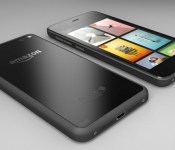
This is what Amazon’s phone looks like

Filed under: Cellphones, Mobile, Amazon
Via: BGR

Microsoft won’t leave XP out of today’s major Internet Explorer security update

Late last week Microsoft announced that it had discovered a serious security flaw in Internet Explorer (versions 6 through 11!) that left users vulnerable to attack. Nefarious characters could use malicious sites to infect a target machine and even take it over remotely. Rather than wait for the regular monthly update, Redmond has decided to release a “out-of-band” update to address the issue. The update will start rolling out this afternoon around 1PM ET (10AM PT) and will quietly install if you have automatic updates turned on. If you’re stubborn and insist on updating your machine manually, we highly suggest you make it a point to download this patch today.
If you’re also clinging to your aging XP install, we have good news: Microsoft has decided to include your OS in this security update. Despite officially ending support for XP a few weeks ago, the company decided that the threat was serious enough to warrant an exception to the rule.
Filed under: Internet, Software, Microsoft
Via: Reuters (Twitter)
Source: Microsoft Security Response Center, The Official Microsoft Blog
Sony offering $350 in goodies for Z1, Z1S, and Z2

Sony on Thursday announced a limited-time promotion for the Z1, Z1S, and Z2 smartphones. Worth up to $350, the devices will be able to download and install a number of applications, six movies, and access a host of services. What’s more, users can download the forthcoming Michael Jackson album, XSCAPE. The deal runs today through July 31; the Xperia Z2 will ship with the pre-loaded content. The Z1 and Z1S can grab the goodies from the Xperia Lounge app.
- Garmin, Full Suite
- OfficeSuite Pro Full version
- Box 50GB for life
- Evernote premium, 3mths
- Bitcasa 1TB storage, 3mths
- 10 Xperia themes
- Social live premium, 1mth*
- Three additional games and apps
The post Sony offering $350 in goodies for Z1, Z1S, and Z2 appeared first on AndroidGuys.
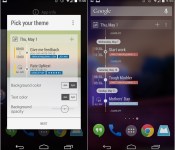
UpNext is a simple calendar widget that’s focused on your next task [App of the Day]

We cover a ton of calendar apps and widgets at AndroidGuys, but what can we say? They’re functional, pretty, and they’re all different. UpNext is a widget, not a calendar app, that gives you a detailed look at your day as it goes by.
Most agenda calendars give you a glimpse at your next event from day-to-day, and that’s about it. Where UpNext differs from the lot is that it gives you current event info for your entire day. When you have some spare time in between two events, UpNext will let you know the amount of time you have to spare. Not only that, but it gives you the amount of days you have off until your next event, as well.
It’s super functional, and it’s what more calendar apps should do. The free version lets you customize the look and feel of the widget. If you want to choose which calendars are selected to show, you’ll need to upgrade to the $1.59 premium version.
If a more functional calendar widget interests you, grab it from the Play Store today!
The post UpNext is a simple calendar widget that’s focused on your next task [App of the Day] appeared first on AndroidGuys.

MacRumors 2014 Blood Drive

MacRumors is pleased to announce the Fifth Annual MacRumors Blood Drive, throughout the month of May 2014. Our goal is to increase the number of life-saving donations in real-world communities by encouraging everyone in our online community to step forward. While most blood drives are specific to a geographic location or collection center, our blood drive is online and worldwide. Our past blood drives have collectively recorded donations of hundreds of units of blood and platelets.
We ask that you:
1. Donate blood or platelets at any donation center or hospital near you. Join the bone marrow registry in your country. Sign up for the organ donor registry in your state, province, or country.
2. Post in the MacRumors 2014 Blood Drive! thread. Tell us about your donation or registration experience, or post a post-donation selfie. We’d like to thank you.
3. Share the news and our message with other people you know, online and in person. Convince one other person to donate blood in the month of May. Help us thank the donors who post about their experiences.
For details see the MacRumors 2014 Blood Drive! thread and our traditional Honor Roll of recognized donors.
Why donate blood or platelets?
Donated blood and platelets save the lives of people recovering from accidents, undergoing surgery, or struck by illness. These are people in your own neighborhoods who need your help. Donated blood and platelets are needed every 2 seconds, not just when hurricanes, earthquakes, and other disasters occur. An hour of your time could save up to 3 lives.
Why join the bone marrow registry?
With a simple cheek swab you are volunteering to donate stem cells or bone marrow if you match someone dying from a disease like leukemia. There are many thousands of people each year searching for donors to save their lives. You might be the one and only person who can save a particular patient’s life.
Why join the organ donor registry?
Thousands of people die every year while waiting for organ transplants. Your donation of organs when your own life ends could save the lives of as many as 8 people.
The lives you save may belong to your friends, neighbors, relatives, or complete strangers. Someday you may receive the same generosity from others. There’s no gift more precious than the gift of life.
 This year’s first blood donor: forum member “stridemat”
What to do today
See the links and general information in our two knowledge base articles: Blood and Platelet Donation and Organ, Tissue, and Bone Marrow Donation. Donor eligibility rules vary by country.
1. If you are eligible to donate blood: Schedule a blood or platelet donation, in May if possible. Register for the bone marrow registry. Register as an organ donor.
2. If you aren’t eligible to donate blood: Some people aren’t eligible to donate blood for medical reasons, while others are barred by government policies that many find outdated. Speak your mind about it in the Blood donor eligibility thread. You can probably still register for the bone marrow registry and register as an organ donor.
3. Help our drive by thanking donors and convincing a friend or relative to donate blood.
Apple charity
Apple’s support for charity has picked up in recent years. Apple has supported a number of health, relief, and charity efforts over the years, especially through Product (RED). See our updated knowledge base article: Apple Support for Charity.
Apple Maintains Narrowing Lead in Tablet Market Share [iOS Blog]
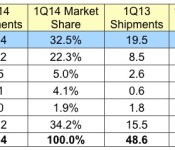
Research firm IDC today published its tablet shipments estimates for the first calendar quarter of 2014, with Apple holding onto its lead in tablet market share. According to IDC’s Worldwide Quarterly Tablet Tracker, the iPad accounts for approximately one third of all global tablets shipped in the first three months of 2014.

On a vendor basis, Apple remains the number one manufacturer, but its dominance is starting to slip. iPad shipments declined both quarterly and yearly, causing Apple to lose some ground to rival Samsung, which saw increases in both units shipped and market share.
Apple maintained its lead in the worldwide tablet plus 2-in-1 market, shipping 16.4 million units. That’s down from 26.0 million units in the previous quarter and well below its total of 19.5 million units in the first quarter of 2013. Despite the contraction, the company saw its share of the market slip only modestly to 32.5%, down from the previous quarter’s share of 33.2%. Samsung once again grew its worldwide share, increasing from 17.2% last quarter to 22.3% this quarter. Samsung continues to work aggressively with carriers to drive tablet shipments through attractively priced smartphone bundles. Rounding out the top five were ASUS (5%), Lenovo (4.1%), and Amazon (1.9%).

On a platform basis, Android is the leader with a two-thirds share of the market, followed by iOS. Windows market share remains small, but is growing due to popularity of inexpensive, hybrid notebook tablets like the ASUS Transformer T100.
When analyzing these numbers, it is important to note that IDC tracks shipments instead of sales, making it impossible to know how many shipped devices were actually purchased by consumers and how many remain on retail shelves. IDC’s figures also are estimates, as most companies do not release their exact tablet shipment data. Research firms like IDC must rely on supply chain data and calculations from information that is made public by manufacturers to build their estimates.
 AIVAnet