



Google Classroom helps teachers easily organize assignments, offer feedback

In doing its part to celebrate Teacher Appreciation Day, Google has announced a preview of Classroom: a simple system for course work organization. The free software is nestled inside Google Apps for Education and serves up a quick and easy way to create/organize assignments, give feedback and communicate in real time with students. As you might expect, Classroom leverages Google Docs, Drive and Gmail in order to complete the aforementioned tasks, automatically creating folders in the cloud-based repository for each student when there’s a new assignment. “Classroom is based on the principle that educational tools should be simple and easy to use, and is designed to give teachers more time to teach and students more time to learn,” writes product manager Zach Yeskel. If you’re an educator that’s interested if giving it a shot, you can apply to be part of a limited preview. Google plans to release Classroom to any school using is education-minded apps program in September — just in time for the fall semester.

Filed under: Software
Source: Google

Razer Blade review (2014): a ‘no-compromise’ premium gaming laptop

More often than not, I feel like my feedback — both as a customer and a writer — vanishes into a collapsing singularity of customer service. And yet, I’ve never felt this way about Razer. When the company launched the original Blade gaming laptop, it was panned for being underpowered, so the company replaced it in the same calendar year. When that second-generation machine was written up for being too short-lived, a smaller machine with exceptional battery life hit the market. That machine was judged for having a middling screen, and so Razer answered its critics again, this time with the fourth-generation Razer Blade, a machine that brings more power, more features and a significantly better display. So, does it answer my biggest complaints? Let’s find out.
Look and feel

Unpacking Razer’s latest gaming laptop gives me some serious déjà vu: This newest model echoes the form, design and packaging of last year’s model, even down to the smallest details. Everything here is familiar; its aluminum hull and meager port selection (three USB connections and HDMI-out) haven’t changed at all. For a moment there, I was worried — has Razer’s notebook team grown complacent? Is the Blade slipping into a pattern of iterative hardware refreshes? No, thankfully; not just yet. There are notable changes here. They’re just fairly subtle.
Still, my first impression wasn’t wrong: This is the same thin chassis Razer designed last year — it has the same keyboard, flanked by the same stereo speakers and headlined by the same black power button. The aforementioned ports are accompanied only by an AC plug and an audio jack. It’s refreshingly simple and elegant — kind of like a MacBook Pro draped in black with green keyboard backlighting. It’s so lovely, in fact, that I almost didn’t notice the notebook’s one visual refinement: the reflective glass surface of the new touchscreen display.

It seems like a small change, but it makes a difference: The Blade’s touch panel makes the new model’s lid just a hair thicker than last year’s version, increasing the laptop’s overall girth to 0.7 inch. It’s still gloriously thin, but it’s no longer slimmer than the MacBook Air at its thickest point — rendering my favorite bit of Razer trivia sadly obsolete. The machine has put on a little weight too: It now tips the scales at 4.47 pounds. Even so, these changes are minor; the Blade is still the best-looking gaming laptop on the market. A marginally thicker waist and a slightly heavier frame don’t change that.
Keyboard and trackpad

The Razer Blade’s 80-button keyboard serves as a reminder of what Razer used to be. Before it started making lighted key interfaces, gaming laptops and overpowered tablets, the company was known for building PC gaming peripherals, and that history shows. The chiclet keyboard is a joy to type on, with firm keys that depress with a light click and just the right amount of downward travel. It also boasts niche features like anti-ghosting, and has fully programmable, macro-ready keys. That said, it’s not quite perfect — the keyboard still lacks a hotkey to disable the Windows button (though this can be accomplished through Razer’s Synapse software).
Although the touchpad hasn’t undergone any physical changes since last year, it seems to perform a little better. It’s still a large, smooth surface with a pair of quiet, if slightly mushy buttons, but it handles Windows 8 gestures better than the 2013 model did. That trackpad, if you’ll recall, had an occasional tendency to zoom while scrolling — an issue I never encountered with Razer’s latest system. It’s a good mouser, but I’m still not completely sold on its left and right clickers. They do the job, but their quiet depressions just feel out of sync with the satisfying clicks of the keyboard.
Display and sound

As much as we loved Razer’s previous Blade laptops, they all fell short in the display department. Middling screens with poor viewing angles and low resolutions (specifically in the 14-inch Blade and Razer’s Edge tablet) were the standard — they got the job done, but they were nothing special. Finally, that’s changing: The new 14-inch Razer Blade features a bright, 400-nit, 3,200 x 1,800 panel. It’s a gorgeous answer to its predecessor, with bright colors, wide viewing angles and a resolution befitting a high-performance gaming rig. At worst, it loses a little brightness when you view it from off-center, but its colors don’t run until you gaze at it from extreme, impractical angles.
Games and high-resolution content look stunning on the screen, of course, but it forces yet another comparison between Razer and Apple. Specifically, I mean Cupertino’s MacBook Pro with Retina display: The Blade’s new panel is excellent (it’s true), but not everything scales well. Programs like Origin insist on displaying text, icons and windows optimized for a 1080p display, making them appear miniscule at the Blade’s default resolution. Similarly, games configured to run at 1080p will be displayed in a large, black border unless the Blade’s desktop resolution is dialed down to match. While this isn’t a hard task to accomplish, it makes running games on the laptop a little less user-friendly; I found I had to be far more mindful of game and display settings than usual.
The Blade’s new panel is also a touchscreen, a feature that initially took me off guard. I couldn’t help but wonder if it was included as a compromise for the Blade’s orphaned Switchblade interface. Razer CEO Min-Liang Tan tells me it’s just the opposite. “We set out to design a truly no-compromise product,” he said. “Windows 8 was designed with a touchscreen in mind.” It’s true; the Windows 8 Start Screen fares much better under the tip of a finger than the pointer of a mouse. Still, Tan admitted that touchscreens aren’t for everyone, joking that Razer happens to make plenty of gaming mice, too.
It’s hard to find fault with the Blade’s speakers. Sitting on either side of the machine’s keyboard, they offer loud, clear and well-separated stereo sound. They don’t pump out a particularly rich sound, but they don’t come off as cheap or tinny, either. Naturally, a proper gaming headset will trump any embedded speaker, but the Blade’s stereo drivers sounded fine to me. Average, perhaps — but fine.
Performance, battery life and software
| PCMark7 | PCMark Vantage | 3DMark06 | 3DMark11 | ATTO (top disk speeds) | |
|---|---|---|---|---|---|
| Razer Blade 14-inch (2.2GHz Core i7-4702HQ, NVIDIA GTX 870M 3GB) | 5,664 | 19,994 | 24,255 |
E9,533 / P6,541 / X2,236 |
542 MB/s (reads); 257 MB/s (writes) |
| MSI GS60 Ghost (2.4GHz Core i7-4700HQ, NVIDIA GTX 860M 2GB) | 5,909 | 22,602 | 22,898 |
E7,908, / P5,152 / X1,519 |
537 MB/s (reads); 495 MB/s (writes) |
| Alienware 14 (2.4GHz Core i7-4700MQ, NVIDIA GTX 765M 2GB) | 5,310 | 21,502 | 20,868 |
E6,529 / P4,211 |
507 MB/s (reads); 418 MB/s (writes) |
| Alienware 17 (2.7GHz Core i7-4800MQ, NVIDIA GeForce GTX 780M 4GB) | 5,647 | 22,114 | 27,137 |
E10,638 / P7,246 |
509 MB/s (reads); 420 MB/s (writes) |
| Digital Storm Veloce (2.7GHz Core i7-4800MQ, GeForce GTX 765M 2GB) | 6,107 | 21,379 | 20,340 |
E6,696 / P4,353 |
506 MB/s (reads); 196 MB/s (writes) |
| 2013 Razer Blade 14-inch (2.2GHz Core i7-4702HQ, GeForce GTX 765M) | 5,837 | 19,505 | 19,815 |
E6,364 / P4,161 |
546 MB/s (reads); 253 MB/s (writes) |
| MSI GT70 Dragon Edition (2013) (2.4GHz Core i7-4700MQ, GeForce GTX 780M) | 6,111 | 20,250 | N/A |
E10,519 / P7,416 |
1.19 GB/s (reads); 806 MB/s (writes) |
| Razer Edge Pro (1.9GHz Core i7-3517U, NVIDIA GT 640M LE 2GB) | 4,949 | 13,536 | 10,260 |
E2,507 / P1,576 |
409 MB/s (reads); 496 MB/s (writes) |
| Samsung Series 7 Gamer (2.30GHz Core i7-3610QM, GeForce GTX 675M) | N/A | 11,515 | 21,131 |
N/A |
N/A |
Last year, Razer reined in the Blade’s performance by anchoring it to a mediocre, low-resolution display. It was a practical move that created an intentional bottleneck — if games can’t run at higher resolutions, they aren’t likely to outpace the machine’s GPU. The 2014 Blade has no such limitations; its 3,200 x 1,800 panel leapfrogs the display capabilities of most gaming portables, leaving the user to choose just how far they want to push their in-game settings. It’s a welcome change, but it’s not necessarily a user-friendly one. Razer Blade owners now have to consider their in-game settings more carefully than ever.
In an ideal situation, most PC gamers would want to run their favorite titles at the maximum configurable visual settings at their monitor’s native resolution — a challenging proposition on all but the most powerful gaming rigs. The new Blade has plenty of power, of course — a 2.2GHz Intel Core i7-4702HQ CPU, 8GB of DDR3L RAM and NVIDIA GeForce GTX 870M graphics — but its enormous display resolution stretches even those internals to their limit. Tuned to ultra or very high-quality settings, most games stuttered at 3,200 x 1,800. Battlefield 4, The Witcher 2, Thief and Crysis 3 all struggled to break 15-20 fps in our tests, reaching playable frame rates only after I downgraded the settings (BF4 managed 36 fps on high, for instance, and a strong 50 fps on medium). Although some games took to the ultra-high resolution naturally (BioShock Infinite, The Elder Scrolls V: Skyrim and Dark Souls II averaged 32, 30 and 40 fps on maximum settings, respectively), reducing the resolution produces more consistently impressive results.

At 1,920 x 1,080, the Blade can handle almost anything. Battlefield 4 bounced between 54 fps and 45 fps on maximum settings, depending on the map, with Thief and The Witcher 2 seeing similar gains to 40 fps and 50 fps, respectively. Crysis 3 stubbornly refused to break 30 fps at its highest visual settings, but managed to hit 40 fps when I stepped down to the second-best configuration. Games that tolerated the laptop’s native display size fared even better, boasting frame rates in excess of 60, sometimes 70, frames per second. Still, many titles wouldn’t run at full screen in 1080p unless I scaled down the Blade’s desktop resolution. It’s a minor inconvenience, but it can be irritating if you prefer the panel’s native resolution for general use.
|
Battery life |
|
|---|---|
| Razer Blade (2014) | 4:27 |
| Razer Blade 14-inch | 6:24 |
| MSI GT70 Dragon Edition | 4:34 |
| Razer Edge Pro | 3:40 |
| Razer Blade 2.0 | 3:29 |
| MSI GS60 Ghost | 3:13 |
| Alienware 14 | 3:07 |
| Alienware 17 | 2:55 |
| Digital Storm Veloce | 2:53 |
| MSI GT70 | 2:49 |
| MSI GT683DXR | 2:40 |
| Samsung Series 7 Gamer | 2:11 |
| 2011 Sony VAIO F Series | 2:07 |
| Qosmio X775-3DV78 | 1:26 |
While the Blade’s internals didn’t leave me wanting for power, its screaming performance comes at a price: battery life. Our standard rundown test exhausted the machine after four hours and 27 minutes — a respectable runtime for a gaming laptop, but still a solid two hours short of last year’s model. It’s understandable, I suppose — Haswell giveth and Haswell (or perhaps the Blade’s gorgeous display panel) taketh away. Still, it’s always sad to see a machine lose longevity from one year to the next. Oh, and that power generates a fair bit of heat, too: The area just above the keyboard and part of the machine’s underside can get quite hot during gaming sessions. Keep your pants on, literally, or risk burning your legs.
The Razer Blade is traditionally lightweight on pre-installed software, and the latest iteration is no exception. A freshly unpacked Blade is outfitted with little more than Windows 8.1, a handful of drivers and Razer’s own Synapse software — a device, backlight and keyboard macro manager. It’s almost nothing, and that’s perfectly fine.
Configuration options and the competition

When the Blade first hit the scene in 2012, it was expensive — almost prohibitively so — but Razer kept knocking down the price with each successive release. That trend seems to be over — this year’s Blade costs $400 more than its predecessor, regardless of configuration. It’s pricey, but also powerful: Our $2,400 review unit is kitted out with a 2.2GHz Intel Core i7-4702HQ processor (3.2GHz with Turbo Boost), 8GB of DDR3L-1600MHz RAM, NVIDIA GeForce GTX 870M graphics (3GB GDDR5 VRAM), a 256GB solid-state drive and a 14-inch, 3,200 x 1,800 QHD+ multitouch display. Customization begins and ends with the machine’s SSD — it can be doubled for $300 or halved, a move that shaves $200 off the price.
Razer does offer a larger Blade too, but it’s not quite the same machine. The 17-inch Blade Pro starts at $2,300, and features a 2.4GHz/3.4GHz Intel Core i7-4700HQ CPU, 16GB of DDR3L RAM and an NVIDIA GeForce GTX 860M GPU (2GB of GDDR5 VRAM). It also boasts Razer’s unique Switchblade interface — a collection of programmable keys, each with their own embedded LED display. Its display panel isn’t a touchscreen like the 14-inch model’s screen, but it’s a good choice for buyers intimidated by higher resolutions: It tops out at 1080p.
Most of the Blade’s competition comes in the form of larger, but less expensive systems — but if your heart is set on a thin machine, take a look at MSI’s GS60 Ghost. This machine isn’t quite as thin as the new Razer Blade, but it matches the Blade Pro’s internal components part for part, and then some. In addition to all the above specs, the Ghost boasts a 1TB HDD for storage and a lower price of $1,800.
Wrap-up

Razer CEO Min-Liang Tan describes the 2014 Razer Blade as a “no-compromise” gaming laptop, and that’s almost accurate. Between the machine’s screaming graphics performance, its thin chassis and that new QHD+ touchscreen, I was hard-pressed to find a legitimate complaint. Even so, the shadow of compromise is indeed here. The 14-inch Blade’s enhancements undo one of the previous models’ best features: battery life. Lasting only about four hours on a single charge, the new Blade still has a decent runtime (for a gaming machine), but it used to be exemplary. It’s a loss worth mourning.
It’s also worth noting that the new Blade is the first in the product’s history to launch with a higher price than the previous model, further solidifying it as a premium gaming machine that won’t compromise features for the sake of price. Either way, Razer’s 2014 Blade is the company’s best laptop yet, trumping its previous machine in nearly every regard. If you’ve got deep pockets, an appreciation for finely crafted electronics and the know-how to navigate the machine’s enormous touch display, you may have found your next laptop.
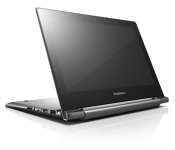
Lenovo Announces new N20 and N20p line of Chromebooks
Lenovo has announced two new Chromebooks today, adding to the current line of more educational geared Chromebooks. The new line consists of the N20 and N20p.

Both Chromebooks offer similar specs:
- 11.6-inch 1366 x 768 display
- 11.6 x 8.34 x 0.70 inches ( 295 x 212 x 17.9 mm)
- Weight – N20: 2.8 pounds (1.3kg) N20p: 3.1 pounds (1.4kg)
- Up to 4G DDR3L RAM
- Up to 16GB eMMC storage
- Intel Celeron processor
- 8 hours battery life
- 2 x USB orts
- 1 x HDMI out
- 2-in1 SD/MMC card reader
The key difference between the Lenovo Chromebook N20 and the N20p is that the N20p offers a 10 point multi-touch display and it also folds around to get the keyboard out of the way entirely. Think more along the lines of the Yoga laptops.
The N20 will set you back $279 and become available in July. Where as the touch screen N20p will be slightly more expensive at $329 and won’t make its debut until August.


//<![CDATA[
ord = window.ord || Math.floor(Math.random()*1E16);
document.write('’);
//]]>

Samsung to Appeal $119M Patent Verdict as Foreman Says Apple Should Target Google Instead
Samsung yesterday confirmed it will challenge the $119.6 million verdict in the second Apple versus Samsung patent infringement trial, claiming the decision was “unsupported by evidence.” According to Bloomberg, Samsung will ask Judge Lucy Koh to reduce the damages to zero and will follow with an appeal if this initial request is denied.

After several days of deliberations and weeks of testimony, the jury found that Samsung willfully infringed on three of the five Apple patents involved in the lawsuit and ordered the company to pay $119.6 million, a figure well below Apple’s requested $2 billion. Speaking after the verdict, jury foreman Thomas Dunham said the compensation was “fair and just” based on the evidence presented at the trial (via Re/code).
“The damages were based on the fact that both sides presented their view of what a reasonable amount of, I guess, compensation would be,” he said. “We didn’t really feel either one was what we felt was a fair and just compensation.”
Dunham, who is familiar with the patent system from his work at IBM, hinted that Apple should pursue Google because the Android operating system is the real target in this case, an argument that Samsung’s lawyers used during the trial (via The Wall Street Journal).
“If you really feel that Google is the cause behind this, as I think everybody has observed, then don’t beat around the bush,” said Mr. Dunham, whose job at IBM was to oversee developers expected to file patents. “Let the courts decide. But a more direct approach may be something to think about.”
Though Samsung was the defendant, Google played a role in the case as it was part of a larger “holy war” against Android instigated by Steve Jobs following Android’s debut Google also sent VP of engineering Hiroshi Lockheimer to testify on behalf of Samsung and agreed to offer partial legal protection to Samsung in case of an Apple win.
While Dunham suggests that Google should be Apple’s real target in the ongoing litigation, jurors claim that Google’s part in the trial was not a factor when they were deciding on the merit of the infringement claims. It also did not influence the amount of damages ultimately awarded to Apple.

Boost Mobile debuts new unlimited talk, text, data plans

Boost Mobile on Tuesday announced a trio of new rate plans for feature phone and smartphone users alike. Priced as low as $40 these “Monthly Unlimited Select” options each allow for unlimited talking, texting, and data. What’s the difference in them, you ask? That would be the full speed data buckets for each plan.
With the unveiling of Monthly Unlimited Select, Boost Mobile once again evens out the playing field with compelling, competitively priced offers,” said Dow Draper, President, Sprint Prepaid Group. “This new package reflects what we hear our customers want: straightforward, value-oriented options that provide more or less data depending on their individual needs.”
In addition the new rate plans, Boost Mobile customers can still enjoy other benefits such as International Minute Packs, Boost Wallet, International Connect, Handset Insurance.
The post Boost Mobile debuts new unlimited talk, text, data plans appeared first on AndroidGuys.

KickSat’s tiny satellites may burn up before they’re released

If you backed the KickSat project in hopes of getting your own tiny satellite into orbit, you’ll want to brace yourself for some bad news. The host vehicle’s master clock has unexpectedly reset while in space, pushing the mini satellites’ release back to May 16th — after the main craft is likely to burn up on reentry. It’s possible to force a deployment once the host’s uplink radio gets enough power, but that might not happen quickly enough to avoid a calamity.
Project creator Zac Manchester believes that radiation was likely responsible for the glitch, and holds out hope that KickSat either stays in orbit for longer than expected or gets a burst of energy to power its radio. Even if the worst happens, though, that might not be all she wrote. Manchester vows that this “won’t be the end” — we wouldn’t rule out a future mission.
Filed under: Science
Via: The Atlantic
Source: Kickstarter
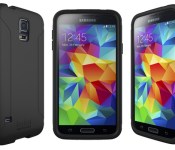
Engadget giveaway: win a Samsung Galaxy S5 courtesy of Tech21!

We’re officially kicking winter to the curb and pretending the polar vortex never happened. It’s time to revel in nature’s glory by kayaking, biking or at least relocating to the backyard for a bit. Of course, that means more chances for your smartphone to tumble onto the pavement instead of couch cushions, so we’ve put together this week’s giveaway with that in mind. The device protection gurus at Tech21 are providing a Samsung Galaxy S5 for one lucky Engadget reader and bundling it with an Impact Tactical case and Impact Shield screen protectors to keep it safe from harm. The case is all about shock absorption and impact resistance (if the name didn’t clue you in) and it was designed to keep the phone’s slim profile intact. All you need to do is head down to the Rafflecopter widget for up to three changes at winning this butterfinger-proofed smartphone package. Now, maybe you can have nice things again.
a Rafflecopter giveaway
- Entries are handled through the Rafflecopter widget above. Comments are no longer accepted as valid methods of entry. You may enter without any obligation to social media accounts, though we may offer them as opportunities for extra entries. Your email address is required so we can get in touch with you if you win, but it will not be given to third parties.
- Contest is open to all residents of the 50 States, the District of Columbia, and Canada (excluding Quebec), 18 or older! Sorry, we don’t make this rule (we hate excluding anyone), so direct your anger at our lawyers and contest laws if you have to be mad.
- Winners will be chosen randomly. One (1) winner will receive one (1) contract-free Samsung Galaxy S5 for the carrier of their choice, one (1) Tech21 Impact Tactical case for GS5 and two (2) Tech21 Impact Shields.
- If you are chosen, you will be notified by email. Winners must respond within three days of being contacted. If you do not respond within that period, another winner will be chosen. Make sure that the account you use to enter the contest includes your real name and a contact email or Facebook login. We do not track any of this information for marketing or third-party purposes.
- This unit is purely for promotional giveaway. Samsung, Tech21 and Engadget / AOL are not held liable to honor warranties, exchanges or customer service.
- The full list of rules, in all its legalese glory, can be found here.
- Entries can be submitted until May 7th at 11:59PM ET. Good luck!
Filed under: Announcements, HD, Mobile, Alt, Samsung

Google discusses security with the NSA, but don’t draw any wild conclusions

Following Edward Snowden’s PRISM leaks last year, companies such as Apple, Google and Microsoft sought to distance themselves from the NSA and claimed to be unaware of some government surveillance activities. And while we’ve seen companies demand greater transparency from the NSA, that doesn’t mean backdoor discussions about security haven’t been going on as well. Consider this, for instance: Email communications obtained by Al Jazeera show that Google execs such as Eric Schmidt and Sergey Brin have cooperated with the NSA on issues such as “mobility threats” as far back as 2012, before Snowden revealed information about the government’s capabilities for spying on Americans’ online activities.
It would be easy to over-hype the significance of interactions between Mountain View bigwigs and the NSA, but the emails don’t indicate anything particularly untoward on Google’s part. Instead, the communications reveal that NSA Director Keith Alexander invited Google CEO Schmidt to a “classified threat briefing” to discuss security issues. An email from Alexander also shows that Google, Apple, Microsoft and other companies worked together to define core security principles, and several other tech firms — including Dell and HP — worked with the NSA to minimize threats to enterprise platforms. In other words, Google is clearly not alone in maintaining a dialogue with the government.
While the alarmist undertones may be a bit uncalled for, Al Jazeera does raise the logical concerns about how the NSA uses the information it receives from Google and other internet giants. In any case, though, Google’s emails with the security agency hardly implicate the company in any wrongdoing. Reportedly, additional emails between Google execs and the NSA have yet to be released, so stay tuned.
Source: Al Jazeera America

There’s a new PlayStation Vita available in the US today: what you need to know

Look, we’re not gonna review the PlayStation Vita again. Promise. Three times is enough, no? We think so too. But we do want to tell you that the second version of the PlayStation Vita is finally available in North America today — it even comes in a bundle with Borderlands 2 for $200 — and we want you to feel safe and secure in your purchase, should you choose to make one. So, is it worth it? In short: yes, yes it is. It’s thinner; it’s got rounded edges; and Sony’s cut a ton of fat from the price as well. Head below for our full video review of the Japanese model, then jump into the Engadget database for specs, reviews from other publications and to discuss which games you’re most excited about. It’s Luftrausers, right? Come on, admit it.
Filed under: Gaming, Handhelds, Home Entertainment, Software, HD, Sony
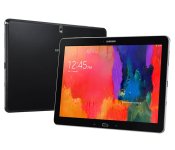
Get Samsung’s Pro line of tablets for $50 to $100 off at Amazon

Deals are always good, and this one is no slouch. Right now, Amazon is taking $50 to $100 off Samsung’s Pro Tablets. This includes all Tab Pros and Note Pros. This sale also includes the Galaxy Note 10.1 2014 Edition with a $70 price reduction for all models (excluding the LTE variant).
Samsung has a model available in just about every size so I’m sure you can find a tablet that will suit your needs. Whether its the 12.2 inch beast, Note Pro, or the smallest Tab Pro offering at 8.4 inches, Samsung has covered all the bases so you can purchase what’s best for you.These tablets bring some amazing specs to the table and can compete with or beat every other tablet in their respective categories.
Head on over to Amazon if this deal is for you. Expert and Customer reviews have been mostly positive, and Samsung seems to have put their best foot forward in creating tablets with best-in-class specs, and a smooth user experience.
Get this deal in your flavor:
- Note 10.1 2014 Edition 32GB
- Note 10.1 2014 Edition 16GB
- Tab Pro 10.1 16GB
- Tab Pro 8.4 16GB
- Note Pro 12.2 32GB
- Tab Pro 12.2 32GB
The post Get Samsung’s Pro line of tablets for $50 to $100 off at Amazon appeared first on AndroidGuys.
 AIVAnet