


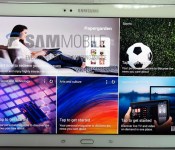
Samsung’s next Android tablet looks like a supersized Galaxy S5

Samsung has already launched a cavalcade of new Android tablets this year, but it looks like the company isn’t quite done yet. SamMobile claims to have the first photos of the Galaxy Tab S 10.5, a recently rumored Android design that would mark Samsung’s return to slates with OLED displays. As the name suggests, it would have a 10.5-inch, 2,560 x 1,600 AMOLED panel that promises higher contrast and bolder colors than an LCD; there’s reportedly an 8.4-inch equivalent in the works, too.
However, the hardware surrounding that display may be as much of an attention-getter. Where the Tab Pro range aped the Galaxy Note 3, the Tab S looks like a Galaxy S5 writ large — you’d get the same dimpled plastic back and, apparently, the same fingerprint sensor. Connectors on the back also hint at a possible smart screen cover. About the only disappointment may be the performance, since there’s talk of the Tab S carrying the same 1.9GHz Exynos 5 Octa processor that we saw in the Tab Pro early this year. Assuming the leak is accurate, the biggest mystery may be when this (mostly) upgraded device hits store shelves.
Via: Liliputing
Source: SamMobile

Home theater deals of the week: 5.9.14

Let’s face it: It’s no longer enough to just have a TV in your living room to access broadcast programming. Streaming services are the norm; DVRs allow delayed commercial-free viewing; and most displays lack the power to fill a room with sound. To remedy those situations, we’ve compiled a handful of tempting deals for your end-of-the-week consideration. Jump down past the break to ogle the goods. If there are other home entertainment gadgets you’re after that we haven’t included here — join us and add them to your “Want” list. Every time there’s a price cut in the future, you’ll get an email alert!
Slingbox 350

Price: $125
Regular Price: $180
Engadget Global Score: 84
Buy: Amazon
If you didn’t snag a Slingbox 350 when we mentioned it a few months back, the price continues to tumble. Right now, the unit is labeled at a cool $125 — a $55 total discount. For the investment, you’ll gain mobile and remote desktop access to live programming and DVR content when you’re out of the living room.
Apple TV (third-gen)

Price: $85
Regular Price: $99
Engadget Global Score: 86
Buy: No Better Deal
As we’ve mentioned before, any discount on current-gen (albeit from 2012) Apple tech is certainly welcome. Cupertino’s compact set-top box is currently seeing a modest discount that could be enough to lure the curious. Of course, rumors are pretty much constant these days about a new model, though we’ve yet to discover any concrete details. The current rate is also on par with the lowest it has been in the past 90 days, too.
Philips Fidelio HTL7180/F7

Price: $500
Regular Price: $800
Buy: Amazon
While we don’t like to revisit options inside this roundup on the regular, the increased discount on the Philips Fidelio HTL7180/F7 made us take another look. The soundbar and its detachable speakers are now seeing a $300 total price drop, hitting a three-month low.
ZVOX SoundBase 555

Price: $299
Regular Price: $399
Engadget Global Score: 76
Buy: Amazon
If you’re after a gadget that will boost your TV’s sound without cluttering up a shelf, have a look here. The ZVOX SoundBase 555, as its moniker suggestions, rests underneath the base of that display and most reviewers have reported respectable sound quality. Inputs are limited though, so that may weigh heavily into your final decision. Current pricing is just $2 above the lowest we’ve seen since early February.
Filed under: Home Entertainment

Oracle gets another shot at making Google pay for using its code in Android

Oh, you thought Oracle and Google’s heated legal battle was over? Not quite: the US Court of Appeals for the Federal Circuit (CAFC) overturned a lower court’s decision that Oracle’s Java APIs weren’t copyrightable. This means that Oracle gets another shot at making Mountain View pay for its alleged transgressions, assuming Google can’t prove that its use of the APIs in Android falls under the fair use doctrine of US copyright law.
To fully understand what’s going on, we need to flash back to 2010. Oracle sued Google for billions because it believed (among other things) that the search giant infringed the “structure, sequence, and organization” of 37 Java application programming interfaces (APIs) while it was first building Android. Two years and lots of legal jostling later, a jury decided that Google did in fact infringe on Oracle’s copyrights (but not its patents). Seems like an open and shut case, no? Judge William Alsup eventually shot down the copyright claims their verdict was based on, though, basically nullifying the jury’s decision.
The court ultimately decided that those APIs aren’t copyrightable, prompting Oracle to accept a whopping $0 in damages from the folks in Mountain View. Today, that’s no longer the case. In short, the appeals court took issue with Alsup’s original conclusion (and some of the intellectual leaps that lead to it) and overturned the ruling. APIs can indeed be copyrighted now, which itself is quite a can of worms to open because of the potential pitfalls for software creators trying to craft apps and services that interact with others. Last time around the jury found itself deadlocked on whether Google’s actions fell under fair use — expect another trial and still more legal intrigue to come.
Via: FOSS Patents

A Westerner’s guide to Japanese toilets

Dirt, stains, effluent, material, the load, waste, matter. These are the words my tour guides at Toto’s toilet factory and research center in Kyushu used to verbally pirouette around what exactly its porcelain thrones deal with: shit. Japanese toilets are probably the best in the business at getting rid of your business, but for many Westerners, that first moment of contact can be terrifying. There are so many buttons, so many unknown symbols and open-to-interpretation stickmen figures; not to mention the (unfounded) fear that you could be sprayed with toilet water by merely approaching one. The Washlet, as Toto’s combination bidet/toilet is called, doesn’t come cheap. And yet, in Japan, they are everywhere. In fact, compared to plain, old, featureless toilets, washlets occupy the majority of restrooms.
Japan’s biggest toilet maker isn’t based in Tokyo. Toto’s headquarters are actually hundreds of miles away from the capital, on the island of Kyushu in the southwest tail of Japan, an area better known for its addictive tonkotsu pork ramen. Toto’s been here for just shy of 100 years; early, illustrious years that included making Japan’s first seated flush toilet. This is the same company that refers to itself as the “Apple of toilet tech.” But for all its technical accomplishments, Toto believes its toilets are the best simply due to its heritage in this area of bathroom fixtures, and not the Star Trek-esque control board attached to the bowl’s side.
Flush with features
The washlet’s plethora of user settings focuses more on physics and chemistry than electronics. Toto’s modern toilet bowls have a nanotech coating on the interior to defend against incidental stains and prevent waste from sticking to it long after you’ve flushed. The very latest models even partially electrolyze the flush water, which not only adds an antibacterial bonus to every flush, but also has a bleaching effect on urine stains. And some higher-end washlets pack proximity sensors that cause the seat to raise and lower on your approach and dismount.

A representative demos Toto’s Intelligence Toilet.
Toto’s high-tech integration reached a peak with its nearly 10-year-old, health-centered “Intelligence Toilet.” A collaboration with construction giant, Daiwa House, the entire system included scales built into the bathroom floor, blood sugar and blood pressure monitoring, access to the internet (and your physician) and the ability to conduct “urine analysis.” It also came with a hefty $6,100 price tag.

A graphical representation of the Tornado Flush.
Then there’s the Tornado flush — think of it as the toilet version of Dyson’s “cyclone technology.” Toto’s team made it a point to drill this specific feature into my head. This particular flushing process uses less water, and as demonstrated by the company’s own graphic visualization, is a more efficient way of getting rid of everything. And it’s constantly evolving, too. Toto teams up with universities, using supercomputers to model water physics, test flushing processes with particle waste and tweak the shape of its future toilets.
The ‘sound princess’ and the pee
For decades, modest Japanese would apparently repeatedly flush the toilet in public stalls to mask any trumpeting. The net effect of which was wasted water. To remedy that, Toto invented the Otohime (translation: sound princess) — a simple noise generator that’s often attached to the company’s public or business-based toilets. Waving your hand over Otohime‘s sensor makes a comforting, camouflaging noise play (a delicate melody, or perhaps something representing a tranquil forest) without an actual water flush, so you can sit in peace.
Don’t cross the streams
The positives of embedding a bidet function within your toilet, aside from a cleaner oshiri (or “arse” in Japanese), are twofold: It’s more economical and, apparently, there’s a therapeutic benefit to washing your butt with water. If you’re looking for said therapeutic relief, Toto’s washlets offer plenty of cleaning options to try out. The typical washlet includes controls for water temperature and pressure, but it can also be further adjusted for both oscillating and pulsing water streams.
With the aid of a strobe light, the Toto team was able to show me how the washlet’s pulsing stream behaves; it’s apparently set to burst at roughly seven centimeters from the spout, about the location of our collective arses’ epicenters. The stream, a mixture of air and water, is also oddly hypnotic, as you’ll see below.
The business of the BM
Despite the myriad benefits of a coddled washlet experience, Westerners are still not entirely sold on the toilet upgrade, and not just because of the associated high price. Sure, button panic and the fear of a rogue water stream factor into that hesitation, but there’s also the cultural discomfort to consider: Everybody poops, but no one wants to talk about it.
“It can be difficult to engage with consumers; to have a meaningful discussion about features and benefits beyond the design and basic function of a toilet,” said Brian Hedlund, marketing manager for US-based Kohler.
Everybody poops, but no one wants to talk about it.
Another US company, Brondell, sells bidet seats to augment existing toilets. As company head Steve Scheer told me, for many consumers, the key to understanding and buying into the luxe toilet experience is to test it out. “Trying to convince someone to change their [toilet paper] habits that have been ingrained in them since childhood were difficult at best. Bidet seats are a very personal and experiential thing in that you must experience it firsthand. You need a trusted source to convince you to try.”
Toto’s aware these cultural traditions and taboos hamper its reach in outside markets, especially in the US. To counter that, the company runs a Try a Washlet scheme in several bars and restaurants around the US to educate potential clients. Toto’s overall aim, however, is not the service industry, but upmarket homes. It’s the opposite tact from the bottom-up approach Toto used to build its business in Japan; a washlet for the everyman. In the US and other overseas markets, Toto’s marketing the washlet as aspirational; because most of us want what we can’t have, even if we’re not comfortable talking about it.
Please take a seat: Toto’s washlet in pictures
The many washlets on display at Toto’s showroom.

The portable Otohime is a convenient audio disguise for toilets that don’t have audio bells and whistles.

A washlet control panel customized for the US market. That “front” setting is meant for women, but don’t let that stop you from trying it.

Relax. The washlet’s self-cleaning bidet isn’t suddenly going to spray if you press a button — it’s connected to a pressure sensor on the seat.

The Washlet G: a toilet so famous it’s part of Japan’s Mechanical Engineering Heritage, like the bullet train. It was that important.

When the Washlet was first conceived, Toto experimented with varying water pressures and temperatures… on its staff.

Designer washlets, like this floating model, can cost around $6,000.

This one’s a toilet made for Sumo wrestlers. It’s specially strengthened to bear their extra weight.
[Image credit: Associated Press]

Amazon’s studio photography patent makes Apple, Samsung look reasonable

Smucker’s, believe it or not, has a patent for the process of making a peanut butter and jelly sandwich. You should see the filing, too — based on the complex diagrams you’d think it detailed architectural concepts or maybe even some weird new camera lens. While the PB&J company won’t likely sue for damages the next time you make yourself some lunch, a recently granted Amazon patent addresses another very simple concept, one used by professional around the world: photography (and video) of items against a white backdrop.
The patent, simply called Studio Arrangement, accounts for one of the most essential foundations of commercial photography: shooting objects in front of a clean white background with very controlled lighting. Though the concept is one familiar to virtually all studio photographers, the patent narrows in on some very particular settings, which Amazon apparently thinks eliminate the need for much post-production work. These include “an ISO setting of about 320,” an elevated surface “positioned about 21 inches above a floor level” and so on.
Since the patent entails so many specific settings, it’s unlikely that Amazon reps will be able to tell if you’re guilty of using a “plurality of light source consuming about 40 kilowatts.” Still, the Studio Arrangement patent addresses an incredibly widely used practice, albeit one that’s even more specific than Apple’s famously contested ownership of the slide-to-unlock function. It makes you wonder: What’s the point?
We can only hope Amazon — and Smucker’s before it — is making a joke of the US patent system by demonstrating just how much companies can get away with. Piling onto the ridiculousness might not be the quickest way to bring about reform, though. In any case, we’ve reached out to the e-commerce giant for comment, and will update the post should we get a response.
Via: Wired UK
Source: USPTO

3D Printable 4.7-Inch and 5.5-inch iPhone 6 Mockups Now Available from Free Plans
Yesterday, designer Martin Hajek started selling a $25 set of 3D files that allow you to print your own 4.7-inch iPhone 6 mockup using a 3D printer. Today, a second set of 3D plans for both the 4.7-inch and 5.5-inch version of the iPhone 6 were released by MacRumors forum user Arthur Tilly and made available for free on Thingiverse.

Using measurements available from leaked design drawings, the plans allow anyone with access to a 3D printer to print out the alleged iPhone 6 design and see how it feels in their hand. The set includes an .STL file for 3D printing and an editable OpenSCad file that can be used to modify the design and add some of the missing details like the Apple logo.
So, here’s an OpenSCad file to create one, and the STL file it makes. There are some comments in there, so you can adjust things to your personal rumour preference. And improve it, of course. It doesn’t print the expected lump on the back for the lens (that would mean the entire build would be on supports, or it would have to be printed a different way around). Neither does it have an apple logo or some other details that would be nice. Maybe I’ll improve it soon, or feel free to do so yourself…
There has been no shortage of renderings of the rumored iPhone 6 that provide an advance look at the possible shape and size of Apple’s upcoming smartphone. A new post from Taiwanese blog AppleCorner provides precise measurements of 138 x 67 x 7.0 mm obtained from one of these mockups, while a Sonny Dickson leak shows physical mockups in roughly the current three colors used on the iPhone 5s.

While there are a variety of cases and mockups all pointing in the same direction for the design of the iPhone 6, it is important to remember that most of these products are essentially all based on the same sets of leaked design drawings, and they ultimately may or may not prove correct.

4.7-Inch iPhone 6 Mockup Comparison to iPod Touch Highlights Design Similarities
Italian site Macitynet, which previously published several photos of a fairly good quality physical mockup of the rumored 4.7-inch iPhone 6 based on design drawings from Japanese magazine MacFan, has now shared an interesting new photo set [Google Translate] comparing the mockup to a current-generation iPod touch.

The photos clearly show how similar the two devices are in design, from the curved edges on the rear shell to the style of speaker holes along the bottom edge. The iPhone 6 at 7.0 mm thick based on the design drawings is clearly thicker than the iPod touch at 6.1 mm, although the iPhone 6 would still be noticeably thinner than the iPhone 5s at 7.6 mm.

The iPhone 6 of course has larger height and width than the iPod touch, given that the body must accommodate a 4.7-inch display compared to the 4-inch display of the iPod touch.

The style is naturally also similar to the iPhone 5c, which itself took some design cues from the iPod touch, although the bright rear shell colors are the defining features of the iPhone 5c and they are unlikely to make their way into Apple’s flagship iPhone 6.
In addition to the 4.7-inch iPhone 6, Apple is rumored to be launching an even larger model with a 5.5-inch display, although that may follow several months after the smaller version. High-quality physical mockups of that device have yet to appear, although users with access to a 3D printer can print their own using files based on the design drawings published by MacFan earlier this year.

Galaxy S 5, Is It Really The Best? A Review

The Samsung Galaxy S 5 is disappointing in precisely one area, build quality. But even in that, it’s slightly better than the previous member of the Galaxy S line. Although even that complaint may soon be a non-issue in the wake of the rumors of the Galaxy S 5 Prime which has been confirmed here. On to the review.

Hardware
Powered by a Snapdragon 801 processor, with 2 GB of RAM, while there hasn’t been much progress since the Galaxy S 4, the device is no slouch. (Full Specifications here) Although the Galaxy S 5 is still made of plastic, it’s much higher quality feeling than it’s predecessor. New features to the Galaxy S 5 include a heart-rate sensor on the back of the device and the added fingerprint scanner functionality built into the home button.
The updated Galaxy S 5 is also waterproof similar to the Galaxy S 4 Active, with a plugged USB 3 charging port and rubber gasket-ed removable battery door. Aside from those details and the textured battery door, the device looks remarkably similar to its younger brother the Galaxy S 4.
Software
In the Software of the Galaxy S 5 we can see the result of Samsung’s agreement with Google to tone down the TouchWiz interface. Like the Nexus 5′s Google Edition launcher, the “Okay, Google…” command will activate Google’s voice search from the the new TouchWiz home screen of the Galaxy S 5. On the Verizon edition, at least, the TouchWiz web browser is gone and Google Chrome is the stoc browser (but this isn’t the case on all Galaxy S 5 variants.)
Unlike the Galaxy S 4′s categorized tabs, the settings menu on the Galaxy S 5 is automatically organized as a straight menu list, reminiscent of the Nexus devices. You’re able to switch to the new “Grid view” layout using the menu button at the top right.

When accessing the menu located on in the app drawer you’ll find the familiar options to edit and change views of the application list. New to this menu is the “GALAXY Essentials” option which will take you to a store dedicated to Samsung Galaxy apps. It seems that this option and a “GALAXY Essentials” widget are the only ways to access this market.

Lastly, although there isn’t much exciting and new about the camera app on the Galaxy S 5, The 16 MP sensor does perform admirably, I did a little comparison between the HTC One M8 and the Galaxy S 5 here:
Want One?
Take your pick!
Galaxy S 5 – T-Mobile
Galaxy S 5 – AT&T
Galaxy S 5 – Sprint
Galaxy S 5 – Verizon
The post Galaxy S 5, Is It Really The Best? A Review appeared first on AndroidGuys.

Blu Products Is An Exciting Company, My Thoughts

A lot of you might not be familiar with Blu Products. Blu is a mobile device manufacturer which started in Miami in 2009 whose smartphone offerings have been the perfect answer for people who want a sturdy device at a great price. Lately they’re been trying to break into the high-end market and there’s nothing better than watching another company bring out devices with power and a great price.
What Does Blu Have To Say?
I had a chance to interview Blu’s channel marketing manager, Carmen Gonzalez, here’s what she had to say:
Tony: How long have you been working with Blu?
Carmen: A little under three years.
Tony: When Blu started in 2009, what was the company’s goal? Were smartphones a goal of the company from the beginning?
Carmen: The company used to focus more on feature phones with a few androids, primarily in Latin America. The goal of the company has always been to provide the consumer everything they want in device, quality, style and amazing pricing.
Tony: How has Blu changed since then?
Carmen: The change has been dramatic, even when we started producing Android devices, they were very entry level, nothing compared to what we have now. I’m proud to say, we’ve come a long way and have made quite the impact along the way!
Tony: What Blu phone do you carry?
Carmen: I carry a Life Play in neon yellow. I haven’t switched yet because I just like this one so much, when we say “We have a Blu just for you” we really mean it.
Tony: What are your favorite features of the devices your company has been releasing?
Carmen: I know most people that I talk to are really going crazy over the LTE 5.0 enabled devices, but I’m really more impressed with the cameras and the displays, the Vivo 4.8 HD has a gorgeous HD Super AMOLED display and it’s the perfect size. When you capture and view photos with it, anyone can look like a superstar.
Tony: Can you provide any insight into Blu’s plans for growth as the smartphone industry gets more competitive?
Carmen: Well, the reason we bring out 5 to 10 new devices every quarter is because we know how competitive it is, and we know that everyone always wants a new device, so we want to provide new options every time someone browses our inventory. Aside from that, there are a lot of things in the works right now that I’m just not able to discuss yet, all I can say is, stay tuned, more are coming your way!
Who Knows What The Future Holds?
So, in this market, what future do we really see for a company like Blu? Is it good? I hope so, because this company is providing something we desperately need. The thing I hope the average consumer can learn is that not everyone needs a flagship phone. If we can start to accept that, then maybe we won’t feel the need to sign away two years of our lives just so we can have the best of the best at an affordable price. Check out this compelling Op-Ed piece Don’t Be A Spec Whore, This Isn’t A Spec War by Nick Schiwy.
Take the Galaxy Note series. Great devices, always leading Samsung’s Galaxy line, and often leading the market in specs, but for most people to get the new one without selling a minor organ will literally cost years of your life in the form on a contractual agreement with a carrier, or a financing plan adding a monthly fee to your bill until the retail price of the device is paid-in-full.
The question is, do the people who use the Note series all need the power that these expensive devices pack? I don’t think they do. Most of the people I’ve known who swear by the Note line are just in it for the screen size, and nothing more. Most don’t even play games or do anything much more taxing than watching Youtube videos and browsing the web. The Galaxy Note 3 has an MSRP of $699.99, but for what a lot of users need (I won’t necessarily say “most” but a lot) they would be better off with Blu’s new Studio 6.0 HD which is prices at $249.99 unlocked, out the door with no contract.
Now, don’t think I don’t know there are a lot of people out there who want the leading edge, but that’s not my point in the above comparison. Besides, for those of you who want that, they have a phone for you, which will be my next personal device, the Life Pure XL. With a 5.5 inch full HD display, 16 MegaPixel shooter in the rear and 8 MegaPixel front facing camera, a Snapdragon 800 processor, 3 GB of RAM and 32 GB of storage all priced at a meager $399.00 on Amazon, how can you say “no”?
The bottom line is, if we can rid ourselves of the contracts and start looking around outside of the carrier retail stores, there are companies like Blu that are eager and waiting to help you save a lot of money with your next smartphone purchase. They have a Blu just for you.
Website: Blu Products
The post Blu Products Is An Exciting Company, My Thoughts appeared first on AndroidGuys.
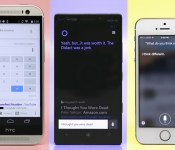
Smartphones for hire: Which personal assistant is right for you?

“Ring-ding-ding-ding-dingeringeding.”
This isn’t a standard job interview answer, but then again, “What does the fox say?” isn’t a typical question, either.
The top three smartphone platforms now feature fully functional personal assistants, and just like real-life assistants, it’s not so easy to pick one at random. Each has its own talents, weaknesses and personality quirks to consider. So, I conducted a series of “interviews” with Siri, Google Now and Cortana to get to know them better — and yes, they all know exactly what the fox says.
Siri

Apple’s Siri is a seasoned assistant with plenty of experience to back up its resumé. Now nearly 3 years old, the once-beta program has had time to squash bugs and add features. And thanks to the iOS platform, it’s integrated with social networks like Twitter and Facebook, as well as services like Yelp, Evernote, Fandango, OpenTable and WolframAlpha.
Siri has a jovial personality. No matter what you ask, just frame your question naturally — for instance, “How should I dress this weekend?” — and nine times out of 10, it’ll not only understand you, but also respond in a similar fashion. If you have follow-up questions or requests, Siri will continue the conversation with you. And if you ask something silly, expect a sassy answer.
Siri is a seasoned assistant with plenty of experience to back up its resumé.
Personality’s a nice touch, but it’s merely a party trick if your assistant lacks functionality. Fortunately, Siri’s not hurting in that area. It can dictate and send texts, emails and social network updates. It can make calls and read messages back to you. It has no problem setting (and canceling) reminders and alarms, and will display your upcoming appointments in a list. How about opening apps and changing settings? Airplane mode, WiFi, Bluetooth, you name it — Siri’s got you covered so you don’t have to dig around countless screens to find stuff.
Siri’s also good with watercooler talk. It told me when the next Giants home game was and how they’re doing this year. When I ask about a movie, the details show up in a card-like view; and I can even buy movie tickets through Fandango. Siri also can pull up music through your library or iTunes, and it’s able to pause, resume and skip songs. However, it doesn’t do a good job of pulling up concert information, opting instead for a web search.
Much like both of its competitors, it can set geofences for reminders. This means you can tell it to remind you to pay the rent as you pass by the landlord’s office, or stop and get a Mother’s Day present when you’re close to your mom’s favorite store (hint, hint). Speaking of location, it can pull up local listings, which you can then filter by distance or Yelp rating; you can also use Siri for all of your navigation needs, as long as you don’t have a strong aversion to Apple Maps. The service also remembers your home and work to help route your morning commute, but unfortunately, it doesn’t do well at determining other places you visit frequently.
Siri’s not all business though. It has a knack for finding your friends, as long as you and your entourage have the iOS app. If Steve’s late getting to your house, you can ask Siri to see where he’s at and it’ll pull up a map with his location. While you wait for him to show up, you might as well use Siri’s OpenTable integration to set up reservations for dinner.
Hire Siri if you’re looking for: Personality, dictation, social networking, music playback, sports, movies, changing settings, reading messages, finding friends.
Google Now

Of the three candidates, Google Now is the blandest. It’s the kind of assistant that takes everything a little too seriously, and on the rare occasion when it tries to be funny, it tries too hard. But it’s also very robust, knowledgeable and takes care of business when called upon — and you can call upon Google without touching the device. It works great on the home screen and in the Now screen, but you can’t activate it when you’re in an app, or even in the app tray. That’s still better than Siri and Cortana, however, which are activated by a long-press of a particular button.
It’s the kind of assistant that takes everything a little too seriously, and on the rare occasion when it tries to be funny, it tries too hard.
Sure, it comes with a few Easter eggs (me: “Make me a sandwich.” Google: “What? Get it yourself!”), but Google prefers function over friendliness. I can respect that — Siri’s and Cortana’s jokes aren’t technically all that useful anyway — but it’s disappointing that an engine like Google can’t understand questions unless they’re framed formulaically, such as “What’s the weather like today?” instead of “What should I wear this weekend?”
It’s not the most intuitive assistant, and it’s a mixed bag for basic daily tasks. Google can look through your email and remind you of upcoming flights and give you other information related to your pending trip. Of course, you can also use it to do the usual voice assistant stuff: Set reminders and alarms, visit specific websites, draft notes and make calls, as well as send texts and emails. For reminders, Google will ask you when and where you want to be pinged. And although it can set up appointments and alarms, it can’t change or cancel them. (If you ask, it doesn’t even understand your request.)
One of Google’s less job-specific strengths is its ability to name a tune. It’ll pull up information about the song you’re listening to and link you to the Google Play Store. It’s a talent Siri simply doesn’t possess, although rumors indicate that Apple’s looking into integrating Shazam. Lastly, if you’re interested in using your assistant to post on social networks, take note: You’re limited to Google+.
Hire Google if you’re looking for: Travel and flights, dictation, music discovery, hands-free voice activation and website shortcuts.
Cortana

Cortana is the only personal assistant in the trio that has a recognizable face, and the only one that has a resumé stretching 500 years into the future. Presently, the service is brand-new and technically in beta, but it’s fully functional. It’ll continue to improve over time as more people use it and Microsoft’s team adds functionality.
Like Siri, Cortana’s got the makings of a fun personality. Jen Taylor, the voice of Cortana in the Halo series, contributes to her Windows Phone namesake by providing a lot of the program’s clever quips, and you’ll hear more of her voice over time. The service doesn’t have quite as many quirky responses as Apple’s counterpart, but wit comes with experience. Currently, Cortana’s sass is limited to telling jokes, poking fun at the competition and responding to random questions about Halo and Microsoft. She’ll also keep conversations going as long as you’re making queries that are relevant to the topic at hand.
She can take care of nearly all of the essential tasks that a virtual assistant should have, many of which I’ve already discussed in earlier sections, but Cortana’s greatest strength comes with her Notebook. After all, your personal assistant would jot down information about you in his or her notebook, right?
Cortana is the only personal assistant in the trio that has a recognizable face, and the only one that has a resumé stretching 500 years into the future.
Do people even use real notebooks anymore? Well, Cortana does. She uses her Notebook to learn more about you. Sure, Siri and Google Now have shown small pieces of this feature: Both services remember your relationships and recognize where you live and work. Siri gets smarter as it gets to know you, and Google displays cards with information about your favorite sports teams, stocks, cable provider, news stories and so on. So far, however, Cortana’s implementation adds a lot more customization. Your list of reminders resides here, as well as your favorite places, music searches and preferred quiet hours.
But the most intriguing part of the Notebook is the section on your interests. This is a customized feed of information that keeps you posted on certain news stories and fills you in on things like your commute time, places to eat, upcoming flights, local weather and your favorite sports teams.
It’s also home to Windows Phone’s Do Not Disturb mode, known as Quiet Hours. A personal assistant would likely know not to bug you about things after a certain time of night, unless it’s incredibly important — but if your mother is trying to get ahold of you at midnight, it’s probably an emergency. Thus, you can set your quiet hours in the Notebook, as well as add a list of people (the Inner Circle) you don’t mind waking you up at the worst possible time in the morning.
You can rely on Cortana when you want to change settings and open apps, and it can even open up specific websites directly as long as you have a shortcut set up as a Live Tile. That’s still not quite as nice as Google, which can open sites without that caveat, but it’s a start. However, just like Google, Cortana can recognize music and offer links to buy the song you’re listening to. She can pull up whatever tunes you want, navigate through your playlist and pause songs currently playing. She’s also skilled at hooking you up with the latest weather conditions in a card-like view (which the others do just fine) and converting temperature between Fahrenheit, Celsius and even Kelvin. Conversely, I asked Siri to convert to Kelvin and it showed me how hot it was in Kelvin, Australia.
Unfortunately, the service’s beta status also means it’s not complete. Cortana doesn’t appear to have any attachments to social networking yet, though I wouldn’t be surprised to see this change down the road. She also doesn’t have hands-free activation, so you have to hold down the search button and then speak your voice commands. Finally, she also has trouble dictating punctuation, so “period” and “question mark” were transcribed as actual words instead of grammatical marks.
Hire Cortana if you’re looking for: Personality, navigation, appointments and reminders, weather, music discovery, changing settings, Do Not Disturb.
Who gets the job?
Don’t you hate it when there isn’t a clear-cut answer? Truth is, all three services do the basics quite well — appointments, reminders, dictation, making calls, sending messages and so on. But each one has its own array of talents to set it apart and its own obstacles to overcome. Between Siri’s experience, Cortana’s Notebook and Google’s hands-free functionality, you could hire any of the three and still be happy.
If you’re not looking for a specific feature or strength, however, you may need to bring them in for a follow-up interview.
Filed under: Cellphones, Software, Mobile, Apple, Microsoft, Google
 AIVAnet